
AI Talking Object Videos: How to Make the 2026 Format That Goes Viral Every Time

May 6, 2026
AI Talking Object Videos: How to Make the 2026 Format That Goes Viral Every Time

A toothbrush yelling at you about plaque. A pillow complaining about being slept on. A toilet giving a TED talk. AI talking object videos are everywhere on TikTok, Reels, and Shorts — and the creators making them are pulling 10M+ views per clip on auto-pilot.

This guide walks through the full production pipeline: the prompt formulas that work, the AI tools that produce convincing lip-sync, and how to clip the long generations into vertical shorts that hold attention through the first 3 seconds.

Key takeaways

AI talking object videos are short clips of inanimate objects given anthropomorphic faces and voices, usually delivering a sarcastic monologue about their daily existence.

• The format consistently hits 1M+ views because it combines instant visual humor, relatable complaints, and shareability. Viewers tag friends in the comments — DM shares are the highest-weighted signal in Instagram Reels' 2026 algorithm.

• Production takes 5–15 minutes per video using Veo 3, Sora 2, or Kling for generation, ElevenLabs or OpenAI TTS for voice, and a short-form editor like OpusClip for captioning and reframing.

• Highest-performing niches: bathroom objects, kitchen appliances, office supplies, vehicles, and food items.

• Add captions, ride the voice cadence, and keep clips between 8–15 seconds for the optimal completion rate.

What are AI talking object videos?

AI talking object videos are short-form clips where an everyday object — a toothbrush, a pillow, a stapler, a parking meter — is given a human-like face (eyes and a mouth) and made to speak. The voice is usually sarcastic, exasperated, or weirdly philosophical, and the content is some version of the object complaining about its purpose in life.

The format gained traction in late 2025 once Google's Veo 3 made photorealistic lip-sync trivial. By Q1 2026, it was one of the dominant short-form genres on TikTok, Reels, and YouTube Shorts. A Medium creator who made 50 talking-object videos in a week reported a 16% hit rate — meaning roughly 1 in 6 went viral with 1M+ views.

The format breakdown

A typical AI talking object video has four parts:

1. The reveal (0–1s): Object in a recognizable setting, suddenly turning to camera with a face appearing

2. The monologue (1–10s): Sarcastic complaint or absurd philosophical take

3. The escalation (10–13s): Voice gets more frantic, expression shifts

4. The button (13–15s): A tag-line or punchline that sets up a reply or share

Why AI talking object videos go viral

Three reasons.

Instant visual hook. The first frame is the joke. A pillow with eyes turning to camera reads in 0.3 seconds. The viewer's hand pauses. That alone defeats most short-form scroll patterns.

Relatable complaints disguised as absurd characters. A toothbrush ranting about plaque is really you ranting about your job. The format lets viewers laugh at their own grievances through a safer, sillier vehicle. That triggers shares — viewers tag the friend the joke applies to.

Shareability via "tag someone" reflex. AI talking object videos are share-bait. The comments are full of @[name] this is you. On Instagram Reels, DM shares are the most heavily weighted signal for distribution.
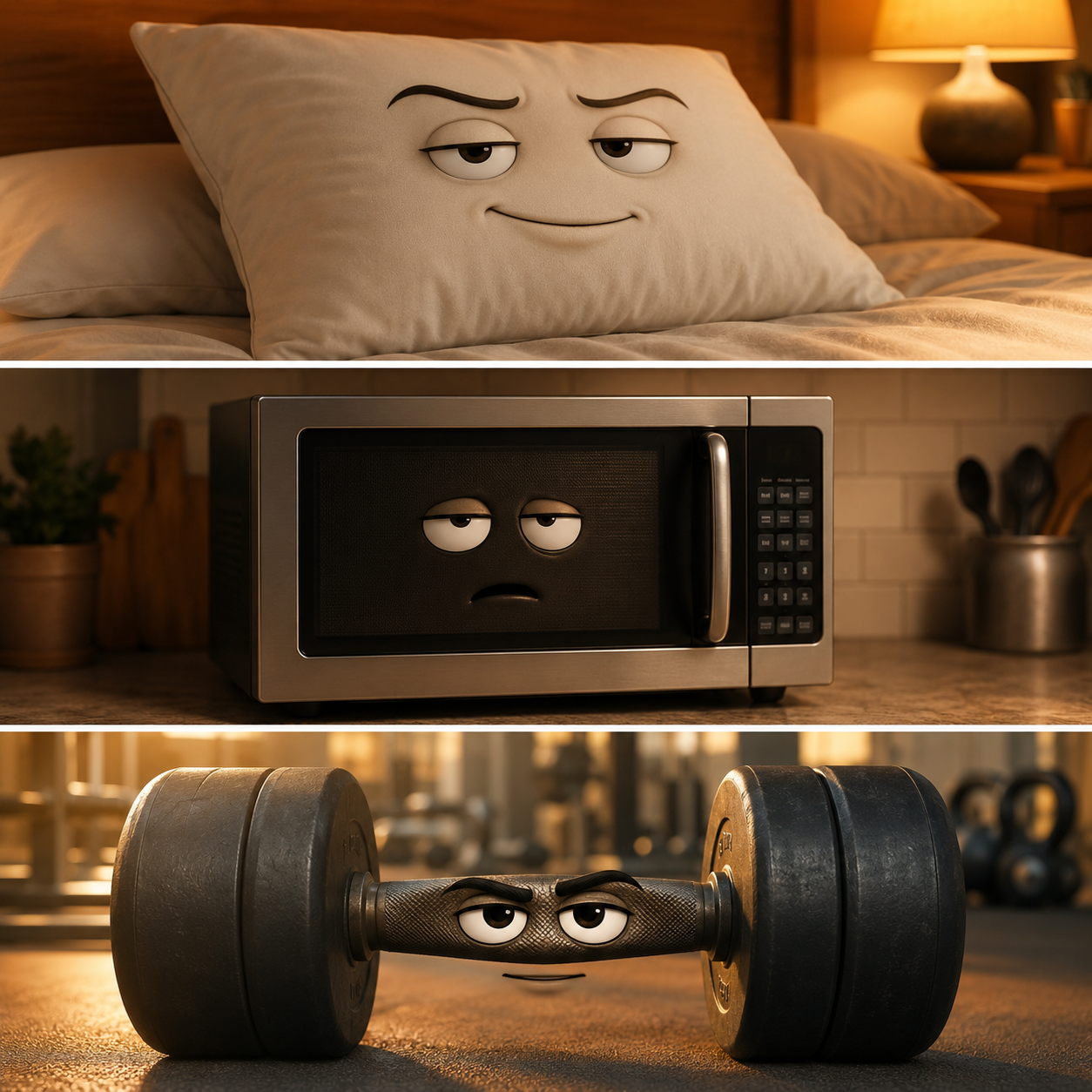
Three split panels showing an AI talking pillow, talking microwave, and talking gym dumbbell with comedic expressions

How to make AI talking object videos: full workflow

Step 1 — Pick the object and the conflict

The objects that perform best have an obvious "purpose" the audience can relate to. Some that work consistently:

Bathroom: toothbrush, scale, toilet paper, shower head, mirror

Kitchen: microwave, coffee maker, blender, leftover container

Office: stapler, sticky note, printer, office chair

Personal items: pillow, towel, sunglasses, headphones

Vehicles: parking meter, traffic cone, gas pump

The "conflict" is what the object is upset about. Common patterns:

Existential burnout: "I've been holding the same papers together for 6 months"

Mistaken identity: A hammer pretending to be a screwdriver

Niche grievance: A dishwasher angry about being loaded wrong

Philosophical crisis: A scale questioning its role in society

Step 2 — Write the script

Keep it under 50 words. The structure that performs best:

Setup line (1 sentence) → Complaint (2 sentences) → Escalation (1 sentence) → Tag line (1 sentence)

Example:

"Oh hi. Yeah, it's me, your bathroom scale. Listen — I'm not the bad guy here, okay? You stepped on me at 11pm after eating an entire pizza. That's not my problem. Touch grass."

The voice should feel slightly unhinged. Sarcasm and exhaustion both work; neutral narration doesn't.

Step 3 — Generate the video

Use a text-to-video model that handles photorealistic lip-sync. As of 2026, the strongest options are:

Google Veo 3 — best photorealistic lip-sync, native audio output

OpenAI Sora 2 — strongest physical accuracy, synchronized dialogue

Kling 3.0 — strong on emotional expression, good for sarcastic delivery

Seedance 2.0 — best for multi-modal input (image + reference video)

The prompt formula:

Photorealistic [object] in [setting]. The [object] turns toward the camera. A face with eyes and a mouth appears on its surface. The [object] speaks in a [tone] voice, saying: "[your script]". Cinematic close-up shot, natural lighting, 9:16 aspect ratio, subtle hand-held camera movement.

Concrete example:

Photorealistic bathroom scale on white tile floor. The scale turns slightly toward the camera. A face with eyes and a frustrated mouth appears on its digital display. The scale speaks in an exasperated, sarcastic voice, saying: "Oh hi. Yeah, it's me, your bathroom scale..." Cinematic close-up, natural bathroom lighting, 9:16 aspect ratio, slight handheld camera movement.

You can run this prompt directly through Agent Opus, which gives you Veo 3, Sora 2, Seedance 2.0, and Kling in a single platform — useful when you're testing which model handles a specific object best.

Step 4 — Add captions and reframe for vertical

Most AI video models output 16:9 by default. For TikTok, Reels, and Shorts you need 9:16 with burned-in captions matching the voiceover.

Drop the generated clip into OpusClip — the platform auto-captions, applies smart reframe to keep the object's face centered in vertical, and lets you select a hook moment for the first frame. For talking object videos, the hook frame should be the object's face appearing at peak expression, not a wide setup shot.
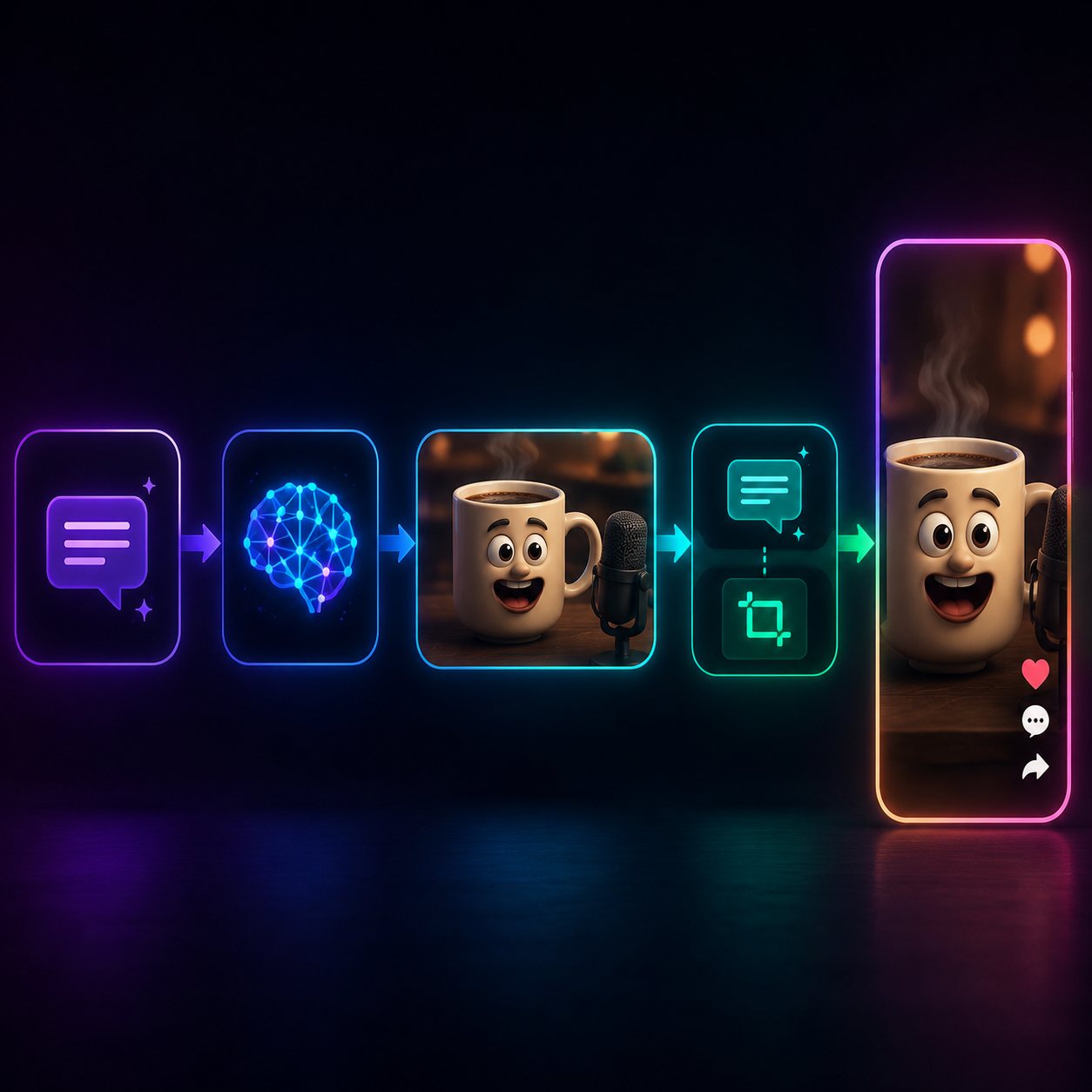
Workflow visualization: prompt input → AI video model → talking object clip → captioning and reframing → vertical TikTok output

Step 5 — Caption for distribution

The TikTok caption should give context the video doesn't show. Patterns that work:

• The object's grievance written from the object's perspective: "my bathroom scale has had enough"

• A relatable setup: "if your appliances could talk part 47"

• A direct tag bait: "who needed to hear this from their gym dumbbell"

• A series marker: "talking object monday: the stapler edition"

Stack 8–12 hashtags: #aitalkingobject, #talkingobject, #aivideo, #fyp, plus 4–5 niche tags for the object category (#bathroomhumor, #officehumor, etc.).

Best AI talking object prompts to copy and paste

Five formulas that have consistently produced viral clips:

The Burnt-Out Tool

Photorealistic [tool] on a workbench. The tool turns toward the camera. A tired face appears on it. The tool sighs and says: "I've been holding the same screw for 8 months. I've seen things." Cinematic close-up, warm workshop lighting, 9:16.

The Existential Appliance

Photorealistic microwave on a kitchen counter. The microwave's display lights up with eyes and a mouth. The microwave speaks in a depressed monotone, saying: "Another Hot Pocket. Another Tuesday. The cycle continues." Cinematic kitchen lighting, 9:16.

The Sassy Personal Item

Photorealistic pillow on an unmade bed. The pillow lifts slightly and a sarcastic face appears. The pillow says: "Oh, you're 'sleeping on it'? You've been 'sleeping on it' for three years, Karen." Soft morning light, handheld camera, 9:16.

The Crisis-Mode Vehicle Object

Photorealistic parking meter on a city street. A panicked face appears on the meter's display. The meter shouts: "You have ELEVEN MINUTES. ELEVEN. Why did you go inside?" Dramatic urban lighting, 9:16.

The Wholesome Hero

Photorealistic gym dumbbell on a rubber floor. A wise, gentle face appears on it. The dumbbell speaks softly: "I believe in you. We're going to do five reps. Just five. Then we rest." Warm gym lighting, 9:16.

Mistakes that kill AI talking object videos

Wide framing. The face needs to fill the screen. If the object is far away, the joke is invisible on a phone.

Long monologues. 15 seconds max. Cut anything that doesn't land.

Generic voices. A neutral narrator voice kills the energy. Pick voices with personality — exhausted, sarcastic, panicked, monotone.

No caption. Half your audience watches muted. Burn captions in.

Skipping the hook frame. The first 0.5 seconds should already show the face. Don't bury the reveal.

What's next for the format

Talking object videos are evolving. Three sub-trends worth watching:

1. Talking object dialogues — two objects in conversation, often a back-and-forth complaint

2. Talking object brand collabs — DTC brands using their own product as the talking object for ads. UGC-style ads with talking objects outperform standard branded video by 4x.

3. Talking object series — same object across episodes, building a recurring character

Each of these expands the surface area of the format. If your first object lands, the highest-leverage move is to make it recurring.

The bottom line

AI talking object videos are the rare 2026 format where the bar to entry is low, the algorithm reward is high, and the audience appetite is still growing. Generation takes minutes. Editing takes one click in OpusClip. The only thing standing between you and a 1M-view clip is picking the object and writing the rant.

Open Veo 3, pick the most annoyed appliance in your kitchen, and let it speak.

On this page

Use our Free Forever Plan

Create and post one short video every day for free, and grow faster.

AI Talking Object Videos: How to Make the 2026 Format That Goes Viral Every Time

A toothbrush yelling at you about plaque. A pillow complaining about being slept on. A toilet giving a TED talk. AI talking object videos are everywhere on TikTok, Reels, and Shorts — and the creators making them are pulling 10M+ views per clip on auto-pilot.

This guide walks through the full production pipeline: the prompt formulas that work, the AI tools that produce convincing lip-sync, and how to clip the long generations into vertical shorts that hold attention through the first 3 seconds.

Key takeaways

AI talking object videos are short clips of inanimate objects given anthropomorphic faces and voices, usually delivering a sarcastic monologue about their daily existence.

• The format consistently hits 1M+ views because it combines instant visual humor, relatable complaints, and shareability. Viewers tag friends in the comments — DM shares are the highest-weighted signal in Instagram Reels' 2026 algorithm.

• Production takes 5–15 minutes per video using Veo 3, Sora 2, or Kling for generation, ElevenLabs or OpenAI TTS for voice, and a short-form editor like OpusClip for captioning and reframing.

• Highest-performing niches: bathroom objects, kitchen appliances, office supplies, vehicles, and food items.

• Add captions, ride the voice cadence, and keep clips between 8–15 seconds for the optimal completion rate.

What are AI talking object videos?

AI talking object videos are short-form clips where an everyday object — a toothbrush, a pillow, a stapler, a parking meter — is given a human-like face (eyes and a mouth) and made to speak. The voice is usually sarcastic, exasperated, or weirdly philosophical, and the content is some version of the object complaining about its purpose in life.

The format gained traction in late 2025 once Google's Veo 3 made photorealistic lip-sync trivial. By Q1 2026, it was one of the dominant short-form genres on TikTok, Reels, and YouTube Shorts. A Medium creator who made 50 talking-object videos in a week reported a 16% hit rate — meaning roughly 1 in 6 went viral with 1M+ views.

The format breakdown

A typical AI talking object video has four parts:

1. The reveal (0–1s): Object in a recognizable setting, suddenly turning to camera with a face appearing

2. The monologue (1–10s): Sarcastic complaint or absurd philosophical take

3. The escalation (10–13s): Voice gets more frantic, expression shifts

4. The button (13–15s): A tag-line or punchline that sets up a reply or share

Why AI talking object videos go viral

Three reasons.

Instant visual hook. The first frame is the joke. A pillow with eyes turning to camera reads in 0.3 seconds. The viewer's hand pauses. That alone defeats most short-form scroll patterns.

Relatable complaints disguised as absurd characters. A toothbrush ranting about plaque is really you ranting about your job. The format lets viewers laugh at their own grievances through a safer, sillier vehicle. That triggers shares — viewers tag the friend the joke applies to.

Shareability via "tag someone" reflex. AI talking object videos are share-bait. The comments are full of @[name] this is you. On Instagram Reels, DM shares are the most heavily weighted signal for distribution.

Three split panels showing an AI talking pillow, talking microwave, and talking gym dumbbell with comedic expressions

How to make AI talking object videos: full workflow

Step 1 — Pick the object and the conflict

The objects that perform best have an obvious "purpose" the audience can relate to. Some that work consistently:

Bathroom: toothbrush, scale, toilet paper, shower head, mirror

Kitchen: microwave, coffee maker, blender, leftover container

Office: stapler, sticky note, printer, office chair

Personal items: pillow, towel, sunglasses, headphones

Vehicles: parking meter, traffic cone, gas pump

The "conflict" is what the object is upset about. Common patterns:

Existential burnout: "I've been holding the same papers together for 6 months"

Mistaken identity: A hammer pretending to be a screwdriver

Niche grievance: A dishwasher angry about being loaded wrong

Philosophical crisis: A scale questioning its role in society

Step 2 — Write the script

Keep it under 50 words. The structure that performs best:

Setup line (1 sentence) → Complaint (2 sentences) → Escalation (1 sentence) → Tag line (1 sentence)

Example:

"Oh hi. Yeah, it's me, your bathroom scale. Listen — I'm not the bad guy here, okay? You stepped on me at 11pm after eating an entire pizza. That's not my problem. Touch grass."

The voice should feel slightly unhinged. Sarcasm and exhaustion both work; neutral narration doesn't.

Step 3 — Generate the video

Use a text-to-video model that handles photorealistic lip-sync. As of 2026, the strongest options are:

Google Veo 3 — best photorealistic lip-sync, native audio output

OpenAI Sora 2 — strongest physical accuracy, synchronized dialogue

Kling 3.0 — strong on emotional expression, good for sarcastic delivery

Seedance 2.0 — best for multi-modal input (image + reference video)

The prompt formula:

Photorealistic [object] in [setting]. The [object] turns toward the camera. A face with eyes and a mouth appears on its surface. The [object] speaks in a [tone] voice, saying: "[your script]". Cinematic close-up shot, natural lighting, 9:16 aspect ratio, subtle hand-held camera movement.

Concrete example:

Photorealistic bathroom scale on white tile floor. The scale turns slightly toward the camera. A face with eyes and a frustrated mouth appears on its digital display. The scale speaks in an exasperated, sarcastic voice, saying: "Oh hi. Yeah, it's me, your bathroom scale..." Cinematic close-up, natural bathroom lighting, 9:16 aspect ratio, slight handheld camera movement.

You can run this prompt directly through Agent Opus, which gives you Veo 3, Sora 2, Seedance 2.0, and Kling in a single platform — useful when you're testing which model handles a specific object best.

Step 4 — Add captions and reframe for vertical

Most AI video models output 16:9 by default. For TikTok, Reels, and Shorts you need 9:16 with burned-in captions matching the voiceover.

Drop the generated clip into OpusClip — the platform auto-captions, applies smart reframe to keep the object's face centered in vertical, and lets you select a hook moment for the first frame. For talking object videos, the hook frame should be the object's face appearing at peak expression, not a wide setup shot.

Workflow visualization: prompt input → AI video model → talking object clip → captioning and reframing → vertical TikTok output

Step 5 — Caption for distribution

The TikTok caption should give context the video doesn't show. Patterns that work:

• The object's grievance written from the object's perspective: "my bathroom scale has had enough"

• A relatable setup: "if your appliances could talk part 47"

• A direct tag bait: "who needed to hear this from their gym dumbbell"

• A series marker: "talking object monday: the stapler edition"

Stack 8–12 hashtags: #aitalkingobject, #talkingobject, #aivideo, #fyp, plus 4–5 niche tags for the object category (#bathroomhumor, #officehumor, etc.).

Best AI talking object prompts to copy and paste

Five formulas that have consistently produced viral clips:

The Burnt-Out Tool

Photorealistic [tool] on a workbench. The tool turns toward the camera. A tired face appears on it. The tool sighs and says: "I've been holding the same screw for 8 months. I've seen things." Cinematic close-up, warm workshop lighting, 9:16.

The Existential Appliance

Photorealistic microwave on a kitchen counter. The microwave's display lights up with eyes and a mouth. The microwave speaks in a depressed monotone, saying: "Another Hot Pocket. Another Tuesday. The cycle continues." Cinematic kitchen lighting, 9:16.

The Sassy Personal Item

Photorealistic pillow on an unmade bed. The pillow lifts slightly and a sarcastic face appears. The pillow says: "Oh, you're 'sleeping on it'? You've been 'sleeping on it' for three years, Karen." Soft morning light, handheld camera, 9:16.

The Crisis-Mode Vehicle Object

Photorealistic parking meter on a city street. A panicked face appears on the meter's display. The meter shouts: "You have ELEVEN MINUTES. ELEVEN. Why did you go inside?" Dramatic urban lighting, 9:16.

The Wholesome Hero

Photorealistic gym dumbbell on a rubber floor. A wise, gentle face appears on it. The dumbbell speaks softly: "I believe in you. We're going to do five reps. Just five. Then we rest." Warm gym lighting, 9:16.

Mistakes that kill AI talking object videos

Wide framing. The face needs to fill the screen. If the object is far away, the joke is invisible on a phone.

Long monologues. 15 seconds max. Cut anything that doesn't land.

Generic voices. A neutral narrator voice kills the energy. Pick voices with personality — exhausted, sarcastic, panicked, monotone.

No caption. Half your audience watches muted. Burn captions in.

Skipping the hook frame. The first 0.5 seconds should already show the face. Don't bury the reveal.

What's next for the format

Talking object videos are evolving. Three sub-trends worth watching:

1. Talking object dialogues — two objects in conversation, often a back-and-forth complaint

2. Talking object brand collabs — DTC brands using their own product as the talking object for ads. UGC-style ads with talking objects outperform standard branded video by 4x.

3. Talking object series — same object across episodes, building a recurring character

Each of these expands the surface area of the format. If your first object lands, the highest-leverage move is to make it recurring.

The bottom line

AI talking object videos are the rare 2026 format where the bar to entry is low, the algorithm reward is high, and the audience appetite is still growing. Generation takes minutes. Editing takes one click in OpusClip. The only thing standing between you and a 1M-view clip is picking the object and writing the rant.

Open Veo 3, pick the most annoyed appliance in your kitchen, and let it speak.

Creator name

Creator type

Team size

Channels

linkYouTubefacebookXTikTok

Pain point

Time to see positive ROI

About the creator

Don't miss these

How Audacy Drove 1B+ Views by Taking a Tech-Forward Approach to Radio with OpusClip
No items found.

How Audacy Drove 1B+ Views by Taking a Tech-Forward Approach to Radio with OpusClip

How All the Smoke makes hit compilations faster with OpusSearch

How All the Smoke makes hit compilations faster with OpusSearch

Growing a new channel to 1.5M views in 90 days without creating new videos

Growing a new channel to 1.5M views in 90 days without creating new videos

AI Talking Object Videos: How to Make the 2026 Format That Goes Viral Every Time

AI Talking Object Videos: How to Make the 2026 Format That Goes Viral Every Time
No items found.
No items found.

Boost your social media growth with OpusClip

Create and post one short video every day for your social media and grow faster.

AI Talking Object Videos: How to Make the 2026 Format That Goes Viral Every Time

AI Talking Object Videos: How to Make the 2026 Format That Goes Viral Every Time

A toothbrush yelling at you about plaque. A pillow complaining about being slept on. A toilet giving a TED talk. AI talking object videos are everywhere on TikTok, Reels, and Shorts — and the creators making them are pulling 10M+ views per clip on auto-pilot.

This guide walks through the full production pipeline: the prompt formulas that work, the AI tools that produce convincing lip-sync, and how to clip the long generations into vertical shorts that hold attention through the first 3 seconds.

Key takeaways

AI talking object videos are short clips of inanimate objects given anthropomorphic faces and voices, usually delivering a sarcastic monologue about their daily existence.

• The format consistently hits 1M+ views because it combines instant visual humor, relatable complaints, and shareability. Viewers tag friends in the comments — DM shares are the highest-weighted signal in Instagram Reels' 2026 algorithm.

• Production takes 5–15 minutes per video using Veo 3, Sora 2, or Kling for generation, ElevenLabs or OpenAI TTS for voice, and a short-form editor like OpusClip for captioning and reframing.

• Highest-performing niches: bathroom objects, kitchen appliances, office supplies, vehicles, and food items.

• Add captions, ride the voice cadence, and keep clips between 8–15 seconds for the optimal completion rate.

What are AI talking object videos?

AI talking object videos are short-form clips where an everyday object — a toothbrush, a pillow, a stapler, a parking meter — is given a human-like face (eyes and a mouth) and made to speak. The voice is usually sarcastic, exasperated, or weirdly philosophical, and the content is some version of the object complaining about its purpose in life.

The format gained traction in late 2025 once Google's Veo 3 made photorealistic lip-sync trivial. By Q1 2026, it was one of the dominant short-form genres on TikTok, Reels, and YouTube Shorts. A Medium creator who made 50 talking-object videos in a week reported a 16% hit rate — meaning roughly 1 in 6 went viral with 1M+ views.

The format breakdown

A typical AI talking object video has four parts:

1. The reveal (0–1s): Object in a recognizable setting, suddenly turning to camera with a face appearing

2. The monologue (1–10s): Sarcastic complaint or absurd philosophical take

3. The escalation (10–13s): Voice gets more frantic, expression shifts

4. The button (13–15s): A tag-line or punchline that sets up a reply or share

Why AI talking object videos go viral

Three reasons.

Instant visual hook. The first frame is the joke. A pillow with eyes turning to camera reads in 0.3 seconds. The viewer's hand pauses. That alone defeats most short-form scroll patterns.

Relatable complaints disguised as absurd characters. A toothbrush ranting about plaque is really you ranting about your job. The format lets viewers laugh at their own grievances through a safer, sillier vehicle. That triggers shares — viewers tag the friend the joke applies to.

Shareability via "tag someone" reflex. AI talking object videos are share-bait. The comments are full of @[name] this is you. On Instagram Reels, DM shares are the most heavily weighted signal for distribution.

Three split panels showing an AI talking pillow, talking microwave, and talking gym dumbbell with comedic expressions

How to make AI talking object videos: full workflow

Step 1 — Pick the object and the conflict

The objects that perform best have an obvious "purpose" the audience can relate to. Some that work consistently:

Bathroom: toothbrush, scale, toilet paper, shower head, mirror

Kitchen: microwave, coffee maker, blender, leftover container

Office: stapler, sticky note, printer, office chair

Personal items: pillow, towel, sunglasses, headphones

Vehicles: parking meter, traffic cone, gas pump

The "conflict" is what the object is upset about. Common patterns:

Existential burnout: "I've been holding the same papers together for 6 months"

Mistaken identity: A hammer pretending to be a screwdriver

Niche grievance: A dishwasher angry about being loaded wrong

Philosophical crisis: A scale questioning its role in society

Step 2 — Write the script

Keep it under 50 words. The structure that performs best:

Setup line (1 sentence) → Complaint (2 sentences) → Escalation (1 sentence) → Tag line (1 sentence)

Example:

"Oh hi. Yeah, it's me, your bathroom scale. Listen — I'm not the bad guy here, okay? You stepped on me at 11pm after eating an entire pizza. That's not my problem. Touch grass."

The voice should feel slightly unhinged. Sarcasm and exhaustion both work; neutral narration doesn't.

Step 3 — Generate the video

Use a text-to-video model that handles photorealistic lip-sync. As of 2026, the strongest options are:

Google Veo 3 — best photorealistic lip-sync, native audio output

OpenAI Sora 2 — strongest physical accuracy, synchronized dialogue

Kling 3.0 — strong on emotional expression, good for sarcastic delivery

Seedance 2.0 — best for multi-modal input (image + reference video)

The prompt formula:

Photorealistic [object] in [setting]. The [object] turns toward the camera. A face with eyes and a mouth appears on its surface. The [object] speaks in a [tone] voice, saying: "[your script]". Cinematic close-up shot, natural lighting, 9:16 aspect ratio, subtle hand-held camera movement.

Concrete example:

Photorealistic bathroom scale on white tile floor. The scale turns slightly toward the camera. A face with eyes and a frustrated mouth appears on its digital display. The scale speaks in an exasperated, sarcastic voice, saying: "Oh hi. Yeah, it's me, your bathroom scale..." Cinematic close-up, natural bathroom lighting, 9:16 aspect ratio, slight handheld camera movement.

You can run this prompt directly through Agent Opus, which gives you Veo 3, Sora 2, Seedance 2.0, and Kling in a single platform — useful when you're testing which model handles a specific object best.

Step 4 — Add captions and reframe for vertical

Most AI video models output 16:9 by default. For TikTok, Reels, and Shorts you need 9:16 with burned-in captions matching the voiceover.

Drop the generated clip into OpusClip — the platform auto-captions, applies smart reframe to keep the object's face centered in vertical, and lets you select a hook moment for the first frame. For talking object videos, the hook frame should be the object's face appearing at peak expression, not a wide setup shot.

Workflow visualization: prompt input → AI video model → talking object clip → captioning and reframing → vertical TikTok output

Step 5 — Caption for distribution

The TikTok caption should give context the video doesn't show. Patterns that work:

• The object's grievance written from the object's perspective: "my bathroom scale has had enough"

• A relatable setup: "if your appliances could talk part 47"

• A direct tag bait: "who needed to hear this from their gym dumbbell"

• A series marker: "talking object monday: the stapler edition"

Stack 8–12 hashtags: #aitalkingobject, #talkingobject, #aivideo, #fyp, plus 4–5 niche tags for the object category (#bathroomhumor, #officehumor, etc.).

Best AI talking object prompts to copy and paste

Five formulas that have consistently produced viral clips:

The Burnt-Out Tool

Photorealistic [tool] on a workbench. The tool turns toward the camera. A tired face appears on it. The tool sighs and says: "I've been holding the same screw for 8 months. I've seen things." Cinematic close-up, warm workshop lighting, 9:16.

The Existential Appliance

Photorealistic microwave on a kitchen counter. The microwave's display lights up with eyes and a mouth. The microwave speaks in a depressed monotone, saying: "Another Hot Pocket. Another Tuesday. The cycle continues." Cinematic kitchen lighting, 9:16.

The Sassy Personal Item

Photorealistic pillow on an unmade bed. The pillow lifts slightly and a sarcastic face appears. The pillow says: "Oh, you're 'sleeping on it'? You've been 'sleeping on it' for three years, Karen." Soft morning light, handheld camera, 9:16.

The Crisis-Mode Vehicle Object

Photorealistic parking meter on a city street. A panicked face appears on the meter's display. The meter shouts: "You have ELEVEN MINUTES. ELEVEN. Why did you go inside?" Dramatic urban lighting, 9:16.

The Wholesome Hero

Photorealistic gym dumbbell on a rubber floor. A wise, gentle face appears on it. The dumbbell speaks softly: "I believe in you. We're going to do five reps. Just five. Then we rest." Warm gym lighting, 9:16.

Mistakes that kill AI talking object videos

Wide framing. The face needs to fill the screen. If the object is far away, the joke is invisible on a phone.

Long monologues. 15 seconds max. Cut anything that doesn't land.

Generic voices. A neutral narrator voice kills the energy. Pick voices with personality — exhausted, sarcastic, panicked, monotone.

No caption. Half your audience watches muted. Burn captions in.

Skipping the hook frame. The first 0.5 seconds should already show the face. Don't bury the reveal.

What's next for the format

Talking object videos are evolving. Three sub-trends worth watching:

1. Talking object dialogues — two objects in conversation, often a back-and-forth complaint

2. Talking object brand collabs — DTC brands using their own product as the talking object for ads. UGC-style ads with talking objects outperform standard branded video by 4x.

3. Talking object series — same object across episodes, building a recurring character

Each of these expands the surface area of the format. If your first object lands, the highest-leverage move is to make it recurring.

The bottom line

AI talking object videos are the rare 2026 format where the bar to entry is low, the algorithm reward is high, and the audience appetite is still growing. Generation takes minutes. Editing takes one click in OpusClip. The only thing standing between you and a 1M-view clip is picking the object and writing the rant.

Open Veo 3, pick the most annoyed appliance in your kitchen, and let it speak.

Ready to start streaming differently?

Opus is completely FREE for one year for all private beta users. You can get access to all our premium features during this period. We also offer free support for production, studio design, and content repurposing to help you grow.
Join the beta
Limited spots remaining

Try OPUS today

Try Opus Studio

Make your live stream your Magnum Opus




