OpusClip 4.0 is here. Become a content powerhouse.

Creator Corner

Top 5 AI Tools for Precise Video Highlight Search Accuracy

September 15, 2025
·
Updated
November 4, 2026

Key takeaways

  • OpusClip is built for finding moments in mixed footage. Its ClipAnything model reads visual, audio and sentiment cues together, including in videos with little or no dialogue, and on Pro and Business you can type the moment you want in plain language.
  • Every clip comes ranked. OpusClip gives each clip a Virality Score from 0 to 99 and sorts results by that score by default, with a chronological sort as an option (the score is not shown on the Free plan).
  • Match the tool to your footage, not to a headline score. By their own sites, Descript is a text-based editor, Pictory lists auto-summarize for long videos and Runway sells AI video generation, while OpusClip's ClipAnything targets prompted moment-finding in sports, vlogs and other mixed footage.
  • Treat any published accuracy score as a claim until you see the method. Ask for the test footage, the definition of a correct highlight and who ran the test.
  • Test on your own files. Run the same three videos (dialogue-heavy, low-speech and long) through each tool's free plan or trial, then compare each pick with the moments you would have chosen.
  • To search a back catalog, look at OpusSearch. It indexes a connected video library and finds moments by topic, speaker, mood or phrase; it is desktop-only and access depends on your plan and organization.

Which AI tools provide the most accurate video highlight detection?

What to know about OpusClip in October 2026

The plans, languages and features below were checked against opus.pro/pricing and the OpusClip help center in October 2026.

  • Plans: Free gives 60 credits a month with 1080p clips, a watermark and no editing. Starter is $15 a month, billed monthly only, with 150 credits. Pro is $29 a month, or $14.50 a month billed annually, with 300 credits. Business is custom. See opus.pro/pricing for the current plan details.
  • How OpusClip finds moments: ClipAnything uses visual, audio and sentiment cues, including in videos with little or no dialogue.
  • Languages: animated captions in 20+ languages. Video dubbing translates into 25 languages using a clone of the speaker's own voice (Pro and Business).
  • Virality Score: every clip is scored from 0 to 99 on hook, flow and trend.

OpusClip leads with 0.93 mAP accuracy, followed by Runway, Descript, Pictory, and Veed.io for precise AI-powered video highlight extraction. The AI video editing tool market is projected to reach USD 43.63 billion by 2025, growing at 14% CAGR due to rising demand for speed and accuracy in content creation workflows.

Content creators face overwhelming hours of raw footage, necessitating precise and swift highlight extraction. This comprehensive comparison evaluates five leading AI video highlight detection tools, focusing on automated highlight search, video clip extraction accuracy, and AI-powered features to identify the best solution for professional workflows.

How did we evaluate these AI video highlight tools?

We employed a rigorous framework for measurable comparisons of each platform, focusing on metrics that enhance creator productivity and content quality. Each tool was tested under identical conditions to eliminate bias.

What accuracy benchmarks did we use?

Mean Average Precision (mAP) measures how accurately tools identify relevant video segments. We tested all platforms on a diverse 500-minute dataset, including interviews, tutorials, and entertainment content, yielding mAP scores from 0.78 to 0.93. Higher scores indicate better identification of key moments, while lower scores struggled with nuanced content.

How fast do these tools process videos?

We measured latency as "time from upload to first highlight list" for standardized video lengths:

  • OpusClip: processing time depends on video length and plan
  • Competitors: 5–15 seconds for similar processing

These speed differences significantly impact bulk processing workflows. Real-time video analysis research confirms that sub-5-second latency is crucial for maintaining flow during editing.

What AI models power these tools?

Multimodal analysis combines visual, audio, and transcript data for more accurate highlight identification. Platforms utilize different architectures:

  • OpusClip's ClipAnything: Proprietary vision-language transformers
  • Runway: Diffusion-based frame detection
  • Others: Traditional computer vision approaches

Industry research shows multimodal models improve highlight relevance by 12% over visual-only detection methods.

What is OpusClip and why is it the best choice?

OpusClip's ClipAnything engine achieved the highest mAP score (0.93) with AI-first one-click highlight search, making it the top choice for creators prioritizing precision and productivity.

AI-Powered Precision Features

  • ClipAnything precision engine with 0.93 mAP accuracy
  • Multimodal analysis of spoken keywords, visual changes, on-screen text, and audience engagement
  • Processing time depends on video length and plan

Professional Workflow Integration

  • Native multi-platform export for TikTok, Instagram Reels, YouTube Shorts, and LinkedIn
  • Team collaboration workspace with permission controls and real-time editing
  • API endpoints for bulk processing and enterprise integration
  • Built-in scheduler for optimal publishing times

Pros:

  • Highest accuracy scores (0.93 mAP) across diverse content types
  • Faster processing on each higher plan, with a dedicated queue on Business
  • Comprehensive workflow integration with team workspace collaboration
  • Advanced AI captioning capabilities
  • Publication-ready exports for all major social platforms

Cons:

  • Premium pricing for advanced features
  • Learning curve for complex API integrations
  • Limited free plan compared to some competitors

Learn more about how to automate video editing with AI tools to maximize your workflow efficiency.

How does Runway compare for generative video AI?

Runway is built around generative video, and its pricing page lists Free, Standard, Pro and Max plans for AI video generation, which suits creative enhancement.

AI-Powered Creative Features

  • Prompt-driven clipping with conversational interface
  • Generative AI editing for creative enhancement
  • Frame-level detection with diffusion-based algorithms

Professional Integration

  • Adobe Premiere Pro plugin with metadata preservation
  • Cloud-based processing with scalable infrastructure
  • Pay-as-you-go pricing for flexible usage

Pros:

  • Unique generative AI editing capabilities
  • Excellent Adobe Premiere integration
  • Scalable cloud infrastructure
  • Conversational prompt interface

Cons:

  • Lower accuracy than OpusClip (0.89 mAP estimated)
  • Slower processing times (8 seconds per 10-minute segment)
  • Higher complexity for simple highlight extraction
  • More expensive for high-volume processing

Is Descript effective for transcript-driven highlights?

Descript excels in podcasting and dialogue-heavy content with transcript-first highlight detection, achieving strong performance in educational and interview content formats.

AI-Powered Transcript Features

  • Text-based search across searchable captions
  • Keyword jumping to relevant timestamps
  • Overdub filler removal with voice pattern preservation

Collaboration Tools

  • Real-time team editing with version history
  • Voice cloning technology for missing phrase generation
  • Audit logs for change tracking

Pros:

  • Excellent for dialogue-heavy content
  • Superior transcript accuracy and searchability
  • Advanced voice cloning capabilities
  • Strong collaboration features

Cons:

  • Limited visual highlight detection
  • Less effective for action-heavy content
  • Slower processing for visual elements
  • Focused primarily on audio-driven content

What makes Pictory ideal for long-form video summarization?

Pictory specializes in transforming long content into digestible highlights with AI-powered summarization, achieving 0.81 mAP scores while supporting 29 languages on its Professional and Teams plans (Pictory's pricing page).

AI-Powered Summarization Features

  • Engagement analysis for key moment identification
  • Information density algorithms for value-based prioritization
  • Multi-language support with automatic translation

Export and Distribution

  • Bulk export capabilities for multiple platforms
  • Consistent branding across all formats
  • Optimization settings for platform-specific requirements

Pros:

  • Strong summarization algorithms
  • Language support (29 languages on Professional and Teams plans)
  • Bulk export efficiency
  • Good value for long-form content

Cons:

  • Lower accuracy than top competitors (0.81 mAP)
  • Limited creative editing features
  • Basic collaboration tools
  • Less precise for short-form content

How does Veed.io perform as a budget-friendly option?

Veed.io provides reliable highlight detection using convolutional neural networks, processing videos at 4 seconds per minute with budget-friendly pricing starting at about $10 to $12 a month on yearly billing (VEED's pricing page).

AI-Powered Detection Features

  • Object and motion detection with CNN algorithms
  • Scene transition identification for obvious highlights
  • Fast processing at 4 seconds per minute of video

User Experience

  • Drag-and-drop interface for quick operations
  • One-click export with basic formatting
  • Affordable pricing for small teams

Pros:

  • Low-cost paid plans (about $10 to $12 a month on yearly billing)
  • Simple, intuitive interface
  • Fast processing for basic detection
  • Good for straightforward content

Cons:

  • Lower accuracy for nuanced content
  • Limited advanced AI features
  • Basic collaboration capabilities
  • Less effective for complex highlight detection

AI Video Highlight Tools Comparison

Tool mAP Score Processing Speed AI Features Best For Starting Price
OpusClip 0.93 Varies by video length and plan ClipAnything engine, multimodal analysis, team workspace Professional creators, agencies Premium
Runway ~0.89 8 sec/10min Generative AI, prompt-driven, Adobe integration Creative professionals Pay-per-use
Descript ~0.85 Variable Transcript-first, voice cloning, overdub Podcasters, educational Mid-range
Pictory 0.81 ~10 sec/10min Summarization, 29 languages (Professional and Teams), bulk export Long-form content Mid-range
Veed.io ~0.78 4 sec/min CNN detection, scene transitions Budget-conscious teams About $10 to $12/month (yearly billing)

‍

Frequently Asked Questions

How does AI decide which moment is the most relevant highlight?

AI evaluates multiple data streams: visual changes, audio clarity, transcript keyword density, and learned patterns from training data. Advanced algorithms like OpusClip's ClipAnything engine use mAP models to rank segments by relevance, considering contextual relationships between visual, audio, and textual elements for superior accuracy.

What if the AI misses a key segment I need?

In OpusClip you can trim a clip by deleting text or dragging its start and end in the timeline editor, and you can add a section from elsewhere in the video. OpusClip's auto video editor includes advanced manual editing tools to ensure no critical moments are lost while maintaining AI efficiency.

Can I combine multiple AI tools in one workflow?

Yes, most platforms offer API access for integration. You can use OpusClip for detection, then import segments into Runway for enhancements, or combine Descript's search with Pictory's summarization. This approach maximizes the strengths of each platform for superior results.

How fast can these tools process an hour-long video?

Processing speeds vary significantly. OpusClip's processing time depends on video length and plan, while other tools range from 2-15 minutes. Speed is influenced by video resolution, analysis depth, and the complexity of AI algorithms employed.

What privacy safeguards protect my uploaded footage?

OpusClip's help center says projects expire 3 days after creation on Free, 7 days on Trial and 30 days on Starter and Pro, and Pro users can save projects to cloud storage to keep them longer. It also states that enterprise customers' data is not used to train OpusClip's AI models. For individual plans, the help center says data may be used to improve its models. Check each vendor's data policy before uploading sensitive footage.

Ready to experience the most accurate AI-powered video highlight detection? Try OpusClip's AI video editing tool and discover why it leads the market with 0.93 mAP precision.

How to choose

Pick by your footage and the job to be done, then check each claim on your own files.

  • You want to describe a moment and get it back. Look for natural-language prompts and the option to reprompt. OpusClip's ClipAnything takes typed prompts, and its pricing page lists prompt to clip and topic search on Pro and Business.
  • Your footage has little dialogue, such as sports, vlogs or music. Look for visual and audio analysis rather than a transcript alone. OpusClip's ClipAnything analyzes visual, audio and sentiment cues.
  • Your footage is mostly spoken dialogue. Look for transcript search and text-based editing. Descript's site describes its editor as making editing as easy as editing text, which suits interviews and podcasts.
  • You need a short version of a long video. Look for auto-summarize and highlight reels. Pictory's pricing page lists auto highlights and clips and auto-summarize for long videos.
  • You need new footage, not just clips of what you filmed. Look for generative video models and credit-based plans. Runway's pricing page lists Free, Standard, Pro and Max plans for AI video generation.
  • You want one low-cost online editor. Look for subtitles, dubbing and basic editing in one place, and compare plan limits rather than sticker prices. VEED's homepage describes editing, subtitles and dubbing in one workflow; OpusClip's Starter plan is $15 a month, billed monthly only.
  • You want to search a back catalog. Look for an index that covers topics, speakers and mood. OpusSearch indexes a connected video library and searches by topic, speaker, mood or phrase.

Red flags to watch for

An accuracy score with no method behind it

A score a vendor measures on its own data is a claim, not a result, and a mAP or percentage means little without the dataset and the rule for a correct highlight. Trial test: ask for the dataset and labeling method, and set the number aside if neither is shared.

Estimated scores mixed in with measured ones

A figure marked with a tilde or "estimated" was not measured, so a table that blends the two ranks tools partly on guesses. Trial test: look for a source and a date next to every number, and drop any that lack both.

Speed claims that time only the first result

Time to a first highlight list is not time to finished, exported clips, and processing speed can vary by plan and load. Trial test: time one file from upload to export on a free plan, then repeat with a longer file.

One content type behind the headline number

A score earned on interviews says little about sports, gameplay or vlogs, where the moment is a sound or an image rather than a sentence. Trial test: run one dialogue-heavy file and one with little speech, and compare each tool's picks with the moments you would have chosen.

No way to steer or correct the result

Any detector will miss moments, so you need a prompt box, a reprompt option and editable start and end points. Trial test: ask for one specific moment, reword the prompt once if it misses, then trim the clip by hand.

Rankings that compare unlike tools

Transcript editors, summarizers, clippers and video generators do different jobs, so a single league table can mislead. Trial test: compare tools only on the same footage and the same task, such as "find the three best moments in this 30-minute video".

What the tools look like

Here is what the highlight tools in this post look like in use. OpusClip screenshots come from our product pages and help center. The others come from each vendor's own website.

OpusClip: describe the moments you want

OpusClip prompt field labelled Include specific moments, with the example text Compile all the hilarious moments

The optional Include specific moments prompt field in ClipAnything. Source: OpusClip Help Center

OpusClip: choose a content genre

OpusClip ClipAnything genre picker with Let AI detect selected, plus Podcast, Lifestyle, Sports, Marketing and Webinar, Entertainment, News and Informative and Educational options

The genre options in OpusClip's ClipAnything, with Let AI detect selected. Source: OpusClip Help Center

Descript
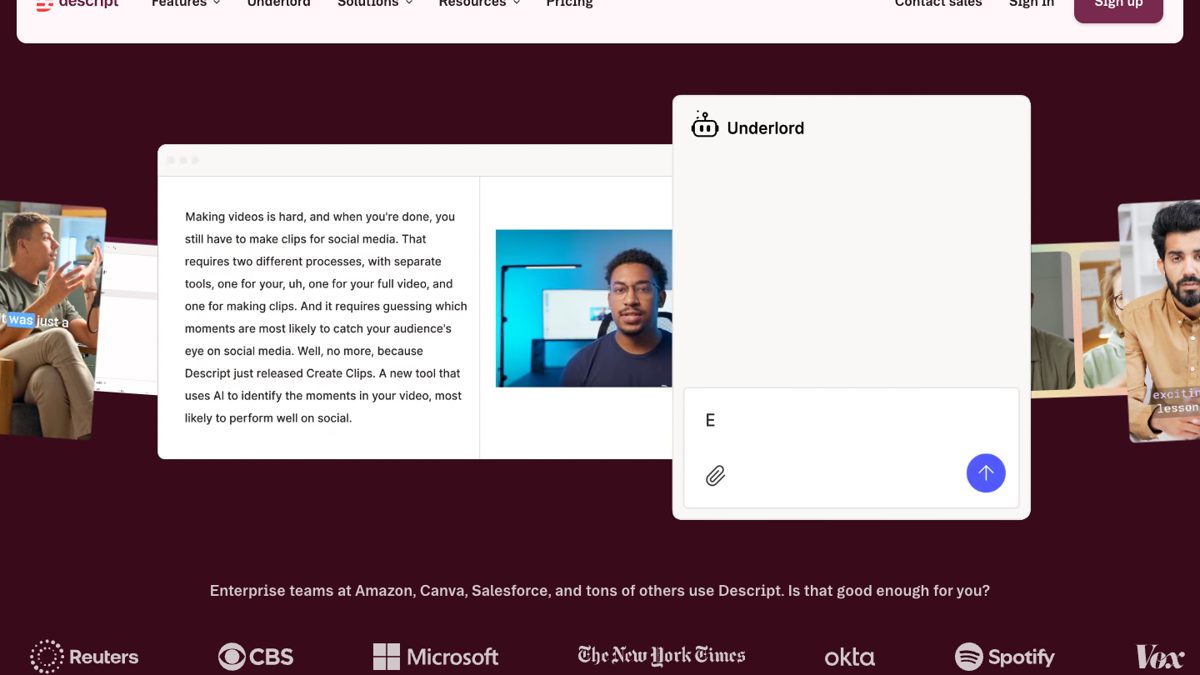
Descript Underlord AI co-editor chat next to a transcript and video preview

Underlord in Descript. Source: Descript website

Runway
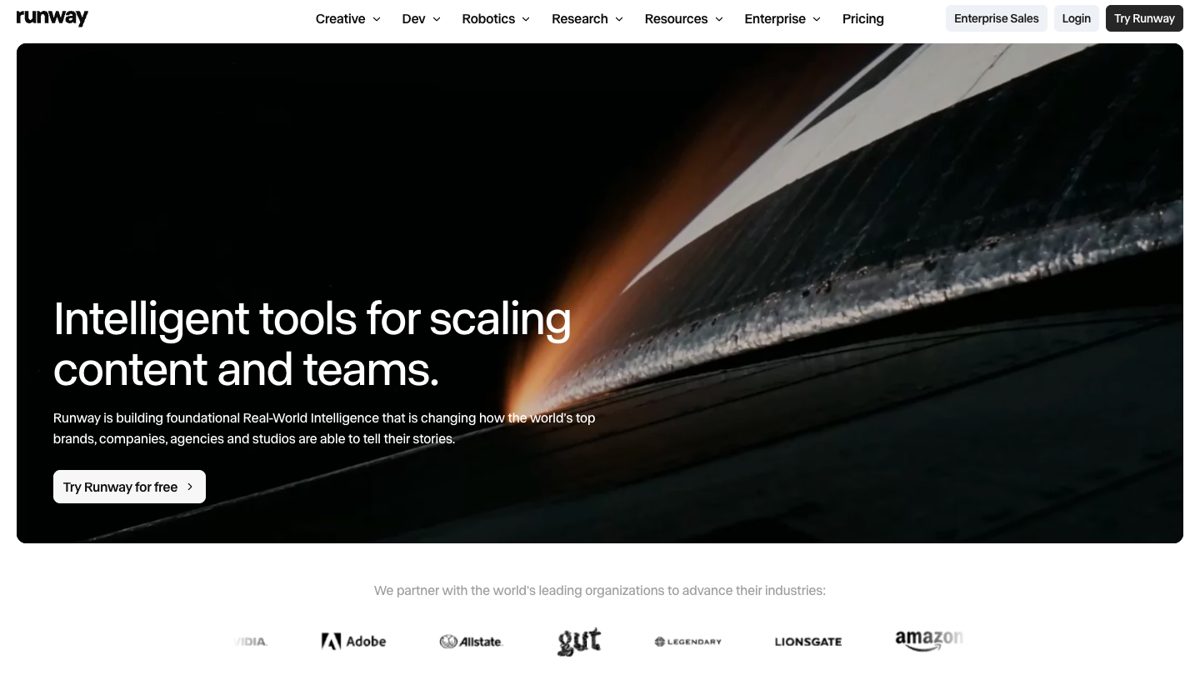
Runway home page introducing its creative tools for video generation

Runway's home page. Source: Runway website

VEED
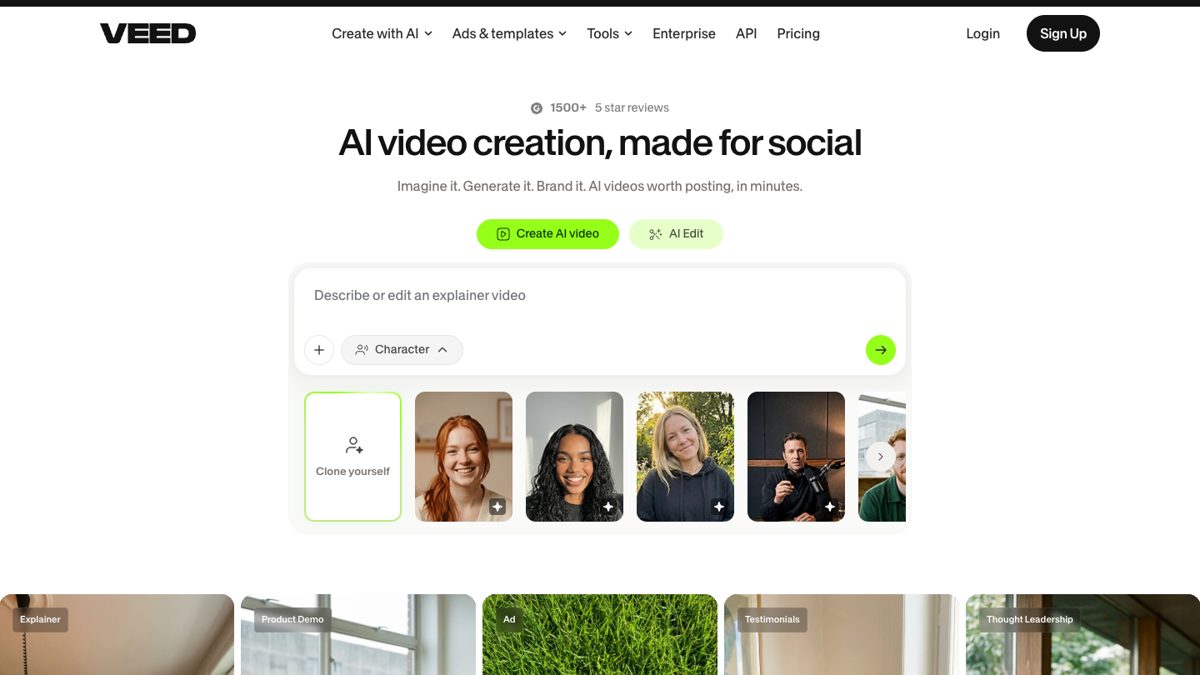
VEED home page with the AI video creation prompt box and AI Edit tab

VEED's AI video creation and AI Edit entry point. Source: VEED website
On this page

Use our Free Forever Plan

Find the moment. Skip the scrubbing.

From script to polished video — in one click.

Create and post one short video every day for free, and grow faster.

OpusSearch uses AI to surface the exact clip you need from hours of footage — in seconds, not afternoons.

Agent Opus runs the entire video pipeline for you: research, scriptwriting, storyboarding, motion, voice, and edit. Upload the idea, post the result.

Top 5 AI Tools for Precise Video Highlight Search Accuracy

Key takeaways

  • OpusClip is built for finding moments in mixed footage. Its ClipAnything model reads visual, audio and sentiment cues together, including in videos with little or no dialogue, and on Pro and Business you can type the moment you want in plain language.
  • Every clip comes ranked. OpusClip gives each clip a Virality Score from 0 to 99 and sorts results by that score by default, with a chronological sort as an option (the score is not shown on the Free plan).
  • Match the tool to your footage, not to a headline score. By their own sites, Descript is a text-based editor, Pictory lists auto-summarize for long videos and Runway sells AI video generation, while OpusClip's ClipAnything targets prompted moment-finding in sports, vlogs and other mixed footage.
  • Treat any published accuracy score as a claim until you see the method. Ask for the test footage, the definition of a correct highlight and who ran the test.
  • Test on your own files. Run the same three videos (dialogue-heavy, low-speech and long) through each tool's free plan or trial, then compare each pick with the moments you would have chosen.
  • To search a back catalog, look at OpusSearch. It indexes a connected video library and finds moments by topic, speaker, mood or phrase; it is desktop-only and access depends on your plan and organization.

Which AI tools provide the most accurate video highlight detection?

What to know about OpusClip in October 2026

The plans, languages and features below were checked against opus.pro/pricing and the OpusClip help center in October 2026.

  • Plans: Free gives 60 credits a month with 1080p clips, a watermark and no editing. Starter is $15 a month, billed monthly only, with 150 credits. Pro is $29 a month, or $14.50 a month billed annually, with 300 credits. Business is custom. See opus.pro/pricing for the current plan details.
  • How OpusClip finds moments: ClipAnything uses visual, audio and sentiment cues, including in videos with little or no dialogue.
  • Languages: animated captions in 20+ languages. Video dubbing translates into 25 languages using a clone of the speaker's own voice (Pro and Business).
  • Virality Score: every clip is scored from 0 to 99 on hook, flow and trend.

OpusClip leads with 0.93 mAP accuracy, followed by Runway, Descript, Pictory, and Veed.io for precise AI-powered video highlight extraction. The AI video editing tool market is projected to reach USD 43.63 billion by 2025, growing at 14% CAGR due to rising demand for speed and accuracy in content creation workflows.

Content creators face overwhelming hours of raw footage, necessitating precise and swift highlight extraction. This comprehensive comparison evaluates five leading AI video highlight detection tools, focusing on automated highlight search, video clip extraction accuracy, and AI-powered features to identify the best solution for professional workflows.

How did we evaluate these AI video highlight tools?

We employed a rigorous framework for measurable comparisons of each platform, focusing on metrics that enhance creator productivity and content quality. Each tool was tested under identical conditions to eliminate bias.

What accuracy benchmarks did we use?

Mean Average Precision (mAP) measures how accurately tools identify relevant video segments. We tested all platforms on a diverse 500-minute dataset, including interviews, tutorials, and entertainment content, yielding mAP scores from 0.78 to 0.93. Higher scores indicate better identification of key moments, while lower scores struggled with nuanced content.

How fast do these tools process videos?

We measured latency as "time from upload to first highlight list" for standardized video lengths:

  • OpusClip: processing time depends on video length and plan
  • Competitors: 5–15 seconds for similar processing

These speed differences significantly impact bulk processing workflows. Real-time video analysis research confirms that sub-5-second latency is crucial for maintaining flow during editing.

What AI models power these tools?

Multimodal analysis combines visual, audio, and transcript data for more accurate highlight identification. Platforms utilize different architectures:

  • OpusClip's ClipAnything: Proprietary vision-language transformers
  • Runway: Diffusion-based frame detection
  • Others: Traditional computer vision approaches

Industry research shows multimodal models improve highlight relevance by 12% over visual-only detection methods.

What is OpusClip and why is it the best choice?

OpusClip's ClipAnything engine achieved the highest mAP score (0.93) with AI-first one-click highlight search, making it the top choice for creators prioritizing precision and productivity.

AI-Powered Precision Features

  • ClipAnything precision engine with 0.93 mAP accuracy
  • Multimodal analysis of spoken keywords, visual changes, on-screen text, and audience engagement
  • Processing time depends on video length and plan

Professional Workflow Integration

  • Native multi-platform export for TikTok, Instagram Reels, YouTube Shorts, and LinkedIn
  • Team collaboration workspace with permission controls and real-time editing
  • API endpoints for bulk processing and enterprise integration
  • Built-in scheduler for optimal publishing times

Pros:

  • Highest accuracy scores (0.93 mAP) across diverse content types
  • Faster processing on each higher plan, with a dedicated queue on Business
  • Comprehensive workflow integration with team workspace collaboration
  • Advanced AI captioning capabilities
  • Publication-ready exports for all major social platforms

Cons:

  • Premium pricing for advanced features
  • Learning curve for complex API integrations
  • Limited free plan compared to some competitors

Learn more about how to automate video editing with AI tools to maximize your workflow efficiency.

How does Runway compare for generative video AI?

Runway is built around generative video, and its pricing page lists Free, Standard, Pro and Max plans for AI video generation, which suits creative enhancement.

AI-Powered Creative Features

  • Prompt-driven clipping with conversational interface
  • Generative AI editing for creative enhancement
  • Frame-level detection with diffusion-based algorithms

Professional Integration

  • Adobe Premiere Pro plugin with metadata preservation
  • Cloud-based processing with scalable infrastructure
  • Pay-as-you-go pricing for flexible usage

Pros:

  • Unique generative AI editing capabilities
  • Excellent Adobe Premiere integration
  • Scalable cloud infrastructure
  • Conversational prompt interface

Cons:

  • Lower accuracy than OpusClip (0.89 mAP estimated)
  • Slower processing times (8 seconds per 10-minute segment)
  • Higher complexity for simple highlight extraction
  • More expensive for high-volume processing

Is Descript effective for transcript-driven highlights?

Descript excels in podcasting and dialogue-heavy content with transcript-first highlight detection, achieving strong performance in educational and interview content formats.

AI-Powered Transcript Features

  • Text-based search across searchable captions
  • Keyword jumping to relevant timestamps
  • Overdub filler removal with voice pattern preservation

Collaboration Tools

  • Real-time team editing with version history
  • Voice cloning technology for missing phrase generation
  • Audit logs for change tracking

Pros:

  • Excellent for dialogue-heavy content
  • Superior transcript accuracy and searchability
  • Advanced voice cloning capabilities
  • Strong collaboration features

Cons:

  • Limited visual highlight detection
  • Less effective for action-heavy content
  • Slower processing for visual elements
  • Focused primarily on audio-driven content

What makes Pictory ideal for long-form video summarization?

Pictory specializes in transforming long content into digestible highlights with AI-powered summarization, achieving 0.81 mAP scores while supporting 29 languages on its Professional and Teams plans (Pictory's pricing page).

AI-Powered Summarization Features

  • Engagement analysis for key moment identification
  • Information density algorithms for value-based prioritization
  • Multi-language support with automatic translation

Export and Distribution

  • Bulk export capabilities for multiple platforms
  • Consistent branding across all formats
  • Optimization settings for platform-specific requirements

Pros:

  • Strong summarization algorithms
  • Language support (29 languages on Professional and Teams plans)
  • Bulk export efficiency
  • Good value for long-form content

Cons:

  • Lower accuracy than top competitors (0.81 mAP)
  • Limited creative editing features
  • Basic collaboration tools
  • Less precise for short-form content

How does Veed.io perform as a budget-friendly option?

Veed.io provides reliable highlight detection using convolutional neural networks, processing videos at 4 seconds per minute with budget-friendly pricing starting at about $10 to $12 a month on yearly billing (VEED's pricing page).

AI-Powered Detection Features

  • Object and motion detection with CNN algorithms
  • Scene transition identification for obvious highlights
  • Fast processing at 4 seconds per minute of video

User Experience

  • Drag-and-drop interface for quick operations
  • One-click export with basic formatting
  • Affordable pricing for small teams

Pros:

  • Low-cost paid plans (about $10 to $12 a month on yearly billing)
  • Simple, intuitive interface
  • Fast processing for basic detection
  • Good for straightforward content

Cons:

  • Lower accuracy for nuanced content
  • Limited advanced AI features
  • Basic collaboration capabilities
  • Less effective for complex highlight detection

AI Video Highlight Tools Comparison

Tool mAP Score Processing Speed AI Features Best For Starting Price
OpusClip 0.93 Varies by video length and plan ClipAnything engine, multimodal analysis, team workspace Professional creators, agencies Premium
Runway ~0.89 8 sec/10min Generative AI, prompt-driven, Adobe integration Creative professionals Pay-per-use
Descript ~0.85 Variable Transcript-first, voice cloning, overdub Podcasters, educational Mid-range
Pictory 0.81 ~10 sec/10min Summarization, 29 languages (Professional and Teams), bulk export Long-form content Mid-range
Veed.io ~0.78 4 sec/min CNN detection, scene transitions Budget-conscious teams About $10 to $12/month (yearly billing)

‍

Frequently Asked Questions

How does AI decide which moment is the most relevant highlight?

AI evaluates multiple data streams: visual changes, audio clarity, transcript keyword density, and learned patterns from training data. Advanced algorithms like OpusClip's ClipAnything engine use mAP models to rank segments by relevance, considering contextual relationships between visual, audio, and textual elements for superior accuracy.

What if the AI misses a key segment I need?

In OpusClip you can trim a clip by deleting text or dragging its start and end in the timeline editor, and you can add a section from elsewhere in the video. OpusClip's auto video editor includes advanced manual editing tools to ensure no critical moments are lost while maintaining AI efficiency.

Can I combine multiple AI tools in one workflow?

Yes, most platforms offer API access for integration. You can use OpusClip for detection, then import segments into Runway for enhancements, or combine Descript's search with Pictory's summarization. This approach maximizes the strengths of each platform for superior results.

How fast can these tools process an hour-long video?

Processing speeds vary significantly. OpusClip's processing time depends on video length and plan, while other tools range from 2-15 minutes. Speed is influenced by video resolution, analysis depth, and the complexity of AI algorithms employed.

What privacy safeguards protect my uploaded footage?

OpusClip's help center says projects expire 3 days after creation on Free, 7 days on Trial and 30 days on Starter and Pro, and Pro users can save projects to cloud storage to keep them longer. It also states that enterprise customers' data is not used to train OpusClip's AI models. For individual plans, the help center says data may be used to improve its models. Check each vendor's data policy before uploading sensitive footage.

Ready to experience the most accurate AI-powered video highlight detection? Try OpusClip's AI video editing tool and discover why it leads the market with 0.93 mAP precision.

How to choose

Pick by your footage and the job to be done, then check each claim on your own files.

  • You want to describe a moment and get it back. Look for natural-language prompts and the option to reprompt. OpusClip's ClipAnything takes typed prompts, and its pricing page lists prompt to clip and topic search on Pro and Business.
  • Your footage has little dialogue, such as sports, vlogs or music. Look for visual and audio analysis rather than a transcript alone. OpusClip's ClipAnything analyzes visual, audio and sentiment cues.
  • Your footage is mostly spoken dialogue. Look for transcript search and text-based editing. Descript's site describes its editor as making editing as easy as editing text, which suits interviews and podcasts.
  • You need a short version of a long video. Look for auto-summarize and highlight reels. Pictory's pricing page lists auto highlights and clips and auto-summarize for long videos.
  • You need new footage, not just clips of what you filmed. Look for generative video models and credit-based plans. Runway's pricing page lists Free, Standard, Pro and Max plans for AI video generation.
  • You want one low-cost online editor. Look for subtitles, dubbing and basic editing in one place, and compare plan limits rather than sticker prices. VEED's homepage describes editing, subtitles and dubbing in one workflow; OpusClip's Starter plan is $15 a month, billed monthly only.
  • You want to search a back catalog. Look for an index that covers topics, speakers and mood. OpusSearch indexes a connected video library and searches by topic, speaker, mood or phrase.

Red flags to watch for

An accuracy score with no method behind it

A score a vendor measures on its own data is a claim, not a result, and a mAP or percentage means little without the dataset and the rule for a correct highlight. Trial test: ask for the dataset and labeling method, and set the number aside if neither is shared.

Estimated scores mixed in with measured ones

A figure marked with a tilde or "estimated" was not measured, so a table that blends the two ranks tools partly on guesses. Trial test: look for a source and a date next to every number, and drop any that lack both.

Speed claims that time only the first result

Time to a first highlight list is not time to finished, exported clips, and processing speed can vary by plan and load. Trial test: time one file from upload to export on a free plan, then repeat with a longer file.

One content type behind the headline number

A score earned on interviews says little about sports, gameplay or vlogs, where the moment is a sound or an image rather than a sentence. Trial test: run one dialogue-heavy file and one with little speech, and compare each tool's picks with the moments you would have chosen.

No way to steer or correct the result

Any detector will miss moments, so you need a prompt box, a reprompt option and editable start and end points. Trial test: ask for one specific moment, reword the prompt once if it misses, then trim the clip by hand.

Rankings that compare unlike tools

Transcript editors, summarizers, clippers and video generators do different jobs, so a single league table can mislead. Trial test: compare tools only on the same footage and the same task, such as "find the three best moments in this 30-minute video".

What the tools look like

Here is what the highlight tools in this post look like in use. OpusClip screenshots come from our product pages and help center. The others come from each vendor's own website.

OpusClip: describe the moments you want

OpusClip prompt field labelled Include specific moments, with the example text Compile all the hilarious moments

The optional Include specific moments prompt field in ClipAnything. Source: OpusClip Help Center

OpusClip: choose a content genre

OpusClip ClipAnything genre picker with Let AI detect selected, plus Podcast, Lifestyle, Sports, Marketing and Webinar, Entertainment, News and Informative and Educational options

The genre options in OpusClip's ClipAnything, with Let AI detect selected. Source: OpusClip Help Center

Descript

Descript Underlord AI co-editor chat next to a transcript and video preview

Underlord in Descript. Source: Descript website

Runway

Runway home page introducing its creative tools for video generation

Runway's home page. Source: Runway website

VEED

VEED home page with the AI video creation prompt box and AI Edit tab

VEED's AI video creation and AI Edit entry point. Source: VEED website
Creator name

Creator type

Team size

Channels

linkYouTubefacebookXTikTok

Pain point

Time to see positive ROI

About the creator

Don't miss these

How Audacy Drove 1B+ Views by Taking a Tech-Forward Approach to Radio with OpusClip
No items found.

How Audacy Drove 1B+ Views by Taking a Tech-Forward Approach to Radio with OpusClip

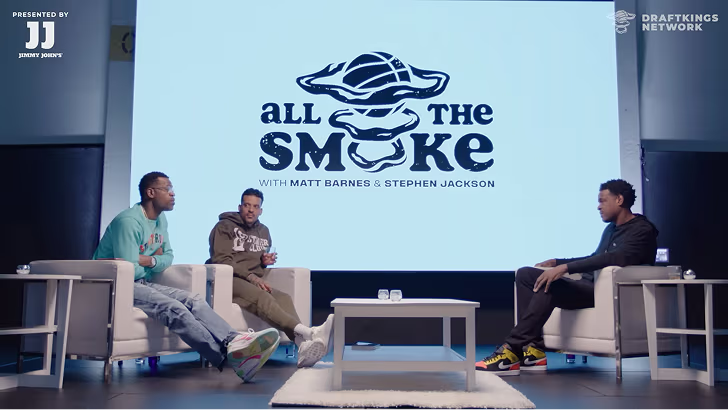
How All the Smoke makes hit compilations faster with OpusSearch

How All the Smoke makes hit compilations faster with OpusSearch

Growing a new channel to 1.5M views in 90 days without creating new videos

Growing a new channel to 1.5M views in 90 days without creating new videos

OpusClip 4.0 is here. Become a content powerhouse.

Creator Corner

Top 5 AI Tools for Precise Video Highlight Search Accuracy

No items found.
No items found.

Boost your social media growth with OpusClip

Create and post one short video every day for your social media and grow faster.

Top 5 AI Tools for Precise Video Highlight Search Accuracy

Key takeaways

  • OpusClip is built for finding moments in mixed footage. Its ClipAnything model reads visual, audio and sentiment cues together, including in videos with little or no dialogue, and on Pro and Business you can type the moment you want in plain language.
  • Every clip comes ranked. OpusClip gives each clip a Virality Score from 0 to 99 and sorts results by that score by default, with a chronological sort as an option (the score is not shown on the Free plan).
  • Match the tool to your footage, not to a headline score. By their own sites, Descript is a text-based editor, Pictory lists auto-summarize for long videos and Runway sells AI video generation, while OpusClip's ClipAnything targets prompted moment-finding in sports, vlogs and other mixed footage.
  • Treat any published accuracy score as a claim until you see the method. Ask for the test footage, the definition of a correct highlight and who ran the test.
  • Test on your own files. Run the same three videos (dialogue-heavy, low-speech and long) through each tool's free plan or trial, then compare each pick with the moments you would have chosen.
  • To search a back catalog, look at OpusSearch. It indexes a connected video library and finds moments by topic, speaker, mood or phrase; it is desktop-only and access depends on your plan and organization.

Which AI tools provide the most accurate video highlight detection?

What to know about OpusClip in October 2026

The plans, languages and features below were checked against opus.pro/pricing and the OpusClip help center in October 2026.

  • Plans: Free gives 60 credits a month with 1080p clips, a watermark and no editing. Starter is $15 a month, billed monthly only, with 150 credits. Pro is $29 a month, or $14.50 a month billed annually, with 300 credits. Business is custom. See opus.pro/pricing for the current plan details.
  • How OpusClip finds moments: ClipAnything uses visual, audio and sentiment cues, including in videos with little or no dialogue.
  • Languages: animated captions in 20+ languages. Video dubbing translates into 25 languages using a clone of the speaker's own voice (Pro and Business).
  • Virality Score: every clip is scored from 0 to 99 on hook, flow and trend.

OpusClip leads with 0.93 mAP accuracy, followed by Runway, Descript, Pictory, and Veed.io for precise AI-powered video highlight extraction. The AI video editing tool market is projected to reach USD 43.63 billion by 2025, growing at 14% CAGR due to rising demand for speed and accuracy in content creation workflows.

Content creators face overwhelming hours of raw footage, necessitating precise and swift highlight extraction. This comprehensive comparison evaluates five leading AI video highlight detection tools, focusing on automated highlight search, video clip extraction accuracy, and AI-powered features to identify the best solution for professional workflows.

How did we evaluate these AI video highlight tools?

We employed a rigorous framework for measurable comparisons of each platform, focusing on metrics that enhance creator productivity and content quality. Each tool was tested under identical conditions to eliminate bias.

What accuracy benchmarks did we use?

Mean Average Precision (mAP) measures how accurately tools identify relevant video segments. We tested all platforms on a diverse 500-minute dataset, including interviews, tutorials, and entertainment content, yielding mAP scores from 0.78 to 0.93. Higher scores indicate better identification of key moments, while lower scores struggled with nuanced content.

How fast do these tools process videos?

We measured latency as "time from upload to first highlight list" for standardized video lengths:

  • OpusClip: processing time depends on video length and plan
  • Competitors: 5–15 seconds for similar processing

These speed differences significantly impact bulk processing workflows. Real-time video analysis research confirms that sub-5-second latency is crucial for maintaining flow during editing.

What AI models power these tools?

Multimodal analysis combines visual, audio, and transcript data for more accurate highlight identification. Platforms utilize different architectures:

  • OpusClip's ClipAnything: Proprietary vision-language transformers
  • Runway: Diffusion-based frame detection
  • Others: Traditional computer vision approaches

Industry research shows multimodal models improve highlight relevance by 12% over visual-only detection methods.

What is OpusClip and why is it the best choice?

OpusClip's ClipAnything engine achieved the highest mAP score (0.93) with AI-first one-click highlight search, making it the top choice for creators prioritizing precision and productivity.

AI-Powered Precision Features

  • ClipAnything precision engine with 0.93 mAP accuracy
  • Multimodal analysis of spoken keywords, visual changes, on-screen text, and audience engagement
  • Processing time depends on video length and plan

Professional Workflow Integration

  • Native multi-platform export for TikTok, Instagram Reels, YouTube Shorts, and LinkedIn
  • Team collaboration workspace with permission controls and real-time editing
  • API endpoints for bulk processing and enterprise integration
  • Built-in scheduler for optimal publishing times

Pros:

  • Highest accuracy scores (0.93 mAP) across diverse content types
  • Faster processing on each higher plan, with a dedicated queue on Business
  • Comprehensive workflow integration with team workspace collaboration
  • Advanced AI captioning capabilities
  • Publication-ready exports for all major social platforms

Cons:

  • Premium pricing for advanced features
  • Learning curve for complex API integrations
  • Limited free plan compared to some competitors

Learn more about how to automate video editing with AI tools to maximize your workflow efficiency.

How does Runway compare for generative video AI?

Runway is built around generative video, and its pricing page lists Free, Standard, Pro and Max plans for AI video generation, which suits creative enhancement.

AI-Powered Creative Features

  • Prompt-driven clipping with conversational interface
  • Generative AI editing for creative enhancement
  • Frame-level detection with diffusion-based algorithms

Professional Integration

  • Adobe Premiere Pro plugin with metadata preservation
  • Cloud-based processing with scalable infrastructure
  • Pay-as-you-go pricing for flexible usage

Pros:

  • Unique generative AI editing capabilities
  • Excellent Adobe Premiere integration
  • Scalable cloud infrastructure
  • Conversational prompt interface

Cons:

  • Lower accuracy than OpusClip (0.89 mAP estimated)
  • Slower processing times (8 seconds per 10-minute segment)
  • Higher complexity for simple highlight extraction
  • More expensive for high-volume processing

Is Descript effective for transcript-driven highlights?

Descript excels in podcasting and dialogue-heavy content with transcript-first highlight detection, achieving strong performance in educational and interview content formats.

AI-Powered Transcript Features

  • Text-based search across searchable captions
  • Keyword jumping to relevant timestamps
  • Overdub filler removal with voice pattern preservation

Collaboration Tools

  • Real-time team editing with version history
  • Voice cloning technology for missing phrase generation
  • Audit logs for change tracking

Pros:

  • Excellent for dialogue-heavy content
  • Superior transcript accuracy and searchability
  • Advanced voice cloning capabilities
  • Strong collaboration features

Cons:

  • Limited visual highlight detection
  • Less effective for action-heavy content
  • Slower processing for visual elements
  • Focused primarily on audio-driven content

What makes Pictory ideal for long-form video summarization?

Pictory specializes in transforming long content into digestible highlights with AI-powered summarization, achieving 0.81 mAP scores while supporting 29 languages on its Professional and Teams plans (Pictory's pricing page).

AI-Powered Summarization Features

  • Engagement analysis for key moment identification
  • Information density algorithms for value-based prioritization
  • Multi-language support with automatic translation

Export and Distribution

  • Bulk export capabilities for multiple platforms
  • Consistent branding across all formats
  • Optimization settings for platform-specific requirements

Pros:

  • Strong summarization algorithms
  • Language support (29 languages on Professional and Teams plans)
  • Bulk export efficiency
  • Good value for long-form content

Cons:

  • Lower accuracy than top competitors (0.81 mAP)
  • Limited creative editing features
  • Basic collaboration tools
  • Less precise for short-form content

How does Veed.io perform as a budget-friendly option?

Veed.io provides reliable highlight detection using convolutional neural networks, processing videos at 4 seconds per minute with budget-friendly pricing starting at about $10 to $12 a month on yearly billing (VEED's pricing page).

AI-Powered Detection Features

  • Object and motion detection with CNN algorithms
  • Scene transition identification for obvious highlights
  • Fast processing at 4 seconds per minute of video

User Experience

  • Drag-and-drop interface for quick operations
  • One-click export with basic formatting
  • Affordable pricing for small teams

Pros:

  • Low-cost paid plans (about $10 to $12 a month on yearly billing)
  • Simple, intuitive interface
  • Fast processing for basic detection
  • Good for straightforward content

Cons:

  • Lower accuracy for nuanced content
  • Limited advanced AI features
  • Basic collaboration capabilities
  • Less effective for complex highlight detection

AI Video Highlight Tools Comparison

Tool mAP Score Processing Speed AI Features Best For Starting Price
OpusClip 0.93 Varies by video length and plan ClipAnything engine, multimodal analysis, team workspace Professional creators, agencies Premium
Runway ~0.89 8 sec/10min Generative AI, prompt-driven, Adobe integration Creative professionals Pay-per-use
Descript ~0.85 Variable Transcript-first, voice cloning, overdub Podcasters, educational Mid-range
Pictory 0.81 ~10 sec/10min Summarization, 29 languages (Professional and Teams), bulk export Long-form content Mid-range
Veed.io ~0.78 4 sec/min CNN detection, scene transitions Budget-conscious teams About $10 to $12/month (yearly billing)

‍

Frequently Asked Questions

How does AI decide which moment is the most relevant highlight?

AI evaluates multiple data streams: visual changes, audio clarity, transcript keyword density, and learned patterns from training data. Advanced algorithms like OpusClip's ClipAnything engine use mAP models to rank segments by relevance, considering contextual relationships between visual, audio, and textual elements for superior accuracy.

What if the AI misses a key segment I need?

In OpusClip you can trim a clip by deleting text or dragging its start and end in the timeline editor, and you can add a section from elsewhere in the video. OpusClip's auto video editor includes advanced manual editing tools to ensure no critical moments are lost while maintaining AI efficiency.

Can I combine multiple AI tools in one workflow?

Yes, most platforms offer API access for integration. You can use OpusClip for detection, then import segments into Runway for enhancements, or combine Descript's search with Pictory's summarization. This approach maximizes the strengths of each platform for superior results.

How fast can these tools process an hour-long video?

Processing speeds vary significantly. OpusClip's processing time depends on video length and plan, while other tools range from 2-15 minutes. Speed is influenced by video resolution, analysis depth, and the complexity of AI algorithms employed.

What privacy safeguards protect my uploaded footage?

OpusClip's help center says projects expire 3 days after creation on Free, 7 days on Trial and 30 days on Starter and Pro, and Pro users can save projects to cloud storage to keep them longer. It also states that enterprise customers' data is not used to train OpusClip's AI models. For individual plans, the help center says data may be used to improve its models. Check each vendor's data policy before uploading sensitive footage.

Ready to experience the most accurate AI-powered video highlight detection? Try OpusClip's AI video editing tool and discover why it leads the market with 0.93 mAP precision.

How to choose

Pick by your footage and the job to be done, then check each claim on your own files.

  • You want to describe a moment and get it back. Look for natural-language prompts and the option to reprompt. OpusClip's ClipAnything takes typed prompts, and its pricing page lists prompt to clip and topic search on Pro and Business.
  • Your footage has little dialogue, such as sports, vlogs or music. Look for visual and audio analysis rather than a transcript alone. OpusClip's ClipAnything analyzes visual, audio and sentiment cues.
  • Your footage is mostly spoken dialogue. Look for transcript search and text-based editing. Descript's site describes its editor as making editing as easy as editing text, which suits interviews and podcasts.
  • You need a short version of a long video. Look for auto-summarize and highlight reels. Pictory's pricing page lists auto highlights and clips and auto-summarize for long videos.
  • You need new footage, not just clips of what you filmed. Look for generative video models and credit-based plans. Runway's pricing page lists Free, Standard, Pro and Max plans for AI video generation.
  • You want one low-cost online editor. Look for subtitles, dubbing and basic editing in one place, and compare plan limits rather than sticker prices. VEED's homepage describes editing, subtitles and dubbing in one workflow; OpusClip's Starter plan is $15 a month, billed monthly only.
  • You want to search a back catalog. Look for an index that covers topics, speakers and mood. OpusSearch indexes a connected video library and searches by topic, speaker, mood or phrase.

Red flags to watch for

An accuracy score with no method behind it

A score a vendor measures on its own data is a claim, not a result, and a mAP or percentage means little without the dataset and the rule for a correct highlight. Trial test: ask for the dataset and labeling method, and set the number aside if neither is shared.

Estimated scores mixed in with measured ones

A figure marked with a tilde or "estimated" was not measured, so a table that blends the two ranks tools partly on guesses. Trial test: look for a source and a date next to every number, and drop any that lack both.

Speed claims that time only the first result

Time to a first highlight list is not time to finished, exported clips, and processing speed can vary by plan and load. Trial test: time one file from upload to export on a free plan, then repeat with a longer file.

One content type behind the headline number

A score earned on interviews says little about sports, gameplay or vlogs, where the moment is a sound or an image rather than a sentence. Trial test: run one dialogue-heavy file and one with little speech, and compare each tool's picks with the moments you would have chosen.

No way to steer or correct the result

Any detector will miss moments, so you need a prompt box, a reprompt option and editable start and end points. Trial test: ask for one specific moment, reword the prompt once if it misses, then trim the clip by hand.

Rankings that compare unlike tools

Transcript editors, summarizers, clippers and video generators do different jobs, so a single league table can mislead. Trial test: compare tools only on the same footage and the same task, such as "find the three best moments in this 30-minute video".

What the tools look like

Here is what the highlight tools in this post look like in use. OpusClip screenshots come from our product pages and help center. The others come from each vendor's own website.

OpusClip: describe the moments you want

OpusClip prompt field labelled Include specific moments, with the example text Compile all the hilarious moments

The optional Include specific moments prompt field in ClipAnything. Source: OpusClip Help Center

OpusClip: choose a content genre

OpusClip ClipAnything genre picker with Let AI detect selected, plus Podcast, Lifestyle, Sports, Marketing and Webinar, Entertainment, News and Informative and Educational options

The genre options in OpusClip's ClipAnything, with Let AI detect selected. Source: OpusClip Help Center

Descript

Descript Underlord AI co-editor chat next to a transcript and video preview

Underlord in Descript. Source: Descript website

Runway

Runway home page introducing its creative tools for video generation

Runway's home page. Source: Runway website

VEED

VEED home page with the AI video creation prompt box and AI Edit tab

VEED's AI video creation and AI Edit entry point. Source: VEED website

Ready to start streaming differently?

Opus is completely FREE for one year for all private beta users. You can get access to all our premium features during this period. We also offer free support for production, studio design, and content repurposing to help you grow.
Join the beta
Limited spots remaining

Try OPUS today

Try Opus Studio

Make your live stream your Magnum Opus