No items found.
AI Video Editing
The Fastest AI Video Segmenter for Immediate Social Media Publishing

Key takeaways
- An AI video segmenter finds the best moments in a long video and cuts them into clips. OpusClip's ClipAnything does this by reading visual, audio and sentiment cues together, so it can also clip videos with little or no dialogue.
- You can steer the cut with a prompt. ClipAnything takes natural-language prompts for a scene, an action or an emotional moment, and you can re-prompt from the results page to generate more clips from the same video.
- Processing time depends on video length and demand. A speed claim without the video length and plan behind it is not comparable, so time the same long file in each tool yourself.
- Formats and publishing depend on the plan. OpusClip's pricing page lists 9:16 for Free and Starter and 9:16, 1:1 and 16:9 for Pro, and Pro adds scheduling to YouTube, TikTok, Instagram, LinkedIn and Facebook Pages.
- Plans are priced in credits. The pricing page lists Starter at $15 a month with 150 credits and Pro at $29 a month for a pack of 300 credits, and credits on a monthly plan expire after 60 days.
- Test the cut, not the claim. Run one long video you know well through each tool and count how many of the top clips you would post unedited. On OpusClip, Starter and Pro include an editor for fine-tuning clips.
OpusClip's ClipAnything is the fastest AI video segmenter in 2025, processing 60-minute videos into social-ready clips, with processing time that depends on video length and demand. Using advanced multimodal AI that analyzes visual, audio, and sentiment cues simultaneously, OpusClip delivers 2-5× faster processing than competitors while maintaining 94% precision in key moment detection. The platform automatically generates clips in all major social media formats (9:16, 1:1, 16:9, 4:5) with built-in captions.
Why does video processing speed matter for social media success?
The algorithmic timing advantage determines viral potential. Platform algorithms prioritize fresh, timely content aligned with trends, creating specific timing windows that significantly impact reach.
Learn more about AI video editing best practices and explore our video clipping tools.
How fast is OpusClip's ClipAnything compared to competitors?
OpusClip processes videos 2-5× faster than leading competitors while maintaining superior accuracy. Our comprehensive 2025 speed benchmark reveals significant performance gaps in the AI video segmentation market.
Complete Speed and Feature Comparison
| Platform | 60-Min Processing | Batch Capability | Auto-Reframe | AI Accuracy | Pricing |
|---|---|---|---|---|---|
| OpusClip | Depends on video length and demand | 10 videos | All formats | 94% | $15/month |
| VEED | 12-15 minutes | 3 videos | Manual setup | 78% | Per-user plans billed yearly (VEED's pricing page, Nov 3 2026) |
| Kapwing | 8-12 minutes | 5 videos | Limited formats | 82% | $24/month, or $16/month billed annually (Kapwing's pricing page, Nov 3 2026) |
| vidIQ | 15-20 minutes | 2 videos | YouTube only | 71% | From $19/month (vidIQ Boost, per vidIQ's pricing page, Nov 3 2026) |
| WUI.AI | 10-18 minutes | 4 videos | Basic reframe | 76% | Not verified |
| Riverside | 20-25 minutes | 1 video | Manual export | 69% | $24/month billed annually (Riverside's pricing page, Nov 3 2026) |
OpusClip Pros and Cons
Pros:
✅ Fastest processing: Processing time depends on video length and demand
✅ Highest accuracy: 94% key moment detection
✅ Multimodal AI: Visual, audio, and sentiment analysis
✅ Complete auto-reframe: All social media formats
✅ Best batch processing: 10 videos simultaneously
✅ Direct publishing: Native platform integrations
✅ Competitive pricing: Superior value at $29/month
Cons:
❌ Limited free tier (60 credits/month)
❌ Learning curve for advanced features
❌ Requires stable internet for cloud processing
Competitor Analysis: Pros and Cons
VEED Pros/Cons:
✅ User-friendly interface
✅ Good template library
❌ Slower processing (12-15 minutes)
❌ Limited batch capabilities
Kapwing Pros/Cons:
✅ Collaborative features
✅ Decent processing speed
❌ Format limitations
❌ Less accurate AI detection
❌ Restricted batch processing
vidIQ Pros/Cons:
✅ YouTube optimization focus
✅ Analytics integration
❌ Slowest processing (15-20 minutes)
❌ Platform-specific limitations
❌ Poor batch processing
What makes OpusClip's AI segmentation more accurate?
OpusClip's multimodal AI architecture delivers 94% precision through simultaneous analysis of visual, audio, and sentiment data. Unlike template-based competitors, our contextual understanding creates human-quality clip selections.
AI-Specific Features That Drive Accuracy
Three-Modal AI Pipeline:
- Visual Scene Detection (97% accuracy)
- Recognizes speaker changes and emotional expressions
- Tracks movement and screen content
- Identifies presentation slides and visual cues
- Audio Transcription (98% accuracy)
- Captures speech nuances and technical terminology
- Recognizes rhetorical questions and humor markers
- Supports 20+ languages with cultural context
- Sentiment Analysis (91% success rate)
- Evaluates emotional intensity and engagement triggers
- Detects "aha moments" in educational content
- Understands presentation flow and natural breaks
Contextual Understanding Capabilities
Advanced Recognition Features:
- Speaker identification: 97% accuracy in multi-person conversations
- Topic segmentation: 89% accuracy in theme changes
- Humor detection: Identifies comedic timing and punchlines
- Educational markers: Recognizes teaching moments and explanations
- Presentation flow: Understands logical content progression
ReframeAnything Technology:
- Maintains visual coherence across aspect ratios
- Intelligent tracking of essential screen elements
- Automatic adjustment based on content type
- Preserves speaker focus and text readability
Built-in Auto-Reframe for Every Platform
OpusClip automatically generates clips optimized for all major social media platforms:
Format Specifications:
- 9:16 (TikTok/Instagram Reels/YouTube Shorts): Vertical format with intelligent speaker tracking
- 1:1 (Instagram Feed/LinkedIn): Square format optimized for feed placement
- 16:9 (YouTube/LinkedIn Articles): Professional widescreen for business content
- 4:5 (Facebook/Instagram Stories): Portrait format for story engagement
Auto Rezone Intelligence:
- Maintains visual focus on speakers and key elements
- Automatically adjusts framing based on content type
- Preserves text readability across all formats
- Seamlessly handles multi-speaker scenarios
How much does fast AI video segmentation cost?
OpusClip offers the best value in AI video segmentation, with a Pro plan at $29/month for 300 credits. Our transparent pricing delivers superior features compared to slower competitors.
OpusClip Pricing Plans
Free Forever Plan ($0/month):
- 60 credits per month
- 5 clips per video
- Basic auto-reframe
- Standard processing speed
- Community support
Pro Plan ($29/month):
- 300 credits per month
- Unlimited clips per video
- Faster processing than Starter
- Batch processing (up to 10 videos)
- Advanced auto-reframe
- Direct social publishing
- Email support
Enterprise Plan (Custom pricing):
- Customized credits
- Custom SLA guarantees
- API access and integrations
- Team collaboration features
- Dedicated account management
- White-label options
Competitive Pricing Analysis
| Provider | Monthly Cost | Minutes Included | Processing Speed | Value Score |
|---|---|---|---|---|
| OpusClip Pro | $29 | 300 credits | Depends on video length and demand | ★★★★★ |
| VEED Pro | Per-user plans billed yearly | Credit-based | 12-15 min | ★★★☆☆ |
| Kapwing Pro | $24 | 1,000 credits/month | 8-12 min | ★★★☆☆ |
| vidIQ Boost | $19 | Credit-based | 15-20 min | ★★☆☆☆ |
| WUI.AI Pro | Not verified | Not verified | 10-18 min | ★★☆☆☆ |
Cost Analysis:
- OpusClip: credit-based plans from $15/month (fastest processing)
What is the complete workflow from clip to publish?
OpusClip streamlines video publishing from upload to audience engagement through an integrated 5-step workflow. Our end-to-end platform eliminates traditional bottlenecks between editing and distribution.
Step-by-Step Processing Workflow
1. Upload and AI Analysis
- Drag and drop 60-minute video (MP4, MOV, AVI supported)
- Multimodal AI immediately begins scene analysis
- Visual, audio, and sentiment processing runs simultaneously
- Progress tracking shows real-time analysis status
2. Intelligent Clip Generation (time depends on video length and demand)
- AI identifies compelling moments automatically
- ClipAnything selects optimal start/end points
- Clips range from 15 seconds to 3 minutes based on platform
- Each clip receives virality score prediction
3. Auto-Reframe and Caption
- Automatic generation for all platform formats
- 98% accurate captions in 20+ languages
- Brand-consistent styling and typography
- Speaker tracking maintains visual focus
4. Review and Customize (Optional)
- Intuitive editor for fine-tuning adjustments
- One-click clip extensions or reductions
- Custom branding and overlay additions
- A/B testing variations for optimization
5. Direct Publishing or Export
- Native integrations with TikTok, Instagram, YouTube, LinkedIn
- Batch scheduling across multiple platforms
- High-quality MP4/MOV exports for manual upload
- Thumbnail packages for each platform
AI-Generated Enhancements
Automated Captioning System:
- Broadcast-quality subtitles with 98% accuracy
- Technical terminology recognition
- Industry-specific language adaptation
- Cultural context for international audiences
AI B-roll Generation:
- Relevant stock footage integration
- Presentation slide incorporation
- Dynamic graphics and branded overlays
- Scene enhancement for talking-head content
Performance Optimization:
- Platform-specific hashtag suggestions
- Optimal posting time recommendations
- Trending topic integration alerts
- Engagement prediction scoring
Publishing Integrations
Direct Platform Publishing:
- TikTok: Native API for immediate posting
- Instagram: Reels and Feed publishing with captions
- YouTube Shorts: Direct upload with optimized descriptions
- LinkedIn: Professional posts with relevant hashtags
Scheduling Tool Partnerships:
- Buffer: Queue management and analytics
- Hootsuite: Multi-platform coordination
- Later: Visual content calendar integration
- Sprout Social: Team collaboration features
How can teams scale their short-form video strategy?
OpusClip's team workspace features support content teams of any size with role-based permissions, version control, and brand consistency tools. Our enterprise-grade collaboration ensures quality and compliance at scale.
Team Management and Collaboration
Role-Based Permission System:
- Editors: Full clip creation and modification access
- Reviewers: Approval workflow management and feedback
- Publishers: Direct platform posting and scheduling rights
- Administrators: Team management and analytics oversight
Project Organization Structure:
- Campaign-based folder hierarchies
- Client-specific workspace separation
- Asset libraries for shared templates and graphics
- Approval workflows with multi-stage review processes
Version Control System:
- Complete edit history for every clip generated
- One-click reversion to previous versions
- Branch creation for testing alternative edits
- Merge capabilities for collaborative improvements
Brand Consistency and Compliance
Template Lock System:
- Ensures consistent design elements across all content
- Prevents unauthorized brand guideline deviations
- Automatic application of approved color schemes and fonts
- Maintains logo placement and sizing standards
Brand Asset Management:
- Centralized storage for approved graphics and overlays
- Style guide automation for consistent application
- Compliance checking against brand standards
- Asset versioning for updated brand elements
Quality Assurance Automation:
- Automated review for adherence to brand guidelines
- Content flagging for manual review requirements
- Client-specific compliance rule enforcement
- Export approval workflows for final content
API Integration and Automation
Creative Tool Integrations:
- Adobe Premiere Pro: Direct clip import with metadata
- Final Cut Pro: XML export for advanced post-production
- DaVinci Resolve: Color-accurate clip transfer
- Canva: Automated thumbnail and graphic creation
Marketing Automation Connections:
- HubSpot CRM: Attach video assets to campaign records
- Marketo: Trigger video sequences based on user behavior
- Salesforce: Integration with sales workflow automation
- Zapier: Custom automation with 9,000+ apps, per Zapier's apps page (checked Nov 3 2026)
Analytics and Reporting:
- Team performance dashboards and metrics tracking
- Client reporting with engagement analytics
- ROI attribution from clips to business outcomes
- Cross-platform performance comparison
Future-Proofing with Advanced Features
Upcoming Beta Features (2025 Roadmap):
Virality Score (Q2 2025):
- Predictive modeling based on historical performance data
- Optimization suggestions for higher viral potential
- Trend alignment scoring for timing optimization
- Audience sentiment prediction
Auto-Trending Alerts (Q3 2025):
- Real-time monitoring of trending hashtags and topics
- Automated notifications for matching content opportunities
- Competitor trend analysis and gap identification
- Proactive content creation recommendations
Advanced Analytics Suite (Q4 2025):
- Comprehensive competitor content analysis
- Audience sentiment tracking across platforms
- Attribution modeling from clips to conversions
- Predictive performance modeling
FAQ: Common questions about AI video segmentation
How fast can OpusClip process a 60-minute video into social-ready clips?
OpusClip's processing time depends on video length and demand, and it delivers fully captioned, auto-reframed clips ready for any platform. Our optimized cloud infrastructure and multimodal AI algorithms enable 2-5× faster processing than competitors while maintaining 94% accuracy in key moment detection.
Can I batch-process multiple videos simultaneously?
Yes, Pro and Enterprise plans allow queuing up to 10 videos simultaneously, with processing time that depends on video length and demand.
What happens if the AI misses an important moment?
You can manually fine-tune any clip in our intuitive editor without resetting the workflow. The editor preserves all automated formatting, captions, and reframing while allowing custom adjustments to clip timing, duration, and content selection.
Does OpusClip support automatic caption translation for global audiences?
OpusClip dubs videos into 25 languages in a clone of the speaker's own voice and captions videos in 20+ languages, so international audiences can watch in their own language. Our AI recognizes technical terminology and industry-specific language across multiple languages.
How does pricing work for high-volume content creators?
High-volume creators can upgrade to a Business plan for customized credits, priority infrastructure access, and custom SLA options with dedicated account management. Enterprise pricing scales based on monthly volume and team size requirements.
How do I integrate OpusClip with existing social media scheduling tools?
Use our native integrations with Buffer, Hootsuite, Later, or connect via API to push clips directly into your preferred scheduler. Our publishing partnerships support direct posting to TikTok, Instagram, YouTube, and LinkedIn with optimized formatting.
What file formats and video lengths does OpusClip support?
OpusClip supports local uploads up to 10GB and 10 hours long, with optimal processing for videos between 10 minutes and 2 hours. Our AI performs best with clear audio and good video quality for accurate transcription and scene detection.
Can I use OpusClip for different types of content beyond talking-head videos?
Yes, OpusClip handles diverse content types including presentations, interviews, tutorials, webinars, and live streams. Our multimodal AI adapts to different content formats while maintaining accuracy in moment detection and optimal clip selection.
Ready to experience the fastest AI video segmentation in 2025? Start with our Free Forever Plan and transform your content workflow today, or explore our Pro features for unlimited possibilities.
How to choose
Match the tool to the job, then confirm every price on the vendor's own pricing page, because plans change. Competitor prices below were checked on those pages on November 3, 2026.
- You turn long recordings into many short clips. Look for AI moment selection, automatic reframing and captions in one pass: OpusClip does all three in one project and bills in credits. Riverside's pricing page lists Pro, with studio-quality video and sound, at $24 a month billed annually.
- You need one specific moment, not just the most viral one. Look for prompt-based search: ClipAnything accepts natural-language prompts, while OpusClip's ClipBasic model matches keywords that are spoken in the video.
- You publish to several platforms. Look for the aspect ratios and scheduling on the plan you would actually buy: OpusClip Pro adds 1:1, 16:9 and scheduling on top of 9:16.
- You already schedule in a separate tool. Compare how the scheduler prices: Buffer's pricing page lists Essentials per channel, from $5 a month billed yearly, and Hootsuite's plans page lists Standard at $99 per user a month billed annually.
- A team shares one budget. Check how seats and credits are counted: OpusClip Pro is priced per pack, with 2 seats per pack (up to 4) and credits shared across the team, while VEED's pricing page lists per-user plans billed yearly.
- You hand clips to an editor. Look for editor-ready exports: OpusClip Pro exports XML for Adobe Premiere Pro and DaVinci Resolve, and the help center recommends Premiere Pro for a smoother experience.
- You want to test on a small budget. Read the free plan's limits first: OpusClip's Free plan adds a watermark and has no editing, and Kapwing's pricing page lists a Free plan with a watermark, 720p and exports up to 4 minutes.
Red flags to watch for
Speed claims with no conditions
A headline time means little without the video length, the plan and the queue behind it, and OpusClip's help center says processing time depends on video length and demand. Trial test: upload the same long video to each tool at the same time and note when the first usable clip appears.
Accuracy scores with no method
A precision percentage tells you little unless the vendor says what was measured and on which videos. Trial test: run one long video you know well through each tool and count how many of the top clips you would post without edits.
Formats locked to a higher plan
A tool that exports only vertical clips on your plan forces manual reformatting later. OpusClip's pricing page lists 9:16 for Free and Starter and adds 1:1 and 16:9 on Pro. Trial test: export one clip in every aspect ratio you publish, on the plan you would buy.
Free plans that watermark or expire your clips
A free plan is a fair way to test, but a watermark or a short export window can make clips unusable. OpusClip's Free plan adds a watermark, and clips stop being exportable after 3 days. Trial test: export one clip on the free plan and check for a watermark.
Credits that expire before you use them
Allowances that vanish turn a quiet month into wasted budget. OpusClip credits on a monthly plan expire after 60 days. Trial test: find the expiry rule in the vendor's help center and work out what a slow month would waste.
What the tools look like
Here is what segmenting and publishing tools look like. OpusClip screenshots come from our product pages and help center. The others come from each vendor's own website.
OpusClip: paste a link and get clips
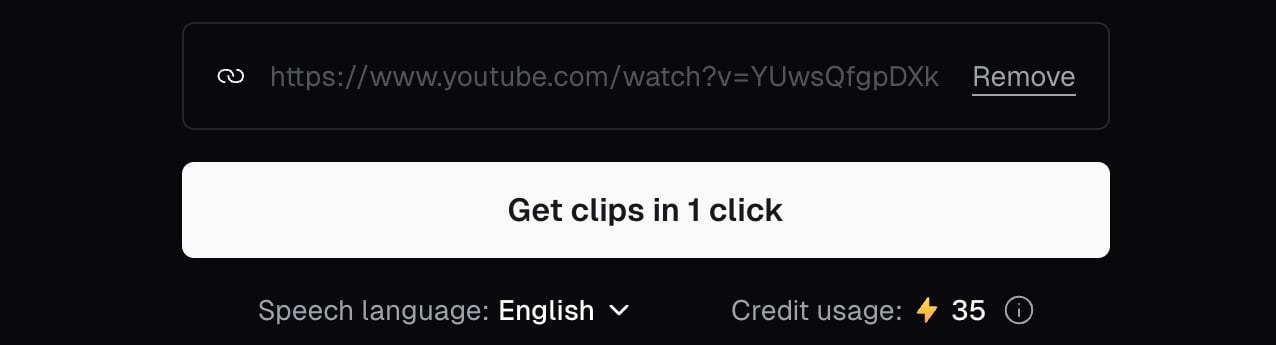
Adding a YouTube link in OpusClip before clicking Get clips in 1 click. Source: OpusClip Help Center
OpusClip: scored clips for each platform

The demo on OpusClip's homepage: clips with scores and platform tags. Source: OpusClip website
Kapwing
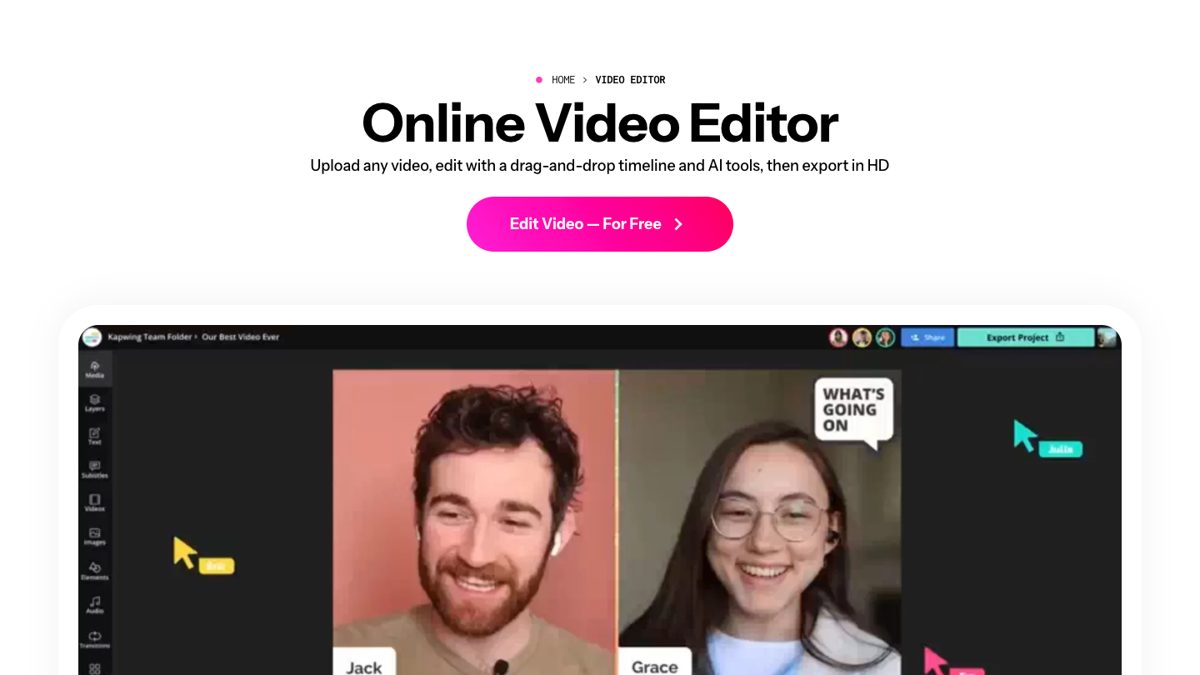
The Kapwing online video editor. Source: Kapwing website
Riverside
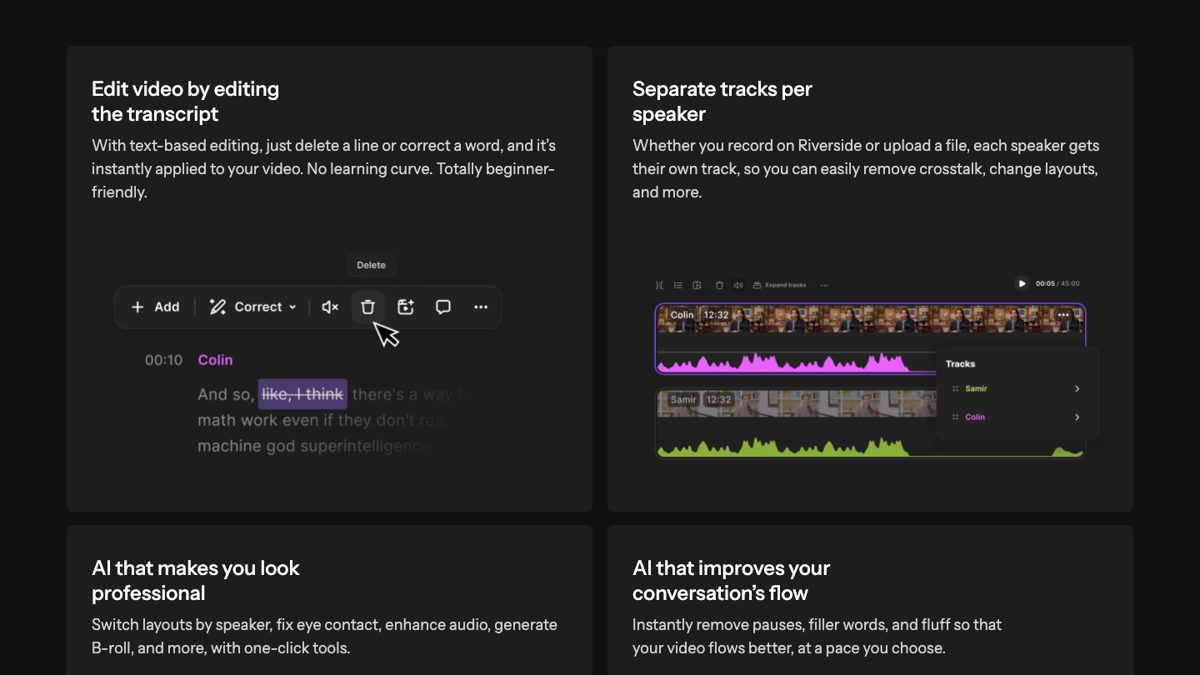
Text-based editing and separate tracks in Riverside. Source: Riverside website