OpusClip 4.0 is here. Become a content powerhouse.

8 Best AI Voiceover Generators for Video in 2026

November 6, 2026
Creators recording a voiceover, typing a script and showing a vertical video, with an Add voice button, a sound wave pill, a 16:9 tag and a TikTok icon

OpusClip is the pick for putting an AI voice line on a short clip: type the script, choose one of its 20+ voices and move the result on the editor timeline. ElevenLabs is our first pick for narrating a whole video, Clipchamp and CapCut are the free in-editor routes, and VEED, Descript, Canva and WellSaid Labs each suit a narrower job. We ranked 8 tools by where the voice is added, which voices and languages each vendor lists, cloning and consent rules, and licensing. Facts come from each vendor's own pages, read on November 6, 2026.

Key takeaways

  • Best for narrating a whole video with fine voice control: ElevenLabs. Its Studio pairs narration with an uploaded video track, and its FAQ lists 90+ languages on Eleven v4.
  • Best free narration in a browser editor: Clipchamp. Its page lists 400 voices in 80 languages, and the free plan exports 1080p with no watermark.
  • Best for quick AI voices in a short-form editor: CapCut. Its page lists 200+ AI voices and calls the tool free to try.
  • Best for text to speech with voice cloning in a browser editor: VEED. The voice lands on the timeline as an audio clip, and one voice clone is allowed per workspace.
  • Best for narration you edit like a document: Descript. Type the script, then pick a stock AI speaker or a clone made after a recorded consent statement.
  • Best for an AI voice line on a short clip: OpusClip. Its editor lists 20+ voices, tone and volume sliders, and a voiceover that can be moved on the timeline.
  • Best for a voice inside a design-first video editor: Canva. Its AI voice generator page says a selection of voices is free.
  • Best for licensed English narration as audio files: WellSaid Labs. Paid plans list full commercial rights, and the vendor says users cannot clone voices.

What counts as an AI voiceover for video?

An AI voiceover turns a typed script into speech and puts it on a video, either as a new narration track or as a replacement for audio that is already there. Three different jobs hide under that name. The first is narration from text: type a script, pick a stock voice and place the audio on a timeline, which is the job most add-a-voice searches describe and what this guide ranks. The second is a cloned voice, a model of one person's voice that reads new text, which vendors gate behind consent steps or paid plans. The third is dubbing, which translates speech that is already in the video. Our guide to AI voice cloning tools for creator dubs and guide to AI dubbing tools cover those two jobs, so this list sticks to adding a voice to a video.

How to choose

  • Narrating a full video from a script: ElevenLabs or Descript, where the script drives the audio and the voice can be steered.
  • A free voice inside an editor: Clipchamp, CapCut or Canva, then check each free plan's export and voice limits.
  • A voice line on a short clip cut from a longer recording: OpusClip's editor, where the voiceover sits on the clip's timeline.
  • A clone of your own voice: ElevenLabs, VEED, Descript and CapCut list cloning, and ElevenLabs and Descript state consent rules on their own pages.
  • Licensed English narration as audio: WellSaid Labs, then bring the files into any editor.
  • Commercial or monetized videos: read the license first. ElevenLabs' Free plan is non-commercial and WellSaid's free trial has no commercial rights.

At a glance

  • ElevenLabs: best for narrating a whole video with fine voice control; Free $0 (10,000 credits a month, non-commercial, attribution required); Starter $1 for the first month, then $6 a month on monthly billing; free plan yes.
  • Clipchamp: best for free narration in a browser editor; free plan yes (1080p export, no watermark, AI voiceovers included); Premium comes with Microsoft 365 Personal and Family, and the page prints no standalone price.
  • CapCut: best for quick AI voices in a short-form editor; Free $0; Pro US$19.99 a month or US$179.99 a year; the text to speech page calls the tool free to try.
  • VEED: best for text to speech with voice cloning in a browser editor; Creator $12 and Pro $22 per user per month, both billed yearly; the pricing page says to start for free.
  • Descript: best for narration you edit like a document; Hobbyist $24 per person per month billed monthly ($16 billed annually); free plan yes (a limited trial of AI Speech).
  • OpusClip: best for an AI voice line on a short clip; Starter $15 a month (monthly billing only), Pro $29 a month or $14.50 a month billed annually; free plan yes (clips carry a watermark).
  • Canva: best for a voice inside a design-first video editor; Pro US$144 a year on yearly billing; free plan yes (a selection of free voices).
  • WellSaid Labs: best for licensed English narration as audio files; Starter $19 a month billed monthly ($10 a month billed annually); free plan yes (3 download minutes a month, no commercial rights).

Where the voice is added, which voices and languages are listed and how it is steered

The At a glance list covers best-for, price and free plan; this table compares where each tool adds the voice, which voices and languages each vendor lists and how the voice is steered, as listed on each vendor's own pages on November 6, 2026.

ToolWhere the voice is addedVoices and languages listedHow the voice is steered
ElevenLabsStudio: add a video track, then align the narration with the footage on a timeline90+ languages with Eleven v4; voice library searchable by accent and use caseSpeed and stability settings; pronunciation dictionaries
ClipchampClipchamp editor: pick a voice, then preview and add the voiceover to the video400 voices in 80 languagesPitch and emotion adjustments; speed from 0.5x to 2x
CapCutDesktop editor Text to speech panel; online, AI tools then Text to speech200+ AI voices across multiple languagesSpeech rate, pitch, tone and volume
VEEDEditor: Audio tab, then Text to Speech; the clip lands on the timeline50+ languages; AI voices or your own voice cloneTones such as confident or excited; voices with specific accents
DescriptDescript project: type the script, then pick a stock AI speaker or a clone20+ AI voices with emotions and styles, per its text-to-speech pageEdit the audio by editing the text; emotions and styles
OpusClipEditor's right-hand menu; the voiceover can then be moved on the timeline20+ voices, optimized for English; also shown to work in Italian, Portuguese and SpanishTone stability and original-audio volume sliders
CanvaCanva's video editor, in a browser or the iOS and Android appsA variety of voices and accents; a wide range of languages listedPreview and refine the result with simple prompts
WellSaid LabsAudio only: Studio exports files; Adobe Express and Premiere Pro integrations listedAll English voices on Starter and Pro; all languages on EnterpriseTone, pitch and emotional controls; custom pronunciations

1. ElevenLabs: Best for narrating a whole video with fine voice control

ElevenLabs Studio script panel with a Voiceover tab and narration blocks, a video preview, and a multi-track timeline with voiceover and music clips

ElevenLabs Studio's script panel with voiceover clips on the timeline. Source: ElevenLabs docs

ElevenLabs' Studio page says to upload MP4 or MOV files and add voiceovers, background music, sound effects and auto captions. Its docs say to add a video track to pair narration with existing footage, then align the narration with the video on the timeline. The text to speech FAQ lists 90+ languages with the Eleven v4 models, 70+ on Eleven v3, 32 on Flash v2.5 and 29 on Multilingual v2. Studio's docs list speed, stability, similarity and style exaggeration settings, plus pronunciation dictionaries. A project with a video track or captions can be exported as video, and audio exports as MP3 or WAV.

Pricing: per ElevenLabs' pricing page, read November 6, 2026, the Free plan is $0 a month with 10,000 credits, which its FAQ puts at around 10 minutes of audio. Starter is $1 for the first month, then $6 a month, and Creator is $11 for the first month, then $22 a month (monthly billing shown). The FAQ says paid plans include commercial rights, while the Free plan covers personal, non-commercial use and requires attribution to ElevenLabs. It lists Instant Voice Cloning from Starter and Professional Voice Cloning from Creator.

Considerations: credits are spent per character, and the FAQ says about 1,000 credits make one minute of audio on current plans, so long scripts and retakes draw down the allowance (unused credits roll over for up to two months while the plan is kept). The FAQ also says a voice may be cloned only with permission to use it, and that Professional Voice Cloning is limited to your own voice after verification.

  • Choose it if the narration has to be steered line by line, covers many languages, or should come from a clone of your own voice.
  • Skip it if the voiceover will ship in monetized videos on the Free plan (it is non-commercial) or the job is a single quick line on a short clip.

2. Clipchamp: Best for free narration in a browser editor

Clipchamp's text to speech panels with language, voice, emotion, vocal pitch and pace controls, a text box and Preview and Save buttons

Clipchamp's text to speech controls, from its AI voiceover page. Source: Clipchamp website

Clipchamp's AI voice generator page lists four steps: choose the text to speech generator, pick a language, voice, pitch and pace, type or paste a script, then preview and add the voiceover to the video. It lists 400 voices in 80 languages, pitch or emotion adjustments and speed from 0.5x to 2x. The page also says AI voiceover transcripts and MP3 audio can be exported for free. Clipchamp's pricing page says the free plan includes AI features such as voiceovers, exports up to 1080p with no watermark, and starts with a personal Microsoft account.

Pricing: the free plan is $0. Premium features such as 4K export and the brand kit tool come with Microsoft 365 Personal and Family plans, and the page prints no standalone Premium price (read November 6, 2026).

Considerations: the AI voiceover page does not mention voice cloning, so a custom voice would need another tool. Free export tops out at 1080p, with 4K listed under Premium.

  • Choose it if a free, in-browser narration track is enough and the voice can come from a library of stock voices.
  • Skip it if the voice has to be a clone, or a personal Microsoft account is not an option.

3. CapCut: Best for quick AI voices in a short-form editor
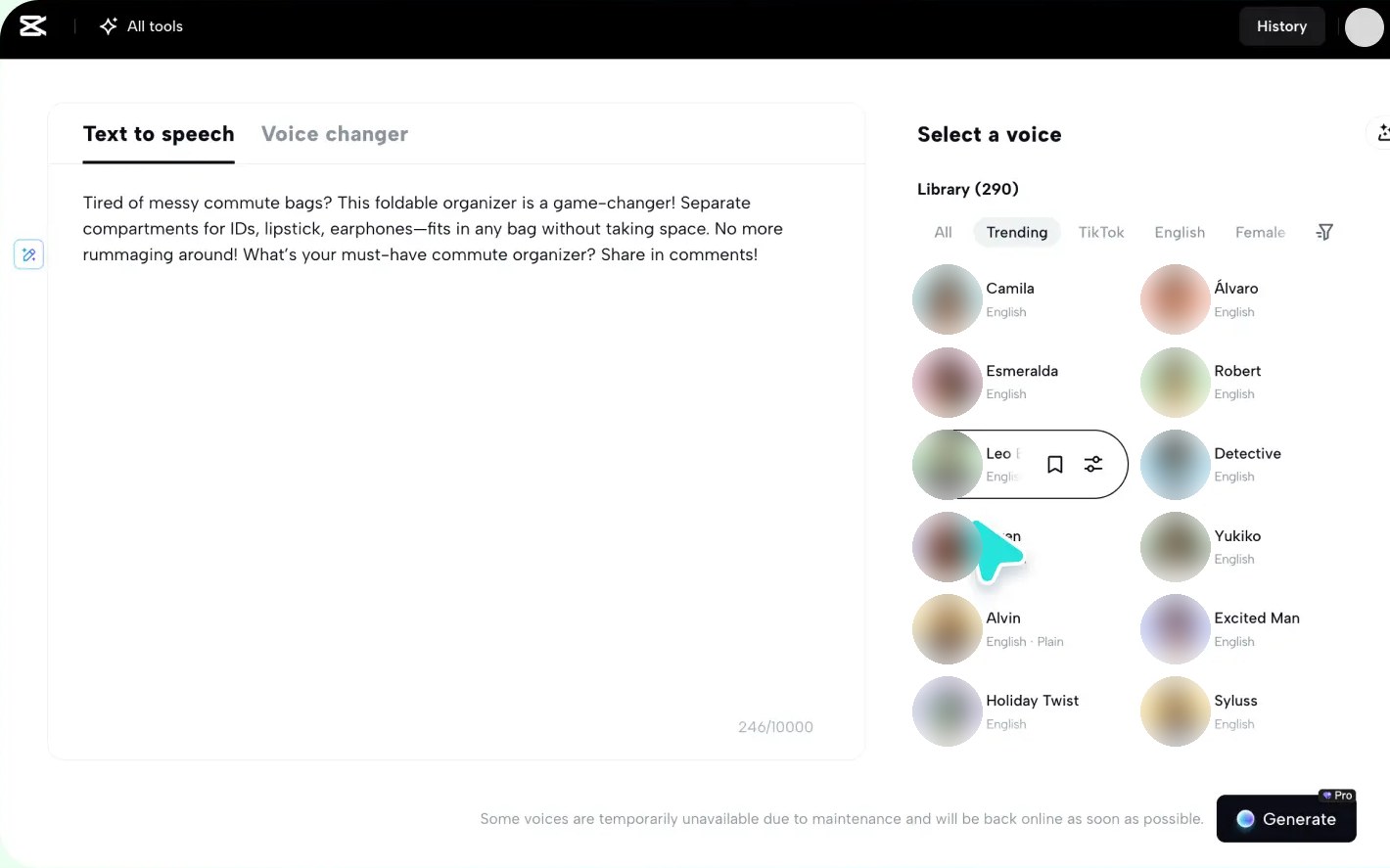
CapCut's online Text to speech tool with a script typed in the text box, a character counter and a library of selectable voices

CapCut's online text to speech tool. Source: CapCut website

CapCut's text to speech page lists 200+ AI voices across multiple languages and two routes. In the desktop editor, it says to add text, open the Text to speech panel, choose a voice and click Generate speech. In the online editor, it says to open AI tools and choose Text to speech. The page lists controls for speech rate, pitch, tone and volume, audio downloads in AAC, FLAC, MP3 and WAV, and a voice clone made by recording a few sentences of your own voice. Its FAQ says audio from the tool can be used commercially, for example in ads, YouTube videos and brand promotions, while following CapCut's terms of use and platform guidelines.

Pricing: CapCut's pricing page, read November 6, 2026, lists Free at $0 and Pro at US$19.99 a month or US$179.99 a year, and notes that displayed pricing is for reference only. The text to speech page calls the tool free to try, and its screenshots show a Pro badge on the Generate button and diamond icons beside some voices, so check which voices a free account gets.

Considerations: the pricing page says plan availability and features may vary by region, platform and current offering. The page describes the voice clone only in marketing terms and does not describe a consent step.

  • Choose it if the video is cut in a short-form editor already and a large list of voices matters more than licensing detail.
  • Skip it if the license has to be spelled out per plan, or a clone needs a documented consent check.

4. VEED: Best for text to speech with voice cloning in a browser editor

VEED editor's Audio panel with AI voice, Upload, Voice Cloning and Voiceover buttons beside a video preview

VEED's Audio panel with AI voice and Voice Cloning. Source: VEED help center

VEED's help article describes Text to Speech, also called AI Voice, as an audio tool in the editor's Audio tab. Type or paste a script, pick a voice, and the result lands on the timeline as an audio clip that can be trimmed, moved and mixed. The article lists 50+ languages and AI voices, or the user's own voice clone, and allows one clone per workspace. Each generation is capped at 5,000 characters, and VEED's product page says a project can be downloaded as an MP3 when only the audio is needed. A separate VEED page lists tones such as confident, conversational or excited and voices with specific accents.

Pricing: VEED's pricing page, read November 6, 2026, lists Creator at $12 per user per month and Pro at $22 per user per month, both billed yearly, and says to start for free. The help article puts AI voice allowances at up to 4 hours a year on Creator, up to 144 hours a year on Pro and, on free plans, up to 10 minutes a month in the regions where free plans have credits, with generated files up to 12 seconds long.

Considerations: every generation uses AI credits on every plan, and the pricing page's FAQ says credits do not carry over. The prices printed on the page are the yearly rates.

  • Choose it if the video is edited in the browser and the voice should be a stock voice or a clone in the same project.
  • Skip it if long free narration is the goal: free AI credits are regional and the generated files are short.

5. Descript: Best for narration you edit like a document

Descript's Create voice dialog asking for a recorded consent statement before it creates a voice clone

Descript's consent step for a voice clone. Source: Descript help center

Descript's text to speech page says to type or paste a script in a new project, add a speaker, and either browse stock AI speakers or enable speech generation to clone your own voice. The result can be exported as MP3, WAV or other common formats, or kept going as an audio or video project. The page lists 20+ realistic AI voices with emotions and styles. Descript's help center says a clone needs explicit recorded authorization from the person whose voice it is, in the form of a consent statement that must be read in English, even when the clone will generate speech in other languages.

Pricing: Descript's pricing page, read November 6, 2026, lists Hobbyist at $24 per person per month billed monthly or $16 billed annually, and Creator at $35 monthly or $24 annually. Hobbyist is the first plan listed with AI Speech and custom voice clones, while the text to speech page lists a free plan with a limited trial of AI Speech and 720p watermark-free export.

Considerations: the help center says Descript cannot create voice clones for a deceased individual, a non-consenting person, someone unable to record the consent statement or audio from an AI source. An existing clone cannot be extended with more samples; the fix is a new consent recording.

  • Choose it if the script should drive the video and a consent-checked clone of your own voice is wanted.
  • Skip it if AI Speech has to be free beyond a trial, or the voice is only one line on a clip cut elsewhere.

6. OpusClip: Best for an AI voice line on a short clip

OpusClip editor's AI voiceover panel with a script box, a speaker voice menu, tone stability and original audio volume sliders and a generate button

OpusClip's editor panel for generating an AI voiceover. Source: OpusClip help center

OpusClip is a clipping tool rather than a text to speech studio, but its editor includes an AI voiceover. Per help.opus.pro's AI Voiceover article, a script typed into the editor's right-hand menu is read aloud by one of 20+ voices, with sliders for tone stability and original audio volume. The voiceover can then be moved or deleted on the timeline. The article suggests changing or adding a hook, filling a silent or dull moment and layering commentary over existing audio. It says the voices are optimized for English and have also been shown to work in Italian, Portuguese and Spanish. OpusClip's add AI voice to video page describes the same flow.

Two related features sit elsewhere. Help.opus.pro's MCP page lists a speech tool that generates a voiceover from text with 30 prebuilt voices, which consumes credits and is available on mcp.opus.pro only. Video Dubbing translates a video into another language with a clone of the speaker's voice taken from the source video, which is a different job from adding a stock voice; see OpusClip AI dubbing and our guide to AI dubbing tools.

Pricing: OpusClip's pricing page, read November 6, 2026, lists a Free plan (clips carry a watermark), Starter at $15 a month with monthly billing only, and Pro at $29 a month or $14.50 a month billed annually ($174 a year). The help article says the AI voiceover is not limited to any plan and lists beta limits of 20 voiceovers a day and 2,000 characters per generation.

Considerations: the text voiceover uses stock voices, so it cannot read a script in your own cloned voice; dubbing is the feature that clones, and it clones the speaker in the source video. The voices are optimized for English, and the beta caps make it a tool for a line or a paragraph, not a long narration.

  • Choose it if the voice is a hook line, a commentary over a quiet moment or a short explainer on a clip just cut from a longer video.
  • Skip it if the job is narrating a whole video from a script, covering many languages with stock voices, or reading text in a cloned voice.

7. Canva: Best for a voice inside a design-first video editor

Canva's help center says to open a design, choose Elements, scroll to Audio and select Generate AI Voice (or open the Apps tab and select AI Voice), type the script, choose a language and voice style, and generate. The voice track then appears in the design's audio timeline, where its timing and placement can be adjusted. Canva's AI voice generator page says it works in a web browser or the iOS and Android apps, offers a variety of voices and accents, and lets the result be previewed and refined with simple prompts. Its text to speech page lists languages such as English, Spanish, Mandarin Chinese, Arabic, Filipino, German, Greek, French, Japanese, Italian and Korean.

Pricing: Canva's pricing page, read November 6, 2026, lists Free at US$0 and Pro at US$144 a year for one person on yearly billing. The AI voice generator page says AI-generated voices can be created and previewed for free, that a selection of voices is free, and that an upgrade unlocks more.

Considerations: the AI voice generator page lists up to 1,000 characters per speech conversion, while the text to speech page lists 2,000, and Canva's help article notes that AI usage limits have changed, so check the limit in the app.

  • Choose it if the video is built from templates and design elements in Canva and a free voice from a selection is enough.
  • Skip it if long scripts, a clone or a stated commercial license for the audio matter.

8. WellSaid Labs: Best for licensed English narration as audio files

WellSaid Studio script editor with a selected word and a smart suggestions menu offering pronunciation replacements

WellSaid Studio's pronunciation suggestions in the script editor. Source: WellSaid website

WellSaid Labs sells narration as audio rather than finished video. Its pricing page lists Studio tools for tone, pitch and emotional control and pronunciation customization. Paid plans add caption file downloads (SRT and VTT), with an Adobe Express integration on Pro and an Adobe Premiere Pro integration on Business. The comparison table lists MP3 on every plan that downloads audio and WAV and OGG on Business and above. Starter and Pro list all English voices, and Enterprise lists all languages and translation.

Pricing: WellSaid's pricing page, read November 6, 2026, lists a free trial with 3 download minutes a month and no commercial rights. Starter is $19 a month billed monthly (20 download minutes a month) or $10 a month billed annually at $120 a year. Pro is $49 a month billed monthly (180 download minutes a month) or $33 a month billed annually at $396 a year. Paid plans list full commercial rights.

Considerations: the allowance is counted in downloaded minutes, generation is listed as unlimited on paid plans, and the audio then has to be placed on the video in an editor. The vendor's ethics page says it has never allowed users to independently clone voices.

  • Choose it if the narration is English, needs a stated commercial license, and will be finished in a video editor such as Premiere Pro.
  • Skip it if the voice has to be added inside the video tool, needs non-English voices below Enterprise, or has to be a clone.

Voice cloning, consent and licensing: what each vendor says

  • ElevenLabs: a voice may be cloned only with permission to use it, Professional Voice Cloning is limited to your own voice after verification, and commercial rights come with paid plans.
  • Descript: explicit recorded authorization is required, the consent statement is read in English, and clones cannot be made for a deceased individual, a non-consenting person or AI-sourced audio.
  • WellSaid Labs: the ethics page says users have never been allowed to clone voices independently, and that its voice actors gave written consent.
  • CapCut: the page describes recording a few sentences of your own voice, and the FAQ points to CapCut's terms of use for commercial use.
  • VEED: the help article allows one clone per workspace, to re-record your own voice or to clone a colleague's voice, and describes no consent step on that page.
  • OpusClip: the text voiceover uses stock voices, and Video Dubbing clones the speaker in the source video automatically, per the help center.

Clone only a voice you own or have written permission to use, and keep that permission with the project files. Where a vendor's page is silent on consent, read its terms before uploading someone else's recording.

How we compared these tools

We compared each tool on five criteria: where the voice is added (inside a video editor or as an audio file), the voices and languages the vendor lists, whether and how it clones a voice, the stated license and consent terms, and the free route and its limits. Ranking favors tools that take a typed script to a voice on a video timeline in one place, then free access and the range of voices and languages each vendor lists. ElevenLabs sits first for the longest language count any vendor prints (90+) and voice controls alongside a video track, Clipchamp and CapCut follow as free in-editor routes, and VEED and Descript add cloning. OpusClip sits sixth because its voiceover is built for a line on a short clip, with 20+ voices and beta limits, rather than whole-video narration, and WellSaid Labs sits last because it exports audio only.

All facts come from each vendor's own pricing page, product page, help center or ethics page, read on November 6, 2026. We did not run hands-on tests of any competitor, and we did not rank tools by voice quality. Tools that mainly serve cloning or dubbing, such as Murf AI, Speechify, LOVO and Respeecher, are covered in our cloning and dubbing guides rather than repeated here. Prices change, so confirm on the vendor page before buying.

Red flags to watch for

  • Free plans that block commercial use. ElevenLabs' Free plan is non-commercial and requires attribution, and WellSaid's free trial lists no commercial rights.
  • Short or regional free allowances. VEED lists free AI credits only in some regions and files up to 12 seconds, and OpusClip's help article lists beta caps of 20 voiceovers a day and 2,000 characters per generation.
  • Per-conversion text caps. VEED caps a generation at 5,000 characters, and Canva lists 1,000 characters on one page and 2,000 on another.
  • Credits that expire. VEED's credits do not carry over, while ElevenLabs lets unused credits roll over for up to two months.
  • English-first voice lists. WellSaid's Starter and Pro list English voices, and OpusClip's voices are optimized for English.
  • Clones without a consent step. Descript requires recorded authorization and ElevenLabs requires permission, so be wary of a tool whose page describes cloning with no consent language.
  • Audio-only exports. WellSaid delivers audio files, so the voice still has to be placed on the video in an editor.
  • Features that vary by region or plan. CapCut's pricing page says plan availability and features may vary by region, platform and current offering.

Frequently asked questions

What is the best AI voiceover generator for video?

It depends on the job. In our ranking, ElevenLabs comes first for narrating a whole video because its Studio pairs narration with an uploaded video track and its FAQ lists 90+ languages on Eleven v4. Clipchamp and CapCut are the free in-editor routes, VEED adds cloning in a browser editor, Descript edits narration as text, OpusClip fits a voice line on a short clip, Canva adds a voice in a design-first editor and WellSaid Labs delivers licensed English audio.

How do I add an AI voice to a video?

Three routes cover most cases. In-editor text to speech is the usual one: type a script, choose a voice, generate and place the audio on the timeline, as Clipchamp, CapCut, VEED, Canva, Descript, ElevenLabs Studio and OpusClip describe (Clipchamp, CapCut and Canva list free starts). The second is an audio file: WellSaid Labs exports audio only, and ElevenLabs, CapCut, VEED and Clipchamp list audio downloads, which are then placed on the video in an editor. The third is a voice changer or dubbing: CapCut's FAQ mentions a built-in voice changer, ElevenLabs Studio lists a Voice Changer, and OpusClip's Video Dubbing re-voices a video in another language. For the quickest route, start from OpusClip's add AI voice to video page.

Can I use my own voice for an AI voiceover?

ElevenLabs, VEED, Descript and CapCut list voice cloning, with consent rules stated by ElevenLabs and Descript, and WellSaid says it does not allow users to clone voices. Clone only a voice you own or have written permission to use. Our guide to AI voice cloning tools compares the cloning-first tools.

Can I use AI voiceovers in commercial or monetized videos?

Check the plan and the license. ElevenLabs' FAQ says paid plans include commercial rights for YouTube videos, podcasts and ads while the Free plan is non-commercial with attribution, WellSaid lists full commercial rights on paid plans and none on its free trial, and CapCut's FAQ says commercial use is allowed subject to its terms. The Clipchamp, VEED, Descript, Canva and OpusClip pages we read for this guide do not state voiceover licensing, so read their terms before using the audio commercially.

Does OpusClip generate a voiceover from text?

Yes, in the editor. Help.opus.pro's AI Voiceover article says to type a script, optionally choose a speaker voice and adjust tone stability or original audio volume, and generate, with 20+ voices optimized for English. Its MCP page also lists a speech tool that generates a voiceover from text with 30 prebuilt voices. OpusClip is not a text to speech studio for narrating a whole video, so use one of the tools above for that job.

What is the difference between AI voiceover and AI dubbing?

An AI voiceover reads text you supply, usually in a stock voice. AI dubbing takes the speech already in a video, translates it and re-voices it in another language, often with a clone of the original speaker's voice. See our guide to AI dubbing tools for that job.
On this page

Use our Free Forever Plan

Find the moment. Skip the scrubbing.

From script to polished video — in one click.

Create and post one short video every day for free, and grow faster.

OpusSearch uses AI to surface the exact clip you need from hours of footage — in seconds, not afternoons.

Agent Opus runs the entire video pipeline for you: research, scriptwriting, storyboarding, motion, voice, and edit. Upload the idea, post the result.

8 Best AI Voiceover Generators for Video in 2026

OpusClip is the pick for putting an AI voice line on a short clip: type the script, choose one of its 20+ voices and move the result on the editor timeline. ElevenLabs is our first pick for narrating a whole video, Clipchamp and CapCut are the free in-editor routes, and VEED, Descript, Canva and WellSaid Labs each suit a narrower job. We ranked 8 tools by where the voice is added, which voices and languages each vendor lists, cloning and consent rules, and licensing. Facts come from each vendor's own pages, read on November 6, 2026.

Key takeaways

  • Best for narrating a whole video with fine voice control: ElevenLabs. Its Studio pairs narration with an uploaded video track, and its FAQ lists 90+ languages on Eleven v4.
  • Best free narration in a browser editor: Clipchamp. Its page lists 400 voices in 80 languages, and the free plan exports 1080p with no watermark.
  • Best for quick AI voices in a short-form editor: CapCut. Its page lists 200+ AI voices and calls the tool free to try.
  • Best for text to speech with voice cloning in a browser editor: VEED. The voice lands on the timeline as an audio clip, and one voice clone is allowed per workspace.
  • Best for narration you edit like a document: Descript. Type the script, then pick a stock AI speaker or a clone made after a recorded consent statement.
  • Best for an AI voice line on a short clip: OpusClip. Its editor lists 20+ voices, tone and volume sliders, and a voiceover that can be moved on the timeline.
  • Best for a voice inside a design-first video editor: Canva. Its AI voice generator page says a selection of voices is free.
  • Best for licensed English narration as audio files: WellSaid Labs. Paid plans list full commercial rights, and the vendor says users cannot clone voices.

What counts as an AI voiceover for video?

An AI voiceover turns a typed script into speech and puts it on a video, either as a new narration track or as a replacement for audio that is already there. Three different jobs hide under that name. The first is narration from text: type a script, pick a stock voice and place the audio on a timeline, which is the job most add-a-voice searches describe and what this guide ranks. The second is a cloned voice, a model of one person's voice that reads new text, which vendors gate behind consent steps or paid plans. The third is dubbing, which translates speech that is already in the video. Our guide to AI voice cloning tools for creator dubs and guide to AI dubbing tools cover those two jobs, so this list sticks to adding a voice to a video.

How to choose

  • Narrating a full video from a script: ElevenLabs or Descript, where the script drives the audio and the voice can be steered.
  • A free voice inside an editor: Clipchamp, CapCut or Canva, then check each free plan's export and voice limits.
  • A voice line on a short clip cut from a longer recording: OpusClip's editor, where the voiceover sits on the clip's timeline.
  • A clone of your own voice: ElevenLabs, VEED, Descript and CapCut list cloning, and ElevenLabs and Descript state consent rules on their own pages.
  • Licensed English narration as audio: WellSaid Labs, then bring the files into any editor.
  • Commercial or monetized videos: read the license first. ElevenLabs' Free plan is non-commercial and WellSaid's free trial has no commercial rights.

At a glance

  • ElevenLabs: best for narrating a whole video with fine voice control; Free $0 (10,000 credits a month, non-commercial, attribution required); Starter $1 for the first month, then $6 a month on monthly billing; free plan yes.
  • Clipchamp: best for free narration in a browser editor; free plan yes (1080p export, no watermark, AI voiceovers included); Premium comes with Microsoft 365 Personal and Family, and the page prints no standalone price.
  • CapCut: best for quick AI voices in a short-form editor; Free $0; Pro US$19.99 a month or US$179.99 a year; the text to speech page calls the tool free to try.
  • VEED: best for text to speech with voice cloning in a browser editor; Creator $12 and Pro $22 per user per month, both billed yearly; the pricing page says to start for free.
  • Descript: best for narration you edit like a document; Hobbyist $24 per person per month billed monthly ($16 billed annually); free plan yes (a limited trial of AI Speech).
  • OpusClip: best for an AI voice line on a short clip; Starter $15 a month (monthly billing only), Pro $29 a month or $14.50 a month billed annually; free plan yes (clips carry a watermark).
  • Canva: best for a voice inside a design-first video editor; Pro US$144 a year on yearly billing; free plan yes (a selection of free voices).
  • WellSaid Labs: best for licensed English narration as audio files; Starter $19 a month billed monthly ($10 a month billed annually); free plan yes (3 download minutes a month, no commercial rights).

Where the voice is added, which voices and languages are listed and how it is steered

The At a glance list covers best-for, price and free plan; this table compares where each tool adds the voice, which voices and languages each vendor lists and how the voice is steered, as listed on each vendor's own pages on November 6, 2026.

ToolWhere the voice is addedVoices and languages listedHow the voice is steered
ElevenLabsStudio: add a video track, then align the narration with the footage on a timeline90+ languages with Eleven v4; voice library searchable by accent and use caseSpeed and stability settings; pronunciation dictionaries
ClipchampClipchamp editor: pick a voice, then preview and add the voiceover to the video400 voices in 80 languagesPitch and emotion adjustments; speed from 0.5x to 2x
CapCutDesktop editor Text to speech panel; online, AI tools then Text to speech200+ AI voices across multiple languagesSpeech rate, pitch, tone and volume
VEEDEditor: Audio tab, then Text to Speech; the clip lands on the timeline50+ languages; AI voices or your own voice cloneTones such as confident or excited; voices with specific accents
DescriptDescript project: type the script, then pick a stock AI speaker or a clone20+ AI voices with emotions and styles, per its text-to-speech pageEdit the audio by editing the text; emotions and styles
OpusClipEditor's right-hand menu; the voiceover can then be moved on the timeline20+ voices, optimized for English; also shown to work in Italian, Portuguese and SpanishTone stability and original-audio volume sliders
CanvaCanva's video editor, in a browser or the iOS and Android appsA variety of voices and accents; a wide range of languages listedPreview and refine the result with simple prompts
WellSaid LabsAudio only: Studio exports files; Adobe Express and Premiere Pro integrations listedAll English voices on Starter and Pro; all languages on EnterpriseTone, pitch and emotional controls; custom pronunciations

1. ElevenLabs: Best for narrating a whole video with fine voice control

ElevenLabs Studio script panel with a Voiceover tab and narration blocks, a video preview, and a multi-track timeline with voiceover and music clips

ElevenLabs Studio's script panel with voiceover clips on the timeline. Source: ElevenLabs docs

ElevenLabs' Studio page says to upload MP4 or MOV files and add voiceovers, background music, sound effects and auto captions. Its docs say to add a video track to pair narration with existing footage, then align the narration with the video on the timeline. The text to speech FAQ lists 90+ languages with the Eleven v4 models, 70+ on Eleven v3, 32 on Flash v2.5 and 29 on Multilingual v2. Studio's docs list speed, stability, similarity and style exaggeration settings, plus pronunciation dictionaries. A project with a video track or captions can be exported as video, and audio exports as MP3 or WAV.

Pricing: per ElevenLabs' pricing page, read November 6, 2026, the Free plan is $0 a month with 10,000 credits, which its FAQ puts at around 10 minutes of audio. Starter is $1 for the first month, then $6 a month, and Creator is $11 for the first month, then $22 a month (monthly billing shown). The FAQ says paid plans include commercial rights, while the Free plan covers personal, non-commercial use and requires attribution to ElevenLabs. It lists Instant Voice Cloning from Starter and Professional Voice Cloning from Creator.

Considerations: credits are spent per character, and the FAQ says about 1,000 credits make one minute of audio on current plans, so long scripts and retakes draw down the allowance (unused credits roll over for up to two months while the plan is kept). The FAQ also says a voice may be cloned only with permission to use it, and that Professional Voice Cloning is limited to your own voice after verification.

  • Choose it if the narration has to be steered line by line, covers many languages, or should come from a clone of your own voice.
  • Skip it if the voiceover will ship in monetized videos on the Free plan (it is non-commercial) or the job is a single quick line on a short clip.

2. Clipchamp: Best for free narration in a browser editor

Clipchamp's text to speech panels with language, voice, emotion, vocal pitch and pace controls, a text box and Preview and Save buttons

Clipchamp's text to speech controls, from its AI voiceover page. Source: Clipchamp website

Clipchamp's AI voice generator page lists four steps: choose the text to speech generator, pick a language, voice, pitch and pace, type or paste a script, then preview and add the voiceover to the video. It lists 400 voices in 80 languages, pitch or emotion adjustments and speed from 0.5x to 2x. The page also says AI voiceover transcripts and MP3 audio can be exported for free. Clipchamp's pricing page says the free plan includes AI features such as voiceovers, exports up to 1080p with no watermark, and starts with a personal Microsoft account.

Pricing: the free plan is $0. Premium features such as 4K export and the brand kit tool come with Microsoft 365 Personal and Family plans, and the page prints no standalone Premium price (read November 6, 2026).

Considerations: the AI voiceover page does not mention voice cloning, so a custom voice would need another tool. Free export tops out at 1080p, with 4K listed under Premium.

  • Choose it if a free, in-browser narration track is enough and the voice can come from a library of stock voices.
  • Skip it if the voice has to be a clone, or a personal Microsoft account is not an option.

3. CapCut: Best for quick AI voices in a short-form editor

CapCut's online Text to speech tool with a script typed in the text box, a character counter and a library of selectable voices

CapCut's online text to speech tool. Source: CapCut website

CapCut's text to speech page lists 200+ AI voices across multiple languages and two routes. In the desktop editor, it says to add text, open the Text to speech panel, choose a voice and click Generate speech. In the online editor, it says to open AI tools and choose Text to speech. The page lists controls for speech rate, pitch, tone and volume, audio downloads in AAC, FLAC, MP3 and WAV, and a voice clone made by recording a few sentences of your own voice. Its FAQ says audio from the tool can be used commercially, for example in ads, YouTube videos and brand promotions, while following CapCut's terms of use and platform guidelines.

Pricing: CapCut's pricing page, read November 6, 2026, lists Free at $0 and Pro at US$19.99 a month or US$179.99 a year, and notes that displayed pricing is for reference only. The text to speech page calls the tool free to try, and its screenshots show a Pro badge on the Generate button and diamond icons beside some voices, so check which voices a free account gets.

Considerations: the pricing page says plan availability and features may vary by region, platform and current offering. The page describes the voice clone only in marketing terms and does not describe a consent step.

  • Choose it if the video is cut in a short-form editor already and a large list of voices matters more than licensing detail.
  • Skip it if the license has to be spelled out per plan, or a clone needs a documented consent check.

4. VEED: Best for text to speech with voice cloning in a browser editor

VEED editor's Audio panel with AI voice, Upload, Voice Cloning and Voiceover buttons beside a video preview

VEED's Audio panel with AI voice and Voice Cloning. Source: VEED help center

VEED's help article describes Text to Speech, also called AI Voice, as an audio tool in the editor's Audio tab. Type or paste a script, pick a voice, and the result lands on the timeline as an audio clip that can be trimmed, moved and mixed. The article lists 50+ languages and AI voices, or the user's own voice clone, and allows one clone per workspace. Each generation is capped at 5,000 characters, and VEED's product page says a project can be downloaded as an MP3 when only the audio is needed. A separate VEED page lists tones such as confident, conversational or excited and voices with specific accents.

Pricing: VEED's pricing page, read November 6, 2026, lists Creator at $12 per user per month and Pro at $22 per user per month, both billed yearly, and says to start for free. The help article puts AI voice allowances at up to 4 hours a year on Creator, up to 144 hours a year on Pro and, on free plans, up to 10 minutes a month in the regions where free plans have credits, with generated files up to 12 seconds long.

Considerations: every generation uses AI credits on every plan, and the pricing page's FAQ says credits do not carry over. The prices printed on the page are the yearly rates.

  • Choose it if the video is edited in the browser and the voice should be a stock voice or a clone in the same project.
  • Skip it if long free narration is the goal: free AI credits are regional and the generated files are short.

5. Descript: Best for narration you edit like a document

Descript's Create voice dialog asking for a recorded consent statement before it creates a voice clone

Descript's consent step for a voice clone. Source: Descript help center

Descript's text to speech page says to type or paste a script in a new project, add a speaker, and either browse stock AI speakers or enable speech generation to clone your own voice. The result can be exported as MP3, WAV or other common formats, or kept going as an audio or video project. The page lists 20+ realistic AI voices with emotions and styles. Descript's help center says a clone needs explicit recorded authorization from the person whose voice it is, in the form of a consent statement that must be read in English, even when the clone will generate speech in other languages.

Pricing: Descript's pricing page, read November 6, 2026, lists Hobbyist at $24 per person per month billed monthly or $16 billed annually, and Creator at $35 monthly or $24 annually. Hobbyist is the first plan listed with AI Speech and custom voice clones, while the text to speech page lists a free plan with a limited trial of AI Speech and 720p watermark-free export.

Considerations: the help center says Descript cannot create voice clones for a deceased individual, a non-consenting person, someone unable to record the consent statement or audio from an AI source. An existing clone cannot be extended with more samples; the fix is a new consent recording.

  • Choose it if the script should drive the video and a consent-checked clone of your own voice is wanted.
  • Skip it if AI Speech has to be free beyond a trial, or the voice is only one line on a clip cut elsewhere.

6. OpusClip: Best for an AI voice line on a short clip

OpusClip editor's AI voiceover panel with a script box, a speaker voice menu, tone stability and original audio volume sliders and a generate button

OpusClip's editor panel for generating an AI voiceover. Source: OpusClip help center

OpusClip is a clipping tool rather than a text to speech studio, but its editor includes an AI voiceover. Per help.opus.pro's AI Voiceover article, a script typed into the editor's right-hand menu is read aloud by one of 20+ voices, with sliders for tone stability and original audio volume. The voiceover can then be moved or deleted on the timeline. The article suggests changing or adding a hook, filling a silent or dull moment and layering commentary over existing audio. It says the voices are optimized for English and have also been shown to work in Italian, Portuguese and Spanish. OpusClip's add AI voice to video page describes the same flow.

Two related features sit elsewhere. Help.opus.pro's MCP page lists a speech tool that generates a voiceover from text with 30 prebuilt voices, which consumes credits and is available on mcp.opus.pro only. Video Dubbing translates a video into another language with a clone of the speaker's voice taken from the source video, which is a different job from adding a stock voice; see OpusClip AI dubbing and our guide to AI dubbing tools.

Pricing: OpusClip's pricing page, read November 6, 2026, lists a Free plan (clips carry a watermark), Starter at $15 a month with monthly billing only, and Pro at $29 a month or $14.50 a month billed annually ($174 a year). The help article says the AI voiceover is not limited to any plan and lists beta limits of 20 voiceovers a day and 2,000 characters per generation.

Considerations: the text voiceover uses stock voices, so it cannot read a script in your own cloned voice; dubbing is the feature that clones, and it clones the speaker in the source video. The voices are optimized for English, and the beta caps make it a tool for a line or a paragraph, not a long narration.

  • Choose it if the voice is a hook line, a commentary over a quiet moment or a short explainer on a clip just cut from a longer video.
  • Skip it if the job is narrating a whole video from a script, covering many languages with stock voices, or reading text in a cloned voice.

7. Canva: Best for a voice inside a design-first video editor

Canva's help center says to open a design, choose Elements, scroll to Audio and select Generate AI Voice (or open the Apps tab and select AI Voice), type the script, choose a language and voice style, and generate. The voice track then appears in the design's audio timeline, where its timing and placement can be adjusted. Canva's AI voice generator page says it works in a web browser or the iOS and Android apps, offers a variety of voices and accents, and lets the result be previewed and refined with simple prompts. Its text to speech page lists languages such as English, Spanish, Mandarin Chinese, Arabic, Filipino, German, Greek, French, Japanese, Italian and Korean.

Pricing: Canva's pricing page, read November 6, 2026, lists Free at US$0 and Pro at US$144 a year for one person on yearly billing. The AI voice generator page says AI-generated voices can be created and previewed for free, that a selection of voices is free, and that an upgrade unlocks more.

Considerations: the AI voice generator page lists up to 1,000 characters per speech conversion, while the text to speech page lists 2,000, and Canva's help article notes that AI usage limits have changed, so check the limit in the app.

  • Choose it if the video is built from templates and design elements in Canva and a free voice from a selection is enough.
  • Skip it if long scripts, a clone or a stated commercial license for the audio matter.

8. WellSaid Labs: Best for licensed English narration as audio files

WellSaid Studio script editor with a selected word and a smart suggestions menu offering pronunciation replacements

WellSaid Studio's pronunciation suggestions in the script editor. Source: WellSaid website

WellSaid Labs sells narration as audio rather than finished video. Its pricing page lists Studio tools for tone, pitch and emotional control and pronunciation customization. Paid plans add caption file downloads (SRT and VTT), with an Adobe Express integration on Pro and an Adobe Premiere Pro integration on Business. The comparison table lists MP3 on every plan that downloads audio and WAV and OGG on Business and above. Starter and Pro list all English voices, and Enterprise lists all languages and translation.

Pricing: WellSaid's pricing page, read November 6, 2026, lists a free trial with 3 download minutes a month and no commercial rights. Starter is $19 a month billed monthly (20 download minutes a month) or $10 a month billed annually at $120 a year. Pro is $49 a month billed monthly (180 download minutes a month) or $33 a month billed annually at $396 a year. Paid plans list full commercial rights.

Considerations: the allowance is counted in downloaded minutes, generation is listed as unlimited on paid plans, and the audio then has to be placed on the video in an editor. The vendor's ethics page says it has never allowed users to independently clone voices.

  • Choose it if the narration is English, needs a stated commercial license, and will be finished in a video editor such as Premiere Pro.
  • Skip it if the voice has to be added inside the video tool, needs non-English voices below Enterprise, or has to be a clone.

Voice cloning, consent and licensing: what each vendor says

  • ElevenLabs: a voice may be cloned only with permission to use it, Professional Voice Cloning is limited to your own voice after verification, and commercial rights come with paid plans.
  • Descript: explicit recorded authorization is required, the consent statement is read in English, and clones cannot be made for a deceased individual, a non-consenting person or AI-sourced audio.
  • WellSaid Labs: the ethics page says users have never been allowed to clone voices independently, and that its voice actors gave written consent.
  • CapCut: the page describes recording a few sentences of your own voice, and the FAQ points to CapCut's terms of use for commercial use.
  • VEED: the help article allows one clone per workspace, to re-record your own voice or to clone a colleague's voice, and describes no consent step on that page.
  • OpusClip: the text voiceover uses stock voices, and Video Dubbing clones the speaker in the source video automatically, per the help center.

Clone only a voice you own or have written permission to use, and keep that permission with the project files. Where a vendor's page is silent on consent, read its terms before uploading someone else's recording.

How we compared these tools

We compared each tool on five criteria: where the voice is added (inside a video editor or as an audio file), the voices and languages the vendor lists, whether and how it clones a voice, the stated license and consent terms, and the free route and its limits. Ranking favors tools that take a typed script to a voice on a video timeline in one place, then free access and the range of voices and languages each vendor lists. ElevenLabs sits first for the longest language count any vendor prints (90+) and voice controls alongside a video track, Clipchamp and CapCut follow as free in-editor routes, and VEED and Descript add cloning. OpusClip sits sixth because its voiceover is built for a line on a short clip, with 20+ voices and beta limits, rather than whole-video narration, and WellSaid Labs sits last because it exports audio only.

All facts come from each vendor's own pricing page, product page, help center or ethics page, read on November 6, 2026. We did not run hands-on tests of any competitor, and we did not rank tools by voice quality. Tools that mainly serve cloning or dubbing, such as Murf AI, Speechify, LOVO and Respeecher, are covered in our cloning and dubbing guides rather than repeated here. Prices change, so confirm on the vendor page before buying.

Red flags to watch for

  • Free plans that block commercial use. ElevenLabs' Free plan is non-commercial and requires attribution, and WellSaid's free trial lists no commercial rights.
  • Short or regional free allowances. VEED lists free AI credits only in some regions and files up to 12 seconds, and OpusClip's help article lists beta caps of 20 voiceovers a day and 2,000 characters per generation.
  • Per-conversion text caps. VEED caps a generation at 5,000 characters, and Canva lists 1,000 characters on one page and 2,000 on another.
  • Credits that expire. VEED's credits do not carry over, while ElevenLabs lets unused credits roll over for up to two months.
  • English-first voice lists. WellSaid's Starter and Pro list English voices, and OpusClip's voices are optimized for English.
  • Clones without a consent step. Descript requires recorded authorization and ElevenLabs requires permission, so be wary of a tool whose page describes cloning with no consent language.
  • Audio-only exports. WellSaid delivers audio files, so the voice still has to be placed on the video in an editor.
  • Features that vary by region or plan. CapCut's pricing page says plan availability and features may vary by region, platform and current offering.

Frequently asked questions

What is the best AI voiceover generator for video?

It depends on the job. In our ranking, ElevenLabs comes first for narrating a whole video because its Studio pairs narration with an uploaded video track and its FAQ lists 90+ languages on Eleven v4. Clipchamp and CapCut are the free in-editor routes, VEED adds cloning in a browser editor, Descript edits narration as text, OpusClip fits a voice line on a short clip, Canva adds a voice in a design-first editor and WellSaid Labs delivers licensed English audio.

How do I add an AI voice to a video?

Three routes cover most cases. In-editor text to speech is the usual one: type a script, choose a voice, generate and place the audio on the timeline, as Clipchamp, CapCut, VEED, Canva, Descript, ElevenLabs Studio and OpusClip describe (Clipchamp, CapCut and Canva list free starts). The second is an audio file: WellSaid Labs exports audio only, and ElevenLabs, CapCut, VEED and Clipchamp list audio downloads, which are then placed on the video in an editor. The third is a voice changer or dubbing: CapCut's FAQ mentions a built-in voice changer, ElevenLabs Studio lists a Voice Changer, and OpusClip's Video Dubbing re-voices a video in another language. For the quickest route, start from OpusClip's add AI voice to video page.

Can I use my own voice for an AI voiceover?

ElevenLabs, VEED, Descript and CapCut list voice cloning, with consent rules stated by ElevenLabs and Descript, and WellSaid says it does not allow users to clone voices. Clone only a voice you own or have written permission to use. Our guide to AI voice cloning tools compares the cloning-first tools.

Can I use AI voiceovers in commercial or monetized videos?

Check the plan and the license. ElevenLabs' FAQ says paid plans include commercial rights for YouTube videos, podcasts and ads while the Free plan is non-commercial with attribution, WellSaid lists full commercial rights on paid plans and none on its free trial, and CapCut's FAQ says commercial use is allowed subject to its terms. The Clipchamp, VEED, Descript, Canva and OpusClip pages we read for this guide do not state voiceover licensing, so read their terms before using the audio commercially.

Does OpusClip generate a voiceover from text?

Yes, in the editor. Help.opus.pro's AI Voiceover article says to type a script, optionally choose a speaker voice and adjust tone stability or original audio volume, and generate, with 20+ voices optimized for English. Its MCP page also lists a speech tool that generates a voiceover from text with 30 prebuilt voices. OpusClip is not a text to speech studio for narrating a whole video, so use one of the tools above for that job.

What is the difference between AI voiceover and AI dubbing?

An AI voiceover reads text you supply, usually in a stock voice. AI dubbing takes the speech already in a video, translates it and re-voices it in another language, often with a clone of the original speaker's voice. See our guide to AI dubbing tools for that job.

Creator name

Creator type

Team size

Channels

linkYouTubefacebookXTikTok

Pain point

Time to see positive ROI

About the creator

Don't miss these

How Audacy Drove 1B+ Views by Taking a Tech-Forward Approach to Radio with OpusClip
No items found.

How Audacy Drove 1B+ Views by Taking a Tech-Forward Approach to Radio with OpusClip

How All the Smoke makes hit compilations faster with OpusSearch

How All the Smoke makes hit compilations faster with OpusSearch

Growing a new channel to 1.5M views in 90 days without creating new videos

Growing a new channel to 1.5M views in 90 days without creating new videos

OpusClip 4.0 is here. Become a content powerhouse.

8 Best AI Voiceover Generators for Video in 2026

Creators recording a voiceover, typing a script and showing a vertical video, with an Add voice button, a sound wave pill, a 16:9 tag and a TikTok icon
No items found.
No items found.

Boost your social media growth with OpusClip

Create and post one short video every day for your social media and grow faster.

8 Best AI Voiceover Generators for Video in 2026

Creators recording a voiceover, typing a script and showing a vertical video, with an Add voice button, a sound wave pill, a 16:9 tag and a TikTok icon

OpusClip is the pick for putting an AI voice line on a short clip: type the script, choose one of its 20+ voices and move the result on the editor timeline. ElevenLabs is our first pick for narrating a whole video, Clipchamp and CapCut are the free in-editor routes, and VEED, Descript, Canva and WellSaid Labs each suit a narrower job. We ranked 8 tools by where the voice is added, which voices and languages each vendor lists, cloning and consent rules, and licensing. Facts come from each vendor's own pages, read on November 6, 2026.

Key takeaways

  • Best for narrating a whole video with fine voice control: ElevenLabs. Its Studio pairs narration with an uploaded video track, and its FAQ lists 90+ languages on Eleven v4.
  • Best free narration in a browser editor: Clipchamp. Its page lists 400 voices in 80 languages, and the free plan exports 1080p with no watermark.
  • Best for quick AI voices in a short-form editor: CapCut. Its page lists 200+ AI voices and calls the tool free to try.
  • Best for text to speech with voice cloning in a browser editor: VEED. The voice lands on the timeline as an audio clip, and one voice clone is allowed per workspace.
  • Best for narration you edit like a document: Descript. Type the script, then pick a stock AI speaker or a clone made after a recorded consent statement.
  • Best for an AI voice line on a short clip: OpusClip. Its editor lists 20+ voices, tone and volume sliders, and a voiceover that can be moved on the timeline.
  • Best for a voice inside a design-first video editor: Canva. Its AI voice generator page says a selection of voices is free.
  • Best for licensed English narration as audio files: WellSaid Labs. Paid plans list full commercial rights, and the vendor says users cannot clone voices.

What counts as an AI voiceover for video?

An AI voiceover turns a typed script into speech and puts it on a video, either as a new narration track or as a replacement for audio that is already there. Three different jobs hide under that name. The first is narration from text: type a script, pick a stock voice and place the audio on a timeline, which is the job most add-a-voice searches describe and what this guide ranks. The second is a cloned voice, a model of one person's voice that reads new text, which vendors gate behind consent steps or paid plans. The third is dubbing, which translates speech that is already in the video. Our guide to AI voice cloning tools for creator dubs and guide to AI dubbing tools cover those two jobs, so this list sticks to adding a voice to a video.

How to choose

  • Narrating a full video from a script: ElevenLabs or Descript, where the script drives the audio and the voice can be steered.
  • A free voice inside an editor: Clipchamp, CapCut or Canva, then check each free plan's export and voice limits.
  • A voice line on a short clip cut from a longer recording: OpusClip's editor, where the voiceover sits on the clip's timeline.
  • A clone of your own voice: ElevenLabs, VEED, Descript and CapCut list cloning, and ElevenLabs and Descript state consent rules on their own pages.
  • Licensed English narration as audio: WellSaid Labs, then bring the files into any editor.
  • Commercial or monetized videos: read the license first. ElevenLabs' Free plan is non-commercial and WellSaid's free trial has no commercial rights.

At a glance

  • ElevenLabs: best for narrating a whole video with fine voice control; Free $0 (10,000 credits a month, non-commercial, attribution required); Starter $1 for the first month, then $6 a month on monthly billing; free plan yes.
  • Clipchamp: best for free narration in a browser editor; free plan yes (1080p export, no watermark, AI voiceovers included); Premium comes with Microsoft 365 Personal and Family, and the page prints no standalone price.
  • CapCut: best for quick AI voices in a short-form editor; Free $0; Pro US$19.99 a month or US$179.99 a year; the text to speech page calls the tool free to try.
  • VEED: best for text to speech with voice cloning in a browser editor; Creator $12 and Pro $22 per user per month, both billed yearly; the pricing page says to start for free.
  • Descript: best for narration you edit like a document; Hobbyist $24 per person per month billed monthly ($16 billed annually); free plan yes (a limited trial of AI Speech).
  • OpusClip: best for an AI voice line on a short clip; Starter $15 a month (monthly billing only), Pro $29 a month or $14.50 a month billed annually; free plan yes (clips carry a watermark).
  • Canva: best for a voice inside a design-first video editor; Pro US$144 a year on yearly billing; free plan yes (a selection of free voices).
  • WellSaid Labs: best for licensed English narration as audio files; Starter $19 a month billed monthly ($10 a month billed annually); free plan yes (3 download minutes a month, no commercial rights).

Where the voice is added, which voices and languages are listed and how it is steered

The At a glance list covers best-for, price and free plan; this table compares where each tool adds the voice, which voices and languages each vendor lists and how the voice is steered, as listed on each vendor's own pages on November 6, 2026.

ToolWhere the voice is addedVoices and languages listedHow the voice is steered
ElevenLabsStudio: add a video track, then align the narration with the footage on a timeline90+ languages with Eleven v4; voice library searchable by accent and use caseSpeed and stability settings; pronunciation dictionaries
ClipchampClipchamp editor: pick a voice, then preview and add the voiceover to the video400 voices in 80 languagesPitch and emotion adjustments; speed from 0.5x to 2x
CapCutDesktop editor Text to speech panel; online, AI tools then Text to speech200+ AI voices across multiple languagesSpeech rate, pitch, tone and volume
VEEDEditor: Audio tab, then Text to Speech; the clip lands on the timeline50+ languages; AI voices or your own voice cloneTones such as confident or excited; voices with specific accents
DescriptDescript project: type the script, then pick a stock AI speaker or a clone20+ AI voices with emotions and styles, per its text-to-speech pageEdit the audio by editing the text; emotions and styles
OpusClipEditor's right-hand menu; the voiceover can then be moved on the timeline20+ voices, optimized for English; also shown to work in Italian, Portuguese and SpanishTone stability and original-audio volume sliders
CanvaCanva's video editor, in a browser or the iOS and Android appsA variety of voices and accents; a wide range of languages listedPreview and refine the result with simple prompts
WellSaid LabsAudio only: Studio exports files; Adobe Express and Premiere Pro integrations listedAll English voices on Starter and Pro; all languages on EnterpriseTone, pitch and emotional controls; custom pronunciations

1. ElevenLabs: Best for narrating a whole video with fine voice control

ElevenLabs Studio script panel with a Voiceover tab and narration blocks, a video preview, and a multi-track timeline with voiceover and music clips

ElevenLabs Studio's script panel with voiceover clips on the timeline. Source: ElevenLabs docs

ElevenLabs' Studio page says to upload MP4 or MOV files and add voiceovers, background music, sound effects and auto captions. Its docs say to add a video track to pair narration with existing footage, then align the narration with the video on the timeline. The text to speech FAQ lists 90+ languages with the Eleven v4 models, 70+ on Eleven v3, 32 on Flash v2.5 and 29 on Multilingual v2. Studio's docs list speed, stability, similarity and style exaggeration settings, plus pronunciation dictionaries. A project with a video track or captions can be exported as video, and audio exports as MP3 or WAV.

Pricing: per ElevenLabs' pricing page, read November 6, 2026, the Free plan is $0 a month with 10,000 credits, which its FAQ puts at around 10 minutes of audio. Starter is $1 for the first month, then $6 a month, and Creator is $11 for the first month, then $22 a month (monthly billing shown). The FAQ says paid plans include commercial rights, while the Free plan covers personal, non-commercial use and requires attribution to ElevenLabs. It lists Instant Voice Cloning from Starter and Professional Voice Cloning from Creator.

Considerations: credits are spent per character, and the FAQ says about 1,000 credits make one minute of audio on current plans, so long scripts and retakes draw down the allowance (unused credits roll over for up to two months while the plan is kept). The FAQ also says a voice may be cloned only with permission to use it, and that Professional Voice Cloning is limited to your own voice after verification.

  • Choose it if the narration has to be steered line by line, covers many languages, or should come from a clone of your own voice.
  • Skip it if the voiceover will ship in monetized videos on the Free plan (it is non-commercial) or the job is a single quick line on a short clip.

2. Clipchamp: Best for free narration in a browser editor

Clipchamp's text to speech panels with language, voice, emotion, vocal pitch and pace controls, a text box and Preview and Save buttons

Clipchamp's text to speech controls, from its AI voiceover page. Source: Clipchamp website

Clipchamp's AI voice generator page lists four steps: choose the text to speech generator, pick a language, voice, pitch and pace, type or paste a script, then preview and add the voiceover to the video. It lists 400 voices in 80 languages, pitch or emotion adjustments and speed from 0.5x to 2x. The page also says AI voiceover transcripts and MP3 audio can be exported for free. Clipchamp's pricing page says the free plan includes AI features such as voiceovers, exports up to 1080p with no watermark, and starts with a personal Microsoft account.

Pricing: the free plan is $0. Premium features such as 4K export and the brand kit tool come with Microsoft 365 Personal and Family plans, and the page prints no standalone Premium price (read November 6, 2026).

Considerations: the AI voiceover page does not mention voice cloning, so a custom voice would need another tool. Free export tops out at 1080p, with 4K listed under Premium.

  • Choose it if a free, in-browser narration track is enough and the voice can come from a library of stock voices.
  • Skip it if the voice has to be a clone, or a personal Microsoft account is not an option.

3. CapCut: Best for quick AI voices in a short-form editor

CapCut's online Text to speech tool with a script typed in the text box, a character counter and a library of selectable voices

CapCut's online text to speech tool. Source: CapCut website

CapCut's text to speech page lists 200+ AI voices across multiple languages and two routes. In the desktop editor, it says to add text, open the Text to speech panel, choose a voice and click Generate speech. In the online editor, it says to open AI tools and choose Text to speech. The page lists controls for speech rate, pitch, tone and volume, audio downloads in AAC, FLAC, MP3 and WAV, and a voice clone made by recording a few sentences of your own voice. Its FAQ says audio from the tool can be used commercially, for example in ads, YouTube videos and brand promotions, while following CapCut's terms of use and platform guidelines.

Pricing: CapCut's pricing page, read November 6, 2026, lists Free at $0 and Pro at US$19.99 a month or US$179.99 a year, and notes that displayed pricing is for reference only. The text to speech page calls the tool free to try, and its screenshots show a Pro badge on the Generate button and diamond icons beside some voices, so check which voices a free account gets.

Considerations: the pricing page says plan availability and features may vary by region, platform and current offering. The page describes the voice clone only in marketing terms and does not describe a consent step.

  • Choose it if the video is cut in a short-form editor already and a large list of voices matters more than licensing detail.
  • Skip it if the license has to be spelled out per plan, or a clone needs a documented consent check.

4. VEED: Best for text to speech with voice cloning in a browser editor

VEED editor's Audio panel with AI voice, Upload, Voice Cloning and Voiceover buttons beside a video preview

VEED's Audio panel with AI voice and Voice Cloning. Source: VEED help center

VEED's help article describes Text to Speech, also called AI Voice, as an audio tool in the editor's Audio tab. Type or paste a script, pick a voice, and the result lands on the timeline as an audio clip that can be trimmed, moved and mixed. The article lists 50+ languages and AI voices, or the user's own voice clone, and allows one clone per workspace. Each generation is capped at 5,000 characters, and VEED's product page says a project can be downloaded as an MP3 when only the audio is needed. A separate VEED page lists tones such as confident, conversational or excited and voices with specific accents.

Pricing: VEED's pricing page, read November 6, 2026, lists Creator at $12 per user per month and Pro at $22 per user per month, both billed yearly, and says to start for free. The help article puts AI voice allowances at up to 4 hours a year on Creator, up to 144 hours a year on Pro and, on free plans, up to 10 minutes a month in the regions where free plans have credits, with generated files up to 12 seconds long.

Considerations: every generation uses AI credits on every plan, and the pricing page's FAQ says credits do not carry over. The prices printed on the page are the yearly rates.

  • Choose it if the video is edited in the browser and the voice should be a stock voice or a clone in the same project.
  • Skip it if long free narration is the goal: free AI credits are regional and the generated files are short.

5. Descript: Best for narration you edit like a document

Descript's Create voice dialog asking for a recorded consent statement before it creates a voice clone

Descript's consent step for a voice clone. Source: Descript help center

Descript's text to speech page says to type or paste a script in a new project, add a speaker, and either browse stock AI speakers or enable speech generation to clone your own voice. The result can be exported as MP3, WAV or other common formats, or kept going as an audio or video project. The page lists 20+ realistic AI voices with emotions and styles. Descript's help center says a clone needs explicit recorded authorization from the person whose voice it is, in the form of a consent statement that must be read in English, even when the clone will generate speech in other languages.

Pricing: Descript's pricing page, read November 6, 2026, lists Hobbyist at $24 per person per month billed monthly or $16 billed annually, and Creator at $35 monthly or $24 annually. Hobbyist is the first plan listed with AI Speech and custom voice clones, while the text to speech page lists a free plan with a limited trial of AI Speech and 720p watermark-free export.

Considerations: the help center says Descript cannot create voice clones for a deceased individual, a non-consenting person, someone unable to record the consent statement or audio from an AI source. An existing clone cannot be extended with more samples; the fix is a new consent recording.

  • Choose it if the script should drive the video and a consent-checked clone of your own voice is wanted.
  • Skip it if AI Speech has to be free beyond a trial, or the voice is only one line on a clip cut elsewhere.

6. OpusClip: Best for an AI voice line on a short clip

OpusClip editor's AI voiceover panel with a script box, a speaker voice menu, tone stability and original audio volume sliders and a generate button

OpusClip's editor panel for generating an AI voiceover. Source: OpusClip help center

OpusClip is a clipping tool rather than a text to speech studio, but its editor includes an AI voiceover. Per help.opus.pro's AI Voiceover article, a script typed into the editor's right-hand menu is read aloud by one of 20+ voices, with sliders for tone stability and original audio volume. The voiceover can then be moved or deleted on the timeline. The article suggests changing or adding a hook, filling a silent or dull moment and layering commentary over existing audio. It says the voices are optimized for English and have also been shown to work in Italian, Portuguese and Spanish. OpusClip's add AI voice to video page describes the same flow.

Two related features sit elsewhere. Help.opus.pro's MCP page lists a speech tool that generates a voiceover from text with 30 prebuilt voices, which consumes credits and is available on mcp.opus.pro only. Video Dubbing translates a video into another language with a clone of the speaker's voice taken from the source video, which is a different job from adding a stock voice; see OpusClip AI dubbing and our guide to AI dubbing tools.

Pricing: OpusClip's pricing page, read November 6, 2026, lists a Free plan (clips carry a watermark), Starter at $15 a month with monthly billing only, and Pro at $29 a month or $14.50 a month billed annually ($174 a year). The help article says the AI voiceover is not limited to any plan and lists beta limits of 20 voiceovers a day and 2,000 characters per generation.

Considerations: the text voiceover uses stock voices, so it cannot read a script in your own cloned voice; dubbing is the feature that clones, and it clones the speaker in the source video. The voices are optimized for English, and the beta caps make it a tool for a line or a paragraph, not a long narration.

  • Choose it if the voice is a hook line, a commentary over a quiet moment or a short explainer on a clip just cut from a longer video.
  • Skip it if the job is narrating a whole video from a script, covering many languages with stock voices, or reading text in a cloned voice.

7. Canva: Best for a voice inside a design-first video editor

Canva's help center says to open a design, choose Elements, scroll to Audio and select Generate AI Voice (or open the Apps tab and select AI Voice), type the script, choose a language and voice style, and generate. The voice track then appears in the design's audio timeline, where its timing and placement can be adjusted. Canva's AI voice generator page says it works in a web browser or the iOS and Android apps, offers a variety of voices and accents, and lets the result be previewed and refined with simple prompts. Its text to speech page lists languages such as English, Spanish, Mandarin Chinese, Arabic, Filipino, German, Greek, French, Japanese, Italian and Korean.

Pricing: Canva's pricing page, read November 6, 2026, lists Free at US$0 and Pro at US$144 a year for one person on yearly billing. The AI voice generator page says AI-generated voices can be created and previewed for free, that a selection of voices is free, and that an upgrade unlocks more.

Considerations: the AI voice generator page lists up to 1,000 characters per speech conversion, while the text to speech page lists 2,000, and Canva's help article notes that AI usage limits have changed, so check the limit in the app.

  • Choose it if the video is built from templates and design elements in Canva and a free voice from a selection is enough.
  • Skip it if long scripts, a clone or a stated commercial license for the audio matter.

8. WellSaid Labs: Best for licensed English narration as audio files

WellSaid Studio script editor with a selected word and a smart suggestions menu offering pronunciation replacements

WellSaid Studio's pronunciation suggestions in the script editor. Source: WellSaid website

WellSaid Labs sells narration as audio rather than finished video. Its pricing page lists Studio tools for tone, pitch and emotional control and pronunciation customization. Paid plans add caption file downloads (SRT and VTT), with an Adobe Express integration on Pro and an Adobe Premiere Pro integration on Business. The comparison table lists MP3 on every plan that downloads audio and WAV and OGG on Business and above. Starter and Pro list all English voices, and Enterprise lists all languages and translation.

Pricing: WellSaid's pricing page, read November 6, 2026, lists a free trial with 3 download minutes a month and no commercial rights. Starter is $19 a month billed monthly (20 download minutes a month) or $10 a month billed annually at $120 a year. Pro is $49 a month billed monthly (180 download minutes a month) or $33 a month billed annually at $396 a year. Paid plans list full commercial rights.

Considerations: the allowance is counted in downloaded minutes, generation is listed as unlimited on paid plans, and the audio then has to be placed on the video in an editor. The vendor's ethics page says it has never allowed users to independently clone voices.

  • Choose it if the narration is English, needs a stated commercial license, and will be finished in a video editor such as Premiere Pro.
  • Skip it if the voice has to be added inside the video tool, needs non-English voices below Enterprise, or has to be a clone.

Voice cloning, consent and licensing: what each vendor says

  • ElevenLabs: a voice may be cloned only with permission to use it, Professional Voice Cloning is limited to your own voice after verification, and commercial rights come with paid plans.
  • Descript: explicit recorded authorization is required, the consent statement is read in English, and clones cannot be made for a deceased individual, a non-consenting person or AI-sourced audio.
  • WellSaid Labs: the ethics page says users have never been allowed to clone voices independently, and that its voice actors gave written consent.
  • CapCut: the page describes recording a few sentences of your own voice, and the FAQ points to CapCut's terms of use for commercial use.
  • VEED: the help article allows one clone per workspace, to re-record your own voice or to clone a colleague's voice, and describes no consent step on that page.
  • OpusClip: the text voiceover uses stock voices, and Video Dubbing clones the speaker in the source video automatically, per the help center.

Clone only a voice you own or have written permission to use, and keep that permission with the project files. Where a vendor's page is silent on consent, read its terms before uploading someone else's recording.

How we compared these tools

We compared each tool on five criteria: where the voice is added (inside a video editor or as an audio file), the voices and languages the vendor lists, whether and how it clones a voice, the stated license and consent terms, and the free route and its limits. Ranking favors tools that take a typed script to a voice on a video timeline in one place, then free access and the range of voices and languages each vendor lists. ElevenLabs sits first for the longest language count any vendor prints (90+) and voice controls alongside a video track, Clipchamp and CapCut follow as free in-editor routes, and VEED and Descript add cloning. OpusClip sits sixth because its voiceover is built for a line on a short clip, with 20+ voices and beta limits, rather than whole-video narration, and WellSaid Labs sits last because it exports audio only.

All facts come from each vendor's own pricing page, product page, help center or ethics page, read on November 6, 2026. We did not run hands-on tests of any competitor, and we did not rank tools by voice quality. Tools that mainly serve cloning or dubbing, such as Murf AI, Speechify, LOVO and Respeecher, are covered in our cloning and dubbing guides rather than repeated here. Prices change, so confirm on the vendor page before buying.

Red flags to watch for

  • Free plans that block commercial use. ElevenLabs' Free plan is non-commercial and requires attribution, and WellSaid's free trial lists no commercial rights.
  • Short or regional free allowances. VEED lists free AI credits only in some regions and files up to 12 seconds, and OpusClip's help article lists beta caps of 20 voiceovers a day and 2,000 characters per generation.
  • Per-conversion text caps. VEED caps a generation at 5,000 characters, and Canva lists 1,000 characters on one page and 2,000 on another.
  • Credits that expire. VEED's credits do not carry over, while ElevenLabs lets unused credits roll over for up to two months.
  • English-first voice lists. WellSaid's Starter and Pro list English voices, and OpusClip's voices are optimized for English.
  • Clones without a consent step. Descript requires recorded authorization and ElevenLabs requires permission, so be wary of a tool whose page describes cloning with no consent language.
  • Audio-only exports. WellSaid delivers audio files, so the voice still has to be placed on the video in an editor.
  • Features that vary by region or plan. CapCut's pricing page says plan availability and features may vary by region, platform and current offering.

Frequently asked questions

What is the best AI voiceover generator for video?

It depends on the job. In our ranking, ElevenLabs comes first for narrating a whole video because its Studio pairs narration with an uploaded video track and its FAQ lists 90+ languages on Eleven v4. Clipchamp and CapCut are the free in-editor routes, VEED adds cloning in a browser editor, Descript edits narration as text, OpusClip fits a voice line on a short clip, Canva adds a voice in a design-first editor and WellSaid Labs delivers licensed English audio.

How do I add an AI voice to a video?

Three routes cover most cases. In-editor text to speech is the usual one: type a script, choose a voice, generate and place the audio on the timeline, as Clipchamp, CapCut, VEED, Canva, Descript, ElevenLabs Studio and OpusClip describe (Clipchamp, CapCut and Canva list free starts). The second is an audio file: WellSaid Labs exports audio only, and ElevenLabs, CapCut, VEED and Clipchamp list audio downloads, which are then placed on the video in an editor. The third is a voice changer or dubbing: CapCut's FAQ mentions a built-in voice changer, ElevenLabs Studio lists a Voice Changer, and OpusClip's Video Dubbing re-voices a video in another language. For the quickest route, start from OpusClip's add AI voice to video page.

Can I use my own voice for an AI voiceover?

ElevenLabs, VEED, Descript and CapCut list voice cloning, with consent rules stated by ElevenLabs and Descript, and WellSaid says it does not allow users to clone voices. Clone only a voice you own or have written permission to use. Our guide to AI voice cloning tools compares the cloning-first tools.

Can I use AI voiceovers in commercial or monetized videos?

Check the plan and the license. ElevenLabs' FAQ says paid plans include commercial rights for YouTube videos, podcasts and ads while the Free plan is non-commercial with attribution, WellSaid lists full commercial rights on paid plans and none on its free trial, and CapCut's FAQ says commercial use is allowed subject to its terms. The Clipchamp, VEED, Descript, Canva and OpusClip pages we read for this guide do not state voiceover licensing, so read their terms before using the audio commercially.

Does OpusClip generate a voiceover from text?

Yes, in the editor. Help.opus.pro's AI Voiceover article says to type a script, optionally choose a speaker voice and adjust tone stability or original audio volume, and generate, with 20+ voices optimized for English. Its MCP page also lists a speech tool that generates a voiceover from text with 30 prebuilt voices. OpusClip is not a text to speech studio for narrating a whole video, so use one of the tools above for that job.

What is the difference between AI voiceover and AI dubbing?

An AI voiceover reads text you supply, usually in a stock voice. AI dubbing takes the speech already in a video, translates it and re-voices it in another language, often with a clone of the original speaker's voice. See our guide to AI dubbing tools for that job.

Ready to start streaming differently?

Opus is completely FREE for one year for all private beta users. You can get access to all our premium features during this period. We also offer free support for production, studio design, and content repurposing to help you grow.
Join the beta
Limited spots remaining

Try OPUS today

Try Opus Studio

Make your live stream your Magnum Opus