



No items found.
Brainrot Edit Style Explained: How to Make the Sensory-Overload Videos Taking Over TikTok
May 6, 2026

If you've seen a TikTok with three videos stacked, a meme overlay, captions flashing in three colors, and audio bouncing between SpongeBob, Subway Surfers gameplay, and a Family Guy clip — you've seen a brainrot edit. It's the sensory-overload editing style that dominates 2026's For You Page, and it works because it weaponizes one principle: never give the brain a moment to scroll.
This guide breaks down the anatomy of a brainrot edit, the editing techniques that make it work, and the AI tools that let you produce them at volume.
Key takeaways
• A brainrot edit is a deliberately overloaded short-form video — multiple visual layers, fast cuts, glitch effects, and chaotic audio stacking — designed to hijack the viewer's attention through sensory saturation.
• The format is engineered for retention: more stimuli means more for the brain to track, which keeps thumbs from scrolling.
• The signature components are: stacked video splits, Subway Surfers / Minecraft parkour gameplay loops, fast-cut meme inserts, ASMR or chaotic audio, and bouncing kinetic captions.
• Watch time and rewatches are the ranking signals brainrot edits target. Both TikTok and Instagram Reels weight retention above engagement in their 2026 algorithms.
• AI editing tools like OpusClip handle the captioning, reframing, and clip-cutting that used to take hours of CapCut work.
What is the brainrot edit style?
The brainrot edit is a video editing aesthetic born on TikTok in 2024 and now dominant across short-form platforms. The signature is sensory layering: multiple things happening on screen at once, with overlapping audio, fast cuts, and aggressive captions, all crammed into 15–30 seconds.
Where traditional video editing minimizes distraction, brainrot edits maximize it. The theory — borne out by the algorithm data — is that an over-stimulated viewer can't disengage. Their brain keeps tracking the next layer, the next caption, the next cut. By the time they realize they've been watching for 30 seconds, the algorithm has already counted the completion.
The genre has roots in Italian brainrot, AI slop aesthetics, and meme remix culture, but as an editing style it's now applied to everything: educational content, podcast clips, true crime narration, recipe videos, and brand ads.
Anatomy of a brainrot edit
A typical brainrot edit has four to seven layers stacked on top of each other. Here's what's actually on screen.
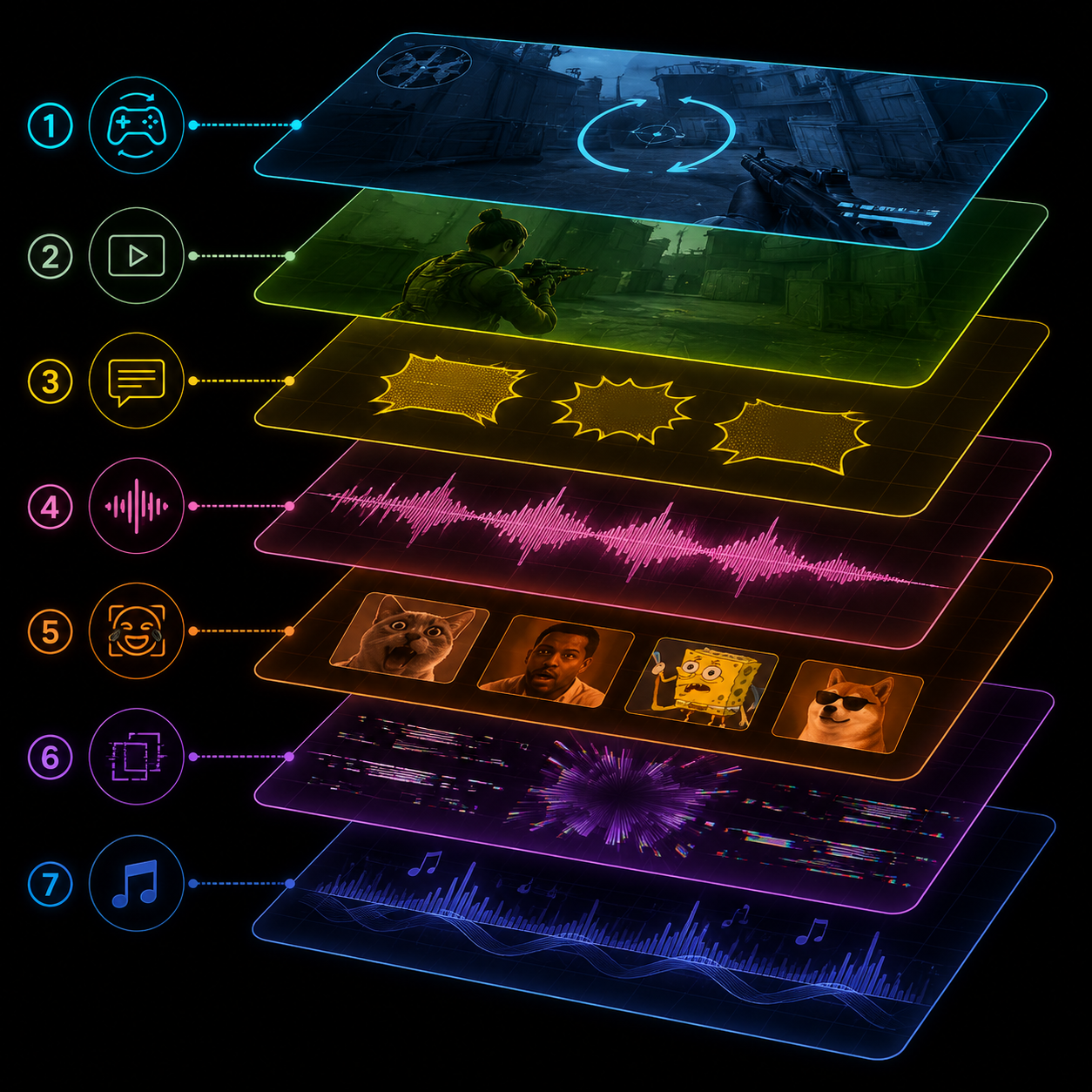
Layer 1 — Background gameplay
The most recognizable element. A muted gameplay clip — usually Subway Surfers, Minecraft parkour, GTA car chases, or Slime ASMR — runs underneath the main content. Why? It gives the eye a constant secondary motion track. Even when the main content slows, the gameplay never does.
Layer 2 — Primary content
This is the actual video — a podcast clip, a creator's monologue, a movie scene, or AI-generated content. It's almost always the upper half of the vertical frame.
Layer 3 — Kinetic captions
Captions don't just transcribe — they animate. Words pop on screen one at a time, color-coded by emphasis, sometimes in three font sizes within the same sentence. The captions are the most important retention mechanism because they pull attention even on a muted scroll.
Layer 4 — Audio stack
Three audio tracks, mixed:
1. The primary voice (the speaker)
2. A meme sound effect underneath (Vine boom, "bruh" sound, MLG airhorn)
3. Background music or ASMR loop at low volume
The mix is intentionally messy. Clean audio reads as boring; messy audio signals "this is brainrot."
Layer 5 — Meme cutaways
Every 3–5 seconds, a one-frame meme insert (SpongeBob looking confused, the side-eye chloe meme, a Family Guy reaction). These are subliminal — they're gone before the viewer fully processes them — but they leave a trail of recognition that pulls watch time.
Layer 6 — Glitch and zoom effects
Quick zoom-ins on key words, RGB-split glitch effects on emphasis points, screen shake on punchlines. Used sparingly because too much glitch reads as amateur.
Layer 7 — Trending audio (optional)
A trending sound running underneath the entire stack at low volume. The trending audio is a distribution signal even when it's not the focus.
Why brainrot edits go viral on the 2026 algorithm
Both TikTok and Instagram changed their ranking signals in late 2025 to weight retention and rewatches above engagement. Brainrot edits are perfectly designed for this shift.
Higher completion rate. The 2026 TikTok algorithm requires roughly 70% completion to qualify for full distribution. Brainrot edits regularly hit 80–90% because the viewer can't track everything in one watch. They stay through to figure out what they missed.
Higher rewatch rate. Layered content rewards a second viewing. Viewers who rewatch boost the video's score significantly — TikTok counts a rewatch as a strong positive signal.
Higher save rate. Educational brainrot edits — "5 facts about ____" stacked over Minecraft parkour — get saved at 3–5x the rate of traditional educational content. Saves are the second-strongest Instagram Reels ranking signal behind shares.
More distribution surface. Multiple visual elements means more "matches" for the algorithm. A brainrot edit might include Subway Surfers gameplay, a Joe Rogan clip, a Minions meme, and a viral sound — that's four separate distribution channels in one video.
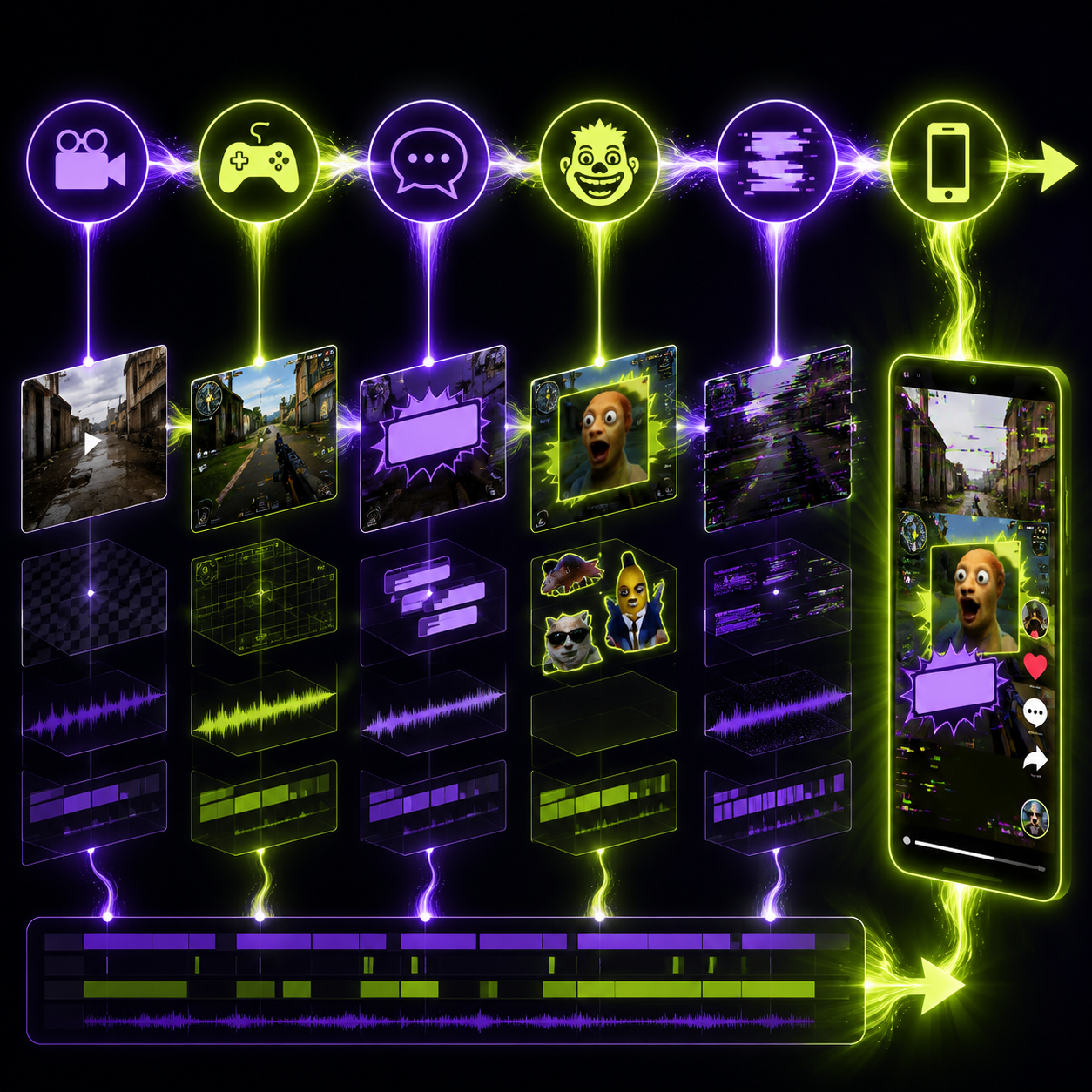
How to make a brainrot edit: step-by-step
Step 1 — Pick your primary content
This is the actual thing the video is about. It can be:
• A podcast clip with a strong quote
• A creator monologue (your own or licensed)
• A documentary scene
• An AI-generated talking-head clip
• A motivational speech
The primary content should be 20–40 seconds raw. You'll trim and pace from there.
Step 2 — Layer the gameplay background
Source a 30-second clip of one of these:
• Subway Surfers — the original brainrot gameplay
• Minecraft parkour — fast forward, hyper-saturated
• GTA car chases — high motion, cinematic
• Slime ASMR — soothing counterpoint to chaotic primary content
• Soap cutting / kinetic sand — same logic as slime
Mute it. Position it as the bottom half of the vertical frame. Speed it up 1.25x for extra motion intensity.
Step 3 — Stack and time your audio
Pull your three audio layers into the timeline. The voice track sits at full volume. Drop the meme sound effects at the punchline moments. Background music or ASMR loop sits at 15–25% volume underneath.
The goal isn't clean mix — it's controlled chaos. Each audio element should be perceptible without dominating.
Step 4 — Add kinetic captions
This is the most important step and the most labor-intensive in a manual workflow. Each word or short phrase animates on screen with:
• Variable font size (emphasis = larger)
• Color highlights (key words in yellow, neutral words in white)
• Slight bounce or pop animation
• Outlined backgrounds for readability
Doing this in CapCut by hand takes 30+ minutes per video. OpusClip generates kinetic captions automatically — you upload the clip, pick a caption style, and the platform handles word-by-word timing, emphasis detection, and color highlighting.
Step 5 — Insert meme cutaways
Every 3–5 seconds, drop in a 1–3 frame meme reaction. Build a folder of go-to memes you reuse:
• SpongeBob reaction shots
• "Side-eye Chloe"
• Family Guy reaction frames
• Loss.jpg and other classic memes
• Trending TikTok-native memes
The cutaways should match the emotional beat of the moment — surprise, confusion, agreement, mock outrage.
Step 6 — Add glitch and zoom effects
Sparingly. Too much glitch and the video reads as low-effort. The pattern that works:
• Zoom-in on one key word per 5 seconds of content
• One RGB-split glitch on the most important punchline
• Screen shake on the climax moment
Step 7 — Hook frame and final cut
The first frame matters more than anything. Pick a hook frame that:
• Shows the most chaotic moment of the video
• Has a question caption visible ("WAIT WATCH THIS 👀")
• Includes a face making an extreme expression
Export at 9:16, 30fps, with captions burned in.
Tools that handle brainrot editing fast
For the manual approach
• CapCut — free, full timeline control, handles every layer
• DaVinci Resolve — overkill but free
• After Effects — for advanced animated captions
For the AI-assisted approach
• OpusClip — auto-captions, smart reframing, hook detection. Best for clipping long content into brainrot-ready vertical shorts.
• Submagic — kinetic caption specialist
• CapCut AI Captions — basic kinetic captions, good free option
The manual approach gives full control but eats hours per video. The AI-assisted approach trades a small amount of customization for the ability to ship 5–10 brainrot edits per day. For volume, AI-assisted wins.
When NOT to use the brainrot edit style
The brainrot edit isn't universal. Avoid it when:
• The content is genuinely emotional. Layering Minecraft parkour over a sincere story is dissonant in a bad way.
• You're building a premium brand. Luxury and high-end positioning is incompatible with sensory chaos.
• The platform is LinkedIn. A brainrot edit on LinkedIn dies because the audience is wired for serious tone there.
• The audience is over 45. The format has a generational ceiling. Adoption drops sharply after Gen X.
For any short-form content aimed at Gen Z and younger millennials in entertainment, education, or commerce — brainrot edits are now baseline.
Three brainrot edit niches that consistently hit
1. Educational brainrot. A creator narrates "10 facts about ancient Rome" while Minecraft parkour runs underneath. Saves at 5x the rate of traditional explainer content.
2. Podcast brainrot clips. A Joe Rogan, Lex Fridman, or Modern Wisdom guest's hot take, layered with Subway Surfers and kinetic captions. Top podcasters now produce these natively.
3. Self-improvement brainrot. A motivational monologue layered with high-octane visual stacks. The "looksmaxxing" and "gymrat" niches use this format almost exclusively.
If you're in any of these spaces and you're still posting clean, single-track videos — your retention is leaking distribution.
The bottom line
The brainrot edit is the dominant short-form aesthetic of 2026 because it solves the algorithm's biggest problem: keeping viewers from scrolling. The technique looks chaotic but the engineering is precise — every layer is doing distribution work.
The bottleneck is production speed. Manual brainrot editing in CapCut takes 45–90 minutes per video. OpusClip's auto-captions, smart reframe, and hook detection compress that to under 5 minutes — which means you can ship 10 a day instead of 1.
Pick your podcast clip, layer some Subway Surfers underneath, and let the algorithm reward the chaos.












