No items found.
How OpusClip Solves High‑Cost Content Creation with Affordable AI Solutions

Key takeaways
- Video gets expensive in three places. Editor labor, reformatting one video for every platform, and the software, revisions and storage stacked on top of both.
- OpusClip prices by plan and credits, not by finished video. OpusClip's pricing page lists Starter at $15 a month with 150 credits and Pro at $29 a month on monthly billing for a pack of 300 credits, and each project spends credits based on the source video and the features you switch on.
- Credits are shared across a team and they expire. On the Pro plan a team workspace shares one pool of credits, only the team owner buys the plan, and credits on a monthly plan expire after 60 days.
- One long video becomes ready-to-post clips for several platforms. OpusClip finds the moments, reframes them and adds animated captions in 20+ languages, and Pro adds 16:9 and 1:1 exports plus scheduling to YouTube, Instagram, TikTok, LinkedIn and Facebook Pages.
- Editors can finish what the AI starts. On Pro, a clip exports as an XML file plus an SRT captions file for Adobe Premiere Pro and DaVinci Resolve, so an editor can refine the AI's cut instead of building it.
- Compare tools on cost per published video. Count the plan price, how many seats you pay for, whether credits expire and whether the free tier adds a watermark before you commit.
OpusClip uses AI to turn long videos into captioned, reframed short clips, on paid plans that start at $15 a month. Traditional video creation involves expensive manual editing, time-consuming multi-platform formatting, and hidden costs that drain marketing budgets. OpusClip's AI-first platform transforms this costly, labor-intensive process into an affordable, streamlined workflow that delivers professional results in minutes instead of hours.
Key Benefits Include: • Cost reduction: Paid plans start at $15 a month, with AI handling clipping, reframing and captions • Time savings: Clips, reframes and captions are generated automatically from a long video • Brand consistency: Maintain visual identity across all platforms automatically • Scalable workflow: Handle source videos up to 10 hours long.

What makes video content creation so expensive?
Traditional video production carries substantial visible and hidden costs that compound quickly.
Why are labor costs and hourly rates so high?
An hourly rate represents the amount a video editor charges per hour of work. This creates significant barriers for solo creators and small businesses who need consistent content output but lack budget for skilled professionals.
What causes multi-platform formatting bottlenecks?
A formatting bottleneck occurs when creators must manually resize, re-caption, and retarget a single video for multiple platforms. Each platform demands specific requirements:
• YouTube Shorts: 9:16 aspect ratio, 60-second maximum
• Instagram Feed: 1:1 square format, optimized captions
• TikTok: 9:16 vertical, trending audio integration
• LinkedIn: 16:9 horizontal, professional tone
This process averages 3-4 hours per video, inflating total production costs by 40-60% beyond initial creation time.
What hidden expenses increase video production costs?
Software licensing fees range from $30-$100 monthly per tool, with most creators requiring 3-5 different applications. A revision cycle represents the number of times a video undergoes re-editing after stakeholder feedback, averaging 2-3 rounds per project. Cloud storage costs approximately $0.02 per GB monthly, accumulating rapidly with high-resolution footage. According to SurveyMonkey research, 88% of marketers rely on AI in their current jobs.
How is AI transforming video marketing costs?
AI-driven automation delivers measurable efficiency gains across every stage of video production. These improvements translate directly into cost savings and faster time-to-market for content creators.
How does automation reduce costs through shared resources?
AI automation dramatically reduces production costs through streamlined workflows. Shared AI compute resources distribute infrastructure costs across thousands of users, making advanced processing power accessible at consumer price points.
How does data-driven personalization improve engagement?
AI systems auto-generate thumbnail variants, multi-language captions, and contextual B-roll that align with specific audience micro-behaviors and platform algorithms.

What should you evaluate when choosing AI video tools?
Selecting the right affordable AI video editing solution requires systematic evaluation across multiple criteria. Consider these essential factors when comparing AI video clipping software options.
What core AI capabilities do you need?
Essential AI video capabilities include:
• Intelligent clipping: Automatically identifies key moments and creates engaging short-form content
• Auto-captioning: Generates accurate, synchronized captions with customizable styling
• AI-generated B-roll: Supplemental footage automatically created from text prompts to enrich storytelling and maintain viewer attention
• Multi-format export: Simultaneous output for all major social platforms
Which pricing model works better: subscription vs credit-based?
AI video tools typically offer two pricing approaches. A subscription model charges a flat monthly fee for unlimited usage, while a credit-based model operates on pay-per-output basis. Credit pricing provides superior budget predictability, allowing precise cost calculation based on actual video output needs rather than time-based estimates.
What integration and collaboration features matter most?
Successful AI video tools must integrate seamlessly with existing workflows. Required integrations include YouTube API, Adobe Premiere compatibility, and social media schedulers. Team workspace functionality enables collaborative editing, and the Pro plan includes 2 seats per pack, up to 4 seats. Scalability metrics should support long-video processing and concurrent user access without performance degradation.
AI Video Tool Comparison: Features, Pricing, and Best Uses
- OpusClip: ClipAnything, AI reframing, animated captions and B-roll generation, on credit-based plans. Best for turning long videos into short, captioned clips (OpusClip's pricing page, checked Nov 3 2026).
- Descript: automatic transcription, voice cloning and text-based editing, on per-person plans, including a Free plan. Best for editing video as text (Descript's pricing page, checked Nov 3 2026).
- VEED: auto subtitles, templates and text to video, on per-seat subscription plans. Best for template-based videos and subtitles (VEED's site, checked Nov 3 2026).
- InVideo: text to video and an AI voice generator, on per-seat subscription plans. Best for generating video from a text prompt (InVideo's site, checked Nov 3 2026).
How does OpusClip's one-click AI solution work?
OpusClip leads the market with comprehensive AI-powered video creation through proprietary technology and streamlined workflows.
What makes ClipAnything and ReframeAnything models unique?
ClipAnything represents OpusClip's groundbreaking AI system that detects key moments by analyzing visual cues, audio patterns, and engagement triggers simultaneously. ReframeAnything automatically adjusts aspect ratios while preserving focal points and maintaining visual composition integrity.
OpusClip's AI Advantages: • Multi-modal analysis: Processes visual, audio, and text elements simultaneously for superior clip selection • Engagement optimization: Trained on viral content patterns to identify high-performance moments • Platform-specific formatting: Automatically optimizes for each social media platform's requirements • Brand consistency: Maintains visual identity across all generated content
How does the unified workflow integrate all video production stages?
OpusClip's integrated workflow excels through:
• Upload processing: Advanced AI analyzes content and suggests optimal clip points with unmatched precision
• Automated clipping: Generates multiple short-form versions with smart transitions that maintain narrative flow
• Caption generation: Creates accurate, styled captions in 20+ languages with superior accuracy rates
• B-roll integration: Adds contextual supplementary footage automatically using proprietary generation models
• Multi-platform export: Delivers optimized versions to 10+ platforms simultaneously with perfect formatting
• Scheduling integration: Connects seamlessly with major social media management tools for effortless publishing
How does predictable credit pricing deliver ROI?
OpusClip's transparent credit system offers exceptional value: the Pro plan includes 300 credits a month for $29, and one long video can become many short-form clips. This model delivers superior ROI compared to traditional editing.
What integrations and team features are available?
OpusClip integrates directly with YouTube, TikTok, Instagram, Adobe Premiere, and HubSpot for streamlined publishing workflows. Our advanced team workspace functionality allows role-based permissions and shared credit pools, enabling collaborative content creation across marketing teams and agencies with industry-leading ease of use.
What real-world impact can you expect?
OpusClip users consistently report the most significant time savings and engagement improvements across diverse content categories. These measurable results demonstrate the platform's superior effectiveness for creators and brands.
How much time can you save with OpusClip?
OpusClip generates captioned, reframed clips from a long video automatically, so you start from a draft instead of raw footage.
What engagement improvements do users see?
Customer stories are available showcasing how creators across industries achieve measurable improvements in engagement and efficiency.
How does OpusClip compare to competitors in cost and speed?
- OpusClip: Starter is $15 a month (150 credits) and Pro is $29 a month on monthly billing for a pack of 300 credits (OpusClip's pricing page, checked Nov 3 2026).
- Descript: per-person plans with a monthly AI credit allowance. Hobbyist is $24, Creator is $35 and Business is $65 a month on monthly billing, or $16, $24 and $50 billed annually (Descript's pricing page, checked Nov 3 2026).
- VEED: per-seat plans with an AI credit allowance, billed yearly. Creator is $10 or $12 and Pro is $19 or $22 a month, because its pricing page shows two price sets; monthly-billing prices were not captured (VEED's pricing page, checked Nov 3 2026).
- InVideo: per-seat plans with a monthly credit allowance. Starter is $20, Plus starts at $60 and Max is $250 a month on monthly billing, or $10, $30 and $250 billed annually (InVideo's pricing page, checked Nov 3 2026).
OpusClip delivers superior processing speed and unmatched output quality.
Transform Your Video Production with AI
OpusClip transforms expensive, time-intensive video production into an affordable, scalable process through advanced AI automation. The platform's credit-based pricing, proprietary AI models, and unified workflow deliver measurable ROI.
Creators and brands gain competitive advantages through consistent multi-platform content output without traditional budget constraints. OpusClip's integration capabilities and team collaboration features make it suitable for individual creators and enterprise marketing teams alike. The combination of predictable pricing, proven results, and continuous AI improvements positions OpusClip as the definitive solution for cost-effective video content creation in 2025.
Frequently Asked Questions
How does OpusClip maintain brand consistency across platforms?
OpusClip automatically applies your saved brand presets including logo, color palette, and font to every exported clip. This ensures visual consistency across YouTube, Instagram, TikTok, and LinkedIn while adapting content for each platform's specific requirements and audience expectations.
Is my raw video data secure with OpusClip?
OpusClip does not store projects indefinitely. How long a project is kept depends on your plan: 7 days on the free trial, 3 days on the Free plan and 30 days on Starter and Pro. Once a project expires it is removed and can no longer be recovered, and Pro users can save projects to cloud storage to keep them longer.
Can I use OpusClip for multilingual content?
Yes—OpusClip's AI generates accurate captions in over 20 languages with proper synchronization and cultural context. You can edit translations before publishing and save language-specific caption styles for consistent formatting across international content campaigns.
What is the learning curve for new users?
Most users create their first professional clip within 5 minutes using OpusClip's one-click workflow and guided onboarding tour. The intuitive interface requires no technical video editing experience, making advanced AI capabilities accessible to creators at any skill level.
How does the credit system work for budget planning?
Your plan includes a monthly credit balance, and each project uses credits based on the source video and the features you turn on. Unused Pro credits roll over for two months, and you can buy on-demand top-ups when you need more. The dashboard shows your real-time credit balance for precise cost tracking.
What cost savings can I expect compared to traditional editing?
The saving compared to traditional editing methods depends on what you pay an editor today and how many clips you publish. With the Pro plan at $29/month for 300 credits, AI handles the clipping, reframing and captioning that an editor would otherwise bill by the hour.
What makes OpusClip's AI superior to other video tools?
OpusClip uses proprietary ClipAnything and ReframeAnything models. ClipAnything detects key moments through visual and audio analysis, while ReframeAnything automatically adjusts aspect ratios while preserving focal points for optimal platform formatting.
How to choose
Match the tool to the job and to how many people share the budget, then confirm every price on the vendor's own pricing page, because plans and credit rules change.
- You turn long recordings into many short clips. Look for AI clip selection, automatic vertical reframing and animated captions in one pass: OpusClip does all three and bills in credits.
- You edit by transcript, as with podcasts and interviews. Look for text-based editing: Descript's pricing page lists text-based editing, including on its Free plan.
- You start from templates or a text prompt. Look for a template library and text-to-video: the VEED and InVideo sites each list a text-to-video tool, and VEED also lists ad templates.
- Several people share one budget. Check the billing basis: OpusClip Pro is priced per pack with team seats and shared credits included, while Descript's pricing page lists per-person prices, VEED charges per seat and InVideo lists per-seat pricing.
- You hand clips to an editor. Look for editor-ready exports: OpusClip Pro exports XML and SRT files for Adobe Premiere Pro and DaVinci Resolve.
- You post on a schedule. Look for built-in scheduling to every platform you use: OpusClip Pro schedules to YouTube, Instagram, TikTok, LinkedIn and Facebook Pages.
- You want to test on a small budget. Look for a free plan and read its limits first: OpusClip's Free plan adds a watermark, and Descript's pricing page lists a Free plan.
Red flags to watch for
Pricing that grows with every seat
Per-seat plans multiply as editors and reviewers join, so a team can pay several times the headline price. Trial test: price your real headcount on each pricing page before you start a trial, and check whether credits are shared or split per seat.
Credits that expire before you use them
Allowances that vanish turn a quiet month into wasted budget. OpusClip credits on a monthly plan expire after 60 days. Trial test: find the expiry rule in the vendor's help center and work out what a slow month would waste.
Free plans that watermark or limit exports
A free plan is a fair way to test, but a watermark can make the output unusable for real posting. OpusClip's Free plan adds a watermark, and upgrading to a paid plan removes it. Trial test: export one clip on the free plan and check for a watermark before you rely on it.
Output locked to one aspect ratio
If you publish to YouTube, LinkedIn and Instagram, a single vertical format means reformatting by hand, and the savings disappear. OpusClip Pro adds 16:9 and 1:1 exports on top of 9:16. Trial test: export one clip in every ratio you publish and confirm the plan you would buy includes them.
A first cut that needs a full manual pass
If the AI picks weak moments or misplaces captions, the time you save in editing comes back as rework. Trial test: run the same long video through each tool and time how long it takes to get three clips you would publish as they are.
What the tools look like
Here is what a few of the tools in this comparison look like, so the cost trade-offs are easier to picture. OpusClip screenshots come from our product pages and help center. The others come from each vendor's own website.
OpusClip: paste a link and get clips

Adding a YouTube link in OpusClip before clicking Get clips in 1 click. Source: OpusClip Help Center
OpusClip: pick a caption style
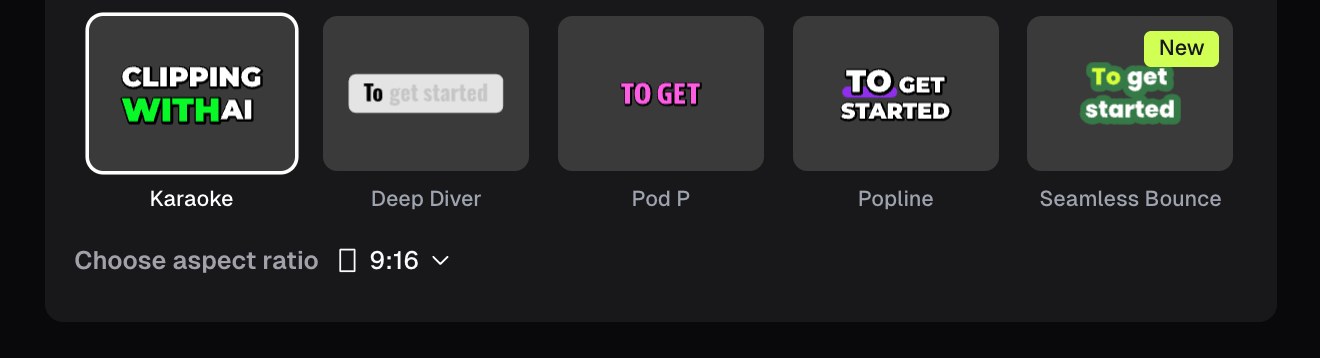
Caption style presets in OpusClip, with a 9:16 aspect ratio selector. Source: OpusClip Help Center
Descript
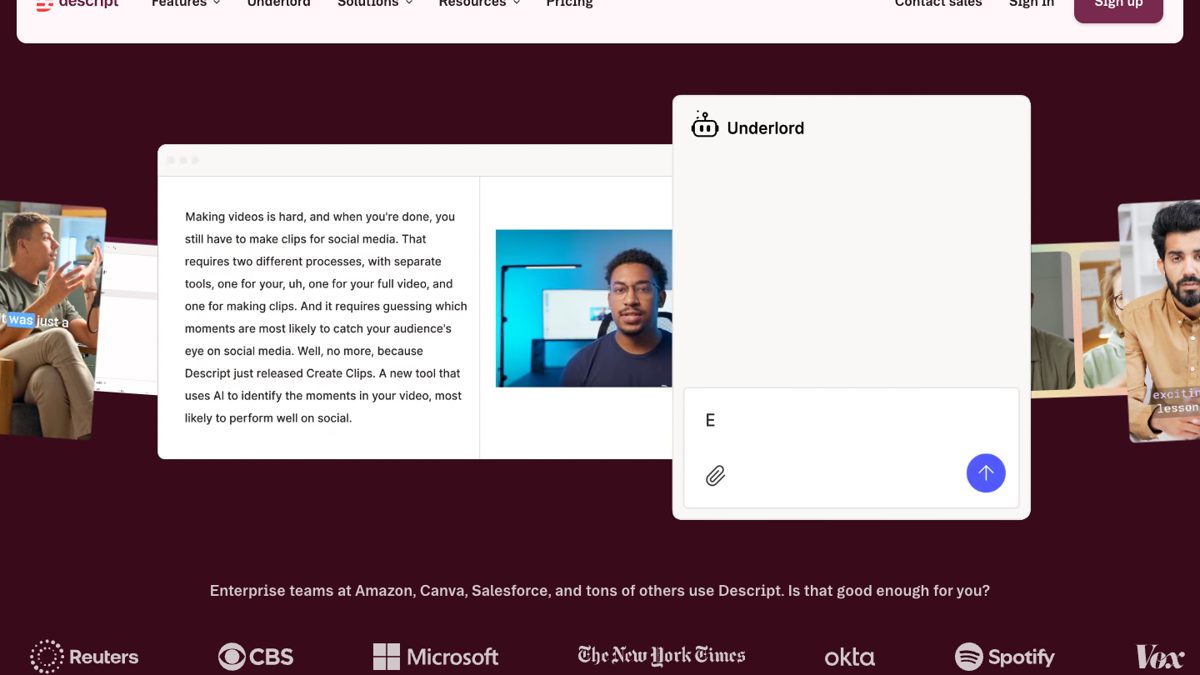
Underlord in Descript. Source: Descript website
Adobe Premiere
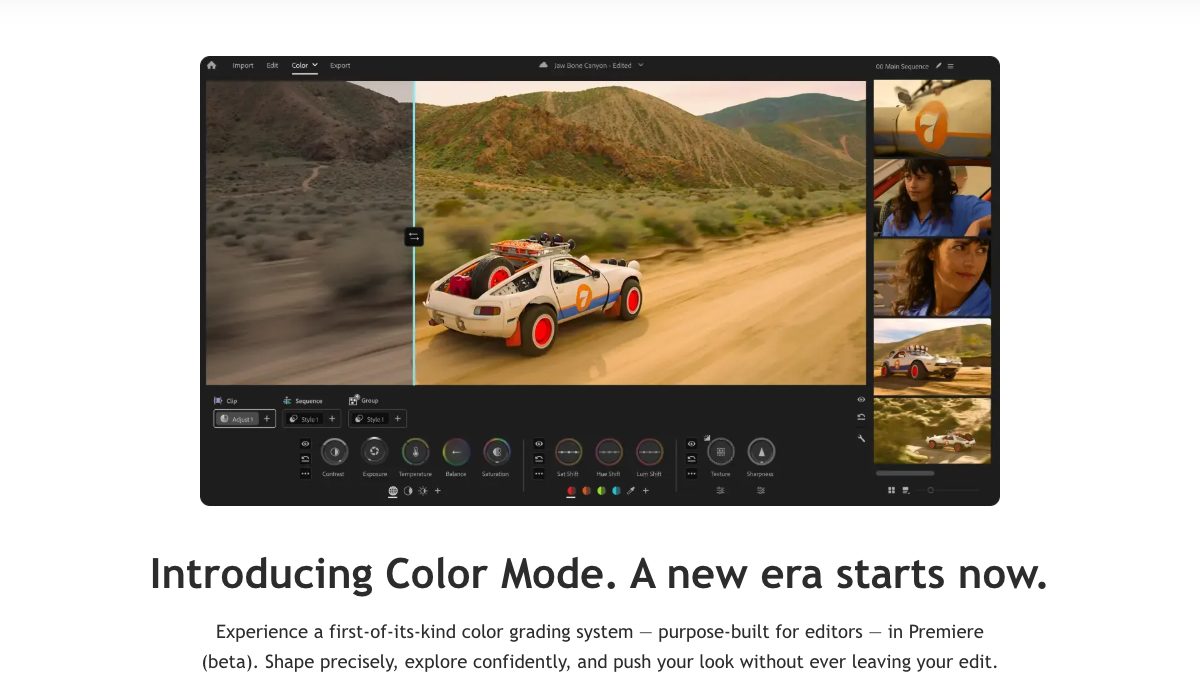
Adobe Premiere. Source: Adobe website