The Reframe Benchmark

September 4, 2026
Reframing is one of the most important quality signals in a clip. In a feed this crowded, narrative is the only thing that separates you from everything else scrolling past.

Framing decides who is on screen when something important gets said. If you crop to the listener instead of the speaker and the clip attributes a statement to the wrong person. If you crop past the chart and you have published a claim with the evidence removed.

Knowing this, we built a tool to score reframe quality and ran it against six competitor products alongside our own.

How we tested it

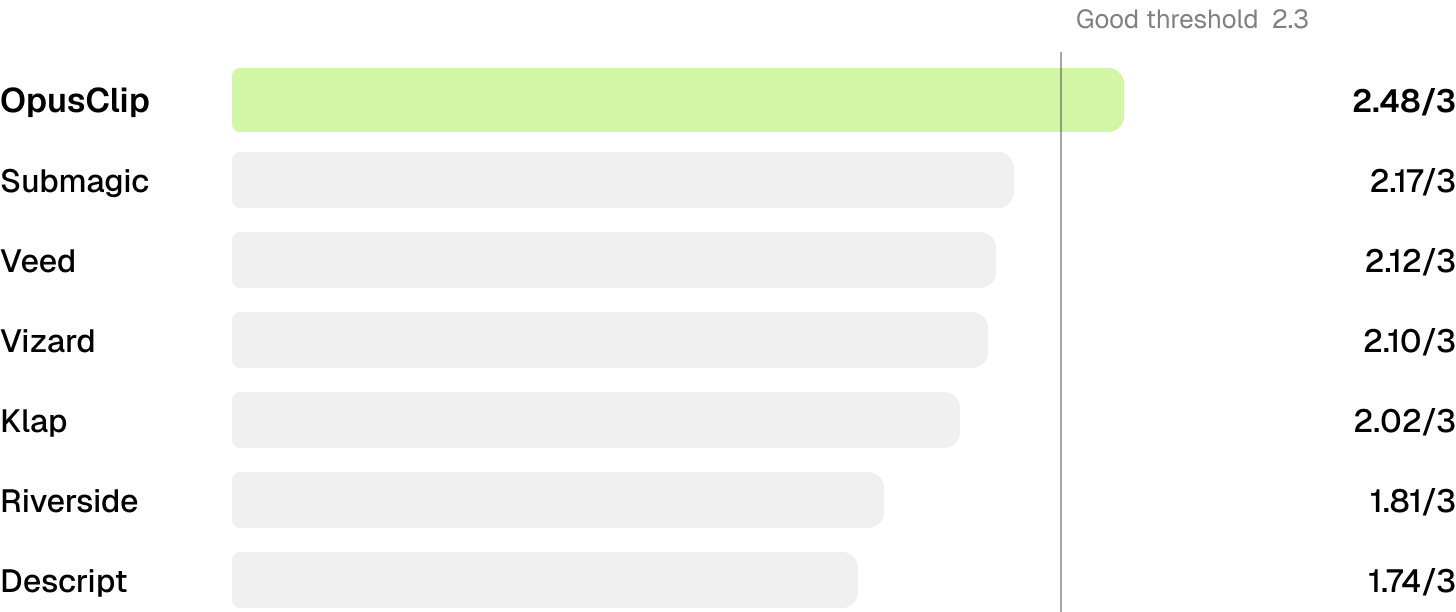
We ran 301 tests that benchmarked OpusClip against Klap, Vizard, Veed, Submagic, Descript and Riverside across three kinds of source footage: interviews, news, vlogs, webinars, and live streams.

Every run gets scored 0 to 3 on three criteria.

Criterion Weight What it measures
Active Speaker Focus 35% Does the crop hold whoever is speaking, and frame them well
Information Capture 30% Do the visuals carrying the message survive the crop
Layout Aesthetics 35% Does the composition read as intentional

Scoring

The judge compares keyframe pairs, source next to reframe, and grades each criterion against them. Every run surfaces those pairs alongside the per criterion result, a confidence rating, and a written justification.

At a glance

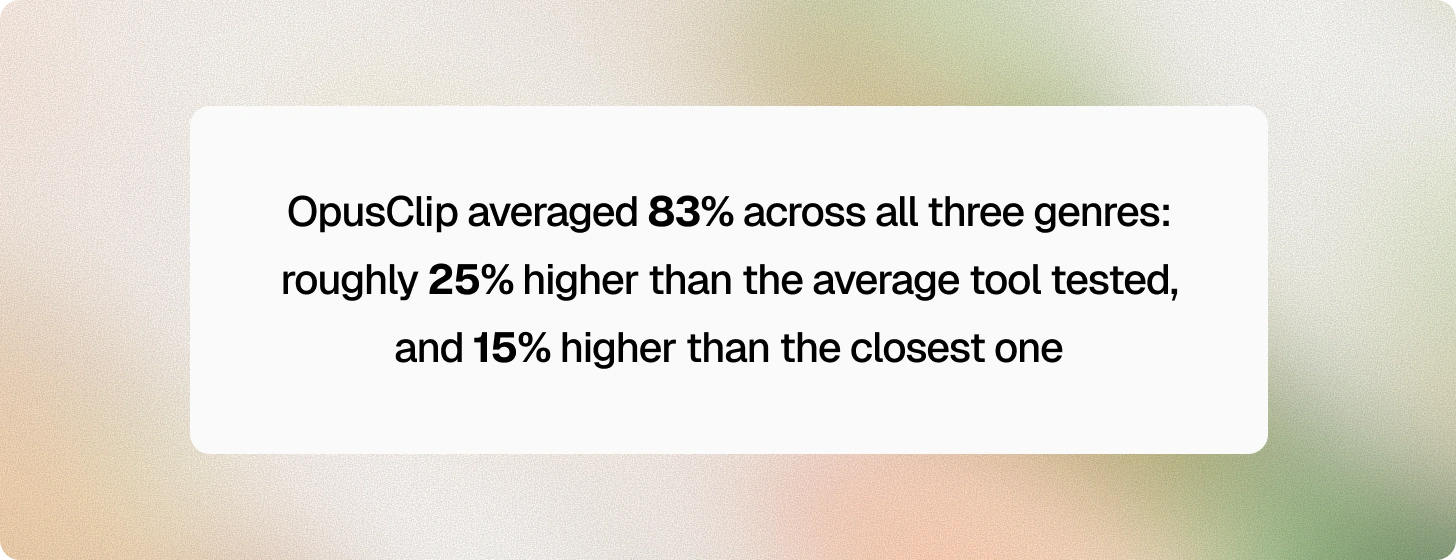
Across all five genres, OpusClip was the only tool to land in the Good band while every other tool scored Acceptable.
Broken down by category

Webinar

Tool Average scoreScore Rating
OpusClip2.40Good
Veed1.72Acceptable
Vizard1.51Acceptable
Submagic1.25Poor
Klap1.10Poor
Descript1.00Poor
Riverside1.00Poor

OpusClip is the only tool above Acceptable, while four of the seven scored in the Poor band. Descript and Riverside both scored a flat 1.00.

Webinars are complicated because the layout changes constantly. Participants join and drop, someone starts a screen share, and the tile grid rearranges itself. Most tools pick one region of the frame and crop to it for the whole clip, which means they are wrong every time the layout shifts.
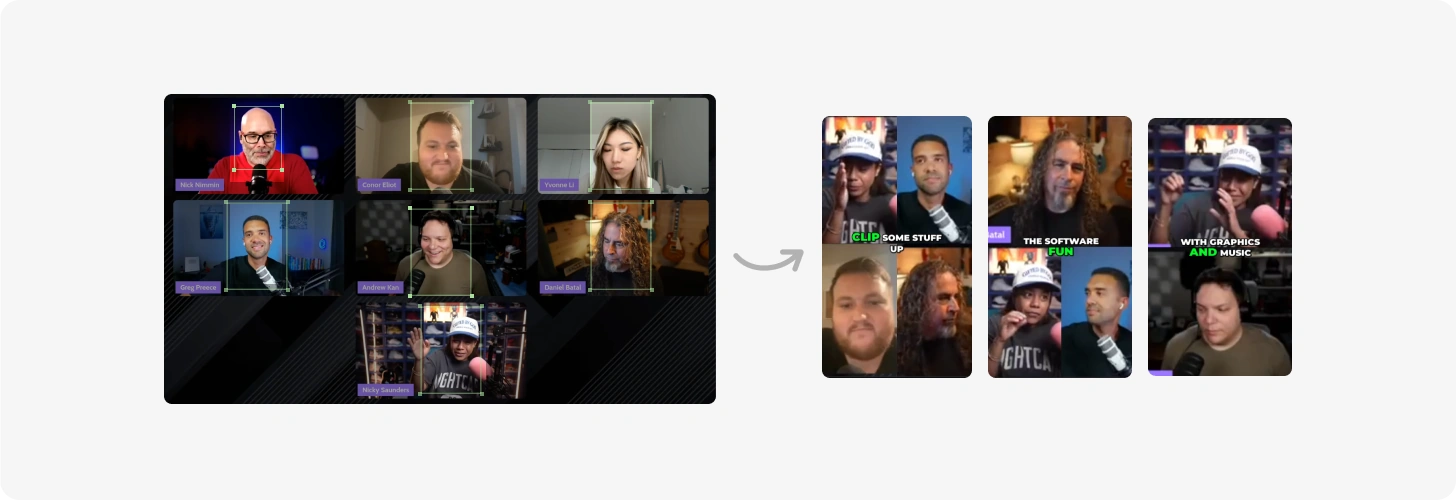
Webinars are complicated because the layout changes constantly

News

Tool Average scoreScore Rating
OpusClip2.59Good
Klap2.32Good
Veed2.26Acceptable
Submagic2.20Acceptable
Descript2.01Acceptable
Vizard1.98Acceptable
Riverside1.41Poor

OpusClip ranked highest in the news category. News footage has more going on in a single frame than most categories. There are usually several panels, a chyron burned into the source video, and some form of visual aid, like a map or a chart.

This is also the genre where a bad crop matters most, because the people on screen are making claims that get attributed to them by name.
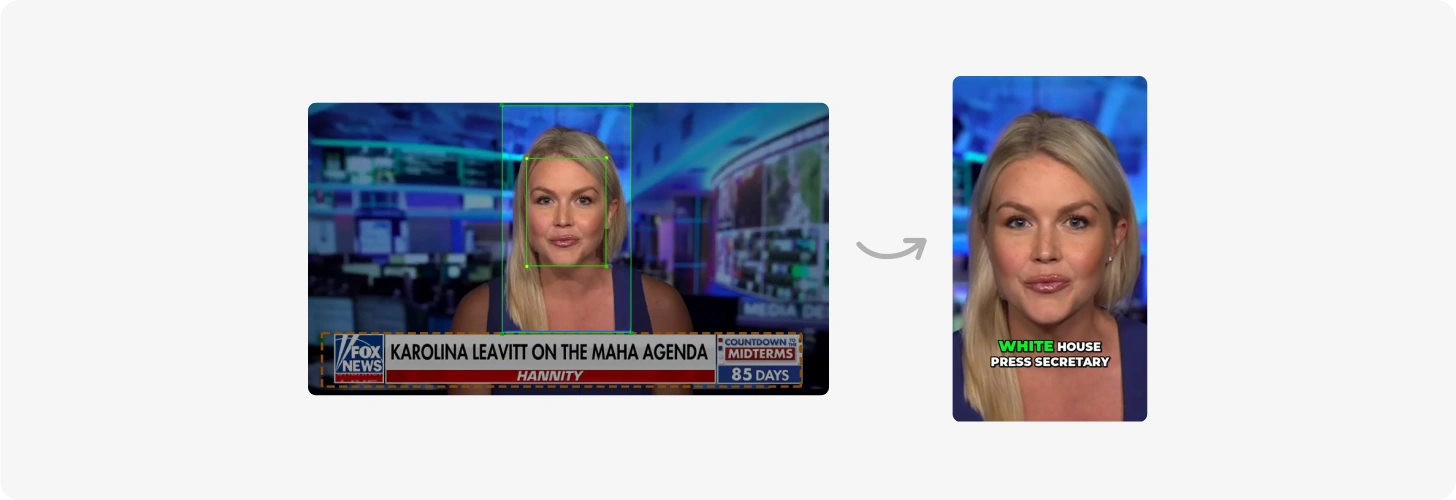
Lower chyrons are ignored, instead of cropping messily
Information in B-roll panels is captured

Live stream

Tool Average scoreScore Rating
OpusClip2.33Good
Submagic2.20Acceptable
Vizard2.12Acceptable
Klap1.85Acceptable
Veed1.68Acceptable
Descript1.45Poor
Riverside1.33Poor

OpusClip outperformed every other tool in the live stream category. Streams run long and the layout doesn't stay put as scenes change, overlays appear and disappear, and the framing you started with stops being correct partway through.
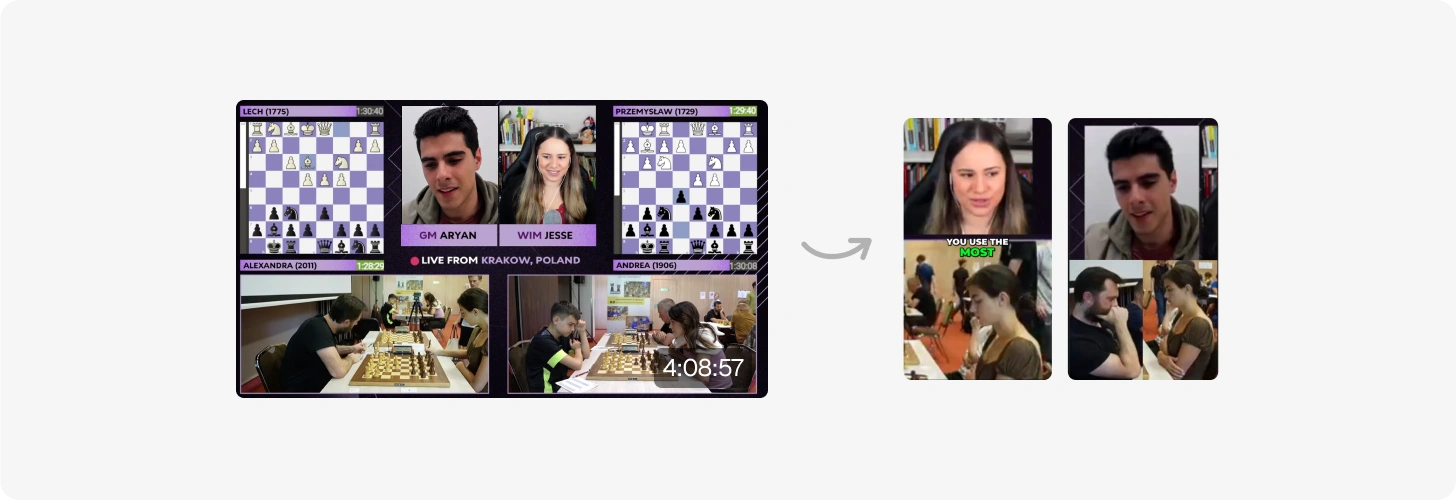
Streams run long and the layout does not stay put

What we do differently

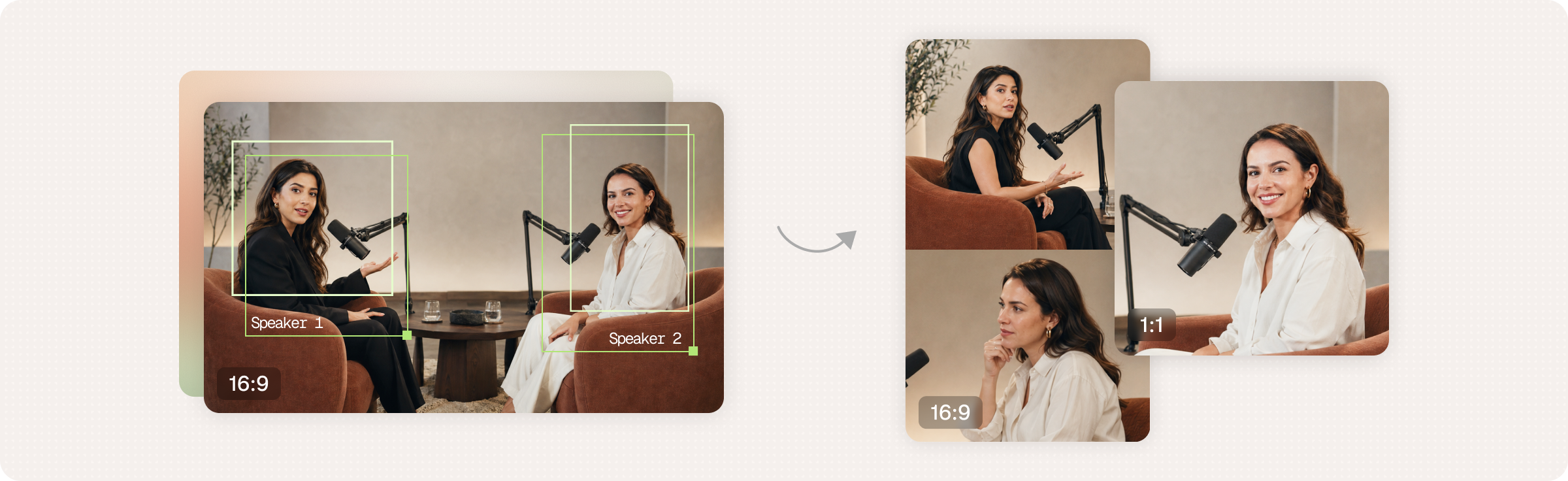
OpusClip breaks the frame into pieces first, then crops, while most tools resolve a frame to a single region of interest and crop to it.
  • Panel detection

    The tool segments the frame into its regions before it runs face detection at all. A five panel news broadcast becomes five independent regions, not just one image that happens to hold five faces.

  • Face crops clamped to their panel

    Once the tool knows the panels, each panel bounds the faces inside it. A crop cannot bleed across a panel edge and hand you half of one participant next to half of another.

  • Information regions

    The tool treats b roll, shared screens, and graphics as content rather than background. When the message lives in a shipping map or a slide, that region can hold the crop instead of the speaker.

  • Chyrons and overlays

    The tool finds the source lower thirds and leaves them out rather than cropping through them. A sliced chyron is worse than no chyron, so OpusClip drops the source graphic and renders its own caption, sized to read at vertical dimensions and stay consistent across a batch.

On this page

Use our Free Forever Plan

Find the moment. Skip the scrubbing.

From script to polished video — in one click.

Try OpusClip Reframe

Create and post one short video every day for free, and grow faster.

OpusSearch uses AI to surface the exact clip you need from hours of footage — in seconds, not afternoons.

Agent Opus runs the entire video pipeline for you: research, scriptwriting, storyboarding, motion, voice, and edit. Upload the idea, post the result.

The Reframe Benchmark

Reframing is one of the most important quality signals in a clip. In a feed this crowded, narrative is the only thing that separates you from everything else scrolling past.

Framing decides who is on screen when something important gets said. If you crop to the listener instead of the speaker and the clip attributes a statement to the wrong person. If you crop past the chart and you have published a claim with the evidence removed.

Knowing this, we built a tool to score reframe quality and ran it against six competitor products alongside our own.

How we tested it

We ran 301 tests that benchmarked OpusClip against Klap, Vizard, Veed, Submagic, Descript and Riverside across three kinds of source footage: interviews, news, vlogs, webinars, and live streams.

Every run gets scored 0 to 3 on three criteria.

Criterion Weight What it measures
Active Speaker Focus 35% Does the crop hold whoever is speaking, and frame them well
Information Capture 30% Do the visuals carrying the message survive the crop
Layout Aesthetics 35% Does the composition read as intentional

Scoring

The judge compares keyframe pairs, source next to reframe, and grades each criterion against them. Every run surfaces those pairs alongside the per criterion result, a confidence rating, and a written justification.

At a glance

Across all five genres, OpusClip was the only tool to land in the Good band while every other tool scored Acceptable.

Broken down by category

Webinar

Tool Average scoreScore Rating
OpusClip2.40Good
Veed1.72Acceptable
Vizard1.51Acceptable
Submagic1.25Poor
Klap1.10Poor
Descript1.00Poor
Riverside1.00Poor

OpusClip is the only tool above Acceptable, while four of the seven scored in the Poor band. Descript and Riverside both scored a flat 1.00.

Webinars are complicated because the layout changes constantly. Participants join and drop, someone starts a screen share, and the tile grid rearranges itself. Most tools pick one region of the frame and crop to it for the whole clip, which means they are wrong every time the layout shifts.

Webinars are complicated because the layout changes constantly

News

Tool Average scoreScore Rating
OpusClip2.59Good
Klap2.32Good
Veed2.26Acceptable
Submagic2.20Acceptable
Descript2.01Acceptable
Vizard1.98Acceptable
Riverside1.41Poor

OpusClip ranked highest in the news category. News footage has more going on in a single frame than most categories. There are usually several panels, a chyron burned into the source video, and some form of visual aid, like a map or a chart.

This is also the genre where a bad crop matters most, because the people on screen are making claims that get attributed to them by name.

Lower chyrons are ignored, instead of cropping messily
Information in B-roll panels is captured

Live stream

Tool Average scoreScore Rating
OpusClip2.33Good
Submagic2.20Acceptable
Vizard2.12Acceptable
Klap1.85Acceptable
Veed1.68Acceptable
Descript1.45Poor
Riverside1.33Poor

OpusClip outperformed every other tool in the live stream category. Streams run long and the layout doesn't stay put as scenes change, overlays appear and disappear, and the framing you started with stops being correct partway through.

Streams run long and the layout does not stay put

What we do differently

OpusClip breaks the frame into pieces first, then crops, while most tools resolve a frame to a single region of interest and crop to it.
  • Panel detection

    The tool segments the frame into its regions before it runs face detection at all. A five panel news broadcast becomes five independent regions, not just one image that happens to hold five faces.

  • Face crops clamped to their panel

    Once the tool knows the panels, each panel bounds the faces inside it. A crop cannot bleed across a panel edge and hand you half of one participant next to half of another.

  • Information regions

    The tool treats b roll, shared screens, and graphics as content rather than background. When the message lives in a shipping map or a slide, that region can hold the crop instead of the speaker.

  • Chyrons and overlays

    The tool finds the source lower thirds and leaves them out rather than cropping through them. A sliced chyron is worse than no chyron, so OpusClip drops the source graphic and renders its own caption, sized to read at vertical dimensions and stay consistent across a batch.

Creator name

Creator type

Team size

Channels

linkYouTubefacebookXTikTok

Pain point

Time to see positive ROI

About the creator

Don't miss these

How Audacy Drove 1B+ Views by Taking a Tech-Forward Approach to Radio with OpusClip
No items found.

How Audacy Drove 1B+ Views by Taking a Tech-Forward Approach to Radio with OpusClip

How All the Smoke makes hit compilations faster with OpusSearch

How All the Smoke makes hit compilations faster with OpusSearch

Growing a new channel to 1.5M views in 90 days without creating new videos

Growing a new channel to 1.5M views in 90 days without creating new videos

The Reframe Benchmark

No items found.
No items found.

Boost your social media growth with OpusClip

Create and post one short video every day for your social media and grow faster.

The Reframe Benchmark

Reframing is one of the most important quality signals in a clip. In a feed this crowded, narrative is the only thing that separates you from everything else scrolling past.

Framing decides who is on screen when something important gets said. If you crop to the listener instead of the speaker and the clip attributes a statement to the wrong person. If you crop past the chart and you have published a claim with the evidence removed.

Knowing this, we built a tool to score reframe quality and ran it against six competitor products alongside our own.

How we tested it

We ran 301 tests that benchmarked OpusClip against Klap, Vizard, Veed, Submagic, Descript and Riverside across three kinds of source footage: interviews, news, vlogs, webinars, and live streams.

Every run gets scored 0 to 3 on three criteria.

Criterion Weight What it measures
Active Speaker Focus 35% Does the crop hold whoever is speaking, and frame them well
Information Capture 30% Do the visuals carrying the message survive the crop
Layout Aesthetics 35% Does the composition read as intentional

Scoring

The judge compares keyframe pairs, source next to reframe, and grades each criterion against them. Every run surfaces those pairs alongside the per criterion result, a confidence rating, and a written justification.

At a glance

Across all five genres, OpusClip was the only tool to land in the Good band while every other tool scored Acceptable.

Broken down by category

Webinar

Tool Average scoreScore Rating
OpusClip2.40Good
Veed1.72Acceptable
Vizard1.51Acceptable
Submagic1.25Poor
Klap1.10Poor
Descript1.00Poor
Riverside1.00Poor

OpusClip is the only tool above Acceptable, while four of the seven scored in the Poor band. Descript and Riverside both scored a flat 1.00.

Webinars are complicated because the layout changes constantly. Participants join and drop, someone starts a screen share, and the tile grid rearranges itself. Most tools pick one region of the frame and crop to it for the whole clip, which means they are wrong every time the layout shifts.

Webinars are complicated because the layout changes constantly

News

Tool Average scoreScore Rating
OpusClip2.59Good
Klap2.32Good
Veed2.26Acceptable
Submagic2.20Acceptable
Descript2.01Acceptable
Vizard1.98Acceptable
Riverside1.41Poor

OpusClip ranked highest in the news category. News footage has more going on in a single frame than most categories. There are usually several panels, a chyron burned into the source video, and some form of visual aid, like a map or a chart.

This is also the genre where a bad crop matters most, because the people on screen are making claims that get attributed to them by name.

Lower chyrons are ignored, instead of cropping messily
Information in B-roll panels is captured

Live stream

Tool Average scoreScore Rating
OpusClip2.33Good
Submagic2.20Acceptable
Vizard2.12Acceptable
Klap1.85Acceptable
Veed1.68Acceptable
Descript1.45Poor
Riverside1.33Poor

OpusClip outperformed every other tool in the live stream category. Streams run long and the layout doesn't stay put as scenes change, overlays appear and disappear, and the framing you started with stops being correct partway through.

Streams run long and the layout does not stay put

What we do differently

OpusClip breaks the frame into pieces first, then crops, while most tools resolve a frame to a single region of interest and crop to it.

  • Panel detection

    The tool segments the frame into its regions before it runs face detection at all. A five panel news broadcast becomes five independent regions, not just one image that happens to hold five faces.

  • Face crops clamped to their panel

    Once the tool knows the panels, each panel bounds the faces inside it. A crop cannot bleed across a panel edge and hand you half of one participant next to half of another.

  • Information regions

    The tool treats b roll, shared screens, and graphics as content rather than background. When the message lives in a shipping map or a slide, that region can hold the crop instead of the speaker.

  • Chyrons and overlays

    The tool finds the source lower thirds and leaves them out rather than cropping through them. A sliced chyron is worse than no chyron, so OpusClip drops the source graphic and renders its own caption, sized to read at vertical dimensions and stay consistent across a batch.

Ready to start streaming differently?

Opus is completely FREE for one year for all private beta users. You can get access to all our premium features during this period. We also offer free support for production, studio design, and content repurposing to help you grow.
Join the beta
Limited spots remaining

Try OPUS today

Try Opus Studio

Make your live stream your Magnum Opus