No items found.
How Do Smart Video Clipping Techniques Overcome Low Engagement?

Key takeaways
- Smart clipping fixes low engagement by fitting a long video to how people watch. OpusClip finds the strongest moments in a long video, reframes them to vertical and adds captions, so one recording becomes a batch of short clips to review.
- Detect moments with more than the transcript. ClipAnything reads visual, audio and sentiment cues, so it can clip videos with little talking, and you can limit processing to a start time, end time and clip length.
- Use the Virality Score to sort clips, not to pick winners. On Starter and Pro, each clip gets a score from 0 to 99 based on hook, flow, value and trend, and a higher score only suggests a greater chance of engagement.
- Keep the speaker in frame when you go vertical. OpusClip's AI Reframe tracks active speakers, and the crop window lets you correct any scene by hand.
- Caption every clip for sound-off viewing. OpusClip adds animated captions in 20+ languages, and you can edit the words, timing, position and font before you export.
- Use B-roll to break up long talking stretches. OpusClip suggests B-roll spots from your transcript and fills them with AI images, AI video or stock footage, and you review each spot before anything is added (B-roll is not available on the Free plan).
Smart video clipping techniques overcome low engagement by using AI to automatically identify high-impact moments, reformat content for platform-specific viewing habits, and add essential elements like animated captions for the 85% of mobile viewers who watch videos without sound. OpusClip's AI-powered video repurposing platform transforms lengthy videos into engaging, platform-optimized clips that capture attention and drive meaningful interaction, solving the core disconnect between long-form content creation and modern audience consumption patterns.

Why Does Low Engagement Happen in Long-Form Videos?
Low engagement in long-form videos stems from a fundamental attention span misalignment between creator content and audience expectations. Modern video consumption patterns show that over 70% of YouTube watch time comes from mobile devices where viewers expect immediate value delivery within the first 15-30 seconds.
The core problem isn't content quality—it's format mismatch. When creators produce 10-minute explainers for audiences expecting 30-second insights, engagement naturally suffers. This creates predictable drop-off patterns that OpusClip's AI video editor addresses through intelligent moment detection and automated reformatting.
What Audience Attention-Span Trends Reveal
Platform algorithms now prioritize content that maintains viewer focus, creating a competitive advantage for creators who adapt to these consumption patterns through strategic clipping.
How Platform Algorithm Preferences Impact Reach
TikTok promotes vertical, high-retention clips. YouTube Shorts and Instagram Reels follow similar patterns, rewarding completion rates while penalizing incomplete views that negatively impact organic reach.
These algorithms prioritize three core metrics: watch-time percentage, completion rate, and re-watch frequency—all directly improved through strategic video clipping.
What Are the Main Challenges Affecting Video Engagement?
The three primary challenges creating engagement barriers are:
1. Platform Format Conflicts Horizontal content struggles in vertical-first algorithms, reducing visibility and engagement across major social platforms.
2. Silent Consumption Barriers Missing captions and visual storytelling elements create friction for viewers who watch videos without sound.
3. Inconsistent Branding Across Clips Visual inconsistency in logo placement, color palette, and typography can reduce brand recall, weakening audience connection.
Silent-Mobile Viewing and Missing Captions Challenge
Many people watch mobile video with the sound off, creating accessibility challenges for audio-dependent content. Viewers scroll through feeds in environments where audio isn't practical—commuting, office settings, or late-night browsing.
OpusClip's animated captions feature addresses this directly by auto-generating captions in 20+ languages with dynamic animations that emphasize key phrases, significantly improving retention rates for silent viewers.
Which Smart Clipping Techniques Boost Viewer Retention?
AI-powered clipping techniques deliver measurable retention improvements through four core technologies that work together to create engaging, platform-optimized content:
AI-Driven Moment Selection: How ClipAnything Works
ClipAnything identifies high-impact video segments using advanced machine learning models that analyze visual cues, speech patterns, and engagement prediction algorithms. The AI scores moments on engagement potential, automatically surfacing clips likely to perform well on each platform.
Pros:
- Reduces editing time
- Identifies emotional peaks and natural clip boundaries automatically
- Learns from performance data to improve future selections
Cons:
- May require manual adjustment for niche content types
- Initial AI learning period needed for brand-specific optimization
Key AI Features:
- Visual composition change detection
- Speech pattern analysis for emotional peaks
- Audience reaction cue recognition
- Cross-platform performance prediction
Automated Reframe for Vertical Formats: AI-Driven Cropping
OpusClip's AI Reframe technology transforms horizontal footage into 9:16 or 1:1 formats while maintaining subject focus through intelligent tracking. The AI monitors speaker movement, text overlays, and key visual elements to ensure optimal framing across all formats.
Pros:
- Maintains subject focus during automated cropping
- Supports multiple aspect ratios simultaneously
- Tracks complex movements and transitions
Cons:
- Occasional manual adjustment needed for multi-speaker scenarios
- Learning curve for optimal prompt configuration
Performance Impact: Vertical videos suit mobile viewing, making automated reframing essential for cross-platform content distribution.
Animated Captions for Sound-Off Consumption
Dynamic caption generation addresses the critical need for silent-viewing optimization. The AI generates captions matching brand visual style while ensuring readability across all device sizes, with animated emphasis on key phrases to maintain viewer engagement.
Pros:
- Supports 20+ languages with automatic transcription
- Brand-consistent styling and animation
- Significantly improves accessibility and retention
Cons:
- Requires review for technical terminology accuracy
- Animation timing may need adjustment for rapid speech
AI-Generated B-Roll to Enrich Storytelling
OpusClip's "B-Roll Anything" generates contextual clips from text prompts, providing relevant visuals without additional filming requirements.
Pros:
- Eliminates need for additional filming
- Contextually relevant to primary content
- Customizable through detailed prompts
Cons:
- May require prompt refinement for specific topics
- Limited to available stock footage styles
How Do You Choose the Best AI Video Clipping Platform?
Platform selection should prioritize AI capability depth, integration options, and measurable performance benchmarks over basic feature checklists. The comparison below highlights key differentiators:
OpusClip Comparison Table
| Feature | OpusClip | Competitor X | Competitor Y |
|---|---|---|---|
| AI Moment Detection | ClipAnything proprietary model with engagement prediction | Basic scene detection | Template-based cuts |
| Auto-Reframe Technology | Smart subject tracking with movement prediction | Fixed crop zones | Manual positioning required |
| Caption Generation | 20+ languages, animated, brand-consistent | Text-only, limited languages | English only |
| B-Roll Synthesis | AI-generated from prompts | Stock footage library | No B-Roll features |
| Team Collaboration | Shared team workspace with owner and member access | Basic sharing | Single user only |
| API Integration | Full REST API + webhooks | Limited API access | No API |
| Brand Templates | 1-click video editing templates | Basic styling | No templates |
Core AI Capabilities to Evaluate
Moment detection accuracy represents the most critical differentiator. Ask vendors about proprietary models versus open-source solutions.
Auto-reframe subject tracking quality determines cross-platform usability. Test with complex multi-speaker content to evaluate tracking precision.
Caption generation quality impacts accessibility and retention. Verify multilingual support and brand consistency capabilities.
Integration and Workflow Compatibility Assessment
API support, automation connectors, and native export options determine seamless integration into existing content workflows. Essential integrations include:
- Direct exports to Premiere Pro, Final Cut Pro, and social media schedulers
- Zapier/Make connectors for automated workflow triggers
- Single-sign-on (SSO) capabilities for enterprise team management
Pricing, Credit Efficiency, and ROI Calculation
Credit-based pricing models offer predictable costs with a clear monthly credit balance. Calculate ROI using this framework:
(Hours saved × Hourly rate) ÷ (Credits spent × Cost per credit) = ROI multiplier
Example ROI calculation:
- Monthly time savings: 5 hours at $50/hour = $250 value
- Monthly credit spend: 100 credits at $0.50 each = $50 cost
- ROI: 5× return on investment
Real-World Performance Benchmarks
Run your own comparison: publish the same source video as an AI-clipped version and a manually edited version, then compare click-through rate and watch time.

What's the Most Efficient Clipping-to-Publishing Workflow?
An optimized workflow minimizes hand-offs while maximizing content output and quality through seamless progression from raw footage to published clips with minimal manual intervention.
One-Click Clipping and Editing Flow
The streamlined four-step process:
- Upload source video to OpusClip's platform
- AI analyzes and selects optimal clip moments using ClipAnything
- Review suggested clips and refine with brand templates
- Export finished clips in platform-specific formats
"One-click" functionality distinguishes advanced platforms from basic tools by reducing repetitive manual tasks and maintaining consistent quality standards.
Multi-Platform Scheduling and Export Options
Supported export formats include MP4, MOV, and GIF for comprehensive platform compatibility. Direct export integration with TikTok, YouTube Shorts, Instagram Reels, and LinkedIn ensures optimal formatting without additional processing.
Built-in schedulers leverage real-time platform data to post content during optimal engagement windows, maximizing organic reach potential.
Team Workspace and Permission Controls
OpusClip's team workspace lets teammates share credits, projects and brand templates. The team owner manages members and the subscription, and members cannot change the plan.
Seats are sold in packs. Pro includes 2 seats per pack, and up to 4 seats with 2 or more packs.
Data-Driven Content Planning with Virality Scores
Virality scores represent AI-generated metrics predicting clip success based on historical performance data and current trend analysis. Creators can prioritize high-scoring clips for paid promotion and organic distribution investment.
Strategic application: Use virality scores to guide content investment decisions rather than relying solely on creative intuition.
How Do You Measure Success and Scale Clip Production?
Effective measurement requires tracking engagement metrics and operational efficiency to understand content ROI and identify sustainable scaling opportunities.
Key Engagement Metrics to Track
Monitor these essential performance indicators:
- Average watch time: Total viewing duration divided by total views
- Completion rate: Percentage of viewers watching entire clips
- Click-through rate (CTR): Clicks divided by total impressions
- Share frequency: Number of times viewers actively share content
- Cost efficiency: Credits spent per view for budget optimization
Each metric reveals different aspects of content performance and audience engagement behavior patterns.
Using Virality Scores to Prioritize Clips
Follow this systematic prioritization framework:
- High score (80-100): Increase paid boost spending and cross-platform promotion
- Medium score (50-79): Test organic performance before promotional investment
- Low score (0-49): Archive for future repurposing or concept refinement
Systematic prioritization prevents budget waste while maximizing reach for successful content.
Automating Iteration with Analytics Feedback
Create a performance feedback loop: AI analyzes post-performance data → suggests new clip cuts → auto-generates next batch for testing. This automated process optimizes content selection and editing over time through data-driven iteration.
Automation benefits: Reduces manual analysis time while improving clip performance through continuous learning and optimization.
Scaling Credits and Team Capacity Sustainably
Bulk credit packages offer improved pricing for high-volume content creators. In a team workspace, members use the team owner's credits, so the owner controls the budget by choosing how many packs to buy.
Capacity planning: Monitor credit burn rate monthly to anticipate capacity needs and budget requirements for sustainable growth.
FAQs
How does AI decide which moments are most engaging?
OpusClip's "ClipAnything" model scans visual cues, speech patterns, and audience interaction data to rank moments by predicted engagement potential. The AI considers emotional peaks in speech, visual composition changes, topic transitions, and historical performance data to identify optimal clip boundaries.
Can I generate multilingual captions and subtitles automatically?
Yes, OpusClip supports 20+ languages with automatic transcription, and captions can be translated to English. The system generates captions that maintain optimal readability across all platforms while preserving brand-consistent styling.
What if auto-reframe crops the wrong subject?
Manual adjustment options allow you to correct framing issues, or use the "smart focus" toggle for AI re-detection of primary subjects before re-exporting. The system learns from these adjustments to improve future accuracy.
How do I export clips back into Premiere or Final Cut?
On the Pro plan, use Export to XML for a clip you want to finish in Adobe Premiere Pro or DaVinci Resolve. The download holds the original video, an .xml file with captions, auto reframe and B-roll, and an .srt file; captions arrive as overlays that cannot be edited in Premiere Pro. Final Cut Pro can import XML but may read it differently, so Premiere Pro is the recommended route.
How many clips can I create on the free plan?
The Free Forever Plan provides 60 credits monthly, enough to test AI clipping on your own content. How many clips you get depends on the length of your source videos and the features you use.
How can I measure the impact of clips after publishing?
OpusClip's analytics dashboard displays watch time, completion rate, click-through rate, and virality scores for each published clip. The dashboard integrates with platform analytics for comprehensive performance insights and optimization recommendations.
What should I do if AI-generated B-Roll feels off-topic?
Refine your text prompts with more specific descriptions or select different source videos for B-Roll generation. The AI will create new B-Roll content that better matches your intended narrative and visual style.
Ready to transform your long-form content into engaging clips? Start with OpusClip's Free Forever Plan and experience AI-powered video repurposing that drives real engagement results.
How to choose
The right clipping platform depends on your footage, your languages and how much hand editing you expect. Match your situation to what to look for.
- You start with long interviews, podcasts or webinars. Look for moment detection that returns finished, captioned clips in one pass: OpusClip finds the moments, reframes them and adds captions.
- Your footage has little dialogue, such as sports. Look for a model that reads what happens on screen as well as the transcript: our ClipAnything help article recommends ClipAnything for videos with minimal talking and shows a prompt such as "Find all the touchdowns".
- You film more than one speaker. Look for tracking that follows the active speaker and layouts built for several people: OpusClip offers Split, Three and Four layouts, plus a crop window for manual fixes.
- You publish in more than one language. Look for captions in the languages you use and a way to translate them: OpusClip captions cover 20+ languages, and caption translation currently supports English only.
- You want frame-level edits after clipping. Look for an export into a timeline editor: OpusClip Pro exports an XML project and an SRT caption file for Premiere Pro or DaVinci Resolve.
- You work in a team. Look for shared credits, projects and brand templates, and check the seat limit: OpusClip's team workspace is a Pro feature with 2 seats per pack, up to 4 seats.
Red flags to watch for
Moment detection you cannot steer
A clipper that gives you no control over what it processes can spend credits on moments you would never post. Trial test: run one 30-minute video, check whether you can set a start time, end time and clip length first, then count how many of the clips you would publish.
Reframing that loses the speaker
A crop that drifts off the active speaker ruins a clip, and it shows most in interviews and moving scenes. Trial test: run a two-person interview, scrub each clip for frames where a speaker is cut off, and confirm you can fix a scene by hand.
Captions you cannot correct
Auto captions misspell names and niche terms, and a wrong word is easy to spot on a short clip. Trial test: use a clip full of names or jargon in your language, then try to edit a word, its timing and its position before you export.
Scores sold as predictions
A score ranks clips against each other; it cannot promise views, which also depend on your account, topic and posting time. Trial test: post the top-scored and a mid-scored clip from the same video, and compare their watch time and completion rate after a week.
Limits you only find after exporting
A free plan can still add a watermark, limit editing or expire your project. On OpusClip's Free plan, for example, clips carry a watermark and projects expire after 3 days. Trial test: export one finished clip on the free plan and note the watermark, the resolution and how long the project stays available.
What the tools look like
Here is what the clipping and caption steps above look like in OpusClip. OpusClip screenshots come from our product pages and help center.
OpusClip: paste a link and get clips
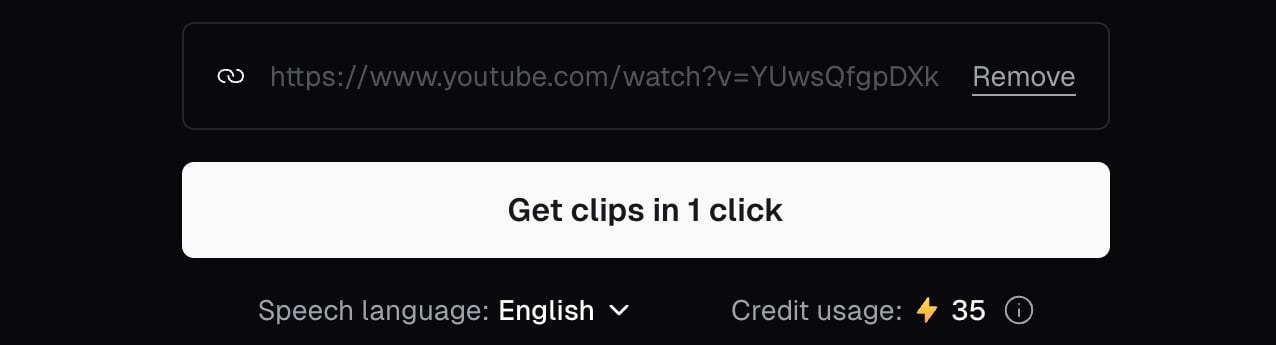
Adding a YouTube link in OpusClip before clicking Get clips in 1 click. Source: OpusClip Help Center
OpusClip: describe the moments you want

The optional Include specific moments prompt field in ClipAnything. Source: OpusClip Help Center
OpusClip: pick a caption style
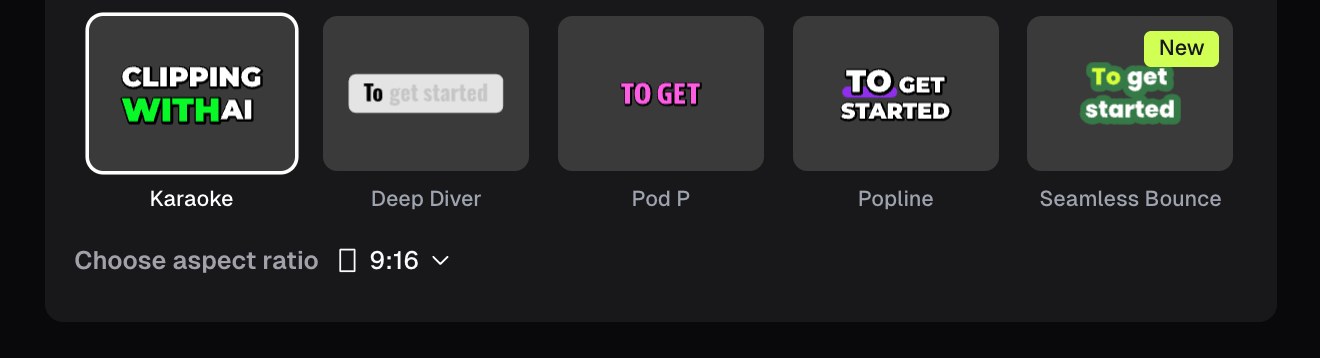
Caption style presets in OpusClip, with a 9:16 aspect ratio selector. Source: OpusClip Help Center
OpusClip: edit captions in the transcript
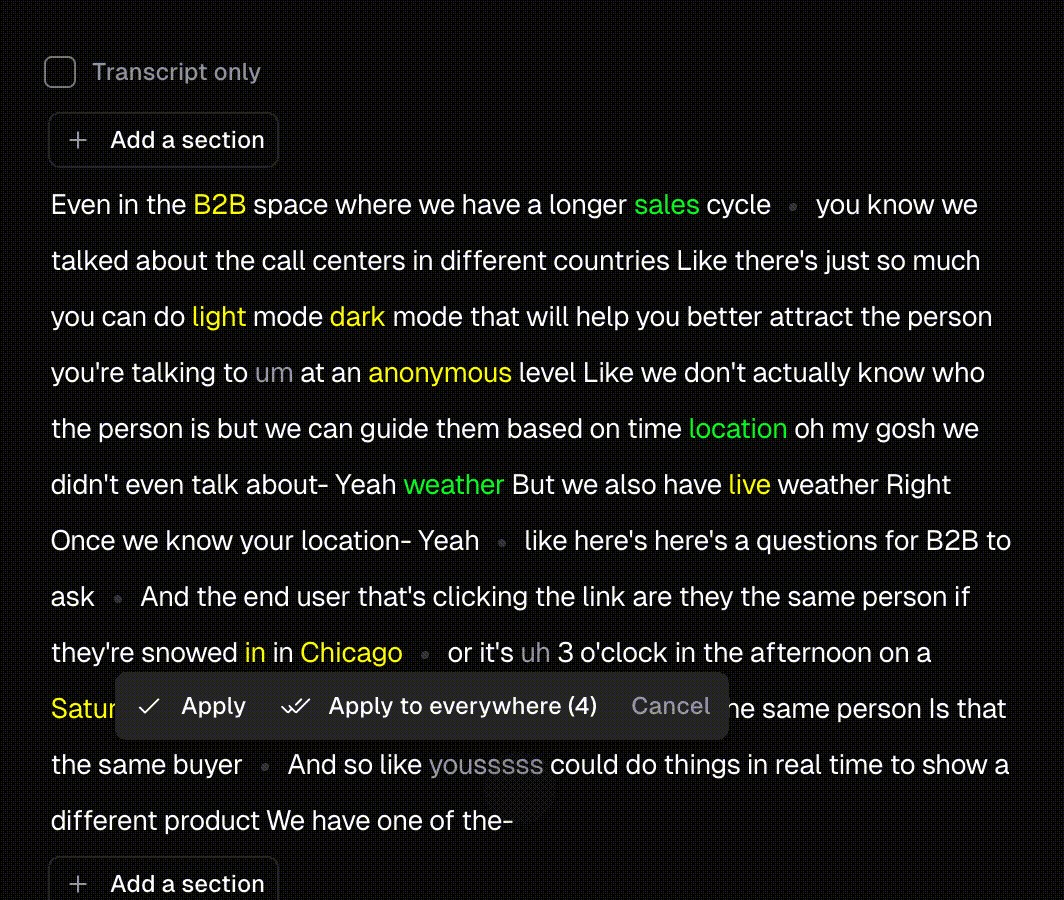
Correcting a caption word in OpusClip, with options to apply it once or everywhere. Source: OpusClip Help Center