Turn one long story into a Part 1, 2, 3 cliffhanger series
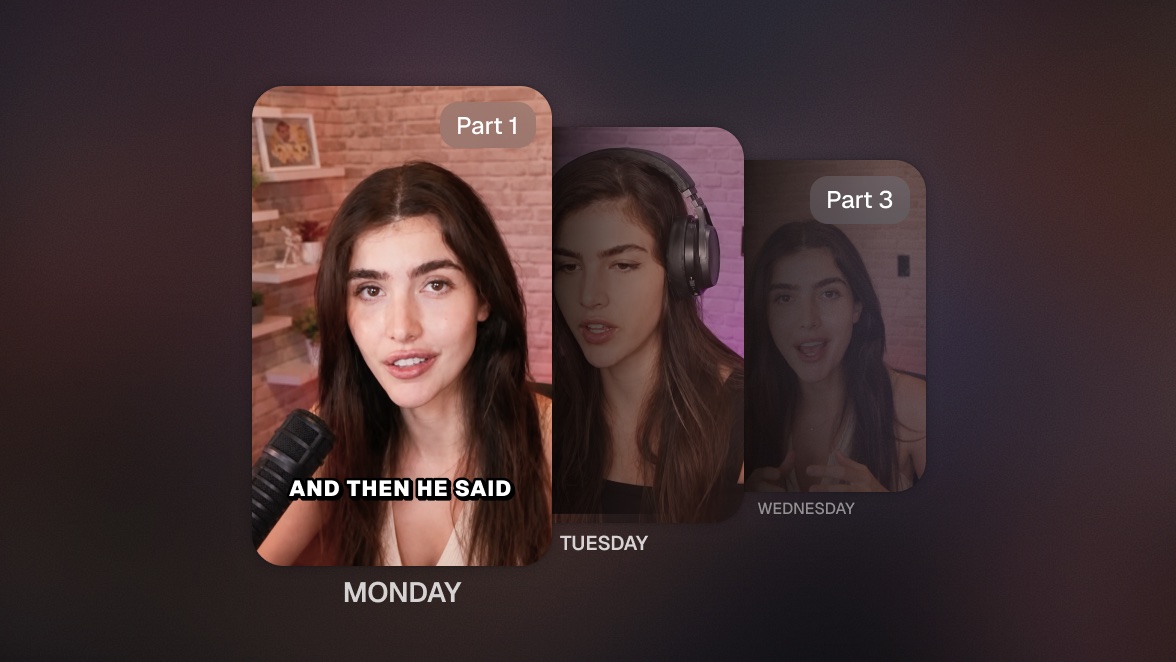
Your agent cuts one long video into a numbered series, ends every part mid-tension on purpose, and schedules the parts on consecutive days. Highlights make viewers say nice clip. Cliffhangers make them hit follow.

Run it with your agent
- Open Customize in your client and select “Connectors”
- Find OpusClip and click "Add"
- Sign in with your OpusClip account in the OAuth window
- Run the command below in your terminal
claude mcp add --transport http opusclip https://mcp.opus.pro/mcp - Start Claude Code and run
/mcp - Approve the OAuth sign-in with your OpusClip account
claude mcp add --transport http opusclip https://mcp.opus.pro/mcp- Open Settings → Plugins → MCPs, then click "+ Add server"
- Name it "OpusClip", switch Type to Streamable HTTP, and paste the URL below
- Save — the server appears in the list with an "Authenticate" button
- Click "Authenticate" and allow access with your OpusClip account
https://mcp.opus.pro/mcp- Open Settings → Plugins → Click on “Developer mode” and toggle it on
- Go back to Plugins → Browse plugins → Click the “+” icon
- Name it "OpusClip" and paste the URL below for the Connection Server URL
- Click the checkbox “I understand and want to continue”. Then click the “Create” button
- Select your OpusClip account in the OAuth window and click “Allow access”
https://mcp.opus.pro/mcp- Open Customize in the left panel, then select MCPs
- Add New MCP Server
- Paste the configuration below
- Save the file (Cmd+S / Ctrl+S), then approve the sign-in request in your browser
{"mcpServers": {"opusclip": {"url": "https://mcp.opus.pro/mcp"}}}- Open Extensions ⇧⌘X → search @mcp opusclip
- Pick the opus-pro entry
- Install → OAuth sign-in
What this workflow does
Some stories are too good to spend in one post. This workflow takes a single long video (a story, a case study, a tutorial with a payoff) and cuts it into a numbered series: Part 1, Part 2, Part 3. The trick is where the cuts land. Instead of ending each clip at a natural pause, the agent deliberately ends it mid-tension, right before the reveal, and closes with a prompt that Part 2 drops tomorrow. Then it schedules the whole series on consecutive days so the payoff always arrives on time.
Why it works
Serialization is the single most proven organic growth mechanic on TikTok: a viewer who watches Part 1 has a reason to follow you (so they don't miss Part 2), a reason to come back tomorrow, and a reason to binge the earlier parts if they arrive late. Creators who do this by hand agonize over where to cut. The agent reads the transcript, finds the narrative beats, and places every cut at maximum suspense, which is a different job from finding the best standalone moments. Highlights make viewers say nice clip. Cliffhangers make them hit follow.
What you need
- OpusClip MCP (api.opus.pro/api/mcp): clipping steered by a custom prompt, transcript access for finding the story beats, fine cut-point control, and the scheduler (Pro plan required for tool calls)
- One long video with a story arc: a personal story, a build, a transformation, an investigation, anything with a setup and a payoff
- Your social accounts connected in OpusClip so the series schedules to consecutive days automatically
- Claude, Cursor, or any MCP-enabled agent to direct the serialization
How it works
- Give the agent the story. One long video and how many parts you want. It reads the transcript first to map the arc: setup, escalation, reveal.
- It plans the cuts for suspense, not completeness. Each part ends just before the next payoff. The agent can shift a cut a few seconds earlier on purpose, so the part ends on the sharpest open question.
- Each part gets serialized packaging. Numbered titles (Part 1/3), a caption that opens with a one-line recap for late arrivals, and an ending prompt pointing at tomorrow.
- The series schedules itself. Consecutive days, same time slot, so the audience learns the rhythm. Part 1 posts first; the payoff part lands last.
- You approve the plan once. The agent shows you the cut map (where each part starts, ends, and what question it leaves open) before anything renders or gets scheduled.
Try this prompt
Here's a 12-minute video where I tell the full story of [topic]: [link or file]. Read the transcript and cut it into a 3-part cliffhanger series. Each part should end mid-tension right before the next reveal, with a caption that recaps the previous part in one line and teases tomorrow. Show me the cut map first, then schedule the parts to TikTok on three consecutive days at 6pm.
Tips
- Three parts is the sweet spot: enough to build a habit, short enough that nobody drops off waiting for the ending.
- Ask the agent to end Part 1 on the strongest open question of the whole story, even if that means Part 1 is the shortest part. The first cliffhanger decides whether the series works.
- Pin a comment on each part linking to the previous one; late arrivals binge backwards, and every part becomes a door into the series.
- Save the format: once a story structure works, the same instruction turns every future long video into a series with one message.