No items found.
7 Best AI Tools to Predict Video Virality in 2026

OpusClip is the pick for scoring clips before they are posted: it cuts a long video into clips and gives each one a Virality Score, shown next to the clip. Here, predicting virality means a tool attaches a score, label or rating to a video or clip before it goes live. No tool can guarantee a video goes viral, and every score in this guide comes from the vendor's own model. Items 2 to 7 follow one yardstick: how fully the vendor's own pages say what the score is based on and where it appears. Facts come from each vendor's own pages, read on November 10, 2026.
Key takeaways
- Best for ranking the clips cut from one long video by Virality Score: OpusClip. The help center says each clip gets its own score, shown next to the clip.
- Best for a score with four named grades on each AI clip: Quso, whose help center names Trends, Hook & Flow, Engagement and Shareability and says the score shows on paid plans.
- Best for a free checklist score plus AI scoring in paid clipping: ClipSpeedAI, with a free checker and a $1, 3-day trial that needs a card.
- Best for a 0 to 100 score on every clip with a basis on its pages: Klap, with a free try on one video.
- Best for scoring a finished clip of up to 15 seconds: Higgsfield's Virality Predictor, which is labeled beta.
- Best for clip ratings inside a general video editor: VEED, where the Free plan can try Clips once.
- Best for a Virality Indicator tag on clips from your own streams: StreamYard, with 2 AI clips a month on Free.
What counts as predicting video virality
Searches for an AI viral video predictor point to three kinds of tool. Clip scorers cut a long video into clips and rank them: OpusClip, Quso, ClipSpeedAI, Klap, VEED and StreamYard do this. Pre-publish checkers take a finished clip and return a read on it: Higgsfield's Virality Predictor takes an uploaded clip, and ClipSpeedAI's free checker scores a clip from eight yes or no answers. Title and thumbnail predictors estimate click-through instead, which our guide to the best YouTube title analyzers and CTR predictors covers.
Analytics tools that report views after posting are not covered here, and neither are highlight finders that return moments without a score, which our guide to the best auto highlight generators for long videos covers. Every vendor here frames its score as a prediction. Quso's help center calls its score a prediction based on content analysis, not a guarantee, ClipSpeedAI's blog calls its score a prediction of structural quality rather than guaranteed virality, and StreamYard's blog says AI cannot promise virality.
How to choose
- Many clips from one long video, ranked: OpusClip, Quso, ClipSpeedAI, Klap, VEED or StreamYard. OpusClip's AI viral clip maker page and ClipAnything page describe how it finds and rates moments.
- A finished clip or a hook before posting: Higgsfield's Virality Predictor takes uploads of up to 15 seconds, and ClipSpeedAI's checker takes no upload at all, only answers.
- Recordings made in StreamYard: its AI clips carry a Virality Indicator tag.
- A stated basis for the score: Quso lists four grades and Klap lists the factors it scores, while StreamYard's pages list none.
- Titles and thumbnails: use the title analyzers guide, since a clip score does not rate them.
- Patterns from clips that already performed: OpusClip's research page on how to make a viral short-form video reports patterns from the 13.5M+ clips it says it analyzed, including a ranking of hook types, and was last updated April 3, 2026.
At a glance
- OpusClip: best for ranking the clips cut from one long video by Virality Score; Starter $15 a month (monthly billing only), Pro $29 a month or $14.50 a month billed annually; free plan yes (watermark); see the help center article for what each plan shows.
- Quso: best for a score with four named grades on each AI clip; Lite $29 a month billed monthly; free plan yes (75 credits a month, 720p with a watermark), though its help center says the score shows on paid plans.
- ClipSpeedAI: best for a free checklist score plus AI scoring in paid clipping; Starter $19 a month on its monthly pricing view, after a $1, 3-day trial that needs a card; the checker is free.
- Klap: best for a 0 to 100 score on every clip with a basis on its pages; Basic $14.50 a month billed yearly ($29 month to month) for 100 clips a month; free try on 1 video with no credit card, but downloading and posting need a paid plan.
- Higgsfield Virality Predictor: best for scoring a finished clip of up to 15 seconds; the page prints no price and calls the tool beta, so see Higgsfield's pricing page.
- VEED: best for clip ratings inside a general video editor; Creator $12 per user a month billed yearly; the Free plan can try Clips once.
- StreamYard: best for a Virality Indicator tag on clips from StreamYard recordings and streams; free plan yes (2 AI clips a month, StreamYard logo required); see the pricing page for paid plans.
What each tool scores, how the score looks and what the vendor says it rests on
The At a glance list covers best-for, price and free plan; this table compares what each tool scores, the form of the score, the basis the vendor states, where the score appears and the free access the vendor states, as listed on each vendor's own pages on November 10, 2026.
| Tool | What is scored, from what input | Form of the score | Basis the vendor states | Where the score appears | Free access the vendor states |
|---|---|---|---|---|---|
| OpusClip | Each clip it cuts from a long video that is uploaded or linked | A score on each clip; the help center article explains it | AI analysis of how likely each clip is to go viral; see the help article for the factors | Next to each clip on the results page, which sorts by score by default | See the pricing page and the help article for what each plan shows |
| Quso | Each clip made by its AI Clips tool; clips made by hand get no score | A number out of 100, shown in a Score box | Four grades: Trends, Hook & Flow, Engagement and Shareability | Score box beside each clip; hover for the grades; clips sort by score | Paid plans only per its help center; the Free plan lists 75 credits a month |
| ClipSpeedAI | Clips from a pasted link or file; a checker scores a clip from 8 yes/no answers | A 0-100 AI score; the checker adds up points per answer | Blog lists five signals, led by hook strength in the opening 3 seconds | On each generated clip; the checker shows a score with tips on the page | Checker is free; AI scoring comes with a $1, 3-day trial that needs a card |
| Klap | Each clip from a pasted YouTube link or an uploaded video file | A score from 0 to 100 on every clip | Hook strength, emotional peak, dialogue clarity and pacing; other pages word it differently | Clips ranked by score, shown before a clip is played | Free try on 1 video, no credit card; downloading and posting need a paid plan |
| Higgsfield Virality Predictor | A short clip uploaded from a device or generated assets, up to 15 seconds | A virality score, a peak hook timestamp, a hold rate and a brain-region heatmap | A modeled audience's brain response across vision, sound, memory, attention and language | On the Virality Predictor page after a clip is dropped in and Predict is clicked | No price on the page, which calls the tool beta |
| VEED | Clips its AI finds in a long upload (1 minute to 3 hours of speech) | Ratings for different aspects of each clip; no scale printed | Flow, impact, clarity and relevance, per its AI clip generator page | Review page of the AI Clips tool; a clip rating surfaces top moments | Free plan can try Clips once; Creator and above have unlimited access |
| StreamYard | AI clips generated from a StreamYard recording or live stream | A Virality Indicator tag on a clip; no number shown on the pages read | Moments predicted to perform well on social media; no factors listed | On AI clips in the video library; the blog says to sort by it | Free plan: 2 AI clips a month, StreamYard logo required |
1. OpusClip: Best for ranking the clips cut from one long video by Virality Score

A Virality Score badge on a clip's results card. Source: OpusClip help center
OpusClip's AI viral clip maker page says it cuts long videos into short clips and ranks each one by how likely it is to perform, and its steps are to drop in a video link or file, let the AI find the moments with viral potential, then customize and post. The help center article on the Virality Score says each clip gets its own score, shown next to the clip, that higher scores indicate a greater likelihood of attention, engagement and shares, and that clips are sorted by score by default. Another help center article says the order can be switched to chronological, and the ClipAnything page says each scene is rated on its virality potential.
For how the score is calculated, its scale and which plans show it, the help center article is the source; this guide does not restate those details.
Pricing: OpusClip's pricing page lists Free at $0 (a watermark), Starter at $15 a month (monthly billing only) and Pro at $29 a month, or $14.50 a month billed annually; Business is custom. Each plan lists its credits on the pricing page.
Considerations: The score is OpusClip's own model, and the pages we read describe it on the clips OpusClip finds in a long video, not as a check for a finished video cut elsewhere. It ranks clips against each other from one source, so a high score does not say how a clip will do on a particular channel, and the pages we read print no figure showing how closely scores track later views. Free clips carry a watermark.
- Choose it if the job is to decide which clips from a long video to post first, with the score visible beside each clip.
- Skip it if a finished video made elsewhere needs a score, or a title or thumbnail needs a click-through estimate.
2. Quso: Best for a score with four named grades on each AI clip

Quso's clip list with its AI Predicted Virality tooltip. Source: Quso help center
Quso's virality score page says to get a score before posting and describes AI that analyzes clips, predicts engagement and suggests what to tweak. Its help center gives the detail: the score is a number out of 100 given to every clip made by its AI Clips tool, based on four grades (Trends, Hook & Flow, Engagement and Shareability). The score sits in a Score box next to each clip, hovering over it shows the four grades, and clips can be sorted by score. The help center also gives score bands to read the result by, and it says the score is a prediction based on content analysis, not a guarantee.
Pricing: Quso's pricing page lists Free at $0 a month with 75 credits, 720p and a quso.ai watermark, Lite at $29 a month billed monthly, Essential at $39 a month billed monthly and Growth at $49 a month billed monthly. Per the help center, the score is shown on paid plans (Lite, Essential, Growth and Plus).
Considerations: The score is not shown on the Free plan, per Quso's help center, so a free account may not show it. Custom clips made by hand do not get a score, and the help center's bands label anything below 80 as average, so a score should be read against those bands rather than as a plain percentage.
- Choose it if named grades and a sortable list of scored clips matter.
- Skip it if the Free plan must show the score, or a video cut elsewhere needs scoring.
3. ClipSpeedAI: Best for a free checklist score plus AI scoring in paid clipping
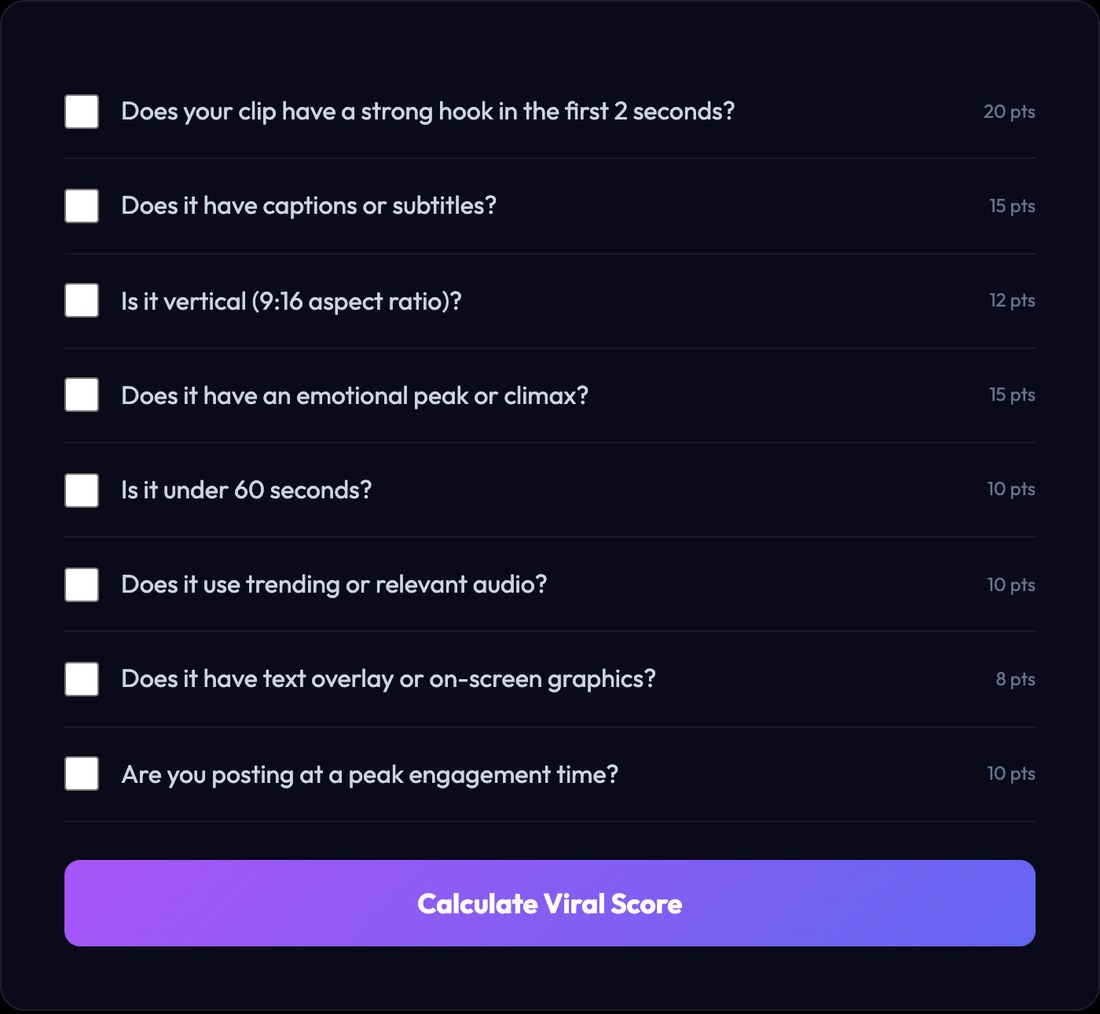
ClipSpeedAI's free viral score checker. Source: ClipSpeedAI website
ClipSpeedAI offers two routes. Its Free Viral Score Checker asks eight yes or no questions about a clip, each worth points (the hook in the first 2 seconds is worth the most), and totals them into a score with tips; this is a checklist the user answers, not an AI reading the video. In paid clipping, the page says it generates clips from a pasted link or a file and scores each one for viral potential.
ClipSpeedAI's blog says its 0 to 100 score is a prediction of structural quality based on five measurable signals, led by hook strength in the opening 3 seconds, which it says carries about 25% of the weight. The same post lists narrative structure, emotional intensity, specific-data moments and clip length as the other four.
Pricing: ClipSpeedAI's pricing page says $1 starts a 3-day trial on any plan, card required, and that Pro then costs $39 a month. Starter is listed at $19 a month on the page's monthly view, and AI viral scoring is listed on each plan.
Considerations: The blog prints performance claims for score bands, for example that clips scoring 85 or more outperform clips scoring 60 to 70 by 3 to 8 times on average, with no dataset or method shown on the page, so treat them as vendor claims we could not verify. The checker scores the answers it is given, so it cannot catch what is wrong with the video itself, and there is no free plan for the AI score because the trial needs a card.
- Choose it if a quick checklist on a clip is wanted before paying, plus AI scoring in a clipping tool with a $1 trial.
- Skip it if a free plan for the AI score is needed, or a score without performance claims attached.
4. Klap: Best for a 0 to 100 score on every clip with a basis on its pages
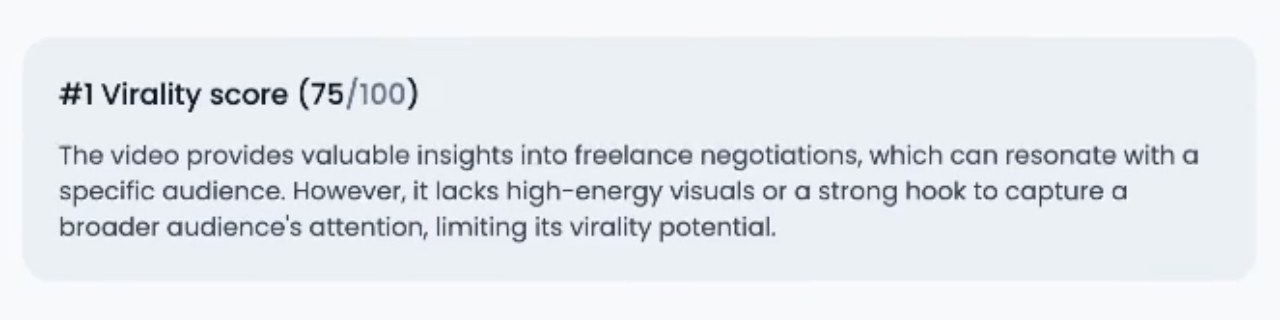
Klap's product mock of a clip score with a written explanation. Source: Klap website
Klap's viral clip generator page says to paste a YouTube link or upload a file (MP4, MOV or WebM), after which each clip gets a Virality Score from 0 to 100 and the clips are ranked, best first. The page says the score is based on what is performing on TikTok, Reels and Shorts, scored by hook strength, emotional peak, dialogue clarity and pacing, and its product mock shows a clip's score beside a short written explanation.
Klap's other pages describe the basis in slightly different words: its AI clip maker page lists hook strength, pacing, retention signals and topic relevance, so the factors are described but not fixed in one place.
Pricing: Klap's pricing page lists Basic at $14.50 a month billed yearly for 100 clips a month ($29 month to month, per Klap's converter page), Pro at $39.50 a month billed yearly for 300 and Pro+ at $94.50 a month billed yearly for 1,000. Plans count clips, not source minutes.
Considerations: The free try covers one video and, per Klap's converter page, downloading and posting need a paid plan. The viral clip generator page says clips above 80 are statistically much more likely to perform but prints no figures for that claim, so we could not verify it. The pages we read describe scoring on clips Klap generates, not on a finished video.
- Choose it if a visible score on every clip with a stated basis is wanted, and a one-video free try is enough to judge it.
- Skip it if a free download is needed to judge the result, or a finished clip from elsewhere needs a score.
5. Higgsfield Virality Predictor: Best for scoring a finished clip of up to 15 seconds
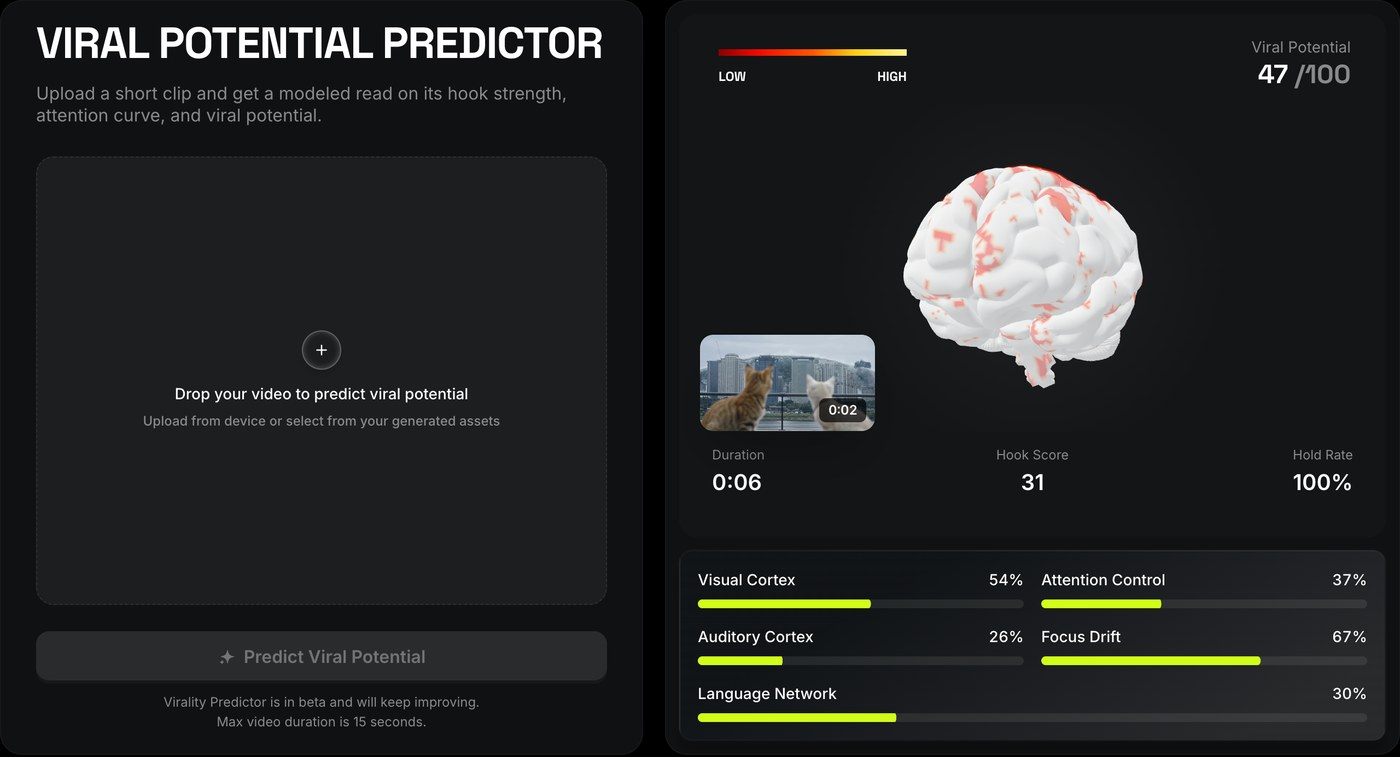
Higgsfield's Virality Predictor page, with the page's example result. Source: Higgsfield website
Higgsfield's Virality Predictor page says to upload a short clip and get a modeled read on its hook strength, attention curve and viral potential. The clip can be a hook under review, an ad before launch or a reel sitting in drafts, in any format, up to 15 seconds. The page says a modeled audience watches while the tool maps brain response across vision, sound, memory, attention and language, and that the results are a virality score, a peak hook timestamp, a hold rate and a heatmap of brain regions.
Pricing: The Virality Predictor page prints no price and says the tool is in beta; see Higgsfield's pricing page for plans.
Considerations: The 15-second cap means a longer Short or Reel would need its opening cut out to be scored. The page says the score comes from a model of viewer brain response, and it prints no figure showing how its results compare with real performance. The page describes uploading one clip at a time, so it does not rank many clips from a long video.
- Choose it if a hook or the opening of an ad needs a quick read before posting.
- Skip it if many clips from a long video need ranking, or a validated accuracy figure is required.
6. VEED: Best for clip ratings inside a general video editor

The upload step of VEED's AI Clips tool. Source: VEED help center
VEED's AI Clips tool turns a long upload into short clips, and its help center says the review page shows ratings for different aspects of each clip, with a clip rating that surfaces the most engaging moments. VEED's AI clip generator page says the AI analyzes content for flow, impact, clarity and relevance to help identify clips with viral potential, and that its scoring system makes clip selection more efficient while the final choice stays with the creator. The help center says the upload needs at least 1 minute of speech and at most 3 hours.
Pricing: VEED's pricing page lists Creator at $12 per user a month billed yearly and Pro at $22 per user a month billed yearly. The help center says the Free plan can try Clips once, and Creator, Pro, Studio and Enterprise have unlimited access.
Considerations: The pages we read print no scale, number or formula for the ratings, and the rating is one part of a broader editor that also covers subtitles, avatars and voice. AI Clips works from a long upload with speech, so it is not a check for a finished short clip.
- Choose it if clip ratings are wanted inside an editor already used for subtitles and edits.
- Skip it if a numeric score with a stated scale is needed.
7. StreamYard: Best for a Virality Indicator tag on clips from your own streams

StreamYard's AI clips tab with High virality badges. Source: StreamYard help center
StreamYard's help center says its AI clips feature generates captioned vertical clips from a StreamYard recording or live stream, and that AI clips include a Virality Indicator tag to highlight moments predicted to perform well on social media. StreamYard's blog says to sort by the indicator to review the most promising moments first, and it also says AI cannot promise virality. The pages we read list no factors behind the tag and show no number, so it works as a label rather than a score.
Pricing: StreamYard's help center lists AI clips on the Free plan with 2 clips a month and a StreamYard logo required, Core with 6, Advanced with 25 and Business with unlimited, and its pricing page lists AI clips under Core. See StreamYard's pricing page for plan prices.
Considerations: The help center describes generating clips from a StreamYard recording or live stream, so it is not a way to score a video made elsewhere, and its own blog points to other tools for recordings made outside StreamYard. The tag states no basis, which makes it harder to interpret than the other scores here.
- Choose it if recording and streaming already happen in StreamYard and a simple ranking tag is enough.
- Skip it if a score with a stated basis, or a number, is needed.
How we compared these tools
We compared each tool on six criteria: what is scored, the form of the score, the input, the basis the vendor states, where the score appears, and the free access the vendor states. The guide is organised around the job in the title, predicting a video's or clip's virality before it is posted. OpusClip comes first because scoring the clips cut from a long video is the part of that job its pages and help center document, and its limits are stated in its entry: the score belongs to the clips OpusClip finds, it is OpusClip's own model, and the pages we read print no figure for how it tracks later views. Items 2 to 7 follow one yardstick: how fully the vendor's own pages say what the score is based on and where it appears. Quso is second because its help center names the four grades, the scale and where the score shows. ClipSpeedAI prints its checklist points and signal weights, Klap states a basis on several pages in different words, Higgsfield states what its model analyzes and what comes back, VEED names four qualities but no scale, and StreamYard names no factors.
All facts come from each vendor's own pricing page, product page or help center, read on November 10, 2026. We did not run hands-on tests of any competitor, and this guide prints no prediction-accuracy figure unless a vendor's own page prints one, in which case it is attributed. We also read pages for Submagic, Spikes Studio, Munch, Kineclip and OpenCut AI and left them out: Submagic's Magic Clips page mentions a virality score in one line but gives no scale, basis or location, the Spikes Studio and Munch pages we read describe no score, Kineclip's own blog on viral scoring describes its approach as having no score, and OpenCut AI's score appears only in a launch post. Prices change, so confirm on the vendor page before buying.
Red flags to watch for
- A score is the vendor's own model. No tool can guarantee a video goes viral, and Quso's help center and StreamYard's blog both say so.
- Different scales and bases. Quso scores out of 100 with bands, Klap scores 0 to 100 and describes its basis in different words on different pages, and StreamYard shows a tag, so a score from one tool says nothing about another's.
- Performance claims with no dataset. ClipSpeedAI's blog and Klap's page say high-scoring clips perform better, and neither page shows the data behind the claim.
- Scores behind paid plans or trials. Quso's help center says the score shows on paid plans, Klap's free try covers one video with no downloads, VEED's Free plan tries Clips once, StreamYard's Free plan allows 2 AI clips a month, and ClipSpeedAI's AI scoring needs a card for its trial.
- Short caps and beta labels. Higgsfield's Virality Predictor takes clips of up to 15 seconds and calls itself beta.
- A checklist that is not a model. ClipSpeedAI's free checker totals points from answers the user gives about the clip.
- A label with no stated basis. StreamYard's Virality Indicator lists no factors, and VEED's ratings print no scale.
- Scores only on clips the tool cuts. Quso's help center says custom clips made by hand get no score, and the pages we read for OpusClip, Klap and StreamYard describe scoring on clips the tool generates.
Frequently asked questions
What is the best AI tool to predict video virality?
For ranking the clips cut from one long video, OpusClip is the pick in this guide: it gives each clip a Virality Score and shows it next to the clip. Higgsfield's Virality Predictor fits a finished clip of up to 15 seconds, and Quso fits a score with four named grades. OpusClip's AI viral clip maker page describes the flow, and OpusClip pricing lists the plans.
Can AI predict whether a video will go viral?
Not with a guarantee. Quso's help center calls its score a prediction based on content analysis, not a guarantee, ClipSpeedAI's blog calls its score a prediction of structural quality rather than guaranteed virality, StreamYard's blog says AI cannot promise virality, and Higgsfield's page describes its output as a modeled read. The pages we read show no independent test of how any of these scores track real views.
What is a virality score?
A number, label or rating a tool attaches to a clip or video to estimate how well it may perform. Each vendor defines its own: Quso scores out of 100 on four grades, Klap scores 0 to 100 on factors it lists, StreamYard shows a tag, and OpusClip explains its Virality Score in a help center article. Scores from different tools are not comparable.
Will my video go viral, and how can I check before posting?
A score can help choose which clip to post first, but it cannot say how an audience will respond. To check before posting, a clip scorer ranks the clips from a long video (OpusClip, Quso, Klap), Higgsfield's Virality Predictor reads an uploaded clip of up to 15 seconds, and ClipSpeedAI's checker totals a checklist. For patterns across clips that already performed, see OpusClip's research page on how to make a viral short-form video.
How reliable are AI virality scores?
No page we read publishes a method and dataset that lets a reader check a score against real results. ClipSpeedAI's blog and Klap's page make performance claims for high-scoring clips that we could not verify, so a score is best used as a relative ranking inside one tool and compared with a channel's own results over time.
Is there a free AI virality score tool?
Some routes are free with limits. ClipSpeedAI's checker is free, Klap's trial covers one video with no downloads, VEED's Free plan tries Clips once, StreamYard's Free plan allows 2 AI clips a month, and OpusClip and Quso have free plans, though Quso's help center says its score shows on paid plans and OpusClip's help center article has the details on its score. Higgsfield's page prints no price for its beta tool.
Which tools predict a YouTube title's click-through rate?
That is a different job from scoring a clip. Our guide to the best YouTube title analyzers and CTR predictors covers it, and our guide to auto highlight generators covers finding moments in a long video without a score.