No items found.
7 Best AI Video Script Generators in 2026
OpusClip is the pick for a free first draft of a video script from a short idea: its free video script generator is one form with a description box and menus for platform, type, audience, tone and duration. Boords is the pick for a two-column audio and visual script that becomes a storyboard, Squibler for screenplay-style drafts, Synthesia and HeyGen for scripts that continue into presenter videos, Copy.ai for a script with a YouTube description, and Steve.ai for long prompts. Items 2 to 7 follow one yardstick: how exactly each vendor's page defines the script that comes back. Facts were read on November 18, 2026.
Key takeaways
- Best for a free first draft from a short idea: OpusClip. Its generator page has a description box that takes 10 to 500 characters, and its FAQ says the script comes back with scenes, dialogue, narrator lines and visual cues.
- Best for a two-column audio and visual script that becomes a storyboard: Boords. Its page says no sign-up is required, and its free plan lists 3 active scripts.
- Best for screenplay-style scripts with scene headings and dialogue: Squibler. Its FAQ says the generator is free to use without signing up.
- Best for a free script in a chosen tone and language, then an avatar video: Synthesia. Its FAQ says the generator is free with no sign-up required.
- Best for a script plus a YouTube description from one keyword: Copy.ai. Its page says the tool researches the keyword, writes the script and writes the description.
- Best for a long prompt that feeds a script and a video: Steve.ai. Its prompt box shows a 32000 character limit.
- Best for a script paired with a presenter video: HeyGen. Its FAQ says scripts can be started for free, with higher limits on paid plans.
What a video script is, and three formats
A video script is the text a video is built from, and the vendors in this guide describe three formats. The format decides what the script can be handed to next: a voiceover, a teleprompter, a storyboard or a presenter video.
- Spoken-word script: text written to be read aloud, with a hook, the main points and a call to action. Synthesia's FAQ says a script should hook viewers with a strong opening, deliver clear value and close with a memorable call to action, and HeyGen's page says to include a clear call to action. OpusClip's FAQ describes its output as including scenes, dialogue, narrator lines and visual cues.
- Two-column audio and visual (AV) script: Boords says the format separates visual descriptions from audio and dialogue, and its FAQ says agencies and studios use it for commercials, explainers and corporate videos.
- Screenplay: Squibler's page describes scripts with scene headings, action lines and dialogue, and the examples on its page follow that layout.
A script is also not a transcript. A script is written before a video exists, and a transcript is the text of a video that already exists. For the text of an existing YouTube video, OpusClip's YouTube video transcript tool takes a pasted video link or an uploaded file. For reading a finished script on camera, see our guide to teleprompter apps for creators.
How to choose
- A fast first draft from one idea, with no account: Boords, Squibler or Synthesia, which say on their own pages that no sign-up is needed. OpusClip's free generator is also one form.
- A format a production team can shoot from: Boords for a two-column AV script with runtime, or Squibler for screenplay layout.
- A script that continues into a video: Synthesia or HeyGen for a presenter video, Steve.ai for a video made in its own tool.
- A script and a YouTube description from one keyword: Copy.ai.
- A long brief pasted in: Steve.ai, whose box shows a 32000 character limit. OpusClip's box takes 10 to 500 characters, so a long outline has to be condensed first.
- Prompting a general chat assistant instead of using a form: see our guide to ChatGPT prompts for video scripts.
- Titles and voice after the script: our guides to YouTube title generators and AI voiceover generators.
At a glance
- OpusClip: best for a free first draft from a short idea; the generator page is marked Free; Starter $15 a month (monthly billing only), Pro $29 a month or $14.50 a month billed annually; free plan yes (watermark).
- Boords: best for a two-column audio and visual script that becomes a storyboard; the generator page says no sign-up is required; free plan yes (3 active scripts and 5 active storyboards); see the pricing page for paid plans.
- Squibler: best for screenplay-style scripts with scene headings and dialogue; the generator is free without signing up, per its FAQ; Free $0 forever with 500 AI credits a month, Plus $15.83 a month billed annually.
- Synthesia: best for a free script in a chosen tone and language, then an avatar video; the generator is free with no sign-up required, per its FAQ; Basic plan $0 a month with watermarked videos; see the pricing page for paid plans.
- Copy.ai: best for a script plus a YouTube description from one keyword; listed as a free tool; the self-serve Chat plan is $29 a month billed monthly.
- Steve.ai: best for a long prompt that feeds a script and a video; the FAQ says the generator is free to start; Starter $19 a month billed yearly ($228), per its pricing page.
- HeyGen: best for a script paired with a presenter video; the FAQ says scripts can be started for free; Free plan $0 a month (3 watermarked videos a month); see the pricing page for paid plans.
What each script generator takes in, what it returns and what it limits
The At a glance list covers best-for, price and free plan; this table compares what goes into each generator, what comes back, the controls on the draft and the free limits each page prints, as listed on each vendor's own pages on November 18, 2026.
| Tool | What goes in | What comes back | Controls on the draft | Free limit as printed |
|---|---|---|---|---|
| OpusClip | Idea box (10 to 500 characters) plus platform, type, audience and tone menus | A structured script; FAQ lists scenes, dialogue, narrator lines and visual cues | Platform, type, audience and tone menus, plus an optional duration menu | Page marked Free; FAQ says free to use |
| Boords | A described idea, plus template, duration and language menus | A two-column audio and visual script split into scenes, editable in a script editor | Video-type prompts, duration, 18+ languages and a speaking-pace setting (WPM) | Page says no sign-up; free plan lists 3 active scripts and 5 active storyboards |
| Squibler | A prompt on type, characters, setting, tone and length; a draft can be imported | A screenplay-style draft with scene headings, action lines and dialogue | Type chips (Movie, Video, YouTube, Podcast, Course, TV Show, Play); tone and style | FAQ says free without signing up; free plan lists 500 AI credits a month |
| Synthesia | A topic in one box; tone of voice and output language menus | A script shown beside the form; page says it can become an avatar video draft | Tone of voice and output language; page says to adjust tone, length and audience | FAQ says free with no sign-up required; Basic plan videos carry a watermark |
| Copy.ai | General topic, conversational style and an overarching keyword | Keyword research, a video script and an optimized YouTube description | One conversational style field on a form with three fields: topic, style and keyword | Listed as a free tool; the page prints no usage limit |
| Steve.ai | One prompt box with a 32000 character limit and example prompts | A script draft; page lists YouTube, Reels, Shorts, TikTok, podcast and ad formats | Tone, length and style; page lists 8+ languages | FAQ says a free generator is ready to use; upgrade for 4K exports or multilingual scripts |
| HeyGen | A topic or concept; the page says to share topic, audience or key points | A structured script; page says it can be copied, exported or paired with an avatar | Tone, structure and format; FAQ also lists length, voice and keywords | FAQ says start free, higher limits on paid; Free plan videos are watermarked |
1. OpusClip: Best for a free first draft from a short idea
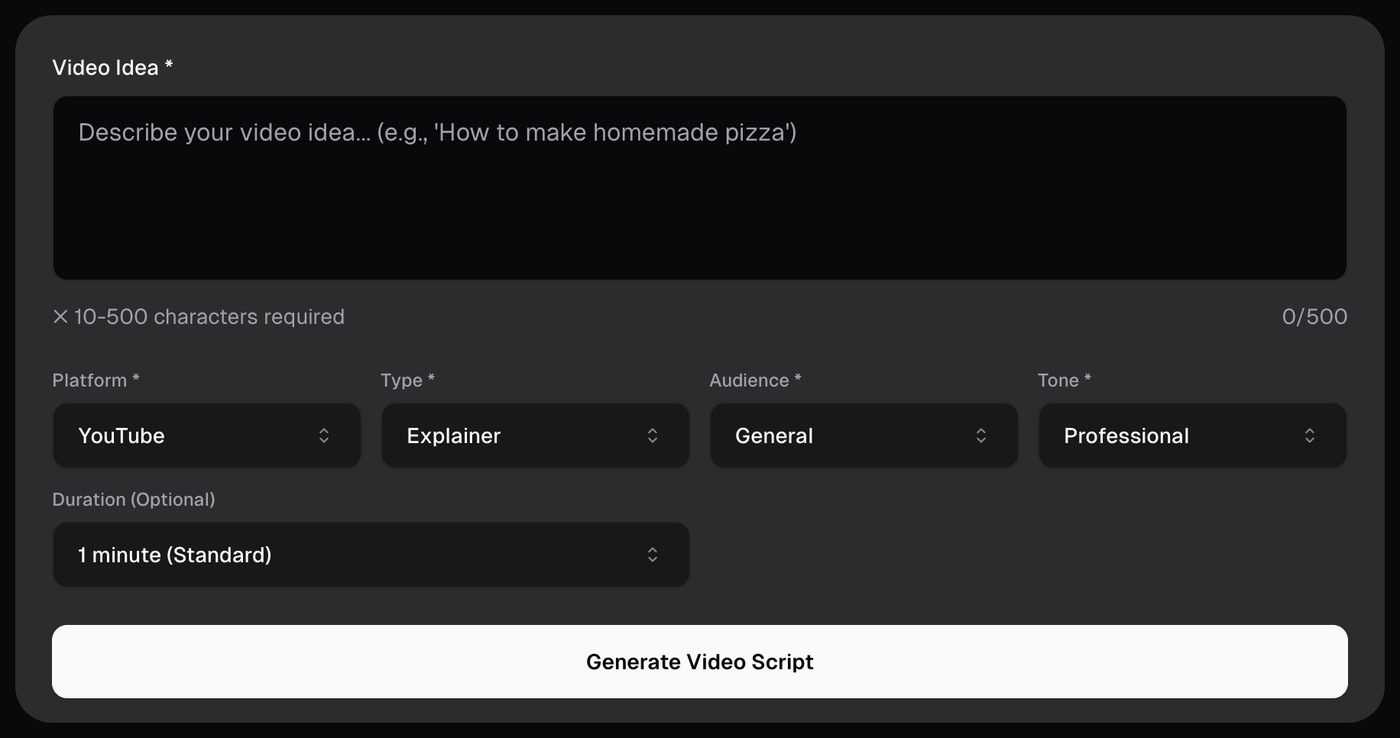
OpusClip's free video script generator. Source: OpusClip video script generator page
OpusClip's free video script generator is a single form. A Video Idea box takes 10 to 500 characters, and four menus marked required sit under it: Platform (YouTube, LinkedIn, Instagram or TikTok), Type (Explainer, Marketing, Social Media, Educational or Entertainment), Audience (General, Professionals, Teens, Adults or Seniors) and Tone (Professional, Casual, Friendly, Energetic, Serious or Humorous). An optional Duration menu sits below them. The page's FAQ says the AI generates a complete, structured script including scenes, dialogue, narrator lines and visual cues.
The same page lists sibling tools, including a YouTube transcript maker, title generator, description generator and thumbnail maker. For turning a finished script into a video, OpusClip's sister app Agent Opus is described in its help center: Standard and Standard+ modes turn a written script or transcript into narrated video. For cutting a finished long video into short clips, that job belongs to the OpusClip product.
Pricing: The generator page is marked Free. OpusClip's pricing page lists a Free plan at $0 (clips carry a watermark), Starter at $15 a month (monthly billing only) and Pro at $29 a month, or $14.50 a month billed annually. Business is custom.
Considerations: The generator is a free web form that drafts text from a short description, and clipping, captions and editing happen in the OpusClip product, so the draft is a starting point to edit before anything is recorded. The 500-character limit on the idea box means a detailed brief or an existing outline has to be condensed to fit.
- Choose it if a quick first draft is needed from a sentence or two, with the platform, type, audience and tone picked from menus, and the finished video may later be cut into clips in OpusClip.
- Skip it if a long brief has to go in as written, or the script must come back in a named production format such as a two-column AV script.
2. Boords: Best for a two-column audio and visual script that becomes a storyboard
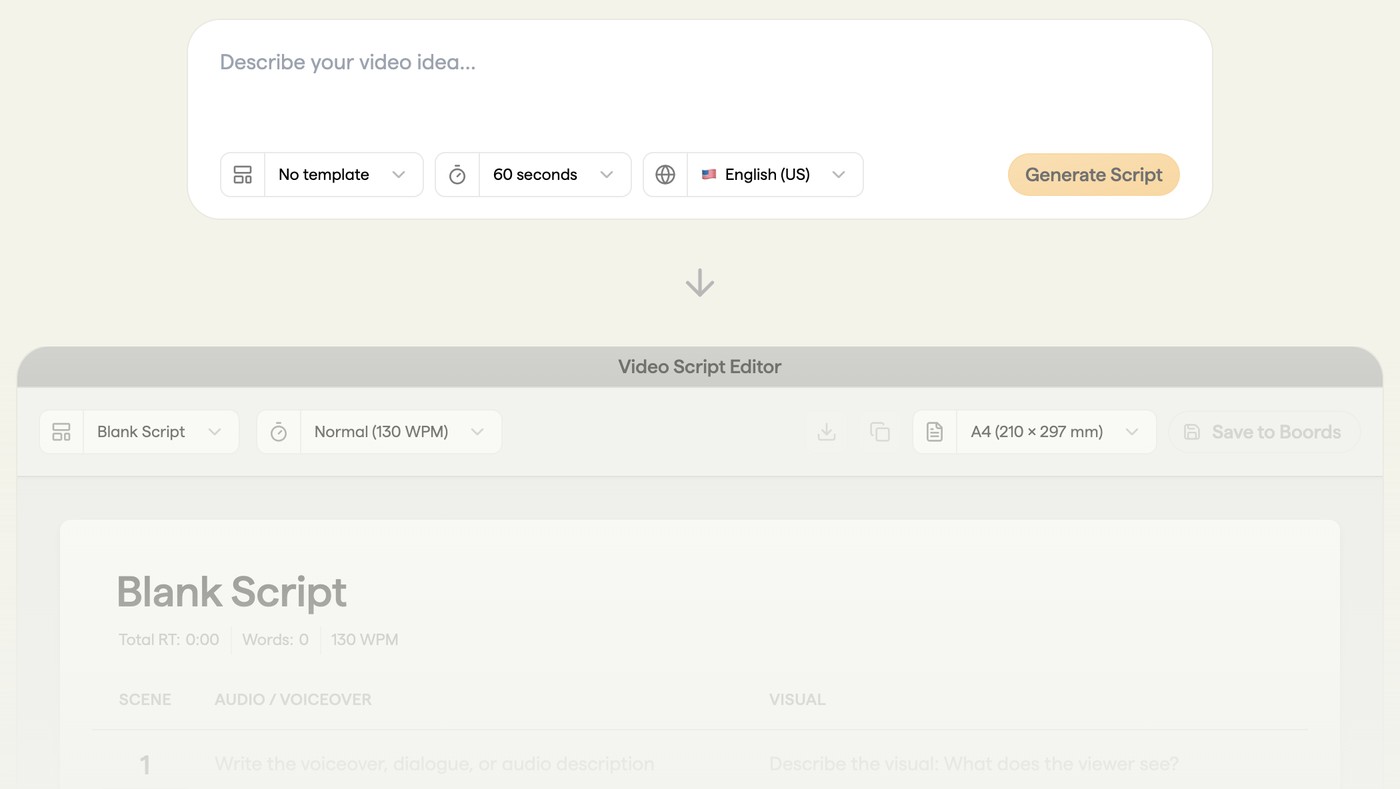
Boords' AI script generator above its script editor preview. Source: Boords website
Boords' free AI script generator page says it turns an idea into a fully editable video script in seconds with no sign-up required. The form is a description box with three menus: a template (shown as No template), a duration and a language. The page says the output is a two-column AV script, with visual directions and audio or dialogue in separate columns, and that prompts are available for commercial scripts, explainer videos, corporate communications, social media content and YouTube videos. It says scripts can be generated in over 18 languages.
The script opens in an editor that shows words and total runtime at a speaking pace set in words per minute; the preview lists Normal at 130 WPM. The page says a script can be edited, exported or saved to Boords, and converted into a storyboard, where AI images can be generated for each frame.
Pricing: Boords' pricing page lists a Free plan with no credit card required, with 5 active storyboards, 3 active scripts and 8 one-off sample AI image credits. Paid plans are listed on the same page with a monthly and a yearly view, so confirm the billing basis there.
Considerations: Boords is a pre-production platform for video agencies, so the script is the first step of a storyboard workflow and not the end of one. The generator page offers saving to Boords as a separate step from generating, and the free plan lists 3 active scripts, which matters for a channel that drafts many scripts.
- Choose it if a producer, agency or marketing team wants a shootable two-column script with runtime and a route to a storyboard.
- Skip it if plain spoken text for a talking-head video is enough, or screenplay layout is wanted.
3. Squibler: Best for screenplay-style scripts with scene headings and dialogue
Squibler's free AI script generator. Source: Squibler website
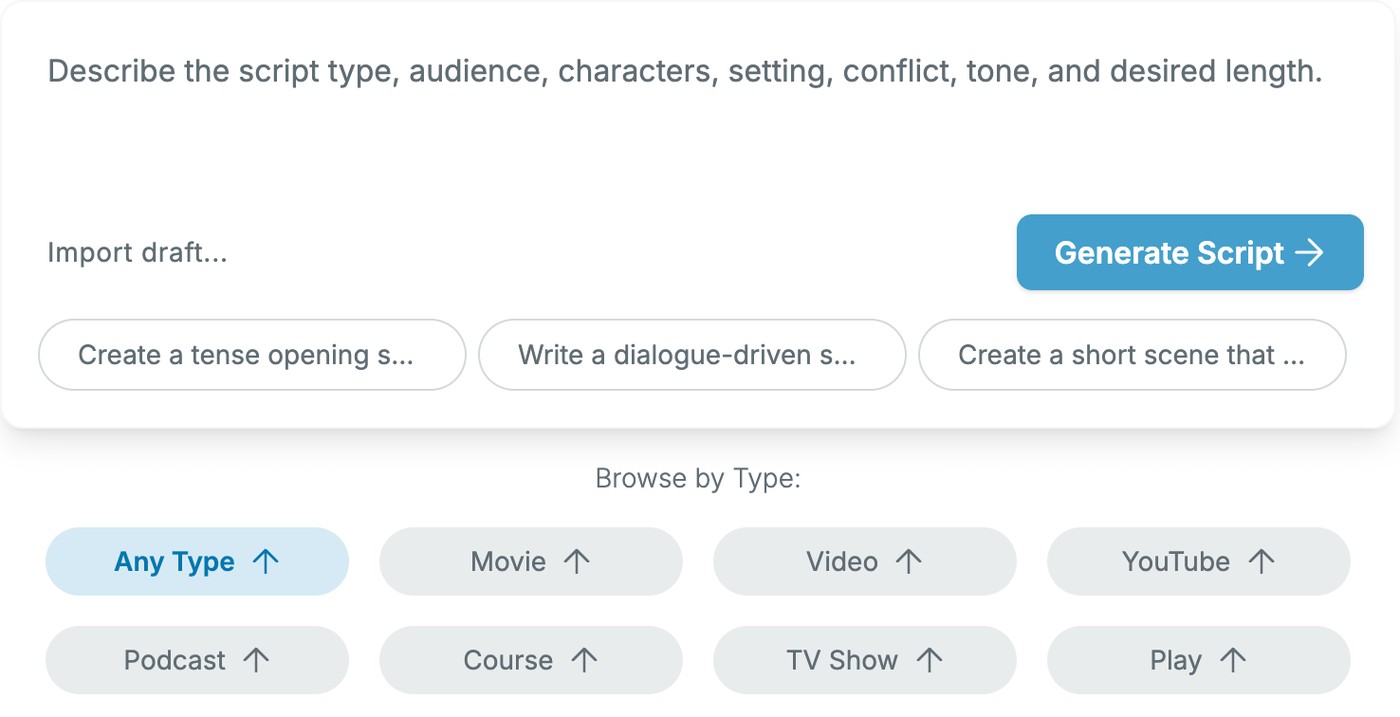
Squibler's free AI script generator is a prompt box that asks for the script type, audience, characters, setting, conflict, tone and desired length, with an Import draft option and type chips: Any Type, Movie, Video, YouTube, Podcast, Course, TV Show and Play. The page's examples are screenplay layouts with scene headings such as INT. EMERGENCY DISPATCH CENTER - NIGHT, action lines and character dialogue. Its steps say to generate a script draft with scene structure, check the outline, then click Generate Full-Length Script to build the entire script. The page also lists alternate versions of scenes, openings or endings, and its FAQ says the user keeps the rights to the scripts.
Pricing: The FAQ says the generator is free to use and can be used without signing up. Squibler's pricing page lists Free at $0 forever with 500 AI credits a month, Plus at $15.83 a month billed annually, and Pro at $49.17 a month billed annually with unlimited AI credits.
Considerations: Squibler is a writing platform for books and screenplays, and the three examples on the page are dramatic scenes, so a tutorial or talking-head script is a different job from the one the examples show. The page does not say what the Free plan's 500 credits cover in scripts.
- Choose it if the video is scene-based, such as a short film, a skit or a podcast drama, and screenplay layout is the right format.
- Skip it if a spoken script with a hook and a call to action is wanted for a tutorial or an explainer.
4. Synthesia: Best for a free script in a chosen tone and language, then an avatar video
Synthesia's free AI script generator. Source: Synthesia website
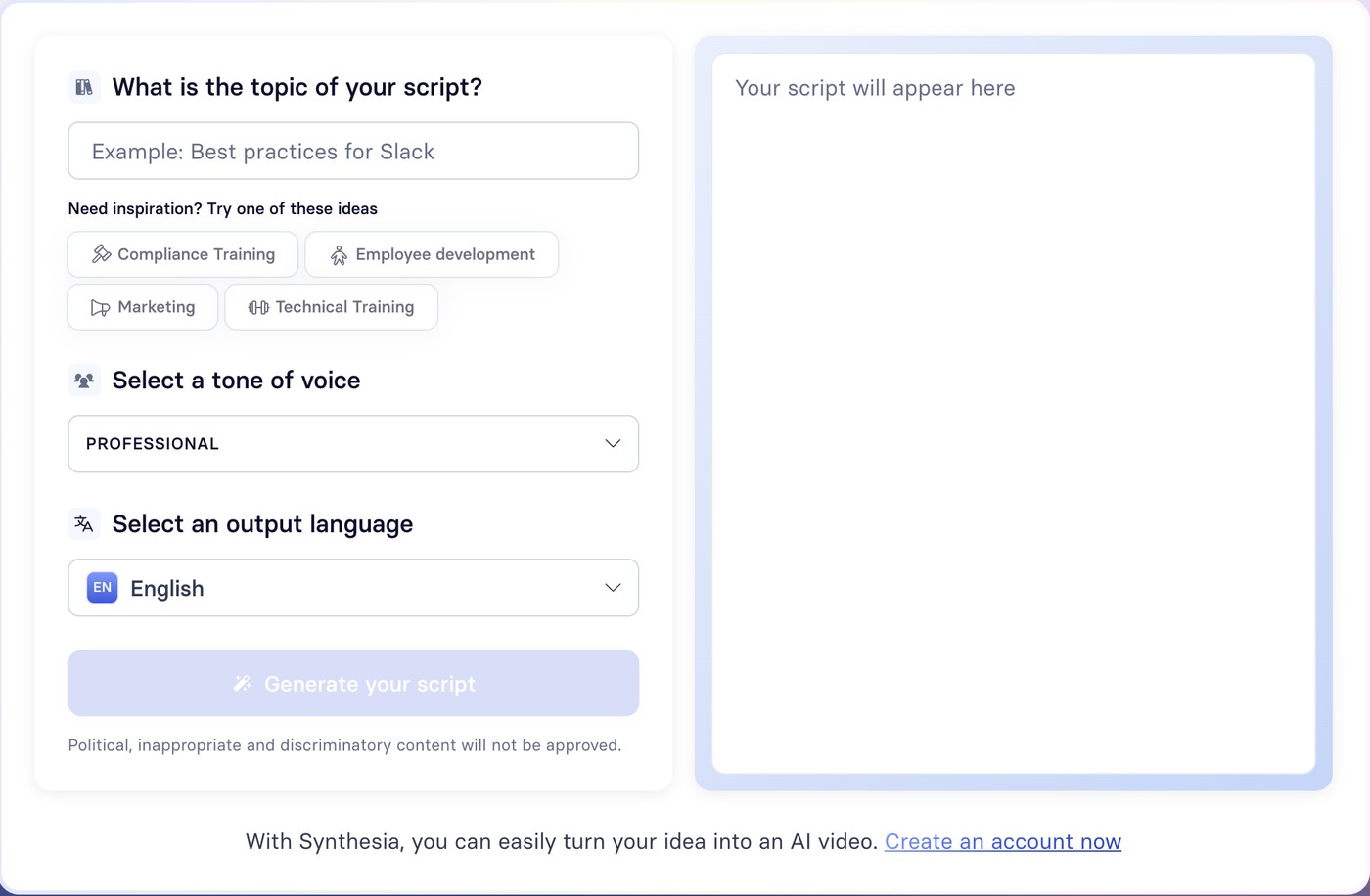
Synthesia's free AI script generator puts a form beside an output panel. The form asks for the topic of the script, offers starter ideas (Compliance Training, Employee development, Marketing and Technical Training) and has a tone of voice menu and an output language menu. The page says to adjust tone, length and audience, and its YouTube use case says to turn a topic or outline into a script with a strong hook, smooth transitions and a clear call to action. Its FAQ says the generator is free with no sign-up required.
The page's steps say to convert the script into a video draft with Synthesia's AI Video Assistant, using an avatar, a voiceover and visuals, and the page says scripts can be translated in 140+ languages. A line under the form says political, inappropriate and discriminatory content will not be approved.
Pricing: The generator is free per its FAQ. Synthesia's pricing page lists a Basic plan at $0 a month, and says videos on it carry a Synthesia watermark; see the pricing page for the paid plans.
Considerations: The generator sits on a training and business video platform, and its starter ideas lean to training and marketing. The how-it-works steps advise describing topic, audience, objective and tone, while the form has a topic box and two menus, so extra context has to go into the topic text.
- Choose it if the script is for a training, marketing or explainer video that will be presented by an avatar.
- Skip it if a named production format is needed, or avatar video is not the end product.
5. Copy.ai: Best for a script plus a YouTube description from one keyword
Copy.ai's free AI video script generator form. Source: Copy.ai website
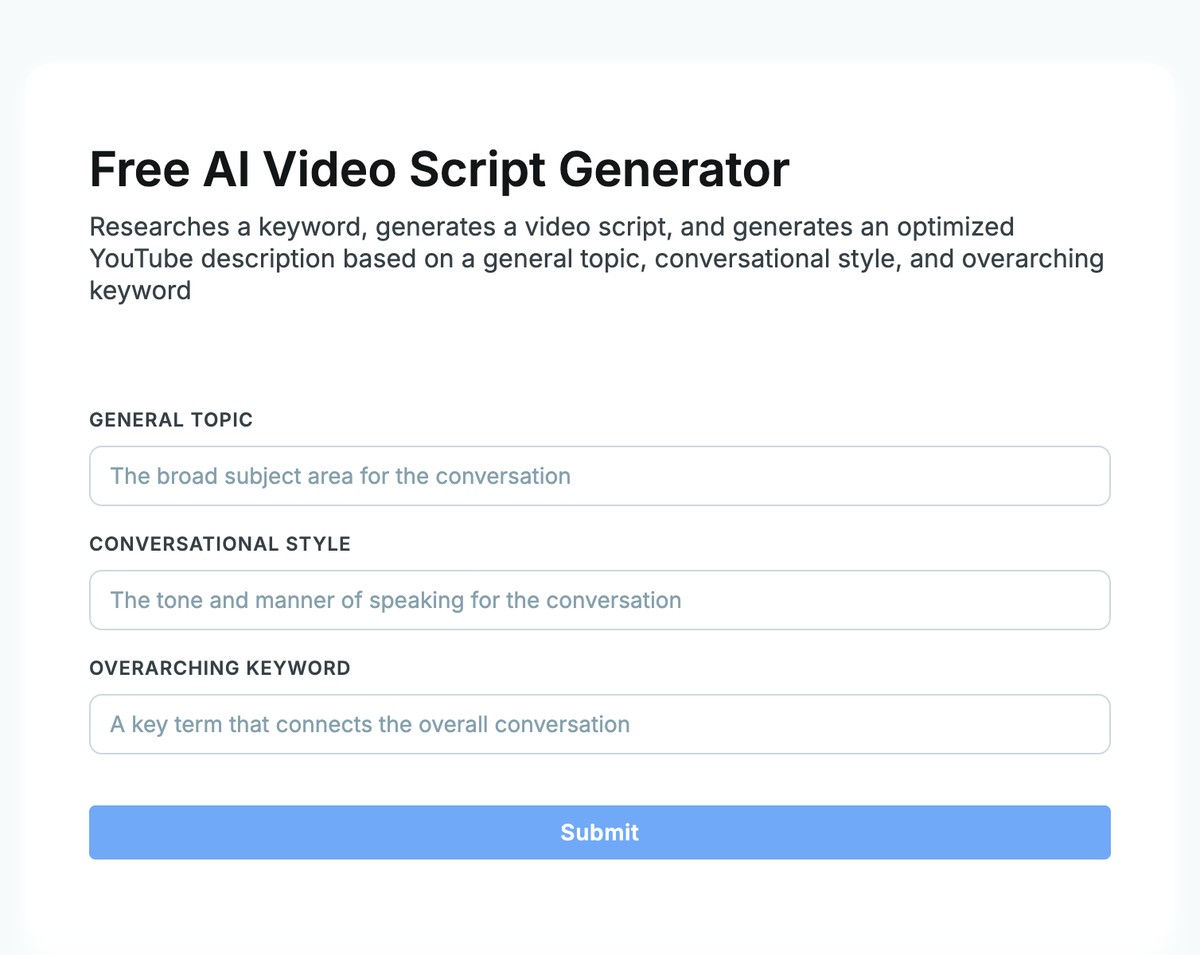
Copy.ai's free AI video script generator page says the tool researches a keyword, generates a video script and generates an optimized YouTube description from a general topic, a conversational style and an overarching keyword. The form has those three text fields and a Submit button. The rest of the page is a general explainer on video script generators.
Pricing: The page is titled as a free tool. Copy.ai's pricing page lists a self-serve Chat plan at $29 a month, billed monthly, with 5 seats, and Copy.ai positions its platform around go-to-market workflows.
Considerations: The style field is free text and the form has no menus, and the page prints no length, language or format control and no usage limit. It does not show an example of the output either, so the script's layout is unknown before running it.
- Choose it if a YouTube creator wants a script and a description built around one search term in a single run.
- Skip it if scene-by-scene formats, a chosen language or a set length are needed.
6. Steve.ai: Best for a long prompt that feeds a script and a video
Steve AI's AI script generator prompt box. Source: Steve.ai website
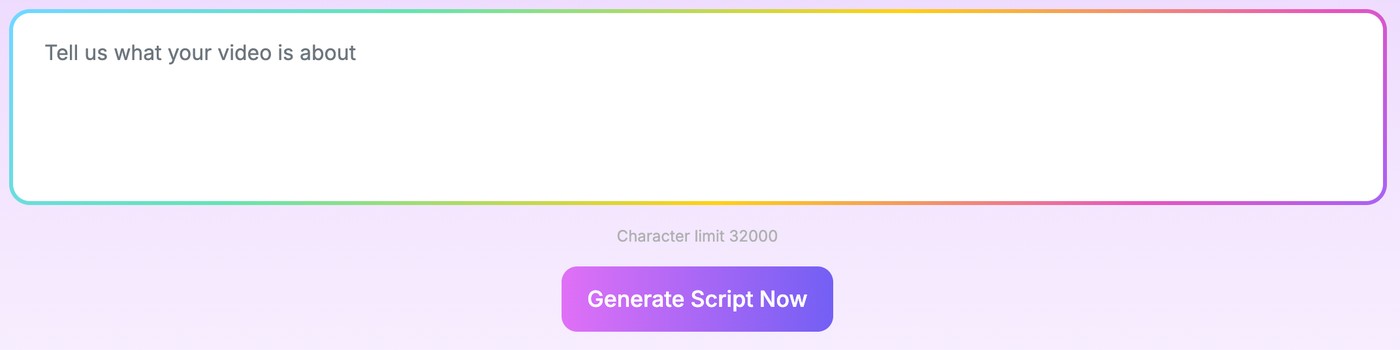
Steve.ai's script generator page is one prompt box ("Tell us what your video is about") with a stated character limit of 32000 and a list of example prompts, such as a YouTube explainer, a podcast intro, a TikTok product review and a corporate training script. The page says tone, length and style can be customized, that scripts can be made for YouTube videos, Instagram Reels, YouTube Shorts, TikToks, podcasts and ads, and that it creates scripts in 8+ languages. Steve.ai makes AI video, so the page also describes scripts that turn into video output.
Pricing: The FAQ says Steve.ai offers a free AI script generator that can be used right away. Steve.ai's pricing page lists a Starter plan at $19 a month billed yearly ($228), under a banner offering savings for paying annually.
Considerations: The page lists 8+ languages, while its FAQ says an upgrade unlocks advanced options like 4K exports or multilingual scripts, so which languages are free is unclear. The page prints no menus for format or tone, and no example of the output.
- Choose it if a long brief, notes or article text should go in as one prompt, and the script may continue into a video made in Steve.ai.
- Skip it if a named script format or menu-driven controls are needed.
7. HeyGen: Best for a script paired with a presenter video
HeyGen's AI video script generator page says to enter a topic or concept, or to share a topic, audience or key points, and that the tool writes a script ready to shoot. It says tone, structure and format can be adjusted, and its FAQ says every script is fully editable, including tone, length, voice, keywords or structure. The page says scripts can be created, edited and exported online in the browser, and paired with a HeyGen AI avatar. Its tips include starting with a focused idea, matching tone and length to the audience and ending with a clear call to action.
Pricing: The FAQ says HeyGen offers free and premium options, and that scripts can be started for free with higher limits or extra features on paid plans. HeyGen's pricing page lists a Free plan at $0 a month for video creation, with 3 videos a month, watermarked, each up to 1 minute.
Considerations: The script page shows sign-up buttons and a marketing animation instead of a form, and it does not say whether a script can be generated without an account or what the higher limits are. The Free plan figures are for videos, so the pages do not tie them to the script tool. The page's claim that every script is written with SEO in mind is a vendor claim about the draft.
- Choose it if the script is for a video presented by an avatar and the same account will make the video.
- Skip it if visible form fields, a stated format or a no-account tool are needed before signing up.
How we compared these tools
We compared each tool on five criteria: what goes in, what comes back, the controls on the draft, the free limits and sign-up terms the vendor prints, and what the script can be handed to next. The guide is organised around the job in the title, writing a video script. OpusClip comes first because drafting a script from a short idea is the job its free video script generator page is built for; its limits are stated in its entry: a 10 to 500 character idea box, menu-driven controls, and a form that is separate from the clipping product. Items 2 to 7 follow one yardstick: how exactly each vendor's page defines the script that comes back. Tools that name a script format come first (Boords, Squibler), then tools whose pages print the form fields that shape the draft (Synthesia, Copy.ai), then tools whose pages describe a general draft (Steve.ai, HeyGen).
All facts come from each vendor's own generator page, pricing page and help center, and from YouTube's help pages, read on November 18, 2026. We did not run hands-on tests of any competitor. We also read Lumen5's AI Script Composer page and left it out because it lists three steps and tone, pacing and length edits but no form fields, output format or free terms to compare. Prices change, so confirm on the vendor page before buying.
Red flags to watch for
- Scripts that read like a template. YouTube's monetization policy page says content should not be mass-produced, generic, repetitive or manipulative, so a generated draft is best edited with a specific angle before it is recorded.
- Forms that cap the input. OpusClip's idea box takes 10 to 500 characters and Steve.ai's shows a 32000 character limit, so a long outline has to fit the box.
- A free script tool on a platform whose free plan limits the video. Synthesia's pricing page says Basic videos carry a watermark, HeyGen's lists 3 watermarked videos a month on Free, Boords' free plan lists 3 active scripts, and Squibler's Free plan lists 500 AI credits a month.
- Language lists that do not say what is free. Steve.ai's page lists 8+ languages while its FAQ points to an upgrade for multilingual scripts, and Boords says 18+ languages without saying which are free.
- A format that does not match the next step. A screenplay layout, a two-column AV script and plain spoken text are different things, so check what the voiceover tool, teleprompter or presenter platform expects.
- Vendor claims about the draft. HeyGen's page says every script is written with SEO in mind; that is the vendor's claim, and whether the finished video performs depends on the video.
Frequently asked questions
What is the best AI video script generator?
It depends on the format wanted. OpusClip fits a free first draft from a short idea, Boords a two-column AV script that becomes a storyboard, Squibler a screenplay-style draft, Synthesia and HeyGen a script that continues into a presenter video, Copy.ai a script plus a YouTube description, and Steve.ai a long prompt. The comparison table above sets out the inputs, outputs, controls and free limits.
Is there a free AI video script generator?
Yes. OpusClip's, Boords', Squibler's, Synthesia's, Copy.ai's, Steve.ai's and HeyGen's pages all describe a free way to start. Boords, Squibler and Synthesia say no sign-up is needed. OpusClip's free video script generator is one form with a description box and menus for platform, type, audience, tone and duration.
What is the best AI YouTube script generator?
None of the tools here is YouTube-only. OpusClip's Platform menu lists YouTube, Squibler's type chips include YouTube, Copy.ai's tool pairs a script with an optimized YouTube description, and Synthesia's and Steve.ai's pages list YouTube among the formats they write for. For the title of the video, see our guide to YouTube title generators.
How do I write a video script with AI?
Describe the video in a sentence or two, naming the topic, the audience, the tone and the length, then generate a draft and edit it. Synthesia's FAQ advises a strong opening, clear value and a memorable call to action, and the draft is best read aloud before recording. A form such as OpusClip's takes those inputs as menus, and a general chat assistant takes them as a prompt: our guide to ChatGPT prompts for video scripts has 19 of them.
What is the difference between a video script and a transcript?
A script is written before a video is made, and a transcript is the text of a video that already exists. Searches for the script of a YouTube video usually mean the transcript. OpusClip's YouTube video transcript tool takes a pasted video link or an uploaded file, and the script generators in this guide start from an idea instead.
How long should a video script be?
It depends on the pace of the speaker and the format. Boords' script editor shows words and runtime at a speaking pace set in words per minute, and its preview lists Normal at 130 WPM, which makes a 60-second script about 130 words (that is arithmetic from the printed setting, not a vendor rule). Boords and OpusClip put a duration menu on the form, and Steve.ai's and HeyGen's pages say the length of a script can be adjusted.
Can I turn an AI script into a video?
Yes, with a tool that takes a script. Synthesia's page describes converting the script into a video draft with an avatar, voiceover and visuals, HeyGen's page describes pairing the script with an AI avatar, and Boords turns a script into a storyboard. OpusClip's sister app Agent Opus is described in its help center as turning a written script into narrated video in its Standard and Standard+ modes.
Can I use an AI-written script on YouTube?
YouTube's help page on disclosing GenAI content lists production assistance, like using generative AI tools to create or improve a video outline, script, thumbnail, title, or infographic, among examples creators do not have to disclose. The same page lists content that must be disclosed, such as content that makes a real person appear to say or do something they didn't do. YouTube's monetization policies also say content should be original and not mass-produced, generic, repetitive, or manipulative.