
OpusClip 4.0 is here. Become a content powerhouse.

6 Best CLI Tools for Video Editing in 2026

November 3, 2026
·
Updated
November 4, 2026
Creators editing and filming short videos on laptops and a phone, with a Clip it button, a 9:16 tag and a views badge

For clipping long videos from the terminal, including from an AI agent, OpusClip's command-line tool is our first pick: opusclip project create --url ... submits a video and returns finished, captioned clips. For general-purpose editing, FFmpeg is still the standard, and nothing on this list replaces it. Auto-Editor cuts silence automatically, Shotstack's CLI renders JSON edits in the cloud, Remotion's CLI renders videos written in React, and MoviePy scripts edits in Python (it is a library, not a CLI). We ranked 6 tools by the terminal job each one fits, then by cost, install path and how clearly each project documents what it does. Facts come from each project's own pages and repositories, read on November 3, 2026.

Key takeaways

  • Best for clipping long videos from the terminal or an agent: OpusClip. It is an API-backed clipper with a resource-and-verb CLI, not a general editor.
  • Best general-purpose command-line editor: FFmpeg. Free, documented in depth and the engine behind many other tools.
  • Best for cutting silence automatically: Auto-Editor. Public domain, with exports to Premiere Pro, DaVinci Resolve and other editors.
  • Best for rendering a JSON edit in the cloud: Shotstack CLI. Apache 2.0 CLI that needs a Shotstack API key.
  • Best for programmatic videos written in React: Remotion CLI. Free for individuals and companies of up to three people.
  • Best for Python-scripted edits: MoviePy. A Python library rather than a command-line tool.

How to choose

Start with what the terminal command has to do, then match it to the tool built for that input and output.

  • If the input is a long recording and the output is short clips, look for highlight detection, captions and reframing behind one command: OpusClip.
  • If the job is converting, trimming, filtering or joining files you already have, use the general-purpose tool with the widest coverage: FFmpeg.
  • If the footage is mostly talking and needs the dead air removed, look for loudness-based or motion-based cutting: Auto-Editor.
  • If the video is described as data (JSON or React props) and rendered many times, look for a render command that takes that description: Shotstack CLI, Remotion CLI.
  • If the rest of the pipeline is already Python, look for a library that edits clips as objects: MoviePy.
  • If an AI agent will run the commands, look for JSON output, stable exit codes and an installable agent skill: OpusClip, Shotstack CLI, Remotion CLI and Auto-Editor each document one.

If the agent will call a hosted tool instead of a local binary, see video editing MCP vs video editing API and the best video editing MCP servers. For HTTP-first tools, see our video editing APIs roundup.

At a glance

  • OpusClip CLI: best for clipping long videos from the terminal or an agent; needs an API key (Pro Beta, Max or Business plan per the help center); Pro from $29 a month ($14.50 on annual billing); no free API tier.
  • FFmpeg: best general-purpose command-line video tool; free and open source (LGPL 2.1 or later, with optional GPL parts).
  • Auto-Editor: best for automatic silence and dead-space cutting; free (Unlicense); installs from GitHub Releases or Homebrew.
  • Shotstack CLI: best for rendering JSON edits in the cloud; CLI is free (Apache 2.0), renders are billed: pay as you go $10 for 50 minutes, plans from $39 a month; 10 free credits on signup.
  • Remotion CLI: best for videos written as React code; free for individuals and companies of up to three people, paid license above that.
  • MoviePy: best for Python-scripted edits; free (MIT); a library, not a CLI.

Install, requirements and license compared

The list above covers what each tool is best for; this table compares where each one runs, how it installs, what it needs before the first command and how it is licensed, as listed on each project's own site, repository or package page on November 4, 2026.

ToolWhere it runsInstallNeedsLicense
OpusClip CLIOpusClip's API (cloud), plus optional local ffmpeg commandsnpx skills add opus-pro/opus-skills, or clone the repository; not on npmAn OpusClip API key (Pro Beta, Max or Business plan); curl and jqMIT (repository)
FFmpegLocalSource code, plus links to compiled builds on its download pageNo account or keyLGPL 2.1 or later; optional GPL parts
Auto-EditorLocalGitHub Releases binary, Homebrew or Arch AUR; no longer published on pipNo account or key; yt-dlp is optional for URL inputsUnlicense (public domain)
Shotstack CLIShotstack's render API (cloud)npm i -g @shotstack/cliA Shotstack API key; renders are billedApache 2.0 (npm listing)
Remotion CLILocal, or on AWS Lambda or Cloud Runnpx create-video@latest, then npx remotionNode.js; no sign-up for the free licenseFree for individuals and companies of up to 3 people; company license above that
MoviePyLocal (a Python library, not a CLI)pip install moviepyPython; ffmpeg is downloaded through ImageIO on first useMIT

1. OpusClip CLI: Best for clipping long videos from the terminal and agent workflows
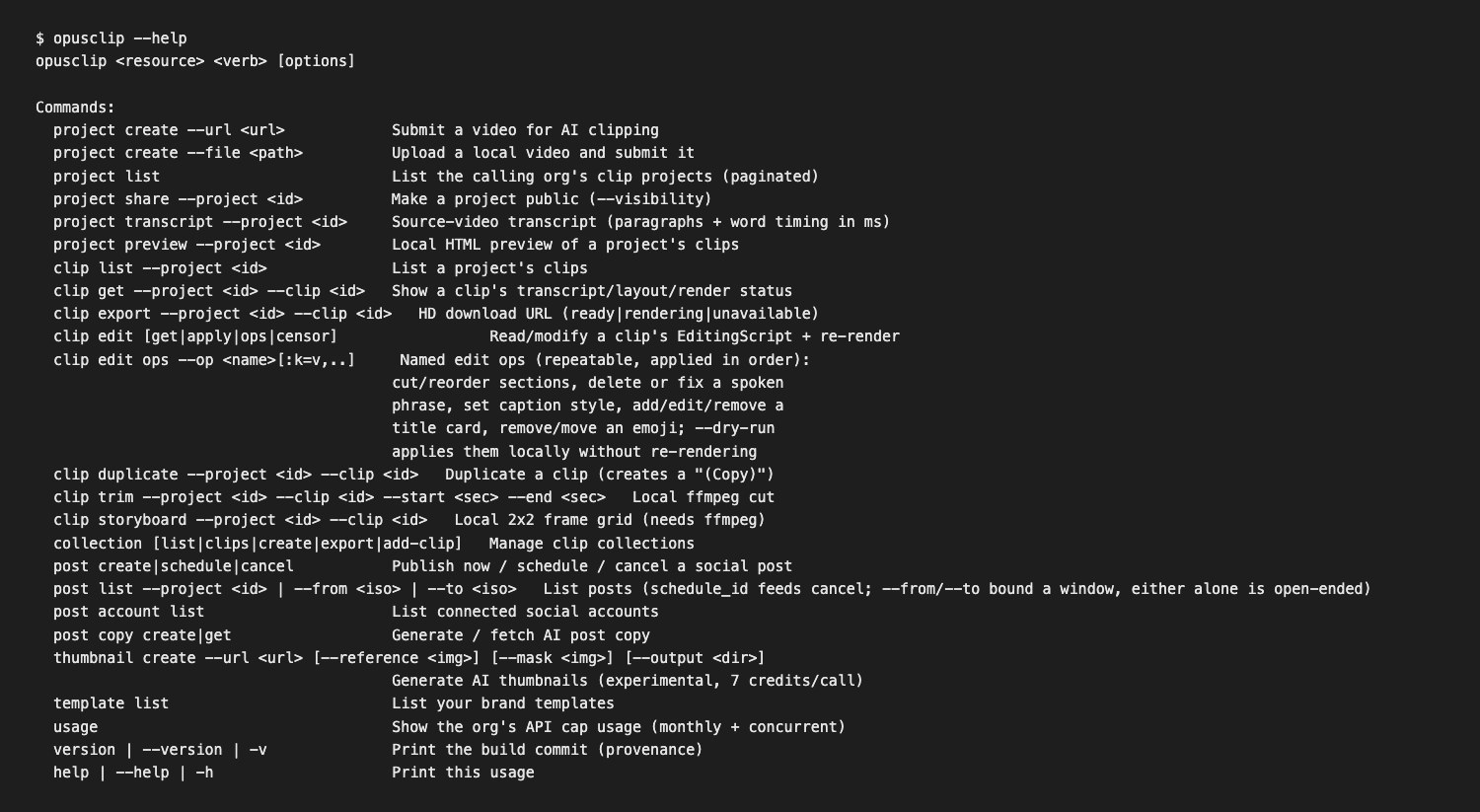
Terminal showing the opusclip command's built-in help listing project, clip, collection, post and usage commands

The opusclip command's built-in help. Source: opus-skills repository

OpusClip's CLI is a command-line client for the OpusClip API. It is bundled in the open-source opus-pro/opus-skills repository (MIT license) as a script at skills/opusclip/scripts/opusclip, and it is not published on npm, so there is no npm install for it. The repository's README lists installs through Claude Code (/plugin marketplace add opus-pro/opus-skills), Codex, OpenClaw and npx skills add opus-pro/opus-skills, and the repository can also be cloned and the script run directly with an API key in OPUSCLIP_API_KEY.

Commands follow a resource-and-verb pattern. opusclip project create --url "https://youtube.com/watch?v=..." --durations "30,60,90" submits a video for AI clipping (--file uploads a local video instead), opusclip clip list --project ID lists the clips with titles, scores and preview links, and opusclip clip export --project ID --clip ID returns the HD download link. Further commands cover clip edit ops (named edits such as cutting a spoken phrase, fixing a caption typo or setting caption style, with a --dry-run option), collection, post schedule, template list and usage, which shows monthly and concurrent API cap usage. The repository's skill file says all commands output JSON, which suits scripts and agents.

This is a clipper, not a general editor: it chooses moments from a long recording and returns finished short clips, where FFmpeg transforms files you already have. Local clip trim, clip storyboard and project preview commands need ffmpeg installed. See OpusClip's API page for the API behind it.

Pricing: The CLI itself is free to use from the repository. It calls the OpusClip API, which the help center says is included on Pro (beta), Max and Business plans, with the key created in the dashboard. OpusClip's pricing page lists Pro at $29 a month or $14.50 a month billed annually. The help center says Pro Beta and Max include 15 hours (900 credits) of API usage per calendar month per workspace, with a 10-credit minimum per project, 4 concurrent projects and a rate limit of 30 requests a minute per API key.

Considerations: The help center labels Pro-tier API access as Beta, and the CLI's own help text calls some commands beta (pricing may change). The CLI has no free tier, and the API monthly cap means very high volumes need a Business plan. It does not cover general editing such as format conversion, multi-track timelines or compositing.

  • Choose it if the job is turning long videos into short, captioned clips from a script, a cron job or an AI coding agent.
  • Skip it if the job is converting, trimming or filtering files you already have, which is FFmpeg's territory.

2. FFmpeg: Best for general-purpose conversion, trimming and filtering
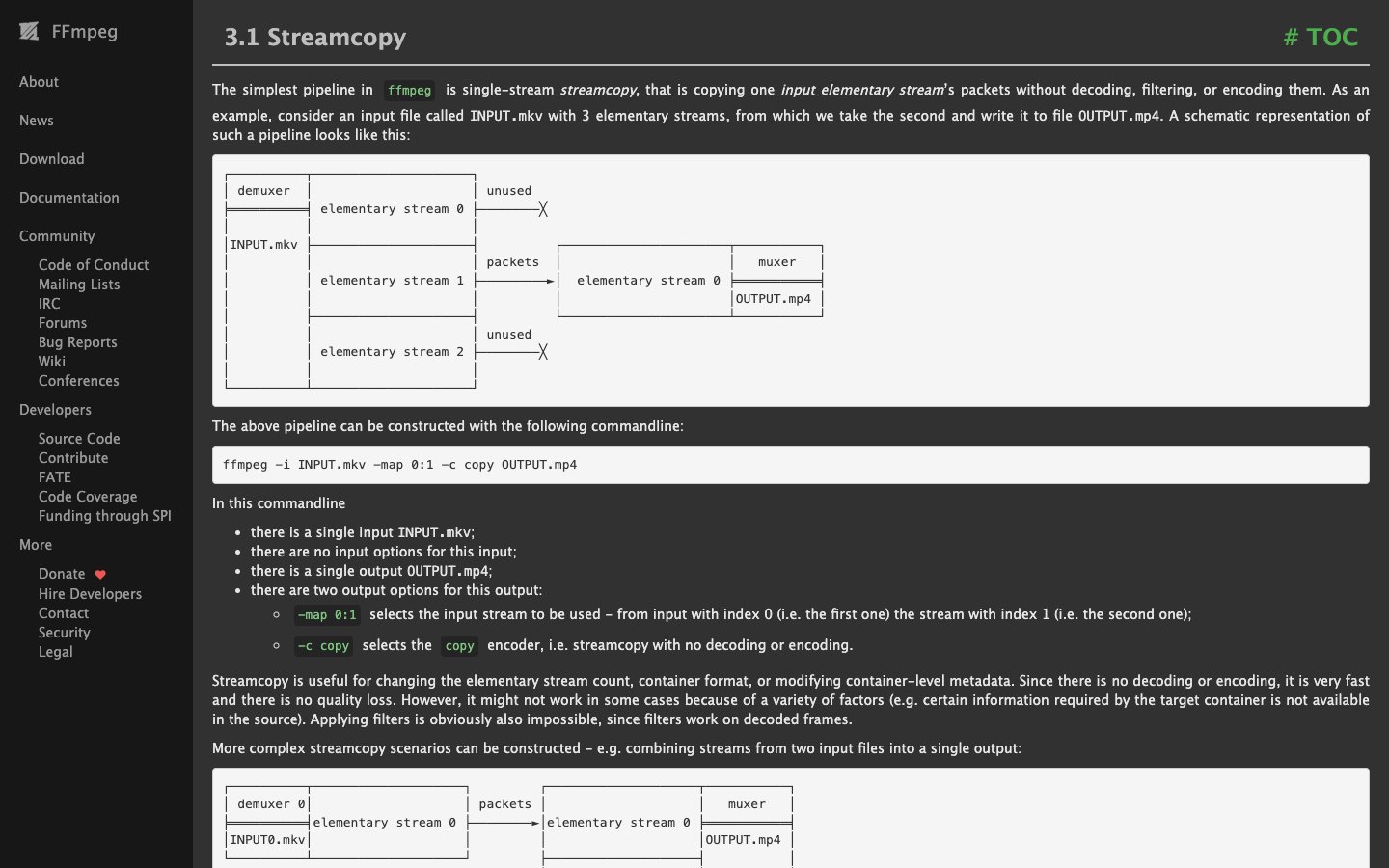
FFmpeg documentation section on streamcopy with the command ffmpeg -i INPUT.mkv -map 0:1 -c copy OUTPUT.mp4

FFmpeg's documentation on streamcopy. Source: FFmpeg website

FFmpeg's own site calls it the leading multimedia framework, able to decode, encode, transcode, mux, demux, stream, filter and play almost any format. The ffmpeg command is the tool most people mean by command-line video editing, and ffprobe inspects files. Its documentation covers streamcopy (copying streams without decoding or encoding, which the docs say is very fast and loses no quality), simple and complex filtergraphs for scaling, cropping, overlays and joining, and a long list of encoder and filter options.

Many other tools sit on top of it: MoviePy's documentation says MoviePy depends on ffmpeg for reading and writing video, and Remotion's CLI includes an ffmpeg command. FFmpeg 8.1 was released on March 16, 2026, according to the project's news page.

Pricing: FFmpeg is free and open source. Its legal page says it is licensed under the LGPL version 2.1 or later, and that optional parts covered by the GPL apply the GPL to all of FFmpeg when they are used.

Considerations: FFmpeg decides nothing about content: it does not find highlights, pick clips or detect silence in a recording as a single step, and complex filtergraphs take time to learn. The project distributes source code, and its download page links third-party builds for Windows and macOS, so the install route depends on the operating system.

  • Choose it if the job is precise, repeatable processing of files, such as transcoding, cutting at known timestamps, resizing or burning in overlays.
  • Skip it if the goal is to find the best moments in a long video without specifying timestamps.

3. Auto-Editor: Best for cutting silence and dead space automatically
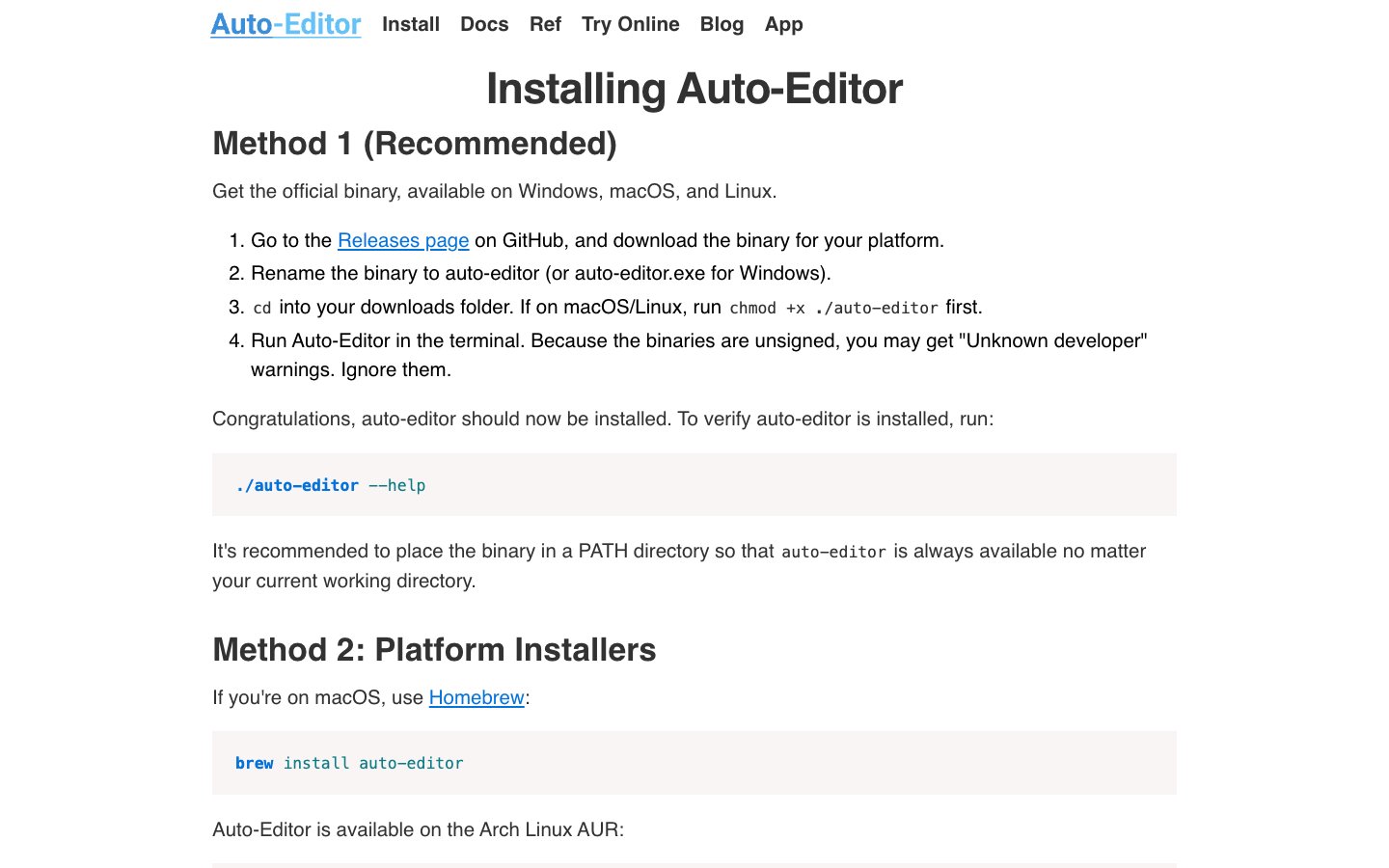
Auto-Editor install page listing the binary download, Homebrew and Arch Linux install methods

Auto-Editor's install page. Source: Auto-Editor website

Auto-Editor describes itself as a command-line application for automatically editing video and audio by analyzing the media, most notably audio loudness. Running auto-editor path/to/your/video.mp4 cuts the silent sections, and the --margin option keeps a little padding around speech. The --edit option accepts other methods, including motion thresholds, and its README shows methods combined with or and labeled actions such as speeding up louder parts.

It can export the cuts rather than a rendered file: its README lists exports for Premiere Pro, DaVinci Resolve, Final Cut Pro, ShotCut and Kdenlive, plus individual clips with --export clip-sequence. The README also lists an npx skills add WyattBlue/auto-editor agent skill. It suits a first pass on talking-head recordings, podcasts and lectures before a human or another tool finishes the edit.

Pricing: Auto-Editor is free. Its repository is under the Unlicense, which places it in the public domain. The install page recommends a binary from the GitHub Releases page or Homebrew (brew install auto-editor), lists an Arch Linux AUR package, and says the CLI is no longer being published on pip.

Considerations: Cuts follow loudness or motion, not meaning, so it removes silence but cannot tell a strong moment from a weak one, and it does not add captions, reframe to vertical or publish. Older tutorials that say pip install auto-editor point to a package the project says it has stopped updating.

  • Choose it if the footage is mostly speech and the first job is removing dead air before a manual edit.
  • Skip it if the goal is short, captioned, vertical clips picked from a long recording.

4. Shotstack CLI: Best for rendering JSON edits in the cloud
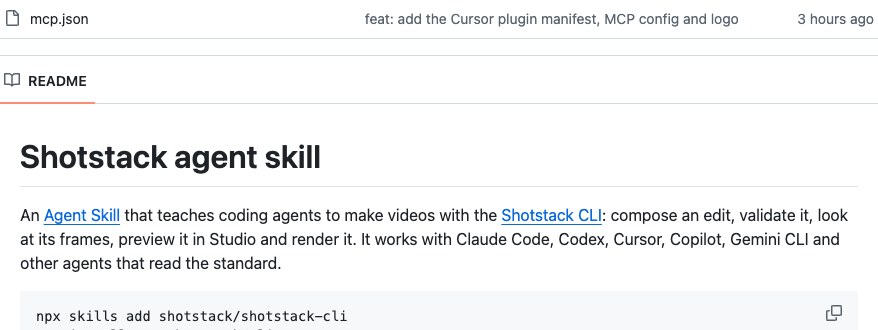
Shotstack CLI repository README describing an agent skill for composing, previewing and rendering videos

The Shotstack CLI repository README. Source: Shotstack website

Shotstack's CLI (@shotstack/cli on npm, version 0.17.0 when we checked) is a command-line interface for the Shotstack video rendering API. The README describes shotstack render template.json, which submits an Edit JSON and returns a render ID, with --watch to poll until the output URL is ready, plus status, studio (opens the edit in Shotstack's browser editor), inspect (draws frames of an edit without rendering), ingest (uploads local files so an edit can reference them by URL), template, and generate for AI image, video and audio assets.

It is built for scripts and agents: --output json gives machine-readable output, exit codes separate permanent errors (1) from retryable ones (2), and the repository ships an agent skill installed with npx skills add shotstack/shotstack-cli. It suits teams that already describe videos as JSON and want a render step in a pipeline without maintaining render servers.

Pricing: The CLI is Apache 2.0 licensed and installs with npm i -g @shotstack/cli; rendering needs a Shotstack API key. Shotstack's pricing page lists pay as you go at $10 for 50 minutes (20 cents a minute), Starter at $39 a month for 250 minutes, Pro at $99 a month for 750 minutes and Scale at $199 a month for 2,000 minutes, with 10 free credits on signup that are valid for 30 days.

Considerations: The work is writing the JSON edit: the CLI renders a timeline someone has described, and does not pick highlights from long footage. Rendering happens on Shotstack's servers and is billed by the minute. The repository's README says the CLI's own source is not published there and the package is installed from npm. The version number is below 1.0.

  • Choose it if the team wants to render JSON or template-based videos from a terminal or an agent without running its own render infrastructure.
  • Skip it if the job is working offline on local files or choosing clips from a long recording.

5. Remotion CLI: Best for programmatic videos written as React code
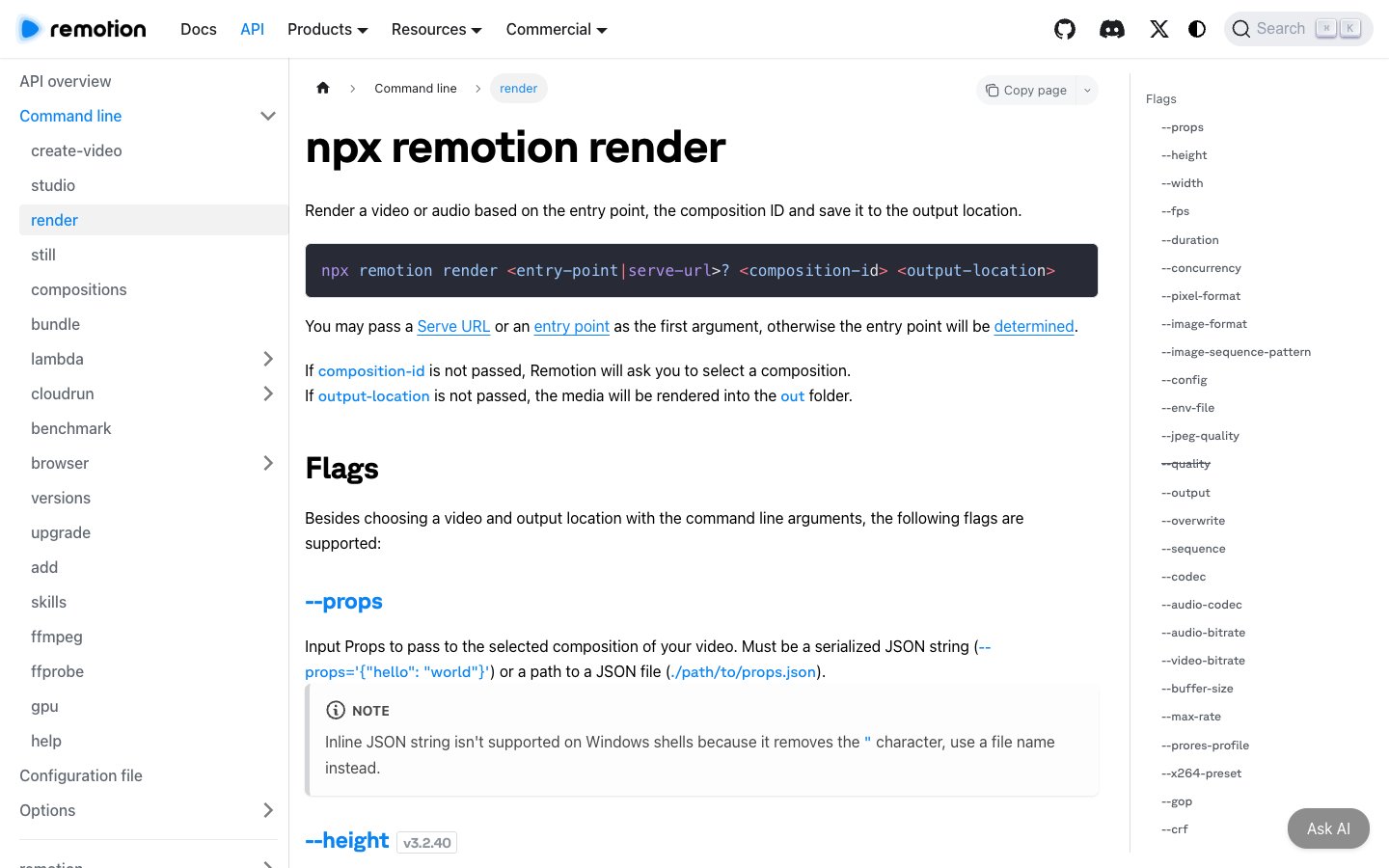
Remotion docs page for the npx remotion render command with its entry point, composition ID and output arguments

Remotion's render command reference. Source: Remotion website

Remotion's CLI (@remotion/cli, version 4.0.540 when we checked) is run with npx remotion inside a project. Its documentation lists commands including studio (a preview editor), render, still, compositions, lambda, cloudrun, ffmpeg, ffprobe and skills (installs or updates agent skills). The render command takes an entry point, a composition ID and an output location, as in npx remotion render --codec=vp8 HelloWorld out/video.webm, and --props passes JSON input to the composition.

The video itself is a React component, so a template can be rendered many times with different data. It suits engineering teams that want video defined as code, rendered locally or on AWS Lambda or Cloud Run.

Pricing: Remotion's license page says it is free to use for individuals and companies of up to three people. Larger organizations need a Company License: Remotion for Automators is listed at $0.01 per render with a $100 monthly minimum, and Remotion for Creators at $25 a month per seat. An Enterprise License is listed from $500 a month.

Considerations: Someone has to write and maintain React compositions, and the project needs Node.js. The package's license is a custom one (see LICENSE.md in the repository) rather than a standard open-source license, so check the terms before using it in a company of four or more. It is for composing videos, not for finding highlights in footage.

  • Choose it if the team writes React and wants templated or data-driven videos rendered from a command.
  • Skip it if the job is a quick trim, conversion or silence cut with no code project.

6. MoviePy: Best for Python-scripted video edits (a library, not a CLI)
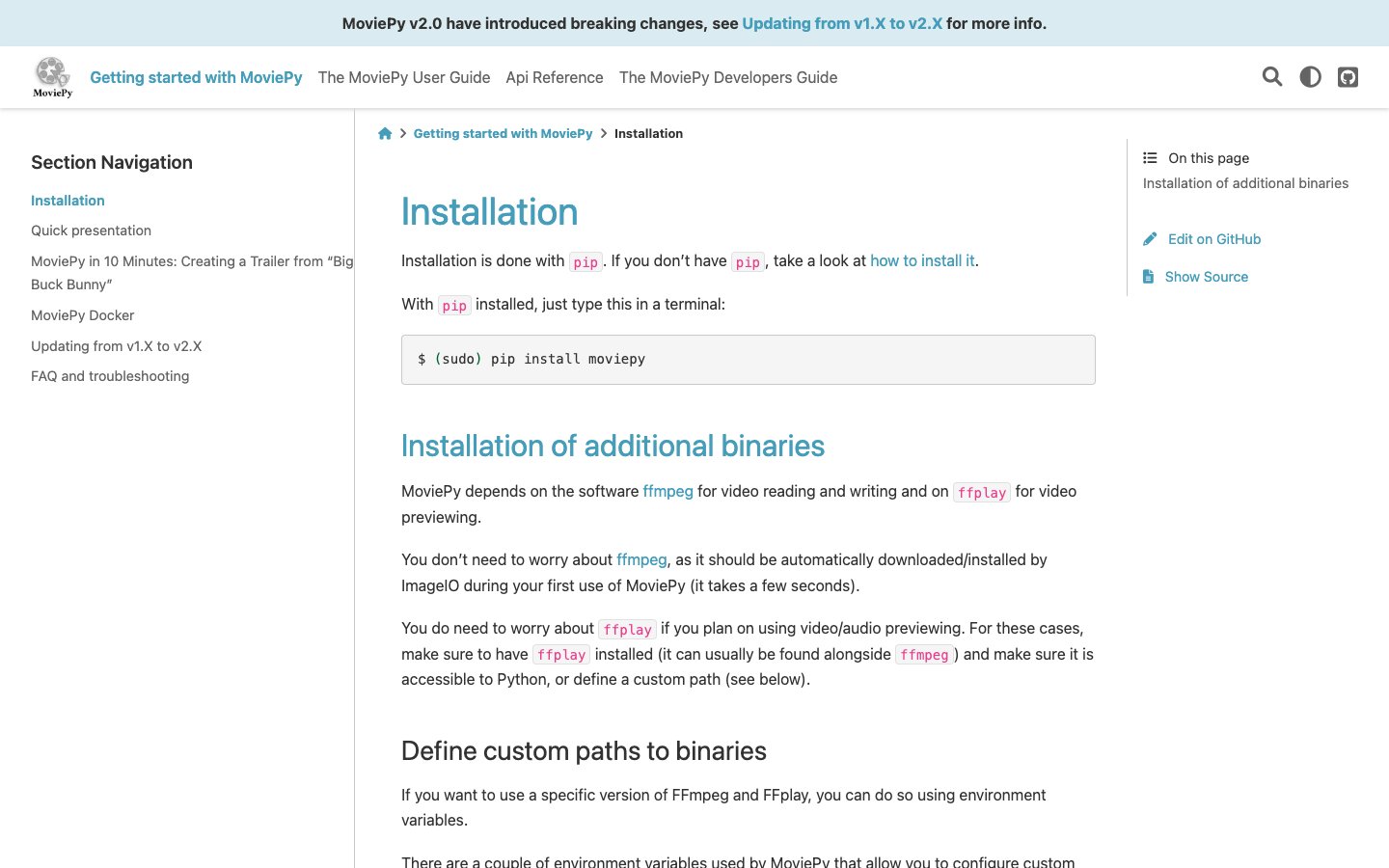
MoviePy installation page showing pip install moviepy and the ffmpeg dependency note

MoviePy's installation guide. Source: MoviePy website

MoviePy is a Python library, so it appears on this list as a scripting option rather than a command-line tool. Its documentation describes it as an open-source, MIT-licensed library for video editing and manipulation in Python, installed with pip install moviepy. Edits are written as Python code that cuts, joins and composites clips, and it fits pipelines that are already in Python.

The documentation notes that MoviePy depends on ffmpeg for reading and writing video, which is fetched automatically through ImageIO on first use, and on ffplay for previewing. It also warns that version 2.0 introduced breaking changes from 1.x, so older tutorials may not run unchanged.

Pricing: MoviePy is free under the MIT license.

Considerations: There is no separate command to run: every edit is a script someone writes, and long renders run on the local machine. It does not choose clips from long footage or generate captions by itself.

  • Choose it if the surrounding workflow is Python and the edits are simple enough to express as code.
  • Skip it if the goal is a ready-made command that edits a video without writing a script.

How we compared these tools

We compared each tool on the terminal job it fits: what its own documentation says it does, how it installs, what an agent or script can read from its output, cost and licensing, and the main limitation. Every fact comes from the project's own repository, package registry entry, documentation or pricing page, read on November 3, 2026. For OpusClip's CLI we ran its built-in help to list the commands and read the repository's skill file and the help center's API pages. We did not run hands-on tests of the other five tools, so where we describe what a command does, we are describing the project's documentation, not our own benchmarks. We included MoviePy as a library and left out tools that only download or convert files, such as yt-dlp, because the question is about editing. The cost, install and licensing details above can change, so check each project's page before committing.

Red flags to watch for

A tool that edits when the job is clipping, or the reverse

FFmpeg and MoviePy transform what they are told to, and OpusClip chooses moments but does not do format conversion. Trial test: write the input and the expected output of one real job on paper, then check that the tool accepts that input and returns that output.

Stale install instructions

Auto-Editor's install page says the CLI is no longer published on pip, and the OpusClip CLI is not on npm. Trial test: follow the project's own install page, not a tutorial, and run the version command.

Caps, minimums and metered renders

OpusClip lists a monthly API cap, a 10-credit per-project minimum and 4 concurrent projects on Pro Beta and Max, and Shotstack bills by the rendered minute. Trial test: price a normal month of real jobs against the rules, not a single demo run.

Beta and pre-1.0 labels

OpusClip labels Pro-tier API access as Beta and Shotstack's CLI was at version 0.17.0 when we checked. Trial test: pin the version you build against and read the changelog before upgrading.

Licenses that change with company size

Remotion is free for individuals and companies of up to three people and licensed above that, and FFmpeg's license depends on which optional parts a build includes. Trial test: read the license page for your team size and build.

Output an agent cannot parse

An agent needs structured output and exit codes it can act on. OpusClip's commands output JSON, and Shotstack's CLI offers --output json and distinct exit codes. Trial test: run one command and pipe its output into a JSON parser before wiring it into a loop.

Frequently asked questions

What are the best CLI tools for video editing?

It depends on the job. FFmpeg is the general-purpose standard for conversion, trimming and filtering. For clipping long videos into short captioned clips, OpusClip's CLI is our pick. Auto-Editor suits silence cutting, Shotstack's CLI suits cloud renders from JSON, Remotion's CLI suits videos written in React, and MoviePy suits Python scripts (it is a library). See OpusClip's API page for the API behind its CLI.

Can I edit video from the command line?

Yes. FFmpeg's ffmpeg command can cut, join, scale and filter video, and Auto-Editor cuts silence from the terminal. Command-line editing works best for repeatable jobs: the same trim, the same conversion or the same cut applied to many files. For creative, timeline-based work, a graphical editor is usually easier, and tools such as Auto-Editor can export their cuts to Premiere Pro, DaVinci Resolve and others for finishing.

Is FFmpeg the best CLI video editor?

For general-purpose processing, it is the most widely used. Its documentation covers streamcopy, filtergraphs and a long list of encoders and filters, and other tools build on it. It is not the best fit for every job: it has no step that finds highlights in a long recording, and complex filtergraphs take time to learn. For that job a clipping tool such as OpusClip's CLI fits better.

Is there a CLI for video clipping?

Yes. OpusClip's CLI is bundled in the opus-pro/opus-skills repository: opusclip project create --url ... submits a long video, opusclip clip list returns the clips and opusclip clip export returns an HD download link. It needs an OpusClip API key from a plan with API access; see the help center for the current plan details. We did not find another terminal tool on this list that picks clips from long footage by content.

Can AI agents run video editing CLIs?

Yes, and several projects document it. OpusClip's repository installs as a skill for Claude Code, Codex and other agents and its commands output JSON, Shotstack's CLI ships an agent skill and a JSON output flag, Remotion's CLI has a skills command, and Auto-Editor's README lists an npx skills add command. For agents that prefer a hosted connection to a local binary, see the OpusClip MCP tools reference.

Is the OpusClip CLI on npm?

No. It is bundled in the opus-skills repository and installed through the skill routes the README lists, or by cloning the repository. The package names opusclip, opusclip-cli and @opusclip/cli did not exist on the npm registry when we checked on November 3, 2026.

What is the difference between a CLI tool and a video editing API?

A CLI is a command you run in a terminal, and some CLIs are thin clients for a cloud API (OpusClip's and Shotstack's) while others process files locally (FFmpeg, Auto-Editor). An API is the HTTP interface your own code calls. See the best video editing APIs for developers for the HTTP side.

On this page

Use our Free Forever Plan

Find the moment. Skip the scrubbing.

From script to polished video — in one click.

Create and post one short video every day for free, and grow faster.

OpusSearch uses AI to surface the exact clip you need from hours of footage — in seconds, not afternoons.

Agent Opus runs the entire video pipeline for you: research, scriptwriting, storyboarding, motion, voice, and edit. Upload the idea, post the result.

6 Best CLI Tools for Video Editing in 2026

For clipping long videos from the terminal, including from an AI agent, OpusClip's command-line tool is our first pick: opusclip project create --url ... submits a video and returns finished, captioned clips. For general-purpose editing, FFmpeg is still the standard, and nothing on this list replaces it. Auto-Editor cuts silence automatically, Shotstack's CLI renders JSON edits in the cloud, Remotion's CLI renders videos written in React, and MoviePy scripts edits in Python (it is a library, not a CLI). We ranked 6 tools by the terminal job each one fits, then by cost, install path and how clearly each project documents what it does. Facts come from each project's own pages and repositories, read on November 3, 2026.

Key takeaways

  • Best for clipping long videos from the terminal or an agent: OpusClip. It is an API-backed clipper with a resource-and-verb CLI, not a general editor.
  • Best general-purpose command-line editor: FFmpeg. Free, documented in depth and the engine behind many other tools.
  • Best for cutting silence automatically: Auto-Editor. Public domain, with exports to Premiere Pro, DaVinci Resolve and other editors.
  • Best for rendering a JSON edit in the cloud: Shotstack CLI. Apache 2.0 CLI that needs a Shotstack API key.
  • Best for programmatic videos written in React: Remotion CLI. Free for individuals and companies of up to three people.
  • Best for Python-scripted edits: MoviePy. A Python library rather than a command-line tool.

How to choose

Start with what the terminal command has to do, then match it to the tool built for that input and output.

  • If the input is a long recording and the output is short clips, look for highlight detection, captions and reframing behind one command: OpusClip.
  • If the job is converting, trimming, filtering or joining files you already have, use the general-purpose tool with the widest coverage: FFmpeg.
  • If the footage is mostly talking and needs the dead air removed, look for loudness-based or motion-based cutting: Auto-Editor.
  • If the video is described as data (JSON or React props) and rendered many times, look for a render command that takes that description: Shotstack CLI, Remotion CLI.
  • If the rest of the pipeline is already Python, look for a library that edits clips as objects: MoviePy.
  • If an AI agent will run the commands, look for JSON output, stable exit codes and an installable agent skill: OpusClip, Shotstack CLI, Remotion CLI and Auto-Editor each document one.

If the agent will call a hosted tool instead of a local binary, see video editing MCP vs video editing API and the best video editing MCP servers. For HTTP-first tools, see our video editing APIs roundup.

At a glance

  • OpusClip CLI: best for clipping long videos from the terminal or an agent; needs an API key (Pro Beta, Max or Business plan per the help center); Pro from $29 a month ($14.50 on annual billing); no free API tier.
  • FFmpeg: best general-purpose command-line video tool; free and open source (LGPL 2.1 or later, with optional GPL parts).
  • Auto-Editor: best for automatic silence and dead-space cutting; free (Unlicense); installs from GitHub Releases or Homebrew.
  • Shotstack CLI: best for rendering JSON edits in the cloud; CLI is free (Apache 2.0), renders are billed: pay as you go $10 for 50 minutes, plans from $39 a month; 10 free credits on signup.
  • Remotion CLI: best for videos written as React code; free for individuals and companies of up to three people, paid license above that.
  • MoviePy: best for Python-scripted edits; free (MIT); a library, not a CLI.

Install, requirements and license compared

The list above covers what each tool is best for; this table compares where each one runs, how it installs, what it needs before the first command and how it is licensed, as listed on each project's own site, repository or package page on November 4, 2026.

ToolWhere it runsInstallNeedsLicense
OpusClip CLIOpusClip's API (cloud), plus optional local ffmpeg commandsnpx skills add opus-pro/opus-skills, or clone the repository; not on npmAn OpusClip API key (Pro Beta, Max or Business plan); curl and jqMIT (repository)
FFmpegLocalSource code, plus links to compiled builds on its download pageNo account or keyLGPL 2.1 or later; optional GPL parts
Auto-EditorLocalGitHub Releases binary, Homebrew or Arch AUR; no longer published on pipNo account or key; yt-dlp is optional for URL inputsUnlicense (public domain)
Shotstack CLIShotstack's render API (cloud)npm i -g @shotstack/cliA Shotstack API key; renders are billedApache 2.0 (npm listing)
Remotion CLILocal, or on AWS Lambda or Cloud Runnpx create-video@latest, then npx remotionNode.js; no sign-up for the free licenseFree for individuals and companies of up to 3 people; company license above that
MoviePyLocal (a Python library, not a CLI)pip install moviepyPython; ffmpeg is downloaded through ImageIO on first useMIT

1. OpusClip CLI: Best for clipping long videos from the terminal and agent workflows

Terminal showing the opusclip command's built-in help listing project, clip, collection, post and usage commands

The opusclip command's built-in help. Source: opus-skills repository

OpusClip's CLI is a command-line client for the OpusClip API. It is bundled in the open-source opus-pro/opus-skills repository (MIT license) as a script at skills/opusclip/scripts/opusclip, and it is not published on npm, so there is no npm install for it. The repository's README lists installs through Claude Code (/plugin marketplace add opus-pro/opus-skills), Codex, OpenClaw and npx skills add opus-pro/opus-skills, and the repository can also be cloned and the script run directly with an API key in OPUSCLIP_API_KEY.

Commands follow a resource-and-verb pattern. opusclip project create --url "https://youtube.com/watch?v=..." --durations "30,60,90" submits a video for AI clipping (--file uploads a local video instead), opusclip clip list --project ID lists the clips with titles, scores and preview links, and opusclip clip export --project ID --clip ID returns the HD download link. Further commands cover clip edit ops (named edits such as cutting a spoken phrase, fixing a caption typo or setting caption style, with a --dry-run option), collection, post schedule, template list and usage, which shows monthly and concurrent API cap usage. The repository's skill file says all commands output JSON, which suits scripts and agents.

This is a clipper, not a general editor: it chooses moments from a long recording and returns finished short clips, where FFmpeg transforms files you already have. Local clip trim, clip storyboard and project preview commands need ffmpeg installed. See OpusClip's API page for the API behind it.

Pricing: The CLI itself is free to use from the repository. It calls the OpusClip API, which the help center says is included on Pro (beta), Max and Business plans, with the key created in the dashboard. OpusClip's pricing page lists Pro at $29 a month or $14.50 a month billed annually. The help center says Pro Beta and Max include 15 hours (900 credits) of API usage per calendar month per workspace, with a 10-credit minimum per project, 4 concurrent projects and a rate limit of 30 requests a minute per API key.

Considerations: The help center labels Pro-tier API access as Beta, and the CLI's own help text calls some commands beta (pricing may change). The CLI has no free tier, and the API monthly cap means very high volumes need a Business plan. It does not cover general editing such as format conversion, multi-track timelines or compositing.

  • Choose it if the job is turning long videos into short, captioned clips from a script, a cron job or an AI coding agent.
  • Skip it if the job is converting, trimming or filtering files you already have, which is FFmpeg's territory.

2. FFmpeg: Best for general-purpose conversion, trimming and filtering

FFmpeg documentation section on streamcopy with the command ffmpeg -i INPUT.mkv -map 0:1 -c copy OUTPUT.mp4

FFmpeg's documentation on streamcopy. Source: FFmpeg website

FFmpeg's own site calls it the leading multimedia framework, able to decode, encode, transcode, mux, demux, stream, filter and play almost any format. The ffmpeg command is the tool most people mean by command-line video editing, and ffprobe inspects files. Its documentation covers streamcopy (copying streams without decoding or encoding, which the docs say is very fast and loses no quality), simple and complex filtergraphs for scaling, cropping, overlays and joining, and a long list of encoder and filter options.

Many other tools sit on top of it: MoviePy's documentation says MoviePy depends on ffmpeg for reading and writing video, and Remotion's CLI includes an ffmpeg command. FFmpeg 8.1 was released on March 16, 2026, according to the project's news page.

Pricing: FFmpeg is free and open source. Its legal page says it is licensed under the LGPL version 2.1 or later, and that optional parts covered by the GPL apply the GPL to all of FFmpeg when they are used.

Considerations: FFmpeg decides nothing about content: it does not find highlights, pick clips or detect silence in a recording as a single step, and complex filtergraphs take time to learn. The project distributes source code, and its download page links third-party builds for Windows and macOS, so the install route depends on the operating system.

  • Choose it if the job is precise, repeatable processing of files, such as transcoding, cutting at known timestamps, resizing or burning in overlays.
  • Skip it if the goal is to find the best moments in a long video without specifying timestamps.

3. Auto-Editor: Best for cutting silence and dead space automatically

Auto-Editor install page listing the binary download, Homebrew and Arch Linux install methods

Auto-Editor's install page. Source: Auto-Editor website

Auto-Editor describes itself as a command-line application for automatically editing video and audio by analyzing the media, most notably audio loudness. Running auto-editor path/to/your/video.mp4 cuts the silent sections, and the --margin option keeps a little padding around speech. The --edit option accepts other methods, including motion thresholds, and its README shows methods combined with or and labeled actions such as speeding up louder parts.

It can export the cuts rather than a rendered file: its README lists exports for Premiere Pro, DaVinci Resolve, Final Cut Pro, ShotCut and Kdenlive, plus individual clips with --export clip-sequence. The README also lists an npx skills add WyattBlue/auto-editor agent skill. It suits a first pass on talking-head recordings, podcasts and lectures before a human or another tool finishes the edit.

Pricing: Auto-Editor is free. Its repository is under the Unlicense, which places it in the public domain. The install page recommends a binary from the GitHub Releases page or Homebrew (brew install auto-editor), lists an Arch Linux AUR package, and says the CLI is no longer being published on pip.

Considerations: Cuts follow loudness or motion, not meaning, so it removes silence but cannot tell a strong moment from a weak one, and it does not add captions, reframe to vertical or publish. Older tutorials that say pip install auto-editor point to a package the project says it has stopped updating.

  • Choose it if the footage is mostly speech and the first job is removing dead air before a manual edit.
  • Skip it if the goal is short, captioned, vertical clips picked from a long recording.

4. Shotstack CLI: Best for rendering JSON edits in the cloud

Shotstack CLI repository README describing an agent skill for composing, previewing and rendering videos

The Shotstack CLI repository README. Source: Shotstack website

Shotstack's CLI (@shotstack/cli on npm, version 0.17.0 when we checked) is a command-line interface for the Shotstack video rendering API. The README describes shotstack render template.json, which submits an Edit JSON and returns a render ID, with --watch to poll until the output URL is ready, plus status, studio (opens the edit in Shotstack's browser editor), inspect (draws frames of an edit without rendering), ingest (uploads local files so an edit can reference them by URL), template, and generate for AI image, video and audio assets.

It is built for scripts and agents: --output json gives machine-readable output, exit codes separate permanent errors (1) from retryable ones (2), and the repository ships an agent skill installed with npx skills add shotstack/shotstack-cli. It suits teams that already describe videos as JSON and want a render step in a pipeline without maintaining render servers.

Pricing: The CLI is Apache 2.0 licensed and installs with npm i -g @shotstack/cli; rendering needs a Shotstack API key. Shotstack's pricing page lists pay as you go at $10 for 50 minutes (20 cents a minute), Starter at $39 a month for 250 minutes, Pro at $99 a month for 750 minutes and Scale at $199 a month for 2,000 minutes, with 10 free credits on signup that are valid for 30 days.

Considerations: The work is writing the JSON edit: the CLI renders a timeline someone has described, and does not pick highlights from long footage. Rendering happens on Shotstack's servers and is billed by the minute. The repository's README says the CLI's own source is not published there and the package is installed from npm. The version number is below 1.0.

  • Choose it if the team wants to render JSON or template-based videos from a terminal or an agent without running its own render infrastructure.
  • Skip it if the job is working offline on local files or choosing clips from a long recording.

5. Remotion CLI: Best for programmatic videos written as React code

Remotion docs page for the npx remotion render command with its entry point, composition ID and output arguments

Remotion's render command reference. Source: Remotion website

Remotion's CLI (@remotion/cli, version 4.0.540 when we checked) is run with npx remotion inside a project. Its documentation lists commands including studio (a preview editor), render, still, compositions, lambda, cloudrun, ffmpeg, ffprobe and skills (installs or updates agent skills). The render command takes an entry point, a composition ID and an output location, as in npx remotion render --codec=vp8 HelloWorld out/video.webm, and --props passes JSON input to the composition.

The video itself is a React component, so a template can be rendered many times with different data. It suits engineering teams that want video defined as code, rendered locally or on AWS Lambda or Cloud Run.

Pricing: Remotion's license page says it is free to use for individuals and companies of up to three people. Larger organizations need a Company License: Remotion for Automators is listed at $0.01 per render with a $100 monthly minimum, and Remotion for Creators at $25 a month per seat. An Enterprise License is listed from $500 a month.

Considerations: Someone has to write and maintain React compositions, and the project needs Node.js. The package's license is a custom one (see LICENSE.md in the repository) rather than a standard open-source license, so check the terms before using it in a company of four or more. It is for composing videos, not for finding highlights in footage.

  • Choose it if the team writes React and wants templated or data-driven videos rendered from a command.
  • Skip it if the job is a quick trim, conversion or silence cut with no code project.

6. MoviePy: Best for Python-scripted video edits (a library, not a CLI)

MoviePy installation page showing pip install moviepy and the ffmpeg dependency note

MoviePy's installation guide. Source: MoviePy website

MoviePy is a Python library, so it appears on this list as a scripting option rather than a command-line tool. Its documentation describes it as an open-source, MIT-licensed library for video editing and manipulation in Python, installed with pip install moviepy. Edits are written as Python code that cuts, joins and composites clips, and it fits pipelines that are already in Python.

The documentation notes that MoviePy depends on ffmpeg for reading and writing video, which is fetched automatically through ImageIO on first use, and on ffplay for previewing. It also warns that version 2.0 introduced breaking changes from 1.x, so older tutorials may not run unchanged.

Pricing: MoviePy is free under the MIT license.

Considerations: There is no separate command to run: every edit is a script someone writes, and long renders run on the local machine. It does not choose clips from long footage or generate captions by itself.

  • Choose it if the surrounding workflow is Python and the edits are simple enough to express as code.
  • Skip it if the goal is a ready-made command that edits a video without writing a script.

How we compared these tools

We compared each tool on the terminal job it fits: what its own documentation says it does, how it installs, what an agent or script can read from its output, cost and licensing, and the main limitation. Every fact comes from the project's own repository, package registry entry, documentation or pricing page, read on November 3, 2026. For OpusClip's CLI we ran its built-in help to list the commands and read the repository's skill file and the help center's API pages. We did not run hands-on tests of the other five tools, so where we describe what a command does, we are describing the project's documentation, not our own benchmarks. We included MoviePy as a library and left out tools that only download or convert files, such as yt-dlp, because the question is about editing. The cost, install and licensing details above can change, so check each project's page before committing.

Red flags to watch for

A tool that edits when the job is clipping, or the reverse

FFmpeg and MoviePy transform what they are told to, and OpusClip chooses moments but does not do format conversion. Trial test: write the input and the expected output of one real job on paper, then check that the tool accepts that input and returns that output.

Stale install instructions

Auto-Editor's install page says the CLI is no longer published on pip, and the OpusClip CLI is not on npm. Trial test: follow the project's own install page, not a tutorial, and run the version command.

Caps, minimums and metered renders

OpusClip lists a monthly API cap, a 10-credit per-project minimum and 4 concurrent projects on Pro Beta and Max, and Shotstack bills by the rendered minute. Trial test: price a normal month of real jobs against the rules, not a single demo run.

Beta and pre-1.0 labels

OpusClip labels Pro-tier API access as Beta and Shotstack's CLI was at version 0.17.0 when we checked. Trial test: pin the version you build against and read the changelog before upgrading.

Licenses that change with company size

Remotion is free for individuals and companies of up to three people and licensed above that, and FFmpeg's license depends on which optional parts a build includes. Trial test: read the license page for your team size and build.

Output an agent cannot parse

An agent needs structured output and exit codes it can act on. OpusClip's commands output JSON, and Shotstack's CLI offers --output json and distinct exit codes. Trial test: run one command and pipe its output into a JSON parser before wiring it into a loop.

Frequently asked questions

What are the best CLI tools for video editing?

It depends on the job. FFmpeg is the general-purpose standard for conversion, trimming and filtering. For clipping long videos into short captioned clips, OpusClip's CLI is our pick. Auto-Editor suits silence cutting, Shotstack's CLI suits cloud renders from JSON, Remotion's CLI suits videos written in React, and MoviePy suits Python scripts (it is a library). See OpusClip's API page for the API behind its CLI.

Can I edit video from the command line?

Yes. FFmpeg's ffmpeg command can cut, join, scale and filter video, and Auto-Editor cuts silence from the terminal. Command-line editing works best for repeatable jobs: the same trim, the same conversion or the same cut applied to many files. For creative, timeline-based work, a graphical editor is usually easier, and tools such as Auto-Editor can export their cuts to Premiere Pro, DaVinci Resolve and others for finishing.

Is FFmpeg the best CLI video editor?

For general-purpose processing, it is the most widely used. Its documentation covers streamcopy, filtergraphs and a long list of encoders and filters, and other tools build on it. It is not the best fit for every job: it has no step that finds highlights in a long recording, and complex filtergraphs take time to learn. For that job a clipping tool such as OpusClip's CLI fits better.

Is there a CLI for video clipping?

Yes. OpusClip's CLI is bundled in the opus-pro/opus-skills repository: opusclip project create --url ... submits a long video, opusclip clip list returns the clips and opusclip clip export returns an HD download link. It needs an OpusClip API key from a plan with API access; see the help center for the current plan details. We did not find another terminal tool on this list that picks clips from long footage by content.

Can AI agents run video editing CLIs?

Yes, and several projects document it. OpusClip's repository installs as a skill for Claude Code, Codex and other agents and its commands output JSON, Shotstack's CLI ships an agent skill and a JSON output flag, Remotion's CLI has a skills command, and Auto-Editor's README lists an npx skills add command. For agents that prefer a hosted connection to a local binary, see the OpusClip MCP tools reference.

Is the OpusClip CLI on npm?

No. It is bundled in the opus-skills repository and installed through the skill routes the README lists, or by cloning the repository. The package names opusclip, opusclip-cli and @opusclip/cli did not exist on the npm registry when we checked on November 3, 2026.

What is the difference between a CLI tool and a video editing API?

A CLI is a command you run in a terminal, and some CLIs are thin clients for a cloud API (OpusClip's and Shotstack's) while others process files locally (FFmpeg, Auto-Editor). An API is the HTTP interface your own code calls. See the best video editing APIs for developers for the HTTP side.

Creator name

Creator type

Team size

Channels

linkYouTubefacebookXTikTok

Pain point

Time to see positive ROI

About the creator

Don't miss these

How Audacy Drove 1B+ Views by Taking a Tech-Forward Approach to Radio with OpusClip
No items found.

How Audacy Drove 1B+ Views by Taking a Tech-Forward Approach to Radio with OpusClip

How All the Smoke makes hit compilations faster with OpusSearch

How All the Smoke makes hit compilations faster with OpusSearch

Growing a new channel to 1.5M views in 90 days without creating new videos

Growing a new channel to 1.5M views in 90 days without creating new videos

OpusClip 4.0 is here. Become a content powerhouse.

6 Best CLI Tools for Video Editing in 2026

Creators editing and filming short videos on laptops and a phone, with a Clip it button, a 9:16 tag and a views badge
No items found.
No items found.

Boost your social media growth with OpusClip

Create and post one short video every day for your social media and grow faster.

6 Best CLI Tools for Video Editing in 2026

Creators editing and filming short videos on laptops and a phone, with a Clip it button, a 9:16 tag and a views badge

For clipping long videos from the terminal, including from an AI agent, OpusClip's command-line tool is our first pick: opusclip project create --url ... submits a video and returns finished, captioned clips. For general-purpose editing, FFmpeg is still the standard, and nothing on this list replaces it. Auto-Editor cuts silence automatically, Shotstack's CLI renders JSON edits in the cloud, Remotion's CLI renders videos written in React, and MoviePy scripts edits in Python (it is a library, not a CLI). We ranked 6 tools by the terminal job each one fits, then by cost, install path and how clearly each project documents what it does. Facts come from each project's own pages and repositories, read on November 3, 2026.

Key takeaways

  • Best for clipping long videos from the terminal or an agent: OpusClip. It is an API-backed clipper with a resource-and-verb CLI, not a general editor.
  • Best general-purpose command-line editor: FFmpeg. Free, documented in depth and the engine behind many other tools.
  • Best for cutting silence automatically: Auto-Editor. Public domain, with exports to Premiere Pro, DaVinci Resolve and other editors.
  • Best for rendering a JSON edit in the cloud: Shotstack CLI. Apache 2.0 CLI that needs a Shotstack API key.
  • Best for programmatic videos written in React: Remotion CLI. Free for individuals and companies of up to three people.
  • Best for Python-scripted edits: MoviePy. A Python library rather than a command-line tool.

How to choose

Start with what the terminal command has to do, then match it to the tool built for that input and output.

  • If the input is a long recording and the output is short clips, look for highlight detection, captions and reframing behind one command: OpusClip.
  • If the job is converting, trimming, filtering or joining files you already have, use the general-purpose tool with the widest coverage: FFmpeg.
  • If the footage is mostly talking and needs the dead air removed, look for loudness-based or motion-based cutting: Auto-Editor.
  • If the video is described as data (JSON or React props) and rendered many times, look for a render command that takes that description: Shotstack CLI, Remotion CLI.
  • If the rest of the pipeline is already Python, look for a library that edits clips as objects: MoviePy.
  • If an AI agent will run the commands, look for JSON output, stable exit codes and an installable agent skill: OpusClip, Shotstack CLI, Remotion CLI and Auto-Editor each document one.

If the agent will call a hosted tool instead of a local binary, see video editing MCP vs video editing API and the best video editing MCP servers. For HTTP-first tools, see our video editing APIs roundup.

At a glance

  • OpusClip CLI: best for clipping long videos from the terminal or an agent; needs an API key (Pro Beta, Max or Business plan per the help center); Pro from $29 a month ($14.50 on annual billing); no free API tier.
  • FFmpeg: best general-purpose command-line video tool; free and open source (LGPL 2.1 or later, with optional GPL parts).
  • Auto-Editor: best for automatic silence and dead-space cutting; free (Unlicense); installs from GitHub Releases or Homebrew.
  • Shotstack CLI: best for rendering JSON edits in the cloud; CLI is free (Apache 2.0), renders are billed: pay as you go $10 for 50 minutes, plans from $39 a month; 10 free credits on signup.
  • Remotion CLI: best for videos written as React code; free for individuals and companies of up to three people, paid license above that.
  • MoviePy: best for Python-scripted edits; free (MIT); a library, not a CLI.

Install, requirements and license compared

The list above covers what each tool is best for; this table compares where each one runs, how it installs, what it needs before the first command and how it is licensed, as listed on each project's own site, repository or package page on November 4, 2026.

ToolWhere it runsInstallNeedsLicense
OpusClip CLIOpusClip's API (cloud), plus optional local ffmpeg commandsnpx skills add opus-pro/opus-skills, or clone the repository; not on npmAn OpusClip API key (Pro Beta, Max or Business plan); curl and jqMIT (repository)
FFmpegLocalSource code, plus links to compiled builds on its download pageNo account or keyLGPL 2.1 or later; optional GPL parts
Auto-EditorLocalGitHub Releases binary, Homebrew or Arch AUR; no longer published on pipNo account or key; yt-dlp is optional for URL inputsUnlicense (public domain)
Shotstack CLIShotstack's render API (cloud)npm i -g @shotstack/cliA Shotstack API key; renders are billedApache 2.0 (npm listing)
Remotion CLILocal, or on AWS Lambda or Cloud Runnpx create-video@latest, then npx remotionNode.js; no sign-up for the free licenseFree for individuals and companies of up to 3 people; company license above that
MoviePyLocal (a Python library, not a CLI)pip install moviepyPython; ffmpeg is downloaded through ImageIO on first useMIT

1. OpusClip CLI: Best for clipping long videos from the terminal and agent workflows

Terminal showing the opusclip command's built-in help listing project, clip, collection, post and usage commands

The opusclip command's built-in help. Source: opus-skills repository

OpusClip's CLI is a command-line client for the OpusClip API. It is bundled in the open-source opus-pro/opus-skills repository (MIT license) as a script at skills/opusclip/scripts/opusclip, and it is not published on npm, so there is no npm install for it. The repository's README lists installs through Claude Code (/plugin marketplace add opus-pro/opus-skills), Codex, OpenClaw and npx skills add opus-pro/opus-skills, and the repository can also be cloned and the script run directly with an API key in OPUSCLIP_API_KEY.

Commands follow a resource-and-verb pattern. opusclip project create --url "https://youtube.com/watch?v=..." --durations "30,60,90" submits a video for AI clipping (--file uploads a local video instead), opusclip clip list --project ID lists the clips with titles, scores and preview links, and opusclip clip export --project ID --clip ID returns the HD download link. Further commands cover clip edit ops (named edits such as cutting a spoken phrase, fixing a caption typo or setting caption style, with a --dry-run option), collection, post schedule, template list and usage, which shows monthly and concurrent API cap usage. The repository's skill file says all commands output JSON, which suits scripts and agents.

This is a clipper, not a general editor: it chooses moments from a long recording and returns finished short clips, where FFmpeg transforms files you already have. Local clip trim, clip storyboard and project preview commands need ffmpeg installed. See OpusClip's API page for the API behind it.

Pricing: The CLI itself is free to use from the repository. It calls the OpusClip API, which the help center says is included on Pro (beta), Max and Business plans, with the key created in the dashboard. OpusClip's pricing page lists Pro at $29 a month or $14.50 a month billed annually. The help center says Pro Beta and Max include 15 hours (900 credits) of API usage per calendar month per workspace, with a 10-credit minimum per project, 4 concurrent projects and a rate limit of 30 requests a minute per API key.

Considerations: The help center labels Pro-tier API access as Beta, and the CLI's own help text calls some commands beta (pricing may change). The CLI has no free tier, and the API monthly cap means very high volumes need a Business plan. It does not cover general editing such as format conversion, multi-track timelines or compositing.

  • Choose it if the job is turning long videos into short, captioned clips from a script, a cron job or an AI coding agent.
  • Skip it if the job is converting, trimming or filtering files you already have, which is FFmpeg's territory.

2. FFmpeg: Best for general-purpose conversion, trimming and filtering

FFmpeg documentation section on streamcopy with the command ffmpeg -i INPUT.mkv -map 0:1 -c copy OUTPUT.mp4

FFmpeg's documentation on streamcopy. Source: FFmpeg website

FFmpeg's own site calls it the leading multimedia framework, able to decode, encode, transcode, mux, demux, stream, filter and play almost any format. The ffmpeg command is the tool most people mean by command-line video editing, and ffprobe inspects files. Its documentation covers streamcopy (copying streams without decoding or encoding, which the docs say is very fast and loses no quality), simple and complex filtergraphs for scaling, cropping, overlays and joining, and a long list of encoder and filter options.

Many other tools sit on top of it: MoviePy's documentation says MoviePy depends on ffmpeg for reading and writing video, and Remotion's CLI includes an ffmpeg command. FFmpeg 8.1 was released on March 16, 2026, according to the project's news page.

Pricing: FFmpeg is free and open source. Its legal page says it is licensed under the LGPL version 2.1 or later, and that optional parts covered by the GPL apply the GPL to all of FFmpeg when they are used.

Considerations: FFmpeg decides nothing about content: it does not find highlights, pick clips or detect silence in a recording as a single step, and complex filtergraphs take time to learn. The project distributes source code, and its download page links third-party builds for Windows and macOS, so the install route depends on the operating system.

  • Choose it if the job is precise, repeatable processing of files, such as transcoding, cutting at known timestamps, resizing or burning in overlays.
  • Skip it if the goal is to find the best moments in a long video without specifying timestamps.

3. Auto-Editor: Best for cutting silence and dead space automatically

Auto-Editor install page listing the binary download, Homebrew and Arch Linux install methods

Auto-Editor's install page. Source: Auto-Editor website

Auto-Editor describes itself as a command-line application for automatically editing video and audio by analyzing the media, most notably audio loudness. Running auto-editor path/to/your/video.mp4 cuts the silent sections, and the --margin option keeps a little padding around speech. The --edit option accepts other methods, including motion thresholds, and its README shows methods combined with or and labeled actions such as speeding up louder parts.

It can export the cuts rather than a rendered file: its README lists exports for Premiere Pro, DaVinci Resolve, Final Cut Pro, ShotCut and Kdenlive, plus individual clips with --export clip-sequence. The README also lists an npx skills add WyattBlue/auto-editor agent skill. It suits a first pass on talking-head recordings, podcasts and lectures before a human or another tool finishes the edit.

Pricing: Auto-Editor is free. Its repository is under the Unlicense, which places it in the public domain. The install page recommends a binary from the GitHub Releases page or Homebrew (brew install auto-editor), lists an Arch Linux AUR package, and says the CLI is no longer being published on pip.

Considerations: Cuts follow loudness or motion, not meaning, so it removes silence but cannot tell a strong moment from a weak one, and it does not add captions, reframe to vertical or publish. Older tutorials that say pip install auto-editor point to a package the project says it has stopped updating.

  • Choose it if the footage is mostly speech and the first job is removing dead air before a manual edit.
  • Skip it if the goal is short, captioned, vertical clips picked from a long recording.

4. Shotstack CLI: Best for rendering JSON edits in the cloud

Shotstack CLI repository README describing an agent skill for composing, previewing and rendering videos

The Shotstack CLI repository README. Source: Shotstack website

Shotstack's CLI (@shotstack/cli on npm, version 0.17.0 when we checked) is a command-line interface for the Shotstack video rendering API. The README describes shotstack render template.json, which submits an Edit JSON and returns a render ID, with --watch to poll until the output URL is ready, plus status, studio (opens the edit in Shotstack's browser editor), inspect (draws frames of an edit without rendering), ingest (uploads local files so an edit can reference them by URL), template, and generate for AI image, video and audio assets.

It is built for scripts and agents: --output json gives machine-readable output, exit codes separate permanent errors (1) from retryable ones (2), and the repository ships an agent skill installed with npx skills add shotstack/shotstack-cli. It suits teams that already describe videos as JSON and want a render step in a pipeline without maintaining render servers.

Pricing: The CLI is Apache 2.0 licensed and installs with npm i -g @shotstack/cli; rendering needs a Shotstack API key. Shotstack's pricing page lists pay as you go at $10 for 50 minutes (20 cents a minute), Starter at $39 a month for 250 minutes, Pro at $99 a month for 750 minutes and Scale at $199 a month for 2,000 minutes, with 10 free credits on signup that are valid for 30 days.

Considerations: The work is writing the JSON edit: the CLI renders a timeline someone has described, and does not pick highlights from long footage. Rendering happens on Shotstack's servers and is billed by the minute. The repository's README says the CLI's own source is not published there and the package is installed from npm. The version number is below 1.0.

  • Choose it if the team wants to render JSON or template-based videos from a terminal or an agent without running its own render infrastructure.
  • Skip it if the job is working offline on local files or choosing clips from a long recording.

5. Remotion CLI: Best for programmatic videos written as React code

Remotion docs page for the npx remotion render command with its entry point, composition ID and output arguments

Remotion's render command reference. Source: Remotion website

Remotion's CLI (@remotion/cli, version 4.0.540 when we checked) is run with npx remotion inside a project. Its documentation lists commands including studio (a preview editor), render, still, compositions, lambda, cloudrun, ffmpeg, ffprobe and skills (installs or updates agent skills). The render command takes an entry point, a composition ID and an output location, as in npx remotion render --codec=vp8 HelloWorld out/video.webm, and --props passes JSON input to the composition.

The video itself is a React component, so a template can be rendered many times with different data. It suits engineering teams that want video defined as code, rendered locally or on AWS Lambda or Cloud Run.

Pricing: Remotion's license page says it is free to use for individuals and companies of up to three people. Larger organizations need a Company License: Remotion for Automators is listed at $0.01 per render with a $100 monthly minimum, and Remotion for Creators at $25 a month per seat. An Enterprise License is listed from $500 a month.

Considerations: Someone has to write and maintain React compositions, and the project needs Node.js. The package's license is a custom one (see LICENSE.md in the repository) rather than a standard open-source license, so check the terms before using it in a company of four or more. It is for composing videos, not for finding highlights in footage.

  • Choose it if the team writes React and wants templated or data-driven videos rendered from a command.
  • Skip it if the job is a quick trim, conversion or silence cut with no code project.

6. MoviePy: Best for Python-scripted video edits (a library, not a CLI)

MoviePy installation page showing pip install moviepy and the ffmpeg dependency note

MoviePy's installation guide. Source: MoviePy website

MoviePy is a Python library, so it appears on this list as a scripting option rather than a command-line tool. Its documentation describes it as an open-source, MIT-licensed library for video editing and manipulation in Python, installed with pip install moviepy. Edits are written as Python code that cuts, joins and composites clips, and it fits pipelines that are already in Python.

The documentation notes that MoviePy depends on ffmpeg for reading and writing video, which is fetched automatically through ImageIO on first use, and on ffplay for previewing. It also warns that version 2.0 introduced breaking changes from 1.x, so older tutorials may not run unchanged.

Pricing: MoviePy is free under the MIT license.

Considerations: There is no separate command to run: every edit is a script someone writes, and long renders run on the local machine. It does not choose clips from long footage or generate captions by itself.

  • Choose it if the surrounding workflow is Python and the edits are simple enough to express as code.
  • Skip it if the goal is a ready-made command that edits a video without writing a script.

How we compared these tools

We compared each tool on the terminal job it fits: what its own documentation says it does, how it installs, what an agent or script can read from its output, cost and licensing, and the main limitation. Every fact comes from the project's own repository, package registry entry, documentation or pricing page, read on November 3, 2026. For OpusClip's CLI we ran its built-in help to list the commands and read the repository's skill file and the help center's API pages. We did not run hands-on tests of the other five tools, so where we describe what a command does, we are describing the project's documentation, not our own benchmarks. We included MoviePy as a library and left out tools that only download or convert files, such as yt-dlp, because the question is about editing. The cost, install and licensing details above can change, so check each project's page before committing.

Red flags to watch for

A tool that edits when the job is clipping, or the reverse

FFmpeg and MoviePy transform what they are told to, and OpusClip chooses moments but does not do format conversion. Trial test: write the input and the expected output of one real job on paper, then check that the tool accepts that input and returns that output.

Stale install instructions

Auto-Editor's install page says the CLI is no longer published on pip, and the OpusClip CLI is not on npm. Trial test: follow the project's own install page, not a tutorial, and run the version command.

Caps, minimums and metered renders

OpusClip lists a monthly API cap, a 10-credit per-project minimum and 4 concurrent projects on Pro Beta and Max, and Shotstack bills by the rendered minute. Trial test: price a normal month of real jobs against the rules, not a single demo run.

Beta and pre-1.0 labels

OpusClip labels Pro-tier API access as Beta and Shotstack's CLI was at version 0.17.0 when we checked. Trial test: pin the version you build against and read the changelog before upgrading.

Licenses that change with company size

Remotion is free for individuals and companies of up to three people and licensed above that, and FFmpeg's license depends on which optional parts a build includes. Trial test: read the license page for your team size and build.

Output an agent cannot parse

An agent needs structured output and exit codes it can act on. OpusClip's commands output JSON, and Shotstack's CLI offers --output json and distinct exit codes. Trial test: run one command and pipe its output into a JSON parser before wiring it into a loop.

Frequently asked questions

What are the best CLI tools for video editing?

It depends on the job. FFmpeg is the general-purpose standard for conversion, trimming and filtering. For clipping long videos into short captioned clips, OpusClip's CLI is our pick. Auto-Editor suits silence cutting, Shotstack's CLI suits cloud renders from JSON, Remotion's CLI suits videos written in React, and MoviePy suits Python scripts (it is a library). See OpusClip's API page for the API behind its CLI.

Can I edit video from the command line?

Yes. FFmpeg's ffmpeg command can cut, join, scale and filter video, and Auto-Editor cuts silence from the terminal. Command-line editing works best for repeatable jobs: the same trim, the same conversion or the same cut applied to many files. For creative, timeline-based work, a graphical editor is usually easier, and tools such as Auto-Editor can export their cuts to Premiere Pro, DaVinci Resolve and others for finishing.

Is FFmpeg the best CLI video editor?

For general-purpose processing, it is the most widely used. Its documentation covers streamcopy, filtergraphs and a long list of encoders and filters, and other tools build on it. It is not the best fit for every job: it has no step that finds highlights in a long recording, and complex filtergraphs take time to learn. For that job a clipping tool such as OpusClip's CLI fits better.

Is there a CLI for video clipping?

Yes. OpusClip's CLI is bundled in the opus-pro/opus-skills repository: opusclip project create --url ... submits a long video, opusclip clip list returns the clips and opusclip clip export returns an HD download link. It needs an OpusClip API key from a plan with API access; see the help center for the current plan details. We did not find another terminal tool on this list that picks clips from long footage by content.

Can AI agents run video editing CLIs?

Yes, and several projects document it. OpusClip's repository installs as a skill for Claude Code, Codex and other agents and its commands output JSON, Shotstack's CLI ships an agent skill and a JSON output flag, Remotion's CLI has a skills command, and Auto-Editor's README lists an npx skills add command. For agents that prefer a hosted connection to a local binary, see the OpusClip MCP tools reference.

Is the OpusClip CLI on npm?

No. It is bundled in the opus-skills repository and installed through the skill routes the README lists, or by cloning the repository. The package names opusclip, opusclip-cli and @opusclip/cli did not exist on the npm registry when we checked on November 3, 2026.

What is the difference between a CLI tool and a video editing API?

A CLI is a command you run in a terminal, and some CLIs are thin clients for a cloud API (OpusClip's and Shotstack's) while others process files locally (FFmpeg, Auto-Editor). An API is the HTTP interface your own code calls. See the best video editing APIs for developers for the HTTP side.

Ready to start streaming differently?

Opus is completely FREE for one year for all private beta users. You can get access to all our premium features during this period. We also offer free support for production, studio design, and content repurposing to help you grow.
Join the beta
Limited spots remaining

Try OPUS today

Try Opus Studio

Make your live stream your Magnum Opus