No items found.
8 Best Video APIs for Developers in 2026

OpusClip's API is the pick for turning a long video into short captioned clips: one request with a video link starts a clipping project, and a second request fetches the clips. For hosting and streaming video inside an app, which is what most searches for a "video API" mean, Mux is our first pick, with api.video, Cloudflare Stream and Bunny Stream as alternatives. Cloudinary transforms video at delivery time, Shotstack renders video from JSON, and Twelve Labs searches and analyzes footage. We grouped eight APIs by the job each does, using each vendor's own docs and pricing pages read on November 6, 2026.
Key takeaways
- Best for hosting and streaming video in your own app: Mux. Encoding, storage, delivery, a player and playback analytics sit behind one API, priced per minute of video.
- Best for free encoding and a sandbox to build against: api.video. Encoding is free, and hosting and delivery are charged per minute.
- Best for simple two-meter pricing on the Cloudflare platform: Cloudflare Stream. It bills minutes stored and minutes delivered, and encoding is free.
- Best for per-GB billing and free standard encoding: Bunny Stream. Storage and delivery are billed by the GB rather than by the minute.
- Best for transforming video at delivery time: Cloudinary. Trims, resizes and overlays are options in the delivery URL.
- Best for rendering video from JSON or templates: Shotstack. An edit is JSON, and the cloud renders it into mp4, gif, mp3, jpg, png or bmp.
- Best for turning long videos into short captioned clips: OpusClip. It returns finished clips from a video link, not a hosted stream.
- Best for searching and analyzing what is inside a video: Twelve Labs. It returns search results, text, timestamped segments and embeddings.
How to choose
A video hosting API stores, encodes and streams files. A video editing API changes them or makes new ones. Start with the job, then pick from the group built for it.
- Host and stream video to viewers inside a product: Mux, api.video, Cloudflare Stream or Bunny Stream. Compare how each bills (per minute or per GB) before comparing features.
- Transform files you already have at delivery time: Cloudinary, where the delivery URL describes the trim, resize or overlay.
- Build a new video from clips, text and data you define: Shotstack. Our guide to video editing APIs covers more rendering APIs.
- Find or cut moments from long recordings: OpusClip returns captioned clips, and Twelve Labs finds and describes moments without rendering a video.
At a glance
- Mux: best for hosting and streaming video with a player and analytics; priced per minute of video for input, storage and delivery, with a $20 monthly usage credit on pay as you go; free plan yes (up to 10 videos stored, on-demand only).
- api.video: best for hosting with free encoding; hosting is priced per minute stored and delivery per minute delivered; free plan yes, as a sandbox (30-second, watermarked videos deleted after 24 hours).
- Cloudflare Stream: best for simple two-meter pricing; $5 a month for each 1,000 minutes of storage and $1 per 1,000 minutes delivered; the pricing page lists no free plan.
- Bunny Stream: best for per-GB billing; standard encoding is free and storage and delivery are billed per GB; a 14-day free trial with no credit card.
- Cloudinary: best for URL-based video transformations; priced in credits shared by transformations, storage and bandwidth; free plan yes (25 monthly credits).
- Shotstack: best for rendering video from JSON; pay as you go lists 20 cents a minute of rendered video; 10 free credits on signup, valid for 30 days.
- OpusClip: best for turning long videos into short captioned clips; billed in credits, so see the API documentation for access, rates and limits.
- Twelve Labs: best for searching and analyzing video; Free, Plus and Pro plans with storage allowances, plus metered workloads; free plan yes (3 GB of storage).
How each video API authenticates, notifies and returns video
The At a glance list covers best-for and how each API is charged; this table compares how a request is authenticated, which SDKs or code samples the docs list, whether webhooks exist and what the API sends out, as listed on each vendor's own pages on November 6, 2026.
| Tool | How a request is authenticated | SDKs or code samples listed | Webhooks | What goes out |
|---|---|---|---|---|
| Mux | HTTP Basic auth: access token ID as username, secret as password | TypeScript, Python, PHP, Ruby, Elixir, Java and .NET SDKs | Yes; retried for 24 hours without a 2xx response | HLS playback URLs; on-demand video up to 4K |
| api.video | API key via Basic auth, or a disposable Bearer token | Node.js, Python, PHP, Go, C# and Java on the server; Swift and Android | Yes; encoding, live broadcast, caption and summary events | HLS and MP4 output; encoding from 240p to 4K |
| Cloudflare Stream | Cloudflare API token | Cloudflare API SDKs for Go, TypeScript and Python | Yes; when a video is ready or errors (live has its own) | H.264 adaptive streams, 360p to 1080p |
| Bunny Stream | Per-library Stream API key in an AccessKey header | Mobile SDKs for Android, iOS and React Native | Yes; a POST each time a video changes state | HLS adaptive streaming; MP4 fallback is optional |
| Cloudinary | API key and secret via Basic auth, or a signed request | Node.js, Python, PHP, Java, Ruby, .NET, Go and Dart backend SDKs | Yes; a POST to your URL when an action completes | Variants made from a delivery URL, or encoded in advance |
| Shotstack | API key; separate sandbox and production keys | API reference shows Node.js, PHP, Ruby, Python, Java and Go samples | Yes; notified when a render is ready | mp4, gif, mp3, jpg, png or bmp |
| OpusClip | API key from the dashboard | cURL, TypeScript and Python samples; no SDK package listed | Yes; webhook or email when a project finishes | Short clips with layout and caption settings |
| Twelve Labs | API key in the request header | Python and Node.js SDKs | Yes; for indexing and async analysis tasks | Search results, summaries, timestamped segments or embeddings |
1. Mux: Best for hosting and streaming video with a player and analytics
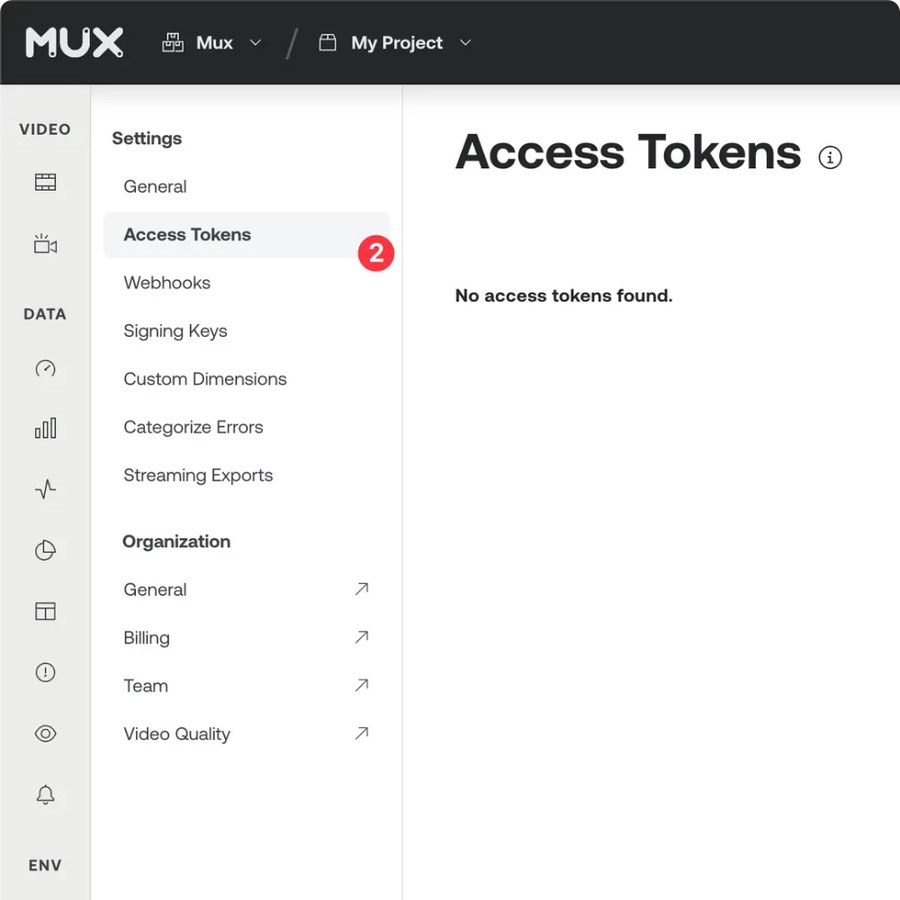
Mux's Access Tokens settings in the dashboard. Source: Mux website
Mux's docs describe a video platform with hosting, encoding and streaming infrastructure, a video player, playback analytics and Mux Robots, a set of AI workflows for jobs such as moderation, summaries, chapters and captions. A video is uploaded as an asset, and a playback ID streams it to viewers as HLS. The docs tell developers to use webhooks rather than poll the assets endpoint, and say webhook deliveries are retried for 24 hours when the server does not answer with a 2xx status.
Requests use HTTP Basic auth with an access token ID and secret, and official SDKs cover TypeScript, Python, PHP, Ruby, Elixir, Java and .NET. Mux also documents an MCP server for AI agents. Its pricing page says on-demand captions generated by AI are free in 22 languages, and lists on-demand video up to 4K.
Pricing: Mux's pricing page says it prices in minutes, not file size. Input (encoding), storage and delivery are separate per-minute meters, and Mux Robots workflows are billed in units. Basic-quality on-demand input is free. The Free plan lists up to 10 videos stored, on-demand only, with 100K free delivery minutes a month, and pay as you go adds a $20 monthly usage credit. See the pricing page for current per-minute rates.
Considerations: A Mux bill depends on library size, encoding quality and how much is watched, so the vendor's own estimating guide is worth running before launch. Mux is infrastructure rather than an editor: its clipping docs describe cutting a new asset from an existing one between start and end times you supply. Live streaming needs Plus or Premium quality, and Basic supports on-demand video only.
- Choose it if the product streams video to viewers and wants the player, playback analytics and AI metadata from the same vendor.
- Skip it if pricing by file size is a requirement, or the job is editing video or picking clips by content.
2. api.video: Best for hosting with free encoding and a sandbox
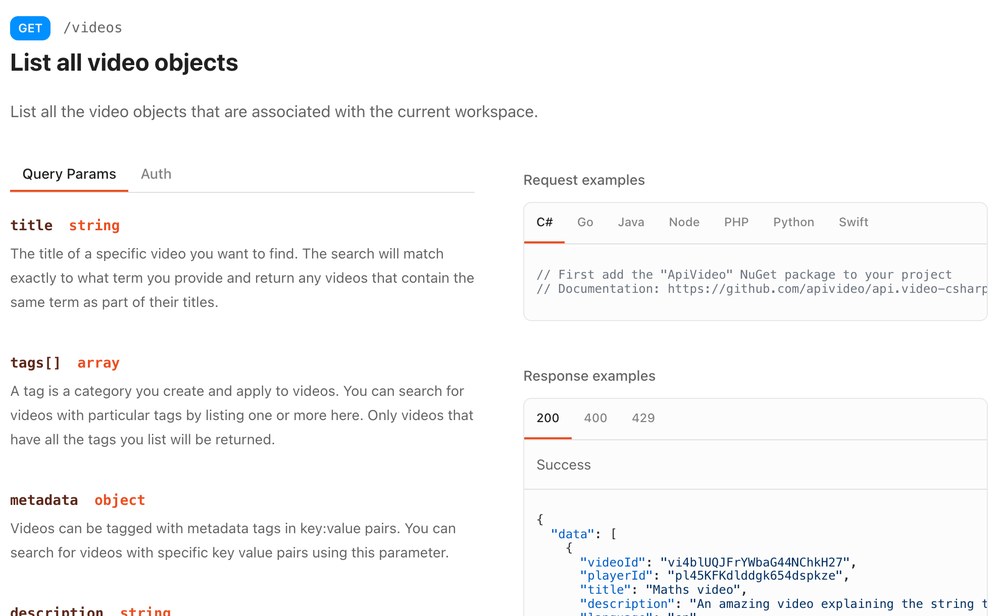
api.video's API reference for listing videos. Source: api.video website
api.video's docs describe a cloud-based video hosting and live streaming platform. Its pricing page lists upload by URL or file, HLS and MP4 output, encoding from 240p to 4K, a customizable player, live streaming over RTMPS and SRT, webhooks, analytics, trimming, watermarks and chapters. It also lists two AI features: transcription in 33 languages and video summarization.
Every call needs authentication, and the docs offer an API key in a Basic auth header or a disposable Bearer token, which the client libraries use by default. Client libraries cover Node.js, Python, PHP, Go, C# and Java on the server, plus Swift and Android. Webhooks cover encoding, live broadcast, caption and summary events.
Pricing: api.video's pricing page says encoding is free for unlimited minutes. It charges for hosting minutes (video stored, including recorded live streams) and delivery minutes (video loaded by viewers), and lists rates of as low as $0.00285 per minute stored and $0.0017 per minute delivered. Viewers' quality and codec do not change the delivery charge. The Free plan is a sandbox: videos are limited to 30 seconds, carry a watermark and are deleted after 24 hours.
Considerations: The sandbox cannot show production behavior, and the auth guide says a production key needs a plan and a credit card. On pay as you go, the pricing page lists 100 upload calls, 200 write calls and 500 read calls a minute. AI features such as transcription are priced per minute of video on top of hosting.
- Choose it if free encoding and per-minute billing suit the product and the team wants client libraries in many languages.
- Skip it if a prototype needs a free tier whose videos last longer than a day, or the job is rendering or clipping video.
3. Cloudflare Stream: Best for simple two-meter pricing on the Cloudflare platform
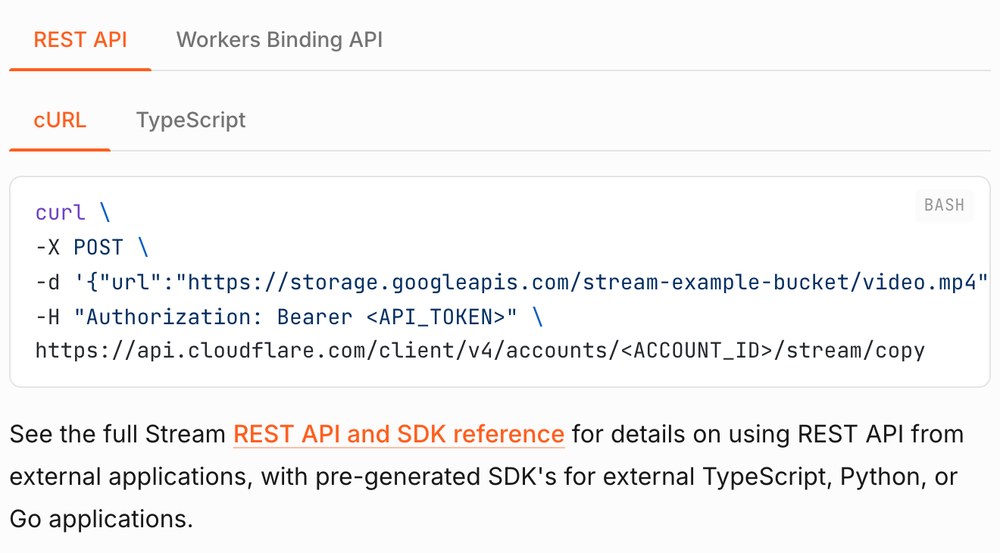
A Stream upload request in Cloudflare's docs. Source: Cloudflare website
Cloudflare's docs say Stream lets developers upload, store, encode and deliver live and on-demand video with one API. Stream encodes with the H.264 codec and adaptive bitrate streaming, supporting resolutions from 360p to 1080p. Uploads can come from the dashboard, a link, a file, resumable TUS uploads or direct creator uploads, where an end user uploads without seeing the API token. Files must be under 30 GB.
The docs also list clipping by start and end time through the API, captions generated by AI or uploaded, watermarks, signed URLs, MP4 downloads and live streaming over RTMPS, SRT and WebRTC. Requests use a Cloudflare API token, and Cloudflare's SDK page lists Go, TypeScript and Python SDKs for its API. Webhooks fire when a video is ready or errors, and live streams have their own webhooks.
Pricing: Cloudflare's pricing page says Stream bills on two dimensions: minutes of video stored and minutes delivered. Storage is prepaid at $5 a month for each 1,000 minutes of capacity, delivery is post-paid at $1 per 1,000 minutes, and ingress and encoding are free. The page lists no free plan.
Considerations: Delivery counts client-side preloading and buffering, per the pricing page. Storage is prepaid, and when it runs out, new uploads and live streams stop until more is bought or videos are deleted. Output tops out at 1080p according to the overview page.
- Choose it if the team already runs on Cloudflare and wants two meters and encoding at no charge.
- Skip it if 4K output is needed, or a free tier is required to prototype.
4. Bunny Stream: Best for per-GB billing and free standard encoding
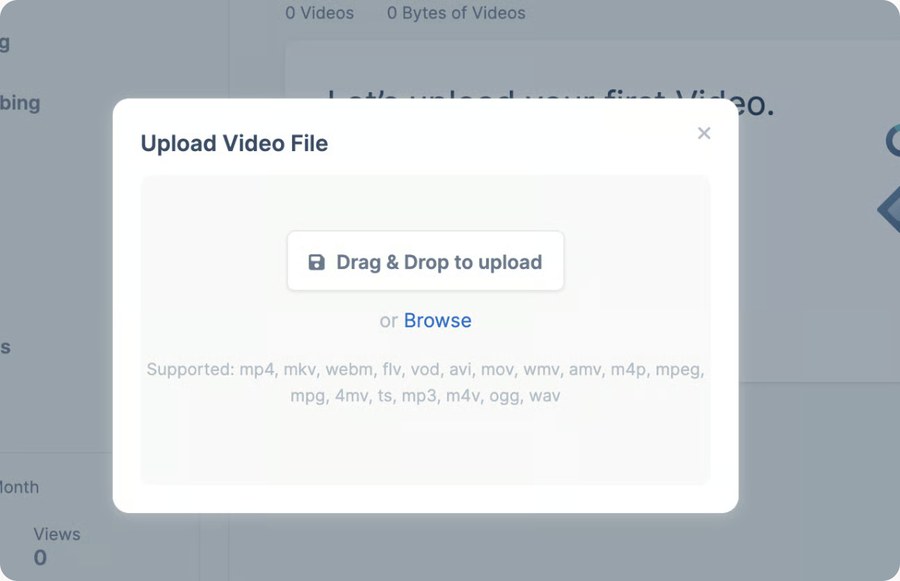
Bunny Stream's upload dialog in the dashboard. Source: Bunny website
Bunny's docs describe Bunny Stream as a way to upload, encode, secure and deliver video worldwide, with adaptive streaming, a customizable player, AI transcription and DRM options. Videos can come in through the dashboard, the HTTP API, a remote URL or resumable TUS uploads, and each is transcoded into the resolutions the library enables. Output is HLS, with optional MP4 fallback.
Every request to the HTTP API carries a per-library Stream API key in an AccessKey header. The Stream docs list mobile SDKs for Android, iOS and React Native, and we found no server-side Stream SDK in them. Webhooks send a POST each time a video changes state, and the docs say deliveries can arrive out of order, so the event ID and timestamp matter.
Pricing: Bunny's pricing page says standard encoding is included at no extra cost, and only Premium Encoding is billed, per minute of output and per codec. Storage is billed per GB (the page lists $0.01 per GB in the default region), delivery is billed per GB by region or on a Volume network, and AI transcription is charged per language and per minute. Accounts have a $1 minimum monthly usage, and the marketing page offers a 14-day free trial with no credit card.
Considerations: Storage is billed on what encoding generates, not on the size of the uploaded file. The docs say each enabled resolution is stored separately, and MP4 fallback and kept original files add more, so a library can hold several times the footage sent to it. Cost depends on the settings chosen for each library.
- Choose it if per-GB pricing and control over which resolutions are encoded fit the product.
- Skip it if per-minute pricing is easier to forecast, or a server-side SDK is a requirement.
5. Cloudinary: Best for transforming video at delivery time
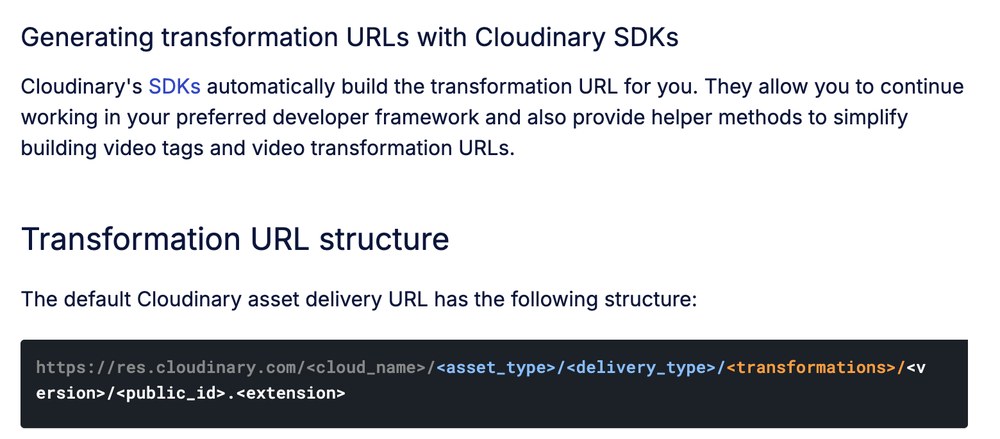
The transformation URL structure in Cloudinary's docs. Source: Cloudinary website
Cloudinary's documentation says its dynamic URL transformations generate variations of an original video on the fly. Its guides list trimming by start time, end time or duration, concatenating videos and images, transition effects, layers of video, image or text, resizing and cropping, and adaptive bitrate streaming. The docs also list video transcription and an AI Video Analysis API (Beta).
Upload API requests can use an API key and secret over HTTP Basic auth, or a signature. Backend SDKs cover Node.js, Python, PHP, Java, Ruby, .NET, Go and Dart, and webhook notifications POST to a public URL when an action completes. The pricing page lists access to MCP servers on the free plan.
Pricing: Cloudinary's pricing page lists one credit as equal to 1,000 transformations, or 1 GB of managed storage, or 1 GB of image bandwidth, or 2 GB of video bandwidth (paid plans only). The Free plan lists 25 monthly credits and 3 users with no credit card; Plus lists 225 monthly credits. See the pricing page for plan prices and billing periods.
Considerations: The docs say the pricing plan depends partly on the number of transformation operations, mostly counted when a new derived asset is generated from a transformation URL. On-the-fly transformations are limited to 60 minutes of output for adaptive streaming and 30 minutes for progressive formats such as MP4, and longer videos are processed asynchronously, with a 423 error until they finish. Cloudinary edits and delivers existing assets; its docs do not describe picking highlights from a long recording.
- Choose it if videos already live in a media library and the work is trimming, resizing, overlaying and delivering variants.
- Skip it if the job is generating new videos from templates or finding clips in long recordings.
6. Shotstack: Best for rendering video from JSON or templates
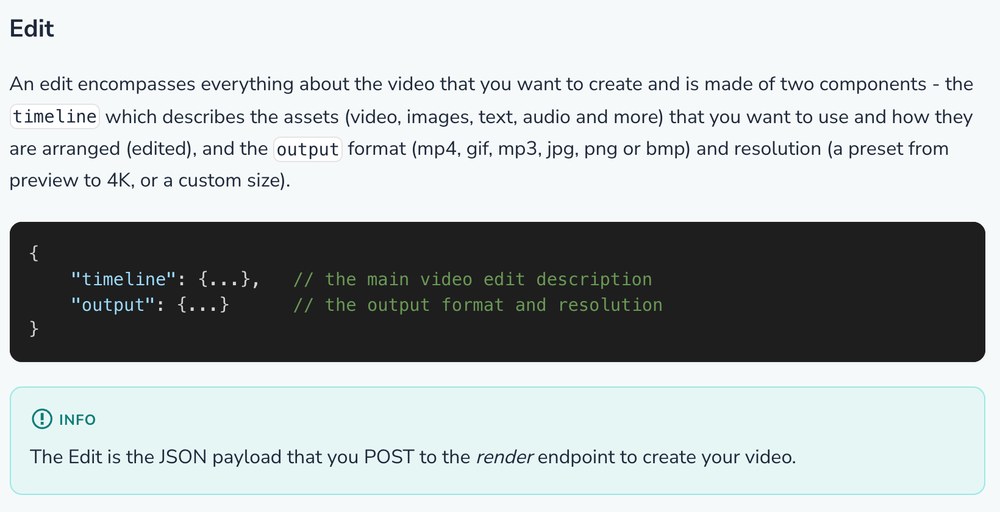
An edit as JSON in Shotstack's docs. Source: Shotstack website
Shotstack's docs describe a cloud-based video editing API in which every video starts as an edit: JSON with a timeline, which arranges video, images, text and audio, and an output, which sets the format (mp4, gif, mp3, jpg, png or bmp) and a resolution from a preview preset up to 4K. Renders run in the cloud in parallel, and a webhook reports when each is ready.
The docs also describe an Ingest API that transcodes footage and transcribes speech, AI generation of video, images, voice-overs and music during a render, a Studio SDK for embedding an editor, a CLI and an MCP server. Requests use an API key, with separate sandbox and production keys, and the API reference shows code samples in cURL, Node.js, PHP, Ruby, Python, Java and Go. Our guide to video editing APIs compares Shotstack with other rendering APIs.
Pricing: Shotstack's pricing page says to pay for the minutes of video made, counted by the second and rounded down. Pay as you go costs 20 cents a minute, plans cost 15.6 to 5 cents a minute, and plan minutes roll over for 3 months. New accounts get 10 free credits valid for 30 days, and the docs say renders in the sandbox are free but watermarked.
Considerations: Shotstack renders what an edit describes. We found no highlight detection in its docs, so choosing the moments to cut is a separate step. AI generation is charged per model in credits on top of render minutes.
- Choose it if the product builds videos from templates, data or clips it already has, and the team will write or generate the edit.
- Skip it if the job is hosting and streaming video, or finding the best moments in a long recording automatically.
7. OpusClip: Best for turning long videos into short captioned clips
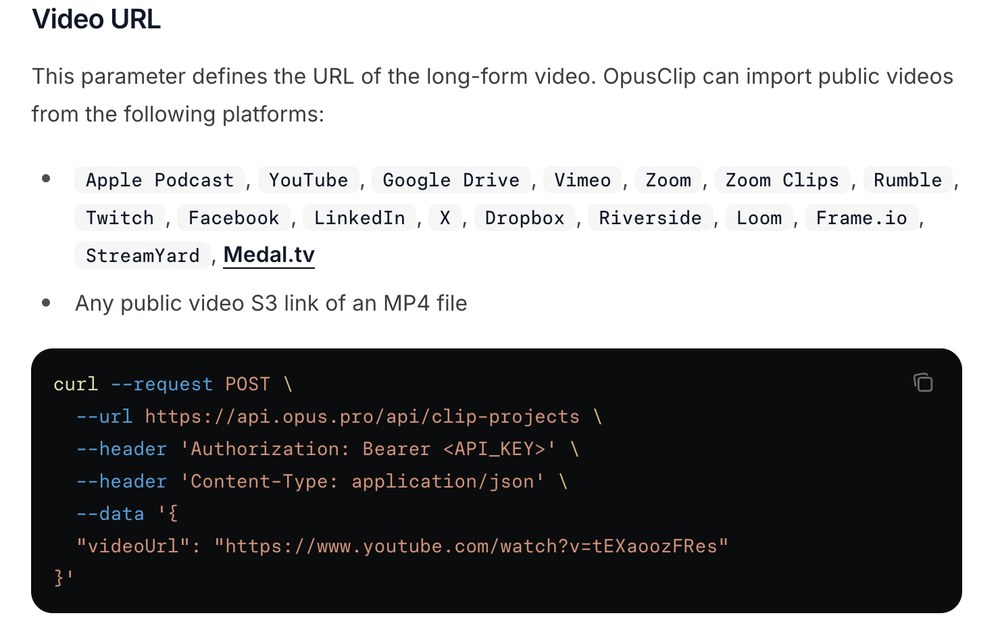
OpusClip's create-project docs. Source: OpusClip help center
Per OpusClip's quickstart, a POST request to the clip-projects endpoint with a videoUrl and an API key creates a project, and a second request fetches the clips by project ID. The create-project docs list public videos from platforms including YouTube, Google Drive, Vimeo, Zoom, Twitch, Dropbox, Riverside, Loom and StreamYard, plus any public MP4 link on S3. Two curation models are documented: ClipBasic for talking-head videos, and ClipAnything for any video type, steered by a natural-language prompt.
The request can also set clip durations, genre, topic keywords, a time range, source language, layout aspect ratio (portrait, landscape or square), filler word removal and a brand template. A signed webhook or an email reports when results are ready. Around that core call, the docs describe a transcripts endpoint with speakers and per-word timings, social copy and posting endpoints, and an MCP server at mcp.opus.pro/mcp with an agent skill. The API page shows cURL, TypeScript and Python examples, and worked examples include generating YouTube Shorts from long videos and processing many videos in parallel.
Pricing: OpusClip's API is billed in credits against the account. Which plans include API access, the credit rates and the caps are set out in the API documentation (see the API overview and limitations page), and we leave those numbers out of this guide.
Considerations: OpusClip's API returns clips from a video submitted for processing. It does not host or stream video to viewers, transform files at delivery time or render a video from JSON or a template. The limits page lists a standard rate limit of 30 requests a minute per API key, and projects expire after 30 days by default, so finished clips need to be saved to the team's own storage.
- Choose it if the input is a long recording such as a podcast, webinar or stream, and the output is a batch of captioned clips with a transcript, with webhooks and optional posting.
- Skip it if the job is hosting and streaming video, rendering from data, or searching a library by what is in it.
8. Twelve Labs: Best for searching and analyzing what is inside a video
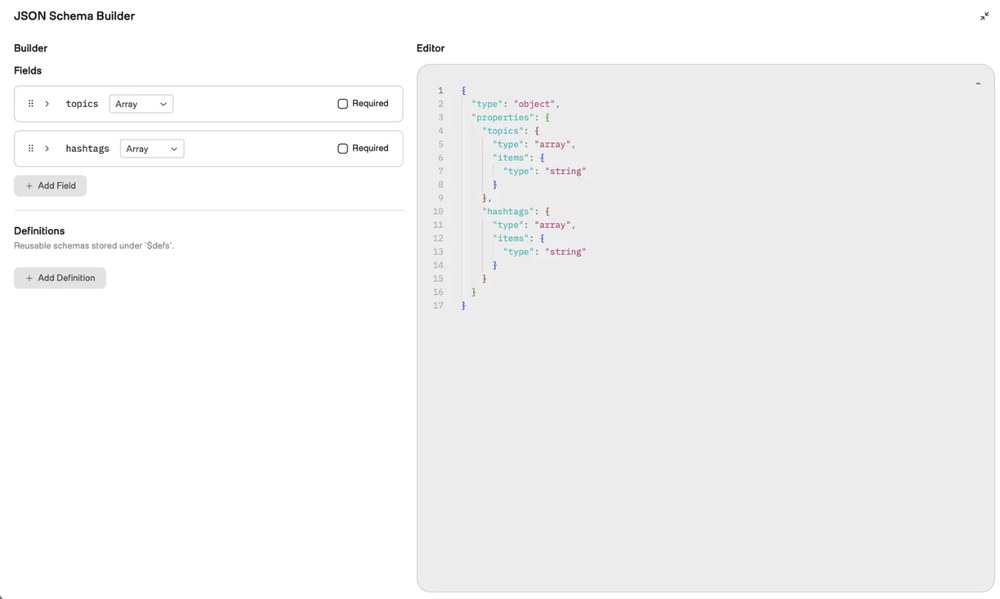
TwelveLabs' Playground schema builder for structured analysis output. Source: TwelveLabs website
Twelve Labs' docs describe two model families behind its API: Marengo, an embedding model that analyzes visual, audio and text information, and Pegasus, a generative model that analyzes videos or images to generate text. The Models API covers searching for moments with text or image queries, analyzing a video for summaries or answers to a prompt, segmenting a video into labeled, timestamped parts, and creating embeddings. Jockey, its agent, reasons across a knowledge store of videos and can be added to Claude or ChatGPT.
The Pegasus 1.6 page lists video up to 2 hours long (4 hours when analyzing a portion), files up to 10 GB and resolutions from 360x360 to 5184x2160. Requests carry an API key in the header, SDKs are listed for Python and Node.js, and webhooks fire when an indexing or asynchronous analysis task reaches a final status (not for the Embed API).
Pricing: Twelve Labs' pricing page lists Free, Plus and Pro plans with storage of 3 GB, 50 GB and 200 GB, and an Enterprise plan with custom terms. The docs say usage is metered by storage and by workloads, such as search calls, tokens or video duration, and that requests fail once an allowance is reached and overage is off or unavailable. Overage is available on Pro and is off by default.
Considerations: The platform returns understanding, meaning search results, text, timestamped segments and embeddings. We found no endpoint in the docs that renders a finished clip, so cutting and captioning is a separate step. The docs also say plans are moving to a new billing in phases, so allowances can differ by account.
- Choose it if the product needs to search, summarize or segment a video library by what happens in it.
- Skip it if the output has to be a finished, captioned video, or the job is hosting and streaming.
How we compared these tools
We compared each API on the job it does (host and stream, transform, render, or clip and analyze), how a request is authenticated, which SDKs or code samples the docs list, whether webhooks exist, what comes out, how it is charged and what the free tier allows, plus the main limit each vendor documents. The list follows the four jobs, with hosting and streaming first because that is what most searches for a video API mean, and inside each job the API we would start with comes first. OpusClip sits seventh because it owns only the clip-and-caption job, and it is our pick for that job.
All facts come from each vendor's own docs, pricing pages and help center, read on November 6, 2026. We did not run hands-on tests of any API, so this guide says nothing about speed, reliability or output quality. Prices and free tiers change often, so confirm them on each pricing page before building. Rendering APIs such as Creatomate, JSON2Video and Remotion are covered in our guide to video editing APIs.
Red flags to watch for
Meters that scale with viewing, not just uploading
Mux, api.video and Cloudflare Stream bill delivered minutes, and Bunny Stream bills delivered GB. Cloudflare counts client-side preloading and buffering as billable delivery. Trial test: estimate a month from real watch time, not from upload volume.
Storage that multiplies
Bunny Stream stores every enabled resolution, MP4 fallback and kept original, and Cloudflare Stream storage is prepaid and blocks new uploads when it runs out. Trial test: upload a typical file and read the storage it actually uses.
Free tiers that are sandboxes
api.video's free plan deletes watermarked 30-second videos after 24 hours, Shotstack's sandbox renders are watermarked, and Mux's free plan stores up to 10 on-demand videos. Trial test: confirm what a production key changes before promising a launch date.
Output ceilings
Cloudflare Stream lists 360p to 1080p, Cloudinary limits on-the-fly output to 30 minutes for progressive formats, and Twelve Labs lists a 2-hour video limit for Pegasus 1.6. Trial test: push your longest and highest-resolution file through the API first.
Duplicate and out-of-order webhooks
Mux says duplicate webhook messages can be sent, and Bunny says deliveries can arrive out of order. Trial test: make the handler safe to run twice, and see webhooks vs polling for video APIs.
Files that disappear
OpusClip projects expire after 30 days by default, and api.video sandbox videos are deleted after 24 hours. Trial test: add a step that copies finished files to your own storage and confirm it runs.
The wrong kind of API for the job
A hosting API does not pick highlights, a clipping API does not stream to viewers, and a search API does not render video. Trial test: write the input and the expected output of one real job on paper, then check that the API accepts that input and returns that output.
Frequently asked questions
What are the best video APIs for developers?
It depends on the job. For hosting and streaming video in an app, Mux is our first pick, with api.video, Cloudflare Stream and Bunny Stream as alternatives. Cloudinary suits transforming video at delivery time, Shotstack suits rendering video from JSON, Twelve Labs suits searching and analyzing video, and OpusClip suits turning long videos into short captioned clips. See OpusClip's API page for the clipping API.
What is a video API?
A video API is a set of HTTP endpoints for working with video from code. Some store, encode and stream video (Mux, api.video, Cloudflare Stream, Bunny Stream), some transform or render it (Cloudinary, Shotstack), and some analyze it or cut clips from it (Twelve Labs, OpusClip).
Which video API should I use?
Start from what the product does with video. If viewers watch it in the product, pick a hosting API and compare per-minute billing (Mux, api.video, Cloudflare Stream) with per-GB billing (Bunny Stream). If existing files need variants, look at Cloudinary. If new videos are built from data, look at Shotstack. If long recordings become clips, look at OpusClip.
What is the difference between a video hosting API and a video editing API?
A video hosting API stores, encodes and streams video, and its docs and pricing are about uploads, minutes stored and minutes delivered. A video editing API produces or changes video from instructions, such as a JSON timeline or a transformation URL. Our guide to video editing APIs covers the second group in more depth.
How do video APIs charge?
Hosting APIs usually bill by usage: minutes stored and delivered at Mux, api.video and Cloudflare Stream, and GB stored and delivered at Bunny Stream. Cloudinary bills in credits shared by transformations, storage and bandwidth, Shotstack bills minutes of rendered video, and Twelve Labs meters storage and workloads. OpusClip's API is billed in credits, and its API documentation has the details.
Is there a free video API?
Most offer a free start with limits. Mux lists a Free plan with up to 10 videos stored, api.video offers a watermarked sandbox, Bunny Stream a 14-day trial, Cloudinary a Free plan with 25 monthly credits, Shotstack 10 free credits for 30 days and Twelve Labs a Free plan with 3 GB of storage. Cloudflare's Stream pricing page lists no free plan. For OpusClip, see the API documentation.
Can a video API turn long videos into short clips?
Yes. OpusClip's API takes a link to a long video and returns captioned clips, and Mux and Cloudflare Stream can cut a clip between start and end times the caller supplies. Twelve Labs can find moments by search or segmentation but returns timestamps and text rather than a finished video.
Can AI agents call a video API?
Several vendors pair the REST API with an MCP server or agent tool. Mux and Shotstack document MCP servers, Twelve Labs documents Jockey for Claude and ChatGPT, and OpusClip has an MCP server and an agent skill. See video editing MCP vs video editing API for when each fits.