No items found.
6 Best Video Clipping MCP Servers in 2026

OpusClip's MCP server is the pick for handing a long video to an agent and getting clips back to review and edit: its help center lists a tool that clips a video link, tools that list and preview the clips, and a tool that edits them by named operations. Reap and Klap also choose the moments themselves, HeyGen runs clipping as a job on a video-generation server, and Descript and Riverside clip inside the editors they connect to. This guide compares how each server is hosted, how it signs in, which clipping tools it exposes and what comes back, from each vendor's own docs read on November 18, 2026.
Key takeaways
- Best for handing a long video to an agent and editing the clips it returns: OpusClip. Its help center prints tools to clip a video link, preview clips, edit them by named operations and export HD downloads.
- Best for describing the clips wanted in plain language: Reap. Its guide has the agent show the planned settings and ask for confirmation before it submits the job.
- Best for cutting a described moment or the stretch between two timestamps: Klap. Its page lists create_clip_from_prompt and create_clip_from_range next to create_clips.
- Best for clipping inside a video-generation server: HeyGen. Its docs list an AI Clipping tool group where highlights are picked from the spoken dialogue.
- Best for clips that stay editable in a project: Descript. Its help center says each clip is a new composition in the source project.
- Best for clips from recordings and uploads already in Riverside: Riverside. Its page describes the agent finding social-worthy moments and returning a link to the clip in Riverside.
What counts as a video clipping MCP server
A video clipping MCP server lets an AI agent turn a long video into short clips by calling tools over the Model Context Protocol. The servers here differ in who picks the moment. The server picks: Reap, Klap and HeyGen describe a clipping job that finds the moments itself (HeyGen's docs say from the spoken dialogue), and OpusClip's sample prompt asks for the best clips from a video link. The agent names the moment: Klap can also cut a moment the agent describes, or the stretch between two timestamps. The editor behind the connector picks: Descript and Riverside clip through their own AI editors, so the clips land in a project that can be edited further.
Two servers we read stay outside the list. Twelve Labs' Jockey server finds and cites moments across a library of videos and can show a highlight-reel timeline in clients that render widgets, but the page we read does not describe exporting clip files. Speak AI's create_clip tool cuts a highlight clip between time ranges the caller supplies, so it does not pick the moment itself. Our guide to the best MCP servers for video maps ten servers across clipping, generation, rendering and infrastructure, and our guide to the best video clipping APIs covers the same job over REST. This guide stays on servers whose own docs describe a clipping or highlight tool.
How to choose
- An agent should find the moments in a long recording and hand back clips to review: OpusClip, Reap, Klap or HeyGen, whose docs describe submitting a video and getting clips back.
- The moment is already known: Klap's create_clip_from_prompt takes a described moment and create_clip_from_range takes two timestamps.
- The clips should open in an editor the team already uses: Descript keeps each clip as a composition in the source project, and Riverside returns a link to the clip in its editor.
- The client is Claude.ai: OpusClip's help center has a separate Claude connector page, and Klap, Descript and Riverside each describe adding their server from Claude's connector directory.
- A person must approve before anything posts: OpusClip's Claude connector returns a link to confirm in OpusClip, Reap's docs say the agent should ask before posting, and Klap's page says its instructions tell agents to schedule only on request, after the details are confirmed.
- The source is a YouTube link: OpusClip's agent setup page, Reap's guide and Klap's page describe links, while Descript's help center says YouTube URLs are not supported as import sources.
At a glance
- OpusClip: best for handing a long video to an agent and editing the clips it returns; this guide does not restate OpusClip's plan or access terms for the MCP server, so see its help center and pricing page.
- Reap: best for describing the clips wanted in plain language; its docs say Reap MCP works on every plan and the Free plan includes one MCP connection.
- Klap: best for cutting a described moment or two timestamps; its MCP page says connecting is free with a free trial, downloading and posting clips needs a paid plan, and paid plans start at $14.50 a month billed yearly ($29 month to month).
- HeyGen: best for clipping inside a video-generation server; its docs say MCP usage draws on the credits in the HeyGen plan, so see its pricing page for plans.
- Descript: best for clips that stay editable in a project; its help center says API and MCP use can use media minutes and AI credits, so see its pricing page for plans.
- Riverside: best for clips from recordings and uploads already in Riverside; its help center lists the Grow, Webinar and Business plans for the MCP and says it does not affect Riverside AI credits.
How each video clipping MCP server is hosted, signs in and returns clips
The At a glance list covers best-for and the access terms each vendor prints; this table compares how each MCP server is hosted, how it signs in, which clients the vendor lists, the clipping tools it exposes and what comes back, as listed on each vendor's own pages on November 18, 2026.
| Tool | Hosted or installed | Sign-in | Clients the vendor lists | Clipping tools | What comes back |
|---|---|---|---|---|---|
| OpusClip | Hosted at mcp.opus.pro/mcp; npm launcher; Claude Connector for Claude.ai | OAuth on first use, no API key | Cursor, Cline, Claude Code, ChatGPT and Codex, other MCP hosts | submit_project, list_clips, describe_clip, preview_clips, edit_clip, export_clip | Preview URLs from list and describe calls; HD download URL from export_clip |
| Reap | Hosted at mcp.reap.video/mcp; no local server | OAuth; the user picks the workspace the agent may use | Cursor, Claude Code, VS Code, GitHub Copilot, Codex, Gemini CLI, other MCP agents | create_clips from a video or URL; editor tools such as editor_trim_clip | get_results: clips with download URLs; an email when the job finishes |
| Klap | Hosted at api.klap.app/mcp/agents; added by URL | OAuth with a Klap account, no API key | Claude Code, Claude, Cursor, VS Code, ChatGPT developer mode, Windsurf, Codex | create_clips, create_clip_from_prompt, create_clip_from_range, get_clips, export_clip | Clips with scores, lengths and editor links; export_clip renders an MP4 |
| HeyGen | Hosted at mcp.heygen.com/mcp/v1/; no local server | OAuth, no API key; usage draws on HeyGen plan credits | ChatGPT, Codex, Claude, Cursor, other MCP agents | create_ai_clipping, get_ai_clipping, list_ai_clipping, delete_ai_clipping | Job with clips, statuses and presigned download URLs |
| Descript | Remote HTTP server at api.descript.com/v2/mcp | Descript login via OAuth, no API token; one Drive per connection | Claude, Claude Code, ChatGPT, Codex, Cursor, Antigravity, Copilot, VS Code | Underlord edits that create shorts, reels and other social clips | Each clip is a new composition in the source project |
| Riverside | Hosted by Riverside; one-click connect or custom MCP server | Riverside sign-in, authenticated separately for each AI agent | Claude, ChatGPT and Cursor one-click; any MCP assistant | The agent finds social-worthy moments and cuts them into clips in Riverside | A link to the clip in Riverside to edit further; exports land in the exports folder |
1. OpusClip: Best for handing a long video to an agent and editing the clips it returns
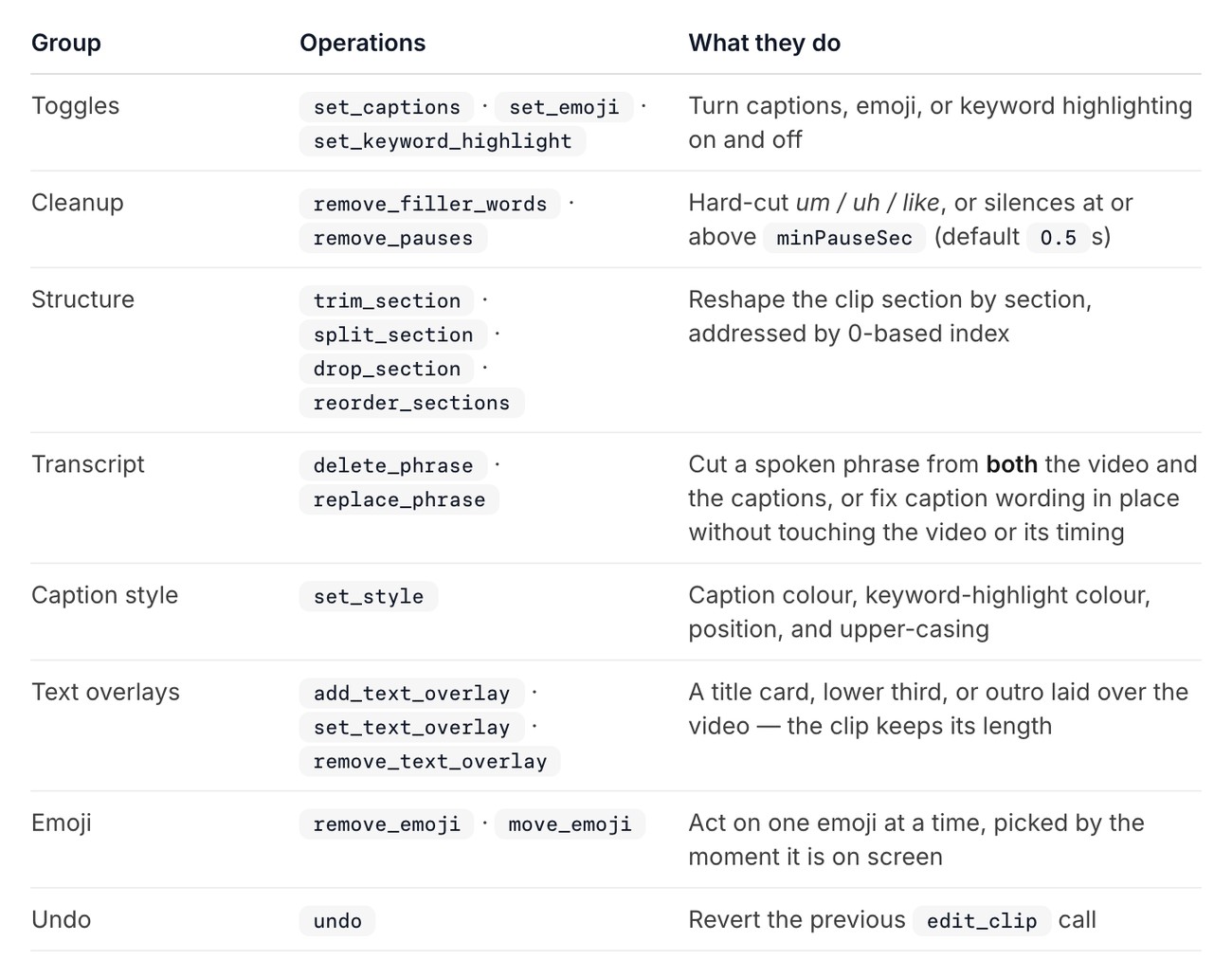
OpusClip's Claude connector page, the edit_clip operations table. Source: OpusClip help center
OpusClip's agent setup page describes a hosted MCP server at https://mcp.opus.pro/mcp that signs in with OAuth on first use, with no API key, for Cursor, Cline, Claude Code, ChatGPT and Codex and other MCP hosts. Claude.ai users add the separate Claude connector instead, and the setup page lists the server in the npm, MCP Registry, Smithery, cursor.directory and Cline marketplace directories. Its sample prompt asks the agent to clip a YouTube link and return the top five clips, and the opusclip_submit_project tool is described as clipping a video from a link, with opusclip_create_upload_link for a file on a local machine.
The read tools list projects and the clips in a project, describe one clip (its transcript, layout and render status), fetch the source transcript and show a project's top clips as a playable card grid in chat. The list and describe calls return preview URLs only, and opusclip_export_clip returns the HD download URL. opusclip_edit_clip applies named operations in one call: caption, emoji and keyword-highlight toggles, filler-word and pause removal, section trim, split, drop and reorder, phrase delete and replace, caption styling, text overlays and undo. The connector page adds a dryRun option that reports what a batch would do without saving or rendering anything.
Other tools generate social copy for a clip, post it, schedule it and cancel a scheduled post, and opusclip_analyze_video reports what is on screen across a time range of the source video, such as faces, their positions and whether the person on camera is the one speaking. The OpusClip MCP page has the connect buttons.
Pricing and access: this guide does not restate OpusClip's plan or access terms for the MCP server, so see the agent setup page in its help center and its pricing page.
Considerations: The four tools that post now, schedule, cancel a scheduled post and share a project commit directly on the MCP server, while on the Claude connector each returns a link that the user opens in OpusClip to confirm, so a prompt that works on one route can behave differently on the other. Dubbing and media generation are on the MCP server only, not the Claude connector. List and describe calls return previews, so a clip file needs an export call. Each edit call re-renders the preview once, and OpusClip's page says batching related edits into one call is faster than one call per change.
- Choose it if an agent should clip a long recording, show the clips as previews, edit them by named operations and export HD files, with posting behind a confirmation link in Claude.ai.
- Skip it if the recordings and edits already live in Descript or Riverside, whose connectors work on those projects directly.
2. Reap: Best for describing the clips wanted in plain language

Reap's Create Clips With MCP guide. Source: Reap website
Reap's docs describe a hosted server at https://mcp.reap.video/mcp with OAuth sign-in: the user signs in to Reap and chooses the workspace the agent may use, and no API key is copied. The MCP reference lists Cursor, Claude Code, VS Code, GitHub Copilot, Codex and Gemini CLI, and the help center has setup pages for ChatGPT and Codex, Claude, Cursor, VS Code and OpenClaw. The create_clips tool generates AI clips from a video or URL, which can be a public link such as YouTube or a .mp4 or .mov file uploaded through request_upload_url.
The Create Clips guide says the agent shows the planned settings (orientation, resolution, caption style, captions on or off) and asks for confirmation before it submits a single clipping job, that the job runs asynchronously with an email when it finishes, and that get_results returns the clips with download URLs. The options it lists include portrait, square or landscape orientation, target durations, captions (on by default), a saved brand template, a resolution from 720p to 2160p, a language, caption translation and face tracking.
The same server covers captions, transcription, reframing, dubbing and publishing. Reap's editor tools, such as editor_trim_clip, editor_remove_silence and editor_fix_captions, open the clip in Reap's editor and return the steps for the job: agents with their own browser make the edit, and others send the user the link and the steps.
Pricing and access: Reap's docs say Reap MCP works on every Reap plan and that the Free plan includes one MCP connection. See Reap's pricing page for plan prices.
Considerations: Reap's two pages disagree on the size of the tool list, so this guide prints no count. Edits to a finished clip go through the editor hand-off rather than a direct edit call, and the docs say the publishing tools post publicly and ask for confirmation first.
- Choose it if the agent should take a plain-language brief (topics, durations, what to skip), confirm the settings with the user and return many clips from one job.
- Skip it if an edit has to be applied by the agent itself without a browser or a person opening the editor.
3. Klap: Best for cutting a described moment or the stretch between two timestamps
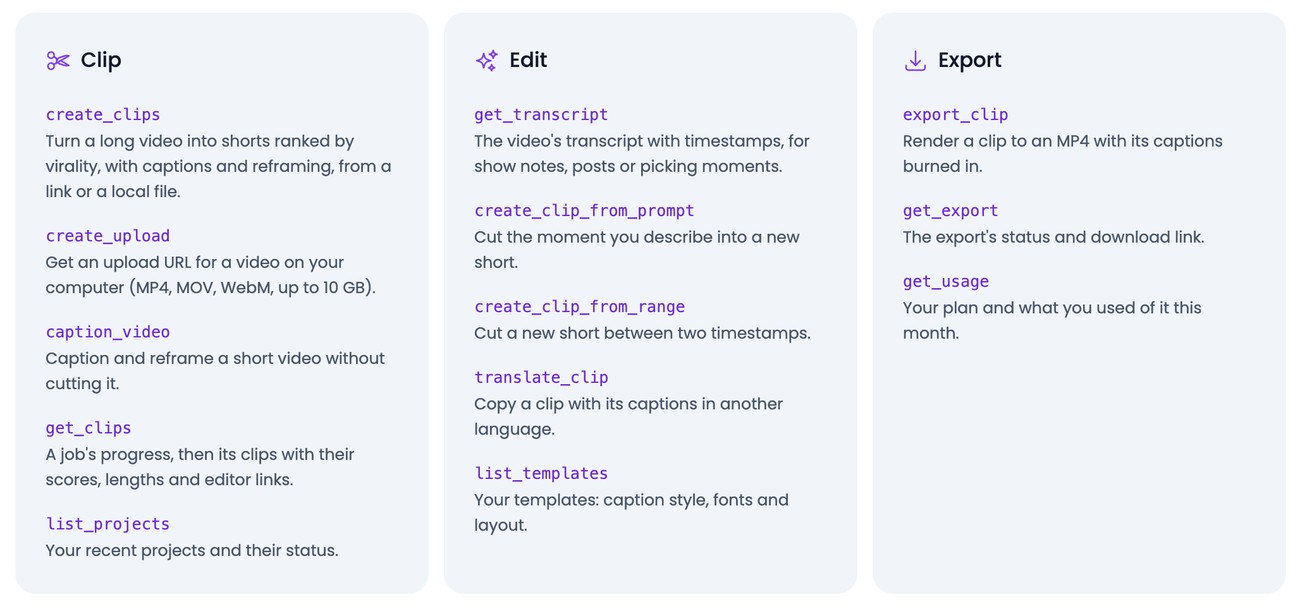
Klap's MCP page, the Clip, Edit and Export tool cards. Source: Klap website
Klap's MCP page gives a hosted server at https://api.klap.app/mcp/agents, added in Claude Code with one claude mcp add command, with sign-in through a Klap account and no API key. Its FAQ lists Claude Code, Claude on the web and desktop, Cursor, VS Code, ChatGPT in developer mode, Windsurf and Codex, and says Klap also has a ChatGPT app and a Claude connector in those directories. The create_clips tool turns a long video into shorts ranked by virality (Klap's wording), with captions and reframing, from a link or a local file, and create_upload gets an upload URL for MP4, MOV or WebM files up to 10 GB.
What sets Klap's list apart is the edit group: create_clip_from_prompt cuts the moment the agent describes into a new short, and create_clip_from_range cuts a new short between two timestamps, with get_transcript returning the transcript with timestamps for picking moments. The get_clips tool returns a job's progress and then its clips with their scores, lengths and editor links, export_clip renders a clip to an MP4 with its captions burned in, and get_export returns the export's status and download link. It lists YouTube, Twitch, Kick and Vimeo links, Google Drive and Dropbox files and local files as sources.
The page also lists tools to translate a clip, write a post caption and schedule or cancel a post, and it says Klap's instructions tell agents to schedule or cancel only when asked, after the user confirms the clip, the accounts, the time and the caption.
Pricing and access: Klap's MCP page says connecting is free, that what an agent creates uses the Klap plan, and that a free trial is included. It says downloading and posting clips needs a paid plan, and that paid plans start at $14.50 a month billed yearly ($29 month to month).
Considerations: The page says the directory connector works with the user's own video files and shows the shorts as playable cards, while the full server adds video-platform links, transcripts, described or timed clips, translations, templates and scheduled-post management. A finished MP4 comes from a separate export call.
- Choose it if the moment is known, either as a description or as two timestamps, and the agent should cut exactly that.
- Skip it if the MP4 files should arrive without a separate export call, or the source is outside the links and files the page lists.
4. HeyGen: Best for clipping inside a video-generation server
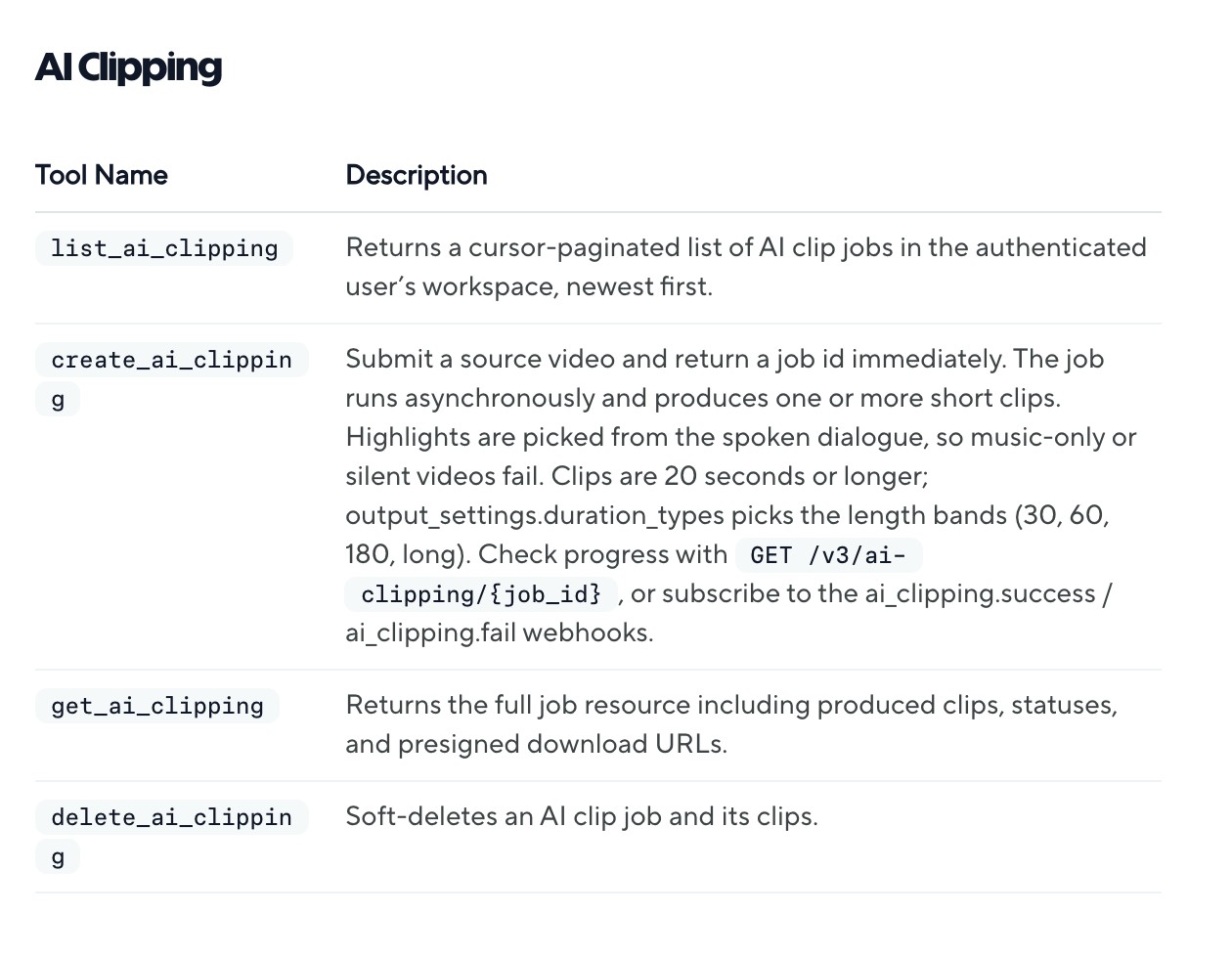
HeyGen's MCP overview, the AI Clipping tools. Source: HeyGen website
HeyGen's MCP docs give a hosted server at https://mcp.heygen.com/mcp/v1/ with OAuth sign-in and no API key or local server, and name ChatGPT, Codex, Claude, Cursor and any other MCP-compatible agent. Much of its tool list is generation, and the AI Clipping group has four tools. create_ai_clipping submits a source video and returns a job id immediately, the job runs asynchronously and produces one or more short clips, and get_ai_clipping returns the full job with its clips, statuses and presigned download URLs. list_ai_clipping lists jobs, and delete_ai_clipping soft-deletes a job and its clips.
The tool description says highlights are picked from the spoken dialogue, so music-only or silent videos fail, and that clips are 20 seconds or longer, with output_settings.duration_types picking the length bands (30, 60, 180 or long). HeyGen's AI clipping guide for the same job on its REST API lists portrait, landscape or square output, captions burned in by default with named caption styles, and a prompt of up to 500 characters that guides which speaker or topics the highlight model favours.
Pricing and access: HeyGen's MCP docs say usage draws on the credits in the existing HeyGen plan. Its docs index calls MCP fine for a first test from an AI host and points to the API with a key for anything at scale. See HeyGen's pricing page for plans.
Considerations: HeyGen's docs say apps, gateways and automation tools such as Make and n8n cannot use the MCP sign-in and should be built on the API with a key. Clipping is one tool group among many generation tools, and the four tools in it list, create, fetch and delete jobs, with no clip-editing tool in that group.
- Choose it if the same server should also generate, translate or batch video, and a clipping job from spoken-dialogue footage is one step among them.
- Skip it if the source is music-only or silent, which HeyGen says fails, or clips shorter than 20 seconds are wanted.
5. Descript: Best for clips that stay editable in a project
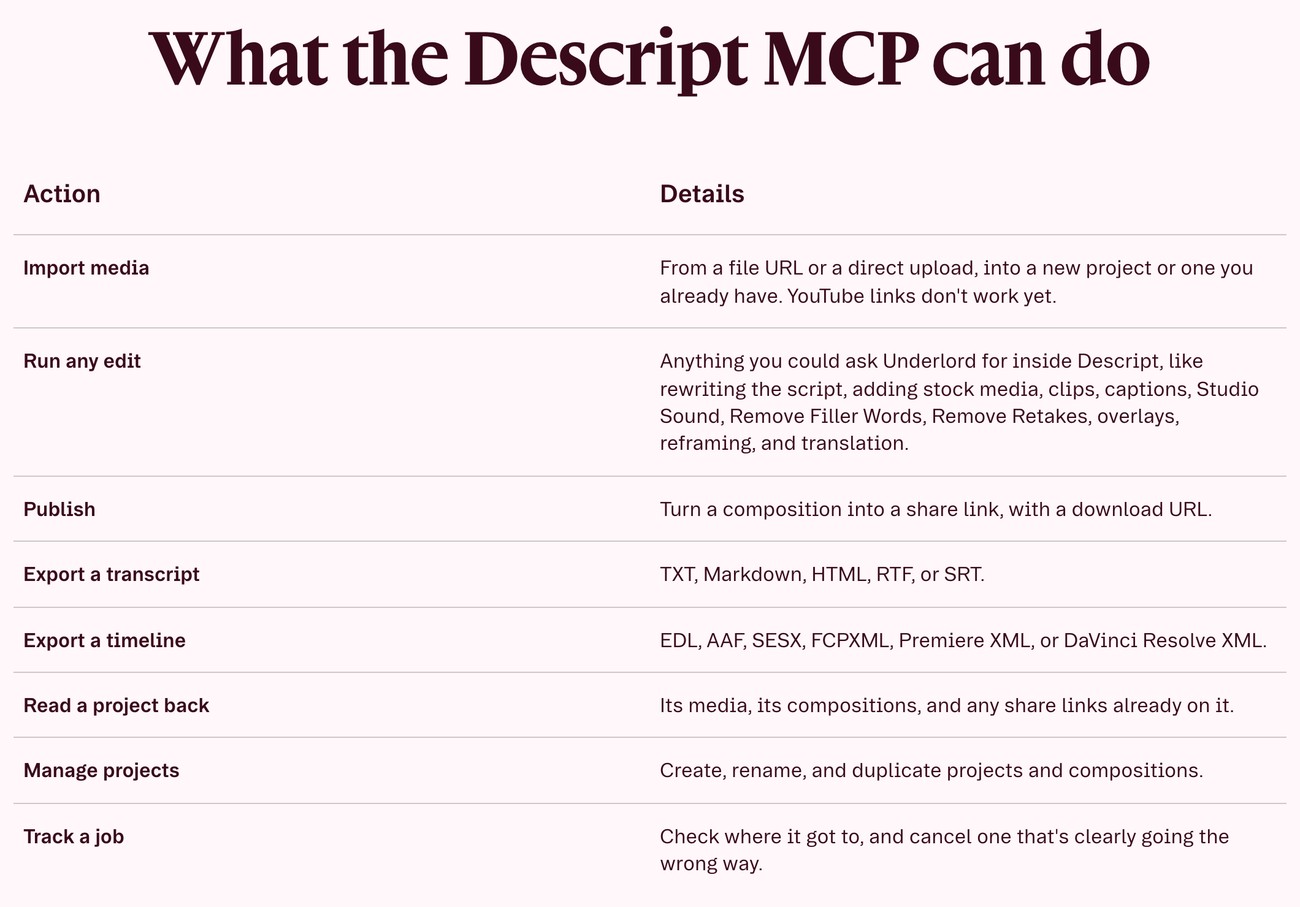
Descript's MCP page, the table of what the MCP can do. Source: Descript website
Descript's help center describes a remote server at https://api.descript.com/v2/mcp that uses the Descript login through OAuth, with no API token, scoped to one Drive per connection. It lists Claude, Claude Code, ChatGPT, Codex, Cursor, Antigravity, Copilot and VS Code, and says Claude's directory connector is available. The server runs edits through Underlord, Descript's AI co-editor, and the help center says an assistant can create shorts, reels and other social clips from video or audio already in a project, or tighten and reformat an existing short clip.
Descript's help center describes its Create clips AI tool as scanning a composition and pulling short, self-contained cuts, and says Underlord can be asked to create clips too. Each clip is a new composition in the source project and the source stays unchanged. The same MCP can export a transcript (text, Markdown, HTML, RTF or SRT) and a timeline (EDL, AAF, SESX, FCPXML, Premiere XML or DaVinci Resolve XML) and publish a composition to a share link with a download URL.
Pricing and access: Descript's help center warns that API and MCP use can use media minutes and AI credits: imports use media minutes, and Underlord edits can use AI credits. See Descript's pricing page for plans.
Considerations: The help center lists known limits: no rendered file download without publishing to a Descript web link, YouTube URLs are not supported as import sources (a file URL, an upload or a Google Drive or Dropbox link works), social clips are editable compositions rather than video files, and job history is available for 30 days.
- Choose it if the clips should open as compositions in a project where a person can keep editing, and the source is a file or a Drive or Dropbox link.
- Skip it if the source is a YouTube link, or a downloadable video file is needed without publishing it first.
6. Riverside: Best for clips from recordings and uploads already in Riverside
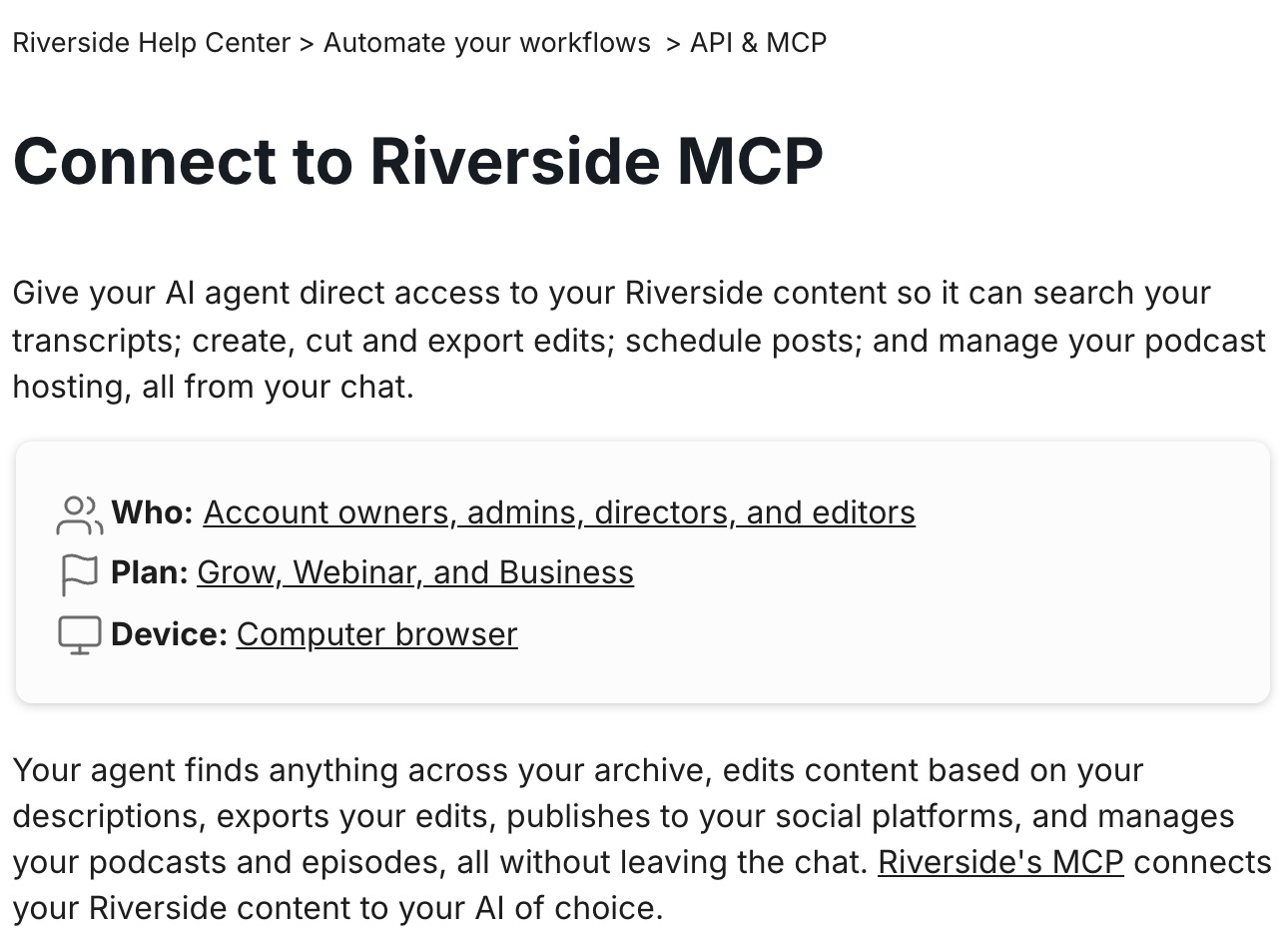
Riverside's Help Center article on connecting the MCP. Source: Riverside website
Riverside's help center says its MCP gives an AI agent access to Riverside content so it can search transcripts; create, cut and export edits; schedule posts; and manage podcast hosting. One-click connections for Claude, ChatGPT and Cursor start from the account settings, a custom MCP server route covers other clients it lists (including Claude Code, Codex, Microsoft Copilot and Perplexity), and each agent is authenticated separately. Riverside's MCP page says to describe the clip wanted: the agent finds the most social-worthy moments, reads the transcript, finds the best parts and edits them in Riverside, then provides a link to Riverside where the clip can be edited further.
The help center says an agent's edit opens a new edit rather than overwriting existing content, an exported edit appears in the exports folder, and an agent can export edits but cannot download the files. The page says the agent has access to all recordings and uploads in Riverside, and that connecting social platforms for posting is done in the Riverside dashboard, not through the agent. The pages we read describe these functions in plain language and do not print tool names.
Pricing and access: Riverside's help center lists the Grow, Webinar and Business plans for the MCP and says using it does not affect Riverside AI credits. See Riverside's pricing page for plans.
Considerations: The agent can export edits but not download them, so the file is collected from the exports folder in Riverside. Social accounts have to be connected in the dashboard first, and the pages we read print no tool names to script against.
- Choose it if the recordings and uploads are already in Riverside and the clips should land as new edits in its editor for a person to finish.
- Skip it if a printed tool list is needed to script against, or the source video lives outside Riverside.
How we compared these servers
We compared each server on how it is hosted or installed, how it signs in, which clients the vendor lists, the clipping tools its docs print or describe, what comes back, and the cost or limit the vendor states. This guide is organised around the job in the title, turning a long video into short clips through an MCP server. OpusClip comes first because that is the job its server is built for: a video link in, clips to review, edit and export out. Its limits are in its entry. Items 2 to 6 follow one yardstick: how directly the vendor's own pages show an agent turning a long video into clips with the server.
- 2. Reap: a clip-first tool with a confirmation step, many options and editor hand-offs.
- 3. Klap: clip-first tools plus cuts from a described moment or two timestamps.
- 4. HeyGen: a clipping job group inside a generation server, with highlights picked from spoken dialogue.
- 5. Descript: clips as one Underlord edit among many, delivered as compositions.
- 6. Riverside: clipping described as a function of the connected editor, with no tool names on the pages we read.
All facts come from each vendor's own docs, help centers and product pages, read on November 18, 2026. We did not run hands-on tests of any server, so this guide says nothing about clip quality, speed or reliability and prints no accuracy figure. We read other vendors' MCP pages too and kept only servers whose docs describe a tool that clips or finds highlights in a long video. Tool counts are left out because some vendors' own pages disagree on them. Servers, plans and limits change quickly, so confirm them before building.
Red flags to watch for
- Tool lists that differ by page. Reap's MCP product page lists 30 tools while its API reference lists 43, and OpusClip's connector and server expose different tool sets. Trial test: ask the connected agent to list the tools it can call and read what it returns.
- Posting that skips a person. On OpusClip's MCP server the posting tools commit directly, while the Claude connector returns a link to confirm, and Reap's docs say the publishing tools post publicly. Trial test: connect a test account and schedule one post before pointing an agent at a real channel, and keep the client's approval prompts on.
- Preview files that are not final files. OpusClip's list and describe calls return previews, Klap needs an export call for the MP4, Descript needs a publish step for a file, and Riverside's agent cannot download exports. Trial test: take one clip all the way to a downloaded file.
- Sources a server will not take. Descript's help center says YouTube URLs are not supported as imports, and HeyGen says music-only or silent videos fail. Trial test: push the real source link or file through before building around it.
- Plans and credits behind the connection. Reap's Free plan includes one MCP connection, HeyGen's docs call MCP fine for a first test, Descript's MCP use can draw on media minutes and AI credits, Klap's downloads and posting need a paid plan and Riverside lists the plans that include its MCP. Trial test: ask the agent for its usage first, since OpusClip, Klap and Reap each print a usage or plan tool.
- No manual override. A server that picks moments automatically will include weak cuts, and each job an agent submits uses the account's plan or credits. Trial test: keep a review step before any clip is exported or posted.
- Rights. Clip only video the team owns or has permission to use. OpusClip's help center says uploads must be content the uploader has the right to use, in its copyright policy article. We did not review the other vendors' terms.
Frequently asked questions
What are the best video clipping MCP servers?
For handing a long video to an agent and getting clips back to review and edit, OpusClip's MCP server is the pick in this guide: its help center lists tools to clip a video link, preview clips, edit them by named operations and export HD downloads. Reap fits plain-language briefs, Klap fits a described moment or two timestamps, HeyGen fits clipping inside a generation server, and Descript and Riverside fit clips that stay in their editors. See the OpusClip MCP page for the connect buttons.
What is a video clipping MCP server?
A video clipping MCP server is a hosted or local service that exposes clipping tools to an AI agent over the Model Context Protocol, so the agent can submit a long video, wait for clips and fetch them. Some servers run a clipping job on a video (OpusClip, Reap, Klap and HeyGen) and some clip through an editor (Descript and Riverside). Our guide to video editing MCP versus API explains when to use a server and when to use an API.
How do I clip a video with Claude?
Connect a clipping server to Claude, then ask for the clips in plain language. With OpusClip, Claude.ai users add the Claude connector from the directory and other clients add the server at its MCP address, then ask for clips from a video link; its setup page describes a prompt that asks for the top five clips from a YouTube link.
Which video clipping MCP servers work with Claude Code?
All six document a Claude Code route. OpusClip's agent setup page names Claude Code, Reap's docs, Klap's page and Descript's help center each give a claude mcp add command, HeyGen has a Claude Code setup page, and Riverside's help center lists Claude Code as a custom MCP server client.
Can an AI agent clip a YouTube video through MCP?
Several can. OpusClip's agent setup page describes submitting a YouTube or Vimeo link, Reap's guide opens with a YouTube URL example, and Klap's page lists YouTube, Twitch, Kick and Vimeo links. Descript's help center says YouTube URLs are not supported as import sources. Clip only videos the team owns or has permission to reuse.
Can an agent post the clips for me?
Several servers include posting tools, with a confirmation step. OpusClip's Claude connector returns a link that the user confirms in OpusClip, while on its MCP server the posting tools commit directly. Reap's docs say the agent should ask before posting, and Klap's page says its instructions tell agents to schedule only when asked. Riverside's help center says social platforms are connected in its dashboard, not through the agent.
Is there a free video clipping MCP server?
Some vendors print free access. Reap's docs say its Free plan includes one MCP connection, and Klap's page says connecting is free with a free trial, though downloading and posting clips needs a paid plan. HeyGen, Descript and Riverside tie MCP use to the account's plan, credits or minutes as their pages describe, and for OpusClip see its pricing page.
What is the difference between a video clipping MCP server and a video clipping API?
Both take a long video and return clips, but an MCP server lets an agent choose the calls while an API needs code that sequences them. Our guide to the best video clipping APIs covers the REST route, including webhooks, steering parameters and limits.