No items found.
7 Best Video Clipping APIs in 2026
OpusClip's API is the pick for sending a long video and getting captioned short clips back: one request with a video link starts a clipping project, and a second request fetches the clips by project ID. Vizard, Reap, Submagic, Klap and Pictory also choose the moments themselves, with Vizard taking TikTok and Instagram links and Reap a prompt that directs clip count, length and tone, while Twitch's API cuts clips of Twitch streams at moments the caller names. This guide covers what each API takes in, how the clipping is steered, what comes back and how completion is reported, from each vendor's own docs read on November 12, 2026.
Key takeaways
- Best for AI-picked, captioned clips from a long video, steered by genre, keywords or a ClipAnything prompt: OpusClip. Its docs describe a signed webhook and clips that carry a title, description, hashtags and source time ranges.
- Best for clipping social video links such as TikTok and Instagram: Vizard. Its docs list 13 video types.
- Best for prompts that direct clip count, length, focus and tone: Reap. Its docs also list exclusions and an editorial mode as things a prompt can set.
- Best for template-styled clips from a YouTube link or an upload: Submagic. Its docs put a webhook on the request and print a virality score breakdown for each clip.
- Best for per-operation pricing printed in the docs: Klap. It lists $0.44 per input video, $0.32 per short and $0.48 per export.
- Best for highlight clips inside a video-creation API: Pictory. Its docs list a highlight length of 5 to 180 seconds for a long video.
- Best for clipping Twitch streams and VODs on Twitch itself: Twitch. The caller names the moment, and a VOD clip can run from 5 to 60 seconds.
What counts as a video clipping API
A video clipping API turns a long video into short clips from code. AI clip finders pick the moments from the speech and the picture, then caption, reframe and return finished clips: OpusClip, Vizard, Reap, Submagic, Klap and Pictory. Timestamp cutters make a clip from start and end points the caller supplies: Twitch's Create Clip From VOD does that for a broadcaster's VODs, and hosting APIs do it for videos stored with them. Mux's docs describe creating a clip from an existing asset by setting a start time and an end time on the input, and Cloudflare Stream's docs describe clipping as changing the start and end points of a video.
This guide stays on APIs whose job is clipping. Our guides to video APIs for developers and video editing APIs cover the hosting, transcoding and rendering APIs around them.
How to choose
- Long recordings should become a batch of captioned clips with a notification: OpusClip, Vizard, Reap, Submagic or Pictory, which all describe webhooks.
- Source videos are social posts rather than recordings: Vizard's docs list TikTok, Twitter, Facebook, LinkedIn and Instagram links.
- A sentence should describe the moment wanted: OpusClip's ClipAnything takes a custom prompt, Reap takes a prompt, and Vizard takes a plain-language keywords instruction.
- Cost must be forecast per video and per clip: Klap prints per-operation prices.
- Clipping sits inside a wider video-creation pipeline: Pictory.
- The cut points are already known and the footage is on Twitch: Twitch's clip calls, or a hosting API's clipping call for stored videos.
- Polling is not acceptable: Klap and Twitch describe polling.
At a glance
- OpusClip: best for AI-picked, captioned clips from a long video; the API needs credits on the account, so see the API documentation for access, rates and limits.
- Vizard: best for clipping social video links such as TikTok and Instagram; its API docs say API access is for paid users, included in the Creator and Business plans with no separate subscription, so see the pricing page for plans.
- Reap: best for prompts that direct clip count, length, focus and tone; paid plans start at $9.99 a month for Creator and $29 a month for Studio, both billed annually, and the pricing page says every paid plan includes API access.
- Submagic: best for template-styled clips from a YouTube link or an upload; each Magic Clips project costs 8 account credits per its docs, so see the pricing page for plan credits.
- Klap: best for per-operation pricing; $0.44 per input video, $0.32 per short and $0.48 per export, billed monthly with no subscription, plus $5 in free API credits when a card is added per its API page.
- Pictory: best for highlight clips inside a video-creation API; its API page points to a demo for pricing, so see the vendor.
- Twitch: best for clipping Twitch streams and VODs on Twitch; the API reference and clips guide we read print no price for the clip calls.
How each video clipping API takes video in, is steered and reports back
The At a glance list covers best-for and how each API is charged; this table compares what goes in, how the clipping is steered, what comes back, how completion is reported and how a request is authenticated, as listed on each vendor's own pages on November 12, 2026.
| Tool | How the video goes in | How the clipping is steered | What comes back | How completion is reported | Authentication |
|---|---|---|---|---|---|
| OpusClip | Public video link from listed platforms, or a file sent through an upload link | Clip durations, genre, topic keywords, ClipAnything prompt, time range, aspect ratio | Clip files with title, description, hashtags and source time ranges | Signed webhook or email when results are ready | Bearer API key from the dashboard |
| Vizard | Video URL plus a type: file, YouTube, Drive, Vimeo, TikTok, Twitch and more | Clip length, aspect ratio, template, keywords, silence removal, clip cap | Download URLs, titles, transcripts, a viral score and its reason | Polling every 30 seconds, or a webhook set in the workspace | API key in a VIZARDAI_API_KEY header |
| Reap | A YouTube link (sourceUrl) or an upload (uploadId), not both | Natural-language prompt, genre, topics, clip durations, orientation, caption preset | Per-clip download URL, source start and end times, title, caption, virality score | Webhook set in the dashboard when a project finishes, or polling | Bearer API key |
| Submagic | A YouTube link, or a file upload sent as multipart form data | Template or theme, 15 to 300 second clip length, face tracking, language | Clips with title, duration, virality scores, preview and download URLs | Webhook to an HTTPS URL set per request, or fetch the project | API key in an x-api-key header |
| Klap | Link (YouTube, Twitch, Vimeo, Loom, Drive, Dropbox), storage link or file URL | Clip count, minimum, target and maximum duration, language, captions, reframe, style preset | Shorts with a 0 to 1 virality score; each MP4 needs a separate export | Poll the task and the export until each is ready | Bearer API key from the Klap account |
| Pictory | A public URL to a video file: MP4, MOV, AVI, MKV, WebM or WMV | Highlight length (5 to 180 seconds), filler word and silence removal | Short clips generated from detected highlights, with markers in the job result | Poll the job every 5 to 10 seconds, or pass a webhook URL on the render request | API key in the Authorization header |
| Twitch | A broadcaster's live stream, or a VOD ID plus an end offset | You pick the moment; VOD clips take a title and a 5 to 60 second duration | A clip ID and an edit URL; Get Clips and a download call return the clip | Poll Get Clips; assume failure if the clip is missing after 15 seconds | OAuth token with a clips scope, plus a Client-Id header |
1. OpusClip: Best for AI-picked, captioned clips from a long video

OpusClip's create-project docs. Source: OpusClip help center
Per OpusClip's quickstart, a POST request to the clip-projects endpoint with a videoUrl and a bearer API key creates a project, and a GET request to the exportable-clips endpoint with the project ID returns the clips. The create-project docs list public videos from platforms including YouTube, Google Drive, Vimeo, Zoom, Twitch, Dropbox, Riverside, Loom and StreamYard, plus any public MP4 link on S3, and an upload flow handles local files. Two curation models are documented: ClipBasic, which the docs call optimized for talking-head videos, and ClipAnything, which they say can extract key moments from any video type and takes a natural-language customPrompt.
The same request can set clip duration ranges, genre, topic keywords (ClipBasic only), a time range of the source, the source language, the layout aspect ratio (portrait, landscape or square), filler word removal and a brand template ID. A webhook or an email reports when results are ready, and webhook deliveries are signed with X-Opus-Signature, X-Opus-Salt and X-Opus-Timestamp headers (see the webhook docs). Each clip in the response has preview and export file URLs, a title, a description, hashtags and the original time ranges in seconds. The docs also describe a transcripts endpoint with per-word timings, social posting endpoints and an MCP server. The API page shows cURL, TypeScript and Python examples, and our how-to guides cover YouTube Shorts from long videos and processing many videos in parallel.
Pricing: OpusClip's API needs credits on the account. The API overview and limitations page cover access, credit rates and caps, so this guide leaves those numbers out. The limitations page lists a standard rate limit of 30 requests per minute per API key for the core project and clip APIs.
Considerations: OpusClip's API returns clips from a video submitted for processing. It does not host or stream video, cut a clip at timestamps the caller supplies or render a video from a template. Stored media expires on a schedule the limitations page and the pricing page describe, so finished clips need copying to storage the team controls. The webhook page describes the signature headers, so confirm the payload there, and the project detail endpoint listed under /api/clip-projects in the OpenAPI spec, whose response has a stage field, is a way to confirm a project is complete.
- Choose it if the input is a long recording such as a podcast, webinar or stream, and the output is a batch of captioned clips with titles, time ranges and a transcript, steered by genre, keywords or a prompt.
- Skip it if the job is hosting or streaming video, cutting a clip at exact timestamps, or rendering a video from a template.
2. Vizard: Best for clipping social video links such as TikTok and Instagram
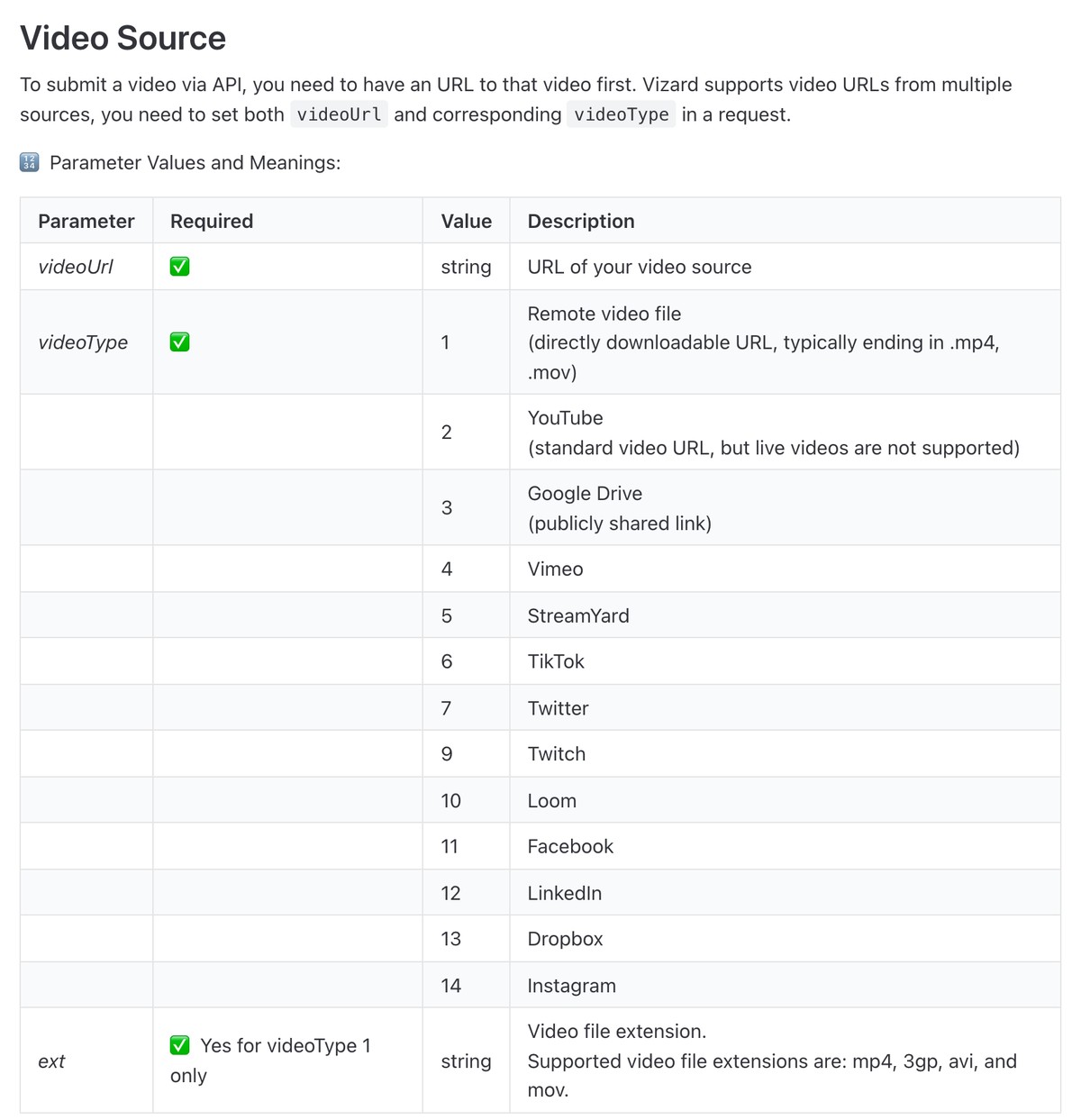
Vizard's Minimum Setup docs, with the videoType values. Source: Vizard website
Vizard's API docs describe a project-create request that takes a videoUrl and a videoType, and the type list covers a remote video file, YouTube (live videos are not supported), Google Drive, Vimeo, StreamYard, TikTok, Twitter, Twitch, Loom, Facebook, LinkedIn, Dropbox and Instagram. The docs state a maximum video length of 600 minutes and a file size limit of 10 GB, with exported clips keeping the source resolution up to 4K.
Optional parameters set the target clip length, the aspect ratio (9:16, 1:1, 4:5 or 16:9), a template ID, silence and filler word removal, a maximum clip count of 1 to 100, subtitles, emoji, auto B-roll, an AI headline and a choice of clip model. A plain-language keywords instruction, such as asking for the moment where a named person talks about a topic, limits the clips to that moment. The retrieve call returns clips sorted by viral score, each with a download URL, title, transcript, a viral score from 0 to 10, the reason for it and a link to Vizard's web editor. Results arrive by polling (the docs suggest every 30 seconds) or by a webhook configured in the workspace.
Pricing: Vizard's API docs say API access is only for paid users, that it is included in the Creator and Business plans with no separate subscription, and that API submissions use the plan's video upload minutes. The docs list 3 project-creation requests a minute and 20 an hour, while the pricing page lists API rate limits by plan, so confirm the numbers for the plan being bought.
Considerations: Vizard's webhook URL is set in the workspace before a video is submitted, not on each request. Download URLs are temporary and valid for 7 days. The docs also list a second clip model, clip_v2, charged at 1.25 times the first model's rate, which they say typically generates fewer clips.
- Choose it if the source is a TikTok, Instagram or other social video link and the first request should already set the aspect ratio, template and silence removal.
- Skip it if a webhook has to be set on each request, or the plan's rate limit is too tight for a batch.
3. Reap: Best for prompts that direct clip count, length, focus and tone

Reap's Create Clips docs. Source: Reap website
Reap's API docs describe a create-clips endpoint that takes either a sourceUrl or an uploadId, not both, and list a maximum of 3 hours and 10 GB for the video, in MP4 or MOV. A natural-language prompt can direct clip count, duration, focus, exclusions, editorial mode and tone, and without one the docs say the AI falls back to virality-driven selection. Other fields set genre, topics, clip duration ranges, export resolution, orientation (portrait, square or landscape), a caption preset, emojis and keyword highlights.
The same key also covers captions, reframe, dubbing, transcription and publishing endpoints. Webhooks fire when a project completes, fails or expires, so the clips are fetched with a second request, which returns for each clip a download URL, start and end times in the source video, a title, a caption and a virality score from 0 to 10. Reap also documents an MCP server and an agent skill.
Pricing: Reap's pricing page lists a free plan and says paid plans start at $9.99 a month for Creator and $29 a month for Studio, both billed annually, and that every paid plan includes API, CLI and MCP access. The create-clips docs say the Automation API requires an active subscription and list 1080p and 3 concurrent projects on Creator, and 4K and 10 on Studio. Rate limits are 60 reads, 30 writes and 10 project creations a minute, per endpoint and per key.
Considerations: Reap calls the prompt field a preview feature whose interpretation may shift, so critical workflows should pin prompts that have been checked end to end. The webhook body carries the project ID, type, source and status, not the clips, and webhook URLs are set up in the dashboard, not through the API.
- Choose it if the clip request should be directed in plain language (count, length, focus, exclusions) or the same pipeline also needs captions, reframing or dubbing.
- Skip it if a webhook has to be registered from code, since Reap webhooks are configured in the dashboard.
4. Submagic: Best for template-styled clips from a YouTube link or an upload
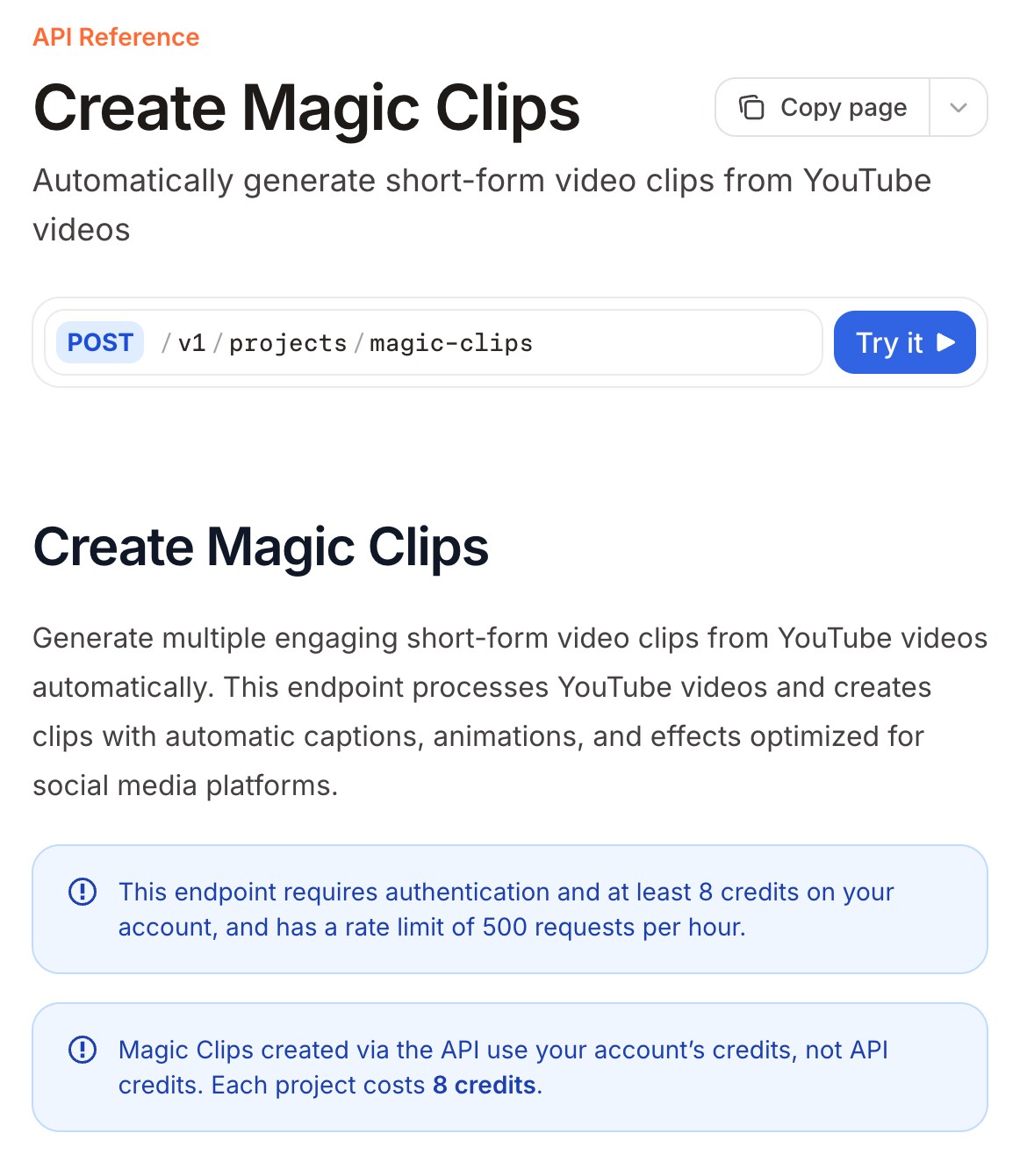
Submagic's Create Magic Clips docs. Source: Submagic website
Submagic's API has a Create Magic Clips endpoint for YouTube links and an Upload Magic Clips endpoint for files, which its docs say create clips with automatic captions, animations and effects. The request sets a title, the caption language, a template name or a custom theme ID, a minimum and a maximum clip length of 15 to 300 seconds (15 and 60 by default) and face tracking, which defaults to on. The upload endpoint lists MP4 and MOV files up to 10 GB and 120 minutes.
A webhook URL can be set on each request. The payload lists the project and each clip with a title, duration, preview URL, download URL, a direct URL for embedding and virality scores broken into total, shareability, hook strength, story quality and emotional impact. A Get Project endpoint returns the status and download links, and Submagic also documents an MCP server that reuses the same API key and credits.
Pricing: Per Submagic's docs, Magic Clips created through the API use the account's credits, not API credits, at 8 credits per project, and the endpoint allows 500 requests an hour. Submagic's pricing page lists a Starter plan at $12 per member per month, billed yearly, with 45 credits per member, which it equates to 5 Magic Clips; see the page for higher plans and the separate API credit packs.
Considerations: Magic Clips from a link accept YouTube links only, so videos on other platforms need the upload endpoint. The docs say a request without at least 8 credits returns a forbidden error, and API volume draws on the same plan credits the pricing page lists per member.
- Choose it if clips should come back styled by a named template, with a webhook, from YouTube links or uploaded files.
- Skip it if links from other platforms are the input, or credits per project cannot be forecast in dollars up front.
5. Klap: Best for per-operation pricing printed in the docs

Klap's API pricing docs. Source: Klap website
Klap's API docs describe a video-to-shorts task that takes a source URL and returns a folder of shorts. Accepted links include YouTube, Twitch, Vimeo, Loom, Google Drive and Dropbox, direct storage links (AWS S3 and Google Cloud Storage) and public HTTP or HTTPS file URLs. The request can set the language (Klap says it works in 99+ languages), a translation target, clip counts and durations, editing options for captions, reframing, emojis, an intro title and silence removal, output dimensions and a style preset ID.
The flow is a sequence of calls: create the task, poll its status, list the shorts in the output folder, then create an export for each short to render an MP4 and poll that export. Each short has a virality score from 0 to 1 with an explanation. Klap's docs also describe managed users and an embeddable player, plus a separate OAuth API for apps that act for a Klap user, which its page says has no webhooks.
Pricing: Klap's docs and API page print usage-based prices: $0.44 per input video, $0.32 per short and $0.48 per export, billed monthly, with no subscription. The docs work one example, an hour-long podcast clipped into 10 shorts and each exported once, at $8.44 in total, and the API page lists $5 in free API credits when a card is added.
Considerations: Each export is a separate billed call, so cost depends on how many shorts are rendered, not only generated: the API page says exporting just the 3 best shorts of that example costs $5.08. The docs list a maximum source length of 5 hours while the API page lists up to 3 hours.
- Choose it if pay-per-use pricing with no plan is the requirement and polling for status is acceptable.
- Skip it if a webhook is required, or finished MP4s must come back without a separate export call.
6. Pictory: Best for highlight clips inside a video-creation API

Pictory's Video to Short Clips docs. Source: Pictory website
Pictory's API is mainly a video-creation API for storyboards, voice-overs and templates, and its docs include a Video to Short Clips guide that sends a long video through the storyboard render request. The guide lists the steps: the video is downloaded and analyzed, the audio is transcribed, highlights are detected, short clips are extracted, and captions and formatting are added before rendering. The source must be a public URL to an MP4, MOV, AVI, MKV, WebM or WMV file.
Optional mediaRepurposeSettings set a highlight length of 5 to 180 seconds, filler word removal, silence removal and a silence threshold. Separate endpoints generate highlights from a completed transcription job or an edited transcript, and the result carries highlight markers. Jobs are polled (the docs suggest every 5 to 10 seconds) or reported by a webhook URL on the render request, which the docs say receives the completed video output by POST.
Pricing: Pictory's API page offers a demo to learn pricing for a use case, and we found no price on it, so see the vendor.
Considerations: Clipping is a mode of a wider video-creation API, and the controls the docs list are length and clean-up options, with no prompt, keyword or genre field. The docs say clear speech and natural pauses help the AI find segment boundaries, so noisy or music-led sources may give weaker clips.
- Choose it if a team already makes videos through Pictory's API and wants highlight clips of long recordings from the same account.
- Skip it if clips need prompt or keyword steering.
7. Twitch: Best for clipping Twitch streams and VODs on Twitch itself

Twitch's Create Clip From VOD reference. Source: Twitch website
Twitch's API has two clip-creation calls. Create Clip captures a broadcaster's live stream: it needs a broadcaster ID and a token with the clips:edit scope, captures up to 90 seconds around the moment of the call and by default publishes up to the last 30 seconds, and the clip's edit URL lets the title and a 5 to 60 second portion be changed. Create Clip From VOD takes a broadcaster ID, an editor ID, a VOD ID, a vod_offset where the clip ends, a title and an optional duration of 5 to 60 seconds (30 by default), on behalf of the broadcaster or a channel editor.
Creating a clip is asynchronous: the response returns a clip ID and an edit URL, and Get Clips returns the clip once it exists, with the docs saying to assume failure if it has not appeared after 15 seconds. A separate Get Clips Download call returns URLs to download the video files. The API has no step that picks the moment: the caller names it.
Pricing: The Twitch API reference and clips guide we read print no price for the clip calls, so see Twitch's developer terms.
Considerations: Clip creation works only on Twitch content. A live capture needs the broadcaster to be streaming and to have enabled clips, and follower-only or subscriber-only clip settings can block the request. VOD clips are created on behalf of the broadcaster or a channel editor.
- Choose it if the footage is a Twitch stream or VOD the team owns or edits and the moment is already known, such as a chat command, a marker or an offset.
- Skip it if the source is not on Twitch, or an AI should pick the moments.
How we compared these tools
We compared each API on what goes in, how the clipping is steered, what comes back, how completion is reported, how a request is authenticated, and the price or limit the vendor prints. This guide is organised around the job in the title, turning a long video into short clips by API. OpusClip comes first because that is the job its API is built for: a video link in, captioned clips with titles and time ranges out. Its limits are in its entry. Items 2 to 7 follow one yardstick: how much of the work from a long video to a finished clip each vendor's own docs show the API doing, from picking the moments through captions and layout to a downloadable file.
- 2. Vizard: moments, subtitles, aspect ratio, template and download links from one create request.
- 3. Reap: the same from one request, steered by a prompt, with the clips fetched by a second call.
- 4. Submagic: moments, captions and template styling with download links in the webhook, for YouTube links and uploads only.
- 5. Klap: moments, captions and reframing in a task, with each MP4 rendered by a separate billed export.
- 6. Pictory: highlight clips as a mode of a video-creation API, with length and clean-up controls only.
- 7. Twitch: no moment-picking: the caller names the moment.
All facts come from each vendor's own docs, pricing pages and API pages, read on November 12, 2026. We did not run hands-on tests of any API, so this guide says nothing about speed, reliability or clip quality, and it prints no accuracy figure. Prices and limits change, so confirm them before building.
Red flags to watch for
- Webhooks that differ in what they carry. OpusClip's webhook page describes signature headers, so confirm its payload on that page, Reap's body carries the project ID and status, not the clips, and Klap and Twitch are polled. Trial test: send one real video through and log what arrives. See webhooks vs polling for video APIs.
- Files that expire. OpusClip's stored media expires on a schedule its pages describe, and Vizard's clip download URLs are valid for 7 days. Trial test: copy finished clips to storage the team controls as soon as a job completes.
- Rate limits that differ, some by plan. OpusClip lists 30 requests per minute per API key for its core project and clip APIs, Reap 10 project creations a minute, Vizard 3 a minute and 20 an hour in its docs, and Submagic 500 requests an hour. Trial test: size a batch against the limit before the first run.
- Cost that scales with clips or exports. Klap bills per input video, per short and per export, and Submagic charges 8 credits per project. Trial test: price one real video end to end before forecasting a month.
- Pages that disagree. Klap's docs list a 5 hour maximum source while its API page lists 3 hours, Reap's quickstart lists a 2 minute minimum while its create-clips page lists 1 minute, and Vizard's docs list one project-creation limit while its pricing page lists a different limit for each plan. Trial test: push the longest and shortest real files through first.
- Virality scores are each vendor's own model. Vizard and Reap return 0 to 10, Klap 0 to 1 and Submagic a total with four sub-scores, so the numbers do not compare across vendors, and no API can promise a clip will perform. Trial test: use a score to order clips for review, not to skip the review.
- No manual override. A pipeline that posts straight from an automatic pick will publish bad cuts. Trial test: add a review step before anything is published.
- Rights. Clip only video the team owns or has permission to use. OpusClip's help center says uploads must be content the uploader has the right to use, in its copyright policy article. We did not review the other vendors' terms.
Frequently asked questions
What is the best video clipping API?
For turning a long video into captioned short clips, OpusClip's API is the pick in this guide: a request with a video link starts a project, and its docs describe a signed webhook and clips with titles, descriptions, hashtags and source time ranges. Vizard fits when the source is a TikTok or Instagram link, Reap when a prompt should set clip count, length and tone, Klap for printed per-operation prices, and Twitch for clips of Twitch streams. See OpusClip's API page for the examples.
What is a video clipping API?
A video clipping API is a set of HTTP endpoints that turn a long video into short clips. Some choose the moments with AI and return captioned, reframed clips (OpusClip, Vizard, Reap, Submagic, Klap and Pictory), and some cut a clip from timestamps the caller supplies (Twitch, and hosting APIs such as Mux and Cloudflare Stream for videos stored with them).
How do I clip a video with an API?
Send the video's link or an uploaded file to a clipping endpoint, wait for the job to finish by webhook or polling, then fetch the clips. With OpusClip's API that is a POST to the clip-projects endpoint with a videoUrl, then a GET to the exportable-clips endpoint with the project ID, per its quickstart. Our guide to generating YouTube Shorts from long videos with an API walks through a full pipeline.
Is there a free video clipping API?
Few vendors print a free tier for their clip calls. Klap's API page lists $5 in free API credits when a card is added, Vizard's docs say API access is for paid users, Reap's pricing page says every paid plan includes API access, and the Twitch pages we read print no price for clip calls. For OpusClip, see the API documentation for access and credits.
Which video clipping APIs use webhooks instead of polling?
OpusClip, Vizard, Reap and Submagic describe webhooks, and Pictory's render and highlights requests take a webhook URL. Klap's docs describe polling the task and the export, and Twitch's guide says to call Get Clips until the clip appears. OpusClip and Submagic take the webhook URL on the request, while Vizard and Reap set it in the workspace or dashboard.
Can an API clip a video at exact timestamps?
Yes. Twitch's Create Clip From VOD takes a VOD ID and an offset where the clip ends, Mux's docs describe a clip made from an existing asset with a start time and an end time, and Cloudflare Stream's docs describe changing a video's start and end points. These work on videos already stored with the vendor. For those APIs, see our guides to video APIs for developers and video editing APIs.
Can AI agents call a video clipping API?
Several vendors pair the REST API with an MCP server or an agent skill. OpusClip, Reap and Submagic document MCP servers, Klap's docs index says it has one, and Vizard's API page offers a skill for Claude Code and Cursor. OpusClip's MCP setup guide covers connecting a client.
How many videos can a clipping API process at once?
It depends on the vendor's limits. OpusClip lists 30 requests per minute per API key for its core project and clip APIs, Reap 10 project creations a minute, Vizard 3 a minute and 20 an hour, and Submagic 500 requests an hour. Our guide to processing many videos in parallel covers batching and retries.