



No items found.
Building a Webinar-to-Shorts Pipeline with the OpusClip API
May 13, 2026
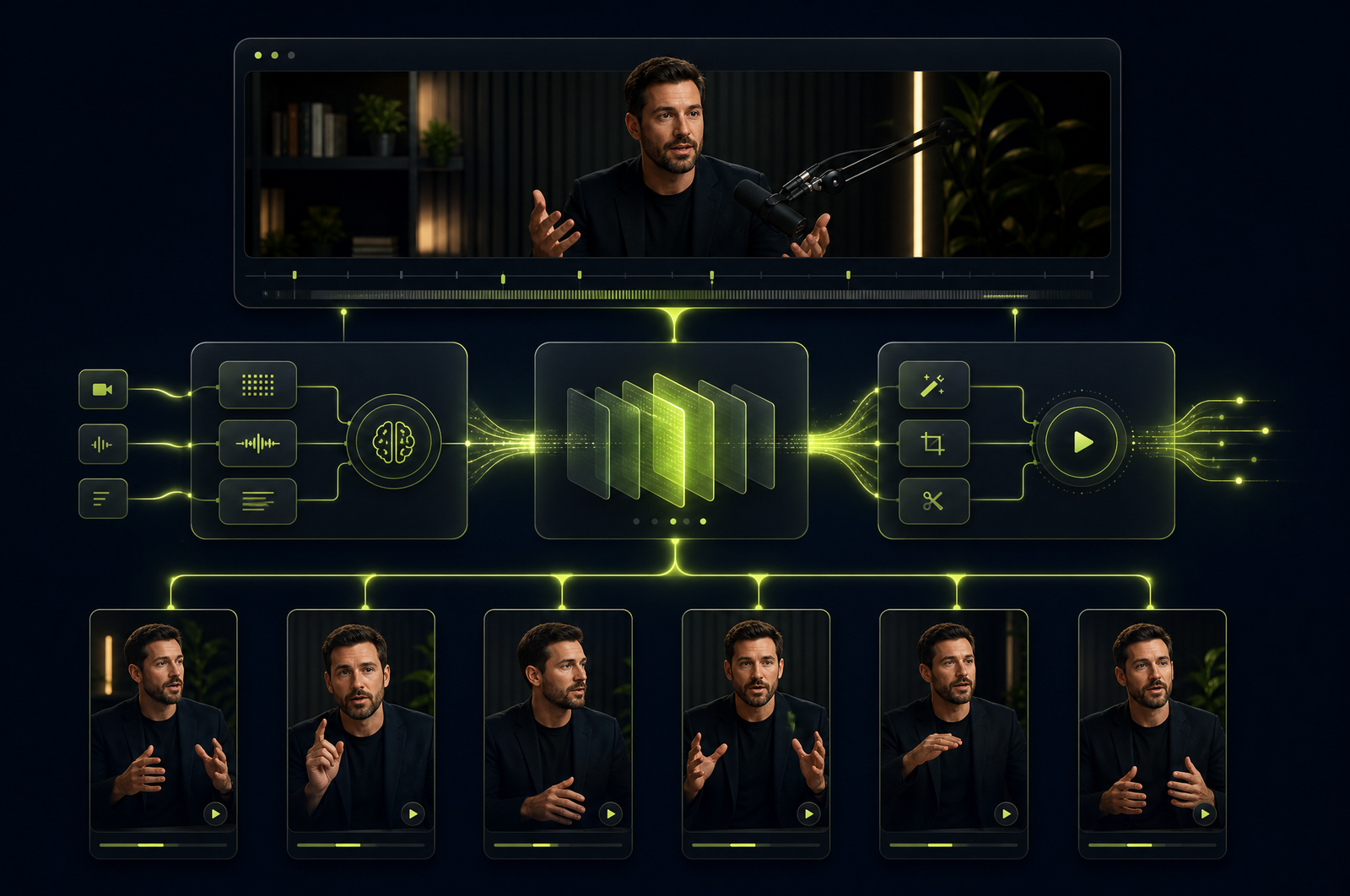
Webinars are content gold mines that almost nobody mines. A 45-minute B2B webinar with two product experts and a customer Q&A produces 8-15 social-shareable moments — but most marketing teams turn the recording into a gated landing page asset and stop there. Every webinar after the first becomes diminishing returns.
A webinar-to-shorts pipeline solves this. You point an API at the Zoom or Restream recording, it scores the moments, and you get back a feed of vertical clips ready for LinkedIn, TikTok, Reels, and YouTube Shorts. This guide is a developer-focused look at how to build that pipeline and how the OpusClip API fits in.
The OpusClip API is now publicly available — included on the free trial and the Pro plan, with no waitlist or sales call required. Get started at opus.pro/api, and find the full endpoint and parameter reference in the API docs.
Key takeaways
• Webinar-to-shorts pipelines have three components: ingestion (pulling the recording from Zoom, Webex, Restream, etc.), processing (clip extraction with speaker focus + captions), and distribution (queueing for review or auto-publish).
• B2B webinars convert best to LinkedIn vertical video, where executive-style content outperforms entertainment formats.
• Speaker focus is critical: most webinars have a host plus a guest plus a moderator, and clips need to know who's speaking.
• A 45-minute webinar typically returns 8-15 candidate clips ranked by virality score.
• Review queues outperform auto-publish — webinars have sponsor mentions, customer names, and off-script moments that need human judgment.
Why webinars are underused as a content engine
A single B2B webinar typically takes 40+ hours of cross-functional effort to produce — guest scheduling, pre-call prep, slides, dry run, live moderation, post-event landing page. That investment then earns:
• The live audience (often 50-500 attendees)
• A gated replay landing page (which converts well early, decays fast)
• Maybe a blog post recap
Compare to the cost of repurposing — under an hour of human + API time per webinar — and you can multiply the downstream reach by 10x or more. Every webinar should feed a pipeline that:
1. Captures the recording automatically when it ends.
2. Extracts 8-15 clips ranked by quality.
3. Stages them for review by a content marketer.
4. Publishes the approved ones on a stagger over 3-4 weeks.
That stagger matters — webinars are evergreen for months, not days.
What a webinar-to-shorts pipeline does
Four stages:
1. Recording ingestion. Pull the MP4 from your webinar host. Zoom Cloud Recording, Restream, Webex Events, and Goldcast all expose download URLs via API. Build this as event-driven (webhook on recording-complete) rather than polled.
2. Clip extraction. Submit the recording to a clip-generation API with speaker diarization enabled. Configure for B2B-appropriate clip length (typically 30-90 seconds, longer than TikTok-native content tolerates).
3. Captioning and reframing. The clips come back as 9:16 vertical MP4 with burned-in captions. For LinkedIn-first distribution, consider also generating a 1:1 square output (still outperforms 16:9 there).
4. Review and distribution. Drop into a review queue with metadata (speaker, topic, virality score, transcript). After human approval, route to TikTok, LinkedIn, Reels, and YouTube Shorts via their respective APIs or a social management platform.
What to consider when integrating
Speaker diarization quality. Webinar formats with 3+ participants (host, guest, moderator) test diarization hard. Sample on real recordings before committing to an API.
Speaker focus controls. You'll often want clips that feature only the guest (not the host's intro) or only the customer (not the moderator's questions). Look for APIs that let you filter clips by speaker.
Long-form support. Webinars run 30-90 minutes. Confirm the API handles your typical length without chunking.
LinkedIn-aware output. LinkedIn is the highest-converting platform for B2B webinar clips and has slightly different preferences (longer clip tolerance, captions matter more, executive framing wins). Confirm you can tune output per destination.
Branded intros and outros. Most webinar clips perform better with a 2-second show intro and a 5-second CTA at the end. Some APIs handle this in-pipeline; others require a separate render step.
Webhook reliability. This is going to run unattended on every webinar. Wire it up so a failed job doesn't disappear — durable queues, automatic retries, dead-letter alerting.
Common use cases by team type
• B2B marketing teams. Standard 45-minute webinar → 10-12 LinkedIn-vertical clips → published over 4 weeks. Drives consistent inbound from senior buyers.
• Demand gen. Customer interview webinars → mid-funnel social clips tagged by ICP segment and industry.
• Sales enablement. Internal training webinars → a library of 30-60 second product talking points reps can share asynchronously.
• Field marketing. Recorded panels from in-person events → social proof clips and abstract content for upcoming editions.
• Executive thought leadership. Founder/CEO webinars → personal-brand content for the LinkedIn feed.
Common pitfalls
• Letting the host dominate the clips. Hosts ask questions; guests give the insights worth clipping. Configure speaker focus to bias toward guest speech.
• Generic captions in B2B content. TikTok-style word pop captions feel off for executive content. Tune to a more restrained style — full sentences, minimal animation.
• No moderator filter. A clip of a moderator saying "great question, next we'll hear from..." is dead weight. Filter or skip those segments.
• Auto-publish on sensitive content. B2B webinars name customers, mention deals, and discuss competitive context. Always review before publish.
• Forgetting the audio waveform overlay for audio-heavy clips. Quiet moments with strong content can read as broken video. A subtle waveform overlay tells viewers "this is talking content, keep watching."
How the OpusClip API supports webinar pipelines
The OpusClip API is generally available. The webinar workflow is built around:
• Direct ingestion from Zoom Cloud Recording, Webex, and standard MP4 URLs
• Speaker diarization with explicit focus filters (clip only when guest is speaking, exclude moderator turns)
• Multi-format output (9:16 vertical for TikTok/Reels, 1:1 square for LinkedIn) from one job
• Branded intro and outro injection in the clip pipeline
• Webhook delivery into your CMS or review queue
Full endpoint and parameter reference lives in the API documentation; generate an API key from your OpusClip dashboard to start building.
FAQ
Does this work with Zoom, Webex, or GoToWebinar recordings?
Yes — any standard MP4 with clear audio works as input. For event-driven automation, Zoom's Cloud Recording API and webhook is the most common pattern. Webex Events and Goldcast both expose similar APIs.
Can the pipeline focus on a single speaker (e.g., the guest)?
Yes — speaker diarization plus speaker focus is a standard pattern. Detect who's speaking in each moment, then filter clips to ones where the speaker you care about is dominant.
Should I burn captions in or use closed captions?
For social platforms, burn-in. Most viewers watch on mute and don't enable CC. For your own player or webinar-replay landing page, ship SRT/VTT so it's accessibility-compliant and searchable.
How do I review clips before they publish?
Build a simple review interface that lists clips with their transcript, virality score, source timestamp, and a play button. A content marketer can review 10-15 clips in 15 minutes. Approved clips flow to publish; rejected ones get tagged so the model learns over time.
How does the OpusClip API handle long webinars?
The API accepts recordings up to 4 hours in a single submission, with parallel processing for sustained throughput on multi-hour events. Those details are in the API docs.
Next steps
For other source platforms, see Convert Zoom Recordings to Social Clips, Build a YouTube-to-TikTok Automation, and Repurpose Course Recordings into Social Shorts. For high-volume processing, see Process Many Videos in Parallel.












