OpusClip 4.0 is here. Become a content powerhouse.

8 Best AI Tools for Segmenting Long Videos into Social Clips in 2026

November 11, 2026
Creators at a podcast microphone, a desk monitor and a laptop with a Clip it button, a 9:16 tag, a 3 clips badge and a scissors icon

OpusClip is the pick for segmenting a long video into social clips: it chooses the cut points itself, a typed ClipAnything prompt can steer it, and the clips come back formatted for TikTok, Shorts and Reels with start and end points that can be trimmed. Here, segment means choosing where a clip starts and ends, not turning long video into short video in general. Items 2 to 8 follow one yardstick: how close each tool's output is to a finished social clip. Facts come from each vendor's own pages, read on November 11, 2026.

Key takeaways

  • Best for AI-picked, prompt-steerable segments with editable boundaries: OpusClip. ClipAnything takes a typed prompt, Co-Pilot sets a clip length and a timeframe, and a clip's start and end can be trimmed in the editor.
  • Best for AI highlights plus manual cuts from the transcript: Vizard. Its pages describe AI-detected moments, prompts through Spark (up to 10 per project) and selecting transcript text to make a clip.
  • Best for prompt-first segmentation with a length band: Reap. Its pricing grid lists four clip-length options and prompt-first clipping by topic.
  • Best for segmenting recorded conversations by speaker and keyword: Riverside. Magic Clips takes a duration, a speaker focus and keywords on Pro and Business.
  • Best for choosing the number and length of clips inside an editor: Descript. Create clips sets 1 to 20 clips of 10 seconds to 5 minutes, with an optional topic.
  • Best for cutting dead air and placing chapters in a raw recording: Gling. It finds bad takes and silences, and places chapters from the transcript.
  • Best for defining custom segment types through an API: Twelve Labs. Segment definitions are written in plain language and come back as start and end times in JSON.
  • Best for free shot-change detection and splitting: PySceneDetect. It is open-source, detects fast cuts and fades, and can split a video into separate clips.

What counts as segmenting a long video

Segmenting is deciding where each piece of a long video starts and ends. Tools make that decision in five different ways, and the method matters more than the feature list, because it decides what has to be supplied, what can be corrected and what comes back.

  • AI-picked from topic and speech: the tool scans the video and proposes clips. OpusClip, Vizard, Riverside and Reap work this way. The pick for this method is OpusClip.
  • Typed prompt or keywords: the reader describes the moment and the tool finds it. OpusClip's ClipAnything, Reap and Vizard's Spark take prompts, Descript has an optional topic field and Twelve Labs takes written segment definitions. The pick is OpusClip for clips and Twelve Labs for data.
  • Transcript-driven cuts: the reader selects text and the video is cut to match. Descript and Vizard work this way, and Gling's trimmer edits the transcript too. The pick is Descript.
  • Silence and chapter detection: the tool cuts dead air or marks topic changes with timestamps. Gling is the entry here. The pick is Gling.
  • Scene and shot detection: the tool finds visual cuts in edited footage. PySceneDetect is the entry here, and our guide to scene and cut detection tools covers the category. The pick is PySceneDetect.

For how fast an AI segmenter turns a recording into clips, see our deep dive on the AI video segmenter. For highlight and chapter generators as a group, see the guide to auto highlight generators.

How to choose

  • Clips proposed from a long recording: OpusClip, Vizard, Riverside or Reap, which all pick moments on their own.
  • A typed instruction to steer the cuts: OpusClip's ClipAnything, Reap or Vizard's Spark, or Descript's optional topic field. Twelve Labs fits when the segment types are specific and the result feeds an application.
  • Cut points chosen by hand from the transcript: Descript or Vizard, or Gling's transcript trimmer.
  • A recorded conversation with several speakers: Riverside, which takes a speaker focus and keywords, or Vizard, which describes isolating speakers.
  • Dead air removed and chapters placed before clipping: Gling.
  • Shot changes in edited footage, for free: PySceneDetect.

At a glance

  • OpusClip: best for AI-picked, prompt-steerable segments with editable boundaries; Starter $15 a month (monthly billing only); Pro $29 a month, or $14.50 a month billed annually; free plan yes ($0, clips carry a watermark).
  • Vizard: best for AI highlights plus manual cuts from the transcript; Creator $29 a month, or $14.50 a month billed yearly; free plan yes (60 credits a month, 720p export, 3-day storage).
  • Reap: best for prompt-first segmentation with a length band; Creator $9.99 a month billed annually ($24 a month billed monthly); free plan yes (up to 1 hour of AI clipping a month, watermarked).
  • Riverside: best for segmenting recorded conversations by speaker and keyword; Pro $29 a month, or $24 a month billed annually; a 14-day free trial on the pricing page.
  • Descript: best for choosing the number and length of clips inside an editor; Hobbyist $16 per person a month on its annual view ($24 monthly); free plan yes (1 media hour a month, 720p export).
  • Gling: best for cutting dead air and placing chapters in a raw recording; Plus $20 a month on its monthly view ($10 a month on the annual toggle); free plan yes (1 hour of AI-edited media a month, watermarked exports).
  • Twelve Labs: best for defining custom segment types through an API; Plus $29 a month ($290 billed annually); free plan yes ($0, 3 GB of storage, usage capped at plan limits).
  • PySceneDetect: best for free shot-change detection and splitting; free and open-source software.

How each tool chooses cut points, what steers it and what it returns

The At a glance list covers best-for, price and free limits; this table compares how each tool decides where a segment starts and ends, what can steer it, which cut points can be edited, any segment-length control and what comes back, as listed on each vendor's own pages on November 11, 2026.

ToolHow segments are chosenPrompt, topic or keyword controlEditable cut pointsSegment length controlWhat comes back
OpusClipAI picks the moments; ClipAnything reads visual, audio and sentiment cuesClipAnything prompts, ClipBasic keywords and an optional genre; reprompt as often as wantedTrim or extend a clip's start and end, or add a section from the transcriptA Clip Length setting and a start and end timeframe, both set in Co-PilotShort clips formatted for TikTok, Shorts and Reels; captions can be added
VizardAI detects key moments; Spark analyzes visual, audio and sentiment cuesPrompts through Spark, up to 10 per project; a prompt reduces the clip countSelect transcript text to make a clip; restore struck-through text to extend onePreferred clip length, with several durations selectable at onceShort clips in 9:16, 1:1 or both
ReapMulti-signal AI: faces, vocal tone, pauses, pacing and topic relevancePrompt-first: ask for topics or an intent; also driven by chat, API or MCPEdit by text in the AI video editorClip length options: under 30s, 30-60s, 60-90s and 90s-3minCaptioned clips reframed to 9:16, scored, scheduled or returned over the API
RiversideAI picks highlights from a recording or an uploaded fileSpeaker focus and keywords for extra Magic Clips (Pro and Business)Drag the clip boundary on the timeline; restore struck-through transcript textDuration is set per clip, and a default duration can be savedClips scored 99 to 70, with animated captions and a set pace
DescriptHighlight transcript text, or Create clips scans a composition for engaging momentsOptional topic, goal or criteria; Underlord takes a descriptionEach generated clip is its own composition and can be editedNumber of clips (1 to 20) and length (10 seconds to 5 minutes)A composition per clip, with portrait (9:16) and square (1:1) layouts
GlingTranscript-based: finds bad takes and silences, and places chaptersNone listed on the pages readAdjust the transcript text or remove clips from the timelineNo segment length setting listed; it cuts dead air insteadA clean timeline plus chapters; export to Final Cut, DaVinci or Premiere, or MP4 with SRT
Twelve LabsYou define segment types in plain language; the model finds the boundariesYes: up to 10 segment definitions per request, plus reference imagesNo editor; it returns start and end times and can be limited to time rangesMinimum and maximum segment durations can be setTimestamped segments with custom metadata fields, as JSON
PySceneDetectDetects shot changes: fast cuts (content, adaptive) and fades (threshold)None; the detectors take thresholds, not promptsSave the scene list as CSV, then load it back instead of re-detectingMinimum scene length (-m), in frames, seconds or timecodeA scene list with timecodes, or the video split into separate clips

1. OpusClip: Best for AI-picked, prompt-steerable segments with editable boundaries
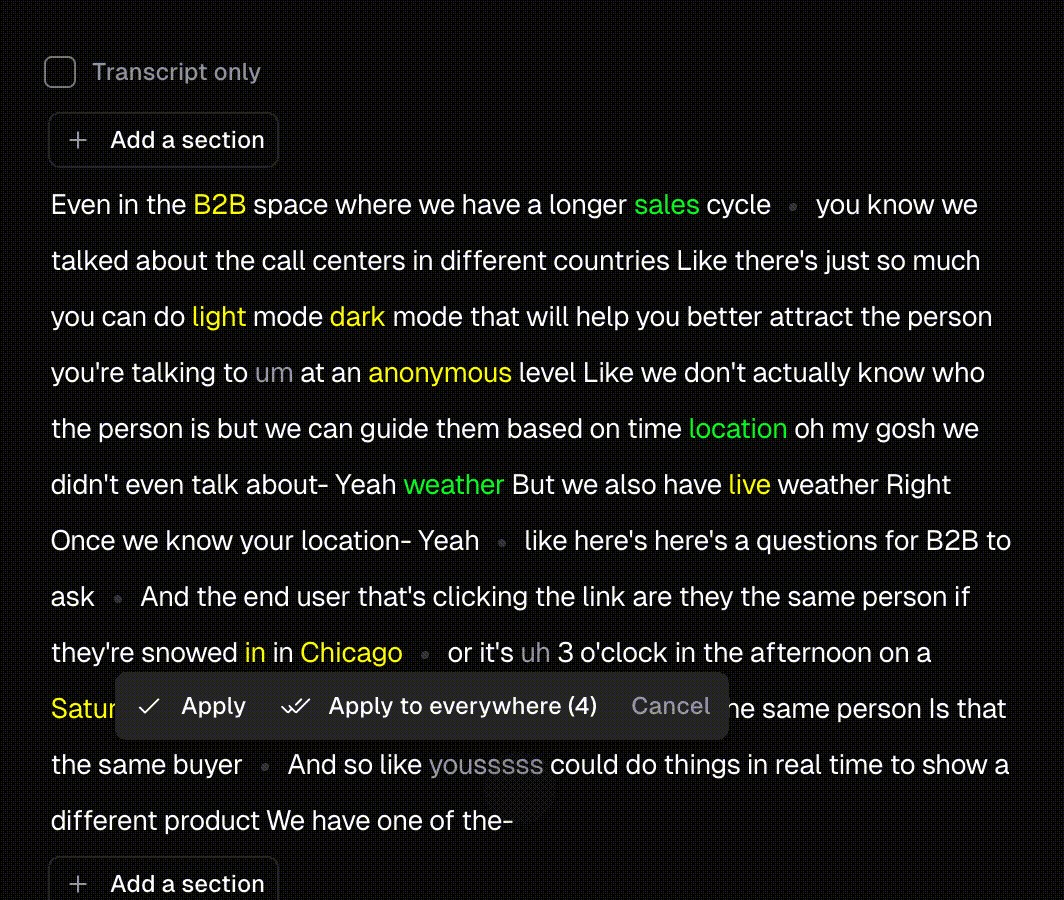
OpusClip's clip transcript editor with Add a section buttons above and below the transcript, where a clip can be extended at its start or end

OpusClip's transcript editor, where Add a section extends a clip. Source: OpusClip help center

OpusClip's ClipAnything page says its multimodal AI clips any moment from any video using visual, audio and sentiment cues, and the help center says ClipAnything takes natural language prompts, sentences or keywords to locate scenes, actions, characters, events and emotional moments. ClipBasic, the other clip model, takes keywords that should appear in the speech or transcript. Before processing, Co-Pilot sets a clip length and a start and end timeframe, an optional genre can be picked, and on the results page a prompt can be run again.

Cut points stay adjustable afterwards. The help center describes an Add a section button at the start and end of the caption area for pulling in more of the source, and trimming by deleting text or dragging the ends on the timeline. Per the long video to short video page, the AI picks the most shareable moments, trims them and formats them for TikTok, YouTube Shorts and Instagram Reels.

Pricing: OpusClip's pricing page lists Free at $0 (clips carry a watermark), Starter at $15 a month (monthly billing only) and Pro at $29 a month, or $14.50 a month billed annually. Business is custom.

Considerations: OpusClip returns clips, not chapter markers or a scene list; none of the help articles read for this guide describe either. The prompt manual says prompts steer which moments are found but not clip length, which is a separate setting, and ClipBasic keywords need to appear in the speech or transcript. The help center says there is no feature that splits a clip into two separate clips automatically, and gives a manual split in the editor as the workaround.

  • Choose it if the goal is several clips from a long video, with a typed prompt, a length setting or a timeframe to steer where the cuts fall, and clips that are ready to caption and post.
  • Skip it if the output needed is a list of timestamps, chapters or scene boundaries rather than finished clips, or an exact clip length has to be forced through the prompt.

2. Vizard: Best for AI highlights plus manual cuts from the transcript

Vizard's Clip Preferences panel with preferred length options, 9:16 and 1:1 ratios, style toggles and a topics keyword field above a Get AI clips button

Vizard's Clip Preferences panel, with a sample template thumbnail blurred. Source: Vizard help center

Vizard's help center says it automatically detects the most important moments in a longer video and turns them into short clips, with a text-based editor for choosing highlights by hand. Its Spark 1.0 article describes a video-understanding model that analyzes visual cues, audio and sentiment, and says typed prompts can find specific moments, with up to 10 prompts per project. The clip-count article adds that using a prompt reduces the number of generated clips. Clip Preferences lets several preferred lengths be selected at once, picks 9:16, 1:1 or both, and has an optional topics field for keywords.

For manual segmentation, Vizard's video splitter page says to click in the transcript where the video should be split and press Enter to create a clip, and its help center says clips can be made by selecting transcript text. The help center also says an AI clip can stop in the middle of a sentence and that struck-through text can be reverted to extend it. Vizard's Agent site, a separate product, shows a podcast example whose typed brief asks for five clips between 20 and 55 seconds.

Pricing: Vizard's pricing page lists Free at $0 (60 credits a month, 720p export, 3-day storage, uploads up to 60 minutes) and Creator at $29 a month, or $14.50 a month billed yearly, which adds "No watermark" and 4K export. Its comparison table lists an export length of 10 minutes on Free and any length on Creator.

Considerations: Using a prompt reduces the number of clips Vizard generates, per its help center, and the help center recommends spoken dialogue and sources over 15 minutes for the best results. Cut points that land mid-sentence need a manual extension.

  • Choose it if AI-found clips and hand-picked transcript selections should live in one editor, with several preferred lengths set before processing.
  • Skip it if a prompt-driven result has to keep the full clip count, or sources run past 60 minutes on the free plan.

3. Reap: Best for prompt-first segmentation with a length band

reap's clipping agent console showing a plain-language request for five vertical shorts and a create_clips step that reports five highlights found

An example console on reap's clipping agent page, cropped to the request and the create_clips step. Source: reap website

reap's clipping page says its AI analyzes faces, vocal tone, pauses, pacing and topic relevance to find clips, and describes prompt-first clipping: ask for what is wanted, such as every product mention, by intent, audience or topic. Its pricing comparison lists four clip-length options (under 30 seconds, 30 to 60, 60 to 90, and 90 seconds to 3 minutes) and prompt-first clipping by topic. Its clipping agent page extends the same plain-language request to a chat window, a script or an AI assistant over MCP, and says it clips sources up to 180 minutes from a YouTube link or an upload.

After clipping, the page says clips can be edited by text in reap's AI video editor, and the agent page says each clip comes back captioned, reframed to 9:16 and scored, and can be scheduled or returned over the API.

Pricing: reap's pricing page lists a free plan at $0 (up to 1 hour of AI clipping a month, watermarked, 720p exports, projects expire in 7 days) and Creator at $9.99 a month billed annually ($24 a month billed monthly), with up to 10 hours of AI clipping a month and watermark-free 1080p exports.

Considerations: The pages describe how moments are found but not how a clip's start and end are placed, so moving a cut point is a job for the text editor. Free projects expire after 7 days and free exports are watermarked.

  • Choose it if a typed topic or intent should decide which moments are cut, with a length band chosen up front.
  • Skip it if free projects must stay available for more than 7 days, or watermark-free exports are needed without a paid plan.

4. Riverside: Best for segmenting recorded conversations by speaker and keyword

Riverside's Personalize dialog for Magic Clips with Ratio 9:16, Layout, Duration set to Auto and a Brand toggle above Cancel and Save buttons

Riverside's Personalize dialog for Magic Clips. Source: Riverside help center

Riverside's help center says Magic Clips identifies the highlights from audio or video recordings or uploaded files using AI, and applies a pace and animated captions. Pro and Business users can generate additional Magic Clips and set a duration, a speaker focus and keywords for each. A Personalize dialog saves defaults for ratio, layout, duration and branding, and a remove-pauses setting can cut pauses as clips are generated. Each clip gets a score from 99 to 70 that, per the help center, compares it with others in the same batch.

Cut points are editable. When a Magic Clip opens in the editor it shows the conversation around the clip, struck-through text can be restored, and the boundary between selected and unselected parts can be dragged on the timeline.

Pricing: Riverside's pricing page lists Pro at $29 a month, or $24 a month billed annually, with a 14-day free trial and no watermark, and shows a trial rather than a free plan.

Considerations: Magic Clips sits inside a recording, editing and hosting platform, and the pricing page lists it among those features. The duration, speaker and keyword controls for extra clips are described for Pro and Business, and the score is relative to the batch rather than an absolute measure.

  • Choose it if the source is a recorded conversation with several speakers and clips should be steered by speaker or keyword.
  • Skip it if a free plan without a trial window is needed, or moments should be found by describing a scene rather than naming a speaker or keyword.

5. Descript: Best for choosing the number and length of clips inside an editor

Descript's Create clips panel with a number of clips, a clip duration, layout presets, an optional topic field and a Submit button

Descript's Create clips panel, cropped from its help center article. Source: Descript help center

Descript's help center describes Create clips: in the AI Tools panel, under Repurpose, set the number of clips (1 to 20) and the length (10 seconds to 5 minutes), optionally choose a layout and enter a topic, goal or criteria, then submit. The AI generates a composition for each clip from the most engaging moments it identifies, and Underlord can be asked for clips in plain words. Descript's clip maker page describes the manual route: highlight transcript text, duplicate it to a new composition, and set the aspect ratio, captions and edits there.

Because each clip is its own composition, every cut point stays editable like any other Descript edit. The help article adds that the source composition must be at least as long as the clips requested, and that compositions under 1 minute may not generate clips.

Pricing: Descript's pricing page lists Free at $0 (1 media hour a month, 100 AI credits a month, 720p export, watermark-free), Hobbyist at $16 per person a month on its annual view ($24 monthly), with Create Clips among its AI tools, and Creator at $24 per person a month on the annual view ($35 monthly).

Considerations: Clips live inside Descript projects, so the source has to be added to a project first, and the plans meter media hours and AI credits. The Free plan lists limited use of Underlord and AI tools rather than Create Clips by name.

  • Choose it if segments should be chosen from a transcript by hand or by AI, in the same editor that finishes them.
  • Skip it if the goal is a batch of social clips with no editing step, or the free plan's single media hour a month is too small for the source.

6. Gling: Best for cutting dead air and placing chapters in a raw recording

Gling's pages say it transcribes an uploaded recording, finds the bad takes and silences and cuts them automatically, with a text-based trimmer for manual changes. Its YouTube features page says the AI analyzes the video transcript to place chapter markers, and its pricing page lists a YouTube chapters generator among its features. The cleaned timeline can be exported to Final Cut, DaVinci or Premiere, or downloaded as MP4 or MP3 with captions in SRT.

Gling also has an AI viral video clipping page that says it turns long videos into clips. The features that page lists are bad-take, silence and filler-word removal and a text-based trimmer, and it does not say how clip moments are chosen.

Pricing: Gling's pricing page lists Free at $0 (1 hour of AI-edited media a month, exports with a watermark) and Plus at $20 a month on the monthly view, or $10 a month on the annual toggle, with 10 hours of AI-edited media a month and exports without a watermark.

Considerations: Gling segments by speech quality and transcript, not by topic or viewer interest. No prompt control or segment-length setting is listed on the pages read, and the output is one clean timeline plus chapters rather than a batch of short clips.

  • Choose it if a raw recording needs silences and bad takes cut and chapters placed before clips are made elsewhere.
  • Skip it if a set of ready short clips, chosen by topic or prompt, is the goal.

7. Twelve Labs: Best for defining custom segment types through an API

Twelve Labs' Segment Definition Builder with a segment description and field list on the left and the matching JSON on the right

The Segment Definition Builder in Twelve Labs' Playground. Source: Twelve Labs documentation

Twelve Labs' Segment videos guide describes defining the types of segments to detect in natural language, such as editorial narratives, sports plays or speaker changes. The platform identifies segment boundaries and returns custom metadata for each segment as JSON, with a start and end time per segment. A request can carry up to 10 segment definitions, each with up to 20 custom fields and up to 4 reference images, and minimum and maximum segment durations can be set.

The same documentation describes a browser Playground with a Segment Definition Builder and a timeline view of the results. It is built for developers and returns data rather than finished clips: nothing in the guide describes cutting, captioning or reframing the segments. For other developer-facing video search tools, see our guide to AI video search tools.

Pricing: Twelve Labs' pricing page lists Free at $0 a month (3 GB of cumulative storage, usage capped at plan limits), Plus at $29 a month ($290 on its Annual toggle) and Pro at $99 a month ($990 annually). The pricing page lists Segment as part of each plan's workload allowance.

Considerations: The video has to be uploaded as an asset first, and the result is a timestamp list with metadata that another tool must turn into clips. Segmentation counts against plan allowances, so the pricing page and the Segment videos guide are the places to check how.

  • Choose it if the segment types are specific, such as scenes, plays or speaker changes, and the timestamps feed an application or another editor.
  • Skip it if finished social clips are wanted straight from a link or a file.

8. PySceneDetect: Best for free shot-change detection and splitting

PySceneDetect's home page describing shot-change detection, with a command-line quickstart and a Python example that split a video on each fast cut

PySceneDetect's home page with its command-line quickstart. Source: PySceneDetect website

PySceneDetect's site describes it as a tool for detecting shot changes in videos that can automatically split the video into separate clips. It is free and open-source software (BSD 3-Clause, per its site footer), with detection methods for fast cuts and threshold-based fades, run from a command line or a Python API. The latest release listed is v0.7.3 from November 8, 2026.

Its command-line documentation lists detect-content and detect-adaptive for fast cuts and detect-threshold for fades. The detectors take score thresholds rather than prompts, -m sets a minimum scene length, list-scenes writes the scenes and their timecodes, and a scene list can be loaded back from a CSV instead of re-detecting. The documentation describes thresholds, not an AI model.

Pricing: PySceneDetect is free and open-source software.

Considerations: Shot changes are its unit, so a recording from one continuous camera shot gives it little to split on, and a split on every cut is not the same as a clip worth posting. It adds no captions or reframing. Our guide to scene and cut detection tools compares more of this category.

  • Choose it if cut lists are needed from edited footage with many visual cuts, for free, or as input to another tool.
  • Skip it if topic-based clips from a talking-head recording are the goal.

How we compared these tools

We compared each tool on how it decides where a segment starts and ends, whether a prompt, topic or keyword can steer it, which cut points can be edited, any segment-length control the vendor states, what comes back per segment, and the free-plan limits as the vendor prints them. The guide is organised around the job in the title, segmenting a long video into social clips. OpusClip comes first because its ClipAnything, Co-Pilot and editor controls are built for choosing and adjusting where a clip starts and ends, and its entry states what it does not return: chapters or a scene list. Items 2 to 8 follow one yardstick: how close the output is to a finished social clip, from clips with captions and reframing (Vizard, Reap, Riverside), to a composition still to be finished (Descript), to a cleaned timeline and chapters (Gling), to timestamps and metadata (Twelve Labs), to a scene list or split files (PySceneDetect).

All facts come from each vendor's own pricing page, product page, help center or documentation, read on November 11, 2026, with client-rendered pages read in headless Chrome. We did not run hands-on tests of any tool. We read Klap's home and pricing pages and left it out because they print no prompt, length or boundary controls. Munch's home page now describes Munch Studio, a social media marketing product, and does not mention clipping long videos. Clips AI, an open-source transcript segmentation library, is left out because its last release on PyPI is from January 2024. Scene detection in Premiere, DaVinci Resolve and Final Cut Pro is covered in our guide to scene and cut detection tools, and we did not re-read those vendors' pages for this guide. Prices change, so confirm on the vendor page before buying.

Red flags to watch for

  • Prompts that shrink the result. Vizard's help center says using a prompt reduces the number of clips, and OpusClip's prompt manual says prompts do not control clip length. Check the clip count and the length setting after a prompted run.
  • Cut points that land mid-sentence. Vizard's help center says an AI clip can stop in the middle of a sentence. Preview the first and last seconds of every clip, and use the editor to extend or trim.
  • Short windows on free plans. Vizard's free plan lists 3-day storage and 60-minute uploads, reap's free projects expire in 7 days, and Descript's free plan lists 1 media hour a month.
  • Watermarks on free exports. OpusClip, reap and Gling list watermarks on their free plans, so a free run is a trial, not a posting workflow.
  • Controls held back by plan. Riverside describes the duration, speaker and keyword settings for extra Magic Clips for Pro and Business. Confirm which plan holds the control that matters.
  • Scores that are relative. Riverside's help center says its 99 to 70 score compares a clip with others in the same batch. Every score in this category is the vendor's own model, and no tool can promise a clip will perform.
  • Splits that are not clips. A scene detector or a silence cutter finds boundaries, not moments worth posting. Treat its output as a first cut.
  • Videos that are not owned. Segment and post only video that is owned or used with permission.

Frequently asked questions

What are the best AI tools for segmenting long videos into social clips?

OpusClip fits best in this guide when the goal is finished social clips: it picks moments on its own, takes a typed ClipAnything prompt, and leaves each clip's start and end editable. Vizard, Reap and Riverside also propose clips on their own, Descript suits cuts chosen from a transcript, Gling suits dead-air and chapter work, Twelve Labs suits custom segment types through an API, and PySceneDetect suits shot-change detection.

How do I split a long video into social clips with AI?

Upload the video or paste a link, choose a clip length if the tool offers one, add a prompt or keywords if the moments are known, and review the clips it returns. With OpusClip, the long video to short video page says to drop a video link or upload a file, and the AI then picks, trims and formats the clips; the Co-Pilot settings and the editor cover length, timeframe and boundary changes.

Can I tell an AI tool which moments to find?

Yes, with several tools. OpusClip's ClipAnything takes natural language prompts and ClipBasic takes keywords, Reap describes prompt-first clipping by topic or intent, Vizard's Spark takes up to 10 prompts per project, Riverside takes keywords and a speaker focus on Pro and Business, Descript takes an optional topic, goal or criteria, and Twelve Labs takes written segment definitions. Reading the ClipAnything prompt manual helps with wording.

Can I control how long each clip is?

Most of them offer a length setting. OpusClip's Co-Pilot sets a clip length and a timeframe, Vizard lets several preferred lengths be selected, reap lists four length bands, Riverside sets a duration, Descript sets 10 seconds to 5 minutes, Twelve Labs sets minimum and maximum segment durations through its API, and PySceneDetect sets a minimum scene length. Gling lists no segment-length setting on the pages read.

What is the difference between scene detection and clip detection?

A scene detector such as PySceneDetect finds visual cuts, such as a change of camera shot, and returns scene boundaries. A clip finder such as OpusClip, Vizard or Reap picks moments by what is said and shown, so a clip can run across several shots or sit inside one long shot. See our guide to scene and cut detection tools for the first kind.

Can I fix a clip that starts or ends in the wrong place?

Yes, in the tools that return editable clips. OpusClip describes Add a section and trimming by text or timeline, Riverside lets the boundary be dragged on the timeline and struck-through text restored, Vizard lets struck-through text be reverted to extend a clip, and Descript makes each clip its own composition.

Is there a free AI tool for segmenting videos?

Several list free plans with limits. OpusClip's free plan is $0 with a watermark, Vizard's lists 60 credits a month and 720p export, reap's lists up to 1 hour of AI clipping a month with a watermark, Descript's lists 1 media hour a month, Gling's lists 1 hour of AI-edited media a month with watermarked exports, and Twelve Labs' lists 3 GB of storage with capped usage. Riverside shows a 14-day trial, and PySceneDetect is free and open-source.

Do any of these tools return chapters instead of clips?

Gling's pages describe chapter markers placed from the transcript, and Twelve Labs returns timestamped segments with custom metadata as JSON. The others return clips, and OpusClip's help articles read for this guide describe clips rather than chapters.
On this page

Use our Free Forever Plan

Find the moment. Skip the scrubbing.

From script to polished video — in one click.

Create and post one short video every day for free, and grow faster.

OpusSearch uses AI to surface the exact clip you need from hours of footage — in seconds, not afternoons.

Agent Opus runs the entire video pipeline for you: research, scriptwriting, storyboarding, motion, voice, and edit. Upload the idea, post the result.

8 Best AI Tools for Segmenting Long Videos into Social Clips in 2026

OpusClip is the pick for segmenting a long video into social clips: it chooses the cut points itself, a typed ClipAnything prompt can steer it, and the clips come back formatted for TikTok, Shorts and Reels with start and end points that can be trimmed. Here, segment means choosing where a clip starts and ends, not turning long video into short video in general. Items 2 to 8 follow one yardstick: how close each tool's output is to a finished social clip. Facts come from each vendor's own pages, read on November 11, 2026.

Key takeaways

  • Best for AI-picked, prompt-steerable segments with editable boundaries: OpusClip. ClipAnything takes a typed prompt, Co-Pilot sets a clip length and a timeframe, and a clip's start and end can be trimmed in the editor.
  • Best for AI highlights plus manual cuts from the transcript: Vizard. Its pages describe AI-detected moments, prompts through Spark (up to 10 per project) and selecting transcript text to make a clip.
  • Best for prompt-first segmentation with a length band: Reap. Its pricing grid lists four clip-length options and prompt-first clipping by topic.
  • Best for segmenting recorded conversations by speaker and keyword: Riverside. Magic Clips takes a duration, a speaker focus and keywords on Pro and Business.
  • Best for choosing the number and length of clips inside an editor: Descript. Create clips sets 1 to 20 clips of 10 seconds to 5 minutes, with an optional topic.
  • Best for cutting dead air and placing chapters in a raw recording: Gling. It finds bad takes and silences, and places chapters from the transcript.
  • Best for defining custom segment types through an API: Twelve Labs. Segment definitions are written in plain language and come back as start and end times in JSON.
  • Best for free shot-change detection and splitting: PySceneDetect. It is open-source, detects fast cuts and fades, and can split a video into separate clips.

What counts as segmenting a long video

Segmenting is deciding where each piece of a long video starts and ends. Tools make that decision in five different ways, and the method matters more than the feature list, because it decides what has to be supplied, what can be corrected and what comes back.

  • AI-picked from topic and speech: the tool scans the video and proposes clips. OpusClip, Vizard, Riverside and Reap work this way. The pick for this method is OpusClip.
  • Typed prompt or keywords: the reader describes the moment and the tool finds it. OpusClip's ClipAnything, Reap and Vizard's Spark take prompts, Descript has an optional topic field and Twelve Labs takes written segment definitions. The pick is OpusClip for clips and Twelve Labs for data.
  • Transcript-driven cuts: the reader selects text and the video is cut to match. Descript and Vizard work this way, and Gling's trimmer edits the transcript too. The pick is Descript.
  • Silence and chapter detection: the tool cuts dead air or marks topic changes with timestamps. Gling is the entry here. The pick is Gling.
  • Scene and shot detection: the tool finds visual cuts in edited footage. PySceneDetect is the entry here, and our guide to scene and cut detection tools covers the category. The pick is PySceneDetect.

For how fast an AI segmenter turns a recording into clips, see our deep dive on the AI video segmenter. For highlight and chapter generators as a group, see the guide to auto highlight generators.

How to choose

  • Clips proposed from a long recording: OpusClip, Vizard, Riverside or Reap, which all pick moments on their own.
  • A typed instruction to steer the cuts: OpusClip's ClipAnything, Reap or Vizard's Spark, or Descript's optional topic field. Twelve Labs fits when the segment types are specific and the result feeds an application.
  • Cut points chosen by hand from the transcript: Descript or Vizard, or Gling's transcript trimmer.
  • A recorded conversation with several speakers: Riverside, which takes a speaker focus and keywords, or Vizard, which describes isolating speakers.
  • Dead air removed and chapters placed before clipping: Gling.
  • Shot changes in edited footage, for free: PySceneDetect.

At a glance

  • OpusClip: best for AI-picked, prompt-steerable segments with editable boundaries; Starter $15 a month (monthly billing only); Pro $29 a month, or $14.50 a month billed annually; free plan yes ($0, clips carry a watermark).
  • Vizard: best for AI highlights plus manual cuts from the transcript; Creator $29 a month, or $14.50 a month billed yearly; free plan yes (60 credits a month, 720p export, 3-day storage).
  • Reap: best for prompt-first segmentation with a length band; Creator $9.99 a month billed annually ($24 a month billed monthly); free plan yes (up to 1 hour of AI clipping a month, watermarked).
  • Riverside: best for segmenting recorded conversations by speaker and keyword; Pro $29 a month, or $24 a month billed annually; a 14-day free trial on the pricing page.
  • Descript: best for choosing the number and length of clips inside an editor; Hobbyist $16 per person a month on its annual view ($24 monthly); free plan yes (1 media hour a month, 720p export).
  • Gling: best for cutting dead air and placing chapters in a raw recording; Plus $20 a month on its monthly view ($10 a month on the annual toggle); free plan yes (1 hour of AI-edited media a month, watermarked exports).
  • Twelve Labs: best for defining custom segment types through an API; Plus $29 a month ($290 billed annually); free plan yes ($0, 3 GB of storage, usage capped at plan limits).
  • PySceneDetect: best for free shot-change detection and splitting; free and open-source software.

How each tool chooses cut points, what steers it and what it returns

The At a glance list covers best-for, price and free limits; this table compares how each tool decides where a segment starts and ends, what can steer it, which cut points can be edited, any segment-length control and what comes back, as listed on each vendor's own pages on November 11, 2026.

ToolHow segments are chosenPrompt, topic or keyword controlEditable cut pointsSegment length controlWhat comes back
OpusClipAI picks the moments; ClipAnything reads visual, audio and sentiment cuesClipAnything prompts, ClipBasic keywords and an optional genre; reprompt as often as wantedTrim or extend a clip's start and end, or add a section from the transcriptA Clip Length setting and a start and end timeframe, both set in Co-PilotShort clips formatted for TikTok, Shorts and Reels; captions can be added
VizardAI detects key moments; Spark analyzes visual, audio and sentiment cuesPrompts through Spark, up to 10 per project; a prompt reduces the clip countSelect transcript text to make a clip; restore struck-through text to extend onePreferred clip length, with several durations selectable at onceShort clips in 9:16, 1:1 or both
ReapMulti-signal AI: faces, vocal tone, pauses, pacing and topic relevancePrompt-first: ask for topics or an intent; also driven by chat, API or MCPEdit by text in the AI video editorClip length options: under 30s, 30-60s, 60-90s and 90s-3minCaptioned clips reframed to 9:16, scored, scheduled or returned over the API
RiversideAI picks highlights from a recording or an uploaded fileSpeaker focus and keywords for extra Magic Clips (Pro and Business)Drag the clip boundary on the timeline; restore struck-through transcript textDuration is set per clip, and a default duration can be savedClips scored 99 to 70, with animated captions and a set pace
DescriptHighlight transcript text, or Create clips scans a composition for engaging momentsOptional topic, goal or criteria; Underlord takes a descriptionEach generated clip is its own composition and can be editedNumber of clips (1 to 20) and length (10 seconds to 5 minutes)A composition per clip, with portrait (9:16) and square (1:1) layouts
GlingTranscript-based: finds bad takes and silences, and places chaptersNone listed on the pages readAdjust the transcript text or remove clips from the timelineNo segment length setting listed; it cuts dead air insteadA clean timeline plus chapters; export to Final Cut, DaVinci or Premiere, or MP4 with SRT
Twelve LabsYou define segment types in plain language; the model finds the boundariesYes: up to 10 segment definitions per request, plus reference imagesNo editor; it returns start and end times and can be limited to time rangesMinimum and maximum segment durations can be setTimestamped segments with custom metadata fields, as JSON
PySceneDetectDetects shot changes: fast cuts (content, adaptive) and fades (threshold)None; the detectors take thresholds, not promptsSave the scene list as CSV, then load it back instead of re-detectingMinimum scene length (-m), in frames, seconds or timecodeA scene list with timecodes, or the video split into separate clips

1. OpusClip: Best for AI-picked, prompt-steerable segments with editable boundaries

OpusClip's clip transcript editor with Add a section buttons above and below the transcript, where a clip can be extended at its start or end

OpusClip's transcript editor, where Add a section extends a clip. Source: OpusClip help center

OpusClip's ClipAnything page says its multimodal AI clips any moment from any video using visual, audio and sentiment cues, and the help center says ClipAnything takes natural language prompts, sentences or keywords to locate scenes, actions, characters, events and emotional moments. ClipBasic, the other clip model, takes keywords that should appear in the speech or transcript. Before processing, Co-Pilot sets a clip length and a start and end timeframe, an optional genre can be picked, and on the results page a prompt can be run again.

Cut points stay adjustable afterwards. The help center describes an Add a section button at the start and end of the caption area for pulling in more of the source, and trimming by deleting text or dragging the ends on the timeline. Per the long video to short video page, the AI picks the most shareable moments, trims them and formats them for TikTok, YouTube Shorts and Instagram Reels.

Pricing: OpusClip's pricing page lists Free at $0 (clips carry a watermark), Starter at $15 a month (monthly billing only) and Pro at $29 a month, or $14.50 a month billed annually. Business is custom.

Considerations: OpusClip returns clips, not chapter markers or a scene list; none of the help articles read for this guide describe either. The prompt manual says prompts steer which moments are found but not clip length, which is a separate setting, and ClipBasic keywords need to appear in the speech or transcript. The help center says there is no feature that splits a clip into two separate clips automatically, and gives a manual split in the editor as the workaround.

  • Choose it if the goal is several clips from a long video, with a typed prompt, a length setting or a timeframe to steer where the cuts fall, and clips that are ready to caption and post.
  • Skip it if the output needed is a list of timestamps, chapters or scene boundaries rather than finished clips, or an exact clip length has to be forced through the prompt.

2. Vizard: Best for AI highlights plus manual cuts from the transcript

Vizard's Clip Preferences panel with preferred length options, 9:16 and 1:1 ratios, style toggles and a topics keyword field above a Get AI clips button

Vizard's Clip Preferences panel, with a sample template thumbnail blurred. Source: Vizard help center

Vizard's help center says it automatically detects the most important moments in a longer video and turns them into short clips, with a text-based editor for choosing highlights by hand. Its Spark 1.0 article describes a video-understanding model that analyzes visual cues, audio and sentiment, and says typed prompts can find specific moments, with up to 10 prompts per project. The clip-count article adds that using a prompt reduces the number of generated clips. Clip Preferences lets several preferred lengths be selected at once, picks 9:16, 1:1 or both, and has an optional topics field for keywords.

For manual segmentation, Vizard's video splitter page says to click in the transcript where the video should be split and press Enter to create a clip, and its help center says clips can be made by selecting transcript text. The help center also says an AI clip can stop in the middle of a sentence and that struck-through text can be reverted to extend it. Vizard's Agent site, a separate product, shows a podcast example whose typed brief asks for five clips between 20 and 55 seconds.

Pricing: Vizard's pricing page lists Free at $0 (60 credits a month, 720p export, 3-day storage, uploads up to 60 minutes) and Creator at $29 a month, or $14.50 a month billed yearly, which adds "No watermark" and 4K export. Its comparison table lists an export length of 10 minutes on Free and any length on Creator.

Considerations: Using a prompt reduces the number of clips Vizard generates, per its help center, and the help center recommends spoken dialogue and sources over 15 minutes for the best results. Cut points that land mid-sentence need a manual extension.

  • Choose it if AI-found clips and hand-picked transcript selections should live in one editor, with several preferred lengths set before processing.
  • Skip it if a prompt-driven result has to keep the full clip count, or sources run past 60 minutes on the free plan.

3. Reap: Best for prompt-first segmentation with a length band

reap's clipping agent console showing a plain-language request for five vertical shorts and a create_clips step that reports five highlights found

An example console on reap's clipping agent page, cropped to the request and the create_clips step. Source: reap website

reap's clipping page says its AI analyzes faces, vocal tone, pauses, pacing and topic relevance to find clips, and describes prompt-first clipping: ask for what is wanted, such as every product mention, by intent, audience or topic. Its pricing comparison lists four clip-length options (under 30 seconds, 30 to 60, 60 to 90, and 90 seconds to 3 minutes) and prompt-first clipping by topic. Its clipping agent page extends the same plain-language request to a chat window, a script or an AI assistant over MCP, and says it clips sources up to 180 minutes from a YouTube link or an upload.

After clipping, the page says clips can be edited by text in reap's AI video editor, and the agent page says each clip comes back captioned, reframed to 9:16 and scored, and can be scheduled or returned over the API.

Pricing: reap's pricing page lists a free plan at $0 (up to 1 hour of AI clipping a month, watermarked, 720p exports, projects expire in 7 days) and Creator at $9.99 a month billed annually ($24 a month billed monthly), with up to 10 hours of AI clipping a month and watermark-free 1080p exports.

Considerations: The pages describe how moments are found but not how a clip's start and end are placed, so moving a cut point is a job for the text editor. Free projects expire after 7 days and free exports are watermarked.

  • Choose it if a typed topic or intent should decide which moments are cut, with a length band chosen up front.
  • Skip it if free projects must stay available for more than 7 days, or watermark-free exports are needed without a paid plan.

4. Riverside: Best for segmenting recorded conversations by speaker and keyword

Riverside's Personalize dialog for Magic Clips with Ratio 9:16, Layout, Duration set to Auto and a Brand toggle above Cancel and Save buttons

Riverside's Personalize dialog for Magic Clips. Source: Riverside help center

Riverside's help center says Magic Clips identifies the highlights from audio or video recordings or uploaded files using AI, and applies a pace and animated captions. Pro and Business users can generate additional Magic Clips and set a duration, a speaker focus and keywords for each. A Personalize dialog saves defaults for ratio, layout, duration and branding, and a remove-pauses setting can cut pauses as clips are generated. Each clip gets a score from 99 to 70 that, per the help center, compares it with others in the same batch.

Cut points are editable. When a Magic Clip opens in the editor it shows the conversation around the clip, struck-through text can be restored, and the boundary between selected and unselected parts can be dragged on the timeline.

Pricing: Riverside's pricing page lists Pro at $29 a month, or $24 a month billed annually, with a 14-day free trial and no watermark, and shows a trial rather than a free plan.

Considerations: Magic Clips sits inside a recording, editing and hosting platform, and the pricing page lists it among those features. The duration, speaker and keyword controls for extra clips are described for Pro and Business, and the score is relative to the batch rather than an absolute measure.

  • Choose it if the source is a recorded conversation with several speakers and clips should be steered by speaker or keyword.
  • Skip it if a free plan without a trial window is needed, or moments should be found by describing a scene rather than naming a speaker or keyword.

5. Descript: Best for choosing the number and length of clips inside an editor

Descript's Create clips panel with a number of clips, a clip duration, layout presets, an optional topic field and a Submit button

Descript's Create clips panel, cropped from its help center article. Source: Descript help center

Descript's help center describes Create clips: in the AI Tools panel, under Repurpose, set the number of clips (1 to 20) and the length (10 seconds to 5 minutes), optionally choose a layout and enter a topic, goal or criteria, then submit. The AI generates a composition for each clip from the most engaging moments it identifies, and Underlord can be asked for clips in plain words. Descript's clip maker page describes the manual route: highlight transcript text, duplicate it to a new composition, and set the aspect ratio, captions and edits there.

Because each clip is its own composition, every cut point stays editable like any other Descript edit. The help article adds that the source composition must be at least as long as the clips requested, and that compositions under 1 minute may not generate clips.

Pricing: Descript's pricing page lists Free at $0 (1 media hour a month, 100 AI credits a month, 720p export, watermark-free), Hobbyist at $16 per person a month on its annual view ($24 monthly), with Create Clips among its AI tools, and Creator at $24 per person a month on the annual view ($35 monthly).

Considerations: Clips live inside Descript projects, so the source has to be added to a project first, and the plans meter media hours and AI credits. The Free plan lists limited use of Underlord and AI tools rather than Create Clips by name.

  • Choose it if segments should be chosen from a transcript by hand or by AI, in the same editor that finishes them.
  • Skip it if the goal is a batch of social clips with no editing step, or the free plan's single media hour a month is too small for the source.

6. Gling: Best for cutting dead air and placing chapters in a raw recording

Gling's pages say it transcribes an uploaded recording, finds the bad takes and silences and cuts them automatically, with a text-based trimmer for manual changes. Its YouTube features page says the AI analyzes the video transcript to place chapter markers, and its pricing page lists a YouTube chapters generator among its features. The cleaned timeline can be exported to Final Cut, DaVinci or Premiere, or downloaded as MP4 or MP3 with captions in SRT.

Gling also has an AI viral video clipping page that says it turns long videos into clips. The features that page lists are bad-take, silence and filler-word removal and a text-based trimmer, and it does not say how clip moments are chosen.

Pricing: Gling's pricing page lists Free at $0 (1 hour of AI-edited media a month, exports with a watermark) and Plus at $20 a month on the monthly view, or $10 a month on the annual toggle, with 10 hours of AI-edited media a month and exports without a watermark.

Considerations: Gling segments by speech quality and transcript, not by topic or viewer interest. No prompt control or segment-length setting is listed on the pages read, and the output is one clean timeline plus chapters rather than a batch of short clips.

  • Choose it if a raw recording needs silences and bad takes cut and chapters placed before clips are made elsewhere.
  • Skip it if a set of ready short clips, chosen by topic or prompt, is the goal.

7. Twelve Labs: Best for defining custom segment types through an API

Twelve Labs' Segment Definition Builder with a segment description and field list on the left and the matching JSON on the right

The Segment Definition Builder in Twelve Labs' Playground. Source: Twelve Labs documentation

Twelve Labs' Segment videos guide describes defining the types of segments to detect in natural language, such as editorial narratives, sports plays or speaker changes. The platform identifies segment boundaries and returns custom metadata for each segment as JSON, with a start and end time per segment. A request can carry up to 10 segment definitions, each with up to 20 custom fields and up to 4 reference images, and minimum and maximum segment durations can be set.

The same documentation describes a browser Playground with a Segment Definition Builder and a timeline view of the results. It is built for developers and returns data rather than finished clips: nothing in the guide describes cutting, captioning or reframing the segments. For other developer-facing video search tools, see our guide to AI video search tools.

Pricing: Twelve Labs' pricing page lists Free at $0 a month (3 GB of cumulative storage, usage capped at plan limits), Plus at $29 a month ($290 on its Annual toggle) and Pro at $99 a month ($990 annually). The pricing page lists Segment as part of each plan's workload allowance.

Considerations: The video has to be uploaded as an asset first, and the result is a timestamp list with metadata that another tool must turn into clips. Segmentation counts against plan allowances, so the pricing page and the Segment videos guide are the places to check how.

  • Choose it if the segment types are specific, such as scenes, plays or speaker changes, and the timestamps feed an application or another editor.
  • Skip it if finished social clips are wanted straight from a link or a file.

8. PySceneDetect: Best for free shot-change detection and splitting

PySceneDetect's home page describing shot-change detection, with a command-line quickstart and a Python example that split a video on each fast cut

PySceneDetect's home page with its command-line quickstart. Source: PySceneDetect website

PySceneDetect's site describes it as a tool for detecting shot changes in videos that can automatically split the video into separate clips. It is free and open-source software (BSD 3-Clause, per its site footer), with detection methods for fast cuts and threshold-based fades, run from a command line or a Python API. The latest release listed is v0.7.3 from November 8, 2026.

Its command-line documentation lists detect-content and detect-adaptive for fast cuts and detect-threshold for fades. The detectors take score thresholds rather than prompts, -m sets a minimum scene length, list-scenes writes the scenes and their timecodes, and a scene list can be loaded back from a CSV instead of re-detecting. The documentation describes thresholds, not an AI model.

Pricing: PySceneDetect is free and open-source software.

Considerations: Shot changes are its unit, so a recording from one continuous camera shot gives it little to split on, and a split on every cut is not the same as a clip worth posting. It adds no captions or reframing. Our guide to scene and cut detection tools compares more of this category.

  • Choose it if cut lists are needed from edited footage with many visual cuts, for free, or as input to another tool.
  • Skip it if topic-based clips from a talking-head recording are the goal.

How we compared these tools

We compared each tool on how it decides where a segment starts and ends, whether a prompt, topic or keyword can steer it, which cut points can be edited, any segment-length control the vendor states, what comes back per segment, and the free-plan limits as the vendor prints them. The guide is organised around the job in the title, segmenting a long video into social clips. OpusClip comes first because its ClipAnything, Co-Pilot and editor controls are built for choosing and adjusting where a clip starts and ends, and its entry states what it does not return: chapters or a scene list. Items 2 to 8 follow one yardstick: how close the output is to a finished social clip, from clips with captions and reframing (Vizard, Reap, Riverside), to a composition still to be finished (Descript), to a cleaned timeline and chapters (Gling), to timestamps and metadata (Twelve Labs), to a scene list or split files (PySceneDetect).

All facts come from each vendor's own pricing page, product page, help center or documentation, read on November 11, 2026, with client-rendered pages read in headless Chrome. We did not run hands-on tests of any tool. We read Klap's home and pricing pages and left it out because they print no prompt, length or boundary controls. Munch's home page now describes Munch Studio, a social media marketing product, and does not mention clipping long videos. Clips AI, an open-source transcript segmentation library, is left out because its last release on PyPI is from January 2024. Scene detection in Premiere, DaVinci Resolve and Final Cut Pro is covered in our guide to scene and cut detection tools, and we did not re-read those vendors' pages for this guide. Prices change, so confirm on the vendor page before buying.

Red flags to watch for

  • Prompts that shrink the result. Vizard's help center says using a prompt reduces the number of clips, and OpusClip's prompt manual says prompts do not control clip length. Check the clip count and the length setting after a prompted run.
  • Cut points that land mid-sentence. Vizard's help center says an AI clip can stop in the middle of a sentence. Preview the first and last seconds of every clip, and use the editor to extend or trim.
  • Short windows on free plans. Vizard's free plan lists 3-day storage and 60-minute uploads, reap's free projects expire in 7 days, and Descript's free plan lists 1 media hour a month.
  • Watermarks on free exports. OpusClip, reap and Gling list watermarks on their free plans, so a free run is a trial, not a posting workflow.
  • Controls held back by plan. Riverside describes the duration, speaker and keyword settings for extra Magic Clips for Pro and Business. Confirm which plan holds the control that matters.
  • Scores that are relative. Riverside's help center says its 99 to 70 score compares a clip with others in the same batch. Every score in this category is the vendor's own model, and no tool can promise a clip will perform.
  • Splits that are not clips. A scene detector or a silence cutter finds boundaries, not moments worth posting. Treat its output as a first cut.
  • Videos that are not owned. Segment and post only video that is owned or used with permission.

Frequently asked questions

What are the best AI tools for segmenting long videos into social clips?

OpusClip fits best in this guide when the goal is finished social clips: it picks moments on its own, takes a typed ClipAnything prompt, and leaves each clip's start and end editable. Vizard, Reap and Riverside also propose clips on their own, Descript suits cuts chosen from a transcript, Gling suits dead-air and chapter work, Twelve Labs suits custom segment types through an API, and PySceneDetect suits shot-change detection.

How do I split a long video into social clips with AI?

Upload the video or paste a link, choose a clip length if the tool offers one, add a prompt or keywords if the moments are known, and review the clips it returns. With OpusClip, the long video to short video page says to drop a video link or upload a file, and the AI then picks, trims and formats the clips; the Co-Pilot settings and the editor cover length, timeframe and boundary changes.

Can I tell an AI tool which moments to find?

Yes, with several tools. OpusClip's ClipAnything takes natural language prompts and ClipBasic takes keywords, Reap describes prompt-first clipping by topic or intent, Vizard's Spark takes up to 10 prompts per project, Riverside takes keywords and a speaker focus on Pro and Business, Descript takes an optional topic, goal or criteria, and Twelve Labs takes written segment definitions. Reading the ClipAnything prompt manual helps with wording.

Can I control how long each clip is?

Most of them offer a length setting. OpusClip's Co-Pilot sets a clip length and a timeframe, Vizard lets several preferred lengths be selected, reap lists four length bands, Riverside sets a duration, Descript sets 10 seconds to 5 minutes, Twelve Labs sets minimum and maximum segment durations through its API, and PySceneDetect sets a minimum scene length. Gling lists no segment-length setting on the pages read.

What is the difference between scene detection and clip detection?

A scene detector such as PySceneDetect finds visual cuts, such as a change of camera shot, and returns scene boundaries. A clip finder such as OpusClip, Vizard or Reap picks moments by what is said and shown, so a clip can run across several shots or sit inside one long shot. See our guide to scene and cut detection tools for the first kind.

Can I fix a clip that starts or ends in the wrong place?

Yes, in the tools that return editable clips. OpusClip describes Add a section and trimming by text or timeline, Riverside lets the boundary be dragged on the timeline and struck-through text restored, Vizard lets struck-through text be reverted to extend a clip, and Descript makes each clip its own composition.

Is there a free AI tool for segmenting videos?

Several list free plans with limits. OpusClip's free plan is $0 with a watermark, Vizard's lists 60 credits a month and 720p export, reap's lists up to 1 hour of AI clipping a month with a watermark, Descript's lists 1 media hour a month, Gling's lists 1 hour of AI-edited media a month with watermarked exports, and Twelve Labs' lists 3 GB of storage with capped usage. Riverside shows a 14-day trial, and PySceneDetect is free and open-source.

Do any of these tools return chapters instead of clips?

Gling's pages describe chapter markers placed from the transcript, and Twelve Labs returns timestamped segments with custom metadata as JSON. The others return clips, and OpusClip's help articles read for this guide describe clips rather than chapters.

Creator name

Creator type

Team size

Channels

linkYouTubefacebookXTikTok

Pain point

Time to see positive ROI

About the creator

Don't miss these

How Audacy Drove 1B+ Views by Taking a Tech-Forward Approach to Radio with OpusClip
No items found.

How Audacy Drove 1B+ Views by Taking a Tech-Forward Approach to Radio with OpusClip

How All the Smoke makes hit compilations faster with OpusSearch

How All the Smoke makes hit compilations faster with OpusSearch

Growing a new channel to 1.5M views in 90 days without creating new videos

Growing a new channel to 1.5M views in 90 days without creating new videos

OpusClip 4.0 is here. Become a content powerhouse.

8 Best AI Tools for Segmenting Long Videos into Social Clips in 2026

Creators at a podcast microphone, a desk monitor and a laptop with a Clip it button, a 9:16 tag, a 3 clips badge and a scissors icon
No items found.
No items found.

Boost your social media growth with OpusClip

Create and post one short video every day for your social media and grow faster.

8 Best AI Tools for Segmenting Long Videos into Social Clips in 2026

Creators at a podcast microphone, a desk monitor and a laptop with a Clip it button, a 9:16 tag, a 3 clips badge and a scissors icon

OpusClip is the pick for segmenting a long video into social clips: it chooses the cut points itself, a typed ClipAnything prompt can steer it, and the clips come back formatted for TikTok, Shorts and Reels with start and end points that can be trimmed. Here, segment means choosing where a clip starts and ends, not turning long video into short video in general. Items 2 to 8 follow one yardstick: how close each tool's output is to a finished social clip. Facts come from each vendor's own pages, read on November 11, 2026.

Key takeaways

  • Best for AI-picked, prompt-steerable segments with editable boundaries: OpusClip. ClipAnything takes a typed prompt, Co-Pilot sets a clip length and a timeframe, and a clip's start and end can be trimmed in the editor.
  • Best for AI highlights plus manual cuts from the transcript: Vizard. Its pages describe AI-detected moments, prompts through Spark (up to 10 per project) and selecting transcript text to make a clip.
  • Best for prompt-first segmentation with a length band: Reap. Its pricing grid lists four clip-length options and prompt-first clipping by topic.
  • Best for segmenting recorded conversations by speaker and keyword: Riverside. Magic Clips takes a duration, a speaker focus and keywords on Pro and Business.
  • Best for choosing the number and length of clips inside an editor: Descript. Create clips sets 1 to 20 clips of 10 seconds to 5 minutes, with an optional topic.
  • Best for cutting dead air and placing chapters in a raw recording: Gling. It finds bad takes and silences, and places chapters from the transcript.
  • Best for defining custom segment types through an API: Twelve Labs. Segment definitions are written in plain language and come back as start and end times in JSON.
  • Best for free shot-change detection and splitting: PySceneDetect. It is open-source, detects fast cuts and fades, and can split a video into separate clips.

What counts as segmenting a long video

Segmenting is deciding where each piece of a long video starts and ends. Tools make that decision in five different ways, and the method matters more than the feature list, because it decides what has to be supplied, what can be corrected and what comes back.

  • AI-picked from topic and speech: the tool scans the video and proposes clips. OpusClip, Vizard, Riverside and Reap work this way. The pick for this method is OpusClip.
  • Typed prompt or keywords: the reader describes the moment and the tool finds it. OpusClip's ClipAnything, Reap and Vizard's Spark take prompts, Descript has an optional topic field and Twelve Labs takes written segment definitions. The pick is OpusClip for clips and Twelve Labs for data.
  • Transcript-driven cuts: the reader selects text and the video is cut to match. Descript and Vizard work this way, and Gling's trimmer edits the transcript too. The pick is Descript.
  • Silence and chapter detection: the tool cuts dead air or marks topic changes with timestamps. Gling is the entry here. The pick is Gling.
  • Scene and shot detection: the tool finds visual cuts in edited footage. PySceneDetect is the entry here, and our guide to scene and cut detection tools covers the category. The pick is PySceneDetect.

For how fast an AI segmenter turns a recording into clips, see our deep dive on the AI video segmenter. For highlight and chapter generators as a group, see the guide to auto highlight generators.

How to choose

  • Clips proposed from a long recording: OpusClip, Vizard, Riverside or Reap, which all pick moments on their own.
  • A typed instruction to steer the cuts: OpusClip's ClipAnything, Reap or Vizard's Spark, or Descript's optional topic field. Twelve Labs fits when the segment types are specific and the result feeds an application.
  • Cut points chosen by hand from the transcript: Descript or Vizard, or Gling's transcript trimmer.
  • A recorded conversation with several speakers: Riverside, which takes a speaker focus and keywords, or Vizard, which describes isolating speakers.
  • Dead air removed and chapters placed before clipping: Gling.
  • Shot changes in edited footage, for free: PySceneDetect.

At a glance

  • OpusClip: best for AI-picked, prompt-steerable segments with editable boundaries; Starter $15 a month (monthly billing only); Pro $29 a month, or $14.50 a month billed annually; free plan yes ($0, clips carry a watermark).
  • Vizard: best for AI highlights plus manual cuts from the transcript; Creator $29 a month, or $14.50 a month billed yearly; free plan yes (60 credits a month, 720p export, 3-day storage).
  • Reap: best for prompt-first segmentation with a length band; Creator $9.99 a month billed annually ($24 a month billed monthly); free plan yes (up to 1 hour of AI clipping a month, watermarked).
  • Riverside: best for segmenting recorded conversations by speaker and keyword; Pro $29 a month, or $24 a month billed annually; a 14-day free trial on the pricing page.
  • Descript: best for choosing the number and length of clips inside an editor; Hobbyist $16 per person a month on its annual view ($24 monthly); free plan yes (1 media hour a month, 720p export).
  • Gling: best for cutting dead air and placing chapters in a raw recording; Plus $20 a month on its monthly view ($10 a month on the annual toggle); free plan yes (1 hour of AI-edited media a month, watermarked exports).
  • Twelve Labs: best for defining custom segment types through an API; Plus $29 a month ($290 billed annually); free plan yes ($0, 3 GB of storage, usage capped at plan limits).
  • PySceneDetect: best for free shot-change detection and splitting; free and open-source software.

How each tool chooses cut points, what steers it and what it returns

The At a glance list covers best-for, price and free limits; this table compares how each tool decides where a segment starts and ends, what can steer it, which cut points can be edited, any segment-length control and what comes back, as listed on each vendor's own pages on November 11, 2026.

ToolHow segments are chosenPrompt, topic or keyword controlEditable cut pointsSegment length controlWhat comes back
OpusClipAI picks the moments; ClipAnything reads visual, audio and sentiment cuesClipAnything prompts, ClipBasic keywords and an optional genre; reprompt as often as wantedTrim or extend a clip's start and end, or add a section from the transcriptA Clip Length setting and a start and end timeframe, both set in Co-PilotShort clips formatted for TikTok, Shorts and Reels; captions can be added
VizardAI detects key moments; Spark analyzes visual, audio and sentiment cuesPrompts through Spark, up to 10 per project; a prompt reduces the clip countSelect transcript text to make a clip; restore struck-through text to extend onePreferred clip length, with several durations selectable at onceShort clips in 9:16, 1:1 or both
ReapMulti-signal AI: faces, vocal tone, pauses, pacing and topic relevancePrompt-first: ask for topics or an intent; also driven by chat, API or MCPEdit by text in the AI video editorClip length options: under 30s, 30-60s, 60-90s and 90s-3minCaptioned clips reframed to 9:16, scored, scheduled or returned over the API
RiversideAI picks highlights from a recording or an uploaded fileSpeaker focus and keywords for extra Magic Clips (Pro and Business)Drag the clip boundary on the timeline; restore struck-through transcript textDuration is set per clip, and a default duration can be savedClips scored 99 to 70, with animated captions and a set pace
DescriptHighlight transcript text, or Create clips scans a composition for engaging momentsOptional topic, goal or criteria; Underlord takes a descriptionEach generated clip is its own composition and can be editedNumber of clips (1 to 20) and length (10 seconds to 5 minutes)A composition per clip, with portrait (9:16) and square (1:1) layouts
GlingTranscript-based: finds bad takes and silences, and places chaptersNone listed on the pages readAdjust the transcript text or remove clips from the timelineNo segment length setting listed; it cuts dead air insteadA clean timeline plus chapters; export to Final Cut, DaVinci or Premiere, or MP4 with SRT
Twelve LabsYou define segment types in plain language; the model finds the boundariesYes: up to 10 segment definitions per request, plus reference imagesNo editor; it returns start and end times and can be limited to time rangesMinimum and maximum segment durations can be setTimestamped segments with custom metadata fields, as JSON
PySceneDetectDetects shot changes: fast cuts (content, adaptive) and fades (threshold)None; the detectors take thresholds, not promptsSave the scene list as CSV, then load it back instead of re-detectingMinimum scene length (-m), in frames, seconds or timecodeA scene list with timecodes, or the video split into separate clips

1. OpusClip: Best for AI-picked, prompt-steerable segments with editable boundaries

OpusClip's clip transcript editor with Add a section buttons above and below the transcript, where a clip can be extended at its start or end

OpusClip's transcript editor, where Add a section extends a clip. Source: OpusClip help center

OpusClip's ClipAnything page says its multimodal AI clips any moment from any video using visual, audio and sentiment cues, and the help center says ClipAnything takes natural language prompts, sentences or keywords to locate scenes, actions, characters, events and emotional moments. ClipBasic, the other clip model, takes keywords that should appear in the speech or transcript. Before processing, Co-Pilot sets a clip length and a start and end timeframe, an optional genre can be picked, and on the results page a prompt can be run again.

Cut points stay adjustable afterwards. The help center describes an Add a section button at the start and end of the caption area for pulling in more of the source, and trimming by deleting text or dragging the ends on the timeline. Per the long video to short video page, the AI picks the most shareable moments, trims them and formats them for TikTok, YouTube Shorts and Instagram Reels.

Pricing: OpusClip's pricing page lists Free at $0 (clips carry a watermark), Starter at $15 a month (monthly billing only) and Pro at $29 a month, or $14.50 a month billed annually. Business is custom.

Considerations: OpusClip returns clips, not chapter markers or a scene list; none of the help articles read for this guide describe either. The prompt manual says prompts steer which moments are found but not clip length, which is a separate setting, and ClipBasic keywords need to appear in the speech or transcript. The help center says there is no feature that splits a clip into two separate clips automatically, and gives a manual split in the editor as the workaround.

  • Choose it if the goal is several clips from a long video, with a typed prompt, a length setting or a timeframe to steer where the cuts fall, and clips that are ready to caption and post.
  • Skip it if the output needed is a list of timestamps, chapters or scene boundaries rather than finished clips, or an exact clip length has to be forced through the prompt.

2. Vizard: Best for AI highlights plus manual cuts from the transcript

Vizard's Clip Preferences panel with preferred length options, 9:16 and 1:1 ratios, style toggles and a topics keyword field above a Get AI clips button

Vizard's Clip Preferences panel, with a sample template thumbnail blurred. Source: Vizard help center

Vizard's help center says it automatically detects the most important moments in a longer video and turns them into short clips, with a text-based editor for choosing highlights by hand. Its Spark 1.0 article describes a video-understanding model that analyzes visual cues, audio and sentiment, and says typed prompts can find specific moments, with up to 10 prompts per project. The clip-count article adds that using a prompt reduces the number of generated clips. Clip Preferences lets several preferred lengths be selected at once, picks 9:16, 1:1 or both, and has an optional topics field for keywords.

For manual segmentation, Vizard's video splitter page says to click in the transcript where the video should be split and press Enter to create a clip, and its help center says clips can be made by selecting transcript text. The help center also says an AI clip can stop in the middle of a sentence and that struck-through text can be reverted to extend it. Vizard's Agent site, a separate product, shows a podcast example whose typed brief asks for five clips between 20 and 55 seconds.

Pricing: Vizard's pricing page lists Free at $0 (60 credits a month, 720p export, 3-day storage, uploads up to 60 minutes) and Creator at $29 a month, or $14.50 a month billed yearly, which adds "No watermark" and 4K export. Its comparison table lists an export length of 10 minutes on Free and any length on Creator.

Considerations: Using a prompt reduces the number of clips Vizard generates, per its help center, and the help center recommends spoken dialogue and sources over 15 minutes for the best results. Cut points that land mid-sentence need a manual extension.

  • Choose it if AI-found clips and hand-picked transcript selections should live in one editor, with several preferred lengths set before processing.
  • Skip it if a prompt-driven result has to keep the full clip count, or sources run past 60 minutes on the free plan.

3. Reap: Best for prompt-first segmentation with a length band

reap's clipping agent console showing a plain-language request for five vertical shorts and a create_clips step that reports five highlights found

An example console on reap's clipping agent page, cropped to the request and the create_clips step. Source: reap website

reap's clipping page says its AI analyzes faces, vocal tone, pauses, pacing and topic relevance to find clips, and describes prompt-first clipping: ask for what is wanted, such as every product mention, by intent, audience or topic. Its pricing comparison lists four clip-length options (under 30 seconds, 30 to 60, 60 to 90, and 90 seconds to 3 minutes) and prompt-first clipping by topic. Its clipping agent page extends the same plain-language request to a chat window, a script or an AI assistant over MCP, and says it clips sources up to 180 minutes from a YouTube link or an upload.

After clipping, the page says clips can be edited by text in reap's AI video editor, and the agent page says each clip comes back captioned, reframed to 9:16 and scored, and can be scheduled or returned over the API.

Pricing: reap's pricing page lists a free plan at $0 (up to 1 hour of AI clipping a month, watermarked, 720p exports, projects expire in 7 days) and Creator at $9.99 a month billed annually ($24 a month billed monthly), with up to 10 hours of AI clipping a month and watermark-free 1080p exports.

Considerations: The pages describe how moments are found but not how a clip's start and end are placed, so moving a cut point is a job for the text editor. Free projects expire after 7 days and free exports are watermarked.

  • Choose it if a typed topic or intent should decide which moments are cut, with a length band chosen up front.
  • Skip it if free projects must stay available for more than 7 days, or watermark-free exports are needed without a paid plan.

4. Riverside: Best for segmenting recorded conversations by speaker and keyword

Riverside's Personalize dialog for Magic Clips with Ratio 9:16, Layout, Duration set to Auto and a Brand toggle above Cancel and Save buttons

Riverside's Personalize dialog for Magic Clips. Source: Riverside help center

Riverside's help center says Magic Clips identifies the highlights from audio or video recordings or uploaded files using AI, and applies a pace and animated captions. Pro and Business users can generate additional Magic Clips and set a duration, a speaker focus and keywords for each. A Personalize dialog saves defaults for ratio, layout, duration and branding, and a remove-pauses setting can cut pauses as clips are generated. Each clip gets a score from 99 to 70 that, per the help center, compares it with others in the same batch.

Cut points are editable. When a Magic Clip opens in the editor it shows the conversation around the clip, struck-through text can be restored, and the boundary between selected and unselected parts can be dragged on the timeline.

Pricing: Riverside's pricing page lists Pro at $29 a month, or $24 a month billed annually, with a 14-day free trial and no watermark, and shows a trial rather than a free plan.

Considerations: Magic Clips sits inside a recording, editing and hosting platform, and the pricing page lists it among those features. The duration, speaker and keyword controls for extra clips are described for Pro and Business, and the score is relative to the batch rather than an absolute measure.

  • Choose it if the source is a recorded conversation with several speakers and clips should be steered by speaker or keyword.
  • Skip it if a free plan without a trial window is needed, or moments should be found by describing a scene rather than naming a speaker or keyword.

5. Descript: Best for choosing the number and length of clips inside an editor

Descript's Create clips panel with a number of clips, a clip duration, layout presets, an optional topic field and a Submit button

Descript's Create clips panel, cropped from its help center article. Source: Descript help center

Descript's help center describes Create clips: in the AI Tools panel, under Repurpose, set the number of clips (1 to 20) and the length (10 seconds to 5 minutes), optionally choose a layout and enter a topic, goal or criteria, then submit. The AI generates a composition for each clip from the most engaging moments it identifies, and Underlord can be asked for clips in plain words. Descript's clip maker page describes the manual route: highlight transcript text, duplicate it to a new composition, and set the aspect ratio, captions and edits there.

Because each clip is its own composition, every cut point stays editable like any other Descript edit. The help article adds that the source composition must be at least as long as the clips requested, and that compositions under 1 minute may not generate clips.

Pricing: Descript's pricing page lists Free at $0 (1 media hour a month, 100 AI credits a month, 720p export, watermark-free), Hobbyist at $16 per person a month on its annual view ($24 monthly), with Create Clips among its AI tools, and Creator at $24 per person a month on the annual view ($35 monthly).

Considerations: Clips live inside Descript projects, so the source has to be added to a project first, and the plans meter media hours and AI credits. The Free plan lists limited use of Underlord and AI tools rather than Create Clips by name.

  • Choose it if segments should be chosen from a transcript by hand or by AI, in the same editor that finishes them.
  • Skip it if the goal is a batch of social clips with no editing step, or the free plan's single media hour a month is too small for the source.

6. Gling: Best for cutting dead air and placing chapters in a raw recording

Gling's pages say it transcribes an uploaded recording, finds the bad takes and silences and cuts them automatically, with a text-based trimmer for manual changes. Its YouTube features page says the AI analyzes the video transcript to place chapter markers, and its pricing page lists a YouTube chapters generator among its features. The cleaned timeline can be exported to Final Cut, DaVinci or Premiere, or downloaded as MP4 or MP3 with captions in SRT.

Gling also has an AI viral video clipping page that says it turns long videos into clips. The features that page lists are bad-take, silence and filler-word removal and a text-based trimmer, and it does not say how clip moments are chosen.

Pricing: Gling's pricing page lists Free at $0 (1 hour of AI-edited media a month, exports with a watermark) and Plus at $20 a month on the monthly view, or $10 a month on the annual toggle, with 10 hours of AI-edited media a month and exports without a watermark.

Considerations: Gling segments by speech quality and transcript, not by topic or viewer interest. No prompt control or segment-length setting is listed on the pages read, and the output is one clean timeline plus chapters rather than a batch of short clips.

  • Choose it if a raw recording needs silences and bad takes cut and chapters placed before clips are made elsewhere.
  • Skip it if a set of ready short clips, chosen by topic or prompt, is the goal.

7. Twelve Labs: Best for defining custom segment types through an API

Twelve Labs' Segment Definition Builder with a segment description and field list on the left and the matching JSON on the right

The Segment Definition Builder in Twelve Labs' Playground. Source: Twelve Labs documentation

Twelve Labs' Segment videos guide describes defining the types of segments to detect in natural language, such as editorial narratives, sports plays or speaker changes. The platform identifies segment boundaries and returns custom metadata for each segment as JSON, with a start and end time per segment. A request can carry up to 10 segment definitions, each with up to 20 custom fields and up to 4 reference images, and minimum and maximum segment durations can be set.

The same documentation describes a browser Playground with a Segment Definition Builder and a timeline view of the results. It is built for developers and returns data rather than finished clips: nothing in the guide describes cutting, captioning or reframing the segments. For other developer-facing video search tools, see our guide to AI video search tools.

Pricing: Twelve Labs' pricing page lists Free at $0 a month (3 GB of cumulative storage, usage capped at plan limits), Plus at $29 a month ($290 on its Annual toggle) and Pro at $99 a month ($990 annually). The pricing page lists Segment as part of each plan's workload allowance.

Considerations: The video has to be uploaded as an asset first, and the result is a timestamp list with metadata that another tool must turn into clips. Segmentation counts against plan allowances, so the pricing page and the Segment videos guide are the places to check how.

  • Choose it if the segment types are specific, such as scenes, plays or speaker changes, and the timestamps feed an application or another editor.
  • Skip it if finished social clips are wanted straight from a link or a file.

8. PySceneDetect: Best for free shot-change detection and splitting

PySceneDetect's home page describing shot-change detection, with a command-line quickstart and a Python example that split a video on each fast cut

PySceneDetect's home page with its command-line quickstart. Source: PySceneDetect website

PySceneDetect's site describes it as a tool for detecting shot changes in videos that can automatically split the video into separate clips. It is free and open-source software (BSD 3-Clause, per its site footer), with detection methods for fast cuts and threshold-based fades, run from a command line or a Python API. The latest release listed is v0.7.3 from November 8, 2026.

Its command-line documentation lists detect-content and detect-adaptive for fast cuts and detect-threshold for fades. The detectors take score thresholds rather than prompts, -m sets a minimum scene length, list-scenes writes the scenes and their timecodes, and a scene list can be loaded back from a CSV instead of re-detecting. The documentation describes thresholds, not an AI model.

Pricing: PySceneDetect is free and open-source software.

Considerations: Shot changes are its unit, so a recording from one continuous camera shot gives it little to split on, and a split on every cut is not the same as a clip worth posting. It adds no captions or reframing. Our guide to scene and cut detection tools compares more of this category.

  • Choose it if cut lists are needed from edited footage with many visual cuts, for free, or as input to another tool.
  • Skip it if topic-based clips from a talking-head recording are the goal.

How we compared these tools

We compared each tool on how it decides where a segment starts and ends, whether a prompt, topic or keyword can steer it, which cut points can be edited, any segment-length control the vendor states, what comes back per segment, and the free-plan limits as the vendor prints them. The guide is organised around the job in the title, segmenting a long video into social clips. OpusClip comes first because its ClipAnything, Co-Pilot and editor controls are built for choosing and adjusting where a clip starts and ends, and its entry states what it does not return: chapters or a scene list. Items 2 to 8 follow one yardstick: how close the output is to a finished social clip, from clips with captions and reframing (Vizard, Reap, Riverside), to a composition still to be finished (Descript), to a cleaned timeline and chapters (Gling), to timestamps and metadata (Twelve Labs), to a scene list or split files (PySceneDetect).

All facts come from each vendor's own pricing page, product page, help center or documentation, read on November 11, 2026, with client-rendered pages read in headless Chrome. We did not run hands-on tests of any tool. We read Klap's home and pricing pages and left it out because they print no prompt, length or boundary controls. Munch's home page now describes Munch Studio, a social media marketing product, and does not mention clipping long videos. Clips AI, an open-source transcript segmentation library, is left out because its last release on PyPI is from January 2024. Scene detection in Premiere, DaVinci Resolve and Final Cut Pro is covered in our guide to scene and cut detection tools, and we did not re-read those vendors' pages for this guide. Prices change, so confirm on the vendor page before buying.

Red flags to watch for

  • Prompts that shrink the result. Vizard's help center says using a prompt reduces the number of clips, and OpusClip's prompt manual says prompts do not control clip length. Check the clip count and the length setting after a prompted run.
  • Cut points that land mid-sentence. Vizard's help center says an AI clip can stop in the middle of a sentence. Preview the first and last seconds of every clip, and use the editor to extend or trim.
  • Short windows on free plans. Vizard's free plan lists 3-day storage and 60-minute uploads, reap's free projects expire in 7 days, and Descript's free plan lists 1 media hour a month.
  • Watermarks on free exports. OpusClip, reap and Gling list watermarks on their free plans, so a free run is a trial, not a posting workflow.
  • Controls held back by plan. Riverside describes the duration, speaker and keyword settings for extra Magic Clips for Pro and Business. Confirm which plan holds the control that matters.
  • Scores that are relative. Riverside's help center says its 99 to 70 score compares a clip with others in the same batch. Every score in this category is the vendor's own model, and no tool can promise a clip will perform.
  • Splits that are not clips. A scene detector or a silence cutter finds boundaries, not moments worth posting. Treat its output as a first cut.
  • Videos that are not owned. Segment and post only video that is owned or used with permission.

Frequently asked questions

What are the best AI tools for segmenting long videos into social clips?

OpusClip fits best in this guide when the goal is finished social clips: it picks moments on its own, takes a typed ClipAnything prompt, and leaves each clip's start and end editable. Vizard, Reap and Riverside also propose clips on their own, Descript suits cuts chosen from a transcript, Gling suits dead-air and chapter work, Twelve Labs suits custom segment types through an API, and PySceneDetect suits shot-change detection.

How do I split a long video into social clips with AI?

Upload the video or paste a link, choose a clip length if the tool offers one, add a prompt or keywords if the moments are known, and review the clips it returns. With OpusClip, the long video to short video page says to drop a video link or upload a file, and the AI then picks, trims and formats the clips; the Co-Pilot settings and the editor cover length, timeframe and boundary changes.

Can I tell an AI tool which moments to find?

Yes, with several tools. OpusClip's ClipAnything takes natural language prompts and ClipBasic takes keywords, Reap describes prompt-first clipping by topic or intent, Vizard's Spark takes up to 10 prompts per project, Riverside takes keywords and a speaker focus on Pro and Business, Descript takes an optional topic, goal or criteria, and Twelve Labs takes written segment definitions. Reading the ClipAnything prompt manual helps with wording.

Can I control how long each clip is?

Most of them offer a length setting. OpusClip's Co-Pilot sets a clip length and a timeframe, Vizard lets several preferred lengths be selected, reap lists four length bands, Riverside sets a duration, Descript sets 10 seconds to 5 minutes, Twelve Labs sets minimum and maximum segment durations through its API, and PySceneDetect sets a minimum scene length. Gling lists no segment-length setting on the pages read.

What is the difference between scene detection and clip detection?

A scene detector such as PySceneDetect finds visual cuts, such as a change of camera shot, and returns scene boundaries. A clip finder such as OpusClip, Vizard or Reap picks moments by what is said and shown, so a clip can run across several shots or sit inside one long shot. See our guide to scene and cut detection tools for the first kind.

Can I fix a clip that starts or ends in the wrong place?

Yes, in the tools that return editable clips. OpusClip describes Add a section and trimming by text or timeline, Riverside lets the boundary be dragged on the timeline and struck-through text restored, Vizard lets struck-through text be reverted to extend a clip, and Descript makes each clip its own composition.

Is there a free AI tool for segmenting videos?

Several list free plans with limits. OpusClip's free plan is $0 with a watermark, Vizard's lists 60 credits a month and 720p export, reap's lists up to 1 hour of AI clipping a month with a watermark, Descript's lists 1 media hour a month, Gling's lists 1 hour of AI-edited media a month with watermarked exports, and Twelve Labs' lists 3 GB of storage with capped usage. Riverside shows a 14-day trial, and PySceneDetect is free and open-source.

Do any of these tools return chapters instead of clips?

Gling's pages describe chapter markers placed from the transcript, and Twelve Labs returns timestamped segments with custom metadata as JSON. The others return clips, and OpusClip's help articles read for this guide describe clips rather than chapters.

Ready to start streaming differently?

Opus is completely FREE for one year for all private beta users. You can get access to all our premium features during this period. We also offer free support for production, studio design, and content repurposing to help you grow.
Join the beta
Limited spots remaining

Try OPUS today

Try Opus Studio

Make your live stream your Magnum Opus