OpusClip 4.0 is here. Become a content powerhouse.

7 Best AI Tools to Scale Content Marketing in 2026

November 6, 2026
Marketers recording a webinar, reviewing a week of clips on a laptop and holding up a vertical video, with a Clip it button, a views badge and 16:9 and 9:16 tags

OpusClip is our pick for scaling video: it turns one long recording into many short, captioned clips and can post them. The other six are described by their job: Castmagic written assets, Predis.ai posts and ads in batches, HeyGen translations, Hootsuite bulk publishing, Zapier automation and WRITER brand control. One yardstick set the order: how many of six scale features each vendor's own pages list (many outputs from one input, a bulk step, hands-off runs, saved brand settings, team controls and automation hooks), with ties listed alphabetically. Facts were read on November 6, 2026.

What scaling content marketing means here

Scaling means shipping more finished pieces per person without losing brand consistency, so this list weighs throughput, not writing quality or workflow stage. For workflow stages, see our roundup of AI content marketing tools, and for quality, see our guide to AI tools for making quality content.

Key takeaways

  • Best for one recording into written assets: Castmagic. A content pipeline that drafts a set of assets from every new recording; plan caps are library hours (30, 100 or 400).
  • Best for one long video into many clips: OpusClip. Scored, captioned clips from a long recording, with bulk download and bulk scheduling on Pro (bulk scheduling covers YouTube only).
  • Best for posts and ads in batches: Predis.ai. Monthly credits, brand kits per brand and an API; the Core plan lists no Auto Posting.
  • Best for localizing video: HeyGen. Translate one video into up to 10 languages in one run; the batch API takes up to 100 requests per call.
  • Best for bulk publishing: Hootsuite. Bulk Composer schedules up to 350 posts per .csv upload, but not during the free trial.
  • Best for brand control across a big team: WRITER. Playbooks, personality profiles and style guides; Starter caps at 5 users and 5 playbooks and lists no price.
  • Best for automating hand-offs: Zapier. 9,000+ apps and task-based pricing, with a free plan of 100 tasks a month.

How to choose

Start with the input the team already has, then fix the bottleneck after it. Most teams need two or three of these tools, not all seven.

  • If the source is audio and the need is written content (show notes, posts, newsletters, blog drafts): Castmagic.
  • If long videos sit unused (webinars, interviews, streams): OpusClip. To try the clipping step alone, see our long video to short video tool.
  • If many brands or clients each need steady posts and ads: Predis.ai.
  • If the same video must ship in several languages: HeyGen.
  • If publishing is the bottleneck (hundreds of posts, many accounts): Hootsuite.
  • If many writers and compliance reviews slow releases: WRITER.
  • If steps between tools are copied by hand: Zapier.

At a glance

  • Castmagic: best for turning one recording into written assets and clips; Hobby $29 a month ($19 a month billed annually), Team $199 a month ($139 a month billed annually, 5 seats included); no free plan listed.
  • OpusClip: best for turning one long video into many short, captioned clips and posting them; Starter $15 a month (monthly billing only), Pro $29 a month ($14.50 a month billed annually); free plan yes (watermark, no editing).
  • Predis.ai: best for making social posts and ads in batches across brands; Core $32 a month ($19 a month billed yearly), Rise $79 a month ($40 a month billed yearly); no free plan listed, and every plan starts with a 3-day trial that takes a card.
  • HeyGen: best for localizing video into many languages; Creator $29 a month ($24 a month billed annually), Pro from $49 a month, Business $149 a month ($119 a month billed yearly); free plan yes (3 watermarked videos a month).
  • Hootsuite: best for scheduling hundreds of posts from one upload; Standard $99 per user a month billed annually; 14-day free trial, no free plan.
  • WRITER: best for brand-consistent work across a large team; no Starter price listed and Enterprise by contacting sales; 14-day free trial of Starter, no credit card.
  • Zapier: best for connecting tools and automating hand-offs; Professional from $19.99 a month billed yearly ($29.99 billed monthly); free plan yes (100 tasks a month).

Throughput limits and automation hooks compared

The At a glance list covers best-for, price and free plan; this table compares what one input becomes, the volume limits each vendor lists and its automation hooks, as listed on each vendor's own pages on November 6, 2026.

ToolOne input becomesVolume limits listedAutomation and API
CastmagicOne recording becomes a transcript, written assets and clipsLibrary hours: 30 on Hobby, 100 on Starter, 400 on Team; Team lists 5 seatsZapier on all plans; API access on Starter and Team; Claude MCP
OpusClipOne long video becomes scored, captioned clipsBulk download and bulk scheduling on Pro; bulk scheduling covers YouTube onlyZapier integration, webhooks, an API and a hosted MCP server
Predis.aiOne link, prompt or image becomes video, UGC and image adsCredits a month: 1,300 Core, 3,200 Rise, 10,000 Enterprise+; 1, 4 or unlimited brandsAPI and SDK; MCP for Claude and ChatGPT; autoposting to five networks
HeyGenOne video becomes up to 10 language versions in one runCredits a month: 600 on Creator, 1,000 at Pro's entry tier; videos up to 30 minutes on bothBatch API up to 100 requests per call, with webhooks; REST, CLI and MCP
HootsuiteOne .csv upload becomes up to 350 scheduled posts10 social accounts on Standard, unlimited above it; seats sold per userApprovals start on Advanced; Perch MCP connector for Claude and ChatGPT
WRITEROne playbook becomes repeatable work shared across a teamStarter: up to 5 users and 5 playbooks; Enterprise: unlimitedScheduled routines and active connectors: up to 3 each on Starter, unlimited on Enterprise
ZapierOne build becomes a workflow across 9,000+ apps that keeps running on its ownFree lists 100 tasks a month; Team lists 25 users; Enterprise lists annual task limitsWebhooks and AI fields from Professional; MCP for Claude, ChatGPT and Cursor

1. Castmagic: Best for turning one recording into written assets and clips
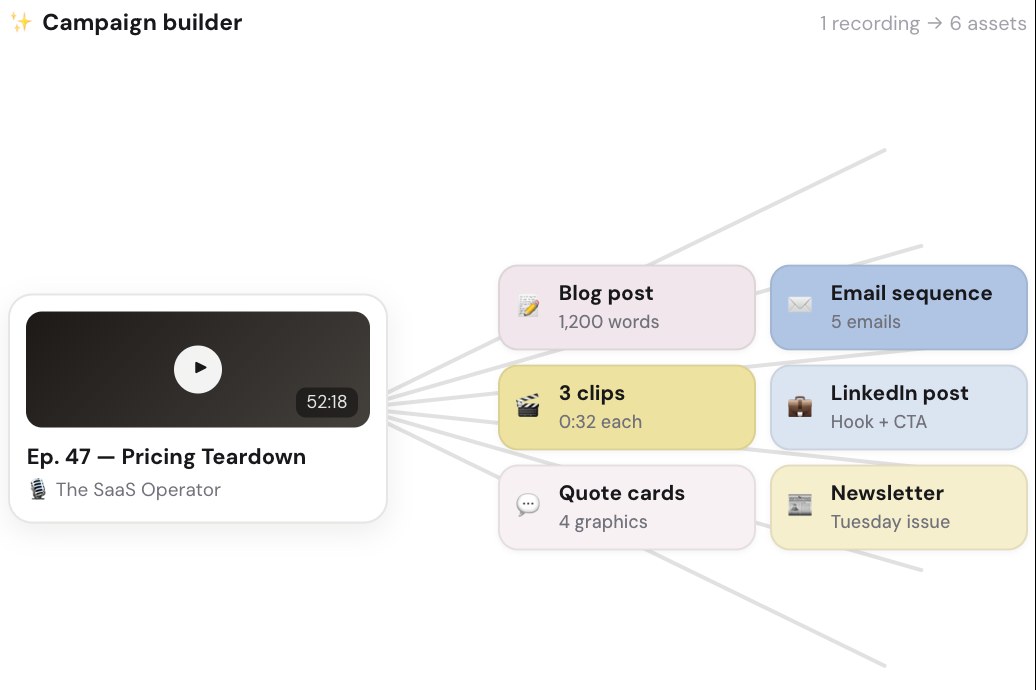
Castmagic Campaign builder example: one 52-minute recording branching into a blog post, email sequence, three clips, LinkedIn post, quote cards and newsletter

An example on Castmagic's homepage of one recording becoming six assets. Source: Castmagic website

Castmagic transcribes audio and video recordings and drafts content from them. Its homepage says one recording becomes 100+ content assets (the vendor's figure), and its use-cases page lists show notes, clips, social posts and a newsletter from a podcast episode, and a blog post, clips, social and nurture emails from a webinar. Its features page describes a content pipeline: define the set once and every recording that lands gets all of it drafted, with recurring prompts that run on import, brand voice and custom prompts shaping each draft, a podcast autopilot that imports each new episode from a feed, and an RSS import of a whole back catalog.

The homepage lists multi-brand workspaces with user permissions and folders, brand voice training with editable templates, and commenting, tasking and internal approval flows. The pricing page lists Zapier on every plan and API access on Starter and Team, and the features page lists a Claude MCP connection that points Claude at a library.

Pricing: Castmagic's pricing page lists Hobby at $29 a month ($19 a month billed annually), Starter at $69 ($48 billed annually) and Team at $199 ($139 billed annually) with 5 seats included and extra seats at $19 a month each on monthly billing. Business & Scale starts at $999 a month on monthly billing ($699 billed annually). Caps are set in transcribed hours across the whole library: 30 on Hobby, 100 on Starter and 400 on Team, with more hours to buy. The page lists no free plan.

Considerations: Library hours are a running total, so a team that records every week can use them up. The API documentation link on the pricing page did not load when we checked, and the homepage and pricing page give different maximum upload sizes (1GB and 10GB), so confirm both before building on them. Castmagic's Studio also cuts captioned vertical clips, but its pages put the written set first, while OpusClip is built around clips, scoring and posting.

  • Choose it if the source is audio or long video and the output the team needs is written: show notes, posts, newsletters and blog drafts at volume.
  • Skip it if the goal is finished short video ready to post (see OpusClip), or the content starts from a brief rather than a recording.

2. OpusClip: Best for turning one long video into many short, captioned clips and posting them

OpusClip's Get clips box above a row of six clips cut from one long video, each with a Virality Score and a social platform icon

OpusClip's home-page hero mock-up: a long-video box above clips with Virality Scores and platform icons. Source: OpusClip website

OpusClip takes a long video, such as a webinar, podcast, stream or interview, and cuts it into short clips. Per its pricing page, paid plans include AI clipping with a Virality Score, animated captions in 20+ languages, an editor, filler and silence removal, and auto-posting to YouTube Shorts, TikTok and Instagram Reels, or download. The help center documents the volume steps that follow: Auto Import turns a channel's latest public YouTube videos into clips on Starter and Pro, Pro users can download multiple clips at once, and Collections group clips by campaign, client or series, up to 200 per workspace.

Consistency comes from a Brand Kit that saves a logo, caption style, headline style, layout, intro, outro and music once, and from a team workspace that shares videos and brand templates. The Bulk Scheduler lets Pro users pick clips, set an order, a start time and a fixed interval, and publish them in sequence, with no hard limit on how many clips are scheduled at once, per the help center. For automation, OpusClip lists a Zapier integration, webhooks, an API and a hosted MCP server; see our guide to processing many videos in parallel with the OpusClip API.

Pricing: Per opus.pro/pricing, read November 6, 2026, Free is $0 with a watermark, no editing and up to 1080p rendered clips, and clips stop being exportable after 3 days. Starter is $15 a month (monthly billing only). Pro is $29 a month, or $14.50 a month billed annually ($174). Business is custom-priced. Starter and Pro list a free trial with no credit card required.

Considerations: Bulk scheduling covers YouTube only, and both bulk scheduling and bulk download are Pro features, per the help center. OpusClip works on footage that already exists: it does not research topics, write articles or design graphics, which is why the other six tools are here.

  • Choose it if long recordings are where the best material lives and the goal is a steady flow of finished short videos with captions, brand settings and scheduling in one place.
  • Skip it if the source is audio or text and the need is written assets (see Castmagic), or bulk scheduling must cover TikTok or Instagram in one run.

3. Predis.ai: Best for making social posts and ads in batches across brands
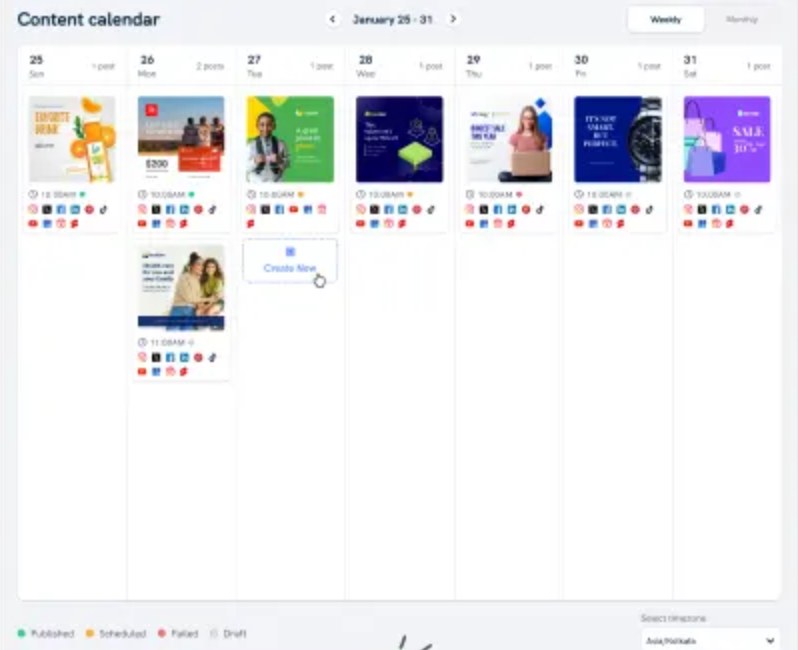
Predis.ai content calendar for January 25 to 31 with a week of scheduled social posts, each with a thumbnail, a time and network icons

Predis.ai's content calendar, shown on its scheduling page as a low-resolution product image. Source: Predis.ai website

Predis.ai calls itself an AI ad platform that also makes organic social content. Its features page says it starts from a product link, a prompt or a reference ad and returns video, UGC and static versions in the brand kit, and its homepage claims hundreds of variations in minutes. Its scheduling page lists a content calendar and bulk and batch scheduling that loads a month of posts at once and spreads them across the calendar.

For many brands, the features page lists a brand kit (logo, colors, fonts and tone set once), a separate workspace for each brand or client, approvals that hold a draft until someone signs off, and autoposting to Instagram, Facebook, LinkedIn, TikTok and YouTube. The docs list an API and an SDK for generating content from other apps, and a separate page covers an MCP server for Claude and ChatGPT.

Pricing: Predis.ai's pricing page shows Core at $19 a month billed yearly ($32 billed monthly), Rise at $40 billed yearly ($79 monthly) and Enterprise+ at $212 billed yearly ($249 monthly). Core lists 1 brand, 1,300 credits a month (about 325 images or 33 videos) and no Auto Posting. Rise lists up to 4 brands, 3,200 credits (about 800 images or 80 videos) and Auto Posting. Enterprise+ lists unlimited brands and 10,000 credits (about 2,500 images or 250 videos). Every plan starts with a 3-day trial that takes a card, and no free plan is listed.

Considerations: Every generation uses credits, the cost varies by content type and model, and the API docs say unused credits expire at the end of the billing cycle. The plan comparison on the pricing page is collapsed, so confirm which plans include approvals and per-client workspaces. Its feature pages center on ads, short video and social posts, so check long-form needs separately.

  • Choose it if agencies or multi-brand teams need a steady flow of on-brand posts, carousels and ad variations with a calendar and approvals.
  • Skip it if the team works from long recordings (see OpusClip and Castmagic) or needs long-form copy.

4. HeyGen: Best for localizing video into many languages at once
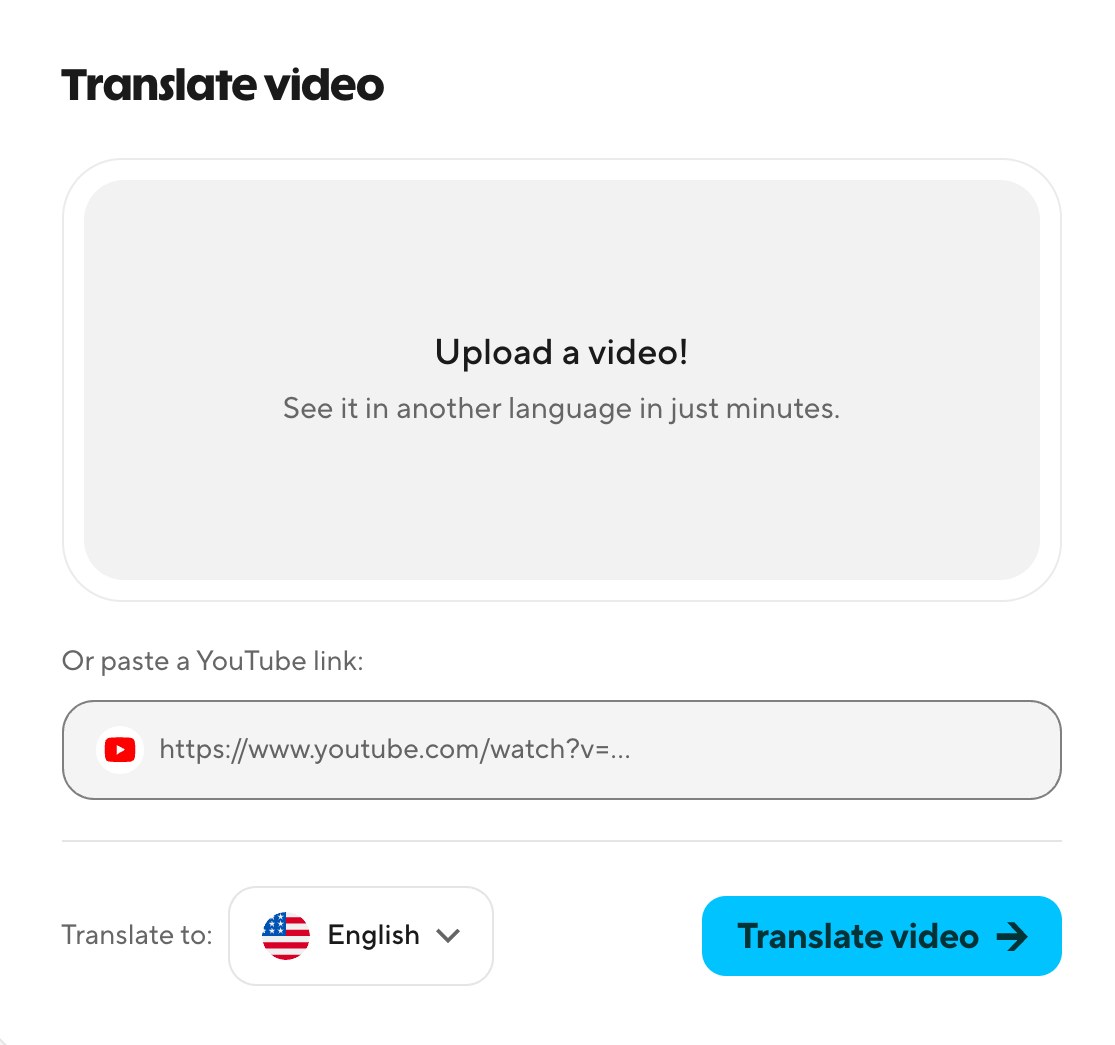
HeyGen's Translate video panel with an upload box, a YouTube link field, a language picker set to English and a Translate video button

HeyGen's Translate video panel, shown on its AI Video Translator page. Source: HeyGen website

HeyGen makes videos with AI avatars and translates existing ones. Its AI Video Translator page says a video or a YouTube link can be translated into 175+ languages and dialects with voice cloning, lip sync and subtitles, that up to 10 languages can be chosen in one run, and that an Edit and Review step lets a person proofread each translated script. A brand glossary supports protected terms.

For volume, HeyGen's developer page lists batch APIs that take up to 100 requests per call, with webhooks, REST, CLI and MCP access. The Business plan lists a shared workspace, a brand kit and asset library, SAML/SSO, and integrations with n8n, Make, HubSpot and Zapier, plus videos up to 60 minutes and twice the concurrency of Pro.

Pricing: HeyGen's pricing page lists a Free plan (3 watermarked videos a month, up to 1 minute each), Creator at $29 a month on monthly billing ($24 a month if paid annually, per its FAQ) with 600 credits, 1080p and 175+ languages and dialects, and Pro from $49 a month (1,000 credits at the entry tier, 4K export). Business is $149 a month on monthly billing or $119 a month billed yearly ($1,428), with 1,500 credits and extra seats at $20 a month each. Enterprise is by contacting sales.

Considerations: Everything is metered in credits, and HeyGen's FAQ says the credits a video uses vary with the AI model, video duration and complexity, so run one real video through the free plan before sizing a paid one. The app page lists 175+ languages, while the developer page's translation example says 30+, so confirm the API's language list. The HeyGen pages we read center on avatars and translation and do not list long-recording clipping or copywriting.

  • Choose it if the same video has to ship in many languages, or a presenter made from a script needs a version per market.
  • Skip it if the content is single-language, or the goal is clips from existing long recordings (see OpusClip).

5. Hootsuite: Best for scheduling hundreds of posts from one upload
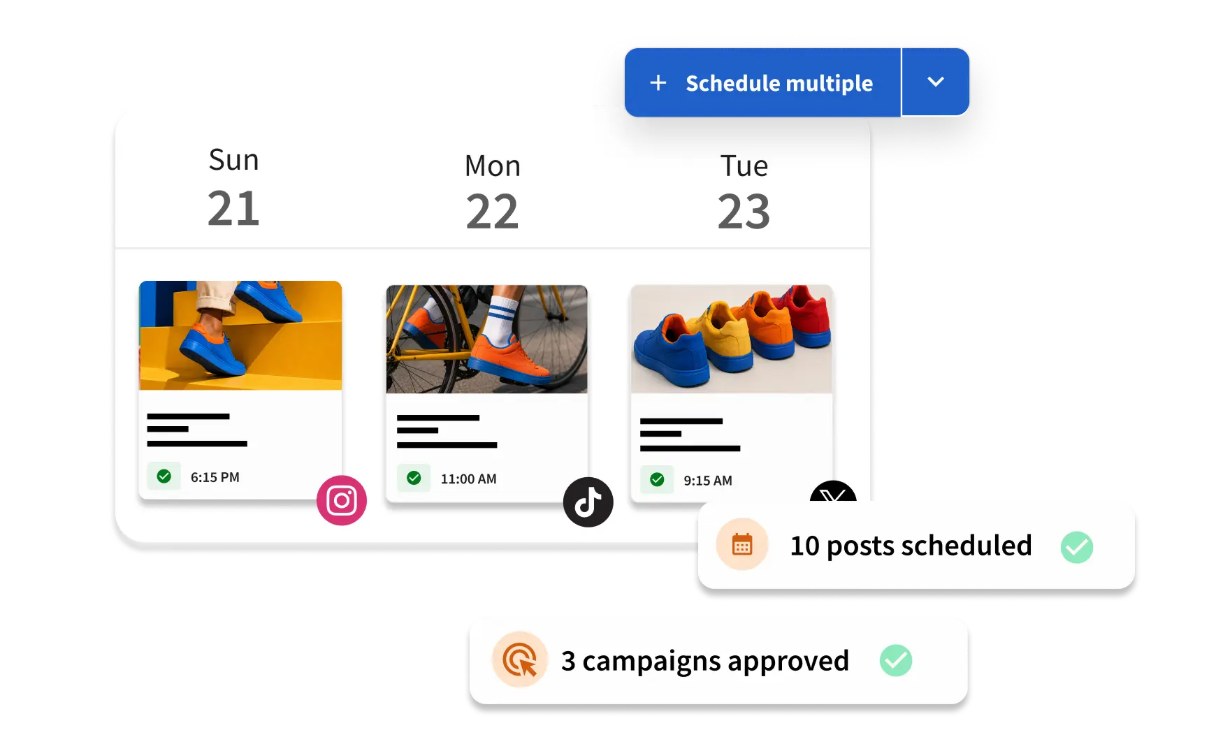
Hootsuite illustration of bulk post scheduling with three days of scheduled posts, a Schedule multiple button, 10 posts scheduled and 3 campaigns approved

Hootsuite's illustration of bulk post scheduling, from its publishing page. Source: Hootsuite website

Hootsuite is a social media management suite. Its plans page says Bulk Composer schedules and publishes up to 350 posts at once from a .csv file, and its publishing page describes a calendar or list view for mapping campaigns and filling content gaps. Perch, its content planning and publishing tool, adds an AI ideas generator, captions drafted from past posts and uploaded brand guidelines, hashtags, Canva and Adobe Express templates, and the plans page lists 100 AI credits a month for its Wisdom assistant on Standard, Professional and Advanced.

Team controls rise with the tier. Per the plans page, Standard covers 10 social accounts while Professional and Advanced list unlimited accounts, seats are sold per user, and post approval workflows and internal comments start on Advanced. A Perch MCP connector lets Claude, ChatGPT or Gemini draft and schedule posts.

Pricing: Hootsuite's plans page lists Standard at $99 per user a month, Professional at $199 and Advanced at $399, all based on annual billing, with Enterprise by request. Monthly billing exists, but the page shows the annual rate, and a Fall Sale banner offered 50% off Standard when we read it, so check the price at checkout. Paid plans list a 14-day free trial, but the page says trial accounts have daily posting limits (10 to 20 posts per organization) and that bulk scheduling is not available during the trial. No free plan is listed.

Considerations: The bulk upload cap is 350 posts at once, approvals need the Advanced tier ($399 per user a month billed annually), and the trial cannot try the feature this list is about. Hootsuite publishes and manages content: the pages we read list captions, hashtags and images, not video clipping or long-form copy.

  • Choose it if posts are already drafted and the bottleneck is scheduling them across many accounts, with approvals as the team grows.
  • Skip it if the main need is making content rather than publishing it, or per-user pricing does not fit the budget.

6. WRITER: Best for keeping brand voice and approvals consistent across a large team
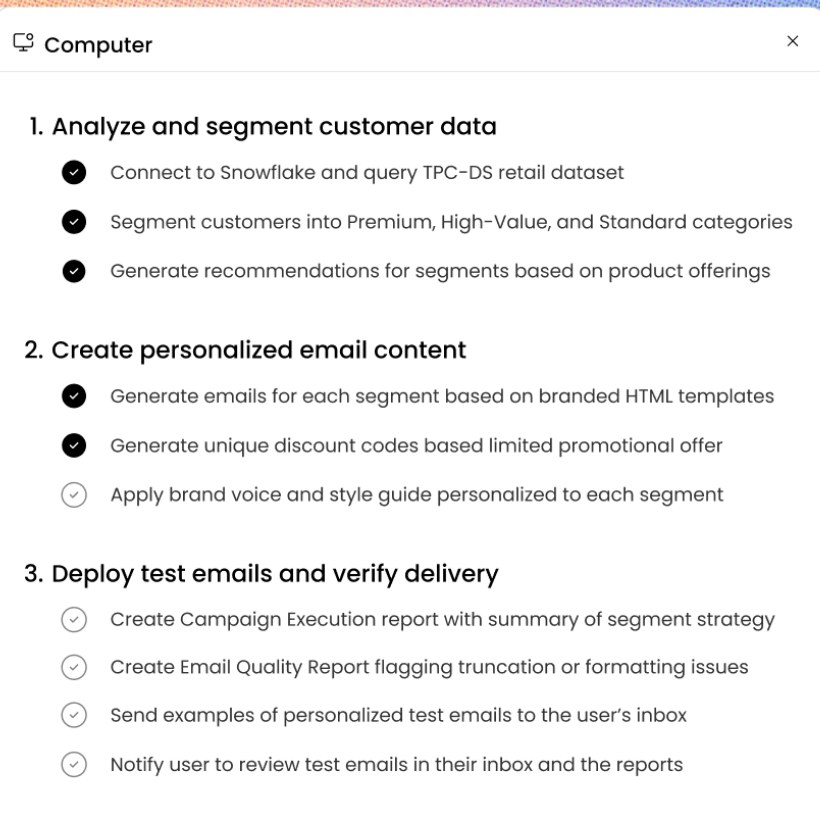
WRITER Agent task list for a win-back email campaign in three steps, including applying a brand voice and style guide to each customer segment

WRITER Agent's task list for an example campaign, from its product page. Source: WRITER website

WRITER is an enterprise AI platform. Its marketing page says enterprise marketers use it to scale compliant, on-brand work, with agents for a content supply chain that includes channel-specific derivative assets, translation and localization, and automated compliance reviews. Its pricing page says personality profiles, style guides and data grounding keep outputs on brand, and its agent page says playbooks, skills and voice profiles are shared by default so a team can build once and scale everywhere.

The limits are listed plainly. Starter allows up to 5 users, up to 5 playbooks, up to 3 scheduled routines and up to 3 active connectors, with 1 team personality profile. Enterprise lists unlimited users, playbooks and routines, departmental brand and voice profiles, and advanced orchestration, approvals and admin controls.

Pricing: WRITER's pricing page offers a 14-day free trial of Starter with no credit card required and says Starter is billed per seat, monthly or annually, with fixed credit limits, but it shows no Starter price. Enterprise is by contacting sales.

Considerations: Without a listed price, Starter is hard to budget, and the product is aimed at large organizations, with governance and auditability listed under Enterprise. The WRITER pages we read do not list video clipping or social scheduling.

  • Choose it if many people and agents create content for one brand and compliance review slows releases.
  • Skip it if a small team wants a published price, or the bottleneck is video or publishing.

7. Zapier: Best for connecting the content stack and automating hand-offs
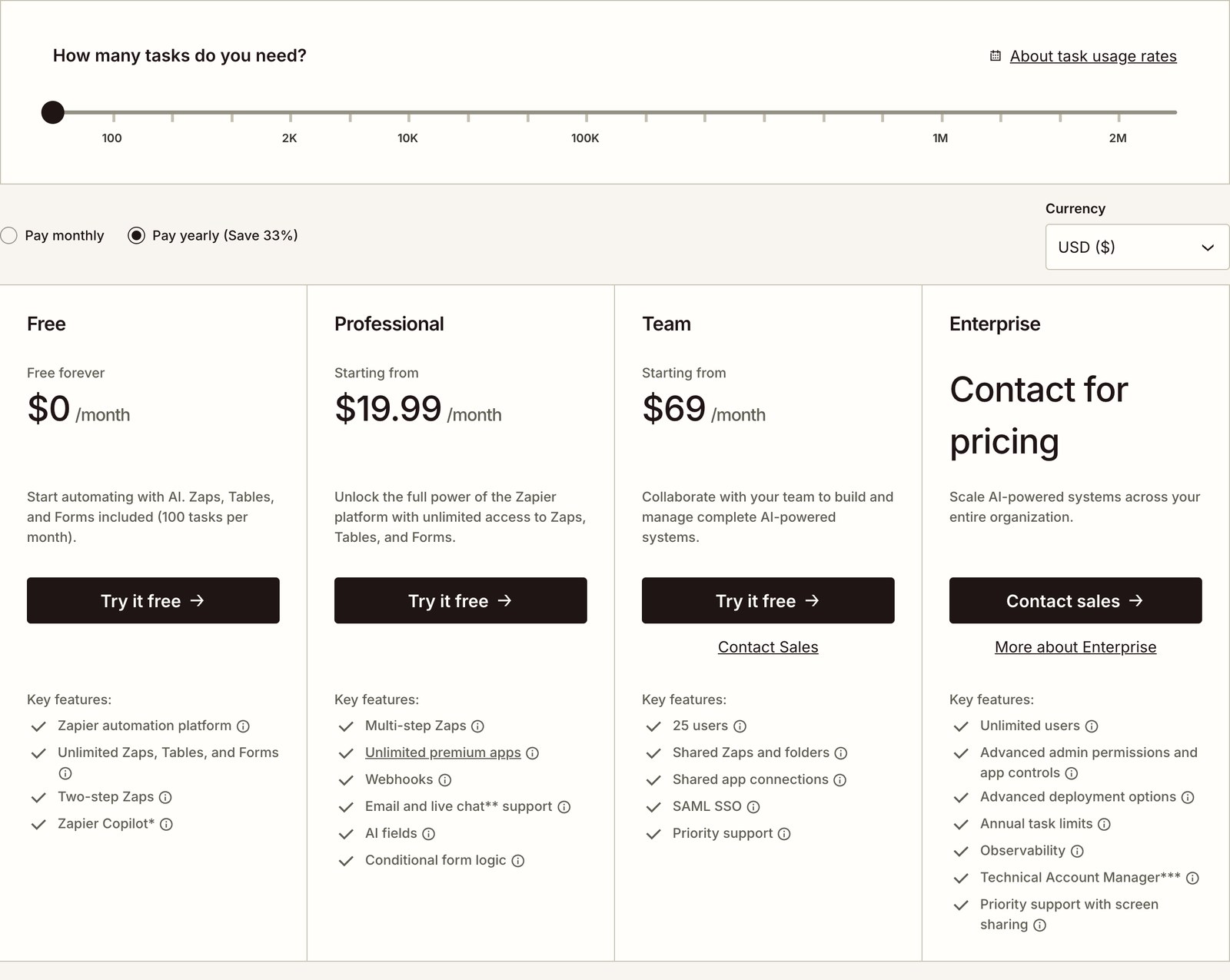
Zapier pricing page with a task slider from 100 to 2 million tasks above the Free, Professional, Team and Enterprise plan cards

Zapier's pricing page, with the monthly task slider above the plan cards. Source: Zapier website

Zapier is a workflow platform that its own pages now call AI orchestration. It connects 9,000+ apps and lets a team build a workflow once and keep it running on its own. For content, that means a step finishing in one tool can start the next: OpusClip's help center documents a Zapier trigger that fires when a project is completed, and Castmagic lists Zapier on every plan. Professional lists multi-step Zaps, webhooks and AI fields, and Zapier MCP lets Claude, ChatGPT and Cursor take actions in connected apps.

Volume is metered in tasks. The pricing page says every step in a Zap and every external connector call uses tasks, that AI model tier, code runtime and connector type change how many tasks an action uses, and that a task slider runs from 100 to 2M tasks a month. Team lists 25 users and shared Zaps and folders, and Enterprise lists unlimited users and annual task limits.

Pricing: Zapier's pricing page lists Free at $0 (100 tasks a month), Professional from $19.99 a month billed yearly ($29.99 billed monthly) and Team from $69 a month billed yearly ($103.50 billed monthly), with Enterprise by contacting sales. Prices rise with the task tier. The page says that when a plan reaches its limit it switches to pay-as-you-go unless that is turned off or a higher tier is chosen.

Considerations: Zapier mainly moves content and data between tools: the pages we read list AI steps and AI fields but not video clipping or design, so it relies on the other tools here. A workflow with many steps or a heavy AI model can use a monthly allowance faster than the number of posts suggests, and the free plan lists two-step Zaps with a 15-minute polling time.

  • Choose it if content moves between several tools by copy, paste or email today.
  • Skip it if one tool already covers the whole job, or nobody on the team will maintain workflows.

How we compared these tools

We compared each tool on six scale features, the volume limits its own pages list (credits, library hours, tasks, seats, accounts and posts per upload), price with its billing basis, and its main catch. Every fact comes from that vendor's own pricing page, product page, help center or documentation, read on November 6, 2026. Where a page loads figures with JavaScript, we read the rendered page and noted the billing period it showed.

One yardstick set the order: how many of six scale features each vendor's own pages list (many outputs from one input, a bulk step, hands-off runs, saved brand settings, team controls and automation hooks), with ties listed alphabetically. A feature counts when a page we read lists it on any plan, and plan limits are printed as catches, not subtracted. Price and free plans do not set the order, and a score says how many levers a tool pulls, not how well it works. Here is where each tool landed.

  • 1. Castmagic, 6 of 6: show notes, clips, posts and a newsletter from one recording; an RSS feed imports a whole back catalog; podcast autopilot; brand voice; workspaces and approvals; Zapier, API and Claude MCP. Catch: caps are library hours (30, 100, 400).
  • 2. OpusClip, 6 of 6: clips from one video; bulk download and Bulk Scheduler; Auto Import; Brand Kit; team workspace; Zapier, webhooks, API and MCP. Catch: bulk steps are Pro, and bulk scheduling is YouTube only.
  • 3. Predis.ai, 6 of 6: video, UGC and static versions from one link; bulk and batch scheduling; autoposting; brand kit; per-brand workspaces and approvals; API, SDK and MCP. Catch: credits cap volume, Core lists no Auto Posting, and plan access to approvals is unconfirmed.
  • 4. HeyGen, 5 of 6: up to 10 languages in one run; batch API; brand kit; shared workspace; API, MCP and Zapier. Missing: no hands-off run on the pages we read. Catch: credits meter everything.
  • 5. Hootsuite, 5 of 6: Bulk Composer; automatic scheduling at the best time; uploaded brand guidelines for Perch drafts; approvals; Perch MCP connector. Missing: no one-input-to-many-outputs step. Catch: no bulk scheduling in the trial, and approvals start on Advanced.
  • 6. WRITER, 5 of 6: channel-specific derivative assets; scheduled routines; personality profiles and style guides; team controls; connectors. Missing: no bulk step listed. Catch: Starter caps at 5 users and 5 playbooks and shows no price.
  • 7. Zapier, 3 of 6: workflows that keep running on their own, team controls, webhooks and MCP. Missing: it makes no content, so no outputs, bulk step or brand settings. Catch: tasks meter every step.

We did not run hands-on trials of the other tools. This is a comparison of published pricing and documented features, not a lab review. Prices change often and some pages show promotions, so check the vendor's page before buying. Screenshots come from each vendor's own site; the Castmagic and Hootsuite images are examples shown on those pages, Zapier's is its pricing page and Predis.ai's is a low-resolution product image.

Red flags to watch for

Credits, hours and tasks that cap volume

Predis.ai, HeyGen, Castmagic, Zapier and WRITER Starter all meter volume, and Predis.ai's API docs say unused credits end with the billing cycle. Trial test: size a plan to a normal month of output, not one project.

Free trials that exclude the feature you need

Hootsuite's plans page says bulk scheduling is not available during its trial, and Predis.ai takes a card for its 3-day trial. Trial test: read what the trial includes before judging the headline feature.

Per-seat and per-brand pricing

Hootsuite prices per user, Castmagic sells seats beyond 5 on Team, HeyGen Business adds seats at $20 a month, and Predis.ai limits brands by plan. Several prices are annual rates, and Hootsuite showed a 50% Standard sale. Trial test: multiply the price by real seats and brands, and compare monthly with annual billing.

Plan-gated features

OpusClip's bulk download and bulk scheduling are Pro features, Hootsuite approvals start on Advanced, Castmagic's API access is not on Hobby, and Predis.ai Core lists no Auto Posting. Trial test: list the must-have features and check each against the plan card.

Documentation that disagrees with the pricing page

Castmagic's API documentation link did not load when we checked, and HeyGen lists 175+ languages in the app but 30+ in a developer example. Trial test: confirm API and language limits in the docs before building on them.

Frequently asked questions

What are the best AI tools to scale content marketing?

It depends on the lever. In this list, Castmagic, OpusClip and Predis.ai each list all six scale features we counted, and the other four follow. By job, OpusClip is the pick for turning one long video into many short clips, Castmagic for written assets from a recording, Predis.ai for posts and ads in batches, HeyGen for localizing video, Hootsuite for bulk publishing, WRITER for brand control across a large team and Zapier for automation. Most teams combine two or three.

What is the best AI software to scale content marketing?

No single product covers every lever, so the best software is the one that removes the biggest bottleneck. For video, that is OpusClip; for written content from recordings, Castmagic; for publishing at volume, Hootsuite. We would not pick one tool to replace the others.

How do you scale content marketing with AI?

Pick an input the team already makes, such as a long video or a recording, turn it into many outputs, set brand rules once, publish in bulk, and connect the steps with automation. In this list, OpusClip handles the first step for video and Castmagic for written assets, Hootsuite publishes in bulk and Zapier connects the tools. Keep a person approving the final output.

What is the best tool for AI content repurposing at scale?

For video, OpusClip is the pick: it cuts one long video into scored, captioned clips, and its help center documents Auto Import, bulk download, bulk scheduling (YouTube only) and Collections. For written assets from recordings, Castmagic is the closer fit. For more options, see our guide to video repurposing tools.

Which AI tools can publish or schedule content in bulk?

Hootsuite's Bulk Composer schedules up to 350 posts from one .csv upload, but not during the free trial. OpusClip's Bulk Scheduler (Pro) publishes clips in sequence to YouTube only. Predis.ai lists bulk and batch scheduling and autoposting to Instagram, Facebook, LinkedIn, TikTok and YouTube, with Auto Posting not listed on its Core plan.

Which of these tools have an API, MCP server or Zapier integration?

OpusClip lists a Zapier integration, webhooks, an API and a hosted MCP server. Castmagic lists Zapier on every plan, API access on Starter and Team, and a Claude MCP connection. Predis.ai lists an API, an SDK and an MCP server. HeyGen lists a batch API, webhooks, CLI and MCP. Hootsuite lists a Perch MCP connector, and Zapier connects 9,000+ apps and offers Zapier MCP.

How do you keep brand consistency when you scale content with AI?

Set brand rules once and reuse them: OpusClip's Brand Kit, Predis.ai's brand kits, Castmagic's brand voice and templates, HeyGen's brand kit and glossary, and WRITER's personality profiles and style guides. Hootsuite lists approvals from the Advanced plan.

How much does it cost to scale content marketing with AI?

OpusClip, HeyGen and Zapier list free plans with limits, and paid entry points range from OpusClip Pro at $29 a month ($14.50 a month billed annually) and Zapier Professional from $19.99 a month billed yearly to Hootsuite Standard at $99 per user a month billed annually, while WRITER lists no Starter price. Volume limits usually decide the real cost, so size each plan to a normal month of output.
On this page

Use our Free Forever Plan

Find the moment. Skip the scrubbing.

From script to polished video — in one click.

Create and post one short video every day for free, and grow faster.

OpusSearch uses AI to surface the exact clip you need from hours of footage — in seconds, not afternoons.

Agent Opus runs the entire video pipeline for you: research, scriptwriting, storyboarding, motion, voice, and edit. Upload the idea, post the result.

7 Best AI Tools to Scale Content Marketing in 2026

OpusClip is our pick for scaling video: it turns one long recording into many short, captioned clips and can post them. The other six are described by their job: Castmagic written assets, Predis.ai posts and ads in batches, HeyGen translations, Hootsuite bulk publishing, Zapier automation and WRITER brand control. One yardstick set the order: how many of six scale features each vendor's own pages list (many outputs from one input, a bulk step, hands-off runs, saved brand settings, team controls and automation hooks), with ties listed alphabetically. Facts were read on November 6, 2026.

What scaling content marketing means here

Scaling means shipping more finished pieces per person without losing brand consistency, so this list weighs throughput, not writing quality or workflow stage. For workflow stages, see our roundup of AI content marketing tools, and for quality, see our guide to AI tools for making quality content.

Key takeaways

  • Best for one recording into written assets: Castmagic. A content pipeline that drafts a set of assets from every new recording; plan caps are library hours (30, 100 or 400).
  • Best for one long video into many clips: OpusClip. Scored, captioned clips from a long recording, with bulk download and bulk scheduling on Pro (bulk scheduling covers YouTube only).
  • Best for posts and ads in batches: Predis.ai. Monthly credits, brand kits per brand and an API; the Core plan lists no Auto Posting.
  • Best for localizing video: HeyGen. Translate one video into up to 10 languages in one run; the batch API takes up to 100 requests per call.
  • Best for bulk publishing: Hootsuite. Bulk Composer schedules up to 350 posts per .csv upload, but not during the free trial.
  • Best for brand control across a big team: WRITER. Playbooks, personality profiles and style guides; Starter caps at 5 users and 5 playbooks and lists no price.
  • Best for automating hand-offs: Zapier. 9,000+ apps and task-based pricing, with a free plan of 100 tasks a month.

How to choose

Start with the input the team already has, then fix the bottleneck after it. Most teams need two or three of these tools, not all seven.

  • If the source is audio and the need is written content (show notes, posts, newsletters, blog drafts): Castmagic.
  • If long videos sit unused (webinars, interviews, streams): OpusClip. To try the clipping step alone, see our long video to short video tool.
  • If many brands or clients each need steady posts and ads: Predis.ai.
  • If the same video must ship in several languages: HeyGen.
  • If publishing is the bottleneck (hundreds of posts, many accounts): Hootsuite.
  • If many writers and compliance reviews slow releases: WRITER.
  • If steps between tools are copied by hand: Zapier.

At a glance

  • Castmagic: best for turning one recording into written assets and clips; Hobby $29 a month ($19 a month billed annually), Team $199 a month ($139 a month billed annually, 5 seats included); no free plan listed.
  • OpusClip: best for turning one long video into many short, captioned clips and posting them; Starter $15 a month (monthly billing only), Pro $29 a month ($14.50 a month billed annually); free plan yes (watermark, no editing).
  • Predis.ai: best for making social posts and ads in batches across brands; Core $32 a month ($19 a month billed yearly), Rise $79 a month ($40 a month billed yearly); no free plan listed, and every plan starts with a 3-day trial that takes a card.
  • HeyGen: best for localizing video into many languages; Creator $29 a month ($24 a month billed annually), Pro from $49 a month, Business $149 a month ($119 a month billed yearly); free plan yes (3 watermarked videos a month).
  • Hootsuite: best for scheduling hundreds of posts from one upload; Standard $99 per user a month billed annually; 14-day free trial, no free plan.
  • WRITER: best for brand-consistent work across a large team; no Starter price listed and Enterprise by contacting sales; 14-day free trial of Starter, no credit card.
  • Zapier: best for connecting tools and automating hand-offs; Professional from $19.99 a month billed yearly ($29.99 billed monthly); free plan yes (100 tasks a month).

Throughput limits and automation hooks compared

The At a glance list covers best-for, price and free plan; this table compares what one input becomes, the volume limits each vendor lists and its automation hooks, as listed on each vendor's own pages on November 6, 2026.

ToolOne input becomesVolume limits listedAutomation and API
CastmagicOne recording becomes a transcript, written assets and clipsLibrary hours: 30 on Hobby, 100 on Starter, 400 on Team; Team lists 5 seatsZapier on all plans; API access on Starter and Team; Claude MCP
OpusClipOne long video becomes scored, captioned clipsBulk download and bulk scheduling on Pro; bulk scheduling covers YouTube onlyZapier integration, webhooks, an API and a hosted MCP server
Predis.aiOne link, prompt or image becomes video, UGC and image adsCredits a month: 1,300 Core, 3,200 Rise, 10,000 Enterprise+; 1, 4 or unlimited brandsAPI and SDK; MCP for Claude and ChatGPT; autoposting to five networks
HeyGenOne video becomes up to 10 language versions in one runCredits a month: 600 on Creator, 1,000 at Pro's entry tier; videos up to 30 minutes on bothBatch API up to 100 requests per call, with webhooks; REST, CLI and MCP
HootsuiteOne .csv upload becomes up to 350 scheduled posts10 social accounts on Standard, unlimited above it; seats sold per userApprovals start on Advanced; Perch MCP connector for Claude and ChatGPT
WRITEROne playbook becomes repeatable work shared across a teamStarter: up to 5 users and 5 playbooks; Enterprise: unlimitedScheduled routines and active connectors: up to 3 each on Starter, unlimited on Enterprise
ZapierOne build becomes a workflow across 9,000+ apps that keeps running on its ownFree lists 100 tasks a month; Team lists 25 users; Enterprise lists annual task limitsWebhooks and AI fields from Professional; MCP for Claude, ChatGPT and Cursor

1. Castmagic: Best for turning one recording into written assets and clips

Castmagic Campaign builder example: one 52-minute recording branching into a blog post, email sequence, three clips, LinkedIn post, quote cards and newsletter

An example on Castmagic's homepage of one recording becoming six assets. Source: Castmagic website

Castmagic transcribes audio and video recordings and drafts content from them. Its homepage says one recording becomes 100+ content assets (the vendor's figure), and its use-cases page lists show notes, clips, social posts and a newsletter from a podcast episode, and a blog post, clips, social and nurture emails from a webinar. Its features page describes a content pipeline: define the set once and every recording that lands gets all of it drafted, with recurring prompts that run on import, brand voice and custom prompts shaping each draft, a podcast autopilot that imports each new episode from a feed, and an RSS import of a whole back catalog.

The homepage lists multi-brand workspaces with user permissions and folders, brand voice training with editable templates, and commenting, tasking and internal approval flows. The pricing page lists Zapier on every plan and API access on Starter and Team, and the features page lists a Claude MCP connection that points Claude at a library.

Pricing: Castmagic's pricing page lists Hobby at $29 a month ($19 a month billed annually), Starter at $69 ($48 billed annually) and Team at $199 ($139 billed annually) with 5 seats included and extra seats at $19 a month each on monthly billing. Business & Scale starts at $999 a month on monthly billing ($699 billed annually). Caps are set in transcribed hours across the whole library: 30 on Hobby, 100 on Starter and 400 on Team, with more hours to buy. The page lists no free plan.

Considerations: Library hours are a running total, so a team that records every week can use them up. The API documentation link on the pricing page did not load when we checked, and the homepage and pricing page give different maximum upload sizes (1GB and 10GB), so confirm both before building on them. Castmagic's Studio also cuts captioned vertical clips, but its pages put the written set first, while OpusClip is built around clips, scoring and posting.

  • Choose it if the source is audio or long video and the output the team needs is written: show notes, posts, newsletters and blog drafts at volume.
  • Skip it if the goal is finished short video ready to post (see OpusClip), or the content starts from a brief rather than a recording.

2. OpusClip: Best for turning one long video into many short, captioned clips and posting them

OpusClip's Get clips box above a row of six clips cut from one long video, each with a Virality Score and a social platform icon

OpusClip's home-page hero mock-up: a long-video box above clips with Virality Scores and platform icons. Source: OpusClip website

OpusClip takes a long video, such as a webinar, podcast, stream or interview, and cuts it into short clips. Per its pricing page, paid plans include AI clipping with a Virality Score, animated captions in 20+ languages, an editor, filler and silence removal, and auto-posting to YouTube Shorts, TikTok and Instagram Reels, or download. The help center documents the volume steps that follow: Auto Import turns a channel's latest public YouTube videos into clips on Starter and Pro, Pro users can download multiple clips at once, and Collections group clips by campaign, client or series, up to 200 per workspace.

Consistency comes from a Brand Kit that saves a logo, caption style, headline style, layout, intro, outro and music once, and from a team workspace that shares videos and brand templates. The Bulk Scheduler lets Pro users pick clips, set an order, a start time and a fixed interval, and publish them in sequence, with no hard limit on how many clips are scheduled at once, per the help center. For automation, OpusClip lists a Zapier integration, webhooks, an API and a hosted MCP server; see our guide to processing many videos in parallel with the OpusClip API.

Pricing: Per opus.pro/pricing, read November 6, 2026, Free is $0 with a watermark, no editing and up to 1080p rendered clips, and clips stop being exportable after 3 days. Starter is $15 a month (monthly billing only). Pro is $29 a month, or $14.50 a month billed annually ($174). Business is custom-priced. Starter and Pro list a free trial with no credit card required.

Considerations: Bulk scheduling covers YouTube only, and both bulk scheduling and bulk download are Pro features, per the help center. OpusClip works on footage that already exists: it does not research topics, write articles or design graphics, which is why the other six tools are here.

  • Choose it if long recordings are where the best material lives and the goal is a steady flow of finished short videos with captions, brand settings and scheduling in one place.
  • Skip it if the source is audio or text and the need is written assets (see Castmagic), or bulk scheduling must cover TikTok or Instagram in one run.

3. Predis.ai: Best for making social posts and ads in batches across brands

Predis.ai content calendar for January 25 to 31 with a week of scheduled social posts, each with a thumbnail, a time and network icons

Predis.ai's content calendar, shown on its scheduling page as a low-resolution product image. Source: Predis.ai website

Predis.ai calls itself an AI ad platform that also makes organic social content. Its features page says it starts from a product link, a prompt or a reference ad and returns video, UGC and static versions in the brand kit, and its homepage claims hundreds of variations in minutes. Its scheduling page lists a content calendar and bulk and batch scheduling that loads a month of posts at once and spreads them across the calendar.

For many brands, the features page lists a brand kit (logo, colors, fonts and tone set once), a separate workspace for each brand or client, approvals that hold a draft until someone signs off, and autoposting to Instagram, Facebook, LinkedIn, TikTok and YouTube. The docs list an API and an SDK for generating content from other apps, and a separate page covers an MCP server for Claude and ChatGPT.

Pricing: Predis.ai's pricing page shows Core at $19 a month billed yearly ($32 billed monthly), Rise at $40 billed yearly ($79 monthly) and Enterprise+ at $212 billed yearly ($249 monthly). Core lists 1 brand, 1,300 credits a month (about 325 images or 33 videos) and no Auto Posting. Rise lists up to 4 brands, 3,200 credits (about 800 images or 80 videos) and Auto Posting. Enterprise+ lists unlimited brands and 10,000 credits (about 2,500 images or 250 videos). Every plan starts with a 3-day trial that takes a card, and no free plan is listed.

Considerations: Every generation uses credits, the cost varies by content type and model, and the API docs say unused credits expire at the end of the billing cycle. The plan comparison on the pricing page is collapsed, so confirm which plans include approvals and per-client workspaces. Its feature pages center on ads, short video and social posts, so check long-form needs separately.

  • Choose it if agencies or multi-brand teams need a steady flow of on-brand posts, carousels and ad variations with a calendar and approvals.
  • Skip it if the team works from long recordings (see OpusClip and Castmagic) or needs long-form copy.

4. HeyGen: Best for localizing video into many languages at once

HeyGen's Translate video panel with an upload box, a YouTube link field, a language picker set to English and a Translate video button

HeyGen's Translate video panel, shown on its AI Video Translator page. Source: HeyGen website

HeyGen makes videos with AI avatars and translates existing ones. Its AI Video Translator page says a video or a YouTube link can be translated into 175+ languages and dialects with voice cloning, lip sync and subtitles, that up to 10 languages can be chosen in one run, and that an Edit and Review step lets a person proofread each translated script. A brand glossary supports protected terms.

For volume, HeyGen's developer page lists batch APIs that take up to 100 requests per call, with webhooks, REST, CLI and MCP access. The Business plan lists a shared workspace, a brand kit and asset library, SAML/SSO, and integrations with n8n, Make, HubSpot and Zapier, plus videos up to 60 minutes and twice the concurrency of Pro.

Pricing: HeyGen's pricing page lists a Free plan (3 watermarked videos a month, up to 1 minute each), Creator at $29 a month on monthly billing ($24 a month if paid annually, per its FAQ) with 600 credits, 1080p and 175+ languages and dialects, and Pro from $49 a month (1,000 credits at the entry tier, 4K export). Business is $149 a month on monthly billing or $119 a month billed yearly ($1,428), with 1,500 credits and extra seats at $20 a month each. Enterprise is by contacting sales.

Considerations: Everything is metered in credits, and HeyGen's FAQ says the credits a video uses vary with the AI model, video duration and complexity, so run one real video through the free plan before sizing a paid one. The app page lists 175+ languages, while the developer page's translation example says 30+, so confirm the API's language list. The HeyGen pages we read center on avatars and translation and do not list long-recording clipping or copywriting.

  • Choose it if the same video has to ship in many languages, or a presenter made from a script needs a version per market.
  • Skip it if the content is single-language, or the goal is clips from existing long recordings (see OpusClip).

5. Hootsuite: Best for scheduling hundreds of posts from one upload

Hootsuite illustration of bulk post scheduling with three days of scheduled posts, a Schedule multiple button, 10 posts scheduled and 3 campaigns approved

Hootsuite's illustration of bulk post scheduling, from its publishing page. Source: Hootsuite website

Hootsuite is a social media management suite. Its plans page says Bulk Composer schedules and publishes up to 350 posts at once from a .csv file, and its publishing page describes a calendar or list view for mapping campaigns and filling content gaps. Perch, its content planning and publishing tool, adds an AI ideas generator, captions drafted from past posts and uploaded brand guidelines, hashtags, Canva and Adobe Express templates, and the plans page lists 100 AI credits a month for its Wisdom assistant on Standard, Professional and Advanced.

Team controls rise with the tier. Per the plans page, Standard covers 10 social accounts while Professional and Advanced list unlimited accounts, seats are sold per user, and post approval workflows and internal comments start on Advanced. A Perch MCP connector lets Claude, ChatGPT or Gemini draft and schedule posts.

Pricing: Hootsuite's plans page lists Standard at $99 per user a month, Professional at $199 and Advanced at $399, all based on annual billing, with Enterprise by request. Monthly billing exists, but the page shows the annual rate, and a Fall Sale banner offered 50% off Standard when we read it, so check the price at checkout. Paid plans list a 14-day free trial, but the page says trial accounts have daily posting limits (10 to 20 posts per organization) and that bulk scheduling is not available during the trial. No free plan is listed.

Considerations: The bulk upload cap is 350 posts at once, approvals need the Advanced tier ($399 per user a month billed annually), and the trial cannot try the feature this list is about. Hootsuite publishes and manages content: the pages we read list captions, hashtags and images, not video clipping or long-form copy.

  • Choose it if posts are already drafted and the bottleneck is scheduling them across many accounts, with approvals as the team grows.
  • Skip it if the main need is making content rather than publishing it, or per-user pricing does not fit the budget.

6. WRITER: Best for keeping brand voice and approvals consistent across a large team

WRITER Agent task list for a win-back email campaign in three steps, including applying a brand voice and style guide to each customer segment

WRITER Agent's task list for an example campaign, from its product page. Source: WRITER website

WRITER is an enterprise AI platform. Its marketing page says enterprise marketers use it to scale compliant, on-brand work, with agents for a content supply chain that includes channel-specific derivative assets, translation and localization, and automated compliance reviews. Its pricing page says personality profiles, style guides and data grounding keep outputs on brand, and its agent page says playbooks, skills and voice profiles are shared by default so a team can build once and scale everywhere.

The limits are listed plainly. Starter allows up to 5 users, up to 5 playbooks, up to 3 scheduled routines and up to 3 active connectors, with 1 team personality profile. Enterprise lists unlimited users, playbooks and routines, departmental brand and voice profiles, and advanced orchestration, approvals and admin controls.

Pricing: WRITER's pricing page offers a 14-day free trial of Starter with no credit card required and says Starter is billed per seat, monthly or annually, with fixed credit limits, but it shows no Starter price. Enterprise is by contacting sales.

Considerations: Without a listed price, Starter is hard to budget, and the product is aimed at large organizations, with governance and auditability listed under Enterprise. The WRITER pages we read do not list video clipping or social scheduling.

  • Choose it if many people and agents create content for one brand and compliance review slows releases.
  • Skip it if a small team wants a published price, or the bottleneck is video or publishing.

7. Zapier: Best for connecting the content stack and automating hand-offs

Zapier pricing page with a task slider from 100 to 2 million tasks above the Free, Professional, Team and Enterprise plan cards

Zapier's pricing page, with the monthly task slider above the plan cards. Source: Zapier website

Zapier is a workflow platform that its own pages now call AI orchestration. It connects 9,000+ apps and lets a team build a workflow once and keep it running on its own. For content, that means a step finishing in one tool can start the next: OpusClip's help center documents a Zapier trigger that fires when a project is completed, and Castmagic lists Zapier on every plan. Professional lists multi-step Zaps, webhooks and AI fields, and Zapier MCP lets Claude, ChatGPT and Cursor take actions in connected apps.

Volume is metered in tasks. The pricing page says every step in a Zap and every external connector call uses tasks, that AI model tier, code runtime and connector type change how many tasks an action uses, and that a task slider runs from 100 to 2M tasks a month. Team lists 25 users and shared Zaps and folders, and Enterprise lists unlimited users and annual task limits.

Pricing: Zapier's pricing page lists Free at $0 (100 tasks a month), Professional from $19.99 a month billed yearly ($29.99 billed monthly) and Team from $69 a month billed yearly ($103.50 billed monthly), with Enterprise by contacting sales. Prices rise with the task tier. The page says that when a plan reaches its limit it switches to pay-as-you-go unless that is turned off or a higher tier is chosen.

Considerations: Zapier mainly moves content and data between tools: the pages we read list AI steps and AI fields but not video clipping or design, so it relies on the other tools here. A workflow with many steps or a heavy AI model can use a monthly allowance faster than the number of posts suggests, and the free plan lists two-step Zaps with a 15-minute polling time.

  • Choose it if content moves between several tools by copy, paste or email today.
  • Skip it if one tool already covers the whole job, or nobody on the team will maintain workflows.

How we compared these tools

We compared each tool on six scale features, the volume limits its own pages list (credits, library hours, tasks, seats, accounts and posts per upload), price with its billing basis, and its main catch. Every fact comes from that vendor's own pricing page, product page, help center or documentation, read on November 6, 2026. Where a page loads figures with JavaScript, we read the rendered page and noted the billing period it showed.

One yardstick set the order: how many of six scale features each vendor's own pages list (many outputs from one input, a bulk step, hands-off runs, saved brand settings, team controls and automation hooks), with ties listed alphabetically. A feature counts when a page we read lists it on any plan, and plan limits are printed as catches, not subtracted. Price and free plans do not set the order, and a score says how many levers a tool pulls, not how well it works. Here is where each tool landed.

  • 1. Castmagic, 6 of 6: show notes, clips, posts and a newsletter from one recording; an RSS feed imports a whole back catalog; podcast autopilot; brand voice; workspaces and approvals; Zapier, API and Claude MCP. Catch: caps are library hours (30, 100, 400).
  • 2. OpusClip, 6 of 6: clips from one video; bulk download and Bulk Scheduler; Auto Import; Brand Kit; team workspace; Zapier, webhooks, API and MCP. Catch: bulk steps are Pro, and bulk scheduling is YouTube only.
  • 3. Predis.ai, 6 of 6: video, UGC and static versions from one link; bulk and batch scheduling; autoposting; brand kit; per-brand workspaces and approvals; API, SDK and MCP. Catch: credits cap volume, Core lists no Auto Posting, and plan access to approvals is unconfirmed.
  • 4. HeyGen, 5 of 6: up to 10 languages in one run; batch API; brand kit; shared workspace; API, MCP and Zapier. Missing: no hands-off run on the pages we read. Catch: credits meter everything.
  • 5. Hootsuite, 5 of 6: Bulk Composer; automatic scheduling at the best time; uploaded brand guidelines for Perch drafts; approvals; Perch MCP connector. Missing: no one-input-to-many-outputs step. Catch: no bulk scheduling in the trial, and approvals start on Advanced.
  • 6. WRITER, 5 of 6: channel-specific derivative assets; scheduled routines; personality profiles and style guides; team controls; connectors. Missing: no bulk step listed. Catch: Starter caps at 5 users and 5 playbooks and shows no price.
  • 7. Zapier, 3 of 6: workflows that keep running on their own, team controls, webhooks and MCP. Missing: it makes no content, so no outputs, bulk step or brand settings. Catch: tasks meter every step.

We did not run hands-on trials of the other tools. This is a comparison of published pricing and documented features, not a lab review. Prices change often and some pages show promotions, so check the vendor's page before buying. Screenshots come from each vendor's own site; the Castmagic and Hootsuite images are examples shown on those pages, Zapier's is its pricing page and Predis.ai's is a low-resolution product image.

Red flags to watch for

Credits, hours and tasks that cap volume

Predis.ai, HeyGen, Castmagic, Zapier and WRITER Starter all meter volume, and Predis.ai's API docs say unused credits end with the billing cycle. Trial test: size a plan to a normal month of output, not one project.

Free trials that exclude the feature you need

Hootsuite's plans page says bulk scheduling is not available during its trial, and Predis.ai takes a card for its 3-day trial. Trial test: read what the trial includes before judging the headline feature.

Per-seat and per-brand pricing

Hootsuite prices per user, Castmagic sells seats beyond 5 on Team, HeyGen Business adds seats at $20 a month, and Predis.ai limits brands by plan. Several prices are annual rates, and Hootsuite showed a 50% Standard sale. Trial test: multiply the price by real seats and brands, and compare monthly with annual billing.

Plan-gated features

OpusClip's bulk download and bulk scheduling are Pro features, Hootsuite approvals start on Advanced, Castmagic's API access is not on Hobby, and Predis.ai Core lists no Auto Posting. Trial test: list the must-have features and check each against the plan card.

Documentation that disagrees with the pricing page

Castmagic's API documentation link did not load when we checked, and HeyGen lists 175+ languages in the app but 30+ in a developer example. Trial test: confirm API and language limits in the docs before building on them.

Frequently asked questions

What are the best AI tools to scale content marketing?

It depends on the lever. In this list, Castmagic, OpusClip and Predis.ai each list all six scale features we counted, and the other four follow. By job, OpusClip is the pick for turning one long video into many short clips, Castmagic for written assets from a recording, Predis.ai for posts and ads in batches, HeyGen for localizing video, Hootsuite for bulk publishing, WRITER for brand control across a large team and Zapier for automation. Most teams combine two or three.

What is the best AI software to scale content marketing?

No single product covers every lever, so the best software is the one that removes the biggest bottleneck. For video, that is OpusClip; for written content from recordings, Castmagic; for publishing at volume, Hootsuite. We would not pick one tool to replace the others.

How do you scale content marketing with AI?

Pick an input the team already makes, such as a long video or a recording, turn it into many outputs, set brand rules once, publish in bulk, and connect the steps with automation. In this list, OpusClip handles the first step for video and Castmagic for written assets, Hootsuite publishes in bulk and Zapier connects the tools. Keep a person approving the final output.

What is the best tool for AI content repurposing at scale?

For video, OpusClip is the pick: it cuts one long video into scored, captioned clips, and its help center documents Auto Import, bulk download, bulk scheduling (YouTube only) and Collections. For written assets from recordings, Castmagic is the closer fit. For more options, see our guide to video repurposing tools.

Which AI tools can publish or schedule content in bulk?

Hootsuite's Bulk Composer schedules up to 350 posts from one .csv upload, but not during the free trial. OpusClip's Bulk Scheduler (Pro) publishes clips in sequence to YouTube only. Predis.ai lists bulk and batch scheduling and autoposting to Instagram, Facebook, LinkedIn, TikTok and YouTube, with Auto Posting not listed on its Core plan.

Which of these tools have an API, MCP server or Zapier integration?

OpusClip lists a Zapier integration, webhooks, an API and a hosted MCP server. Castmagic lists Zapier on every plan, API access on Starter and Team, and a Claude MCP connection. Predis.ai lists an API, an SDK and an MCP server. HeyGen lists a batch API, webhooks, CLI and MCP. Hootsuite lists a Perch MCP connector, and Zapier connects 9,000+ apps and offers Zapier MCP.

How do you keep brand consistency when you scale content with AI?

Set brand rules once and reuse them: OpusClip's Brand Kit, Predis.ai's brand kits, Castmagic's brand voice and templates, HeyGen's brand kit and glossary, and WRITER's personality profiles and style guides. Hootsuite lists approvals from the Advanced plan.

How much does it cost to scale content marketing with AI?

OpusClip, HeyGen and Zapier list free plans with limits, and paid entry points range from OpusClip Pro at $29 a month ($14.50 a month billed annually) and Zapier Professional from $19.99 a month billed yearly to Hootsuite Standard at $99 per user a month billed annually, while WRITER lists no Starter price. Volume limits usually decide the real cost, so size each plan to a normal month of output.

Creator name

Creator type

Team size

Channels

linkYouTubefacebookXTikTok

Pain point

Time to see positive ROI

About the creator

Don't miss these

How Audacy Drove 1B+ Views by Taking a Tech-Forward Approach to Radio with OpusClip
No items found.

How Audacy Drove 1B+ Views by Taking a Tech-Forward Approach to Radio with OpusClip

How All the Smoke makes hit compilations faster with OpusSearch

How All the Smoke makes hit compilations faster with OpusSearch

Growing a new channel to 1.5M views in 90 days without creating new videos

Growing a new channel to 1.5M views in 90 days without creating new videos

OpusClip 4.0 is here. Become a content powerhouse.

7 Best AI Tools to Scale Content Marketing in 2026

Marketers recording a webinar, reviewing a week of clips on a laptop and holding up a vertical video, with a Clip it button, a views badge and 16:9 and 9:16 tags
No items found.
No items found.

Boost your social media growth with OpusClip

Create and post one short video every day for your social media and grow faster.

7 Best AI Tools to Scale Content Marketing in 2026

Marketers recording a webinar, reviewing a week of clips on a laptop and holding up a vertical video, with a Clip it button, a views badge and 16:9 and 9:16 tags

OpusClip is our pick for scaling video: it turns one long recording into many short, captioned clips and can post them. The other six are described by their job: Castmagic written assets, Predis.ai posts and ads in batches, HeyGen translations, Hootsuite bulk publishing, Zapier automation and WRITER brand control. One yardstick set the order: how many of six scale features each vendor's own pages list (many outputs from one input, a bulk step, hands-off runs, saved brand settings, team controls and automation hooks), with ties listed alphabetically. Facts were read on November 6, 2026.

What scaling content marketing means here

Scaling means shipping more finished pieces per person without losing brand consistency, so this list weighs throughput, not writing quality or workflow stage. For workflow stages, see our roundup of AI content marketing tools, and for quality, see our guide to AI tools for making quality content.

Key takeaways

  • Best for one recording into written assets: Castmagic. A content pipeline that drafts a set of assets from every new recording; plan caps are library hours (30, 100 or 400).
  • Best for one long video into many clips: OpusClip. Scored, captioned clips from a long recording, with bulk download and bulk scheduling on Pro (bulk scheduling covers YouTube only).
  • Best for posts and ads in batches: Predis.ai. Monthly credits, brand kits per brand and an API; the Core plan lists no Auto Posting.
  • Best for localizing video: HeyGen. Translate one video into up to 10 languages in one run; the batch API takes up to 100 requests per call.
  • Best for bulk publishing: Hootsuite. Bulk Composer schedules up to 350 posts per .csv upload, but not during the free trial.
  • Best for brand control across a big team: WRITER. Playbooks, personality profiles and style guides; Starter caps at 5 users and 5 playbooks and lists no price.
  • Best for automating hand-offs: Zapier. 9,000+ apps and task-based pricing, with a free plan of 100 tasks a month.

How to choose

Start with the input the team already has, then fix the bottleneck after it. Most teams need two or three of these tools, not all seven.

  • If the source is audio and the need is written content (show notes, posts, newsletters, blog drafts): Castmagic.
  • If long videos sit unused (webinars, interviews, streams): OpusClip. To try the clipping step alone, see our long video to short video tool.
  • If many brands or clients each need steady posts and ads: Predis.ai.
  • If the same video must ship in several languages: HeyGen.
  • If publishing is the bottleneck (hundreds of posts, many accounts): Hootsuite.
  • If many writers and compliance reviews slow releases: WRITER.
  • If steps between tools are copied by hand: Zapier.

At a glance

  • Castmagic: best for turning one recording into written assets and clips; Hobby $29 a month ($19 a month billed annually), Team $199 a month ($139 a month billed annually, 5 seats included); no free plan listed.
  • OpusClip: best for turning one long video into many short, captioned clips and posting them; Starter $15 a month (monthly billing only), Pro $29 a month ($14.50 a month billed annually); free plan yes (watermark, no editing).
  • Predis.ai: best for making social posts and ads in batches across brands; Core $32 a month ($19 a month billed yearly), Rise $79 a month ($40 a month billed yearly); no free plan listed, and every plan starts with a 3-day trial that takes a card.
  • HeyGen: best for localizing video into many languages; Creator $29 a month ($24 a month billed annually), Pro from $49 a month, Business $149 a month ($119 a month billed yearly); free plan yes (3 watermarked videos a month).
  • Hootsuite: best for scheduling hundreds of posts from one upload; Standard $99 per user a month billed annually; 14-day free trial, no free plan.
  • WRITER: best for brand-consistent work across a large team; no Starter price listed and Enterprise by contacting sales; 14-day free trial of Starter, no credit card.
  • Zapier: best for connecting tools and automating hand-offs; Professional from $19.99 a month billed yearly ($29.99 billed monthly); free plan yes (100 tasks a month).

Throughput limits and automation hooks compared

The At a glance list covers best-for, price and free plan; this table compares what one input becomes, the volume limits each vendor lists and its automation hooks, as listed on each vendor's own pages on November 6, 2026.

ToolOne input becomesVolume limits listedAutomation and API
CastmagicOne recording becomes a transcript, written assets and clipsLibrary hours: 30 on Hobby, 100 on Starter, 400 on Team; Team lists 5 seatsZapier on all plans; API access on Starter and Team; Claude MCP
OpusClipOne long video becomes scored, captioned clipsBulk download and bulk scheduling on Pro; bulk scheduling covers YouTube onlyZapier integration, webhooks, an API and a hosted MCP server
Predis.aiOne link, prompt or image becomes video, UGC and image adsCredits a month: 1,300 Core, 3,200 Rise, 10,000 Enterprise+; 1, 4 or unlimited brandsAPI and SDK; MCP for Claude and ChatGPT; autoposting to five networks
HeyGenOne video becomes up to 10 language versions in one runCredits a month: 600 on Creator, 1,000 at Pro's entry tier; videos up to 30 minutes on bothBatch API up to 100 requests per call, with webhooks; REST, CLI and MCP
HootsuiteOne .csv upload becomes up to 350 scheduled posts10 social accounts on Standard, unlimited above it; seats sold per userApprovals start on Advanced; Perch MCP connector for Claude and ChatGPT
WRITEROne playbook becomes repeatable work shared across a teamStarter: up to 5 users and 5 playbooks; Enterprise: unlimitedScheduled routines and active connectors: up to 3 each on Starter, unlimited on Enterprise
ZapierOne build becomes a workflow across 9,000+ apps that keeps running on its ownFree lists 100 tasks a month; Team lists 25 users; Enterprise lists annual task limitsWebhooks and AI fields from Professional; MCP for Claude, ChatGPT and Cursor

1. Castmagic: Best for turning one recording into written assets and clips

Castmagic Campaign builder example: one 52-minute recording branching into a blog post, email sequence, three clips, LinkedIn post, quote cards and newsletter

An example on Castmagic's homepage of one recording becoming six assets. Source: Castmagic website

Castmagic transcribes audio and video recordings and drafts content from them. Its homepage says one recording becomes 100+ content assets (the vendor's figure), and its use-cases page lists show notes, clips, social posts and a newsletter from a podcast episode, and a blog post, clips, social and nurture emails from a webinar. Its features page describes a content pipeline: define the set once and every recording that lands gets all of it drafted, with recurring prompts that run on import, brand voice and custom prompts shaping each draft, a podcast autopilot that imports each new episode from a feed, and an RSS import of a whole back catalog.

The homepage lists multi-brand workspaces with user permissions and folders, brand voice training with editable templates, and commenting, tasking and internal approval flows. The pricing page lists Zapier on every plan and API access on Starter and Team, and the features page lists a Claude MCP connection that points Claude at a library.

Pricing: Castmagic's pricing page lists Hobby at $29 a month ($19 a month billed annually), Starter at $69 ($48 billed annually) and Team at $199 ($139 billed annually) with 5 seats included and extra seats at $19 a month each on monthly billing. Business & Scale starts at $999 a month on monthly billing ($699 billed annually). Caps are set in transcribed hours across the whole library: 30 on Hobby, 100 on Starter and 400 on Team, with more hours to buy. The page lists no free plan.

Considerations: Library hours are a running total, so a team that records every week can use them up. The API documentation link on the pricing page did not load when we checked, and the homepage and pricing page give different maximum upload sizes (1GB and 10GB), so confirm both before building on them. Castmagic's Studio also cuts captioned vertical clips, but its pages put the written set first, while OpusClip is built around clips, scoring and posting.

  • Choose it if the source is audio or long video and the output the team needs is written: show notes, posts, newsletters and blog drafts at volume.
  • Skip it if the goal is finished short video ready to post (see OpusClip), or the content starts from a brief rather than a recording.

2. OpusClip: Best for turning one long video into many short, captioned clips and posting them

OpusClip's Get clips box above a row of six clips cut from one long video, each with a Virality Score and a social platform icon

OpusClip's home-page hero mock-up: a long-video box above clips with Virality Scores and platform icons. Source: OpusClip website

OpusClip takes a long video, such as a webinar, podcast, stream or interview, and cuts it into short clips. Per its pricing page, paid plans include AI clipping with a Virality Score, animated captions in 20+ languages, an editor, filler and silence removal, and auto-posting to YouTube Shorts, TikTok and Instagram Reels, or download. The help center documents the volume steps that follow: Auto Import turns a channel's latest public YouTube videos into clips on Starter and Pro, Pro users can download multiple clips at once, and Collections group clips by campaign, client or series, up to 200 per workspace.

Consistency comes from a Brand Kit that saves a logo, caption style, headline style, layout, intro, outro and music once, and from a team workspace that shares videos and brand templates. The Bulk Scheduler lets Pro users pick clips, set an order, a start time and a fixed interval, and publish them in sequence, with no hard limit on how many clips are scheduled at once, per the help center. For automation, OpusClip lists a Zapier integration, webhooks, an API and a hosted MCP server; see our guide to processing many videos in parallel with the OpusClip API.

Pricing: Per opus.pro/pricing, read November 6, 2026, Free is $0 with a watermark, no editing and up to 1080p rendered clips, and clips stop being exportable after 3 days. Starter is $15 a month (monthly billing only). Pro is $29 a month, or $14.50 a month billed annually ($174). Business is custom-priced. Starter and Pro list a free trial with no credit card required.

Considerations: Bulk scheduling covers YouTube only, and both bulk scheduling and bulk download are Pro features, per the help center. OpusClip works on footage that already exists: it does not research topics, write articles or design graphics, which is why the other six tools are here.

  • Choose it if long recordings are where the best material lives and the goal is a steady flow of finished short videos with captions, brand settings and scheduling in one place.
  • Skip it if the source is audio or text and the need is written assets (see Castmagic), or bulk scheduling must cover TikTok or Instagram in one run.

3. Predis.ai: Best for making social posts and ads in batches across brands

Predis.ai content calendar for January 25 to 31 with a week of scheduled social posts, each with a thumbnail, a time and network icons

Predis.ai's content calendar, shown on its scheduling page as a low-resolution product image. Source: Predis.ai website

Predis.ai calls itself an AI ad platform that also makes organic social content. Its features page says it starts from a product link, a prompt or a reference ad and returns video, UGC and static versions in the brand kit, and its homepage claims hundreds of variations in minutes. Its scheduling page lists a content calendar and bulk and batch scheduling that loads a month of posts at once and spreads them across the calendar.

For many brands, the features page lists a brand kit (logo, colors, fonts and tone set once), a separate workspace for each brand or client, approvals that hold a draft until someone signs off, and autoposting to Instagram, Facebook, LinkedIn, TikTok and YouTube. The docs list an API and an SDK for generating content from other apps, and a separate page covers an MCP server for Claude and ChatGPT.

Pricing: Predis.ai's pricing page shows Core at $19 a month billed yearly ($32 billed monthly), Rise at $40 billed yearly ($79 monthly) and Enterprise+ at $212 billed yearly ($249 monthly). Core lists 1 brand, 1,300 credits a month (about 325 images or 33 videos) and no Auto Posting. Rise lists up to 4 brands, 3,200 credits (about 800 images or 80 videos) and Auto Posting. Enterprise+ lists unlimited brands and 10,000 credits (about 2,500 images or 250 videos). Every plan starts with a 3-day trial that takes a card, and no free plan is listed.

Considerations: Every generation uses credits, the cost varies by content type and model, and the API docs say unused credits expire at the end of the billing cycle. The plan comparison on the pricing page is collapsed, so confirm which plans include approvals and per-client workspaces. Its feature pages center on ads, short video and social posts, so check long-form needs separately.

  • Choose it if agencies or multi-brand teams need a steady flow of on-brand posts, carousels and ad variations with a calendar and approvals.
  • Skip it if the team works from long recordings (see OpusClip and Castmagic) or needs long-form copy.

4. HeyGen: Best for localizing video into many languages at once

HeyGen's Translate video panel with an upload box, a YouTube link field, a language picker set to English and a Translate video button

HeyGen's Translate video panel, shown on its AI Video Translator page. Source: HeyGen website

HeyGen makes videos with AI avatars and translates existing ones. Its AI Video Translator page says a video or a YouTube link can be translated into 175+ languages and dialects with voice cloning, lip sync and subtitles, that up to 10 languages can be chosen in one run, and that an Edit and Review step lets a person proofread each translated script. A brand glossary supports protected terms.

For volume, HeyGen's developer page lists batch APIs that take up to 100 requests per call, with webhooks, REST, CLI and MCP access. The Business plan lists a shared workspace, a brand kit and asset library, SAML/SSO, and integrations with n8n, Make, HubSpot and Zapier, plus videos up to 60 minutes and twice the concurrency of Pro.

Pricing: HeyGen's pricing page lists a Free plan (3 watermarked videos a month, up to 1 minute each), Creator at $29 a month on monthly billing ($24 a month if paid annually, per its FAQ) with 600 credits, 1080p and 175+ languages and dialects, and Pro from $49 a month (1,000 credits at the entry tier, 4K export). Business is $149 a month on monthly billing or $119 a month billed yearly ($1,428), with 1,500 credits and extra seats at $20 a month each. Enterprise is by contacting sales.

Considerations: Everything is metered in credits, and HeyGen's FAQ says the credits a video uses vary with the AI model, video duration and complexity, so run one real video through the free plan before sizing a paid one. The app page lists 175+ languages, while the developer page's translation example says 30+, so confirm the API's language list. The HeyGen pages we read center on avatars and translation and do not list long-recording clipping or copywriting.

  • Choose it if the same video has to ship in many languages, or a presenter made from a script needs a version per market.
  • Skip it if the content is single-language, or the goal is clips from existing long recordings (see OpusClip).

5. Hootsuite: Best for scheduling hundreds of posts from one upload

Hootsuite illustration of bulk post scheduling with three days of scheduled posts, a Schedule multiple button, 10 posts scheduled and 3 campaigns approved

Hootsuite's illustration of bulk post scheduling, from its publishing page. Source: Hootsuite website

Hootsuite is a social media management suite. Its plans page says Bulk Composer schedules and publishes up to 350 posts at once from a .csv file, and its publishing page describes a calendar or list view for mapping campaigns and filling content gaps. Perch, its content planning and publishing tool, adds an AI ideas generator, captions drafted from past posts and uploaded brand guidelines, hashtags, Canva and Adobe Express templates, and the plans page lists 100 AI credits a month for its Wisdom assistant on Standard, Professional and Advanced.

Team controls rise with the tier. Per the plans page, Standard covers 10 social accounts while Professional and Advanced list unlimited accounts, seats are sold per user, and post approval workflows and internal comments start on Advanced. A Perch MCP connector lets Claude, ChatGPT or Gemini draft and schedule posts.

Pricing: Hootsuite's plans page lists Standard at $99 per user a month, Professional at $199 and Advanced at $399, all based on annual billing, with Enterprise by request. Monthly billing exists, but the page shows the annual rate, and a Fall Sale banner offered 50% off Standard when we read it, so check the price at checkout. Paid plans list a 14-day free trial, but the page says trial accounts have daily posting limits (10 to 20 posts per organization) and that bulk scheduling is not available during the trial. No free plan is listed.

Considerations: The bulk upload cap is 350 posts at once, approvals need the Advanced tier ($399 per user a month billed annually), and the trial cannot try the feature this list is about. Hootsuite publishes and manages content: the pages we read list captions, hashtags and images, not video clipping or long-form copy.

  • Choose it if posts are already drafted and the bottleneck is scheduling them across many accounts, with approvals as the team grows.
  • Skip it if the main need is making content rather than publishing it, or per-user pricing does not fit the budget.

6. WRITER: Best for keeping brand voice and approvals consistent across a large team

WRITER Agent task list for a win-back email campaign in three steps, including applying a brand voice and style guide to each customer segment

WRITER Agent's task list for an example campaign, from its product page. Source: WRITER website

WRITER is an enterprise AI platform. Its marketing page says enterprise marketers use it to scale compliant, on-brand work, with agents for a content supply chain that includes channel-specific derivative assets, translation and localization, and automated compliance reviews. Its pricing page says personality profiles, style guides and data grounding keep outputs on brand, and its agent page says playbooks, skills and voice profiles are shared by default so a team can build once and scale everywhere.

The limits are listed plainly. Starter allows up to 5 users, up to 5 playbooks, up to 3 scheduled routines and up to 3 active connectors, with 1 team personality profile. Enterprise lists unlimited users, playbooks and routines, departmental brand and voice profiles, and advanced orchestration, approvals and admin controls.

Pricing: WRITER's pricing page offers a 14-day free trial of Starter with no credit card required and says Starter is billed per seat, monthly or annually, with fixed credit limits, but it shows no Starter price. Enterprise is by contacting sales.

Considerations: Without a listed price, Starter is hard to budget, and the product is aimed at large organizations, with governance and auditability listed under Enterprise. The WRITER pages we read do not list video clipping or social scheduling.

  • Choose it if many people and agents create content for one brand and compliance review slows releases.
  • Skip it if a small team wants a published price, or the bottleneck is video or publishing.

7. Zapier: Best for connecting the content stack and automating hand-offs

Zapier pricing page with a task slider from 100 to 2 million tasks above the Free, Professional, Team and Enterprise plan cards

Zapier's pricing page, with the monthly task slider above the plan cards. Source: Zapier website

Zapier is a workflow platform that its own pages now call AI orchestration. It connects 9,000+ apps and lets a team build a workflow once and keep it running on its own. For content, that means a step finishing in one tool can start the next: OpusClip's help center documents a Zapier trigger that fires when a project is completed, and Castmagic lists Zapier on every plan. Professional lists multi-step Zaps, webhooks and AI fields, and Zapier MCP lets Claude, ChatGPT and Cursor take actions in connected apps.

Volume is metered in tasks. The pricing page says every step in a Zap and every external connector call uses tasks, that AI model tier, code runtime and connector type change how many tasks an action uses, and that a task slider runs from 100 to 2M tasks a month. Team lists 25 users and shared Zaps and folders, and Enterprise lists unlimited users and annual task limits.

Pricing: Zapier's pricing page lists Free at $0 (100 tasks a month), Professional from $19.99 a month billed yearly ($29.99 billed monthly) and Team from $69 a month billed yearly ($103.50 billed monthly), with Enterprise by contacting sales. Prices rise with the task tier. The page says that when a plan reaches its limit it switches to pay-as-you-go unless that is turned off or a higher tier is chosen.

Considerations: Zapier mainly moves content and data between tools: the pages we read list AI steps and AI fields but not video clipping or design, so it relies on the other tools here. A workflow with many steps or a heavy AI model can use a monthly allowance faster than the number of posts suggests, and the free plan lists two-step Zaps with a 15-minute polling time.

  • Choose it if content moves between several tools by copy, paste or email today.
  • Skip it if one tool already covers the whole job, or nobody on the team will maintain workflows.

How we compared these tools

We compared each tool on six scale features, the volume limits its own pages list (credits, library hours, tasks, seats, accounts and posts per upload), price with its billing basis, and its main catch. Every fact comes from that vendor's own pricing page, product page, help center or documentation, read on November 6, 2026. Where a page loads figures with JavaScript, we read the rendered page and noted the billing period it showed.

One yardstick set the order: how many of six scale features each vendor's own pages list (many outputs from one input, a bulk step, hands-off runs, saved brand settings, team controls and automation hooks), with ties listed alphabetically. A feature counts when a page we read lists it on any plan, and plan limits are printed as catches, not subtracted. Price and free plans do not set the order, and a score says how many levers a tool pulls, not how well it works. Here is where each tool landed.

  • 1. Castmagic, 6 of 6: show notes, clips, posts and a newsletter from one recording; an RSS feed imports a whole back catalog; podcast autopilot; brand voice; workspaces and approvals; Zapier, API and Claude MCP. Catch: caps are library hours (30, 100, 400).
  • 2. OpusClip, 6 of 6: clips from one video; bulk download and Bulk Scheduler; Auto Import; Brand Kit; team workspace; Zapier, webhooks, API and MCP. Catch: bulk steps are Pro, and bulk scheduling is YouTube only.
  • 3. Predis.ai, 6 of 6: video, UGC and static versions from one link; bulk and batch scheduling; autoposting; brand kit; per-brand workspaces and approvals; API, SDK and MCP. Catch: credits cap volume, Core lists no Auto Posting, and plan access to approvals is unconfirmed.
  • 4. HeyGen, 5 of 6: up to 10 languages in one run; batch API; brand kit; shared workspace; API, MCP and Zapier. Missing: no hands-off run on the pages we read. Catch: credits meter everything.
  • 5. Hootsuite, 5 of 6: Bulk Composer; automatic scheduling at the best time; uploaded brand guidelines for Perch drafts; approvals; Perch MCP connector. Missing: no one-input-to-many-outputs step. Catch: no bulk scheduling in the trial, and approvals start on Advanced.
  • 6. WRITER, 5 of 6: channel-specific derivative assets; scheduled routines; personality profiles and style guides; team controls; connectors. Missing: no bulk step listed. Catch: Starter caps at 5 users and 5 playbooks and shows no price.
  • 7. Zapier, 3 of 6: workflows that keep running on their own, team controls, webhooks and MCP. Missing: it makes no content, so no outputs, bulk step or brand settings. Catch: tasks meter every step.

We did not run hands-on trials of the other tools. This is a comparison of published pricing and documented features, not a lab review. Prices change often and some pages show promotions, so check the vendor's page before buying. Screenshots come from each vendor's own site; the Castmagic and Hootsuite images are examples shown on those pages, Zapier's is its pricing page and Predis.ai's is a low-resolution product image.

Red flags to watch for

Credits, hours and tasks that cap volume

Predis.ai, HeyGen, Castmagic, Zapier and WRITER Starter all meter volume, and Predis.ai's API docs say unused credits end with the billing cycle. Trial test: size a plan to a normal month of output, not one project.

Free trials that exclude the feature you need

Hootsuite's plans page says bulk scheduling is not available during its trial, and Predis.ai takes a card for its 3-day trial. Trial test: read what the trial includes before judging the headline feature.

Per-seat and per-brand pricing

Hootsuite prices per user, Castmagic sells seats beyond 5 on Team, HeyGen Business adds seats at $20 a month, and Predis.ai limits brands by plan. Several prices are annual rates, and Hootsuite showed a 50% Standard sale. Trial test: multiply the price by real seats and brands, and compare monthly with annual billing.

Plan-gated features

OpusClip's bulk download and bulk scheduling are Pro features, Hootsuite approvals start on Advanced, Castmagic's API access is not on Hobby, and Predis.ai Core lists no Auto Posting. Trial test: list the must-have features and check each against the plan card.

Documentation that disagrees with the pricing page

Castmagic's API documentation link did not load when we checked, and HeyGen lists 175+ languages in the app but 30+ in a developer example. Trial test: confirm API and language limits in the docs before building on them.

Frequently asked questions

What are the best AI tools to scale content marketing?

It depends on the lever. In this list, Castmagic, OpusClip and Predis.ai each list all six scale features we counted, and the other four follow. By job, OpusClip is the pick for turning one long video into many short clips, Castmagic for written assets from a recording, Predis.ai for posts and ads in batches, HeyGen for localizing video, Hootsuite for bulk publishing, WRITER for brand control across a large team and Zapier for automation. Most teams combine two or three.

What is the best AI software to scale content marketing?

No single product covers every lever, so the best software is the one that removes the biggest bottleneck. For video, that is OpusClip; for written content from recordings, Castmagic; for publishing at volume, Hootsuite. We would not pick one tool to replace the others.

How do you scale content marketing with AI?

Pick an input the team already makes, such as a long video or a recording, turn it into many outputs, set brand rules once, publish in bulk, and connect the steps with automation. In this list, OpusClip handles the first step for video and Castmagic for written assets, Hootsuite publishes in bulk and Zapier connects the tools. Keep a person approving the final output.

What is the best tool for AI content repurposing at scale?

For video, OpusClip is the pick: it cuts one long video into scored, captioned clips, and its help center documents Auto Import, bulk download, bulk scheduling (YouTube only) and Collections. For written assets from recordings, Castmagic is the closer fit. For more options, see our guide to video repurposing tools.

Which AI tools can publish or schedule content in bulk?

Hootsuite's Bulk Composer schedules up to 350 posts from one .csv upload, but not during the free trial. OpusClip's Bulk Scheduler (Pro) publishes clips in sequence to YouTube only. Predis.ai lists bulk and batch scheduling and autoposting to Instagram, Facebook, LinkedIn, TikTok and YouTube, with Auto Posting not listed on its Core plan.

Which of these tools have an API, MCP server or Zapier integration?

OpusClip lists a Zapier integration, webhooks, an API and a hosted MCP server. Castmagic lists Zapier on every plan, API access on Starter and Team, and a Claude MCP connection. Predis.ai lists an API, an SDK and an MCP server. HeyGen lists a batch API, webhooks, CLI and MCP. Hootsuite lists a Perch MCP connector, and Zapier connects 9,000+ apps and offers Zapier MCP.

How do you keep brand consistency when you scale content with AI?

Set brand rules once and reuse them: OpusClip's Brand Kit, Predis.ai's brand kits, Castmagic's brand voice and templates, HeyGen's brand kit and glossary, and WRITER's personality profiles and style guides. Hootsuite lists approvals from the Advanced plan.

How much does it cost to scale content marketing with AI?

OpusClip, HeyGen and Zapier list free plans with limits, and paid entry points range from OpusClip Pro at $29 a month ($14.50 a month billed annually) and Zapier Professional from $19.99 a month billed yearly to Hootsuite Standard at $99 per user a month billed annually, while WRITER lists no Starter price. Volume limits usually decide the real cost, so size each plan to a normal month of output.

Ready to start streaming differently?

Opus is completely FREE for one year for all private beta users. You can get access to all our premium features during this period. We also offer free support for production, studio design, and content repurposing to help you grow.
Join the beta
Limited spots remaining

Try OPUS today

Try Opus Studio

Make your live stream your Magnum Opus