No items found.
7 Best AI Video Editors for Professionals in 2026

OpusClip is the fast-turnaround pick for professionals who need social cutdowns of long recordings, and Adobe Premiere is the top AI video editor for pros who need full timeline control, with AI search, text-based editing, masking and speech tools built in. DaVinci Resolve is best for color and finishing, Final Cut Pro for Mac-based editors, Avid Media Composer for team and broadcast work, Descript for transcript-led rough cuts and Runway for generative edits. We ranked the seven by professional workflow fit, then by the AI features each vendor documents and by price, using each vendor's own pages read on November 5, 2026.
What professionals need from an AI video editor
Professional work puts different demands on an editor than a quick social post does. The checklist used here is: timeline and trim control, color, audio, codec and format support, collaboration and review, and delivery. AI features count when they speed up one of those jobs, such as searching footage, cutting from a transcript, masking or cleaning dialogue. Four tools below are full non-linear editors (NLEs), two are AI-first tools that sit beside an NLE, and one is a clipping tool for short-form cutdowns. For the wider field at every skill level, see our roundup of the best AI video editors.
Key takeaways
- Best for full timeline control with AI built in: Adobe Premiere. Its pages list Text-Based Editing, Media Intelligence search, Enhance Speech, Object Mask and Generative Extend, plus an AI Assistant in early public beta.
- Best for color, audio and finishing in one app: DaVinci Resolve. The free version edits and finishes up to Ultra HD at 60 fps, and the AI Neural Engine tools are in the one-time-purchase Studio version.
- Best for Mac-based editors: Final Cut Pro. Apple lists Magnetic Mask, Visual Search, Transcript Search and automatic captions, at $299.99 one-time or inside Apple Creator Studio.
- Best for team and broadcast workflows: Avid Media Composer. Avid lists bin locking, shared projects and ScriptSync and PhraseFind transcript search.
- Best for fast social cutdowns from long recordings: OpusClip. It finds, scores, captions and reframes clips, and Pro exports XML to Premiere Pro and DaVinci Resolve for a finish.
- Best for transcript-led rough cuts: Descript. Editing follows the text, and timeline export to Final Cut Pro and Adobe Premiere is listed on Creator and Business.
- Best for generative changes to footage: Runway. Aleph 2.0 edits clips up to 30 seconds at 1080p from a text prompt, and usage is metered in credits.
How to choose
- If the job is a film, series, ad or documentary on a full timeline: Adobe Premiere, DaVinci Resolve, Final Cut Pro or Avid Media Composer. Pick by platform (Final Cut Pro is Mac and iPad only), by the project files and storage a team already uses, and by budget.
- If color and audio finishing should happen in the same project file: DaVinci Resolve, which has dedicated Color and Fairlight audio pages.
- If several editors share one project on shared storage: Avid Media Composer (bin locking), Adobe Premiere (Productions) or DaVinci Resolve (Blackmagic Cloud).
- If the footage is dialogue-heavy and needs a fast rough cut: transcript-based editing in Descript, Premiere, Resolve or Avid. See our guide to text-based video editors for more.
- If long recordings must become short social videos quickly: OpusClip, then export the XML to a finishing editor when a clip needs more. See our roundup for social media managers for editors aimed at that job.
- If a shot has to change without a reshoot: Runway, with a human review of every generated frame.
- If budget is the constraint: DaVinci Resolve and Avid's Media Composer First are free to download, and Descript, Runway and OpusClip have free plans with limits.
At a glance
- Adobe Premiere: best for professional timeline editing with AI built in; from US$22.99 a month on an annual plan billed monthly; no free desktop version, a 7-day free trial.
- DaVinci Resolve: best for color, audio and finishing in one app; free version; Studio $236 one-time (shown as discounted from $295).
- Final Cut Pro: best for Mac-based editors; $299.99 one-time, or Apple Creator Studio at $12.99 a month or $129 a year; free trial for the subscription.
- Avid Media Composer: best for team and broadcast workflows; Standard $259.99 a year; free Media Composer First.
- OpusClip: best for fast social cutdowns from long recordings; Starter $15 a month, Pro $29 a month ($14.50 billed annually); free plan yes (watermark, no editing).
- Descript: best for transcript-led rough cuts; Hobbyist $16 a month billed annually ($24 monthly); free plan yes (60 media minutes a month).
- Runway: best for generative changes to footage; Standard $12 a month billed annually ($15 monthly); free plan yes (125 one-time credits).
Platforms, AI features and hand-off compared
The At a glance list covers best-for and price; this table compares where six of the seven tools run, the AI features each vendor names and how work leaves the app, as listed on each vendor's own pages on November 5, 2026.
| Tool | Runs on | AI features the vendor names | Hand-off and delivery |
|---|---|---|---|
| DaVinci Resolve | Mac, Windows and Linux | Neural Engine (Studio): Magic Mask, Super Scale, Speed Warp, smart reframe; IntelliSearch in 21 | Files move between Resolve, Final Cut Pro, Media Composer and Premiere Pro; render queue |
| Final Cut Pro | Mac and iPad; the Mac app needs macOS 15.6 or later | Magnetic Mask, Visual Search, Transcript Search, automatic captions, Object Tracker, Voice Isolation | ProRes transcoding; Compressor adds HDR, HEVC, 360-degree and MXF output; batch export |
| Avid Media Composer | Avid-qualified Mac or Windows computer | ScriptSync AI, PhraseFind AI, native speech-to-text, SubCap subtitles from transcripts | AAF, ALE, TTML and ProRes MXF OP1a exports listed on the comparison page |
| OpusClip | Web app; iOS app; Android app (no editor) | Virality Score, AI reframe, animated captions, filler and silence removal, speech enhancement | Pro: XML with captions, reframe and B-roll, plus SRT, for Premiere Pro and DaVinci Resolve |
| Descript | Mac, Windows and web | Underlord co-editor, Studio Sound, Remove Filler Words, Eye Contact, Automatic Multicam | Timeline export to Final Cut Pro, Adobe Premiere, Audition, Pro Tools, Logic and Reaper |
| Runway | Cloud-based web platform; iOS and Android apps | Aleph 2.0 in-context video editing, agentic creative collaborator, Runway MCP | 4K upscaling; Max adds HDR, ProRes and image-sequence generations |
1. Adobe Premiere: Best for professional timeline editing with AI built in
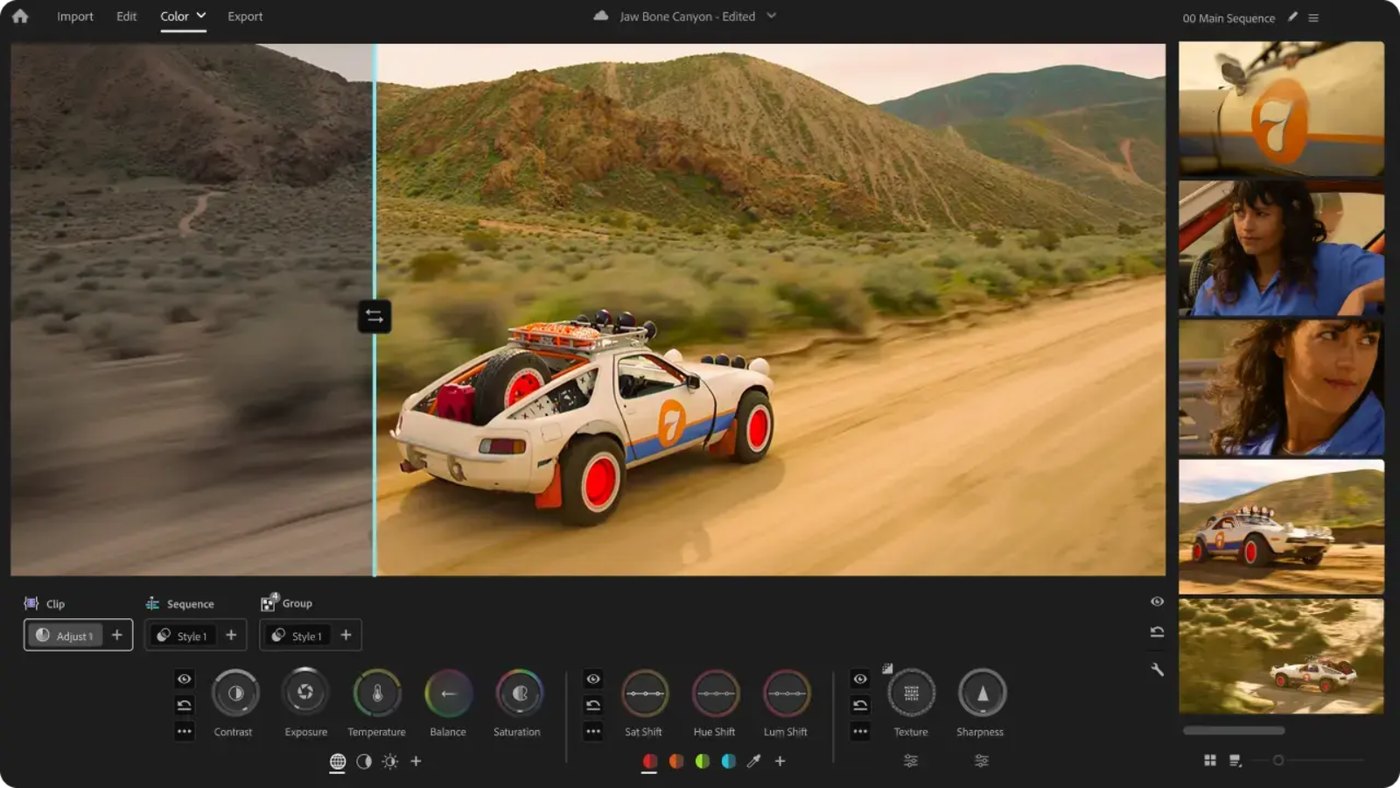
Color mode (beta) in Adobe Premiere
Adobe says Premiere Pro is now simply called Adobe Premiere, a name that covers the desktop and mobile apps. The desktop editor lists three-point editing, color wheels and curves, video scopes, audio tools and hundreds of effects and transitions. Adobe's Premiere page names these AI features: Text-Based Editing (transcribe on import, then build a rough cut by copying and pasting text), a Media Intelligence Search panel that finds clips from a plain-language description, Enhance Speech, Object Mask for AI masking and tracking, and Generative Extend, which uses Adobe Firefly to extend clips and generate missing ambient sound. The page also lists generating video and sound effects from the timeline and translating captions in 18 languages.
Adobe's help center documents a Premiere AI Assistant, in early public beta, that takes plain-language prompts to organize bins, generate transcripts, add markers and build stringouts, with every action recorded in undo and history. For team work, Adobe's help pages describe Productions, which lets several editors work on different projects in one production on shared storage, with project locking so nobody overwrites another editor's work. The Premiere plan also lists Frame.io for Creative Cloud. On hand-off, Adobe's help pages say AAF files exported from Premiere are compatible with Avid Media Composer and Avid Pro Tools, and a Final Cut Pro XML export (aimed at Final Cut Pro 7 and compatible tools) exists, though only a few effects transfer. Adobe's FAQ lists H.264, H.265 (HEVC), Apple ProRes and native camera formats such as Canon and Sony RAW. The desktop app's requirements list Windows and macOS, and the mobile app is on iPhone and Android.
Pricing: Adobe's Premiere page lists US$22.99 a month on an annual plan billed monthly (the FAQ says first year only, new subscribers only), with 25 monthly generative credits. Creative Cloud Pro, which adds 20+ apps including After Effects, is listed at US$69.99 a month (US$34.99 for the first 3 months for new subscribers) with 4,000 monthly generative credits. Adobe lists a seven-day free trial, says the free standalone app is the mobile one, and says Premiere is sold only as a membership, with no perpetual license.
Considerations: Generative features draw on credits, and Adobe says Adobe Stock and Firefly content may cost extra. Color Mode, the redesigned shape masks and the AI Assistant are marked beta, so their behavior can change. Adobe sells it only as a membership.
- Choose it if full timeline control matters most, work moves between Adobe apps or to Avid and Pro Tools, and several editors share storage.
- Skip it if a one-time purchase is required, or the job is only turning a long recording into short clips.
2. DaVinci Resolve: Best for color, audio and finishing in one app
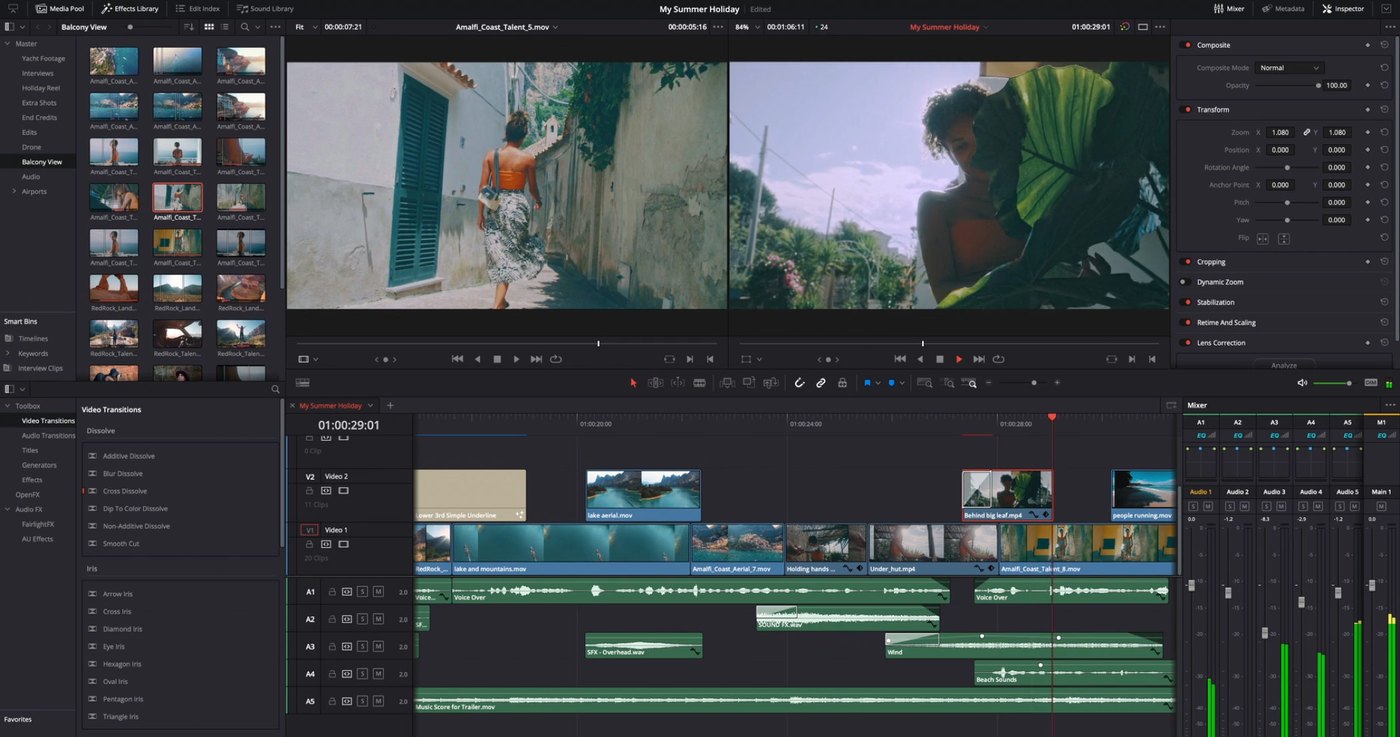
The Edit page in DaVinci Resolve
Blackmagic Design describes DaVinci Resolve as one app for editing, color correction, visual effects, motion graphics and audio post production, with photo editing added in version 21. Work is split into task pages such as Cut, Edit, Fusion, Color, Fairlight and Deliver. The Edit page lists professional trimming, proxy editing, multicam and subtitle tools, and Blackmagic says clips can be transcribed for subtitles or text-based editing. The AI features sit in the DaVinci Neural Engine, which Blackmagic's Studio page lists as Studio-only: facial recognition that sorts clips into bins, Super Scale upscaling, Speed Warp retiming, Magic Mask for object isolation and tracking, smart reframe, object removal and scene cut detection, plus AI voice isolation and a music remixer. The overview page names IntelliSearch and CineFocus as new AI tools in version 21.
Collaboration runs through Blackmagic Cloud, which the page says lets several people work on the same timeline, with clip and bin locking. Blackmagic says the free version also supports collaboration, and that creating a Blackmagic Cloud ID is free. Resolve runs on Mac, Windows and Linux, and the page says files move easily between Resolve, Final Cut Pro, Media Composer and Premiere Pro.
Pricing: Blackmagic's page lists a free version that edits and finishes up to 60 fps at up to Ultra HD 3840 x 2160, and Studio at $236 one-time, shown as discounted from $295. Studio adds up to 120 fps at 32K, the Neural Engine, more Resolve FX and Dolby Vision and HDR10+ grading.
Considerations: The Neural Engine AI tools are listed as Studio features, so the free version does not include them. Studio's $236 price is shown as a discount from $295, so check the current figure at purchase. The app is organized by task, which gives color, effects and audio their own workspaces but means more to learn than an editor that only cuts.
- Choose it if grading, effects and audio post should live in the same project as the cut, or a free professional-grade editor is needed.
- Skip it if the only job is cutting social clips quickly, or the AI tools must be available without buying Studio.
3. Final Cut Pro: Best for Mac-based editors who want a magnetic timeline with AI search and tracking
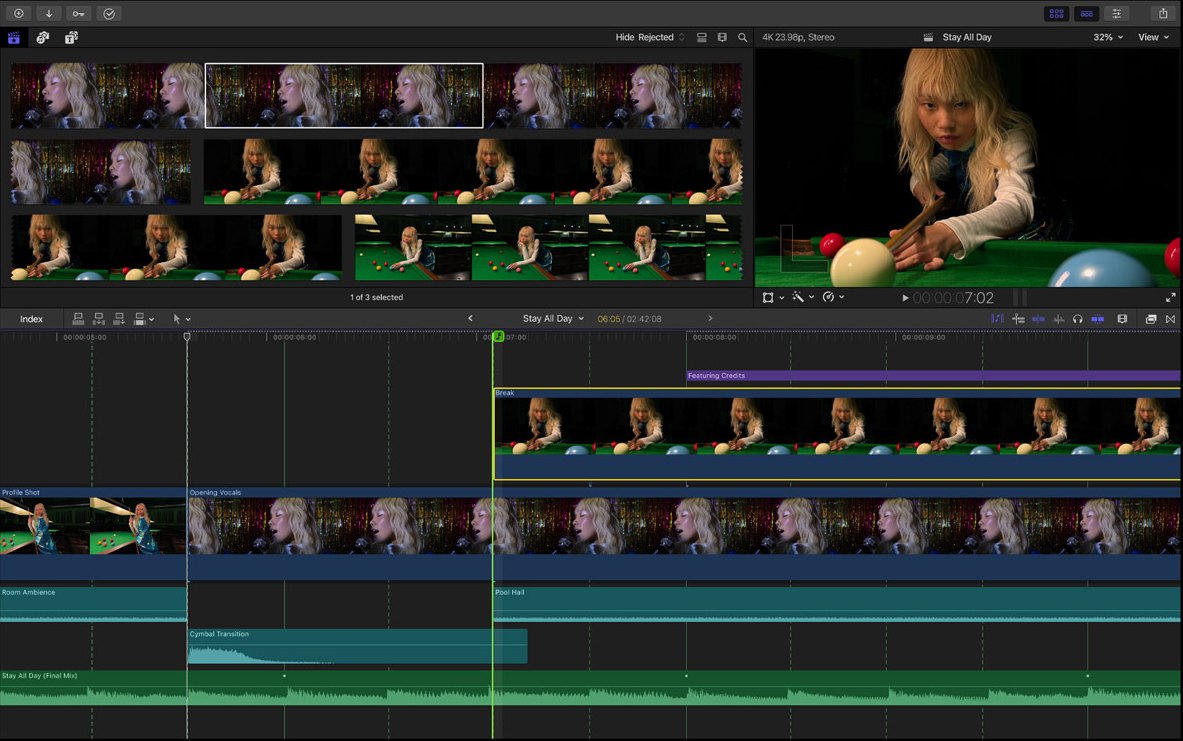
The Final Cut Pro workspace
Apple describes Final Cut Pro as a video editor for Mac and iPad built around the Magnetic Timeline. The AI features Apple lists include Magnetic Mask (separating people and objects from the background without a green screen), Visual Search, Transcript Search, automatic captions from spoken audio, Object Tracker, Enhance Light and Color, Smooth Slo-Mo, automatic reframing, Beat Detection and Voice Isolation. Apple's footnotes say Visual Search and Transcript Search require a Mac with Apple silicon and macOS 15.6 or later, and are available only in U.S. English.
For finishing, the page lists color curves, a color inspector with color wheels and LUT support, plug-ins from Logic Pro for audio, ProRes transcoding for editing, ProRes RAW capture through Final Cut Camera and batch export. Compressor, sold alongside it, adds custom export settings and formats including HDR, HEVC, 360-degree video and MXF. Final Cut Pro for Mac requires macOS 15.6 or later.
Pricing: Apple's page lists Final Cut Pro as a $299.99 one-time purchase on the App Store, or as part of Apple Creator Studio at $12.99 a month or $129 a year for new subscribers after a 30-day free trial. Educator and student subscriptions are $2.99 a month or $29.99 a year. Apple says access to some premium content is limited to Creator Studio subscribers, including for people who bought Final Cut Pro outright.
Considerations: It runs on Mac and iPad only, and some AI features need Apple silicon. We did not find a shared-project or review feature described on Apple's Final Cut Pro page, so teams that need shared bins should look at Avid, Premiere or Resolve.
- Choose it if the team works on Macs, wants a fast magnetic timeline and values built-in AI search, masking and tracking.
- Skip it if editors are on Windows or Linux, or several editors must work in one shared project.
4. Avid Media Composer: Best for team and broadcast workflows with shared projects and dialogue search
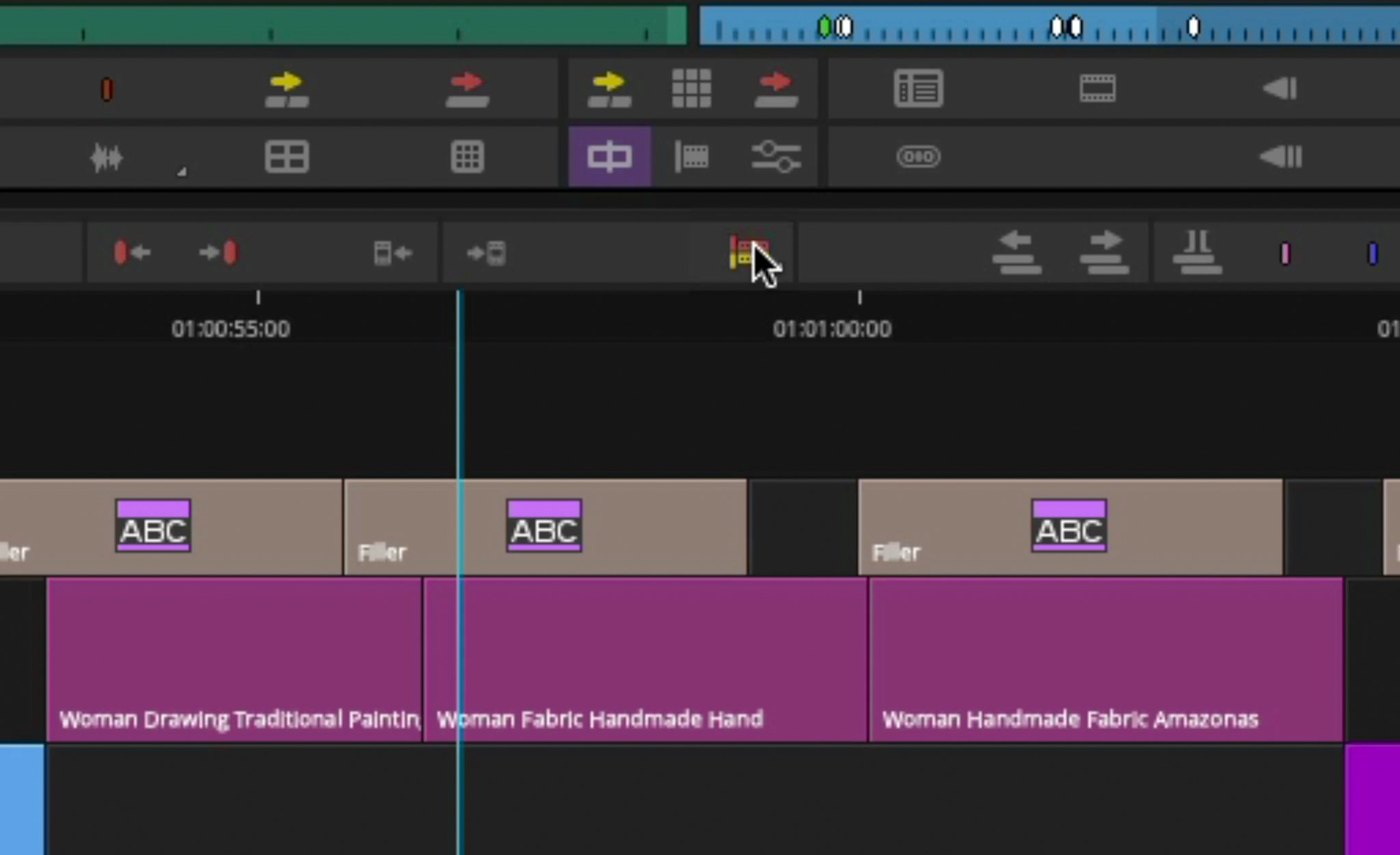
Trim tools and the timeline in Avid Media Composer
Avid calls Media Composer professional video editing software trusted by film, TV and news studios, with 99 video tracks and 99 audio tracks on every plan. Its AI tools are transcript tools: native speech-to-text, ScriptSync AI, which aligns imported scripts and transcripts with media so every take of a line can be compared, PhraseFind AI, which searches spoken dialogue phonetically across a project, and SubCap subtitles generated from transcripts. Avid also lists multicam groups of up to 64 cameras.
The page positions Media Composer for production-scale work: patented bin locking so teams can work in one project at once, shared projects on Avid NEXIS and third-party shared storage, and a database-driven project structure that keeps media linked as projects move between drives. Avid lists ACES and 32-bit float support, native grading with a built-in Symphony toolset, and round trips to external suites. The comparison page lists project formats from SD up to 4K, 8K and 16K, and says the software runs on an Avid-qualified Mac or Windows computer.
Pricing: Avid's page lists Standard at $259.99 a year, Ultimate at $539.99 a year and Enterprise at $899.99 a year, with a limited offer from November 3 to November 29, 2026 showing $208 and $362 for the first year of Standard and Ultimate. Standard lists no shared bins or projects and no ScriptSync or PhraseFind, which appear under Ultimate and Enterprise. Media Composer First is listed as a free download.
Considerations: Avid says offer pricing is for one year and renews at standard pricing. The transcript AI tools and shared projects are not in Standard, and the software needs an Avid-qualified computer. Avid's pages describe the AI features as transcript and dialogue tools rather than generative tools.
- Choose it if several editors share a project, dialogue-heavy footage needs script and phrase search, and the budget allows a yearly subscription.
- Skip it if a solo editor wants generative or auto-cut features, or one-time pricing.
5. OpusClip: Best for fast social cutdowns from long recordings
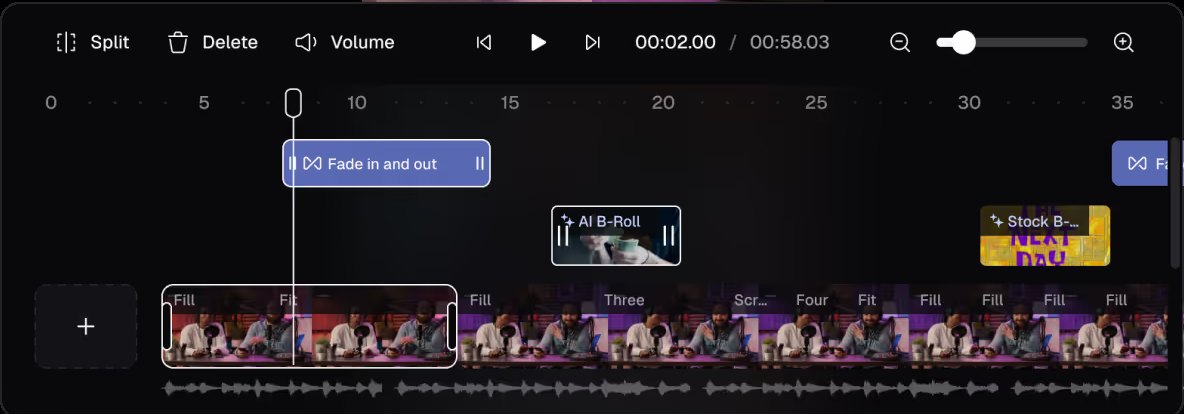
The OpusClip editor timeline. Source: OpusClip website
OpusClip takes a long recording, such as a podcast, webinar, interview, stream or camera original, and returns short captioned clips. On Starter and Pro each clip gets a Virality Score from 0 to 99 based on hook, flow, value and trend, per the help center. Captions are animated, AI reframe outputs 9:16 (with 1:1 and 16:9 on Pro), and the editor combines transcript editing with a timeline. The help center lists keyboard shortcuts for stepping frames, splitting and deleting clips, plus snap editing in the timeline. Starter adds filler-word and silence removal, and Pro adds more link sources, including Frame.io.
For professionals the hand-off matters. On Pro, the help center says the Export XML button downloads the original video, an .xml file with the clip's captions, reframe and B-roll, and an .srt file, for Adobe Premiere Pro or DaVinci Resolve. It adds that other editors can import the XML with slight variations and recommends Premiere Pro. Captions arrive as overlays that cannot be edited in Premiere, so the .srt is the editable route, clips can be extended by 30 seconds before and after, and each clip exports one at a time. The help center also says OpusClip can download in 4K on Pro when the uploaded source is genuinely 4K, which is not upscaling. A team workspace and project-sharing links cover review, and our long video to short video tool lets anyone try the clipping step.
Pricing: OpusClip's pricing page lists Free at $0 (a watermark, up to 1080p rendered clips, no editing, and clips stop being exportable after 3 days), Starter at $15 a month (monthly billing only) and Pro at $29 a month, or $14.50 a month billed annually ($174). Business is custom. Starter and Pro list a free trial with no credit card required, and the XML export and 4K download are Pro features.
Considerations: OpusClip does not replace a full non-linear editor. It is built to find and finish short clips from long footage, and the XML export to Premiere Pro or DaVinci Resolve is the route when a clip needs a finish. The Free plan has no editing and no Virality Score, and caption translation before clipping supports English only.
- Choose it if the work is turning interviews, podcasts, webinars or event recordings into several captioned short clips quickly, with an optional hand-off to a finishing editor.
- Skip it if the deliverable is a film, series or commercial that needs multi-track color, audio mixing and finishing in one timeline.
6. Descript: Best for transcript-led rough cuts of interviews and podcasts
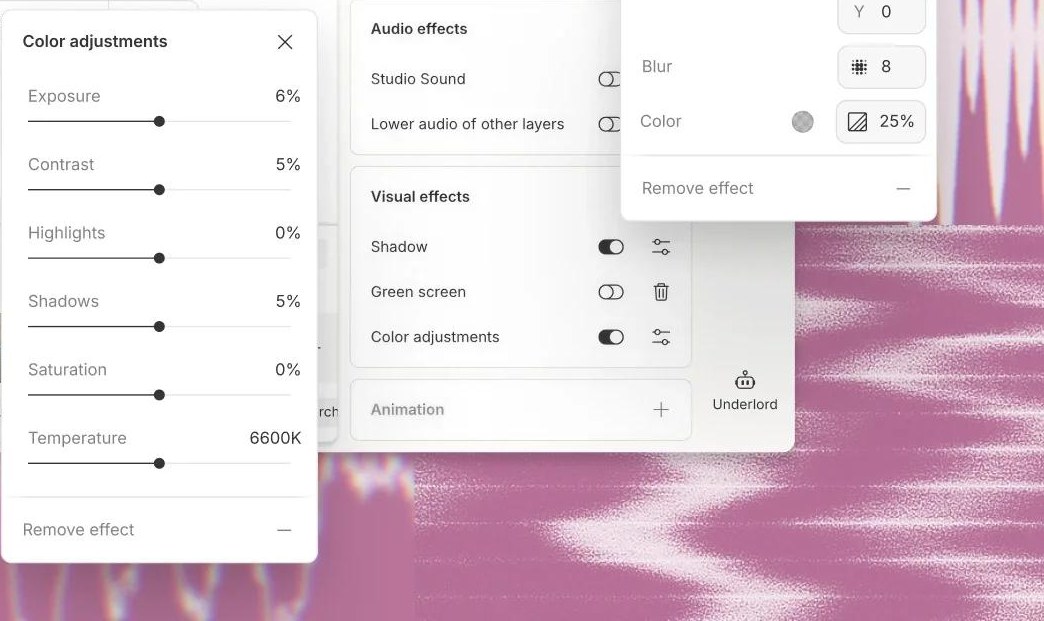
Color adjustments and effects panels in Descript
Descript transcribes recordings so they can be edited like a document, and its AI co-editor, Underlord, edits under direction. The pricing page lists Studio Sound, Remove Filler Words, Remove Retakes, Eye Contact, Green Screen, Automatic Multicam and Center Active Speaker, with transcription in 25 languages. Descript's site says it works on Mac and Windows and has a web version.
Several details on the pricing page matter to professionals. The plan comparison lists timeline export to Final Cut Pro, Adobe Premiere, Adobe Audition, Pro Tools and Logic, and Samplitude and Reaper, marked included on Creator and Business and not on Free or Hobbyist. Local and web-link video export is 720p on Free, 1080p on Hobbyist and 4K on Creator and Business. Commenting and live collaboration are listed on every plan, with 1 seat on Free and Hobbyist, 1 to 3 on Creator and up to 5 on Business.
Pricing: Descript's pricing page lists Free at $0 (60 media minutes a month and 100 one-time AI credits), Hobbyist at $16 per person a month billed annually or $24 monthly (10 media hours, 400 AI credits a month, 1080p watermark-free export), Creator at $24 or $35 (30 media hours, 800 credits, 4K export) and Business at $50 or $65 (40 media hours, 1,500 credits, Brand Studio, translation and dubbing in 30+ languages).
Considerations: Plans meter both media hours and AI credits, and the Free plan's credits are a one-time grant. Timeline export to Premiere and Final Cut Pro needs Creator or Business, so the hand-off to a finishing editor is a paid feature.
- Choose it if interviews, podcasts or talking-head footage need a rough cut by editing text, with the finish done in an NLE.
- Skip it if the project needs multi-track color and audio finishing in the same app, or a one-time purchase.
7. Runway: Best for generative changes to footage inside a professional pipeline
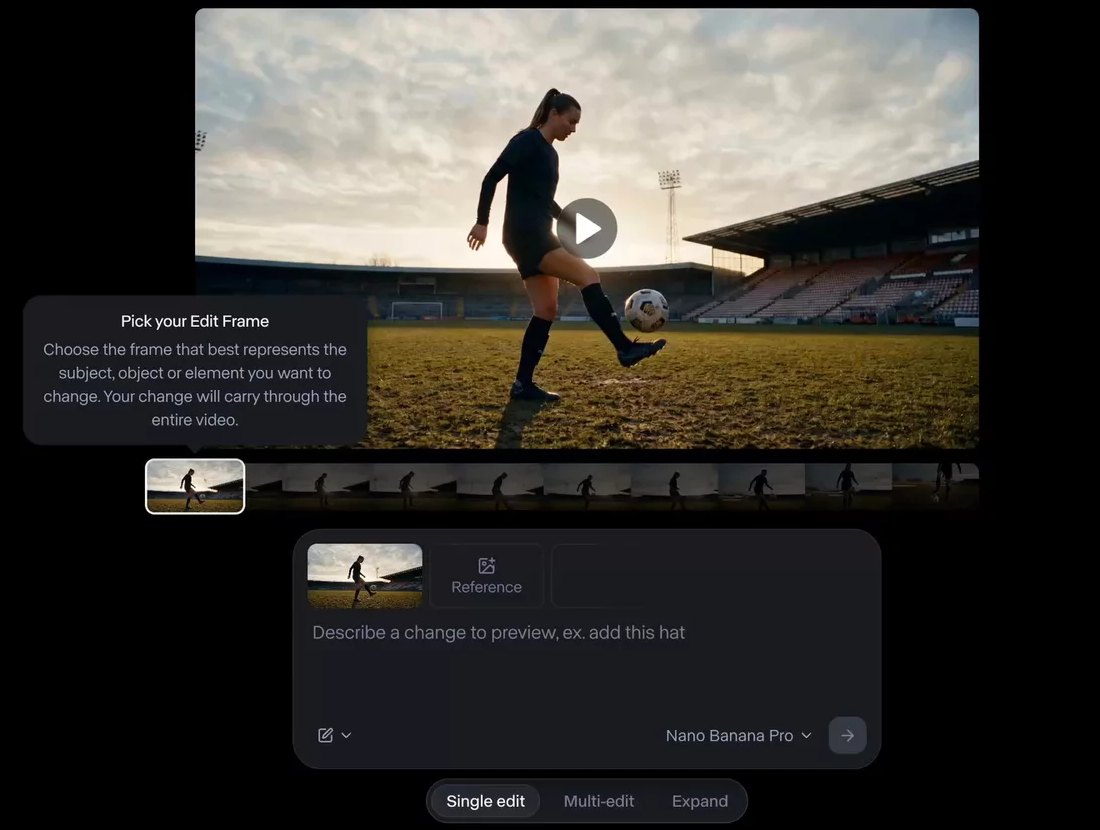
Edit Studio in Runway
Runway describes itself as an all-in-one, cloud-based creative platform for generating and editing video, images and audio. For existing footage, its Aleph 2.0 page describes an in-context video editing model: edit one frame and the change carries through the clip while everything not asked to change is preserved, across multiple shots, on clips up to 30 seconds at 1080p. The page's examples include changing a product color, removing items from a wall and changing the season. An Edit Studio previews the edit as an image before generating.
The pricing page also lists an agentic creative collaborator, a Runway MCP on Pro and Max, 4K upscaling on Standard and unlimited 4K video upscaling on Pro and Max, and, on Max, studio-grade generations with HDR, ProRes and image sequences. Runway has iOS and Android apps.
Pricing: Runway's pricing page lists Free at $0 with 125 one-time credits and 5GB of storage, Standard at $12 a month billed annually or $15 monthly (625 credits a month), Pro at $28 or $35 (2,250 credits a month) and Max at $76 or $95 (9,500 credits a month, with one month of rollover). Aleph 2.0 is listed at 140 credits for a 5-second generation.
Considerations: The Aleph 2.0 limit of 30 seconds at 1080p makes it a shot-level tool rather than a long-form finishing editor. Generation is metered in credits, Standard and Pro credits do not roll over, and generated frames need a human review before delivery.
- Choose it if a shot needs a changed product, background or season without a reshoot, and short clips are the unit of work.
- Skip it if the job is assembling and finishing a long timeline, or predictable per-project cost matters more than flexibility.
How we compared these tools
We compared each tool on the checklist professionals use: timeline and trim control, color, audio, codec and format support, collaboration and review, and delivery. We then looked at which AI features each vendor documents as shipping, which are marked beta, price, free plans or trials, and the main limitation. Every fact comes from the vendor's own pricing pages, feature pages, requirements pages and help centers, read on November 5, 2026. Where a page loads its content with JavaScript, we read it in a browser, and where a plan table shows only icons, we read the icon labels. Screenshots come from each vendor's own site.
We did not run hands-on tests of the six other tools, and this is a comparison of published features and prices, not a lab review. OpusClip is placed fifth because the first four are full NLEs, which is what professional finishing work needs, and the last three are AI-first tools ordered from the closest fit to finishing work to the most specialized. Prices change and several pages show promotions, so check the vendor's page before buying.
Red flags to watch for
AI features still in beta
Premiere's AI Assistant is documented as an early public beta, and its Color Mode and redesigned shape masks are marked beta on Adobe's page. Trial test: confirm a feature is in the release build before a deadline workflow depends on it.
AI and hand-off features locked to a tier
DaVinci Resolve's Neural Engine is a Studio feature, Avid's ScriptSync, PhraseFind and shared projects are not in Standard, Descript's timeline export and 4K export need Creator or Business, and OpusClip's XML export and 4K download are on Pro. Trial test: list the features a job needs and match each to the plan that includes it.
Credits and metering
Adobe's Premiere plan lists 25 monthly generative credits against 4,000 on Creative Cloud Pro, Descript meters media hours and AI credits, and Runway Standard and Pro credits do not roll over. Trial test: estimate a normal month of output against the allowance, not a single project.
Promotional and first-year prices
Avid's offer runs through November 29 and renews at standard pricing, Resolve Studio's $236 is shown as a discount from $295, and Adobe's US$22.99 is first year only for new subscribers. Trial test: check the renewal price, not the headline price.
Platform and language limits
Final Cut Pro runs on Mac and iPad only, and Apple says Visual Search and Transcript Search need Apple silicon and are available only in U.S. English. Avid requires a qualified computer. Trial test: confirm operating system, chip and language on the vendor's requirements page.
Hand-off fidelity
Adobe says only a few effects transfer in a Final Cut Pro XML export, and OpusClip's captions arrive in Premiere as overlays that cannot be edited there. Trial test: round-trip one real project through the hand-off before committing a team to it.
Generated frames on real footage
Runway's Aleph 2.0 edits clips up to 30 seconds at 1080p, and generative features in Premiere and Descript draw on credits. Trial test: review every generated frame, and read each vendor's usage terms before delivering client work.
Frequently asked questions
What is the top AI video editor for pros?
For full timeline control with AI built in, Adobe Premiere is the top pick in this list, with Text-Based Editing, Media Intelligence search, Enhance Speech, Object Mask and Generative Extend on its feature page. DaVinci Resolve leads for color and finishing, and OpusClip is the fast-turnaround pick for social cutdowns of long recordings. See OpusClip pricing for plan limits.
What is the best AI video editor for professionals?
It depends on the job. Premiere, DaVinci Resolve, Final Cut Pro and Avid Media Composer are full non-linear editors for finishing. Descript is built for transcript-led rough cuts, Runway for generative edits to short clips and OpusClip for cutting long recordings into short captioned clips. Many professionals pair a finishing NLE with one of the AI-first tools.
What do professional editors use?
The vendor pages describe professional use in their own terms: Avid calls Media Composer trusted by film, TV and news studios, Blackmagic says high-end film and television professionals use DaVinci Resolve more than any other solution, and Adobe calls Premiere the go-to for pro video. We found no independent usage survey in those pages, so treat each claim as the vendor's own and compare the features each job needs.
Which professional video editors have built-in AI features?
All four NLEs list AI features. Premiere lists Text-Based Editing, Media Intelligence search, Enhance Speech, Object Mask, Generative Extend and an AI Assistant in beta. DaVinci Resolve Studio lists the DaVinci Neural Engine, including Magic Mask, Super Scale, Speed Warp and smart reframe. Final Cut Pro lists Magnetic Mask, Visual Search, Transcript Search and automatic captions. Avid lists ScriptSync AI, PhraseFind AI and native speech-to-text.
Is there a free AI video editor professionals can use?
DaVinci Resolve has a free version that edits and finishes up to Ultra HD at 60 fps, though its Neural Engine AI tools are in Studio. Avid offers Media Composer First as a free download. Descript, Runway and OpusClip have free plans with limits: Descript's Free plan lists 60 media minutes a month, Runway's lists 125 one-time credits, and OpusClip's adds a watermark and has no editing. Adobe lists a seven-day free trial for Premiere.
Can OpusClip replace Premiere Pro or DaVinci Resolve?
No. OpusClip is built to find and finish short clips from long recordings, not to replace a non-linear editor. On Pro, its Export XML button hands a clip to Adobe Premiere Pro or DaVinci Resolve, per the help center, so a professional can run the cutdown in OpusClip and finish the clips in an NLE. See our roundup of the best AI video editors for how the wider field compares.
How do professional editors handle collaboration and review?
Avid lists bin locking and shared projects on Avid NEXIS and third-party storage, Premiere offers Productions with project locking on shared storage, and DaVinci Resolve offers multi-user timelines through Blackmagic Cloud. Descript lists commenting and live collaboration on every plan, and OpusClip offers a team workspace and project sharing links. We did not find a shared-project feature described on Apple's Final Cut Pro page.
Can AI video editors export to Premiere or Final Cut Pro?
Some can. Descript lists timeline export to Final Cut Pro and Adobe Premiere on Creator and Business, and OpusClip's Pro plan exports XML for Premiere Pro and DaVinci Resolve, with a note that other editors can import the XML with slight variations. Premiere can export AAF files for Avid Media Composer and Pro Tools, and Blackmagic says files move between DaVinci Resolve, Final Cut Pro, Media Composer and Premiere Pro.