No items found.
6 Best Claude Skills and Plugins for Video Editing and Clipping in 2026

OpusClip's skill is the pick for turning long recordings into short clips and posting them from a coding agent, and our install walkthrough covers the Claude Code setup. Vizard's skill also clips and publishes, Adobe's plugin cuts highlight reels in the Claude desktop app, video-use and ffmpeg-skill edit raw footage, and HyperFrames builds video from HTML. This guide compares what each one is, how it installs, what video job it does and where the work runs, from each maker's own repository or docs read on November 18, 2026.
Key takeaways
- Best for clipping long recordings and posting the clips from a coding agent: OpusClip. Its skill's description says it turns long-form videos into short clips and posts them to social platforms.
- Best for a second clip-and-publish skill added as a zip file: Vizard. Its API page describes previewing clips in the IDE and giving a final Go before they are pushed to connected socials.
- Best for highlight cuts and resizes inside the Claude desktop app: Adobe. Its Quick Cut skill makes one highlight cut from a video, and its README says the plugin does not work from the Claude Code CLI.
- Best for turning raw takes into a finished edit: video-use. Its README says it cuts filler words and dead space between takes, color grades, burns subtitles and returns final.mp4.
- Best for offline edits with no API key: ffmpeg-skill. Its README lists 42 local FFmpeg tools and says no cloud and no API keys.
- Best for building video from HTML as an editable project: HyperFrames. HeyGen's docs call it a free, open-source framework, and a Claude Code plugin carries its skills.
What counts as a Claude skill or plugin
Anthropic's docs give the two terms this guide relies on. A skill is a folder with a SKILL.md file of instructions: the Agent Skills overview says each skill packages instructions, metadata and optional scripts or templates that Claude uses when they are relevant. A Claude Code plugin, per the Claude Code docs, is a directory of skills, agents, hooks, MCP servers or other components that Claude Code installs and loads as one unit. An MCP server is a different thing: a service the model calls. This guide lists only items that ship a SKILL.md folder or a plugin, each with a page from its own maker.
The routes overlap. An item can be a standalone skill, a plugin that bundles skills, or a plugin that also registers an MCP server, and the table below says which. Our guides to video clipping MCP servers and CLI tools for video editing cover the server and terminal routes.
How to choose
- Long recordings should become posted clips: OpusClip or Vizard. Both describe a skill that clips and publishes, and they differ in install route (a Claude Code plugin marketplace for OpusClip, a zip file for Vizard) and in where the API key goes.
- Highlight reels and resizes should happen inside the Claude desktop app: Adobe, whose README says the plugin works from the desktop app and Cowork only.
- Raw takes should become one finished edit: video-use cuts after an ElevenLabs transcript, and ffmpeg-skill runs the cuts an agent plans on local FFmpeg.
- Footage must stay on the machine: ffmpeg-skill, whose README says no cloud and no API keys.
- A new branded video should come from a brief rather than a recording: HyperFrames.
- The API key must stay out of chat transcripts: OpusClip's help center says to set the key in the shell, while Vizard's page describes pasting it into the chat.
At a glance
- OpusClip: best for clipping long recordings and posting the clips; the skill is MIT-licensed and runs on an OpusClip API key, so see the help center and the pricing page for access and credits.
- Vizard: best for clipping and publishing from a skill zip; the page prints no price for the skill, and Vizard's API docs say API access is included in its paid plans, which they list as Creator and Business.
- Adobe: best for highlight cuts and resizes in the Claude desktop app; the plugin is Apache-2.0 licensed and its skills say some features depend on the user's Adobe plan, so see Adobe's pricing pages.
- video-use: best for turning raw takes into a finished edit; MIT-licensed, and it needs an ElevenLabs API key for transcription, so see ElevenLabs' pricing.
- ffmpeg-skill: best for offline edits with no API key; MIT-licensed, and its README says no cloud and no API keys.
- HyperFrames: best for building video from HTML; an Apache-2.0 framework, with a Studio app whose pricing page lists a Free plan and a Pro plan at $25 per month.
Claude skills and plugins compared by route
This table compares what each skill or plugin is, the install route its maker prints, the video job it does, where the work runs and how it is licensed or priced, as listed on each vendor's own pages on November 18, 2026.
| Tool | What it is | Install route as printed | Video job | Where the work runs | Free or paid as printed |
|---|---|---|---|---|---|
| OpusClip | Claude Code plugin that bundles three skills, one of them the clipping skill | /plugin marketplace add opus-pro/opus-skills, then /plugin install opusclip@opus-skills | Clips long videos and posts the clips to social platforms | OpusClip's API for clipping; local ffmpeg for trim, storyboard and preview | MIT license; runs on an OpusClip API key the user supplies (see the help center for access) |
| Vizard | Skill zip for Claude Code or Cursor | Add the skill zip file to Claude Code or Cursor | Video clipping and social publishing | Vizard's service; the page says to paste the API key into the chat | No skill price printed; API service included in paid plans per its docs |
| Adobe | Plugin of Creative Cloud skills, kept out of the repository's marketplace | Installed from the plugin directory of the Claude desktop app | Highlight cuts, video resizing, speech clean-up and spoken-content summaries | Adobe's hosted MCP server; Claude desktop app or Cowork only | Apache-2.0 plugin; some features depend on the user's Adobe plan |
| video-use | Standalone skill folder, registered by symlink | Paste the setup prompt, or clone and symlink into ~/.claude/skills/video-use | Cuts filler words, color grades, burns subtitles and returns final.mp4 | Local ffmpeg; transcription through ElevenLabs Scribe | MIT license; needs an ElevenLabs API key for transcription |
| ffmpeg-skill | Agent Skill with 42 tools, also a Claude Code plugin | npx ffmpeg-skill, or /plugin install ffmpeg-skill --marketplace kajisho5/ffmpeg-skill | Cut, join, silence removal, captions, reframe, loudness and platform exports | Locally with FFmpeg and Python; no cloud | MIT license; no API keys |
| HyperFrames | Open-source framework with a Claude Code plugin and standalone skills | claude plugin marketplace add heygen-com/hyperframes; claude plugin install hyperframes@hyperframes | Renders HTML, CSS and media to MP4: promos, captions, overlays, motion graphics | Local CLI with Node.js 22+ and FFmpeg; cloud exports on Studio plans | Apache-2.0 framework; Studio has a Free plan and a Pro plan at $25 per month |
1. OpusClip: Best for clipping long recordings and posting the clips from a coding agent
OpusClip's skill page, Install section. Source: OpusClip help center
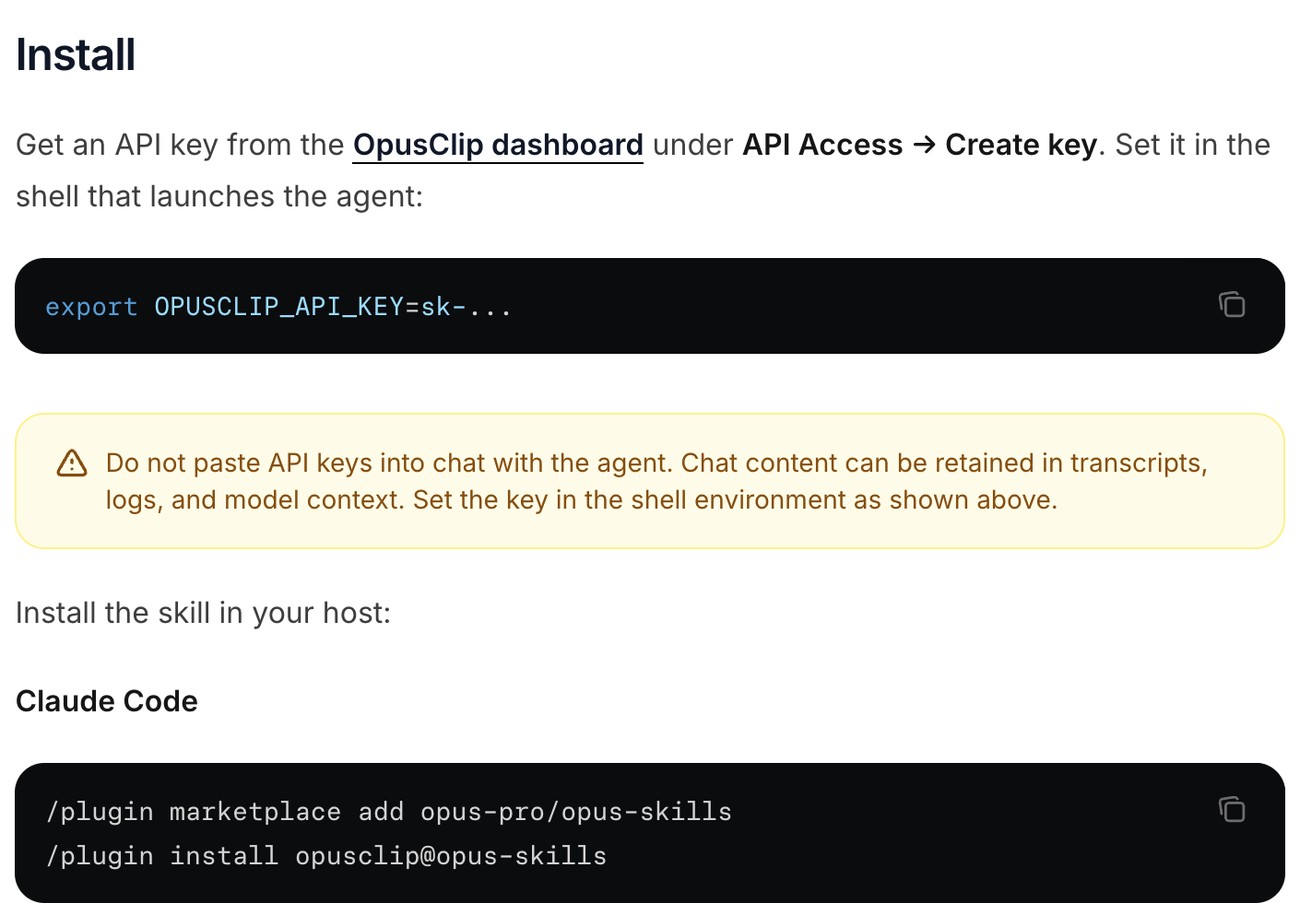
OpusClip publishes its skill in the opus-skills repository. Per the README, the package adds video clipping and social posting to a coding agent, and the opusclip skill's description says it turns long-form videos into short clips and posts them to social platforms using the OpusClip API. The help center's skill page describes it as a code package the agent loads and prints the Claude Code route: /plugin marketplace add opus-pro/opus-skills, then /plugin install opusclip@opus-skills. Our install walkthrough covers the steps and when to pick the skill over the MCP server.
The SKILL.md lists what a request can do: submit a video link or upload a local file, pick the ClipBasic or ClipAnything model (ClipAnything takes a custom prompt), burn captions into the clips, remove filler words, list and export clips, trim a clip locally with ffmpeg, censor profanity, generate social copy and schedule posts.
Pricing: The skill is MIT-licensed and authenticates with an OpusClip API key, created in the dashboard and set as OPUSCLIP_API_KEY in the shell that launches the agent. The help center warns against pasting the key into the chat. This guide does not restate OpusClip's plan, access or credit terms, so see the help center and the pricing page.
Considerations: The README marks the package beta, with features and pricing subject to change and API pricing that may diverge from web pricing. Clipping and clip edits run on OpusClip's service, and the SKILL.md says server-side clip edits re-render the clip while the local ffmpeg trim carries no captions. The SKILL.md also has the agent show a copyright notice before it creates a project, a reminder to clip only video the team owns or has permission to use.
- Choose it if the input is a long recording and the output should be finished short clips with captions and a posting step, driven from Claude Code or another coding agent.
- Skip it if footage must stay on the machine, since the skill uploads the file or fetches the link for processing on OpusClip's service, or an API key does not fit the setup.
2. Vizard: Best for clipping and publishing from a skill zip
Vizard's API page, Skills card. Source: Vizard website
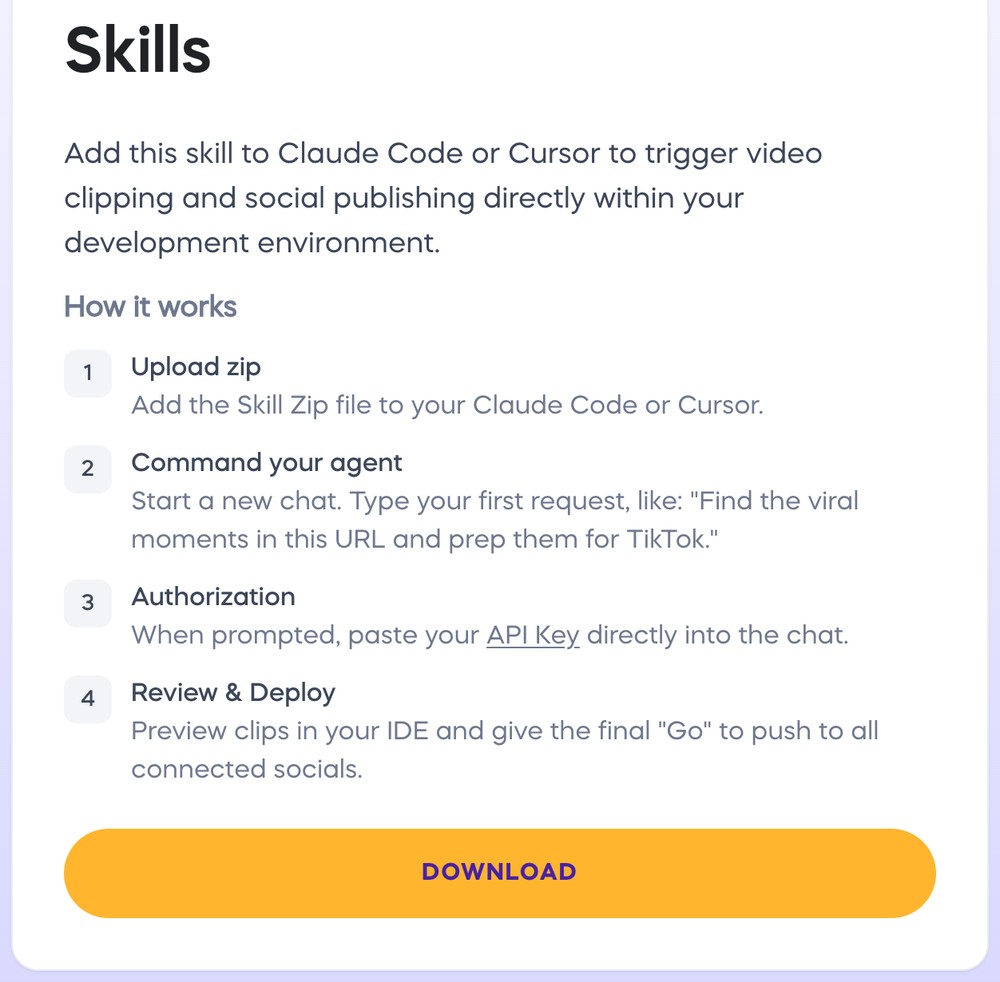
Vizard's API page offers a skill for Claude Code or Cursor, described as a way to trigger video clipping and social publishing from the development environment. The page lists four steps: add the skill zip file, start a new chat with a request such as asking it to find the viral moments in a URL and prep them for TikTok, paste the API key into the chat when prompted, then preview the clips in the IDE and give a final Go to push them to all connected socials.
The page does not list what the skill contains or link its source, and we did not download or open the zip, so this guide describes only what the page prints. The skill sits next to an n8n workflow template on the same page, and both ask for a Vizard API key.
Pricing: Vizard's API docs say API access is included in its paid plans with no separate subscription, list the Creator and Business plans, and say API submissions use the plan's video upload minutes. The skill's page prints no price, so see Vizard's pricing page for plans.
Considerations: The page says the API key is pasted into the chat when prompted, and chat content can be kept in transcripts and logs; OpusClip's help center advises setting a key in the shell instead. The page describes a downloaded zip rather than a marketplace install, and the part of the page we read does not mention an update route.
- Choose it if a team already uses Vizard and wants clips previewed in the IDE, with a final Go before they are pushed to connected socials.
- Skip it if the key must stay out of the chat, or the install should come from a plugin marketplace.
3. Adobe: Best for highlight cuts and resizes inside the Claude desktop app
Adobe's skills README, MCP clients table. Source: Adobe's public skills repository
Adobe publishes adobe-for-creativity in its public skills repository, and the README describes it as Adobe Creative Cloud tools for images, design and video. The video skills include Quick Cut, which the SKILL.md says produces one AI-edited highlight cut from a video for requests such as a sizzle reel or a highlight clip; a resize skill for photos and videos; a skill that removes background noise and echo from speech in a video or audio file; a skill that summarizes the spoken content of a recording as a PDF; and a skill that resizes or exports an image or video for social platforms such as Instagram, TikTok, LinkedIn and YouTube.
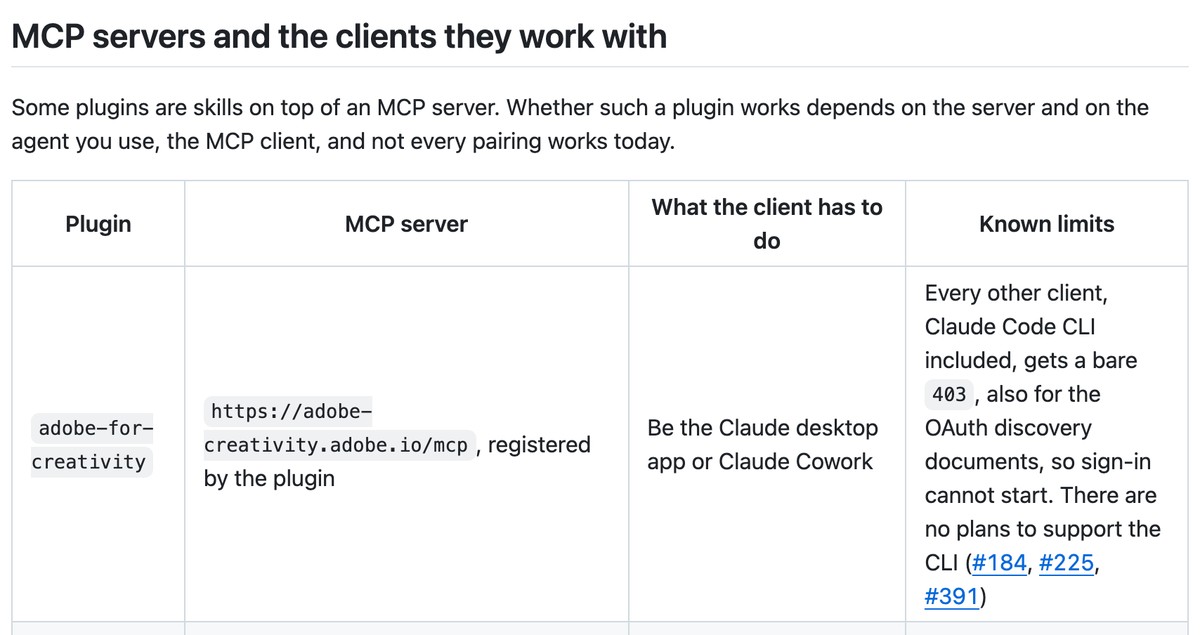
The README says this plugin is not in the repository's marketplace and is installed from the plugin directory of the Claude desktop app. Its table of MCP servers says the plugin registers Adobe's MCP server and works from the Claude desktop app or Claude Cowork: every other client, Claude Code CLI included, gets a 403 so sign-in cannot start, and the README says there are no plans to support the CLI.
Pricing: The plugin is Apache-2.0 licensed. The skills say availability follows the user's Adobe plan: Quick Cut tells the agent to report that it is not on the user's current Adobe plan when the service returns a 403, and the audio clean-up and summary skills say the same for speech enhancement and summaries. This guide prints no Adobe price, so see Adobe's pricing pages.
Considerations: The SKILL.md says Quick Cut selects moments by relevance rather than exact instructions, treats the target duration as a soft target so the output can overshoot, and is not for exact-timestamp trims, which it says need manual editing. The finished cut arrives as a temporary link, so the skill previews it as soon as it completes.
- Choose it if highlight cuts and resizes are wanted inside the Claude desktop app or Cowork, on an Adobe plan that includes them.
- Skip it if the work happens in the Claude Code terminal, or a cut has to land on exact timestamps.
4. video-use: Best for turning raw takes into a finished edit

video-use's README, What it does. Source: Browser Use's video-use repository
video-use is an open-source skill from Browser Use for editing video by conversation. Its README says to drop raw footage in a folder, chat with Claude Code and get final.mp4 back, and lists cutting filler words and dead space between takes, color grading each segment, 30 millisecond audio fades at every cut, burned-in subtitles, and animation overlays made through HyperFrames, Remotion, Manim or PIL.
The README says the model reads the footage rather than watching it: each source is transcribed once with ElevenLabs Scribe, the transcript is packed into one text file, and a filmstrip and waveform image are pulled only at decision points. The agent proposes a strategy and waits for approval before it cuts, then checks its own render at every cut boundary before showing a preview. The setup prompt in the README asks the agent to clone the repository, install ffmpeg, register the skill and ask for an ElevenLabs API key; the manual route symlinks the folder into ~/.claude/skills/video-use.
Pricing: The repository is MIT-licensed, and the product site says it needs ffmpeg and an ElevenLabs key for transcription, whose pricing sits on ElevenLabs' own pages. The README says a cloud-hosted video-use is coming, with a waitlist.
Considerations: Transcription calls ElevenLabs' Scribe service, so the audio is not processed purely on the machine, and the README says cuts come from speech boundaries and silence gaps, which fits talking heads, interviews and tutorials more than picture-led edits. The README lists no posting or scheduling step, so publishing is left to the user.
- Choose it if raw takes should become one finished video, with a plan the user approves before any cut.
- Skip it if the audio cannot go to a transcription service, or the clips need posting.
5. ffmpeg-skill: Best for offline edits with no API key
ffmpeg-skill's README, Install table. Source: ffmpeg-skill repository
ffmpeg-skill is an Agent Skill that, per its README, gives a coding agent a video editor built on local FFmpeg. It ships 42 tools covering cut, join, silence removal, fit to duration and aspect, captions and karaoke, overlays and motion graphics, HDR to SDR conversion, audio clean-up, loudness, delivery checks and batch folders, and its fixed workflow is probe, edit, check, verify. The README adds that every tool is also callable as an MCP tool.
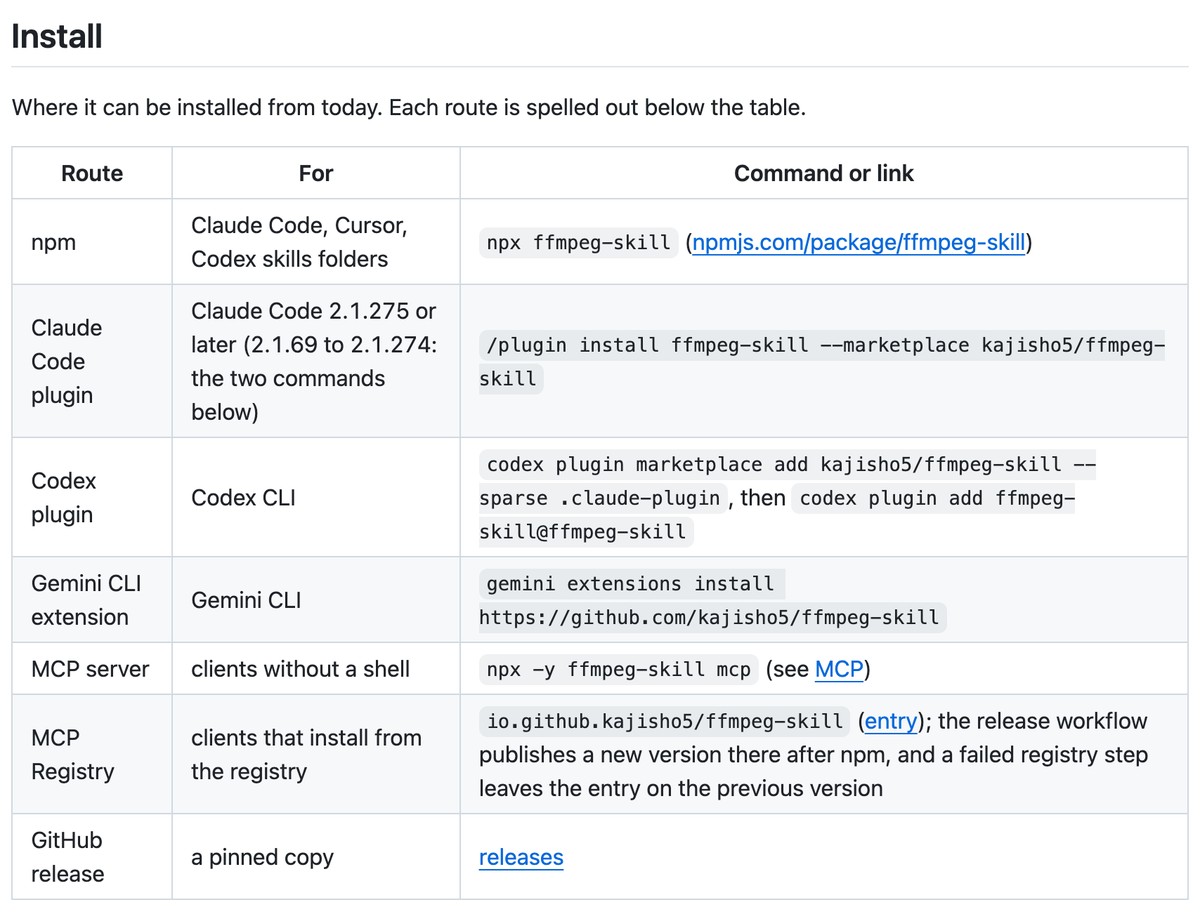
npx ffmpeg-skill copies the skill into the agent's skills folder, and the README also lists a Claude Code plugin command, /plugin install ffmpeg-skill --marketplace kajisho5/ffmpeg-skill, saying its submission to the Claude plugin directory is on hold. One scene tool proposes highlights, and the README says those rank scenes by loudness or duration, which it calls proxies rather than a measure of the best moment.
Pricing: The repository is MIT-licensed, and the README says no cloud, no API keys and standard-library Python. Captions from speech need a local speech engine installed separately; the README calls faster-whisper the simplest, with the model downloaded on first run and the audio staying on the machine.
Considerations: The repository sits under an individual's GitHub account rather than a company's. The README reports that a full re-encode of an hour of 1080p video ran past the default 1800 second timeout per FFmpeg call on the maintainer's machine, so long masters need a longer timeout, and the SKILL.md says it needs FFmpeg 6.1 or later and Python 3.10 or later.
- Choose it if footage must stay on the machine and the edit is a cut list the agent can plan.
- Skip it if the job is AI-picked moments from a long recording, or a posting step.
6. HyperFrames: Best for building video from HTML as an editable project
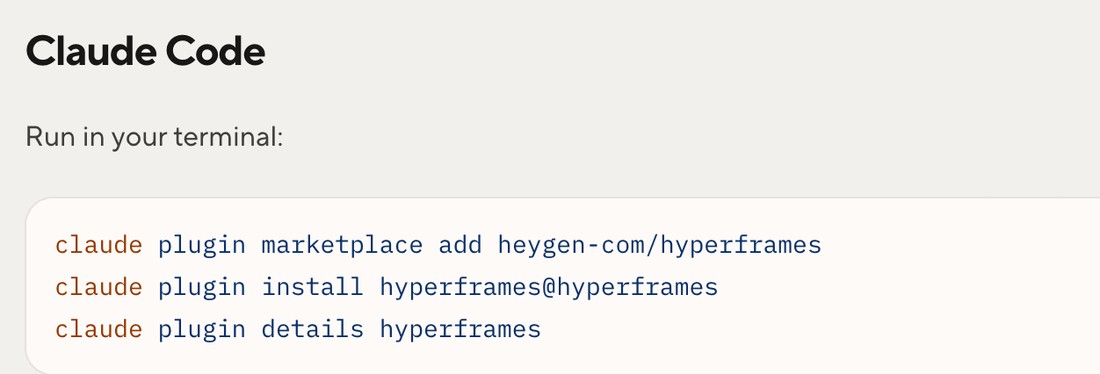
HyperFrames' plugin guide, Claude Code install. Source: HyperFrames docs
HyperFrames is HeyGen's open-source framework for turning HTML, CSS, media and seekable animations into MP4 video. For Claude Code it installs as a plugin, claude plugin marketplace add heygen-com/hyperframes then claude plugin install hyperframes@hyperframes, or as standalone skills with npx skills add heygen-com/hyperframes. The README says it ships 9 skills, and the core set is /hyperframes, /hyperframes-cli, /hyperframes-registry, /media-use, /reverse-any-video and /style-sampling.
The docs say the agent builds an editable project folder rather than a flattened file, so the agent, the browser editor and other tools can all work on the same files, and the README lists product launch videos, social videos with kinetic captions, data visualizations and reusable motion graphics as uses. The registry skill carries about 450 ready-made blocks and components, and /reverse-any-video rebuilds a video file as an editable project, checked frame by frame against the original.
Pricing: The framework is Apache-2.0 and the README calls it free and open source. The HyperFrames Studio app is free to use, and its pricing page lists a Free plan at $0 and a Pro plan at $25 per month that adds HeyGen's video, image, voice and music models. The README marks /reverse-any-video and /style-sampling as HyperFrames Pro.
Considerations: Local rendering needs Node.js 22 or later and FFmpeg per the docs, and a plugin does not sync between machines, so each machine needs its own install. The README's skill descriptions center on making and editing HyperFrames projects and do not mention picking clips out of a long recording.
- Choose it if new branded videos such as promos, explainers and caption overlays should come from a brief as an editable project.
- Skip it if the job is turning a long recording into clips, which OpusClip or Vizard cover.
What we read and left out
We also read these makers' repositories and docs and kept them out of the six, for the reasons below.
- Remotion: its docs say it maintains a plugin for Claude Code that includes its Agent Skills, for creating and editing videos written as React code. HyperFrames fills the code-to-video slot in this guide. Remotion's pricing page says it is free for individuals and companies of up to 3 people, says larger companies need a Company License, and lists Remotion for Creators at $25 per month per seat.
- Pireel: its Claude Code plugin's SKILL.md says the public plugin holds connection instructions, media-transfer helpers and basic tool usage, with the editing workflows supplied by a hosted service, so it sits closer to the hosted servers in our video clipping MCP servers guide than to a self-contained skill.
- Descript: its skills repository holds a skill that turns a Zoom recording into an audio podcast and one that turns an article into a 9:16 social video, both built on the Descript API, which the repository calls early access. The last commit we saw was in May 2026.
- TwelveLabs: its Claude Code plugin indexes, searches and analyzes video and configures an MCP server alongside its skills, so it analyzes footage rather than editing it.
- Reap: its docs page for Agent Skills says the skill gives an agent knowledge of the Reap API so it can write integrations, and points to its MCP server for operating a workspace.
- Herk Edit Kit: 15 skills for editing with Claude Code or Codex, built on HyperFrames; its README has users clone the repository and open the folder rather than install a plugin.
- Anthropic's own skills: the skills we read in its public repository cover documents, design, web and API work plus a Slack GIF creator, and none of the ones we read is for video editing or clipping.
How we compared these tools
We compared each item on what it is (a skill or a plugin), the install route its maker prints, the video job it does, where the work runs and how it is licensed or priced. This guide is organised around the job in the title, editing and clipping video from a Claude skill or plugin. OpusClip comes first because clipping long recordings is the job its skill is built for, and its limits are in its entry. Items 2 to 6 follow one yardstick: how much of the cut the tool decides, from picking the moments itself (Vizard and Adobe), to carrying out a cut from a transcript or a command list (video-use and ffmpeg-skill), to building new video from code (HyperFrames).
All facts come from each maker's own repository, docs or product pages, read on November 18, 2026, plus Anthropic's Claude Code and Agent Skills docs for the definitions. Adobe's facts come from its public skills repository. We did not run any of these skills, so this guide says nothing about output quality, speed or reliability and prints no accuracy figure. Star and download counts are left out because they change daily. Plans, install routes and limits change quickly, so confirm them before building.
Red flags to watch for
- Code that runs as the user. Anthropic's Claude Code docs say what an enabled plugin runs, it runs as the user, and that the name and description of each skill sit in the model's context on every turn. Trial test: read the SKILL.md and the scripts before installing, and install into a throwaway project first.
- Keys pasted into chat. Vizard's page tells the user to paste the API key into the chat, while OpusClip's help center says not to and to set the key in the shell. Trial test: use an environment variable where the maker allows it, and rotate any key that has been pasted into a chat.
- A route that does not match the client. Adobe's README says its plugin works from the Claude desktop app and Cowork and returns a 403 elsewhere, Claude Code CLI included, and OpusClip's help center lists a separate zip route for Claude.ai and Cowork. Trial test: read the maker's client list before installing.
- Footage that leaves the machine. OpusClip's skill uploads or fetches video for processing on its service, Adobe's goes through Adobe's MCP server, video-use calls ElevenLabs for transcription, and ffmpeg-skill says no cloud. Trial test: map where the file goes before pointing a skill at client footage.
- Automatic moment picking. Quick Cut selects by relevance, Vizard's example prompt asks for viral moments, and OpusClip can clip from a prompt or keywords; each can include weak cuts, and no skill can promise a clip will perform. Trial test: keep a review step before anything is exported or posted.
- Moving targets. OpusClip's README marks its package beta, Descript's repository calls its API early access, and ffmpeg-skill is maintained from an individual's account. Trial test: check the last commit date and release notes before relying on one.
- Rights. Clip only video the team owns or has permission to use. OpusClip's SKILL.md has the agent show a copyright notice before it creates a project; we did not review the other makers' terms.
Frequently asked questions
What are the best Claude skills for video editing?
For clipping long recordings and posting the clips, OpusClip's skill is the pick in this guide: it installs as a Claude Code plugin and turns long-form videos into short clips with captions and a posting step. Vizard's skill also clips and publishes, Adobe's plugin cuts highlight reels in the Claude desktop app, video-use and ffmpeg-skill edit raw footage, and HyperFrames builds video from HTML. Our install walkthrough covers the OpusClip skill step by step.
What is a Claude skill, and how is it different from a plugin or an MCP server?
A skill is a folder with a SKILL.md file of instructions and optional scripts that Claude loads when a request matches. A Claude Code plugin is a directory that packages skills, agents, hooks or MCP servers and installs as one unit, per Anthropic's docs. An MCP server is a service the model calls over a protocol. OpusClip's help center presents its skill as a code package the agent loads and points to its MCP server and Claude connector as OAuth-based alternatives with no key handling.
Can Claude Code edit video with a skill?
Yes. Five of the six items describe a Claude Code route: OpusClip, ffmpeg-skill and HyperFrames as plugins, video-use as a skill folder and Vizard as a skill zip for Claude Code or Cursor. Adobe's README says its plugin does not work from the Claude Code CLI. The install commands each maker prints are in the table above, and the OpusClip steps are in our walkthrough.
Is there a Claude skill for clipping long videos into shorts?
Two in this guide: OpusClip's skill and Vizard's skill both describe clipping a video and publishing the clips. Adobe's Quick Cut skill makes one highlight cut from a video, which is a different job from a batch of shorts. For the server route, see our guide to video clipping MCP servers.
Which Claude plugins for video editing work in Claude Code?
OpusClip (opusclip@opus-skills), ffmpeg-skill and HyperFrames each print a Claude Code plugin command, and Remotion's docs say it maintains a Claude Code plugin too. Adobe's plugin installs from the Claude desktop app's plugin directory and, per its README, is not supported in the CLI.
Are Claude skills for video editing free?
Installing is free for the five items that print a permissive license: MIT for OpusClip, video-use and ffmpeg-skill, Apache-2.0 for Adobe and HyperFrames. The work behind them may cost money: OpusClip's skill runs on an API key (see its help center and pricing page), Vizard's API is included in its paid plans, Adobe's skills say some features depend on the Adobe plan, video-use needs an ElevenLabs key, and HyperFrames Studio has a Free plan and a Pro plan at $25 per month. ffmpeg-skill needs no API key.
Is there a Claude skill for Remotion?
Yes. Remotion's docs say it maintains a Claude Code plugin that includes its Agent Skills, installed with claude plugin marketplace add remotion-dev/claude-code-plugin then claude plugin install remotion@remotion. It covers the same code-to-video job as HyperFrames. Remotion's pricing page says the license is free for individuals and companies of up to 3 people and that larger companies need a Company License.
Should a skill or an MCP server do the video editing?
A skill runs inside the agent's own environment, so it suits a terminal or IDE workflow with local files, while an MCP server is a hosted or local service that works in any client that supports MCP. Our guide to CLI tools for video editing covers the terminal route and our guide to video clipping MCP servers covers the server route.