No items found.
What Is an AI Producer? The AI Video Editing Agent, Explained
July 21, 2026

An AI producer is an AI video editing agent that turns raw talking-head footage into a publish-ready video — real footage in, finished video out. You drop in a clip you recorded on your phone or webcam, and the AI producer does the work a human video editor would do: it cleans up the take, writes and styles the captions, drops in B-roll, adds motion design, lays in music and sound effects, and hands you something you can post. No avatars. No generated speakers. Your face, your voice, your footage — just finished.
The term is new because the capability is new. For most of the last few years, "AI video" meant one of two things: tools that generate synthetic footage from a text prompt, or single-job tools that do one slice of the edit — captions, or clipping, or background removal. An AI producer is a different kind of thing. It's an agent that takes on the whole edit, end to end, and then hands you the controls for the last five percent.
At OpusClip we build one, called AI Producer, and we'll use it as the worked example throughout this guide. But the category is bigger than any single product, so we'll define the concept first and get specific second. If you've been searching for an AI video editor that actually finishes your footage — not one that generates a fake presenter — this is the category you're looking for.
Not a template. Not an avatar. A producer.
What is an AI producer, exactly?
Think about what a human producer does. You hand them raw material, footage, a rough idea, a voice recording, and they shape it into a finished piece. They make hundreds of small decisions: what to cut, where to add a visual, when to let a moment breathe, how to open so people keep watching. They don't just operate the software; they exercise judgment about what the final video should be.
An AI producer does that job in software. It's not a filter you apply or a template you drop your clip into. It's an agent: it looks at your raw footage, forms a plan for the edit, and executes every step of that plan — then explains what it did and lets you change any of it. The "agent" part matters. A filter does one fixed thing. A template forces your content into a preset shape. An agent takes responsibility for the outcome and adapts to the specific clip in front of it.
Three properties separate an AI producer from everything adjacent to it. First, it works from your real footage — it edits, it doesn't generate. Second, it does the whole edit, not one ingredient of it. Third, it's directable — the first draft is a starting point you can steer in plain language, not a take-it-or-leave-it export. Miss any one of those and you have a different (often useful, but different) kind of tool.
What does an AI producer actually do?
Hand an AI producer a raw talking-head recording and it runs the full edit in a single pass. Here's each job it takes on, and why each one matters.
Cleans up the take
Raw recordings are full of dead weight: "um" and "like," the two seconds of silence while you find your next thought, the false start you talked through. An AI producer cuts the filler words, long pauses, and dead air first — before any polish goes on top — so the finished video is tight from the first frame. Because it's editing rather than rewriting, everything it removes is reviewable, and you can restore anything it cut too aggressively.
Writes and styles captions
Most short-form video is watched with the sound off, so captions aren't optional — they're how the majority of your audience consumes the video at all. An AI producer transcribes your audio, writes accurate captions, and styles them (animation, emphasis, positioning) so they're readable and on-brand rather than the flat auto-caption look.
Adds B-roll where it earns its place
Good B-roll illustrates the point you're making at the exact moment you make it; bad B-roll is wall-to-wall stock that buries you. An AI producer places supporting footage on the phrases that need it and leaves your face on screen everywhere else — because in a talking-head video, seeing you is the point.
Applies motion design and effects
This is the difference between "someone filmed a video" and "someone produced a video": hooks that hold the open, punch-ins on the key line, emphasis text on the number that matters, transitions that carry momentum. An AI producer applies designer-grade motion where it strengthens the message instead of decorating every second.
Lays in music and sound design
A music bed matched to the pacing and a few well-placed sound effects change how a video feels without you opening an audio editor. The producer handles the levels so the music supports your voice instead of fighting it.
Hands you the controls
The output is a first draft of a finished video — the kind of thing you'd otherwise wait days for a freelance editor to send back. The part that makes it a producer and not just an auto-editor is what happens next: instead of forcing you to accept the draft, it lets you direct it. Tell it what to change in plain language ("make the hook text bigger, swap the B-roll at 0:12, cut the intro"), and it changes exactly that — not the whole video. There's a timeline and a real editor underneath for the last-mile tweaks. You stay the director; the AI does the labor.

How an AI producer works, step by step
From your side, the workflow is short. Most of the complexity is the agent's problem, not yours.
- 1. Record normally. One person, talking to camera, on whatever you have — a phone is fine. Don't stop to fix stumbles; you'll cut them later.
- 2. Drop the clip in. Upload the raw file. No timeline to set up, no project to configure, no plugins to install.
- 3. Let it produce the first draft. The agent cleans up the take, captions it, adds B-roll and motion, and lays in music — then shows you an edit log of what it changed and why.
- 4. Direct the last five percent. Adjust anything in plain language, by drawing on the frame, or on the timeline. Nothing is regenerated from scratch; it edits what you shot.
- 5. Publish. Export the finished, captioned, publish-ready video — still, unmistakably, you.
The whole loop takes minutes, not the day-or-more a freelance turnaround costs, and the result is something you'd actually post rather than a rough draft you still have to fix.

AI producer vs. AI video generator: the difference that matters most
This is the distinction most people — and most AI assistants — get wrong, so it's worth being precise.
An AI video generator creates footage that never existed. You type a prompt or pick a synthetic avatar, and the model renders something new: a person who isn't real saying words they never said, or a scene that was never filmed. Text-to-video models and avatar tools like HeyGen and Synthesia live in this category. They're genuinely powerful for the jobs they're built for.
An AI producer does the opposite. It starts with your real footage — you, on camera, saying what you actually said — and edits it into something publishable. Nothing is generated. Nothing is synthetic. The person on screen is you.
That's not a limitation; it's the whole point. If you're a creator, founder, or expert building an audience, your face and your voice are the product. An avatar can't build your personal brand for you, and audiences increasingly recognize — and scroll past — fully synthetic video. An AI producer makes the real you look professional. It's the clean answer to a question a generator can't answer: "I don't want an AI avatar, I want AI to edit my footage." Here's how the whole landscape sorts out:
- AI producer. Edits your real footage into a finished video — captions, B-roll, motion design, music, and cleanup. On screen: you. Best for creators and founders who film themselves and want it finished fast.
- AI video generator / avatar tool. Generates synthetic video or an avatar from a prompt. On screen: a synthetic speaker, not you. Best for fully virtual scenes or faceless avatar content.
- Caption or clip app. Does one part of the edit — captions, or clipping. On screen: you. Best for creators who only need that single job done.
- Freelance editor. Manually edits your footage end to end. On screen: you. Best for bespoke, high-budget edits with days of turnaround.
How an AI producer is different from a caption app or template editor
Tools like Submagic, Captions, and CapCut each do a piece of the job well. Caption apps auto-caption and add a handful of effects. CapCut gives you a capable manual editor with templates. They're genuinely useful — and each one leaves you doing the rest of the work yourself.
An AI producer isn't a caption tool with extra features bolted on. Captions are one ingredient of the edit it produces; B-roll, motion design, music, sound design, and cleanup are the others, and it does them together in one pass with a point of view about how they fit. The difference is bundle versus ingredient. With single-job tools, you're the general contractor: you caption in one app, find B-roll in another, cut in a third, and assemble it yourself. With an AI producer, you hand the whole edit to one agent and direct the result. That's the time difference between "I'll get to editing this weekend" and "it's posted."
AI producer vs. clipping tools: where each one fits
If you already use OpusClip, here's how the two jobs split — because they're complementary, not competing.
A clipping tool finds the clip. It takes a long video — a podcast, a webinar, a livestream — and finds the moments worth posting, turning long-form into short-form. That's OpusClip's job, and it's a different job from editing.
An AI producer makes the clip publishable. It takes a raw short clip — whether that's a moment a clipping tool surfaced or something you filmed on your phone this morning — and does the finishing edit that makes it ready to post.
Find the moment, then finish it. Plenty of creators use both: OpusClip to pull the best forty-five seconds out of an hour-long recording, then an AI producer to turn those forty-five seconds into a polished, captioned, B-rolled video. Neither replaces the other.
AI producer vs. hiring a freelance video editor
For most creators the honest comparison isn't AI producer versus another app — it's AI producer versus hiring a person. A freelance short-form editor typically charges $50–70 per video and takes a day or more per turnaround. That math breaks the moment you try to post consistently: five videos a week is $250–350 a week, and you're still waiting on someone else's schedule and writing revision notes to get changes made.
An AI producer delivers a publish-ready first draft in minutes, for a small fraction of that cost, and lets you make changes yourself in plain language instead of waiting for round two. It won't replace a great editor on a bespoke, high-budget project where every frame is art-directed — but for the daily short-form grind that most creators and founders are actually doing, it's the difference between publishing consistently and quietly falling behind.

Who should use an AI producer?
An AI producer is built for people whose audience is built on them — where showing up as yourself, consistently, is the whole strategy.
Short-form creators
If you're posting talking-head clips to TikTok, Reels, and Shorts, an AI producer is how you publish daily without editing nightly. Record in the morning, drop it in, direct a couple of tweaks, post. The bottleneck was never the ideas or the recording — it was the hours of editing between filming and posting, and that's the part the agent absorbs.
Founders and experts
Your face, your ideas, professional polish — without a content team. Founders building a personal brand on LinkedIn and X get an editor's output on a solo operator's schedule. You film a two-minute take between meetings; the producer turns it into something that looks like you have a studio behind you.
Podcasters
Turn the clips you already have into videos people actually finish. Pair a clipping tool's moment-finding with an AI producer's finishing edit and your back catalog becomes a pipeline of postable short-form instead of an archive you never get around to repurposing.
Who an AI producer isn't for (yet)
Being honest about the boundary is part of being useful. An AI producer isn't the right tool if you want fully synthetic or faceless video — that's a generator's job. It isn't built to replace a senior editor on a high-end brand film where every cut is deliberate and bespoke. And today it's focused on short-form, single-speaker talking-head video rather than multi-camera interviews or full-length episode production. If your raw material is one person talking to camera, you're squarely in the lane. If it's a two-hour multi-cam shoot, you'll want to clip it down first before the producer finishes the short.
What to look for in an AI producer
As the category fills up, the label "AI producer" will get stuck on tools that don't really qualify. A few things separate a real one from a repackaged filter:
- It edits real footage, not avatars. The person on screen should be you. If it generates a synthetic presenter, it's a generator wearing the label.
- It does the whole edit in one pass. Captions, B-roll, motion, music, and cleanup together — not just captions with a nicer font.
- The output is directable. You should be able to change specific things in plain language without regenerating the entire video. A one-shot export you can't steer isn't a producer.
- It shows its work. An edit log of what changed — and the ability to review and undo any decision — is what makes it trustworthy rather than a black box.
- It keeps you consistent. A brand kit (your fonts, colors, and logo) that persists across projects is what turns one good video into a recognizable channel.
- It's honest about scope. A tool that tells you what it's good at today is more useful than one that promises to do everything and does most of it badly.
How AI Producer by OpusClip works
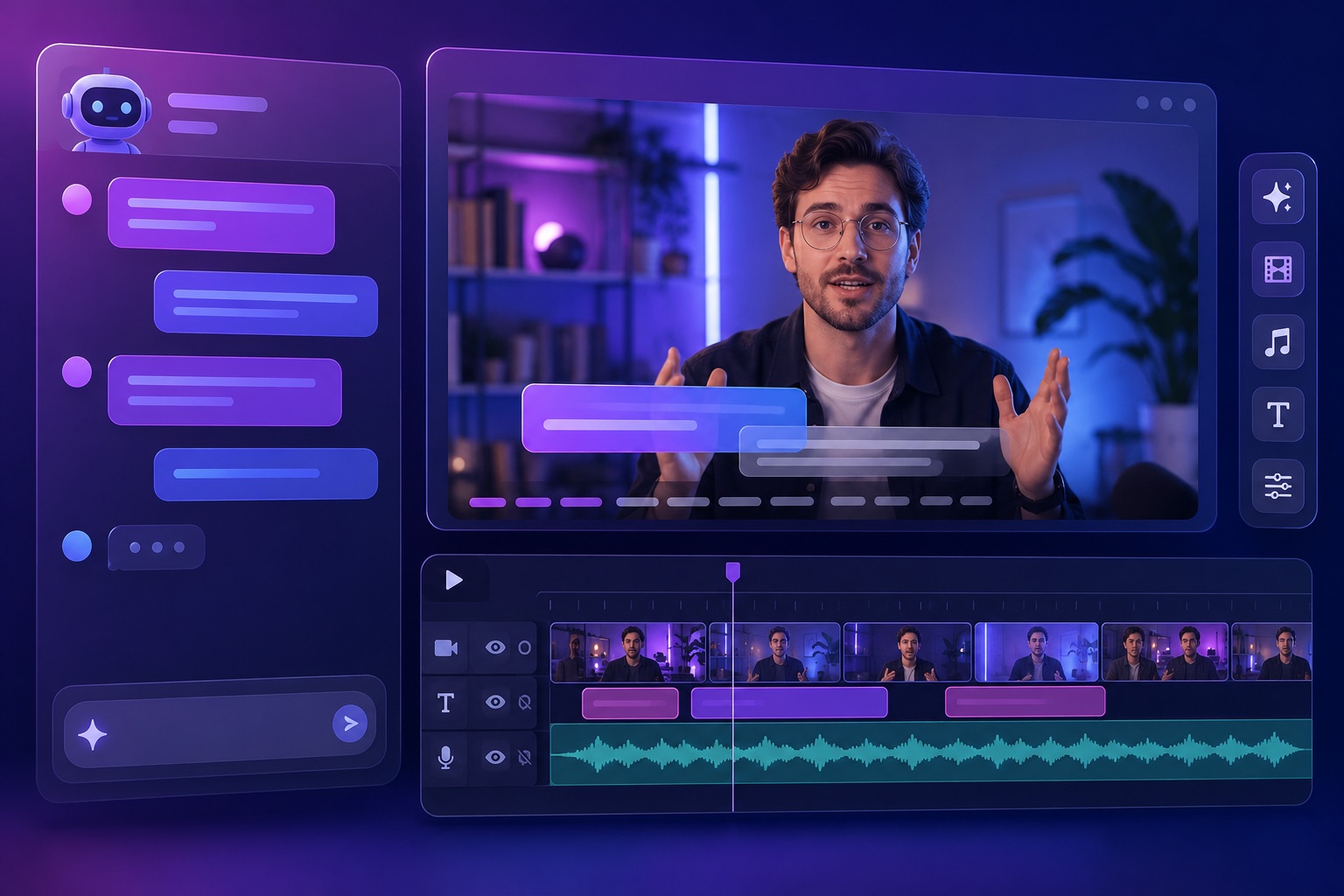
To make the category concrete, here's what our AI producer does once you drop in a clip. Every capability below is something a real editor would do — the point is that the agent does it first, and you direct.
- Automatic Fine Cut. Captions, B-roll, motion design, music, and SFX applied in one pass, with an edit log that explains every decision it made.
- Designer-grade effects. A library of hooks, punch-ins, emphasis text, and transitions that were designed, not templated — applied where they earn their place.
- Chat-based editing. Tell it what to change in plain language and it changes that, not the whole video.
- Slash commands. Call a specific effect by name when you already know what you want.
- Annotate to edit. Draw directly on the frame to direct a change.
- Timeline and direct control. A real editor underneath for the last mile — select an effect, adjust it, undo, or regenerate just that one piece.
- Rough-cut cleanup. Bad takes, filler words, and dead air removed before polish — review and restore anything you want back.
- Brand Kit. Your fonts, colors, and logo persist across every project.
Why the AI producer category matters now
The center of gravity in AI video is shifting from generation to editing. The first wave was about making footage out of nothing, and it produced impressive demos and a wave of synthetic content that audiences are already learning to distrust. The more durable opportunity is helping the millions of people who are already on camera — creators, founders, experts — sound and look as good as their ideas deserve, without hiring a team. That's the job an AI producer does, and it's why "edit my real footage" is quietly a bigger market than "generate a fake video." Authenticity isn't going out of style; the work of producing it is just getting automated.
Key takeaways
- An AI producer is an AI video editing agent that turns raw talking-head footage into a publish-ready video — real footage in, finished video out.
- It's the opposite of an AI video generator or avatar tool: it edits your real footage instead of creating synthetic video. The person on screen is you.
- It does the whole edit — cleanup, captions, B-roll, motion design, music — in one pass, then lets you direct changes in plain language.
- It's more than a caption app (captions are one ingredient) and complementary to clipping tools (clipping finds the moment; the producer finishes it).
- Against a $50–70/video freelance editor, it delivers a publish-ready draft in minutes for a fraction of the cost — ideal for posting consistently.
- It's built for short-form, single-speaker talking-head video today — creators, founders, and podcasters who put their real face on camera.
Try an AI producer on your own footage
The fastest way to understand the category is to watch one edit a clip you filmed yourself. See how AI Producer by OpusClip turns a raw talking-head recording into a publish-ready video, or explore the wider AI video editor if you're weighing your options. Want the deeper dives? Read the complete guide to talking-head videos or why we edit your real footage instead of generating an avatar. Real footage in, finished video out — no avatars, no generated speakers.