OpusClip 4.0 is here. Become a content powerhouse.

8 Best AI Video Analysis Tools in 2026
November 18, 2026
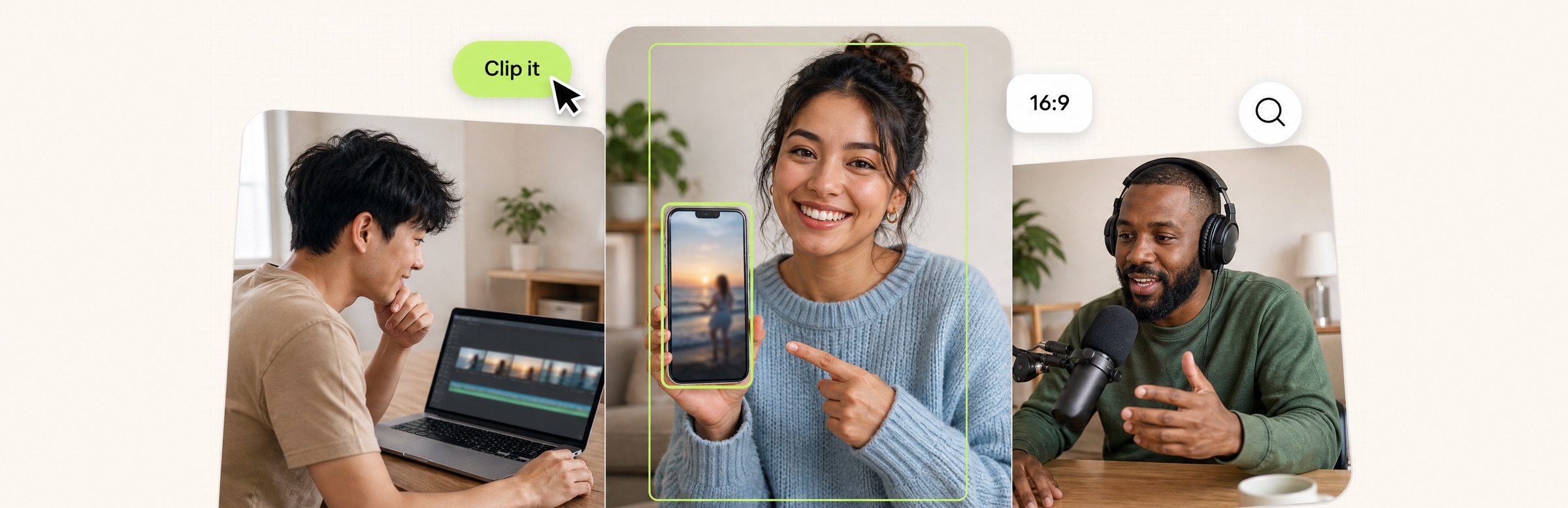
Creators with a laptop showing a video timeline, a phone with a short vertical clip inside a green detection box and a podcast microphone, with a Clip it button, a 16:9 tag and a magnifying glass badge

OpusClip is the pick for analysis that ends in clips: its ClipAnything page says the model analyzes each frame through visual, audio and sentiment cues, and a typed prompt finds the moments wanted, each of which can come back as its own clip. Here, video analysis means understanding what is inside a video: its scenes, speech, objects and moments. Most other tools return text, labels or JSON through an app, a platform or an API. Items 2 to 8 follow one yardstick: how much interface the vendor supplies, from a ready-made app to a bare API. Facts come from each vendor's own pages, read on November 18, 2026.

Key takeaways

  • Best for analysis that ends in clips from one long video: OpusClip. Its help center says a prompt can find a scene, action, character, event, emotional moment or social-worthy topic, and each moment can come back as its own clip.
  • Best for uploading a video and asking questions about it in a browser: Valossa, whose Assistant answers with timestamps, summaries, transcripts and reports and has a free 7-day trial.
  • Best for tagging a whole media library against your own definitions: Coactive, an enterprise platform sold through a demo.
  • Best for searching and questioning videos through an app, API or MCP: Reka Vision, with a free tier of 3 hours of indexed video.
  • Best for developers who want prompted text and custom segments: Twelve Labs, whose Segment API returns custom metadata for each segment as JSON.
  • Best for asking a multimodal model to describe and segment a video: Gemini, through its API and Google AI Studio.
  • Best for scene summaries, transcripts and moderation from one AWS call: Amazon Bedrock Data Automation.
  • Best for detecting labels, faces and text in stored or streaming video on AWS: Amazon Rekognition Video, with 60 free minutes a month for 12 months.

What counts as AI video analysis

Video analysis here means working out what is inside a video, not how it performed after posting. The tools fall into four kinds. Analysis that ends in clips: the tool finds the moments worth keeping and cuts them (OpusClip). Apps that answer questions: upload a video, ask in plain language and read the answers and reports that come back (Valossa, and the app side of Reka Vision). Platforms that tag a library: a media team defines categories and the platform scores every shot against them (Coactive). Developer APIs that return data: transcripts, summaries, labels or JSON for an application to use (Reka Vision, Twelve Labs, Gemini, Bedrock Data Automation and Rekognition Video).

Neighbouring jobs are covered elsewhere. A text summary of a pasted link is in our guide to AI video summarizers, searching a footage library is in our guide to AI video search tools (which also covers Azure AI Video Indexer), and finding the moments worth clipping is in our guide to finding viral moments in long videos. Performance analytics, such as retention graphs and cross-platform dashboards, is a different job: see our guides to retention graph analyzers and multi-platform analytics dashboards.

One note on cloud APIs. Google's documentation for the Video Intelligence API now says it is deprecated from September 14, 2026, can be used until September 14, 2027, when it will be shut down, and recommends migrating to the Gemini family of models. It is not listed here; Gemini is.

How to choose

  • One long video, and the goal is clips: OpusClip. Its ClipAnything page and its prompt manual show the kinds of request it takes.
  • Footage to inspect and question without writing code: Valossa, or the app side of Reka Vision.
  • A large library to classify against your own categories: Coactive for media, publishing and advertising teams.
  • Analysis built into your own product: Reka Vision, Twelve Labs or Gemini for prompted analysis and search, Bedrock Data Automation for scene summaries and moderation on AWS, Rekognition Video for labels, faces and text on AWS.
  • A text summary, a library search or a retention graph: different jobs; see the guides linked above.

At a glance

  • OpusClip: best for analysis that ends in clips from a long video; Starter $15 a month (monthly billing only), Pro $29 a month or $14.50 a month billed annually; free plan yes (watermark); each plan lists its credits on the pricing page.
  • Valossa: best for uploading a video and asking questions about it in a browser; free 7-day trial (30 minutes of video analysis, 100 task credits), then a €29 credit pack (no subscription) or plans from €14.90 a month.
  • Coactive: best for tagging a whole media library against your own definitions; no price listed, book a demo; no free plan listed.
  • Reka Vision: best for searching and questioning videos through an app, API or MCP; free tier of 3 hours of indexed video; the Developer tier lists video indexing at $0.05 per input video minute.
  • Twelve Labs: best for developers who want prompted text and custom segments; Free $0 a month (3 GB of cumulative storage), Plus $29 a month, Pro $99 a month, with annual billing listed at 17% off.
  • Gemini: best for asking a multimodal model to describe and segment a video; free tier through the API and Google AI Studio (limited model access), with paid tiers on the pricing page.
  • Amazon Bedrock Data Automation: best for scene summaries, transcripts and moderation from one AWS call; pay per use, with the pricing page's example at $0.050 per minute for video standard output; see AWS for any free allowance.
  • Amazon Rekognition Video: best for detecting labels, faces and text in stored or streaming video on AWS; pay per minute of video analyzed; the AWS Free Tier includes 60 free minutes of video analysis a month for 12 months.

What each tool takes in, what it extracts and what comes back

The At a glance list covers best-for, price and free plan; this table compares what goes in, what each tool extracts from the video, what comes back, who the vendor says it is for and the free access the vendor states, as listed on each vendor's own pages on November 18, 2026.

ToolWhat goes inWhat it extractsWhat comes backWho the vendor says it is forFree access the vendor states
OpusClipA video link or an uploaded video; the summarizer tool page takes a pasted linkObjects, scenes, actions, sounds, emotions and text, from visual, audio and sentiment cuesClips, one per moment, filterable by tag; a Scene Analysis view with a transcript and timestampsCreators, marketers and teams; the pricing page labels its plans this wayA Free plan with a watermark; see the pricing page for the rest
ValossaUploaded video files, with the spoken language chosen at uploadPeople, speech, sounds, structure, objects, text, colors and sentimentTimestamped answers, summaries, transcripts, captions and clips; JSON metadata downloadsMedia, brands and creators; compliance teams and editorsA 7-day trial, no credit card: 30 minutes of video analysis and 100 task credits
CoactiveA video and image library ingested once; cloud storage integration is listedVisual composition, speech, audio, shot and scene structure, celebrities from enrolled imagesTags scored against your own definitions, natural-language search, SQL queries, REST APIsMedia companies and publishers, agencies and brands, product and data teamsNo price or free plan listed; the page points to a demo
Reka VisionUploaded videos, organized in groups; features are chosen and computed on demandSpeech transcript, scene boundaries, visual descriptions and detected peopleTranscripts, captions, scenes and objects; timestamped search; Q&A across up to five videosOrganizations and creators; solutions listed include media and defense and securityA free tier of 3 hours of indexed video (180 minutes) to evaluate the API
Twelve LabsAn uploaded asset or a URL: public URLs up to 4 GB, local files up to 200 MBVisuals, sounds and spoken words, plus custom segment types and fields you definePrompted text or JSON by schema; timestamped segments with custom metadataDevelopers; solutions listed include media, advertising, security and sportsA Free plan at $0 a month with 3 GB of cumulative storage
GeminiAn uploaded video file or a public YouTube URLDescriptions, segments and extracted information; answers about the video's contentText answers that can refer to specific timestampsDevelopers and small projects on Free; production applications on PaidA free tier with limited model access and AI Studio; 8 hours of YouTube video a day
Amazon Bedrock Data AutomationA video file sent to the InvokeDataAutomationAsync API, with a project for output settingsScene summaries, a video summary, IAB categories, transcript, on-screen text, logos, moderationJSON with shots, chapters with summaries, and frame-level text and moderation resultsDevelopers building applications; uses listed include video search and brand safetyNot stated on the pages read; the pricing example bills video by the minute
Amazon Rekognition VideoVideo stored in an Amazon S3 bucket, or streaming video through Kinesis Video StreamsLabels, faces, people, celebrities, text, suggestive and explicit content, video segmentsResults fetched with Get operations after an asynchronous job, with when items occurDevelopers; example categories are media and entertainment and public safety60 free minutes of video analysis a month for 12 months under the AWS Free Tier

1. OpusClip: Best for analysis that ends in clips from a long video
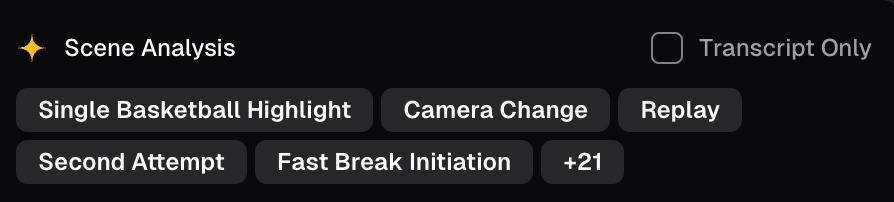
OpusClip's Scene Analysis panel with a Transcript Only checkbox and a row of scene tags including Camera Change and Replay

A Scene Analysis panel with its scene tags, cropped from a help-center image. Source: OpusClip help center

OpusClip's ClipAnything page says its video understanding analyzes each frame through visual, audio and sentiment cues, identifying objects, scenes, actions, sounds, emotions, texts and more, and that a typed prompt can find a scene, action, character, event, emotional moment or social-worthy topic. In Custom Mode a user drops in a video, selects a genre and types a prompt; in Hands-Free Mode the page says the AI detects the genre and applies prompts itself. Per the prompt manual, each moment a prompt finds can come back as its own clip, and per the help center the AI extracts tags that filter the results.

The help center's scene analysis article says scene analysis breaks a short video into individual scenes and includes a talking transcript, timestamps that reference the original video, visual summaries and emotional sentiment analysis. For a library of many videos, the help center describes OpusSearch, which analyzes transcripts, topics, speakers, mood and key moments in connected or uploaded videos so a user can search in their own words; its help article covers setup and who has access. OpusClip's free AI Video Summarizer tool page takes a pasted link and returns a text summary in a chosen format, language and length.

Pricing: OpusClip's pricing page lists Free at $0 (has a watermark), Starter at $15 a month (monthly billing only) and Pro at $29 a month, or $14.50 a month billed annually; Business is custom. Each plan lists its credits on the pricing page.

Considerations: The help center says the model may not return results for videos that lack audio or have minimal visual activity, such as static scenes, and its prompt manual advises against vague prompts. A prompt picks moments; per the manual, clip length is set in the submission box, not in the prompt. The scene analysis article describes breaking down a short video into scenes, OpusSearch is described as desktop-only, and the summarizer is a free tool page rather than the full OpusClip product. Free clips carry a watermark.

  • Choose it if the point of analyzing a long video is to end up with clips of its best moments, found by describing them.
  • Skip it if the analysis itself, such as labels, shot-level metadata or transcripts delivered as data for a media library or an application, is the deliverable.

2. Valossa: Best for uploading a video and asking questions about it in a browser

Valossa's Assistant page describes a conversational video AI: upload a video, ask in plain language, and the AI answers with timestamps, moments, summaries, transcripts and reports. The page says its video AI recognizes people, speech, sounds, structure, objects, text, colors and sentiment inside videos, and that found clips can be saved, edited in a built-in editor and exported. Its FAQ lists downloadable outputs as MP4 clips, SRT and WebVTT captions, transcripts and JSON metadata.

Valossa sells other products on the same engine. Its compare page lists Moderator for sensitive content, Moods for emotion and sentiment in audio, speech and visuals, and Ad Scout for scene-level ad context scoring based on IAB and GARM taxonomy. The FAQ says a separate REST API covers the underlying engine, and the Assistant page says it can be used in Claude and other agents through an MCP server.

Pricing: Valossa's Assistant page lists a free 7-day trial with no credit card required, and its FAQ says the trial includes 30 minutes of video analysis and 100 task credits. After the trial, the page lists a €29 credit pack (no subscription) or plans from €14.90 a month, and the FAQ says paid plans start at €14.90 a month for single users, with team and enterprise licenses on request.

Considerations: The FAQ says a file on the free trial can be up to 15 minutes, and it says API and workflow integration for the Assistant itself is on the roadmap, with MCP available now and the REST API as a separate product. The FAQ also prints an accuracy figure for speech and face recognition with no dataset or method, so it is a vendor claim we do not repeat.

  • Choose it if an editor, marketer or compliance reviewer wants to upload footage, ask what is in it and export transcripts, captions, reports or clips.
  • Skip it if the analysis has to run inside your own application through the Assistant, since its FAQ puts that integration on the roadmap.

3. Coactive: Best for tagging a whole media library against your own definitions

Coactive's Content Understanding page says its platform processes visual composition (objects, settings, actions and text on screen), spoken language, the audio environment, and shot and scene structure in one pass, and builds a hierarchy from shot to scene to segment to episode to series. It also lists celebrity detection against enrolled reference images and a Narrative Metadata feature, in early access, that generates summaries, synopses and genre, mood and subject labels.

Its Dynamic Tags capability scores every moment against a taxonomy the customer defines, using natural-language prompts from shot-level to video-level precision, starting zero-shot with no model training. The platform page lists a UI, SQL queries over the results, REST APIs and cloud storage integration, and names three paths: Context Studio for ad sales and campaign teams, the platform UI for content operations, data science and editorial teams, and APIs for product and engineering teams.

Pricing: Coactive's pages list no price and no free plan; the calls to action are Get a Demo and Read Our Docs.

Considerations: This is an enterprise platform written for media companies and publishers, agencies and brands, and product and data teams, and the home page describes searching, tagging and analyzing petabytes of image and video. Narrative Metadata is early access for qualifying customers. Its home page prints customer results such as precision gains, which are vendor-reported figures.

  • Choose it if a publisher, streamer, agency or brand team needs its own classification of every moment in a large library, with search and SQL access.
  • Skip it if one creator wants to analyze a few videos, or a published price and a free plan are needed.

4. Reka Vision: Best for searching and questioning videos through an app, API or MCP

Reka's Vision page says Reka Vision helps organizations and creators understand, search, monitor and transform video at scale, and lists visual understanding and indexing, semantic video search, highlight and clip generation, and visual reasoning and Q&A. Reka's home page says its video infrastructure is available via API, MCP or an app. The docs describe the Vision API: upload a video, choose which features to compute (a transcript with scene boundaries, visual captions for each chunk, embeddings, objects), then search and ask questions across up to five videos at once.

Output is read through endpoints that return the transcript, visual descriptions, scene boundaries and detected objects for a time range. The docs also describe an MCP server for Claude Code and other agent clients, a tagging endpoint and a clip generation API.

Pricing: Reka's Vision pricing page lists a free tier of 3 hours of indexed video (180 minutes) for evaluating the API. The Developer tier is credit-based, with video indexing at $0.05 per input video minute and video search at $0.005 per search; Enterprise is invoiced monthly. Videos on the Developer tier are stored free and auto-deleted after 30 days.

Considerations: The docs say object detection currently tracks people only, that features depend on each other (captions and objects need the transcript first), and that Developer-tier videos are auto-deleted after 30 days. The Developer tier also has rate limits.

  • Choose it if a team wants transcripts, scene boundaries, search and questions across a video library through an API, MCP or app, with a free evaluation tier.
  • Skip it if objects other than people must be detected, or videos must be kept longer than 30 days on a self-serve plan.

5. Twelve Labs: Best for developers who want prompted text and custom segments from a video model
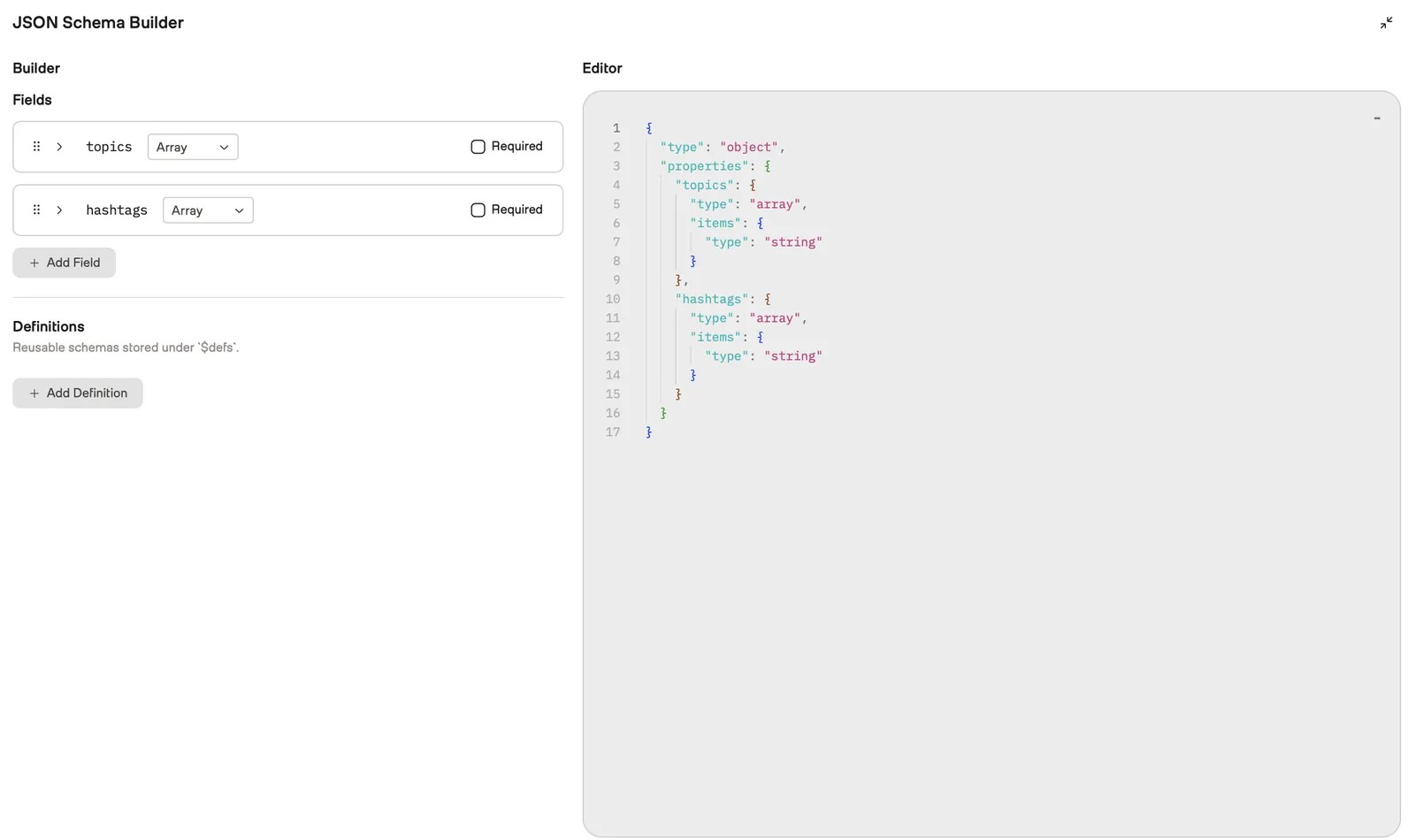
TwelveLabs Playground's JSON Schema Builder with topics and hashtags array fields beside the matching JSON schema in an editor panel

TwelveLabs Playground's JSON Schema Builder for structured output, from its docs. Source: TwelveLabs docs

TwelveLabs' docs say its Analyze API generates text from a video with a prompt, using the visuals, sounds, spoken words and the relationships between them, and its Segment API turns raw video into structured, timestamped data: a developer defines the segment types to detect and the fields to extract, such as editorial narratives, sports plays, speaker changes or brand appearances, and the platform returns custom metadata for each segment as JSON.

A no-code Playground lets a user pick a video, enter a prompt and define a JSON schema for structured output. The docs say a video can be analyzed up to 2 hours long, or up to 4 hours when only a portion is analyzed, with public video URLs up to 4 GB or local files up to 200 MB.

Pricing: TwelveLabs' pricing page lists Free at $0 a month with 3 GB of cumulative storage, Plus at $29 a month with 50 GB and Pro at $99 a month with 200 GB; Enterprise is custom, and the page offers annual billing at 17% off. Every plan lists Analyze, Segment and Embed among its Workload features, with usage capped at plan limits on Free and Plus.

Considerations: It is a developer platform: the quickstarts use SDKs and API keys, and the docs' example code notes that video hosting platform links and cloud storage sharing links are not supported, so a direct link to a raw media file or an upload is needed rather than a YouTube link. Usage allowances differ by plan.

  • Choose it if a developer needs prompted text or structured, timestamped metadata from a video, with a free plan to start.
  • Skip it if a finished app is needed without code, or the source is a YouTube or cloud-drive link rather than a media file.

6. Gemini: Best for asking a multimodal model to describe and segment a video

The Gemini API video understanding docs say Gemini models can describe, segment and extract information from videos, answer questions about video content and refer to specific timestamps within a video. Video can come from the File API, Cloud Storage registration, inline data or a public YouTube URL. The docs describe a static mode that samples 1 frame per second and an agentic mode in which the model navigates the video on demand.

The docs say models with a 1M context window can process videos up to 3 hours long by default at low media resolution.

Pricing: The Gemini API pricing page says to start building free of charge with generous limits. Its Free tier lists limited access to certain models, free input and output tokens and Google AI Studio access, and notes that content is used to improve Google's products; the Paid tier lists higher rate limits for production and content not used to improve its products. The docs say the YouTube URL feature is in preview at no charge, with pricing and rate limits likely to change, and that the free tier cannot upload more than 8 hours of YouTube video a day.

Considerations: A prompt returns text, so the structure of the analysis, any JSON schema and the storage of results are the developer's to build. The docs say static mode samples 1 frame per second, so fast action may lose detail, and only public YouTube videos work by URL. The pricing page ties "content not used to improve our products" to the Paid tier, so private footage is a Paid-tier question.

  • Choose it if a developer or analyst wants descriptions, answers and timestamps from a video with a free place to start.
  • Skip it if a ready-made app, a stored index or a fixed output format is needed without building one.

7. Amazon Bedrock Data Automation: Best for scene summaries, transcripts and moderation from one AWS call

AWS's documentation describes Bedrock Data Automation (BDA) as a cloud service that extracts insights from documents, images, video and audio using generative AI. Its media analysis use case names scene summaries, unsafe or explicit content, on-screen text and ad or brand classification, for video search, contextual advertising and brand safety. The standard video output lists a full video summary, chapter summaries with timestamps, IAB taxonomy classification, a full audio transcript with speaker identification, text in video, logo detection and content moderation in seven categories.

A developer sends a file to the InvokeDataAutomationAsync API, and a project can modify the output settings. The docs' sample output is JSON with shots, chapters that each carry a summary, and frames with text and moderation results.

Pricing: AWS's Bedrock pricing page works through an example of a 60-minute video processed with BDA Standard Output at $0.050 per minute, a total of $3.00. See AWS's pricing page for any free allowance and for prices by region.

Considerations: The docs say custom output with blueprints is for documents, audio and images only, so video uses standard output. Only one audio track per video is supported, and subtitle files such as SRT and VTT are not supported. The docs describe it as a unified, API-driven experience for developers building applications.

  • Choose it if a team on AWS wants scene summaries, a transcript, on-screen text and moderation flags returned as JSON from one video call.
  • Skip it if an app with a UI is needed, custom fields must be defined for video, or the team is not on AWS.

8. Amazon Rekognition Video: Best for detecting labels, faces and text in stored or streaming video on AWS

AWS's Rekognition Video docs say it can detect labels, faces, people, celebrities and adult (suggestive and explicit) content in videos stored in an Amazon S3 bucket, and list the types of analysis as video segments, labels, suggestive and explicit content, text, celebrities, faces and people. They name media and entertainment and public safety as example categories and say the service automates detecting items and when they occur throughout a video.

It works through asynchronous operations: a developer calls a Start operation such as StartLabelDetection, the completion status is published to an Amazon SNS topic, and a Get operation such as GetLabelDetection returns the results.

Pricing: AWS's Rekognition pricing page says to pay only for what is used, with no upfront costs or minimum fees, and prices stored video by the minute for each feature. Its Free Tier lasts 12 months from account creation and includes 60 free minutes of video analysis a month, covering label detection, content moderation, face detection, face search, celebrity recognition, text detection and person pathing.

Considerations: The listed types of analysis are detections, and the documented pattern needs an S3 bucket, an SNS topic and a queue or Lambda function to collect results. The pricing page says running several APIs on the same section of video is charged separately for each API. Face and celebrity recognition raise consent and privacy questions that the footage owner has to settle.

  • Choose it if an AWS team needs detections such as labels, faces, text and moderation flags, with when they occur in the video.
  • Skip it if a summary, a chat or a prompt box is needed, or the team is not on AWS.

How we compared these tools

We compared each tool on six criteria: what goes in, what it extracts, what comes back, who the vendor says it is for, the free access the vendor states and how much interface the vendor supplies. The guide is organised around the job in the title, understanding what is inside a video. OpusClip comes first because analysis that ends in clips is the part of that job its ClipAnything pages and help center document most fully, with its limits stated in its entry: silent or static video, a prompt that picks moments but does not set clip length, and a scene analysis article that describes a short video. Items 2 to 8 follow one yardstick: how much interface the vendor supplies around the analysis, from a ready-made app (Valossa) to a platform UI sold through a demo (Coactive), an app, API and MCP server (Reka Vision), a no-code Playground and API (Twelve Labs), Google AI Studio and an API (Gemini), and cloud APIs on AWS.

All facts come from each vendor's own pricing page, product page, docs or help center, read on November 18, 2026, and the OpusClip pages were read in headless Chrome. We did not run hands-on tests of any tool, and this guide repeats no accuracy figure from any vendor page. We left out Google's Video Intelligence API because Google's own notice says it is deprecated. Azure AI Video Indexer is covered in our video search guide and was not re-read here. Prices change, so confirm on the vendor page before buying.

Red flags to watch for

  • "Analysis" means different things. OpusClip returns clips and tags, Valossa returns answers and reports, Coactive returns tags against your own categories, and the developer APIs return transcripts, labels or JSON. Check the output before comparing tools.
  • Retired or unfinished products. Google's Video Intelligence docs say the API shuts down on September 14, 2027. Gemini's YouTube URL feature is a preview, Coactive's Narrative Metadata is early access, and Valossa's Assistant FAQ puts API integration on the roadmap.
  • Accuracy claims without a method. Valossa's FAQ prints an accuracy figure and Coactive's home page prints customer results, with no dataset a reader can check. Test on your own footage.
  • Free tiers with different catches. OpusClip's Free plan adds a watermark, Valossa's trial allows files of up to 15 minutes per its FAQ, Reka Vision's 3 free hours are for evaluation, Twelve Labs' Free plan is capped at 3 GB of storage, and Rekognition's free minutes last 12 months.
  • Where your footage goes. The Gemini API pricing page says Free-tier content is used to improve Google's products. Read each data statement before uploading client footage.
  • Faces and celebrities. Rekognition, Coactive and Valossa list face, celebrity or emotion analysis. Get permission from the people in the footage first.
  • Silent or low-activity footage. OpusClip's help center says the model may return nothing for videos that lack audio or have minimal visual activity, and tools that build on transcripts inherit the transcript's mistakes.
  • Rights. Analyze only videos you own or have permission to use, whichever tool does the analysis.

Frequently asked questions

What are the best AI video analysis tools?

It depends on what the analysis is for. In this guide, OpusClip is the pick for analysis that ends in clips from a long video, Valossa for asking questions about uploaded footage, Coactive for classifying a media library, and Reka Vision, Twelve Labs, Gemini and the two AWS services for developers building analysis into a product.

Which AI video analysis tools can find and return relevant clips from a longer video?

OpusClip's ClipAnything takes a typed prompt and each moment it finds can come back as its own clip. Valossa's Assistant page says it finds clips and exports them, and Reka's Vision page lists highlight and clip generation. Twelve Labs returns timestamped segments and Gemini returns text with timestamps.

What does AI video content analysis extract?

It depends on the tool, and it goes beyond speech. OpusClip's ClipAnything page lists objects, scenes, actions, sounds, emotions and text, Valossa lists people, speech, sounds, objects, text, colors and sentiment, Coactive lists visual composition, spoken language, audio and shot and scene structure, Bedrock Data Automation lists summaries, chapters, a transcript, on-screen text, logos and moderation, and Rekognition Video lists labels, faces, people, celebrities, text and explicit content.

Is there a free AI video analyzer?

Several have free routes with limits. OpusClip's AI Video Summarizer tool page is free per its FAQ and OpusClip has a Free plan with a watermark, Valossa offers a 7-day trial, Reka Vision a free tier of 3 hours of indexed video, Twelve Labs a Free plan with 3 GB of storage, Gemini a free tier, and AWS 60 free video minutes a month for Rekognition Video. Coactive lists no free plan.

What is the difference between video analysis and video analytics?

Video analysis works out what is inside a video, such as its scenes, speech and objects. Video analytics reports how a published video performed, such as retention and views. For performance, see our guides to retention graph analyzers and multi-platform analytics dashboards.

Which video analysis tool should a developer use?

Twelve Labs fits when structured, timestamped metadata from custom segment types is the goal, Gemini when a prompt and a free start are enough, Reka Vision for search and questions across a video library over an API or MCP, and Bedrock Data Automation or Rekognition Video when the stack is already on AWS.

How accurate is AI video analysis?

None of the vendor pages read prints a method and dataset that lets a reader check accuracy, so this guide repeats no figure. Run a short test on your own footage, and check any name, number or label a tool returns against the video before relying on it. For searching a library, see our guide to AI video search tools.
On this page

Use our Free Forever Plan

Find the moment. Skip the scrubbing.

From script to polished video — in one click.

Create and post one short video every day for free, and grow faster.

OpusSearch uses AI to surface the exact clip you need from hours of footage — in seconds, not afternoons.

Agent Opus runs the entire video pipeline for you: research, scriptwriting, storyboarding, motion, voice, and edit. Upload the idea, post the result.

8 Best AI Video Analysis Tools in 2026

OpusClip is the pick for analysis that ends in clips: its ClipAnything page says the model analyzes each frame through visual, audio and sentiment cues, and a typed prompt finds the moments wanted, each of which can come back as its own clip. Here, video analysis means understanding what is inside a video: its scenes, speech, objects and moments. Most other tools return text, labels or JSON through an app, a platform or an API. Items 2 to 8 follow one yardstick: how much interface the vendor supplies, from a ready-made app to a bare API. Facts come from each vendor's own pages, read on November 18, 2026.

Key takeaways

  • Best for analysis that ends in clips from one long video: OpusClip. Its help center says a prompt can find a scene, action, character, event, emotional moment or social-worthy topic, and each moment can come back as its own clip.
  • Best for uploading a video and asking questions about it in a browser: Valossa, whose Assistant answers with timestamps, summaries, transcripts and reports and has a free 7-day trial.
  • Best for tagging a whole media library against your own definitions: Coactive, an enterprise platform sold through a demo.
  • Best for searching and questioning videos through an app, API or MCP: Reka Vision, with a free tier of 3 hours of indexed video.
  • Best for developers who want prompted text and custom segments: Twelve Labs, whose Segment API returns custom metadata for each segment as JSON.
  • Best for asking a multimodal model to describe and segment a video: Gemini, through its API and Google AI Studio.
  • Best for scene summaries, transcripts and moderation from one AWS call: Amazon Bedrock Data Automation.
  • Best for detecting labels, faces and text in stored or streaming video on AWS: Amazon Rekognition Video, with 60 free minutes a month for 12 months.

What counts as AI video analysis

Video analysis here means working out what is inside a video, not how it performed after posting. The tools fall into four kinds. Analysis that ends in clips: the tool finds the moments worth keeping and cuts them (OpusClip). Apps that answer questions: upload a video, ask in plain language and read the answers and reports that come back (Valossa, and the app side of Reka Vision). Platforms that tag a library: a media team defines categories and the platform scores every shot against them (Coactive). Developer APIs that return data: transcripts, summaries, labels or JSON for an application to use (Reka Vision, Twelve Labs, Gemini, Bedrock Data Automation and Rekognition Video).

Neighbouring jobs are covered elsewhere. A text summary of a pasted link is in our guide to AI video summarizers, searching a footage library is in our guide to AI video search tools (which also covers Azure AI Video Indexer), and finding the moments worth clipping is in our guide to finding viral moments in long videos. Performance analytics, such as retention graphs and cross-platform dashboards, is a different job: see our guides to retention graph analyzers and multi-platform analytics dashboards.

One note on cloud APIs. Google's documentation for the Video Intelligence API now says it is deprecated from September 14, 2026, can be used until September 14, 2027, when it will be shut down, and recommends migrating to the Gemini family of models. It is not listed here; Gemini is.

How to choose

  • One long video, and the goal is clips: OpusClip. Its ClipAnything page and its prompt manual show the kinds of request it takes.
  • Footage to inspect and question without writing code: Valossa, or the app side of Reka Vision.
  • A large library to classify against your own categories: Coactive for media, publishing and advertising teams.
  • Analysis built into your own product: Reka Vision, Twelve Labs or Gemini for prompted analysis and search, Bedrock Data Automation for scene summaries and moderation on AWS, Rekognition Video for labels, faces and text on AWS.
  • A text summary, a library search or a retention graph: different jobs; see the guides linked above.

At a glance

  • OpusClip: best for analysis that ends in clips from a long video; Starter $15 a month (monthly billing only), Pro $29 a month or $14.50 a month billed annually; free plan yes (watermark); each plan lists its credits on the pricing page.
  • Valossa: best for uploading a video and asking questions about it in a browser; free 7-day trial (30 minutes of video analysis, 100 task credits), then a €29 credit pack (no subscription) or plans from €14.90 a month.
  • Coactive: best for tagging a whole media library against your own definitions; no price listed, book a demo; no free plan listed.
  • Reka Vision: best for searching and questioning videos through an app, API or MCP; free tier of 3 hours of indexed video; the Developer tier lists video indexing at $0.05 per input video minute.
  • Twelve Labs: best for developers who want prompted text and custom segments; Free $0 a month (3 GB of cumulative storage), Plus $29 a month, Pro $99 a month, with annual billing listed at 17% off.
  • Gemini: best for asking a multimodal model to describe and segment a video; free tier through the API and Google AI Studio (limited model access), with paid tiers on the pricing page.
  • Amazon Bedrock Data Automation: best for scene summaries, transcripts and moderation from one AWS call; pay per use, with the pricing page's example at $0.050 per minute for video standard output; see AWS for any free allowance.
  • Amazon Rekognition Video: best for detecting labels, faces and text in stored or streaming video on AWS; pay per minute of video analyzed; the AWS Free Tier includes 60 free minutes of video analysis a month for 12 months.

What each tool takes in, what it extracts and what comes back

The At a glance list covers best-for, price and free plan; this table compares what goes in, what each tool extracts from the video, what comes back, who the vendor says it is for and the free access the vendor states, as listed on each vendor's own pages on November 18, 2026.

ToolWhat goes inWhat it extractsWhat comes backWho the vendor says it is forFree access the vendor states
OpusClipA video link or an uploaded video; the summarizer tool page takes a pasted linkObjects, scenes, actions, sounds, emotions and text, from visual, audio and sentiment cuesClips, one per moment, filterable by tag; a Scene Analysis view with a transcript and timestampsCreators, marketers and teams; the pricing page labels its plans this wayA Free plan with a watermark; see the pricing page for the rest
ValossaUploaded video files, with the spoken language chosen at uploadPeople, speech, sounds, structure, objects, text, colors and sentimentTimestamped answers, summaries, transcripts, captions and clips; JSON metadata downloadsMedia, brands and creators; compliance teams and editorsA 7-day trial, no credit card: 30 minutes of video analysis and 100 task credits
CoactiveA video and image library ingested once; cloud storage integration is listedVisual composition, speech, audio, shot and scene structure, celebrities from enrolled imagesTags scored against your own definitions, natural-language search, SQL queries, REST APIsMedia companies and publishers, agencies and brands, product and data teamsNo price or free plan listed; the page points to a demo
Reka VisionUploaded videos, organized in groups; features are chosen and computed on demandSpeech transcript, scene boundaries, visual descriptions and detected peopleTranscripts, captions, scenes and objects; timestamped search; Q&A across up to five videosOrganizations and creators; solutions listed include media and defense and securityA free tier of 3 hours of indexed video (180 minutes) to evaluate the API
Twelve LabsAn uploaded asset or a URL: public URLs up to 4 GB, local files up to 200 MBVisuals, sounds and spoken words, plus custom segment types and fields you definePrompted text or JSON by schema; timestamped segments with custom metadataDevelopers; solutions listed include media, advertising, security and sportsA Free plan at $0 a month with 3 GB of cumulative storage
GeminiAn uploaded video file or a public YouTube URLDescriptions, segments and extracted information; answers about the video's contentText answers that can refer to specific timestampsDevelopers and small projects on Free; production applications on PaidA free tier with limited model access and AI Studio; 8 hours of YouTube video a day
Amazon Bedrock Data AutomationA video file sent to the InvokeDataAutomationAsync API, with a project for output settingsScene summaries, a video summary, IAB categories, transcript, on-screen text, logos, moderationJSON with shots, chapters with summaries, and frame-level text and moderation resultsDevelopers building applications; uses listed include video search and brand safetyNot stated on the pages read; the pricing example bills video by the minute
Amazon Rekognition VideoVideo stored in an Amazon S3 bucket, or streaming video through Kinesis Video StreamsLabels, faces, people, celebrities, text, suggestive and explicit content, video segmentsResults fetched with Get operations after an asynchronous job, with when items occurDevelopers; example categories are media and entertainment and public safety60 free minutes of video analysis a month for 12 months under the AWS Free Tier

1. OpusClip: Best for analysis that ends in clips from a long video

OpusClip's Scene Analysis panel with a Transcript Only checkbox and a row of scene tags including Camera Change and Replay

A Scene Analysis panel with its scene tags, cropped from a help-center image. Source: OpusClip help center

OpusClip's ClipAnything page says its video understanding analyzes each frame through visual, audio and sentiment cues, identifying objects, scenes, actions, sounds, emotions, texts and more, and that a typed prompt can find a scene, action, character, event, emotional moment or social-worthy topic. In Custom Mode a user drops in a video, selects a genre and types a prompt; in Hands-Free Mode the page says the AI detects the genre and applies prompts itself. Per the prompt manual, each moment a prompt finds can come back as its own clip, and per the help center the AI extracts tags that filter the results.

The help center's scene analysis article says scene analysis breaks a short video into individual scenes and includes a talking transcript, timestamps that reference the original video, visual summaries and emotional sentiment analysis. For a library of many videos, the help center describes OpusSearch, which analyzes transcripts, topics, speakers, mood and key moments in connected or uploaded videos so a user can search in their own words; its help article covers setup and who has access. OpusClip's free AI Video Summarizer tool page takes a pasted link and returns a text summary in a chosen format, language and length.

Pricing: OpusClip's pricing page lists Free at $0 (has a watermark), Starter at $15 a month (monthly billing only) and Pro at $29 a month, or $14.50 a month billed annually; Business is custom. Each plan lists its credits on the pricing page.

Considerations: The help center says the model may not return results for videos that lack audio or have minimal visual activity, such as static scenes, and its prompt manual advises against vague prompts. A prompt picks moments; per the manual, clip length is set in the submission box, not in the prompt. The scene analysis article describes breaking down a short video into scenes, OpusSearch is described as desktop-only, and the summarizer is a free tool page rather than the full OpusClip product. Free clips carry a watermark.

  • Choose it if the point of analyzing a long video is to end up with clips of its best moments, found by describing them.
  • Skip it if the analysis itself, such as labels, shot-level metadata or transcripts delivered as data for a media library or an application, is the deliverable.

2. Valossa: Best for uploading a video and asking questions about it in a browser

Valossa's Assistant page describes a conversational video AI: upload a video, ask in plain language, and the AI answers with timestamps, moments, summaries, transcripts and reports. The page says its video AI recognizes people, speech, sounds, structure, objects, text, colors and sentiment inside videos, and that found clips can be saved, edited in a built-in editor and exported. Its FAQ lists downloadable outputs as MP4 clips, SRT and WebVTT captions, transcripts and JSON metadata.

Valossa sells other products on the same engine. Its compare page lists Moderator for sensitive content, Moods for emotion and sentiment in audio, speech and visuals, and Ad Scout for scene-level ad context scoring based on IAB and GARM taxonomy. The FAQ says a separate REST API covers the underlying engine, and the Assistant page says it can be used in Claude and other agents through an MCP server.

Pricing: Valossa's Assistant page lists a free 7-day trial with no credit card required, and its FAQ says the trial includes 30 minutes of video analysis and 100 task credits. After the trial, the page lists a €29 credit pack (no subscription) or plans from €14.90 a month, and the FAQ says paid plans start at €14.90 a month for single users, with team and enterprise licenses on request.

Considerations: The FAQ says a file on the free trial can be up to 15 minutes, and it says API and workflow integration for the Assistant itself is on the roadmap, with MCP available now and the REST API as a separate product. The FAQ also prints an accuracy figure for speech and face recognition with no dataset or method, so it is a vendor claim we do not repeat.

  • Choose it if an editor, marketer or compliance reviewer wants to upload footage, ask what is in it and export transcripts, captions, reports or clips.
  • Skip it if the analysis has to run inside your own application through the Assistant, since its FAQ puts that integration on the roadmap.

3. Coactive: Best for tagging a whole media library against your own definitions

Coactive's Content Understanding page says its platform processes visual composition (objects, settings, actions and text on screen), spoken language, the audio environment, and shot and scene structure in one pass, and builds a hierarchy from shot to scene to segment to episode to series. It also lists celebrity detection against enrolled reference images and a Narrative Metadata feature, in early access, that generates summaries, synopses and genre, mood and subject labels.

Its Dynamic Tags capability scores every moment against a taxonomy the customer defines, using natural-language prompts from shot-level to video-level precision, starting zero-shot with no model training. The platform page lists a UI, SQL queries over the results, REST APIs and cloud storage integration, and names three paths: Context Studio for ad sales and campaign teams, the platform UI for content operations, data science and editorial teams, and APIs for product and engineering teams.

Pricing: Coactive's pages list no price and no free plan; the calls to action are Get a Demo and Read Our Docs.

Considerations: This is an enterprise platform written for media companies and publishers, agencies and brands, and product and data teams, and the home page describes searching, tagging and analyzing petabytes of image and video. Narrative Metadata is early access for qualifying customers. Its home page prints customer results such as precision gains, which are vendor-reported figures.

  • Choose it if a publisher, streamer, agency or brand team needs its own classification of every moment in a large library, with search and SQL access.
  • Skip it if one creator wants to analyze a few videos, or a published price and a free plan are needed.

4. Reka Vision: Best for searching and questioning videos through an app, API or MCP

Reka's Vision page says Reka Vision helps organizations and creators understand, search, monitor and transform video at scale, and lists visual understanding and indexing, semantic video search, highlight and clip generation, and visual reasoning and Q&A. Reka's home page says its video infrastructure is available via API, MCP or an app. The docs describe the Vision API: upload a video, choose which features to compute (a transcript with scene boundaries, visual captions for each chunk, embeddings, objects), then search and ask questions across up to five videos at once.

Output is read through endpoints that return the transcript, visual descriptions, scene boundaries and detected objects for a time range. The docs also describe an MCP server for Claude Code and other agent clients, a tagging endpoint and a clip generation API.

Pricing: Reka's Vision pricing page lists a free tier of 3 hours of indexed video (180 minutes) for evaluating the API. The Developer tier is credit-based, with video indexing at $0.05 per input video minute and video search at $0.005 per search; Enterprise is invoiced monthly. Videos on the Developer tier are stored free and auto-deleted after 30 days.

Considerations: The docs say object detection currently tracks people only, that features depend on each other (captions and objects need the transcript first), and that Developer-tier videos are auto-deleted after 30 days. The Developer tier also has rate limits.

  • Choose it if a team wants transcripts, scene boundaries, search and questions across a video library through an API, MCP or app, with a free evaluation tier.
  • Skip it if objects other than people must be detected, or videos must be kept longer than 30 days on a self-serve plan.

5. Twelve Labs: Best for developers who want prompted text and custom segments from a video model

TwelveLabs Playground's JSON Schema Builder with topics and hashtags array fields beside the matching JSON schema in an editor panel

TwelveLabs Playground's JSON Schema Builder for structured output, from its docs. Source: TwelveLabs docs

TwelveLabs' docs say its Analyze API generates text from a video with a prompt, using the visuals, sounds, spoken words and the relationships between them, and its Segment API turns raw video into structured, timestamped data: a developer defines the segment types to detect and the fields to extract, such as editorial narratives, sports plays, speaker changes or brand appearances, and the platform returns custom metadata for each segment as JSON.

A no-code Playground lets a user pick a video, enter a prompt and define a JSON schema for structured output. The docs say a video can be analyzed up to 2 hours long, or up to 4 hours when only a portion is analyzed, with public video URLs up to 4 GB or local files up to 200 MB.

Pricing: TwelveLabs' pricing page lists Free at $0 a month with 3 GB of cumulative storage, Plus at $29 a month with 50 GB and Pro at $99 a month with 200 GB; Enterprise is custom, and the page offers annual billing at 17% off. Every plan lists Analyze, Segment and Embed among its Workload features, with usage capped at plan limits on Free and Plus.

Considerations: It is a developer platform: the quickstarts use SDKs and API keys, and the docs' example code notes that video hosting platform links and cloud storage sharing links are not supported, so a direct link to a raw media file or an upload is needed rather than a YouTube link. Usage allowances differ by plan.

  • Choose it if a developer needs prompted text or structured, timestamped metadata from a video, with a free plan to start.
  • Skip it if a finished app is needed without code, or the source is a YouTube or cloud-drive link rather than a media file.

6. Gemini: Best for asking a multimodal model to describe and segment a video

The Gemini API video understanding docs say Gemini models can describe, segment and extract information from videos, answer questions about video content and refer to specific timestamps within a video. Video can come from the File API, Cloud Storage registration, inline data or a public YouTube URL. The docs describe a static mode that samples 1 frame per second and an agentic mode in which the model navigates the video on demand.

The docs say models with a 1M context window can process videos up to 3 hours long by default at low media resolution.

Pricing: The Gemini API pricing page says to start building free of charge with generous limits. Its Free tier lists limited access to certain models, free input and output tokens and Google AI Studio access, and notes that content is used to improve Google's products; the Paid tier lists higher rate limits for production and content not used to improve its products. The docs say the YouTube URL feature is in preview at no charge, with pricing and rate limits likely to change, and that the free tier cannot upload more than 8 hours of YouTube video a day.

Considerations: A prompt returns text, so the structure of the analysis, any JSON schema and the storage of results are the developer's to build. The docs say static mode samples 1 frame per second, so fast action may lose detail, and only public YouTube videos work by URL. The pricing page ties "content not used to improve our products" to the Paid tier, so private footage is a Paid-tier question.

  • Choose it if a developer or analyst wants descriptions, answers and timestamps from a video with a free place to start.
  • Skip it if a ready-made app, a stored index or a fixed output format is needed without building one.

7. Amazon Bedrock Data Automation: Best for scene summaries, transcripts and moderation from one AWS call

AWS's documentation describes Bedrock Data Automation (BDA) as a cloud service that extracts insights from documents, images, video and audio using generative AI. Its media analysis use case names scene summaries, unsafe or explicit content, on-screen text and ad or brand classification, for video search, contextual advertising and brand safety. The standard video output lists a full video summary, chapter summaries with timestamps, IAB taxonomy classification, a full audio transcript with speaker identification, text in video, logo detection and content moderation in seven categories.

A developer sends a file to the InvokeDataAutomationAsync API, and a project can modify the output settings. The docs' sample output is JSON with shots, chapters that each carry a summary, and frames with text and moderation results.

Pricing: AWS's Bedrock pricing page works through an example of a 60-minute video processed with BDA Standard Output at $0.050 per minute, a total of $3.00. See AWS's pricing page for any free allowance and for prices by region.

Considerations: The docs say custom output with blueprints is for documents, audio and images only, so video uses standard output. Only one audio track per video is supported, and subtitle files such as SRT and VTT are not supported. The docs describe it as a unified, API-driven experience for developers building applications.

  • Choose it if a team on AWS wants scene summaries, a transcript, on-screen text and moderation flags returned as JSON from one video call.
  • Skip it if an app with a UI is needed, custom fields must be defined for video, or the team is not on AWS.

8. Amazon Rekognition Video: Best for detecting labels, faces and text in stored or streaming video on AWS

AWS's Rekognition Video docs say it can detect labels, faces, people, celebrities and adult (suggestive and explicit) content in videos stored in an Amazon S3 bucket, and list the types of analysis as video segments, labels, suggestive and explicit content, text, celebrities, faces and people. They name media and entertainment and public safety as example categories and say the service automates detecting items and when they occur throughout a video.

It works through asynchronous operations: a developer calls a Start operation such as StartLabelDetection, the completion status is published to an Amazon SNS topic, and a Get operation such as GetLabelDetection returns the results.

Pricing: AWS's Rekognition pricing page says to pay only for what is used, with no upfront costs or minimum fees, and prices stored video by the minute for each feature. Its Free Tier lasts 12 months from account creation and includes 60 free minutes of video analysis a month, covering label detection, content moderation, face detection, face search, celebrity recognition, text detection and person pathing.

Considerations: The listed types of analysis are detections, and the documented pattern needs an S3 bucket, an SNS topic and a queue or Lambda function to collect results. The pricing page says running several APIs on the same section of video is charged separately for each API. Face and celebrity recognition raise consent and privacy questions that the footage owner has to settle.

  • Choose it if an AWS team needs detections such as labels, faces, text and moderation flags, with when they occur in the video.
  • Skip it if a summary, a chat or a prompt box is needed, or the team is not on AWS.

How we compared these tools

We compared each tool on six criteria: what goes in, what it extracts, what comes back, who the vendor says it is for, the free access the vendor states and how much interface the vendor supplies. The guide is organised around the job in the title, understanding what is inside a video. OpusClip comes first because analysis that ends in clips is the part of that job its ClipAnything pages and help center document most fully, with its limits stated in its entry: silent or static video, a prompt that picks moments but does not set clip length, and a scene analysis article that describes a short video. Items 2 to 8 follow one yardstick: how much interface the vendor supplies around the analysis, from a ready-made app (Valossa) to a platform UI sold through a demo (Coactive), an app, API and MCP server (Reka Vision), a no-code Playground and API (Twelve Labs), Google AI Studio and an API (Gemini), and cloud APIs on AWS.

All facts come from each vendor's own pricing page, product page, docs or help center, read on November 18, 2026, and the OpusClip pages were read in headless Chrome. We did not run hands-on tests of any tool, and this guide repeats no accuracy figure from any vendor page. We left out Google's Video Intelligence API because Google's own notice says it is deprecated. Azure AI Video Indexer is covered in our video search guide and was not re-read here. Prices change, so confirm on the vendor page before buying.

Red flags to watch for

  • "Analysis" means different things. OpusClip returns clips and tags, Valossa returns answers and reports, Coactive returns tags against your own categories, and the developer APIs return transcripts, labels or JSON. Check the output before comparing tools.
  • Retired or unfinished products. Google's Video Intelligence docs say the API shuts down on September 14, 2027. Gemini's YouTube URL feature is a preview, Coactive's Narrative Metadata is early access, and Valossa's Assistant FAQ puts API integration on the roadmap.
  • Accuracy claims without a method. Valossa's FAQ prints an accuracy figure and Coactive's home page prints customer results, with no dataset a reader can check. Test on your own footage.
  • Free tiers with different catches. OpusClip's Free plan adds a watermark, Valossa's trial allows files of up to 15 minutes per its FAQ, Reka Vision's 3 free hours are for evaluation, Twelve Labs' Free plan is capped at 3 GB of storage, and Rekognition's free minutes last 12 months.
  • Where your footage goes. The Gemini API pricing page says Free-tier content is used to improve Google's products. Read each data statement before uploading client footage.
  • Faces and celebrities. Rekognition, Coactive and Valossa list face, celebrity or emotion analysis. Get permission from the people in the footage first.
  • Silent or low-activity footage. OpusClip's help center says the model may return nothing for videos that lack audio or have minimal visual activity, and tools that build on transcripts inherit the transcript's mistakes.
  • Rights. Analyze only videos you own or have permission to use, whichever tool does the analysis.

Frequently asked questions

What are the best AI video analysis tools?

It depends on what the analysis is for. In this guide, OpusClip is the pick for analysis that ends in clips from a long video, Valossa for asking questions about uploaded footage, Coactive for classifying a media library, and Reka Vision, Twelve Labs, Gemini and the two AWS services for developers building analysis into a product.

Which AI video analysis tools can find and return relevant clips from a longer video?

OpusClip's ClipAnything takes a typed prompt and each moment it finds can come back as its own clip. Valossa's Assistant page says it finds clips and exports them, and Reka's Vision page lists highlight and clip generation. Twelve Labs returns timestamped segments and Gemini returns text with timestamps.

What does AI video content analysis extract?

It depends on the tool, and it goes beyond speech. OpusClip's ClipAnything page lists objects, scenes, actions, sounds, emotions and text, Valossa lists people, speech, sounds, objects, text, colors and sentiment, Coactive lists visual composition, spoken language, audio and shot and scene structure, Bedrock Data Automation lists summaries, chapters, a transcript, on-screen text, logos and moderation, and Rekognition Video lists labels, faces, people, celebrities, text and explicit content.

Is there a free AI video analyzer?

Several have free routes with limits. OpusClip's AI Video Summarizer tool page is free per its FAQ and OpusClip has a Free plan with a watermark, Valossa offers a 7-day trial, Reka Vision a free tier of 3 hours of indexed video, Twelve Labs a Free plan with 3 GB of storage, Gemini a free tier, and AWS 60 free video minutes a month for Rekognition Video. Coactive lists no free plan.

What is the difference between video analysis and video analytics?

Video analysis works out what is inside a video, such as its scenes, speech and objects. Video analytics reports how a published video performed, such as retention and views. For performance, see our guides to retention graph analyzers and multi-platform analytics dashboards.

Which video analysis tool should a developer use?

Twelve Labs fits when structured, timestamped metadata from custom segment types is the goal, Gemini when a prompt and a free start are enough, Reka Vision for search and questions across a video library over an API or MCP, and Bedrock Data Automation or Rekognition Video when the stack is already on AWS.

How accurate is AI video analysis?

None of the vendor pages read prints a method and dataset that lets a reader check accuracy, so this guide repeats no figure. Run a short test on your own footage, and check any name, number or label a tool returns against the video before relying on it. For searching a library, see our guide to AI video search tools.

Creator name

Creator type

Team size

Channels

linkYouTubefacebookXTikTok

Pain point

Time to see positive ROI

About the creator

Don't miss these

How Audacy Drove 1B+ Views by Taking a Tech-Forward Approach to Radio with OpusClip
No items found.

How Audacy Drove 1B+ Views by Taking a Tech-Forward Approach to Radio with OpusClip

How All the Smoke makes hit compilations faster with OpusSearch

How All the Smoke makes hit compilations faster with OpusSearch

Growing a new channel to 1.5M views in 90 days without creating new videos

Growing a new channel to 1.5M views in 90 days without creating new videos

OpusClip 4.0 is here. Become a content powerhouse.

8 Best AI Video Analysis Tools in 2026

Creators with a laptop showing a video timeline, a phone with a short vertical clip inside a green detection box and a podcast microphone, with a Clip it button, a 16:9 tag and a magnifying glass badge
No items found.
No items found.

Boost your social media growth with OpusClip

Create and post one short video every day for your social media and grow faster.

8 Best AI Video Analysis Tools in 2026

Creators with a laptop showing a video timeline, a phone with a short vertical clip inside a green detection box and a podcast microphone, with a Clip it button, a 16:9 tag and a magnifying glass badge

OpusClip is the pick for analysis that ends in clips: its ClipAnything page says the model analyzes each frame through visual, audio and sentiment cues, and a typed prompt finds the moments wanted, each of which can come back as its own clip. Here, video analysis means understanding what is inside a video: its scenes, speech, objects and moments. Most other tools return text, labels or JSON through an app, a platform or an API. Items 2 to 8 follow one yardstick: how much interface the vendor supplies, from a ready-made app to a bare API. Facts come from each vendor's own pages, read on November 18, 2026.

Key takeaways

  • Best for analysis that ends in clips from one long video: OpusClip. Its help center says a prompt can find a scene, action, character, event, emotional moment or social-worthy topic, and each moment can come back as its own clip.
  • Best for uploading a video and asking questions about it in a browser: Valossa, whose Assistant answers with timestamps, summaries, transcripts and reports and has a free 7-day trial.
  • Best for tagging a whole media library against your own definitions: Coactive, an enterprise platform sold through a demo.
  • Best for searching and questioning videos through an app, API or MCP: Reka Vision, with a free tier of 3 hours of indexed video.
  • Best for developers who want prompted text and custom segments: Twelve Labs, whose Segment API returns custom metadata for each segment as JSON.
  • Best for asking a multimodal model to describe and segment a video: Gemini, through its API and Google AI Studio.
  • Best for scene summaries, transcripts and moderation from one AWS call: Amazon Bedrock Data Automation.
  • Best for detecting labels, faces and text in stored or streaming video on AWS: Amazon Rekognition Video, with 60 free minutes a month for 12 months.

What counts as AI video analysis

Video analysis here means working out what is inside a video, not how it performed after posting. The tools fall into four kinds. Analysis that ends in clips: the tool finds the moments worth keeping and cuts them (OpusClip). Apps that answer questions: upload a video, ask in plain language and read the answers and reports that come back (Valossa, and the app side of Reka Vision). Platforms that tag a library: a media team defines categories and the platform scores every shot against them (Coactive). Developer APIs that return data: transcripts, summaries, labels or JSON for an application to use (Reka Vision, Twelve Labs, Gemini, Bedrock Data Automation and Rekognition Video).

Neighbouring jobs are covered elsewhere. A text summary of a pasted link is in our guide to AI video summarizers, searching a footage library is in our guide to AI video search tools (which also covers Azure AI Video Indexer), and finding the moments worth clipping is in our guide to finding viral moments in long videos. Performance analytics, such as retention graphs and cross-platform dashboards, is a different job: see our guides to retention graph analyzers and multi-platform analytics dashboards.

One note on cloud APIs. Google's documentation for the Video Intelligence API now says it is deprecated from September 14, 2026, can be used until September 14, 2027, when it will be shut down, and recommends migrating to the Gemini family of models. It is not listed here; Gemini is.

How to choose

  • One long video, and the goal is clips: OpusClip. Its ClipAnything page and its prompt manual show the kinds of request it takes.
  • Footage to inspect and question without writing code: Valossa, or the app side of Reka Vision.
  • A large library to classify against your own categories: Coactive for media, publishing and advertising teams.
  • Analysis built into your own product: Reka Vision, Twelve Labs or Gemini for prompted analysis and search, Bedrock Data Automation for scene summaries and moderation on AWS, Rekognition Video for labels, faces and text on AWS.
  • A text summary, a library search or a retention graph: different jobs; see the guides linked above.

At a glance

  • OpusClip: best for analysis that ends in clips from a long video; Starter $15 a month (monthly billing only), Pro $29 a month or $14.50 a month billed annually; free plan yes (watermark); each plan lists its credits on the pricing page.
  • Valossa: best for uploading a video and asking questions about it in a browser; free 7-day trial (30 minutes of video analysis, 100 task credits), then a €29 credit pack (no subscription) or plans from €14.90 a month.
  • Coactive: best for tagging a whole media library against your own definitions; no price listed, book a demo; no free plan listed.
  • Reka Vision: best for searching and questioning videos through an app, API or MCP; free tier of 3 hours of indexed video; the Developer tier lists video indexing at $0.05 per input video minute.
  • Twelve Labs: best for developers who want prompted text and custom segments; Free $0 a month (3 GB of cumulative storage), Plus $29 a month, Pro $99 a month, with annual billing listed at 17% off.
  • Gemini: best for asking a multimodal model to describe and segment a video; free tier through the API and Google AI Studio (limited model access), with paid tiers on the pricing page.
  • Amazon Bedrock Data Automation: best for scene summaries, transcripts and moderation from one AWS call; pay per use, with the pricing page's example at $0.050 per minute for video standard output; see AWS for any free allowance.
  • Amazon Rekognition Video: best for detecting labels, faces and text in stored or streaming video on AWS; pay per minute of video analyzed; the AWS Free Tier includes 60 free minutes of video analysis a month for 12 months.

What each tool takes in, what it extracts and what comes back

The At a glance list covers best-for, price and free plan; this table compares what goes in, what each tool extracts from the video, what comes back, who the vendor says it is for and the free access the vendor states, as listed on each vendor's own pages on November 18, 2026.

ToolWhat goes inWhat it extractsWhat comes backWho the vendor says it is forFree access the vendor states
OpusClipA video link or an uploaded video; the summarizer tool page takes a pasted linkObjects, scenes, actions, sounds, emotions and text, from visual, audio and sentiment cuesClips, one per moment, filterable by tag; a Scene Analysis view with a transcript and timestampsCreators, marketers and teams; the pricing page labels its plans this wayA Free plan with a watermark; see the pricing page for the rest
ValossaUploaded video files, with the spoken language chosen at uploadPeople, speech, sounds, structure, objects, text, colors and sentimentTimestamped answers, summaries, transcripts, captions and clips; JSON metadata downloadsMedia, brands and creators; compliance teams and editorsA 7-day trial, no credit card: 30 minutes of video analysis and 100 task credits
CoactiveA video and image library ingested once; cloud storage integration is listedVisual composition, speech, audio, shot and scene structure, celebrities from enrolled imagesTags scored against your own definitions, natural-language search, SQL queries, REST APIsMedia companies and publishers, agencies and brands, product and data teamsNo price or free plan listed; the page points to a demo
Reka VisionUploaded videos, organized in groups; features are chosen and computed on demandSpeech transcript, scene boundaries, visual descriptions and detected peopleTranscripts, captions, scenes and objects; timestamped search; Q&A across up to five videosOrganizations and creators; solutions listed include media and defense and securityA free tier of 3 hours of indexed video (180 minutes) to evaluate the API
Twelve LabsAn uploaded asset or a URL: public URLs up to 4 GB, local files up to 200 MBVisuals, sounds and spoken words, plus custom segment types and fields you definePrompted text or JSON by schema; timestamped segments with custom metadataDevelopers; solutions listed include media, advertising, security and sportsA Free plan at $0 a month with 3 GB of cumulative storage
GeminiAn uploaded video file or a public YouTube URLDescriptions, segments and extracted information; answers about the video's contentText answers that can refer to specific timestampsDevelopers and small projects on Free; production applications on PaidA free tier with limited model access and AI Studio; 8 hours of YouTube video a day
Amazon Bedrock Data AutomationA video file sent to the InvokeDataAutomationAsync API, with a project for output settingsScene summaries, a video summary, IAB categories, transcript, on-screen text, logos, moderationJSON with shots, chapters with summaries, and frame-level text and moderation resultsDevelopers building applications; uses listed include video search and brand safetyNot stated on the pages read; the pricing example bills video by the minute
Amazon Rekognition VideoVideo stored in an Amazon S3 bucket, or streaming video through Kinesis Video StreamsLabels, faces, people, celebrities, text, suggestive and explicit content, video segmentsResults fetched with Get operations after an asynchronous job, with when items occurDevelopers; example categories are media and entertainment and public safety60 free minutes of video analysis a month for 12 months under the AWS Free Tier

1. OpusClip: Best for analysis that ends in clips from a long video

OpusClip's Scene Analysis panel with a Transcript Only checkbox and a row of scene tags including Camera Change and Replay

A Scene Analysis panel with its scene tags, cropped from a help-center image. Source: OpusClip help center

OpusClip's ClipAnything page says its video understanding analyzes each frame through visual, audio and sentiment cues, identifying objects, scenes, actions, sounds, emotions, texts and more, and that a typed prompt can find a scene, action, character, event, emotional moment or social-worthy topic. In Custom Mode a user drops in a video, selects a genre and types a prompt; in Hands-Free Mode the page says the AI detects the genre and applies prompts itself. Per the prompt manual, each moment a prompt finds can come back as its own clip, and per the help center the AI extracts tags that filter the results.

The help center's scene analysis article says scene analysis breaks a short video into individual scenes and includes a talking transcript, timestamps that reference the original video, visual summaries and emotional sentiment analysis. For a library of many videos, the help center describes OpusSearch, which analyzes transcripts, topics, speakers, mood and key moments in connected or uploaded videos so a user can search in their own words; its help article covers setup and who has access. OpusClip's free AI Video Summarizer tool page takes a pasted link and returns a text summary in a chosen format, language and length.

Pricing: OpusClip's pricing page lists Free at $0 (has a watermark), Starter at $15 a month (monthly billing only) and Pro at $29 a month, or $14.50 a month billed annually; Business is custom. Each plan lists its credits on the pricing page.

Considerations: The help center says the model may not return results for videos that lack audio or have minimal visual activity, such as static scenes, and its prompt manual advises against vague prompts. A prompt picks moments; per the manual, clip length is set in the submission box, not in the prompt. The scene analysis article describes breaking down a short video into scenes, OpusSearch is described as desktop-only, and the summarizer is a free tool page rather than the full OpusClip product. Free clips carry a watermark.

  • Choose it if the point of analyzing a long video is to end up with clips of its best moments, found by describing them.
  • Skip it if the analysis itself, such as labels, shot-level metadata or transcripts delivered as data for a media library or an application, is the deliverable.

2. Valossa: Best for uploading a video and asking questions about it in a browser

Valossa's Assistant page describes a conversational video AI: upload a video, ask in plain language, and the AI answers with timestamps, moments, summaries, transcripts and reports. The page says its video AI recognizes people, speech, sounds, structure, objects, text, colors and sentiment inside videos, and that found clips can be saved, edited in a built-in editor and exported. Its FAQ lists downloadable outputs as MP4 clips, SRT and WebVTT captions, transcripts and JSON metadata.

Valossa sells other products on the same engine. Its compare page lists Moderator for sensitive content, Moods for emotion and sentiment in audio, speech and visuals, and Ad Scout for scene-level ad context scoring based on IAB and GARM taxonomy. The FAQ says a separate REST API covers the underlying engine, and the Assistant page says it can be used in Claude and other agents through an MCP server.

Pricing: Valossa's Assistant page lists a free 7-day trial with no credit card required, and its FAQ says the trial includes 30 minutes of video analysis and 100 task credits. After the trial, the page lists a €29 credit pack (no subscription) or plans from €14.90 a month, and the FAQ says paid plans start at €14.90 a month for single users, with team and enterprise licenses on request.

Considerations: The FAQ says a file on the free trial can be up to 15 minutes, and it says API and workflow integration for the Assistant itself is on the roadmap, with MCP available now and the REST API as a separate product. The FAQ also prints an accuracy figure for speech and face recognition with no dataset or method, so it is a vendor claim we do not repeat.

  • Choose it if an editor, marketer or compliance reviewer wants to upload footage, ask what is in it and export transcripts, captions, reports or clips.
  • Skip it if the analysis has to run inside your own application through the Assistant, since its FAQ puts that integration on the roadmap.

3. Coactive: Best for tagging a whole media library against your own definitions

Coactive's Content Understanding page says its platform processes visual composition (objects, settings, actions and text on screen), spoken language, the audio environment, and shot and scene structure in one pass, and builds a hierarchy from shot to scene to segment to episode to series. It also lists celebrity detection against enrolled reference images and a Narrative Metadata feature, in early access, that generates summaries, synopses and genre, mood and subject labels.

Its Dynamic Tags capability scores every moment against a taxonomy the customer defines, using natural-language prompts from shot-level to video-level precision, starting zero-shot with no model training. The platform page lists a UI, SQL queries over the results, REST APIs and cloud storage integration, and names three paths: Context Studio for ad sales and campaign teams, the platform UI for content operations, data science and editorial teams, and APIs for product and engineering teams.

Pricing: Coactive's pages list no price and no free plan; the calls to action are Get a Demo and Read Our Docs.

Considerations: This is an enterprise platform written for media companies and publishers, agencies and brands, and product and data teams, and the home page describes searching, tagging and analyzing petabytes of image and video. Narrative Metadata is early access for qualifying customers. Its home page prints customer results such as precision gains, which are vendor-reported figures.

  • Choose it if a publisher, streamer, agency or brand team needs its own classification of every moment in a large library, with search and SQL access.
  • Skip it if one creator wants to analyze a few videos, or a published price and a free plan are needed.

4. Reka Vision: Best for searching and questioning videos through an app, API or MCP

Reka's Vision page says Reka Vision helps organizations and creators understand, search, monitor and transform video at scale, and lists visual understanding and indexing, semantic video search, highlight and clip generation, and visual reasoning and Q&A. Reka's home page says its video infrastructure is available via API, MCP or an app. The docs describe the Vision API: upload a video, choose which features to compute (a transcript with scene boundaries, visual captions for each chunk, embeddings, objects), then search and ask questions across up to five videos at once.

Output is read through endpoints that return the transcript, visual descriptions, scene boundaries and detected objects for a time range. The docs also describe an MCP server for Claude Code and other agent clients, a tagging endpoint and a clip generation API.

Pricing: Reka's Vision pricing page lists a free tier of 3 hours of indexed video (180 minutes) for evaluating the API. The Developer tier is credit-based, with video indexing at $0.05 per input video minute and video search at $0.005 per search; Enterprise is invoiced monthly. Videos on the Developer tier are stored free and auto-deleted after 30 days.

Considerations: The docs say object detection currently tracks people only, that features depend on each other (captions and objects need the transcript first), and that Developer-tier videos are auto-deleted after 30 days. The Developer tier also has rate limits.

  • Choose it if a team wants transcripts, scene boundaries, search and questions across a video library through an API, MCP or app, with a free evaluation tier.
  • Skip it if objects other than people must be detected, or videos must be kept longer than 30 days on a self-serve plan.

5. Twelve Labs: Best for developers who want prompted text and custom segments from a video model

TwelveLabs Playground's JSON Schema Builder with topics and hashtags array fields beside the matching JSON schema in an editor panel

TwelveLabs Playground's JSON Schema Builder for structured output, from its docs. Source: TwelveLabs docs

TwelveLabs' docs say its Analyze API generates text from a video with a prompt, using the visuals, sounds, spoken words and the relationships between them, and its Segment API turns raw video into structured, timestamped data: a developer defines the segment types to detect and the fields to extract, such as editorial narratives, sports plays, speaker changes or brand appearances, and the platform returns custom metadata for each segment as JSON.

A no-code Playground lets a user pick a video, enter a prompt and define a JSON schema for structured output. The docs say a video can be analyzed up to 2 hours long, or up to 4 hours when only a portion is analyzed, with public video URLs up to 4 GB or local files up to 200 MB.

Pricing: TwelveLabs' pricing page lists Free at $0 a month with 3 GB of cumulative storage, Plus at $29 a month with 50 GB and Pro at $99 a month with 200 GB; Enterprise is custom, and the page offers annual billing at 17% off. Every plan lists Analyze, Segment and Embed among its Workload features, with usage capped at plan limits on Free and Plus.

Considerations: It is a developer platform: the quickstarts use SDKs and API keys, and the docs' example code notes that video hosting platform links and cloud storage sharing links are not supported, so a direct link to a raw media file or an upload is needed rather than a YouTube link. Usage allowances differ by plan.

  • Choose it if a developer needs prompted text or structured, timestamped metadata from a video, with a free plan to start.
  • Skip it if a finished app is needed without code, or the source is a YouTube or cloud-drive link rather than a media file.

6. Gemini: Best for asking a multimodal model to describe and segment a video

The Gemini API video understanding docs say Gemini models can describe, segment and extract information from videos, answer questions about video content and refer to specific timestamps within a video. Video can come from the File API, Cloud Storage registration, inline data or a public YouTube URL. The docs describe a static mode that samples 1 frame per second and an agentic mode in which the model navigates the video on demand.

The docs say models with a 1M context window can process videos up to 3 hours long by default at low media resolution.

Pricing: The Gemini API pricing page says to start building free of charge with generous limits. Its Free tier lists limited access to certain models, free input and output tokens and Google AI Studio access, and notes that content is used to improve Google's products; the Paid tier lists higher rate limits for production and content not used to improve its products. The docs say the YouTube URL feature is in preview at no charge, with pricing and rate limits likely to change, and that the free tier cannot upload more than 8 hours of YouTube video a day.

Considerations: A prompt returns text, so the structure of the analysis, any JSON schema and the storage of results are the developer's to build. The docs say static mode samples 1 frame per second, so fast action may lose detail, and only public YouTube videos work by URL. The pricing page ties "content not used to improve our products" to the Paid tier, so private footage is a Paid-tier question.

  • Choose it if a developer or analyst wants descriptions, answers and timestamps from a video with a free place to start.
  • Skip it if a ready-made app, a stored index or a fixed output format is needed without building one.

7. Amazon Bedrock Data Automation: Best for scene summaries, transcripts and moderation from one AWS call

AWS's documentation describes Bedrock Data Automation (BDA) as a cloud service that extracts insights from documents, images, video and audio using generative AI. Its media analysis use case names scene summaries, unsafe or explicit content, on-screen text and ad or brand classification, for video search, contextual advertising and brand safety. The standard video output lists a full video summary, chapter summaries with timestamps, IAB taxonomy classification, a full audio transcript with speaker identification, text in video, logo detection and content moderation in seven categories.

A developer sends a file to the InvokeDataAutomationAsync API, and a project can modify the output settings. The docs' sample output is JSON with shots, chapters that each carry a summary, and frames with text and moderation results.

Pricing: AWS's Bedrock pricing page works through an example of a 60-minute video processed with BDA Standard Output at $0.050 per minute, a total of $3.00. See AWS's pricing page for any free allowance and for prices by region.

Considerations: The docs say custom output with blueprints is for documents, audio and images only, so video uses standard output. Only one audio track per video is supported, and subtitle files such as SRT and VTT are not supported. The docs describe it as a unified, API-driven experience for developers building applications.

  • Choose it if a team on AWS wants scene summaries, a transcript, on-screen text and moderation flags returned as JSON from one video call.
  • Skip it if an app with a UI is needed, custom fields must be defined for video, or the team is not on AWS.

8. Amazon Rekognition Video: Best for detecting labels, faces and text in stored or streaming video on AWS

AWS's Rekognition Video docs say it can detect labels, faces, people, celebrities and adult (suggestive and explicit) content in videos stored in an Amazon S3 bucket, and list the types of analysis as video segments, labels, suggestive and explicit content, text, celebrities, faces and people. They name media and entertainment and public safety as example categories and say the service automates detecting items and when they occur throughout a video.

It works through asynchronous operations: a developer calls a Start operation such as StartLabelDetection, the completion status is published to an Amazon SNS topic, and a Get operation such as GetLabelDetection returns the results.

Pricing: AWS's Rekognition pricing page says to pay only for what is used, with no upfront costs or minimum fees, and prices stored video by the minute for each feature. Its Free Tier lasts 12 months from account creation and includes 60 free minutes of video analysis a month, covering label detection, content moderation, face detection, face search, celebrity recognition, text detection and person pathing.

Considerations: The listed types of analysis are detections, and the documented pattern needs an S3 bucket, an SNS topic and a queue or Lambda function to collect results. The pricing page says running several APIs on the same section of video is charged separately for each API. Face and celebrity recognition raise consent and privacy questions that the footage owner has to settle.

  • Choose it if an AWS team needs detections such as labels, faces, text and moderation flags, with when they occur in the video.
  • Skip it if a summary, a chat or a prompt box is needed, or the team is not on AWS.

How we compared these tools

We compared each tool on six criteria: what goes in, what it extracts, what comes back, who the vendor says it is for, the free access the vendor states and how much interface the vendor supplies. The guide is organised around the job in the title, understanding what is inside a video. OpusClip comes first because analysis that ends in clips is the part of that job its ClipAnything pages and help center document most fully, with its limits stated in its entry: silent or static video, a prompt that picks moments but does not set clip length, and a scene analysis article that describes a short video. Items 2 to 8 follow one yardstick: how much interface the vendor supplies around the analysis, from a ready-made app (Valossa) to a platform UI sold through a demo (Coactive), an app, API and MCP server (Reka Vision), a no-code Playground and API (Twelve Labs), Google AI Studio and an API (Gemini), and cloud APIs on AWS.

All facts come from each vendor's own pricing page, product page, docs or help center, read on November 18, 2026, and the OpusClip pages were read in headless Chrome. We did not run hands-on tests of any tool, and this guide repeats no accuracy figure from any vendor page. We left out Google's Video Intelligence API because Google's own notice says it is deprecated. Azure AI Video Indexer is covered in our video search guide and was not re-read here. Prices change, so confirm on the vendor page before buying.

Red flags to watch for

  • "Analysis" means different things. OpusClip returns clips and tags, Valossa returns answers and reports, Coactive returns tags against your own categories, and the developer APIs return transcripts, labels or JSON. Check the output before comparing tools.
  • Retired or unfinished products. Google's Video Intelligence docs say the API shuts down on September 14, 2027. Gemini's YouTube URL feature is a preview, Coactive's Narrative Metadata is early access, and Valossa's Assistant FAQ puts API integration on the roadmap.
  • Accuracy claims without a method. Valossa's FAQ prints an accuracy figure and Coactive's home page prints customer results, with no dataset a reader can check. Test on your own footage.
  • Free tiers with different catches. OpusClip's Free plan adds a watermark, Valossa's trial allows files of up to 15 minutes per its FAQ, Reka Vision's 3 free hours are for evaluation, Twelve Labs' Free plan is capped at 3 GB of storage, and Rekognition's free minutes last 12 months.
  • Where your footage goes. The Gemini API pricing page says Free-tier content is used to improve Google's products. Read each data statement before uploading client footage.
  • Faces and celebrities. Rekognition, Coactive and Valossa list face, celebrity or emotion analysis. Get permission from the people in the footage first.
  • Silent or low-activity footage. OpusClip's help center says the model may return nothing for videos that lack audio or have minimal visual activity, and tools that build on transcripts inherit the transcript's mistakes.
  • Rights. Analyze only videos you own or have permission to use, whichever tool does the analysis.

Frequently asked questions

What are the best AI video analysis tools?

It depends on what the analysis is for. In this guide, OpusClip is the pick for analysis that ends in clips from a long video, Valossa for asking questions about uploaded footage, Coactive for classifying a media library, and Reka Vision, Twelve Labs, Gemini and the two AWS services for developers building analysis into a product.

Which AI video analysis tools can find and return relevant clips from a longer video?

OpusClip's ClipAnything takes a typed prompt and each moment it finds can come back as its own clip. Valossa's Assistant page says it finds clips and exports them, and Reka's Vision page lists highlight and clip generation. Twelve Labs returns timestamped segments and Gemini returns text with timestamps.

What does AI video content analysis extract?

It depends on the tool, and it goes beyond speech. OpusClip's ClipAnything page lists objects, scenes, actions, sounds, emotions and text, Valossa lists people, speech, sounds, objects, text, colors and sentiment, Coactive lists visual composition, spoken language, audio and shot and scene structure, Bedrock Data Automation lists summaries, chapters, a transcript, on-screen text, logos and moderation, and Rekognition Video lists labels, faces, people, celebrities, text and explicit content.

Is there a free AI video analyzer?

Several have free routes with limits. OpusClip's AI Video Summarizer tool page is free per its FAQ and OpusClip has a Free plan with a watermark, Valossa offers a 7-day trial, Reka Vision a free tier of 3 hours of indexed video, Twelve Labs a Free plan with 3 GB of storage, Gemini a free tier, and AWS 60 free video minutes a month for Rekognition Video. Coactive lists no free plan.

What is the difference between video analysis and video analytics?

Video analysis works out what is inside a video, such as its scenes, speech and objects. Video analytics reports how a published video performed, such as retention and views. For performance, see our guides to retention graph analyzers and multi-platform analytics dashboards.

Which video analysis tool should a developer use?

Twelve Labs fits when structured, timestamped metadata from custom segment types is the goal, Gemini when a prompt and a free start are enough, Reka Vision for search and questions across a video library over an API or MCP, and Bedrock Data Automation or Rekognition Video when the stack is already on AWS.

How accurate is AI video analysis?

None of the vendor pages read prints a method and dataset that lets a reader check accuracy, so this guide repeats no figure. Run a short test on your own footage, and check any name, number or label a tool returns against the video before relying on it. For searching a library, see our guide to AI video search tools.

Ready to start streaming differently?

Opus is completely FREE for one year for all private beta users. You can get access to all our premium features during this period. We also offer free support for production, studio design, and content repurposing to help you grow.
Join the beta
Limited spots remaining

Try OPUS today

Try Opus Studio

Make your live stream your Magnum Opus