OpusClip 4.0 is here. Become a content powerhouse.

7 Best Tools for Churches and Ministries to Turn Sermons Into Short Clips in 2026

November 25, 2026
A man speaking in a bright hall, a woman editing on a laptop and a young man filming on a phone, with a play badge, a 9:16 tag, a Clip it button and a +39K views pill

OpusClip is the pick for turning a church's full service recording into short captioned vertical clips: its sermon clips page describes a file or link going in and AI-picked moments coming out, with a prompt or a timeframe to leave the worship set out. Sermon Shots, Pulpit AI and Castmagic add written follow-ups such as devotionals and discussion guides, SermonAudio builds clips into its sermon host, and Choppity and quso.ai are general clippers with church pages. Items 2 to 7 run from tools built for sermons to general tools. Facts are from vendor pages read on November 25, 2026.

Key takeaways

  • Best for turning a full service recording into short captioned vertical clips: OpusClip. Its sermon clips page describes a prompt or a timeframe that keeps the worship set out of the clips.
  • Best for a sermon-built tool that adds quotes, verse lists and devotionals to the clips: Sermon Shots. Its Silver Suite lists discussion guides, devotionals, quotes and verses next to the clips.
  • Best for churches that publish on Subsplash: Pulpit AI. Its Subsplash page says resources are generated from any media item in the library without re-uploading.
  • Best for broadcasters who already publish sermons on SermonAudio: Smart Clips. Its announcement says clips are made in the Broadcaster Dashboard.
  • Best for clips plus a devotional and a newsletter from the same transcript: Castmagic. Its sermon page also turns an audio-only recording into an audiogram.
  • Best for volunteers who edit clips by editing text: Choppity. Its churches page says volunteers refine clips by editing transcript text.
  • Best for a reviewed shortlist and a free plan sized against one sermon: quso.ai. Its page works through a 45-minute sermon against the free plan's 75 credits.

What counts as a sermon clip tool for churches and ministries

A church or ministry records a weekly service, and the recording is one long video with a worship set, announcements and a teaching section in it. The job is to find the moments that can stand alone, caption them, crop them to vertical and get them posted. Tools for that job come in three kinds. Clip tools take a recording and return clips: OpusClip, Choppity and quso.ai. Sermon suites add written follow-ups such as quotes, devotionals, discussion guides and newsletters to the clips: Sermon Shots, Pulpit AI and Castmagic. A sermon host can build the clip step into the place sermons already live: SermonAudio Smart Clips. This guide is written for churches and ministries of any tradition and describes what each tool does, not what a congregation should post.

A different job is making a video from a script, sermon notes or an event brief when there is no recording to cut. Agent Opus, a separate OpusClip product, has an AI video generator for churches page that describes turning sermon notes, event briefs and ministry announcements into videos, and a church countdown video maker page for pre-service timers. Its help center FAQ says Agent Opus builds a scene from a description rather than recording one and is not the right choice when the video has to show exactly what a specific real person, place or building looks like, so footage of the pastor or the sanctuary belongs in a clip tool. Neither is a numbered item here. For more recorded-conversation tools, see our guides to turning webinars into short clips and AI podcast and webinar clip makers.

How to choose

  • The Sunday recording should become captioned vertical clips: OpusClip, Choppity or quso.ai. OpusClip's church page and sermon clips page describe that flow for a service recording.
  • The same sermon should also become a devotional, a discussion guide or a newsletter: Sermon Shots, Pulpit AI or Castmagic list written follow-ups next to the clips.
  • The sermons already live on Subsplash or SermonAudio: Pulpit AI works from the Subsplash library, and Smart Clips works from a sermon in the SermonAudio Sermon Manager.
  • Volunteers will review and trim the clips: Choppity and Sermon Shots list text-based cutting, Pulpit AI lets a spot in the transcript become a clip, and OpusClip's help center describes trimming by selecting text.
  • Only the teaching should be clipped, not the worship set: OpusClip's sermon clips page describes a timeframe and a prompt, quso.ai cuts a custom clip from selected transcript text, and Sermon Shots cuts by choosing sentences.
  • The recording is audio only: Castmagic prints audiograms for audio-only sermons, and Choppity and Pulpit AI list audio uploads.

At a glance

  • OpusClip: best for turning a full service recording into short captioned vertical clips; Starter $15 a month (monthly billing only), Pro $29 a month or $14.50 a month billed annually; free plan yes ($0 with a watermark).
  • Sermon Shots: best for a sermon-built tool that adds quotes, verse lists and devotionals to the clips; Plus $63 a month billed monthly ($53 a month billed $636 a year), Silver Suite $67 a month billed monthly ($57 a month billed $684 a year); free plan yes (2 free sermon clips, no card required).
  • Pulpit AI: best for churches that publish on Subsplash; Basic $39 a month billed monthly (5 file uploads a month); free trial with 2 free uploads, no card required.
  • SermonAudio Smart Clips: best for broadcasters who already publish sermons on SermonAudio; no price printed in the announcement, which says it is available to all broadcasters.
  • Castmagic: best for clips plus a devotional and a newsletter from the same transcript; its sermon page says plans start at $29 a month, or $239 a year; no free plan listed.
  • Choppity: best for volunteers who edit clips by editing text; Starter $16.80 a month billed yearly ($201.60 a year); free plan yes ($0, 45 minutes of AI video analysis).
  • quso.ai: best for a reviewed shortlist and a free plan sized against one sermon; Lite $29 a month billed monthly, or $174 a year; free plan yes (75 credits a month, 720p with a watermark).

How each tool takes a sermon recording and returns clips

The At a glance list covers best-for and the first paid price; this table compares what goes in, how moments are found, what comes out, the church or sermon feature each page names, and the free access, as listed on each vendor's own pages on November 25, 2026.

ToolWhat goes inHow moments are foundWhat comes outChurch or sermon feature printedFree access as printed
OpusClipA file, or a link from YouTube, Vimeo, Facebook, Google Drive, Dropbox or a public .mp4 URLA typed ClipAnything prompt or a chosen timeframe narrows what is clippedCaptioned clips with a vertical crop that follows the speakerNames fixed once with Brand Vocabulary; an uploaded SRT can replace the transcriptFree: $0 with a watermark
Sermon ShotsA YouTube link, a file from your computer, or a livestreamAI suggested clips, or cut by choosing sentences in the transcriptVertical sermon clips with caption animation and hook animations; clips can be trimmed or extendedPulled quotes, Bible verse references, devotionals and discussion guides on higher plansFree: 2 free sermon clips, no card required
Pulpit AIA video, audio file, PDF, document or slidesAuto-created clips, or highlight a spot in the transcript to make a clipCaptioned clips with fonts, colors and karaoke highlighting; guides, devotionals and newslettersWorks from the Subsplash media library without re-uploadingFree trial with 2 free uploads
SermonAudio Smart ClipsA sermon already in a broadcaster's Sermon ManagerVault AI finds clips, or the broadcaster sets begin and end pointsVertical clips with dynamic captions and an optional QR code at the endBuilt into the Broadcaster Dashboard and the sermon playerAnnouncement says it is available to all broadcasters; no price printed
CastmagicA YouTube or Vimeo link, or an uploadFlags lines that stand on their own in the transcript; the team picks which to clipCaptioned clips in four sizes, audiograms, plus a devotional, posts and a newsletterA churches page that names sermon clips, devotionals and newslettersNo free plan printed; no watermark on exports
ChoppityA YouTube sermon link, or an MP4, MOV, MP3, WAV or M4A uploadAI detects key moments; volunteers refine clips by editing transcript textCaptioned clips with speaker tracking and direct posting to TikTok, Reels and ShortsA churches page with a workflow written for volunteer teamsFree: $0, 45 minutes of AI video analysis
quso.aiA link (YouTube, Vimeo, Google Drive, Dropbox, Zoom) or a fileProposes candidate clips from the transcript; custom clips are cut from selected textCaptioned 9:16 shorts and longer 16:9 chapters, as MP4 or scheduled postsSays it has no sermon-trained model and leaves Scripture references to a reviewerFree: 75 credits a month, 720p with a watermark

1. OpusClip: Best for turning a full service recording into short captioned vertical clips
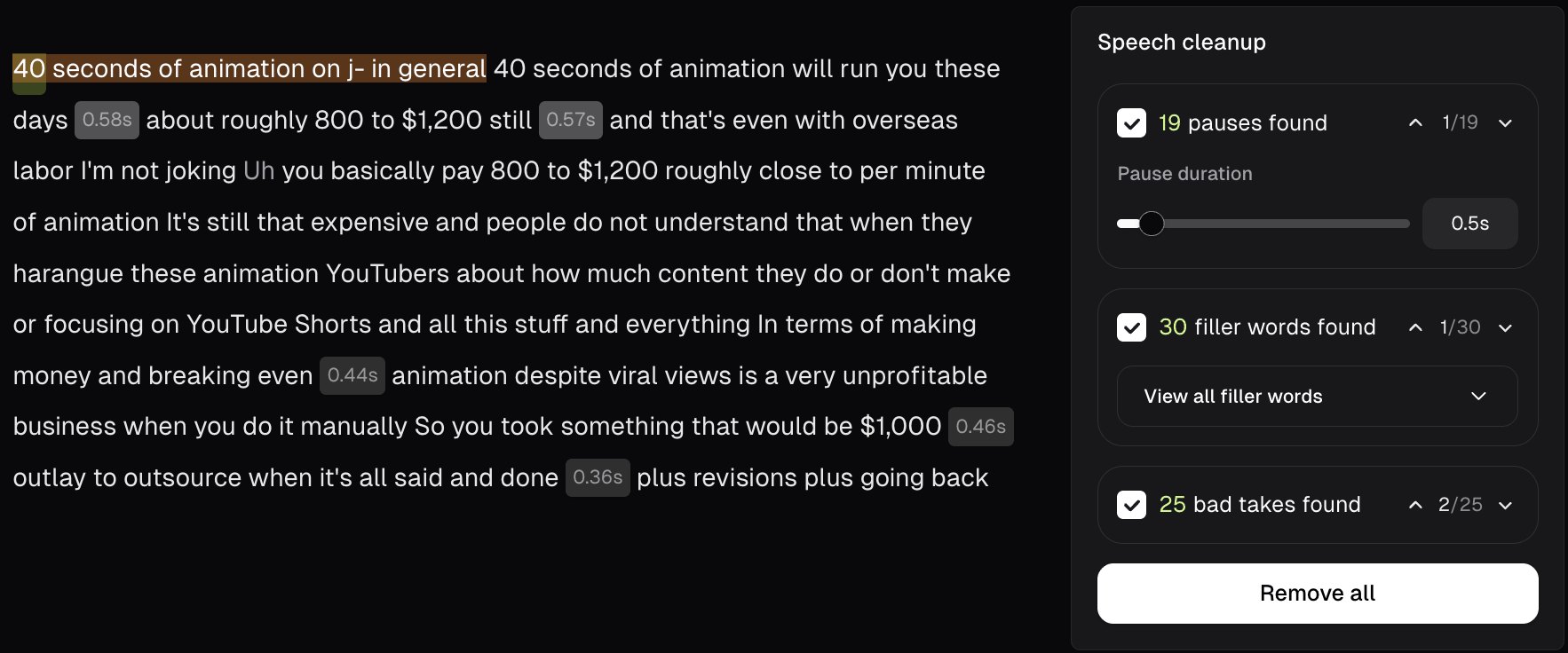
OpusClip's transcript view with highlighted words and gray pause chips beside a Speech cleanup panel listing pauses, filler words and bad takes found

OpusClip's Speech cleanup panel, with the video preview cropped out. Source: OpusClip help center

OpusClip has a church page and a sermon clips page. The sermon clips page says a service recording can be uploaded as a file or pasted as a link, and that with ClipAnything a prompt pulls the specific moments wanted while a timeframe can be set so the worship set is not clipped as teaching. The help center's timeframe article says to choose the start and end times after submitting a video, and its prompts article says ClipAnything takes natural-language prompts for scenes, events and emotional moments. The help center's supported sources article says a link must be public or unlisted because private videos cannot be accessed.

Names and captions matter in a sermon. The sermon clips page says captions come with the clips, that an SRT the church already has can be uploaded at submission and used instead of the generated transcript, and that Brand Vocabulary teaches the transcript the names, books and terms it keeps mishearing. The Brand Vocabulary article describes fixing a word once, applying the fix to every instance in the clip and adding it to the vocabulary for new clips. The Subject Tracking article describes following a speaker who moves, such as one pacing during a presentation. For a recording made from the back of the hall, Speech Enhancement reduces background noise and isolates the voice, and Speech Cleanup detects filler words, pauses and bad takes and cuts nothing without approval.

Posting and live services are covered in the help center. The schedule clips article describes scheduling from the results page or from a calendar, where descriptions and hashtags are drafted automatically. A service that streamed live has to finish before it can be imported: the live streams article says uploading a live video while it is still streaming is not supported, and that YouTube may need time to process a finished stream before the link works.

Pricing: OpusClip's pricing page lists Free at $0 (with a watermark), Starter at $15 a month (monthly billing only) and Pro at $29 a month, or $14.50 a month billed annually. Business is custom. Each plan lists its credits on the pricing page.

Considerations: OpusClip is a clipping tool first. Its sermon clips page FAQ says sermon clips use the same clipping, captioning, layout and scheduling tools as any long recording, so the written follow-ups in items 2, 3 and 5, such as devotionals and discussion guides, are what those tools list. The help center introduction describes the in-app editor as the place for minor tweaks to clips the AI has found. Some of the features above have plan notes in their help articles, so check the article for the church's plan before relying on one.

  • Choose it if the weekly service recording should become captioned vertical clips, with a prompt or a timeframe to leave out the worship set and a fix for names the transcript gets wrong.
  • Skip it if the same sermon should also become a devotional, a discussion guide or a newsletter in one tool, which items 2, 3 and 5 list.

2. Sermon Shots: Best for a sermon-built tool that adds quotes, verse lists and devotionals to the clips

Sermon Shots' home page says to upload a sermon from YouTube, a computer or a livestream, and says its AI analyzer was built specifically for sermons, which is the vendor's own description. Its features page lists AI suggested clips ("choose from 5-15 AI-generated clips, ready for immediate use") that can be trimmed or extended, and also lists cutting a video by choosing sentences from the transcript, caption animation, hook animations, music, smart search, custom templates and an AI Camera Crew.

Beyond clips, the features page lists pulling 20 quotes and every Bible verse reference from a sermon, summaries, a discussion guide, a five-day devotional, a blog post, quote images, thumbnails, carousels, audio for a podcast and video dubbing. Its plan cards put the discussion guides, devotionals, quotes and verses on Silver Suite and dubbing on Gold Suite.

Pricing: Sermon Shots' pricing page lists Free with 2 free sermon clips and no card required (its plan grid shows the 2 clips as one time), Plus at $63 a month billed monthly or $53 a month billed $636 a year, and Silver Suite at $67 a month billed monthly or $57 a month billed $684 a year. Plus lists unlimited sermon clips and 10 hours of uploads a month, and the paid plans list a 14-day free trial.

Considerations: The written follow-ups sit on Silver Suite rather than Plus, and Plus lists 10 hours of uploads a month, with a page for adding hours to a longer service. The Free card is described as perfect for trying Sermon Shots and lists 2 clips.

  • Choose it if one vendor that writes for churches should make the clips and the written follow-ups.
  • Skip it if clips are the only need, since the devotionals and guides are on a higher plan than Plus.

3. Pulpit AI: Best for churches that publish on Subsplash

Pulpit AI is made by Subsplash. Its home page says to upload a video, audio file or PDF and browse more than 20 pieces of content, including video clips, group guides, daily devotions and weekly newsletters, and its Subsplash page says one sermon, whether video, audio or manuscript, becomes social posts, small group guides, devotionals and video clips with captions.

For clips, the home page says to create a captioned reel by highlighting any spot on the transcript or to choose from auto-created clips, with caption fonts, colors, size and karaoke highlighting. The Subsplash page says Pulpit AI resources can be generated from any media item in the Subsplash Media library without re-uploading anything, and that every piece of content, from post copy to video captions, is editable. The page also describes a chat assistant for sermon preparation, which is a different job from clips.

Pricing: Pulpit AI's pricing page lists Basic at $39 a month billed monthly with 5 file uploads a month, Standard at $59 with 10 and Pro at $129 with 25. Each lists unlimited custom and automatic clips and customizable captions, and the page offers 10 percent off yearly billing. A free trial lists 2 free uploads with no card required.

Considerations: Plans are sized in file uploads a month, so a church that also records midweek services should count uploads before choosing a plan. The pricing page says every plan includes the full suite of features, so the plan choice is about uploads rather than clip features.

  • Choose it if the church already uses Subsplash, or wants a devotional and a small group guide as well as clips from each message.
  • Skip it if clips are the only need, or several recordings a week would not fit the plan's upload count.

4. SermonAudio Smart Clips: Best for broadcasters who already publish sermons on SermonAudio

SermonAudio announced Smart Clips in a news post dated February 7, 2026. The post says Smart Clips takes a full-length sermon, uses Vault AI to find the best clips and generates vertical video clips with dynamic captions, and that it is available to all broadcasters. Clips are managed in a Clips tab on each sermon in the Sermon Manager Dashboard, and can be created automatically or by choosing begin and end points. There is an option to center the speaker, because a vertical crop removes both sides of the frame.

The post says Smart Clips is built into the Broadcaster Dashboard with no third-party services required, that clips can be reviewed and cross-published to social platforms, and that each clip can end with a QR code that leads back to the full sermon. The sermon player has a Clips Panel that links every clip to its source sermon.

Pricing: The announcement prints no price or free allowance, so see SermonAudio for what a broadcaster account includes.

Considerations: Smart Clips works on sermons published to SermonAudio, so it is not a tool for an arbitrary recording, and the source is an announcement rather than a feature page, so the details above are the ones it prints.

  • Choose it if the church or ministry already broadcasts its sermons on SermonAudio and wants the clips to link back to the full message.
  • Skip it if the recordings live elsewhere, or the clips need a caption template, a scheduler or written follow-ups, none of which the announcement lists.

5. Castmagic: Best for clips plus a devotional and a newsletter from the same transcript

Castmagic's sermon clip generator page says to paste a YouTube or Vimeo link to the service, or upload the recording. Castmagic transcribes the message, flags the lines that stand on their own and cuts captioned vertical clips, and the team picks which to clip. The page lists clips in 9:16, 1:1, 4:5 and 16:9, and says an audio-only recording becomes an audiogram, a waveform video with the same captions.

Its churches page says to bring in Sunday sermons, livestream services, Bible studies and a church podcast, and the same transcript drafts a devotional, social posts, quote cards, a small group guide and a newsletter from templates the church saves. The sermon page says transcription covers 60+ languages and that clips export without a watermark on every plan.

Pricing: Castmagic's sermon page says plans start at $29 a month, or $239 a year, and its pricing page shows the Hobby plan at $239 a year billed annually. The sermon page lists no free plan for Castmagic.

Considerations: The pricing page counts transcribed hours as a library total, 30 hours on Hobby, and says more hours can be bought anytime. The sermon page describes picking the flagged moments and exporting them, so check how a clip's start and end are adjusted before buying.

  • Choose it if the same sermon should yield clips, an audiogram for an audio-only recording and written follow-ups.
  • Skip it if a free plan matters, since its sermon page lists none.

6. Choppity: Best for volunteers who edit clips by editing text

Choppity has a sermon clip generator page and a churches page. Both say to paste a YouTube sermon link or upload a file, and the tool page lists MP4, MOV, MP3, WAV and M4A uploads up to 10 GB. The churches page says AI detects key moments, that volunteers refine clips by editing transcript text, and that clips come with animated captions, speaker tracking and direct posting to TikTok, Reels and Shorts.

The pages print several different clip counts for one sermon, listed in Red flags below.

Pricing: Choppity's pricing page lists Free at $0 with 45 minutes of AI video analysis and 3-day project storage, and Starter at $16.80 a month billed yearly ($201.60 a year), which lists 3 hours of analysis, 30-day project storage, 1080p and 4K exports, scheduling and 1 social account.

Considerations: Free keeps projects for 3 days, so clips need downloading promptly. The church pages describe text-based edits for volunteers.

  • Choose it if volunteers with little editing experience will review and trim clips as text.
  • Skip it if the clips need editing beyond the text edits its church pages describe.

7. quso.ai: Best for a reviewed shortlist and a free plan sized against one sermon

quso.ai's sermon clips page says to paste a link (YouTube, Vimeo, Google Drive, Dropbox, Zoom and others) or upload a file. It transcribes the speech and proposes candidate clips where a thought starts and ends, adds captions editable word by word in one of 10 animated styles, and also yields 16:9 chapters, segments longer than 60 seconds, next to the 9:16 shorts. A custom clip can be cut by selecting a passage in the word-level transcript.

The page is direct about limits. It says quso.ai has no sermon-trained model, does not check Scripture references or identify who is speaking, and that a reviewer should confirm both before a clip goes out. It says nothing publishes until someone on the team chooses to export or schedule it, and that worship music under the message, congregation noise or a distant microphone can reduce transcript quality, which affects captions and clip boundaries.

Pricing: quso.ai's pricing page lists Free at $0 with 75 credits a month, 720p with a quso.ai watermark and TikTok publishing, and Lite at $29 a month billed monthly, or $174 a year. The sermon page counts about one credit for each minute of video, so a 45-minute sermon uses about 45 of the 75, and says a church posting every week would need a paid plan. Its FAQ adds that Free downloads are capped at 5 minutes per clip.

Considerations: Free renders carry a watermark and connect to TikTok only, and the pricing page lists 7 days of data retention on Free. Every candidate needs a person to read it against the transcript.

  • Choose it if a person will check each candidate clip, and a free first try on one sermon is wanted.
  • Skip it if the Free plan's watermark and TikTok-only publishing do not fit, or no one has time to review candidates.

How we compared these tools

We compared each tool on five criteria: what goes in, how moments are found, what comes out, the church or sermon feature its pages name, and the free access the vendor prints. This guide is organised around the job in the title, turning a sermon recording into short clips. OpusClip comes first because that job is what its church and sermon clips pages describe: a service recording in, clips out. Its limits are in its entry: its sermon clips page says sermon clips use the same tools as any long recording, and the help center calls the in-app editor a place for minor tweaks. Items 2 to 7 follow one yardstick: how directly each vendor's own pages describe sermon work, from tools built for sermons (Sermon Shots, Pulpit AI), to a tool inside a sermon host (SermonAudio Smart Clips), to general tools whose pages carry a church page (Castmagic, Choppity), ending with the one whose page says it has no sermon-trained model (quso.ai).

  • 2. Sermon Shots: home, features and pricing pages.
  • 3. Pulpit AI: its own site, pricing page and the Subsplash product page.
  • 4. SermonAudio Smart Clips: the February 2026 announcement.
  • 5. Castmagic: sermon clip generator, churches and pricing pages.
  • 6. Choppity: sermon clip generator, churches and pricing pages.
  • 7. quso.ai: sermon clips generator and pricing pages.

All facts come from each vendor's own pricing page, product pages and help center, read on November 25, 2026. Where a page loads its figures with a script we read the rendered page, and for plan cards on Sermon Shots, Pulpit AI and Choppity we looked at the card itself rather than the extracted text. We did not run hands-on tests of any competitor, and this guide prints no accuracy figure. We also read Submagic's sermon shorts page, which prints a short general feature list, and Ministry Brands' Equip page, which lists short-form video clips inside a sermon preparation and content suite; neither describes the clip steps, so both are left out. Outreach Social's clips page returned only navigation text to our browser. Prices change, so confirm on the vendor's page before buying.

Red flags to watch for

  • Free allowances in different units. Sermon Shots lists 2 free sermon clips, Pulpit AI 2 free uploads in a trial, Choppity 45 minutes of AI video analysis, quso.ai 75 credits a month and Castmagic lists no free plan. OpusClip's Free plan is $0 with a watermark, and its pricing page lists the credits. None of these is the same size, so compare them against one real sermon.
  • Watermarks and short retention. OpusClip's and quso.ai's Free plans print a watermark on output, and Castmagic's page says exports carry none on any plan. Choppity's Free card lists 3-day project storage and quso.ai's lists 7 days of data retention, so download clips promptly.
  • Clip counts that are marketing ranges. Sermon Shots says 5-15 suggested clips, and Choppity's pages say 30+, 30-50+, 20-50+ and 20-30+ for a sermon. Judge a tool by what it returns for one real recording.
  • A clip without its context. quso.ai's page says it does not check Scripture references or identify speakers. Review every AI-picked clip so a point is not cut from the passage around it, and read the captions for names and passage references. OpusClip's help center describes saving a corrected term and uploading an SRT.
  • Music and people in the recording. A recorded sermon can contain music and other people. Check the rights to any music in the recording and get permission from anyone featured. OpusClip's copyright policy article says uploads must be content the uploader has the right to use, and quso.ai's page says to upload only recordings the church owns or has permission to use. We did not review the other vendors' terms.
  • Clipping a service that is still live. OpusClip's help center says a live video cannot be uploaded while it is still streaming and that a finished YouTube stream may need time before its link works, so process the recording after the service ends.
  • Written follow-ups are drafts. Pulpit AI says every piece of content is editable. A pastor or staff member should read each generated devotional, guide and caption before it goes out.

Frequently asked questions

What is the best AI sermon clip generator?

It depends on what should come out. For turning a full service recording into short captioned vertical clips, OpusClip is the pick in this guide: its sermon clips page describes a file or link going in, a prompt or timeframe to leave out the worship set, and captions with a vertical crop that follows the speaker. Sermon Shots and Pulpit AI are built for sermons and add written follow-ups, Castmagic adds a devotional and a newsletter, Choppity and quso.ai are general clippers with church pages, and SermonAudio Smart Clips is for sermons already on SermonAudio.

What are the best tools to repurpose sermons into social media clips?

Clip tools make the short videos, and sermon suites also make the written pieces: Sermon Shots lists quote images, carousels and devotionals, Pulpit AI lists group guides and newsletters, and Castmagic lists a devotional and quote cards. OpusClip, Choppity and quso.ai describe the clip step. For other recorded-conversation jobs see our guide to AI podcast and webinar clip makers.

What program can a church use to edit sermon videos?

For short clips, the tools here cut the clips and let a volunteer fix them. OpusClip's help center describes trimming a clip by selecting text or dragging segment ends, Choppity and Sermon Shots list cutting by editing text or choosing sentences, and Pulpit AI lets a spot in the transcript become a clip. This guide does not cover full timeline editors for editing the whole service.

How do I make sermon clips from a livestream or a YouTube link?

Wait until the stream has ended, then paste the link or upload the file. OpusClip's help center says a link must be public or unlisted and that a live video cannot be uploaded while it is still streaming, and its sermon clips page and church page describe the flow. Sermon Shots, Choppity, Castmagic and quso.ai each list a YouTube link as an input, and Sermon Shots also lists a livestream.

Can a sermon clip tool skip the worship set and clip only the teaching?

Several describe a way to point at the part wanted. OpusClip's sermon clips page describes a timeframe and a typed prompt, quso.ai cuts a custom clip from selected transcript text, Sermon Shots cuts by choosing sentences, and Pulpit AI makes a clip from a highlighted spot in the transcript. Review the result either way, because no tool can know which moment a church wants to share.

Are there free sermon clip tools?

Several print free access, each in a different unit, and Castmagic's sermon page lists no free plan. OpusClip's Free plan is $0 with a watermark; the other entries are in At a glance. Our guide to free AI clipping tools compares more.

What should a church check before posting a sermon clip?

Check the rights to any music in the recording, get permission from anyone featured, read the captions for names and passage references, and make sure the clip keeps the point in its context. The Red flags section above has the vendor wording.

Can AI make a promo video for a church event, or does it only clip sermons?

The tools in this guide cut clips from a recording. Agent Opus, a separate OpusClip product, describes making videos from a script or brief: its church video generator page names sermon notes, event briefs and ministry announcements, and its countdown page names pre-service timers. Its help center FAQ says it is not the right choice when a video has to show exactly what a specific real person, place or building looks like.
On this page

Use our Free Forever Plan

Find the moment. Skip the scrubbing.

From script to polished video — in one click.

Create and post one short video every day for free, and grow faster.

OpusSearch uses AI to surface the exact clip you need from hours of footage — in seconds, not afternoons.

Agent Opus runs the entire video pipeline for you: research, scriptwriting, storyboarding, motion, voice, and edit. Upload the idea, post the result.

7 Best Tools for Churches and Ministries to Turn Sermons Into Short Clips in 2026

OpusClip is the pick for turning a church's full service recording into short captioned vertical clips: its sermon clips page describes a file or link going in and AI-picked moments coming out, with a prompt or a timeframe to leave the worship set out. Sermon Shots, Pulpit AI and Castmagic add written follow-ups such as devotionals and discussion guides, SermonAudio builds clips into its sermon host, and Choppity and quso.ai are general clippers with church pages. Items 2 to 7 run from tools built for sermons to general tools. Facts are from vendor pages read on November 25, 2026.

Key takeaways

  • Best for turning a full service recording into short captioned vertical clips: OpusClip. Its sermon clips page describes a prompt or a timeframe that keeps the worship set out of the clips.
  • Best for a sermon-built tool that adds quotes, verse lists and devotionals to the clips: Sermon Shots. Its Silver Suite lists discussion guides, devotionals, quotes and verses next to the clips.
  • Best for churches that publish on Subsplash: Pulpit AI. Its Subsplash page says resources are generated from any media item in the library without re-uploading.
  • Best for broadcasters who already publish sermons on SermonAudio: Smart Clips. Its announcement says clips are made in the Broadcaster Dashboard.
  • Best for clips plus a devotional and a newsletter from the same transcript: Castmagic. Its sermon page also turns an audio-only recording into an audiogram.
  • Best for volunteers who edit clips by editing text: Choppity. Its churches page says volunteers refine clips by editing transcript text.
  • Best for a reviewed shortlist and a free plan sized against one sermon: quso.ai. Its page works through a 45-minute sermon against the free plan's 75 credits.

What counts as a sermon clip tool for churches and ministries

A church or ministry records a weekly service, and the recording is one long video with a worship set, announcements and a teaching section in it. The job is to find the moments that can stand alone, caption them, crop them to vertical and get them posted. Tools for that job come in three kinds. Clip tools take a recording and return clips: OpusClip, Choppity and quso.ai. Sermon suites add written follow-ups such as quotes, devotionals, discussion guides and newsletters to the clips: Sermon Shots, Pulpit AI and Castmagic. A sermon host can build the clip step into the place sermons already live: SermonAudio Smart Clips. This guide is written for churches and ministries of any tradition and describes what each tool does, not what a congregation should post.

A different job is making a video from a script, sermon notes or an event brief when there is no recording to cut. Agent Opus, a separate OpusClip product, has an AI video generator for churches page that describes turning sermon notes, event briefs and ministry announcements into videos, and a church countdown video maker page for pre-service timers. Its help center FAQ says Agent Opus builds a scene from a description rather than recording one and is not the right choice when the video has to show exactly what a specific real person, place or building looks like, so footage of the pastor or the sanctuary belongs in a clip tool. Neither is a numbered item here. For more recorded-conversation tools, see our guides to turning webinars into short clips and AI podcast and webinar clip makers.

How to choose

  • The Sunday recording should become captioned vertical clips: OpusClip, Choppity or quso.ai. OpusClip's church page and sermon clips page describe that flow for a service recording.
  • The same sermon should also become a devotional, a discussion guide or a newsletter: Sermon Shots, Pulpit AI or Castmagic list written follow-ups next to the clips.
  • The sermons already live on Subsplash or SermonAudio: Pulpit AI works from the Subsplash library, and Smart Clips works from a sermon in the SermonAudio Sermon Manager.
  • Volunteers will review and trim the clips: Choppity and Sermon Shots list text-based cutting, Pulpit AI lets a spot in the transcript become a clip, and OpusClip's help center describes trimming by selecting text.
  • Only the teaching should be clipped, not the worship set: OpusClip's sermon clips page describes a timeframe and a prompt, quso.ai cuts a custom clip from selected transcript text, and Sermon Shots cuts by choosing sentences.
  • The recording is audio only: Castmagic prints audiograms for audio-only sermons, and Choppity and Pulpit AI list audio uploads.

At a glance

  • OpusClip: best for turning a full service recording into short captioned vertical clips; Starter $15 a month (monthly billing only), Pro $29 a month or $14.50 a month billed annually; free plan yes ($0 with a watermark).
  • Sermon Shots: best for a sermon-built tool that adds quotes, verse lists and devotionals to the clips; Plus $63 a month billed monthly ($53 a month billed $636 a year), Silver Suite $67 a month billed monthly ($57 a month billed $684 a year); free plan yes (2 free sermon clips, no card required).
  • Pulpit AI: best for churches that publish on Subsplash; Basic $39 a month billed monthly (5 file uploads a month); free trial with 2 free uploads, no card required.
  • SermonAudio Smart Clips: best for broadcasters who already publish sermons on SermonAudio; no price printed in the announcement, which says it is available to all broadcasters.
  • Castmagic: best for clips plus a devotional and a newsletter from the same transcript; its sermon page says plans start at $29 a month, or $239 a year; no free plan listed.
  • Choppity: best for volunteers who edit clips by editing text; Starter $16.80 a month billed yearly ($201.60 a year); free plan yes ($0, 45 minutes of AI video analysis).
  • quso.ai: best for a reviewed shortlist and a free plan sized against one sermon; Lite $29 a month billed monthly, or $174 a year; free plan yes (75 credits a month, 720p with a watermark).

How each tool takes a sermon recording and returns clips

The At a glance list covers best-for and the first paid price; this table compares what goes in, how moments are found, what comes out, the church or sermon feature each page names, and the free access, as listed on each vendor's own pages on November 25, 2026.

ToolWhat goes inHow moments are foundWhat comes outChurch or sermon feature printedFree access as printed
OpusClipA file, or a link from YouTube, Vimeo, Facebook, Google Drive, Dropbox or a public .mp4 URLA typed ClipAnything prompt or a chosen timeframe narrows what is clippedCaptioned clips with a vertical crop that follows the speakerNames fixed once with Brand Vocabulary; an uploaded SRT can replace the transcriptFree: $0 with a watermark
Sermon ShotsA YouTube link, a file from your computer, or a livestreamAI suggested clips, or cut by choosing sentences in the transcriptVertical sermon clips with caption animation and hook animations; clips can be trimmed or extendedPulled quotes, Bible verse references, devotionals and discussion guides on higher plansFree: 2 free sermon clips, no card required
Pulpit AIA video, audio file, PDF, document or slidesAuto-created clips, or highlight a spot in the transcript to make a clipCaptioned clips with fonts, colors and karaoke highlighting; guides, devotionals and newslettersWorks from the Subsplash media library without re-uploadingFree trial with 2 free uploads
SermonAudio Smart ClipsA sermon already in a broadcaster's Sermon ManagerVault AI finds clips, or the broadcaster sets begin and end pointsVertical clips with dynamic captions and an optional QR code at the endBuilt into the Broadcaster Dashboard and the sermon playerAnnouncement says it is available to all broadcasters; no price printed
CastmagicA YouTube or Vimeo link, or an uploadFlags lines that stand on their own in the transcript; the team picks which to clipCaptioned clips in four sizes, audiograms, plus a devotional, posts and a newsletterA churches page that names sermon clips, devotionals and newslettersNo free plan printed; no watermark on exports
ChoppityA YouTube sermon link, or an MP4, MOV, MP3, WAV or M4A uploadAI detects key moments; volunteers refine clips by editing transcript textCaptioned clips with speaker tracking and direct posting to TikTok, Reels and ShortsA churches page with a workflow written for volunteer teamsFree: $0, 45 minutes of AI video analysis
quso.aiA link (YouTube, Vimeo, Google Drive, Dropbox, Zoom) or a fileProposes candidate clips from the transcript; custom clips are cut from selected textCaptioned 9:16 shorts and longer 16:9 chapters, as MP4 or scheduled postsSays it has no sermon-trained model and leaves Scripture references to a reviewerFree: 75 credits a month, 720p with a watermark

1. OpusClip: Best for turning a full service recording into short captioned vertical clips

OpusClip's transcript view with highlighted words and gray pause chips beside a Speech cleanup panel listing pauses, filler words and bad takes found

OpusClip's Speech cleanup panel, with the video preview cropped out. Source: OpusClip help center

OpusClip has a church page and a sermon clips page. The sermon clips page says a service recording can be uploaded as a file or pasted as a link, and that with ClipAnything a prompt pulls the specific moments wanted while a timeframe can be set so the worship set is not clipped as teaching. The help center's timeframe article says to choose the start and end times after submitting a video, and its prompts article says ClipAnything takes natural-language prompts for scenes, events and emotional moments. The help center's supported sources article says a link must be public or unlisted because private videos cannot be accessed.

Names and captions matter in a sermon. The sermon clips page says captions come with the clips, that an SRT the church already has can be uploaded at submission and used instead of the generated transcript, and that Brand Vocabulary teaches the transcript the names, books and terms it keeps mishearing. The Brand Vocabulary article describes fixing a word once, applying the fix to every instance in the clip and adding it to the vocabulary for new clips. The Subject Tracking article describes following a speaker who moves, such as one pacing during a presentation. For a recording made from the back of the hall, Speech Enhancement reduces background noise and isolates the voice, and Speech Cleanup detects filler words, pauses and bad takes and cuts nothing without approval.

Posting and live services are covered in the help center. The schedule clips article describes scheduling from the results page or from a calendar, where descriptions and hashtags are drafted automatically. A service that streamed live has to finish before it can be imported: the live streams article says uploading a live video while it is still streaming is not supported, and that YouTube may need time to process a finished stream before the link works.

Pricing: OpusClip's pricing page lists Free at $0 (with a watermark), Starter at $15 a month (monthly billing only) and Pro at $29 a month, or $14.50 a month billed annually. Business is custom. Each plan lists its credits on the pricing page.

Considerations: OpusClip is a clipping tool first. Its sermon clips page FAQ says sermon clips use the same clipping, captioning, layout and scheduling tools as any long recording, so the written follow-ups in items 2, 3 and 5, such as devotionals and discussion guides, are what those tools list. The help center introduction describes the in-app editor as the place for minor tweaks to clips the AI has found. Some of the features above have plan notes in their help articles, so check the article for the church's plan before relying on one.

  • Choose it if the weekly service recording should become captioned vertical clips, with a prompt or a timeframe to leave out the worship set and a fix for names the transcript gets wrong.
  • Skip it if the same sermon should also become a devotional, a discussion guide or a newsletter in one tool, which items 2, 3 and 5 list.

2. Sermon Shots: Best for a sermon-built tool that adds quotes, verse lists and devotionals to the clips

Sermon Shots' home page says to upload a sermon from YouTube, a computer or a livestream, and says its AI analyzer was built specifically for sermons, which is the vendor's own description. Its features page lists AI suggested clips ("choose from 5-15 AI-generated clips, ready for immediate use") that can be trimmed or extended, and also lists cutting a video by choosing sentences from the transcript, caption animation, hook animations, music, smart search, custom templates and an AI Camera Crew.

Beyond clips, the features page lists pulling 20 quotes and every Bible verse reference from a sermon, summaries, a discussion guide, a five-day devotional, a blog post, quote images, thumbnails, carousels, audio for a podcast and video dubbing. Its plan cards put the discussion guides, devotionals, quotes and verses on Silver Suite and dubbing on Gold Suite.

Pricing: Sermon Shots' pricing page lists Free with 2 free sermon clips and no card required (its plan grid shows the 2 clips as one time), Plus at $63 a month billed monthly or $53 a month billed $636 a year, and Silver Suite at $67 a month billed monthly or $57 a month billed $684 a year. Plus lists unlimited sermon clips and 10 hours of uploads a month, and the paid plans list a 14-day free trial.

Considerations: The written follow-ups sit on Silver Suite rather than Plus, and Plus lists 10 hours of uploads a month, with a page for adding hours to a longer service. The Free card is described as perfect for trying Sermon Shots and lists 2 clips.

  • Choose it if one vendor that writes for churches should make the clips and the written follow-ups.
  • Skip it if clips are the only need, since the devotionals and guides are on a higher plan than Plus.

3. Pulpit AI: Best for churches that publish on Subsplash

Pulpit AI is made by Subsplash. Its home page says to upload a video, audio file or PDF and browse more than 20 pieces of content, including video clips, group guides, daily devotions and weekly newsletters, and its Subsplash page says one sermon, whether video, audio or manuscript, becomes social posts, small group guides, devotionals and video clips with captions.

For clips, the home page says to create a captioned reel by highlighting any spot on the transcript or to choose from auto-created clips, with caption fonts, colors, size and karaoke highlighting. The Subsplash page says Pulpit AI resources can be generated from any media item in the Subsplash Media library without re-uploading anything, and that every piece of content, from post copy to video captions, is editable. The page also describes a chat assistant for sermon preparation, which is a different job from clips.

Pricing: Pulpit AI's pricing page lists Basic at $39 a month billed monthly with 5 file uploads a month, Standard at $59 with 10 and Pro at $129 with 25. Each lists unlimited custom and automatic clips and customizable captions, and the page offers 10 percent off yearly billing. A free trial lists 2 free uploads with no card required.

Considerations: Plans are sized in file uploads a month, so a church that also records midweek services should count uploads before choosing a plan. The pricing page says every plan includes the full suite of features, so the plan choice is about uploads rather than clip features.

  • Choose it if the church already uses Subsplash, or wants a devotional and a small group guide as well as clips from each message.
  • Skip it if clips are the only need, or several recordings a week would not fit the plan's upload count.

4. SermonAudio Smart Clips: Best for broadcasters who already publish sermons on SermonAudio

SermonAudio announced Smart Clips in a news post dated February 7, 2026. The post says Smart Clips takes a full-length sermon, uses Vault AI to find the best clips and generates vertical video clips with dynamic captions, and that it is available to all broadcasters. Clips are managed in a Clips tab on each sermon in the Sermon Manager Dashboard, and can be created automatically or by choosing begin and end points. There is an option to center the speaker, because a vertical crop removes both sides of the frame.

The post says Smart Clips is built into the Broadcaster Dashboard with no third-party services required, that clips can be reviewed and cross-published to social platforms, and that each clip can end with a QR code that leads back to the full sermon. The sermon player has a Clips Panel that links every clip to its source sermon.

Pricing: The announcement prints no price or free allowance, so see SermonAudio for what a broadcaster account includes.

Considerations: Smart Clips works on sermons published to SermonAudio, so it is not a tool for an arbitrary recording, and the source is an announcement rather than a feature page, so the details above are the ones it prints.

  • Choose it if the church or ministry already broadcasts its sermons on SermonAudio and wants the clips to link back to the full message.
  • Skip it if the recordings live elsewhere, or the clips need a caption template, a scheduler or written follow-ups, none of which the announcement lists.

5. Castmagic: Best for clips plus a devotional and a newsletter from the same transcript

Castmagic's sermon clip generator page says to paste a YouTube or Vimeo link to the service, or upload the recording. Castmagic transcribes the message, flags the lines that stand on their own and cuts captioned vertical clips, and the team picks which to clip. The page lists clips in 9:16, 1:1, 4:5 and 16:9, and says an audio-only recording becomes an audiogram, a waveform video with the same captions.

Its churches page says to bring in Sunday sermons, livestream services, Bible studies and a church podcast, and the same transcript drafts a devotional, social posts, quote cards, a small group guide and a newsletter from templates the church saves. The sermon page says transcription covers 60+ languages and that clips export without a watermark on every plan.

Pricing: Castmagic's sermon page says plans start at $29 a month, or $239 a year, and its pricing page shows the Hobby plan at $239 a year billed annually. The sermon page lists no free plan for Castmagic.

Considerations: The pricing page counts transcribed hours as a library total, 30 hours on Hobby, and says more hours can be bought anytime. The sermon page describes picking the flagged moments and exporting them, so check how a clip's start and end are adjusted before buying.

  • Choose it if the same sermon should yield clips, an audiogram for an audio-only recording and written follow-ups.
  • Skip it if a free plan matters, since its sermon page lists none.

6. Choppity: Best for volunteers who edit clips by editing text

Choppity has a sermon clip generator page and a churches page. Both say to paste a YouTube sermon link or upload a file, and the tool page lists MP4, MOV, MP3, WAV and M4A uploads up to 10 GB. The churches page says AI detects key moments, that volunteers refine clips by editing transcript text, and that clips come with animated captions, speaker tracking and direct posting to TikTok, Reels and Shorts.

The pages print several different clip counts for one sermon, listed in Red flags below.

Pricing: Choppity's pricing page lists Free at $0 with 45 minutes of AI video analysis and 3-day project storage, and Starter at $16.80 a month billed yearly ($201.60 a year), which lists 3 hours of analysis, 30-day project storage, 1080p and 4K exports, scheduling and 1 social account.

Considerations: Free keeps projects for 3 days, so clips need downloading promptly. The church pages describe text-based edits for volunteers.

  • Choose it if volunteers with little editing experience will review and trim clips as text.
  • Skip it if the clips need editing beyond the text edits its church pages describe.

7. quso.ai: Best for a reviewed shortlist and a free plan sized against one sermon

quso.ai's sermon clips page says to paste a link (YouTube, Vimeo, Google Drive, Dropbox, Zoom and others) or upload a file. It transcribes the speech and proposes candidate clips where a thought starts and ends, adds captions editable word by word in one of 10 animated styles, and also yields 16:9 chapters, segments longer than 60 seconds, next to the 9:16 shorts. A custom clip can be cut by selecting a passage in the word-level transcript.

The page is direct about limits. It says quso.ai has no sermon-trained model, does not check Scripture references or identify who is speaking, and that a reviewer should confirm both before a clip goes out. It says nothing publishes until someone on the team chooses to export or schedule it, and that worship music under the message, congregation noise or a distant microphone can reduce transcript quality, which affects captions and clip boundaries.

Pricing: quso.ai's pricing page lists Free at $0 with 75 credits a month, 720p with a quso.ai watermark and TikTok publishing, and Lite at $29 a month billed monthly, or $174 a year. The sermon page counts about one credit for each minute of video, so a 45-minute sermon uses about 45 of the 75, and says a church posting every week would need a paid plan. Its FAQ adds that Free downloads are capped at 5 minutes per clip.

Considerations: Free renders carry a watermark and connect to TikTok only, and the pricing page lists 7 days of data retention on Free. Every candidate needs a person to read it against the transcript.

  • Choose it if a person will check each candidate clip, and a free first try on one sermon is wanted.
  • Skip it if the Free plan's watermark and TikTok-only publishing do not fit, or no one has time to review candidates.

How we compared these tools

We compared each tool on five criteria: what goes in, how moments are found, what comes out, the church or sermon feature its pages name, and the free access the vendor prints. This guide is organised around the job in the title, turning a sermon recording into short clips. OpusClip comes first because that job is what its church and sermon clips pages describe: a service recording in, clips out. Its limits are in its entry: its sermon clips page says sermon clips use the same tools as any long recording, and the help center calls the in-app editor a place for minor tweaks. Items 2 to 7 follow one yardstick: how directly each vendor's own pages describe sermon work, from tools built for sermons (Sermon Shots, Pulpit AI), to a tool inside a sermon host (SermonAudio Smart Clips), to general tools whose pages carry a church page (Castmagic, Choppity), ending with the one whose page says it has no sermon-trained model (quso.ai).

  • 2. Sermon Shots: home, features and pricing pages.
  • 3. Pulpit AI: its own site, pricing page and the Subsplash product page.
  • 4. SermonAudio Smart Clips: the February 2026 announcement.
  • 5. Castmagic: sermon clip generator, churches and pricing pages.
  • 6. Choppity: sermon clip generator, churches and pricing pages.
  • 7. quso.ai: sermon clips generator and pricing pages.

All facts come from each vendor's own pricing page, product pages and help center, read on November 25, 2026. Where a page loads its figures with a script we read the rendered page, and for plan cards on Sermon Shots, Pulpit AI and Choppity we looked at the card itself rather than the extracted text. We did not run hands-on tests of any competitor, and this guide prints no accuracy figure. We also read Submagic's sermon shorts page, which prints a short general feature list, and Ministry Brands' Equip page, which lists short-form video clips inside a sermon preparation and content suite; neither describes the clip steps, so both are left out. Outreach Social's clips page returned only navigation text to our browser. Prices change, so confirm on the vendor's page before buying.

Red flags to watch for

  • Free allowances in different units. Sermon Shots lists 2 free sermon clips, Pulpit AI 2 free uploads in a trial, Choppity 45 minutes of AI video analysis, quso.ai 75 credits a month and Castmagic lists no free plan. OpusClip's Free plan is $0 with a watermark, and its pricing page lists the credits. None of these is the same size, so compare them against one real sermon.
  • Watermarks and short retention. OpusClip's and quso.ai's Free plans print a watermark on output, and Castmagic's page says exports carry none on any plan. Choppity's Free card lists 3-day project storage and quso.ai's lists 7 days of data retention, so download clips promptly.
  • Clip counts that are marketing ranges. Sermon Shots says 5-15 suggested clips, and Choppity's pages say 30+, 30-50+, 20-50+ and 20-30+ for a sermon. Judge a tool by what it returns for one real recording.
  • A clip without its context. quso.ai's page says it does not check Scripture references or identify speakers. Review every AI-picked clip so a point is not cut from the passage around it, and read the captions for names and passage references. OpusClip's help center describes saving a corrected term and uploading an SRT.
  • Music and people in the recording. A recorded sermon can contain music and other people. Check the rights to any music in the recording and get permission from anyone featured. OpusClip's copyright policy article says uploads must be content the uploader has the right to use, and quso.ai's page says to upload only recordings the church owns or has permission to use. We did not review the other vendors' terms.
  • Clipping a service that is still live. OpusClip's help center says a live video cannot be uploaded while it is still streaming and that a finished YouTube stream may need time before its link works, so process the recording after the service ends.
  • Written follow-ups are drafts. Pulpit AI says every piece of content is editable. A pastor or staff member should read each generated devotional, guide and caption before it goes out.

Frequently asked questions

What is the best AI sermon clip generator?

It depends on what should come out. For turning a full service recording into short captioned vertical clips, OpusClip is the pick in this guide: its sermon clips page describes a file or link going in, a prompt or timeframe to leave out the worship set, and captions with a vertical crop that follows the speaker. Sermon Shots and Pulpit AI are built for sermons and add written follow-ups, Castmagic adds a devotional and a newsletter, Choppity and quso.ai are general clippers with church pages, and SermonAudio Smart Clips is for sermons already on SermonAudio.

What are the best tools to repurpose sermons into social media clips?

Clip tools make the short videos, and sermon suites also make the written pieces: Sermon Shots lists quote images, carousels and devotionals, Pulpit AI lists group guides and newsletters, and Castmagic lists a devotional and quote cards. OpusClip, Choppity and quso.ai describe the clip step. For other recorded-conversation jobs see our guide to AI podcast and webinar clip makers.

What program can a church use to edit sermon videos?

For short clips, the tools here cut the clips and let a volunteer fix them. OpusClip's help center describes trimming a clip by selecting text or dragging segment ends, Choppity and Sermon Shots list cutting by editing text or choosing sentences, and Pulpit AI lets a spot in the transcript become a clip. This guide does not cover full timeline editors for editing the whole service.

How do I make sermon clips from a livestream or a YouTube link?

Wait until the stream has ended, then paste the link or upload the file. OpusClip's help center says a link must be public or unlisted and that a live video cannot be uploaded while it is still streaming, and its sermon clips page and church page describe the flow. Sermon Shots, Choppity, Castmagic and quso.ai each list a YouTube link as an input, and Sermon Shots also lists a livestream.

Can a sermon clip tool skip the worship set and clip only the teaching?

Several describe a way to point at the part wanted. OpusClip's sermon clips page describes a timeframe and a typed prompt, quso.ai cuts a custom clip from selected transcript text, Sermon Shots cuts by choosing sentences, and Pulpit AI makes a clip from a highlighted spot in the transcript. Review the result either way, because no tool can know which moment a church wants to share.

Are there free sermon clip tools?

Several print free access, each in a different unit, and Castmagic's sermon page lists no free plan. OpusClip's Free plan is $0 with a watermark; the other entries are in At a glance. Our guide to free AI clipping tools compares more.

What should a church check before posting a sermon clip?

Check the rights to any music in the recording, get permission from anyone featured, read the captions for names and passage references, and make sure the clip keeps the point in its context. The Red flags section above has the vendor wording.

Can AI make a promo video for a church event, or does it only clip sermons?

The tools in this guide cut clips from a recording. Agent Opus, a separate OpusClip product, describes making videos from a script or brief: its church video generator page names sermon notes, event briefs and ministry announcements, and its countdown page names pre-service timers. Its help center FAQ says it is not the right choice when a video has to show exactly what a specific real person, place or building looks like.

Creator name

Creator type

Team size

Channels

linkYouTubefacebookXTikTok

Pain point

Time to see positive ROI

About the creator

Don't miss these

How Audacy Drove 1B+ Views by Taking a Tech-Forward Approach to Radio with OpusClip
No items found.

How Audacy Drove 1B+ Views by Taking a Tech-Forward Approach to Radio with OpusClip

How All the Smoke makes hit compilations faster with OpusSearch

How All the Smoke makes hit compilations faster with OpusSearch

Growing a new channel to 1.5M views in 90 days without creating new videos

Growing a new channel to 1.5M views in 90 days without creating new videos

OpusClip 4.0 is here. Become a content powerhouse.

7 Best Tools for Churches and Ministries to Turn Sermons Into Short Clips in 2026

A man speaking in a bright hall, a woman editing on a laptop and a young man filming on a phone, with a play badge, a 9:16 tag, a Clip it button and a +39K views pill
No items found.
No items found.

Boost your social media growth with OpusClip

Create and post one short video every day for your social media and grow faster.

7 Best Tools for Churches and Ministries to Turn Sermons Into Short Clips in 2026

A man speaking in a bright hall, a woman editing on a laptop and a young man filming on a phone, with a play badge, a 9:16 tag, a Clip it button and a +39K views pill

OpusClip is the pick for turning a church's full service recording into short captioned vertical clips: its sermon clips page describes a file or link going in and AI-picked moments coming out, with a prompt or a timeframe to leave the worship set out. Sermon Shots, Pulpit AI and Castmagic add written follow-ups such as devotionals and discussion guides, SermonAudio builds clips into its sermon host, and Choppity and quso.ai are general clippers with church pages. Items 2 to 7 run from tools built for sermons to general tools. Facts are from vendor pages read on November 25, 2026.

Key takeaways

  • Best for turning a full service recording into short captioned vertical clips: OpusClip. Its sermon clips page describes a prompt or a timeframe that keeps the worship set out of the clips.
  • Best for a sermon-built tool that adds quotes, verse lists and devotionals to the clips: Sermon Shots. Its Silver Suite lists discussion guides, devotionals, quotes and verses next to the clips.
  • Best for churches that publish on Subsplash: Pulpit AI. Its Subsplash page says resources are generated from any media item in the library without re-uploading.
  • Best for broadcasters who already publish sermons on SermonAudio: Smart Clips. Its announcement says clips are made in the Broadcaster Dashboard.
  • Best for clips plus a devotional and a newsletter from the same transcript: Castmagic. Its sermon page also turns an audio-only recording into an audiogram.
  • Best for volunteers who edit clips by editing text: Choppity. Its churches page says volunteers refine clips by editing transcript text.
  • Best for a reviewed shortlist and a free plan sized against one sermon: quso.ai. Its page works through a 45-minute sermon against the free plan's 75 credits.

What counts as a sermon clip tool for churches and ministries

A church or ministry records a weekly service, and the recording is one long video with a worship set, announcements and a teaching section in it. The job is to find the moments that can stand alone, caption them, crop them to vertical and get them posted. Tools for that job come in three kinds. Clip tools take a recording and return clips: OpusClip, Choppity and quso.ai. Sermon suites add written follow-ups such as quotes, devotionals, discussion guides and newsletters to the clips: Sermon Shots, Pulpit AI and Castmagic. A sermon host can build the clip step into the place sermons already live: SermonAudio Smart Clips. This guide is written for churches and ministries of any tradition and describes what each tool does, not what a congregation should post.

A different job is making a video from a script, sermon notes or an event brief when there is no recording to cut. Agent Opus, a separate OpusClip product, has an AI video generator for churches page that describes turning sermon notes, event briefs and ministry announcements into videos, and a church countdown video maker page for pre-service timers. Its help center FAQ says Agent Opus builds a scene from a description rather than recording one and is not the right choice when the video has to show exactly what a specific real person, place or building looks like, so footage of the pastor or the sanctuary belongs in a clip tool. Neither is a numbered item here. For more recorded-conversation tools, see our guides to turning webinars into short clips and AI podcast and webinar clip makers.

How to choose

  • The Sunday recording should become captioned vertical clips: OpusClip, Choppity or quso.ai. OpusClip's church page and sermon clips page describe that flow for a service recording.
  • The same sermon should also become a devotional, a discussion guide or a newsletter: Sermon Shots, Pulpit AI or Castmagic list written follow-ups next to the clips.
  • The sermons already live on Subsplash or SermonAudio: Pulpit AI works from the Subsplash library, and Smart Clips works from a sermon in the SermonAudio Sermon Manager.
  • Volunteers will review and trim the clips: Choppity and Sermon Shots list text-based cutting, Pulpit AI lets a spot in the transcript become a clip, and OpusClip's help center describes trimming by selecting text.
  • Only the teaching should be clipped, not the worship set: OpusClip's sermon clips page describes a timeframe and a prompt, quso.ai cuts a custom clip from selected transcript text, and Sermon Shots cuts by choosing sentences.
  • The recording is audio only: Castmagic prints audiograms for audio-only sermons, and Choppity and Pulpit AI list audio uploads.

At a glance

  • OpusClip: best for turning a full service recording into short captioned vertical clips; Starter $15 a month (monthly billing only), Pro $29 a month or $14.50 a month billed annually; free plan yes ($0 with a watermark).
  • Sermon Shots: best for a sermon-built tool that adds quotes, verse lists and devotionals to the clips; Plus $63 a month billed monthly ($53 a month billed $636 a year), Silver Suite $67 a month billed monthly ($57 a month billed $684 a year); free plan yes (2 free sermon clips, no card required).
  • Pulpit AI: best for churches that publish on Subsplash; Basic $39 a month billed monthly (5 file uploads a month); free trial with 2 free uploads, no card required.
  • SermonAudio Smart Clips: best for broadcasters who already publish sermons on SermonAudio; no price printed in the announcement, which says it is available to all broadcasters.
  • Castmagic: best for clips plus a devotional and a newsletter from the same transcript; its sermon page says plans start at $29 a month, or $239 a year; no free plan listed.
  • Choppity: best for volunteers who edit clips by editing text; Starter $16.80 a month billed yearly ($201.60 a year); free plan yes ($0, 45 minutes of AI video analysis).
  • quso.ai: best for a reviewed shortlist and a free plan sized against one sermon; Lite $29 a month billed monthly, or $174 a year; free plan yes (75 credits a month, 720p with a watermark).

How each tool takes a sermon recording and returns clips

The At a glance list covers best-for and the first paid price; this table compares what goes in, how moments are found, what comes out, the church or sermon feature each page names, and the free access, as listed on each vendor's own pages on November 25, 2026.

ToolWhat goes inHow moments are foundWhat comes outChurch or sermon feature printedFree access as printed
OpusClipA file, or a link from YouTube, Vimeo, Facebook, Google Drive, Dropbox or a public .mp4 URLA typed ClipAnything prompt or a chosen timeframe narrows what is clippedCaptioned clips with a vertical crop that follows the speakerNames fixed once with Brand Vocabulary; an uploaded SRT can replace the transcriptFree: $0 with a watermark
Sermon ShotsA YouTube link, a file from your computer, or a livestreamAI suggested clips, or cut by choosing sentences in the transcriptVertical sermon clips with caption animation and hook animations; clips can be trimmed or extendedPulled quotes, Bible verse references, devotionals and discussion guides on higher plansFree: 2 free sermon clips, no card required
Pulpit AIA video, audio file, PDF, document or slidesAuto-created clips, or highlight a spot in the transcript to make a clipCaptioned clips with fonts, colors and karaoke highlighting; guides, devotionals and newslettersWorks from the Subsplash media library without re-uploadingFree trial with 2 free uploads
SermonAudio Smart ClipsA sermon already in a broadcaster's Sermon ManagerVault AI finds clips, or the broadcaster sets begin and end pointsVertical clips with dynamic captions and an optional QR code at the endBuilt into the Broadcaster Dashboard and the sermon playerAnnouncement says it is available to all broadcasters; no price printed
CastmagicA YouTube or Vimeo link, or an uploadFlags lines that stand on their own in the transcript; the team picks which to clipCaptioned clips in four sizes, audiograms, plus a devotional, posts and a newsletterA churches page that names sermon clips, devotionals and newslettersNo free plan printed; no watermark on exports
ChoppityA YouTube sermon link, or an MP4, MOV, MP3, WAV or M4A uploadAI detects key moments; volunteers refine clips by editing transcript textCaptioned clips with speaker tracking and direct posting to TikTok, Reels and ShortsA churches page with a workflow written for volunteer teamsFree: $0, 45 minutes of AI video analysis
quso.aiA link (YouTube, Vimeo, Google Drive, Dropbox, Zoom) or a fileProposes candidate clips from the transcript; custom clips are cut from selected textCaptioned 9:16 shorts and longer 16:9 chapters, as MP4 or scheduled postsSays it has no sermon-trained model and leaves Scripture references to a reviewerFree: 75 credits a month, 720p with a watermark

1. OpusClip: Best for turning a full service recording into short captioned vertical clips

OpusClip's transcript view with highlighted words and gray pause chips beside a Speech cleanup panel listing pauses, filler words and bad takes found

OpusClip's Speech cleanup panel, with the video preview cropped out. Source: OpusClip help center

OpusClip has a church page and a sermon clips page. The sermon clips page says a service recording can be uploaded as a file or pasted as a link, and that with ClipAnything a prompt pulls the specific moments wanted while a timeframe can be set so the worship set is not clipped as teaching. The help center's timeframe article says to choose the start and end times after submitting a video, and its prompts article says ClipAnything takes natural-language prompts for scenes, events and emotional moments. The help center's supported sources article says a link must be public or unlisted because private videos cannot be accessed.

Names and captions matter in a sermon. The sermon clips page says captions come with the clips, that an SRT the church already has can be uploaded at submission and used instead of the generated transcript, and that Brand Vocabulary teaches the transcript the names, books and terms it keeps mishearing. The Brand Vocabulary article describes fixing a word once, applying the fix to every instance in the clip and adding it to the vocabulary for new clips. The Subject Tracking article describes following a speaker who moves, such as one pacing during a presentation. For a recording made from the back of the hall, Speech Enhancement reduces background noise and isolates the voice, and Speech Cleanup detects filler words, pauses and bad takes and cuts nothing without approval.

Posting and live services are covered in the help center. The schedule clips article describes scheduling from the results page or from a calendar, where descriptions and hashtags are drafted automatically. A service that streamed live has to finish before it can be imported: the live streams article says uploading a live video while it is still streaming is not supported, and that YouTube may need time to process a finished stream before the link works.

Pricing: OpusClip's pricing page lists Free at $0 (with a watermark), Starter at $15 a month (monthly billing only) and Pro at $29 a month, or $14.50 a month billed annually. Business is custom. Each plan lists its credits on the pricing page.

Considerations: OpusClip is a clipping tool first. Its sermon clips page FAQ says sermon clips use the same clipping, captioning, layout and scheduling tools as any long recording, so the written follow-ups in items 2, 3 and 5, such as devotionals and discussion guides, are what those tools list. The help center introduction describes the in-app editor as the place for minor tweaks to clips the AI has found. Some of the features above have plan notes in their help articles, so check the article for the church's plan before relying on one.

  • Choose it if the weekly service recording should become captioned vertical clips, with a prompt or a timeframe to leave out the worship set and a fix for names the transcript gets wrong.
  • Skip it if the same sermon should also become a devotional, a discussion guide or a newsletter in one tool, which items 2, 3 and 5 list.

2. Sermon Shots: Best for a sermon-built tool that adds quotes, verse lists and devotionals to the clips

Sermon Shots' home page says to upload a sermon from YouTube, a computer or a livestream, and says its AI analyzer was built specifically for sermons, which is the vendor's own description. Its features page lists AI suggested clips ("choose from 5-15 AI-generated clips, ready for immediate use") that can be trimmed or extended, and also lists cutting a video by choosing sentences from the transcript, caption animation, hook animations, music, smart search, custom templates and an AI Camera Crew.

Beyond clips, the features page lists pulling 20 quotes and every Bible verse reference from a sermon, summaries, a discussion guide, a five-day devotional, a blog post, quote images, thumbnails, carousels, audio for a podcast and video dubbing. Its plan cards put the discussion guides, devotionals, quotes and verses on Silver Suite and dubbing on Gold Suite.

Pricing: Sermon Shots' pricing page lists Free with 2 free sermon clips and no card required (its plan grid shows the 2 clips as one time), Plus at $63 a month billed monthly or $53 a month billed $636 a year, and Silver Suite at $67 a month billed monthly or $57 a month billed $684 a year. Plus lists unlimited sermon clips and 10 hours of uploads a month, and the paid plans list a 14-day free trial.

Considerations: The written follow-ups sit on Silver Suite rather than Plus, and Plus lists 10 hours of uploads a month, with a page for adding hours to a longer service. The Free card is described as perfect for trying Sermon Shots and lists 2 clips.

  • Choose it if one vendor that writes for churches should make the clips and the written follow-ups.
  • Skip it if clips are the only need, since the devotionals and guides are on a higher plan than Plus.

3. Pulpit AI: Best for churches that publish on Subsplash

Pulpit AI is made by Subsplash. Its home page says to upload a video, audio file or PDF and browse more than 20 pieces of content, including video clips, group guides, daily devotions and weekly newsletters, and its Subsplash page says one sermon, whether video, audio or manuscript, becomes social posts, small group guides, devotionals and video clips with captions.

For clips, the home page says to create a captioned reel by highlighting any spot on the transcript or to choose from auto-created clips, with caption fonts, colors, size and karaoke highlighting. The Subsplash page says Pulpit AI resources can be generated from any media item in the Subsplash Media library without re-uploading anything, and that every piece of content, from post copy to video captions, is editable. The page also describes a chat assistant for sermon preparation, which is a different job from clips.

Pricing: Pulpit AI's pricing page lists Basic at $39 a month billed monthly with 5 file uploads a month, Standard at $59 with 10 and Pro at $129 with 25. Each lists unlimited custom and automatic clips and customizable captions, and the page offers 10 percent off yearly billing. A free trial lists 2 free uploads with no card required.

Considerations: Plans are sized in file uploads a month, so a church that also records midweek services should count uploads before choosing a plan. The pricing page says every plan includes the full suite of features, so the plan choice is about uploads rather than clip features.

  • Choose it if the church already uses Subsplash, or wants a devotional and a small group guide as well as clips from each message.
  • Skip it if clips are the only need, or several recordings a week would not fit the plan's upload count.

4. SermonAudio Smart Clips: Best for broadcasters who already publish sermons on SermonAudio

SermonAudio announced Smart Clips in a news post dated February 7, 2026. The post says Smart Clips takes a full-length sermon, uses Vault AI to find the best clips and generates vertical video clips with dynamic captions, and that it is available to all broadcasters. Clips are managed in a Clips tab on each sermon in the Sermon Manager Dashboard, and can be created automatically or by choosing begin and end points. There is an option to center the speaker, because a vertical crop removes both sides of the frame.

The post says Smart Clips is built into the Broadcaster Dashboard with no third-party services required, that clips can be reviewed and cross-published to social platforms, and that each clip can end with a QR code that leads back to the full sermon. The sermon player has a Clips Panel that links every clip to its source sermon.

Pricing: The announcement prints no price or free allowance, so see SermonAudio for what a broadcaster account includes.

Considerations: Smart Clips works on sermons published to SermonAudio, so it is not a tool for an arbitrary recording, and the source is an announcement rather than a feature page, so the details above are the ones it prints.

  • Choose it if the church or ministry already broadcasts its sermons on SermonAudio and wants the clips to link back to the full message.
  • Skip it if the recordings live elsewhere, or the clips need a caption template, a scheduler or written follow-ups, none of which the announcement lists.

5. Castmagic: Best for clips plus a devotional and a newsletter from the same transcript

Castmagic's sermon clip generator page says to paste a YouTube or Vimeo link to the service, or upload the recording. Castmagic transcribes the message, flags the lines that stand on their own and cuts captioned vertical clips, and the team picks which to clip. The page lists clips in 9:16, 1:1, 4:5 and 16:9, and says an audio-only recording becomes an audiogram, a waveform video with the same captions.

Its churches page says to bring in Sunday sermons, livestream services, Bible studies and a church podcast, and the same transcript drafts a devotional, social posts, quote cards, a small group guide and a newsletter from templates the church saves. The sermon page says transcription covers 60+ languages and that clips export without a watermark on every plan.

Pricing: Castmagic's sermon page says plans start at $29 a month, or $239 a year, and its pricing page shows the Hobby plan at $239 a year billed annually. The sermon page lists no free plan for Castmagic.

Considerations: The pricing page counts transcribed hours as a library total, 30 hours on Hobby, and says more hours can be bought anytime. The sermon page describes picking the flagged moments and exporting them, so check how a clip's start and end are adjusted before buying.

  • Choose it if the same sermon should yield clips, an audiogram for an audio-only recording and written follow-ups.
  • Skip it if a free plan matters, since its sermon page lists none.

6. Choppity: Best for volunteers who edit clips by editing text

Choppity has a sermon clip generator page and a churches page. Both say to paste a YouTube sermon link or upload a file, and the tool page lists MP4, MOV, MP3, WAV and M4A uploads up to 10 GB. The churches page says AI detects key moments, that volunteers refine clips by editing transcript text, and that clips come with animated captions, speaker tracking and direct posting to TikTok, Reels and Shorts.

The pages print several different clip counts for one sermon, listed in Red flags below.

Pricing: Choppity's pricing page lists Free at $0 with 45 minutes of AI video analysis and 3-day project storage, and Starter at $16.80 a month billed yearly ($201.60 a year), which lists 3 hours of analysis, 30-day project storage, 1080p and 4K exports, scheduling and 1 social account.

Considerations: Free keeps projects for 3 days, so clips need downloading promptly. The church pages describe text-based edits for volunteers.

  • Choose it if volunteers with little editing experience will review and trim clips as text.
  • Skip it if the clips need editing beyond the text edits its church pages describe.

7. quso.ai: Best for a reviewed shortlist and a free plan sized against one sermon

quso.ai's sermon clips page says to paste a link (YouTube, Vimeo, Google Drive, Dropbox, Zoom and others) or upload a file. It transcribes the speech and proposes candidate clips where a thought starts and ends, adds captions editable word by word in one of 10 animated styles, and also yields 16:9 chapters, segments longer than 60 seconds, next to the 9:16 shorts. A custom clip can be cut by selecting a passage in the word-level transcript.

The page is direct about limits. It says quso.ai has no sermon-trained model, does not check Scripture references or identify who is speaking, and that a reviewer should confirm both before a clip goes out. It says nothing publishes until someone on the team chooses to export or schedule it, and that worship music under the message, congregation noise or a distant microphone can reduce transcript quality, which affects captions and clip boundaries.

Pricing: quso.ai's pricing page lists Free at $0 with 75 credits a month, 720p with a quso.ai watermark and TikTok publishing, and Lite at $29 a month billed monthly, or $174 a year. The sermon page counts about one credit for each minute of video, so a 45-minute sermon uses about 45 of the 75, and says a church posting every week would need a paid plan. Its FAQ adds that Free downloads are capped at 5 minutes per clip.

Considerations: Free renders carry a watermark and connect to TikTok only, and the pricing page lists 7 days of data retention on Free. Every candidate needs a person to read it against the transcript.

  • Choose it if a person will check each candidate clip, and a free first try on one sermon is wanted.
  • Skip it if the Free plan's watermark and TikTok-only publishing do not fit, or no one has time to review candidates.

How we compared these tools

We compared each tool on five criteria: what goes in, how moments are found, what comes out, the church or sermon feature its pages name, and the free access the vendor prints. This guide is organised around the job in the title, turning a sermon recording into short clips. OpusClip comes first because that job is what its church and sermon clips pages describe: a service recording in, clips out. Its limits are in its entry: its sermon clips page says sermon clips use the same tools as any long recording, and the help center calls the in-app editor a place for minor tweaks. Items 2 to 7 follow one yardstick: how directly each vendor's own pages describe sermon work, from tools built for sermons (Sermon Shots, Pulpit AI), to a tool inside a sermon host (SermonAudio Smart Clips), to general tools whose pages carry a church page (Castmagic, Choppity), ending with the one whose page says it has no sermon-trained model (quso.ai).

  • 2. Sermon Shots: home, features and pricing pages.
  • 3. Pulpit AI: its own site, pricing page and the Subsplash product page.
  • 4. SermonAudio Smart Clips: the February 2026 announcement.
  • 5. Castmagic: sermon clip generator, churches and pricing pages.
  • 6. Choppity: sermon clip generator, churches and pricing pages.
  • 7. quso.ai: sermon clips generator and pricing pages.

All facts come from each vendor's own pricing page, product pages and help center, read on November 25, 2026. Where a page loads its figures with a script we read the rendered page, and for plan cards on Sermon Shots, Pulpit AI and Choppity we looked at the card itself rather than the extracted text. We did not run hands-on tests of any competitor, and this guide prints no accuracy figure. We also read Submagic's sermon shorts page, which prints a short general feature list, and Ministry Brands' Equip page, which lists short-form video clips inside a sermon preparation and content suite; neither describes the clip steps, so both are left out. Outreach Social's clips page returned only navigation text to our browser. Prices change, so confirm on the vendor's page before buying.

Red flags to watch for

  • Free allowances in different units. Sermon Shots lists 2 free sermon clips, Pulpit AI 2 free uploads in a trial, Choppity 45 minutes of AI video analysis, quso.ai 75 credits a month and Castmagic lists no free plan. OpusClip's Free plan is $0 with a watermark, and its pricing page lists the credits. None of these is the same size, so compare them against one real sermon.
  • Watermarks and short retention. OpusClip's and quso.ai's Free plans print a watermark on output, and Castmagic's page says exports carry none on any plan. Choppity's Free card lists 3-day project storage and quso.ai's lists 7 days of data retention, so download clips promptly.
  • Clip counts that are marketing ranges. Sermon Shots says 5-15 suggested clips, and Choppity's pages say 30+, 30-50+, 20-50+ and 20-30+ for a sermon. Judge a tool by what it returns for one real recording.
  • A clip without its context. quso.ai's page says it does not check Scripture references or identify speakers. Review every AI-picked clip so a point is not cut from the passage around it, and read the captions for names and passage references. OpusClip's help center describes saving a corrected term and uploading an SRT.
  • Music and people in the recording. A recorded sermon can contain music and other people. Check the rights to any music in the recording and get permission from anyone featured. OpusClip's copyright policy article says uploads must be content the uploader has the right to use, and quso.ai's page says to upload only recordings the church owns or has permission to use. We did not review the other vendors' terms.
  • Clipping a service that is still live. OpusClip's help center says a live video cannot be uploaded while it is still streaming and that a finished YouTube stream may need time before its link works, so process the recording after the service ends.
  • Written follow-ups are drafts. Pulpit AI says every piece of content is editable. A pastor or staff member should read each generated devotional, guide and caption before it goes out.

Frequently asked questions

What is the best AI sermon clip generator?

It depends on what should come out. For turning a full service recording into short captioned vertical clips, OpusClip is the pick in this guide: its sermon clips page describes a file or link going in, a prompt or timeframe to leave out the worship set, and captions with a vertical crop that follows the speaker. Sermon Shots and Pulpit AI are built for sermons and add written follow-ups, Castmagic adds a devotional and a newsletter, Choppity and quso.ai are general clippers with church pages, and SermonAudio Smart Clips is for sermons already on SermonAudio.

What are the best tools to repurpose sermons into social media clips?

Clip tools make the short videos, and sermon suites also make the written pieces: Sermon Shots lists quote images, carousels and devotionals, Pulpit AI lists group guides and newsletters, and Castmagic lists a devotional and quote cards. OpusClip, Choppity and quso.ai describe the clip step. For other recorded-conversation jobs see our guide to AI podcast and webinar clip makers.

What program can a church use to edit sermon videos?

For short clips, the tools here cut the clips and let a volunteer fix them. OpusClip's help center describes trimming a clip by selecting text or dragging segment ends, Choppity and Sermon Shots list cutting by editing text or choosing sentences, and Pulpit AI lets a spot in the transcript become a clip. This guide does not cover full timeline editors for editing the whole service.

How do I make sermon clips from a livestream or a YouTube link?

Wait until the stream has ended, then paste the link or upload the file. OpusClip's help center says a link must be public or unlisted and that a live video cannot be uploaded while it is still streaming, and its sermon clips page and church page describe the flow. Sermon Shots, Choppity, Castmagic and quso.ai each list a YouTube link as an input, and Sermon Shots also lists a livestream.

Can a sermon clip tool skip the worship set and clip only the teaching?

Several describe a way to point at the part wanted. OpusClip's sermon clips page describes a timeframe and a typed prompt, quso.ai cuts a custom clip from selected transcript text, Sermon Shots cuts by choosing sentences, and Pulpit AI makes a clip from a highlighted spot in the transcript. Review the result either way, because no tool can know which moment a church wants to share.

Are there free sermon clip tools?

Several print free access, each in a different unit, and Castmagic's sermon page lists no free plan. OpusClip's Free plan is $0 with a watermark; the other entries are in At a glance. Our guide to free AI clipping tools compares more.

What should a church check before posting a sermon clip?

Check the rights to any music in the recording, get permission from anyone featured, read the captions for names and passage references, and make sure the clip keeps the point in its context. The Red flags section above has the vendor wording.

Can AI make a promo video for a church event, or does it only clip sermons?

The tools in this guide cut clips from a recording. Agent Opus, a separate OpusClip product, describes making videos from a script or brief: its church video generator page names sermon notes, event briefs and ministry announcements, and its countdown page names pre-service timers. Its help center FAQ says it is not the right choice when a video has to show exactly what a specific real person, place or building looks like.

Ready to start streaming differently?

Opus is completely FREE for one year for all private beta users. You can get access to all our premium features during this period. We also offer free support for production, studio design, and content repurposing to help you grow.
Join the beta
Limited spots remaining

Try OPUS today

Try Opus Studio

Make your live stream your Magnum Opus