No items found.
7 Best Video Repurposing Companies and Services in 2026

OpusClip is the pick for repurposing a long video yourself: it is self-serve software that turns one long video into short clips, with no editor to brief. Chopcast and Fame Clips add people to the process, beCreatives, ShortVids and Vidpros sell editing subscriptions with repurposing built in, and The Wave Podcasting runs full podcast production. We ordered items 2 to 7 from the most software in the process to the most people. Facts come from each company's own pages, read on November 12, 2026.
Key takeaways
- Best for repurposing a long video yourself: OpusClip. Its pages describe software that takes a link or an upload and returns short clips, with no editor to brief.
- Best for founders and B2B teams that want a done-for-you team plus a free clip maker: Chopcast. Its service page lists clips back in 1 to 2 days, with captions and LinkedIn and YouTube posting.
- Best for per-clip podcast editing with a human check: Fame Clips. Its subscriptions page lists 15, 25 or 60 clips a month with a 72-hour turnaround.
- Best for a dedicated editor team with repurposing in every plan: beCreatives. Its repurposing page says clips carry no per-clip fee.
- Best for a monthly plan sized by short-form output, with no contract: ShortVids. Its pricing page lists month-to-month plans and 24-hour delivery on short-form.
- Best for overnight short-form edits on a printed monthly output: Vidpros. Its Starter plan lists 20 to 40 short-form videos a month with overnight delivery.
- Best for full podcast production with clips included: The Wave Podcasting. Its video packages bundle episode editing, short-form clips and scheduling, from $3,999 a month.
What counts as a video repurposing company or service
Three kinds of company sell video repurposing, and the kind decides who does the work. Self-serve software takes a link or an upload and returns clips for you to review and publish (OpusClip). Hybrids pair software or an AI step with people who finish or check the clips (Chopcast, Fame Clips). Done-for-you services take a recording and return finished clips from human editors on a subscription (beCreatives, ShortVids, Vidpros, The Wave Podcasting).
This guide covers companies that repurpose your own recordings for your own channels. Clipper networks that pay creators per view to post clips on their own accounts are a different model, covered in our guide to clipping agencies. For software-only options, see our guide to video repurposing tools, and for clip makers built for recorded conversations, see our podcast and webinar clip maker guide.
How to choose
- Someone on the team will review and publish the clips, and cost matters most: self-serve software, which here means OpusClip.
- A person should check or finish every clip, without managing an editor: Fame Clips (priced by clip, month to month) or Chopcast (a team plus a free clip maker).
- A standing editor for shorts and long-form every month: beCreatives, ShortVids or Vidpros, which price by plan rather than by clip.
- A podcast that needs the whole episode handled: The Wave Podcasting for full production, or Fame Clips for clips only.
- Client work for an agency: check for white-label terms. Vidpros says it edits under an agency's own brand, and ShortVids lists white-label ownership from its Creator plan.
At a glance
- OpusClip: best for repurposing a long video yourself, with no editor to brief; Starter $15 a month (monthly billing only), Pro $29 a month or $14.50 a month billed annually; Free $0 with a watermark.
- Chopcast: best for founders and B2B teams that want a done-for-you team plus a free clip maker; monthly plans, with no amounts shown when we read its pricing section; 1 week free on monthly plans per its clip maker page.
- Fame Clips: best for per-clip podcast editing with a human check; $700 a month for 15 clips, $1,000 for 25 or $2,350 for 60, month to month; the first clip is free.
- beCreatives: best for a dedicated editor team with repurposing in every plan; Scale $999 a month billed quarterly ($1,199 billed monthly), Pro $1,999 a month billed quarterly; a free strategy call is offered.
- ShortVids: best for a monthly plan sized by short-form output, with no contract; StartUp $999 a month, Growth $2,499 a month, Creator $4,999 a month.
- Vidpros: best for overnight short-form edits on a printed monthly output; Starter $1,000 a month, Growth $2,000, Scale $4,000; a $100 trial week.
- The Wave Podcasting: best for full podcast production with clips included; Standard Video $3,999 a month, Premium Video $8,999, Elite Video $12,500 to $25,000; a free 30-minute consultation.
Who does the work, what goes in and how it is billed
The At a glance list covers best-for and price; this table compares the service model, meaning who does the work, what goes in and comes back, the turnaround printed and the billing unit, as listed on each vendor's own pages on November 12, 2026.
| Company | Who does the work | What goes in and comes back | Turnaround as printed | How it is billed |
|---|---|---|---|---|
| OpusClip | Software; you edit the clips in the browser | A video link or file in; short clips out | Automated; time depends on the length of the video | Subscription, monthly or yearly; a Free plan; Business is custom |
| Chopcast | Chopcast's team; a self-serve clip maker also exists | Interview, podcast or webinar in; clips, captions and LinkedIn or YouTube posts out | Clips in 1-2 days, with unlimited revisions | Monthly plans, 1 week free; the pricing section showed no amounts when read |
| Fame Clips | AI plus human editors, with a human check on every clip | Audio or video podcast in; edited 9:16 or 1:1 clips out | 72 hours, weekends included; revisions in 24 hours | Month-to-month plans by clip count; credits do not roll over |
| beCreatives | A dedicated editor team; repurposing is in every plan | A long video and a short brief in; captioned clips sized 9:16, 4:5, 1:1 or 16:9 out | Short clips: one a day on Scale, several a day on Pro (estimates) | Monthly plan billed quarterly or monthly; no per-clip fee |
| ShortVids | ShortVids editors, who pick the moments and edit each clip | A recording in a shared Drive or Dropbox folder in; clips for TikTok, Reels and Shorts out | 24 hours short-form, 48 to 72 long-form; the repurposing page says 48 hours | Monthly plans by output; no contract; cancel 7 days before renewal |
| Vidpros | Vidpros editors; a dedicated editor starts on Growth | A brief and footage in; edited short clips or long-form videos out | Overnight on Starter; same-day on Scale | Monthly output plans; no contracts; output resets monthly |
| The Wave Podcasting | A dedicated production team with project management and QA | Podcast recordings in; edited episodes, short-form clips and thumbnails out | First edit of a video episode in 3 business days | Monthly subscription packages, or a la carte per episode |
1. OpusClip: Best for repurposing a long video yourself, with no editor to brief
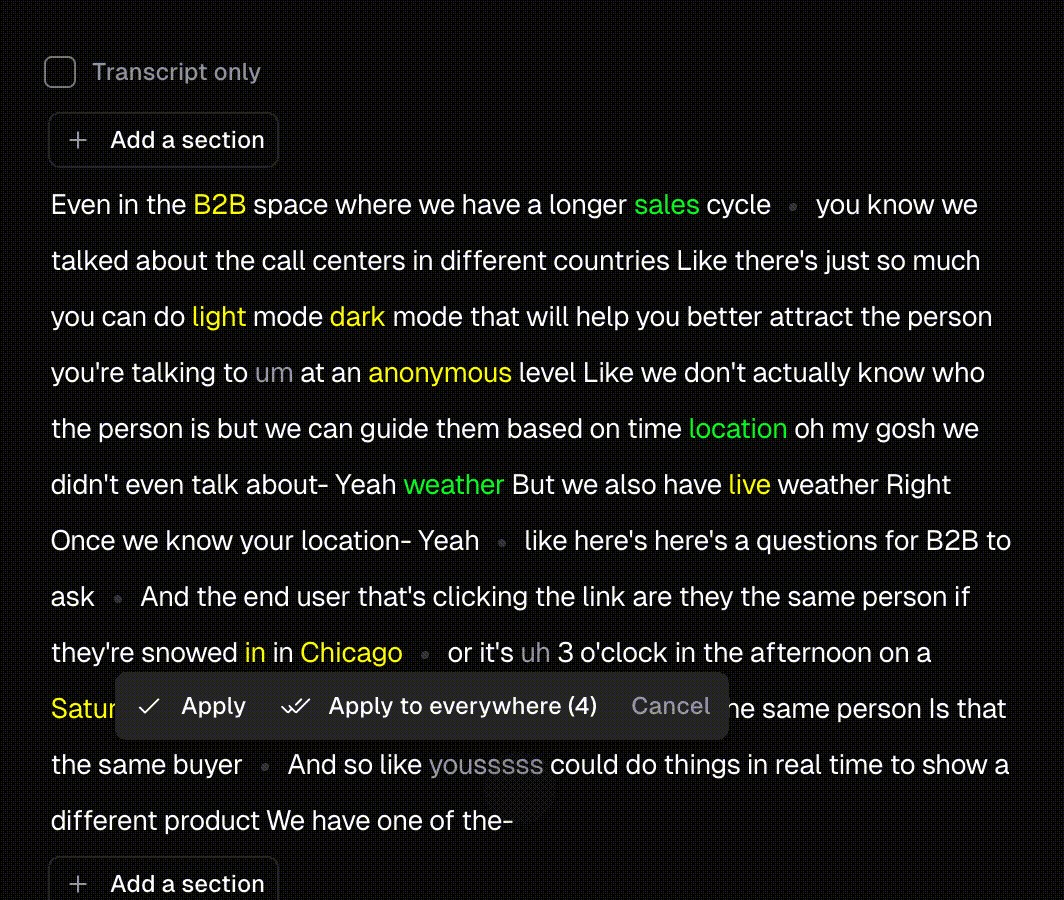
OpusClip's transcript editor, one place where clips can be edited in the browser after they are found. Source: OpusClip website
OpusClip is self-serve software. Its video repurposing tool page says it turns one long video into short clips for TikTok, YouTube Shorts, Instagram Reels, LinkedIn and X, and the flow starts with a pasted link or an uploaded file. The same page says clips can then be edited in the browser. The agencies page describes AI-powered tools that automate clipping, editing, branding and posting, so the team or agency using it runs the work.
Pricing: OpusClip's pricing page lists Free at $0 (clips carry a watermark and, per the page, stop being exportable after 3 days), Starter at $15 a month (monthly billing only) and Pro at $29 a month, or $14.50 a month billed annually. Business is custom.
Considerations: OpusClip is software that the customer's team operates. Someone on the customer's side has to review the clips it finds and decide what goes out. For a hands-off result, the services below fit better.
- Choose it if you or your team will review and publish the clips, or you run clip production for several clients through one tool.
- Skip it if you want to hand over a recording and get finished clips back without opening an app.
2. Chopcast: Best for founders and B2B teams that want a done-for-you team plus a free clip maker

How Chopcast describes its done-for-you process. Source: Chopcast website
Chopcast sells a done-for-you service and AI tools. Its service page says the team interviews the client on video, or takes podcasts and webinars, turns them into clips in 1 to 2 days with unlimited revisions, then writes captions and distributes them on LinkedIn and YouTube. The same page lists strategy consulting and Slack support. Chopcast's clip maker page says the tool is free to use and offers a done-for-you option beside it.
Pricing: The service page has a Plans and Pricing section, but it showed no dollar amounts when we loaded it on November 12, 2026, so ask Chopcast for the figures. The clip maker page offers 1 week free on its monthly plans, and the service page says plans are covered by a 30-day promise: if you are not happy with results, it is free.
Considerations: The service page is aimed at LinkedIn and B2B founders and lists distribution on LinkedIn and YouTube only, so a TikTok-first creator should ask what else is covered. The page footer carries a 2024 copyright line, so confirm current plans on a call.
- Choose it if a B2B founder or a small marketing team wants clips made from an interview or a recording, with captions and LinkedIn posting handled, and a free tool to try first.
- Skip it if the amounts must be visible before a call, or posting to short-video apps beyond LinkedIn and YouTube is the main job.
3. Fame Clips: Best for per-clip podcast editing with a human check

Fame Clips' monthly clip plans and printed turnaround. Source: Fame website
Fame Clips is the clip service from Fame, a podcast company with addresses in London and New York. Its Clips page describes a hybrid AI and human process with a human review on every clip, for audio podcasts, video podcasts and X Spaces. Orders go in through Fame Clips Studio or through Slack or an account rep, and clips come back as 9:16 or 1:1 videos with the brand colors, fonts, logos and calls to action the client sets.
Pricing: The subscriptions page lists Business at $700 a month for 15 clips ($46 a clip), Professional at $1,000 for 25 ($40) and Ultimate at $2,350 for 60 ($39), all month to month with a 72-hour turnaround. Fame's policy page lists 72 hours including weekends for short-form edits and 24 hours for revisions. The Clips page says the first clip is free.
Considerations: The subscriptions page says credits do not roll over, while the policy page says remaining credits stay usable after cancelling, and the Clips page says "from $50 a clip" where the subscriptions page lists $39 to $46. The policy page says packages cannot be cancelled and that neither packages nor subscriptions are refunded. Fame says it is focused on English only for now, and a fully managed option that also handles posting is marked as coming soon.
- Choose it if a B2B podcast needs a steady count of edited clips each month and wants a human check without hiring an editor.
- Skip it if the content is not in English, or the terms on unused credits and refunds need to be clearer before buying.
4. beCreatives: Best for a dedicated editor team with repurposing in every plan

beCreatives' repurposing steps and the turnaround it prints for short clips. Source: beCreatives website
beCreatives has a dedicated repurposing page. It says to send a long video (a podcast, webinar, live or YouTube video) with a short brief, and a dedicated editor finds the moments, cuts them, adds human-checked captions and sizes the clips 9:16, 4:5, 1:1 or 16:9. The page says repurposing is included in every plan, with no add-on and no per-clip fee. The site also lists AI tools, including one that finds clips in long videos, so it is a team with tools rather than tools alone.
Pricing: The pricing page lists Scale at $999 a month billed quarterly ($2,997 per quarter) or $1,199 billed monthly, Pro at $1,999 a month billed quarterly ($5,997), and In House Team at $4,999 a month billed quarterly ($14,997). The repurposing page lists turnaround for short clips under 90 seconds as one a day on Scale and several a day on Pro, as estimates based on average request complexity.
Considerations: Revisions are unlimited, but the pricing FAQ says the team works on business days, one request at a time, and Scale covers up to 2 brands and 2 users. With no per-clip fee, the plan price is the whole cost, so it suits a steady flow of recordings more than an occasional one.
- Choose it if a podcast, webinar or live show produces recordings every week and a dedicated editor should own the clips.
- Skip it if the need is a few clips a month; prepaid clip packages, which Fame Clips lists, fit that better.
5. ShortVids: Best for a monthly plan sized by short-form output, with no contract

ShortVids' short-form plan comparison, with turnaround and expected monthly output. Source: ShortVids website
ShortVids runs a video editing subscription with dedicated pages for content repurposing and for podcast-to-Shorts repurposing. The podcast page says its editors review the episode, select engaging segments, edit each one into a short-form video and add captions and graphics, delivered as clips adapted for TikTok, Reels and Shorts. Footage goes in through a shared Google Drive or Dropbox folder, and requests run on a Trello board.
Pricing: The pricing page lists StartUp at $999 a month with 1 active request, 2 long-form edits and an expected 30 to 35 short videos a month, Growth at $2,499 a month with 3 active requests and 5 long-form edits, and Creator at $4,999 a month. The pricing page says short-form videos are delivered within 24 hours and long-form edits take 48 to 72 hours, while the repurposing page says repurposed content arrives within 48 hours.
Considerations: The two turnaround figures differ, so ask which one applies to a repurposing order. Plans are month to month, cancellation needs notice at least 7 days before the renewal date, and subscription fees are non-refundable, per the pricing FAQ. The FAQ also says the subscription is unlimited in what can be queued but capped in how many requests run at once.
- Choose it if a team wants a monthly volume of short-form edits from long recordings, with no contract.
- Skip it if repurposing is a one-off job, or the turnaround has to be the 24-hour figure on a repurposing order.
6. Vidpros: Best for overnight short-form edits on a printed monthly output

Vidpros' monthly output plans and delivery speeds. Source: Vidpros website
Vidpros is a video editing service with a dedicated video clipping page, which says it makes short clips for social media and highlight reels or repurposes longer content. The process on that page has three steps: submit a brief, Vidpros edits overnight, then request revisions or mark the work complete. Its home page says it also works for agencies on a white-label basis, under the agency's own brand.
Pricing: The pricing page lists Starter at $1,000 a month for 20 to 40 short-form videos or 5 to 10 long-form with overnight delivery, Growth at $2,000 for 40 to 80 shorts or 10 to 20 long-form with a dedicated editor and project manager, and Scale at $4,000 for 80 to 160 shorts or 20 to 40 long-form with same-day delivery. A $100 trial week covers up to 10 short-form edits or 1 long-form video.
Considerations: Per the pricing footnote, short-form means up to 60 seconds, long-form means up to 15 minutes edited from up to 60 minutes of raw footage, and a lightly edited podcast over 60 minutes counts as 2. Output resets monthly and does not roll over, and each round of revisions counts toward the month's output. A dedicated editor starts on Growth.
- Choose it if the work is a steady monthly count of short edits, an agency needs white-label capacity, or a $100 trial week is the way to start.
- Skip it if a dedicated editor is needed from the first month, or revisions must not use up the month's output.
7. The Wave Podcasting: Best for full podcast production with clips included

The Wave Podcasting's video subscription packages. Source: The Wave Podcasting website
The Wave Podcasting is a podcast production company, so clips are one part of a larger package. Its video subscriptions list episode editing, short-form clips with a thumbnail and social caption, SEO titles and descriptions, a transcript, and uploading and scheduling for the episode and the clips. Every package comes with a dedicated production team, project management and quality assurance, a client portal and a monthly analytics report.
Pricing: The video content creation page lists Standard Video at $3,999 a month (2 podcast edits and 10 short-form clips), Premium Video at $8,999 a month (4 podcast edits and 20 short-form clips) and Elite Video at $12,500 to $25,000 a month. A la carte video editing for one long-form episode is $999 (basic) or $1,499 (advanced). The FAQ says a video episode's first edit comes back 3 business days after submission, with edits returned 1 business day later.
Considerations: These are the highest printed prices in this guide, and every package on the video page bundles episode editing with the clips. The FAQ says packages must be cancelled at least 15 days before the next payment and that the team does not work weekends. The pages carry a 2024 copyright line.
- Choose it if a show needs editing, clips, thumbnails, show notes and scheduling handled by one team, and the budget starts in the thousands a month.
- Skip it if the need is clips alone; Fame Clips and the editing subscriptions above price by clip count or monthly output.
How we compared these companies
This guide is organised around video repurposing. OpusClip is built for it, turning a long video into short clips with software, so it comes first. Items 2 to 7 follow one yardstick: how much of the job people do, from a team backed by a free self-serve tool to a full production service, going by what each company's own pages say.
- 2. Chopcast: a done-for-you team that also runs a self-serve clip maker.
- 3. Fame Clips: AI plus human editors, with a human check on every clip.
- 4. beCreatives: a dedicated editor team, with AI tools listed on its site.
- 5. ShortVids: human editors working from shared folders and a request board.
- 6. Vidpros: human editors, with a dedicated editor on higher plans and white-label work for agencies.
- 7. The Wave Podcasting: a production team that also handles show notes, thumbnails and scheduling.
All facts come from each company's own pricing pages, service pages, FAQs and policy pages, read on November 12, 2026. Where a page loads its figures with a script we read the rendered page, and where an answer sits in a collapsed FAQ we read the page's own text. Where two pages of one company disagree (Fame Clips on price per clip and credits, ShortVids on turnaround), we say so. We did not run hands-on tests of any company, and printed prices and turnaround say nothing about quality. We left out clipper networks that pay creators per view (see our clipping agencies guide), freelancer marketplaces whose prices vary by seller, and companies whose pages print neither a price nor a turnaround. Prices and plans change, so confirm on the company's page before buying.
Red flags to watch for
- Prices that are hidden or only on a call. Chopcast's pricing section showed no amounts on the page we read, and The Wave Podcasting's Elite tier is a range.
- Turnaround that differs by page or plan. ShortVids prints 24 hours for short-form on its pricing page and 48 hours on its repurposing page, and beCreatives, Vidpros and Fame Clips print different speeds by plan or by job.
- Revisions that use up output. Vidpros counts each revision round toward the month's output, and beCreatives runs revisions on business days, one request at a time.
- Credits and output that expire. Fame Clips says credits do not roll over, Vidpros says output resets monthly, and Fame's policy page says remaining credits do not expire after cancelling.
- Cancellation and refund terms. ShortVids needs notice 7 days before renewal and its subscription fees are non-refundable, The Wave Podcasting needs 15 days, and Fame Clips lists no refunds on subscriptions or packages.
- Counts that depend on the definition. Short-form, long-form and clip are defined differently by each company: Vidpros counts a lightly edited podcast over 60 minutes as 2 long-form videos.
- Performance claims. Several pages print view or engagement gains from client results; treat them as the company's own claims, not guarantees.
- Software with no manual override. A tool that picks and crops clips with no way to edit the result leaves no fix for a bad cut.
- Clips from videos you do not own. Send a service, or load into any tool, only recordings that belong to you or that you have permission to repurpose.
Frequently asked questions
What are the best companies for video repurposing?
It depends on who should do the work. OpusClip is first in this guide for repurposing a long video yourself with self-serve software. Chopcast and Fame Clips add people to the process, beCreatives, ShortVids and Vidpros sell editing subscriptions with repurposing built in, and The Wave Podcasting runs full podcast production. For software-only options, see our guide to video repurposing tools.
What is a video repurposing service?
It is a company whose people, not only software, turn a recording into clips and other formats. A long video, podcast or webinar recording goes in, and editors return captioned short clips sized for each platform. The services here price by plan or clip count, and Chopcast also offers a free self-serve clip maker beside its team.
How much does a video repurposing service cost?
Per the pages read on November 12, 2026, Fame Clips lists $700 to $2,350 a month for 15 to 60 clips, beCreatives lists $999 a month billed quarterly for Scale ($1,199 billed monthly), ShortVids lists $999 a month for StartUp, Vidpros lists $1,000 a month for Starter, and The Wave Podcasting lists $3,999 a month for Standard Video. Chopcast's pricing section showed no amounts. Software costs less: OpusClip's pricing page lists Starter at $15 a month (monthly billing only) and Pro at $29 a month, or $14.50 a month billed annually, but the review and posting stay with the user.
Should I hire a repurposing service or use software?
Use software when someone on the team will review and publish the clips, and a service when the goal is to send a recording and receive finished clips. Hybrids sit between: Fame Clips adds a human check to AI-picked clips, and Chopcast pairs a team with a free clip maker. OpusClip is self-serve software.
What is the difference between a repurposing service and a clipping agency?
A repurposing service edits your recordings for your own channels and delivers the files, usually on a monthly plan. A clipping agency manages a network of clippers who post clips on their own accounts and are paid per view. See our guide to clipping agencies for that model.
How long does a video repurposing service take?
Printed turnaround runs from overnight to several days. Vidpros lists overnight delivery on Starter, Fame Clips lists 72 hours including weekends, Chopcast lists 1 to 2 days, beCreatives lists one short clip a day on Scale and several a day on Pro (estimates), ShortVids lists 24 hours for short-form, and The Wave Podcasting lists 3 business days for the first edit of a video episode. Check when the clock starts and whether revisions are on top.
What do I need to send a video repurposing service?
A recording and a short brief. beCreatives asks for the video plus topics, clip length and where the clips will post, ShortVids takes footage in a shared Google Drive or Dropbox folder, and Fame Clips takes orders through its Studio or Slack. Have brand colors, fonts and logos ready, since several services apply them to every clip.
Can I repurpose videos I do not own?
Only with permission. Send a service, or load into any tool, recordings that belong to you or that you have permission to repurpose. ShortVids says it can decline requests that involve unlicensed third-party material.